Windows Tablets and Laptops Breaking Down the Benefits and Drawbacks
Ever wondered if you should grab a laptop or a windows tablet for your next big purchase? You’re not alone. Take a look at how people are actually choosing:
Shenzhen TopAdkiosk Display Technology Co., Ltd.
Add.: 2F, Bldg 10, Changfeng Industrial Park, Dongkeng, Fenghuang, Guangming, Shenzhen, China 518132
Mobile/WHATSAPP: 86-138 25769658
Email: marketing@topadkiosk.com topadkiosk@gmail.com
Skype: pghenry1
Wechat: adkioskhenry
English Web.: http://www.topadkiosk.com/
https://www.topkioskdisplay.com/
http://www.ad-kiosk.com/
https://www.toplcddisplay.com/
http://www.multitouchdigitalsignage.com/
https://www.youtube.com/channel/UCYVYNJHxLVEcQD8fuUxXNTA/videos?view_as=subscriber
https://www.facebook.com/TOPADKIOSKSHENZHEN/?ref=bookmarks
Product Type | |
|---|---|
Laptops | 52.8 |
Tablets | 34.1 |
2-in-1 Devices | 13.1 |
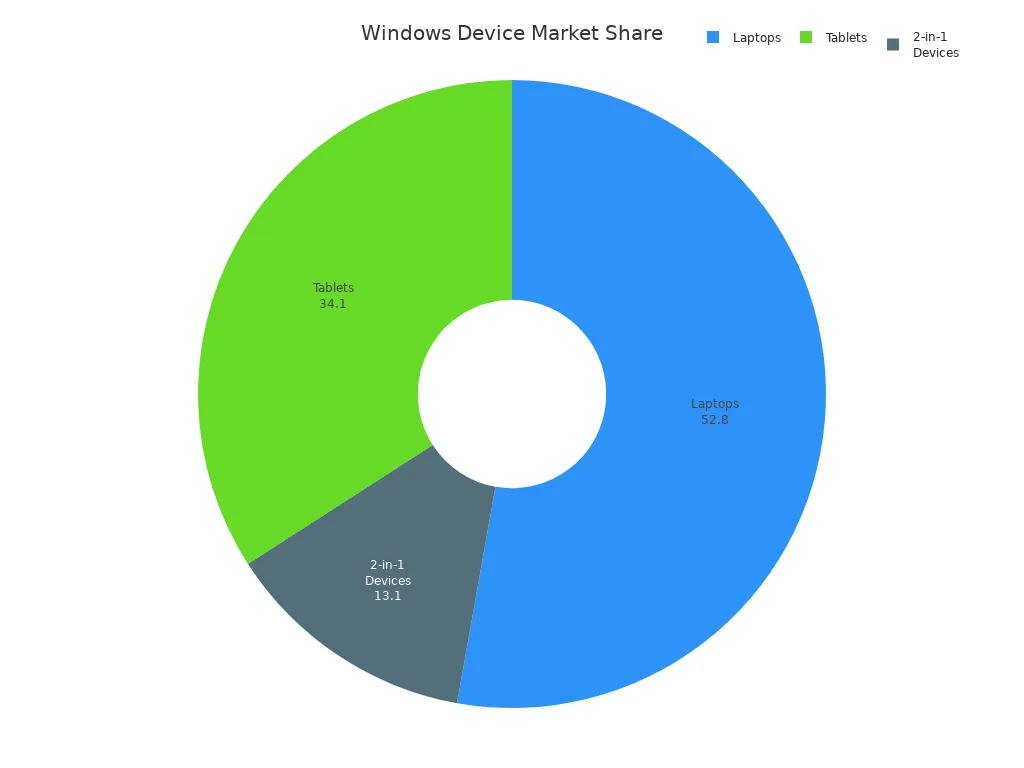
Many users pick tablets for note-taking or quick meetings, while laptops win for heavy multitasking and long typing sessions. Your choice depends on what you need most—portability, power, or a bit of both.
Key Takeaways
Think about what you need most before picking a device. Tablets are easy to carry and their batteries last longer. Laptops are stronger and can do many things at once.
Tablets are good for taking notes and simple tasks. They are great for students and people who travel. Laptops are better for hard jobs like editing videos or coding.
Check how long the battery lasts. Windows tablets usually work for 8 to 14 hours. Laptops work for 6 to 10 hours. Pick one that fits how long you need to use it without charging.
Look at how much money you want to spend. Tablets might cost less but you may need to buy extra things. Laptops can cost a little or a lot, depending on what they can do.
You can also look at hybrid devices like 2-in-1s. These give you both a tablet and a laptop in one. They are good for people who want to use both ways.
Tablet vs Laptop: Quick Comparison
When you compare tablets and laptops, it helps to see their main differences. Here’s a table that shows how they are different:
Feature | Windows Tablets | Laptops |
|---|---|---|
Portability | Lighter and easier to carry | Heavier, better for staying in one place |
Performance | Depends on the model; some are fast | Good for multitasking and tough apps |
Battery Life | Often lasts longer because of smart hardware | Can last all day, but depends on the setup |
Input Methods | Touch, pen, and sometimes keyboards | Built-in keyboard and trackpad, some touchscreens |
Main Benefits of Windows Tablets
Windows tablets are easy to carry. They fit in your bag and don’t weigh much. You can use touch or a pen to draw or take notes. Tablets usually last longer on one charge. You can use them for hours without needing to plug in. If you travel, go to meetings, or like to read, a tablet is a good choice.
Main Benefits of Laptops
Laptops are great when you need more power. They have a full keyboard and bigger screens. This makes typing and doing many things at once easier. Laptops run desktop apps like Photoshop and Excel. You can connect them to monitors and printers. If you do schoolwork, edit videos, or work with lots of files, a laptop is often better.
Key Drawbacks of Each Device
No device is perfect. Tablets can cost more if you add a keyboard or storage. Some tablets may not run every app as well as laptops. Laptops can be heavy and may not last as long on battery if they are powerful. They also take up more space in your backpack.
Tip: Think about what matters most to you—portability, battery life, or performance—before you pick your device.
Key Differences Between Tablets and Laptops
Portability and Battery Life
Tablets are easier to carry than laptops. You can put a windows tablet in your backpack or a big purse. Laptops are heavier and need more space, so you might leave them at home if you go out for a short time. If you move from place to place a lot, having a light device is important.
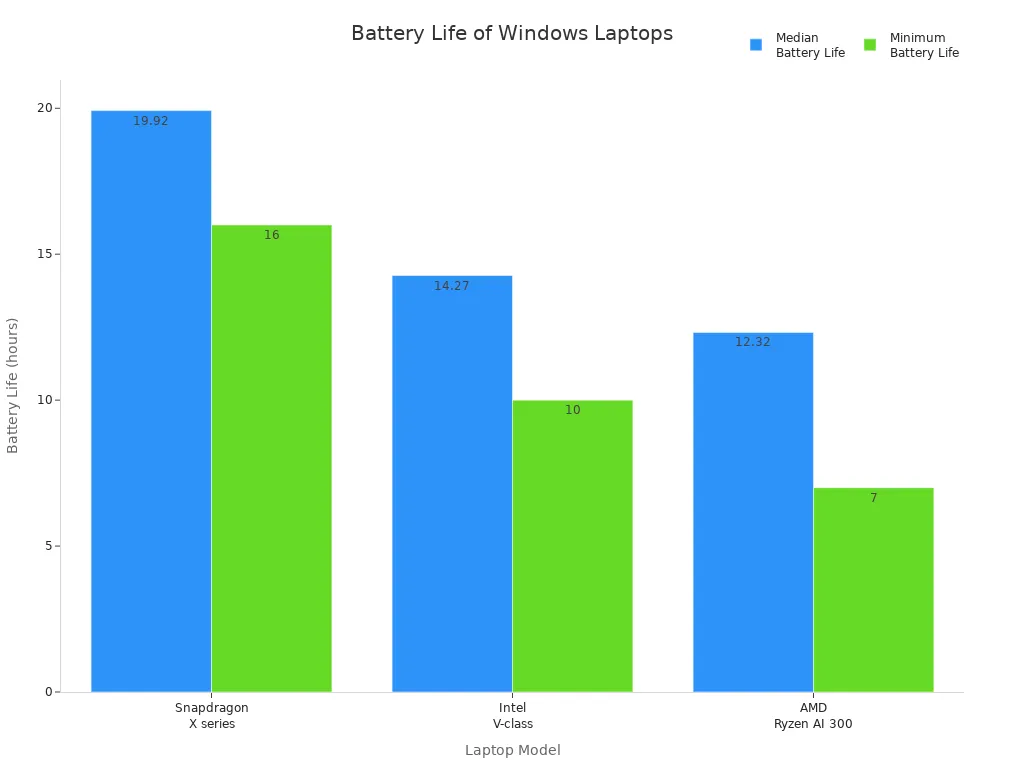
Battery life is also a big difference. Most windows tablets last between 8 and 14 hours when you use them. Laptops usually work for 6 to 10 hours, but it depends on what you do. If you want to use your device all day without charging, a tablet is a good choice.
Windows tablets: 8–14 hours battery life
Laptops: 6–10 hours battery life
Performance and Multitasking
Laptops are better for tough jobs. You can use full desktop apps, open many windows, and do things like video editing. Tablets are getting better, but they still use lighter versions of some apps. Here’s a quick look:
Feature | Windows Tablets | Laptops |
|---|---|---|
Multitasking Capability | Handles complex tasks and many windows | |
Productivity Focus | Good for office work | Great for coding, design, and big projects |
Integration | Works well with Microsoft Office | Supports pro tools like Adobe Suite |
If you need to do many things at once or use strong software, a laptop is more powerful.
Input Methods and Accessories
You can use a windows tablet in different ways. Use your fingers, a stylus, or a keyboard. Tablets have features like Input Panel Autocomplete, which helps you type faster and easier. Laptops have a keyboard and trackpad built in, and some have touchscreens too. If you like to draw or write notes by hand, a tablet feels more natural.
Tablets: Touch, pen, keyboard, autocomplete features
Laptops: Keyboard, trackpad, sometimes touchscreen
Price and Value
Price is another big difference between tablets and laptops. Some tablets cost about $200, but the best ones can be $900 or more. Laptops start at $200 for simple ones and can go over $1,000 for strong models. Here’s a quick table:
Category | Description | |
|---|---|---|
Budget Laptops | ~$200 - $400 | Good for light tasks |
Mid-range Laptops | ~$700 - $800 | Handles most needs |
High-end Laptops | $1,000+ | Best for gaming and editing |
Budget Tablets | ~$200 | Basic use, small size |
Mid-range Tablets | ~$350 - $500 | Better screens, more power |
High-end Tablets | ~$900 | Can replace a laptop |
Think about what you need most before you choose. Do you want something easy to carry, a long battery life, or strong performance?
Windows Tablet Pros and Cons
When you look at the pros and cons of a windows tablet, you see why so many people consider them for work and play. Let’s break down what makes these devices stand out and where they might fall short.
Advantages of Windows Tablets
You get a lot of flexibility with a windows tablet. These devices are light and easy to carry, so you can slip one into your bag and take it anywhere. If you like to switch between work and entertainment, a windows tablet can handle both. Many models, like the Fusion5 Windows 11 Pro Tablet, have bright Full HD screens. You can watch Netflix or YouTube in sharp detail, then jump right into your homework or office tasks.
Here’s a quick look at what makes a windows tablet a smart choice:
Feature | Advantage |
|---|---|
Handles demanding work, great for professional software | |
Generous RAM | Lets you run many apps at once |
Long Battery Life | Keeps going through long days |
You can use heavy software like Microsoft Office or Adobe Creative Suite.
You get a full PC experience, so you can open several apps at the same time.
The advantages of tablets include easy note-taking with a stylus and smooth multitasking.
Tip: If you want a device for both streaming and productivity, a windows tablet gives you the best of both worlds.
Disadvantages of Windows Tablets
You should also think about the cons before you buy. A windows tablet does not have as many apps as an Android tablet. The Microsoft Store has fewer choices, so you might not find every app you want. Sometimes, new apps do not work well or install properly because of compatibility issues.
You get less app variety compared to Android tablets.
Some specialized apps are missing from the Microsoft Store.
New apps may not always run smoothly on a windows tablet.
If you need a device for very specific apps, you might want to check if those apps work on a windows tablet first. Looking at the pros and cons helps you decide if this device fits your needs.
Laptop Pros and Cons
Advantages of Laptops
A laptop gives you a lot of power and is flexible. You can type, edit photos, or use big programs on it. Many people choose laptops because they help you get more done. You can open many windows and switch between apps fast. This helps you finish your work quicker. Laptops are good for school projects, making art, or joining video calls. They make these tasks simple.
Let’s see why laptops are good for business and creative jobs:
Advantage | Description |
|---|---|
Windows laptops, especially 2-in-1 devices, are lightweight and easy to carry, enhancing mobility. | |
Power | They combine performance with portability, suitable for demanding business and creative tasks. |
Efficient Communication | Features like high-definition video conferencing facilitate collaboration among geographically separated teams. |
Real-time Collaboration | Access to shared documents and instant messaging apps allows for timely project completion and teamwork. |
Integration with IT Systems | Seamless compatibility with existing Windows software reduces training time and operational disruptions. |
Strong Security Features | Centralized control and security measures protect sensitive data on mobile devices. |
You can use a laptop almost anywhere you go. Laptops have strong security, so your files are safe. You can join meetings, share files, and chat with your team. Laptops help you do more in less time. You can pick a regular laptop or a 2-in-1 device. It depends on what you need.
Tip: If you need a device for school, work, or creative projects, a laptop gives you the tools to succeed.
Disadvantages of Laptops
Laptops have some problems too. Sometimes, the battery does not last as long as you want. You may need to charge your laptop often, even if you just browse the web. Carrying a heavy laptop every day can be hard.
Here are some common problems:
Windows laptops usually have poorer battery performance compared to macOS devices.
You may notice short battery life, which makes portability harder.
For example, the Surface Pro lasts about 7 hours during web browsing, while the MacBook Air lasts 14 hours.
Battery efficiency has dropped over time, with Windows laptops showing a 50% reduction in battery life compared to macOS.
If you want a device that lasts all day, check the battery specs before you buy. You can also look at a windows tablet, which often lasts longer on one charge. A regular laptop can feel heavy if you travel a lot. You might get less work done if you have to stop and charge your laptop.
Note: Always check battery life and weight before you choose your laptop. You want a device that fits your lifestyle and keeps your productivity high.
How to Choose Between a Tablet and a Laptop
Choosing the right device can feel tricky. You want something that fits your life, your work, and your budget. Let’s break down how to choose between a tablet and a laptop for different users. This way, you can match each device’s strengths to your needs and get the best value.
For Students
If you’re a student, you need a device that keeps up with your busy day. You want to take notes, do homework, and maybe watch videos after class. Both tablets and laptops can help, but each has its own strengths.
Here’s a quick table to help you see what matters most for students:
Feature | Why It Matters for Students |
|---|---|
Lasts 6–10 hours, so you don’t run out during school | |
Display Size | 13–15 inches is easy to carry and good for reading |
Build Quality | Tough materials handle bumps in your backpack |
A tablet gives you flexibility. You can write with a stylus, draw diagrams, or read e-books. Tablets are light, so you can carry them all day. If you like to take notes by hand, a tablet feels natural. You can use a keyboard for typing essays or reports.
A laptop is better for typing long assignments. You get a bigger screen and a full keyboard. Laptops run all the software you need for school, like Word, PowerPoint, and even coding tools. If you need to multitask or use advanced programs, a laptop is the way to go.
Tip: If you want flexibility and easy note-taking, try a tablet. If you do a lot of typing and need strong performance, pick a laptop.
For Professionals
Professionals need devices that handle work tasks, meetings, and travel. You want something reliable that helps you stay productive. Let’s look at what matters most for professionals:
Consideration | What to Look For |
|---|---|
Operating System | Windows 10 or 11 for full software access |
Processor | Intel Core i5/i7 or AMD Ryzen for multitasking |
RAM and Storage | At least 8GB RAM, 256GB SSD for speed and space |
Display Quality | 10–13 inches, Full HD or better for clear visuals |
Battery Life | 8+ hours for long meetings and travel |
Connectivity | USB-C, Wi-Fi 6E, LTE/5G for flexibility |
A tablet is great for mobile professionals who move from meeting to meeting. You can use touch, pen, or keyboard for different tasks. Tablets are easy to carry and set up anywhere. If you need to sign documents, sketch ideas, or present slides, a tablet gives you flexibility.
A laptop is better if you need performance and productivity. You can run heavy software, open many windows, and handle big projects. Laptops support all business apps, so you never worry about compatibility. If you do a lot of typing or need to multitask, a laptop helps you work faster.
Note: Professionals who want flexibility and travel a lot may prefer a tablet. If your work needs power and multitasking, a laptop is the best choice.
For Travelers
Travelers want devices that are light, last all day, and work anywhere. You don’t want to carry something heavy or run out of battery on the road.
Here are some top options for travelers:
Model | Weight/Portability | Battery Life | Special Feature |
|---|---|---|---|
Very light, easy to pack | Long-lasting | Optional 5G | |
Lenovo ThinkPad X1 Tablet | Compact, modular design | Good for travel | Enterprise-ready |
HP Elite Folio | Foldable, super portable | Excellent battery | Convertible design |
A tablet is perfect for travel. You can read, watch movies, or check emails on the go. Tablets fit in small bags and last a long time on one charge. If you need to type, just add a keyboard. You get flexibility for work and play.
A laptop is better if you need to do more than just browse or stream. You can edit photos, write reports, or join video calls. Laptops give you more power, but they are heavier. If you travel for work and need to do serious tasks, a laptop is a smart pick.
Tip: For travel, a tablet gives you the best mix of portability and battery life. If you need to do heavy work, bring a laptop.
For Home Use
At home, you want a device that fits your lifestyle. Maybe you stream movies, browse the web, or help your kids with homework. Let’s see how tablets and laptops compare for home use:
Factor | Tablets | Laptops |
|---|---|---|
Cost Efficiency | Can be more expensive | |
Portability | Easy to move around the house | Heavier, stays in one place |
Performance | Good for basic tasks | Great for gaming, editing, big projects |
User Interface | Touch, easy for all ages | Keyboard and trackpad for fast typing |
Storage | Limited, not upgradeable | More space, upgrade options |
Security | Fewer threats, simple to use | Needs more security steps |
A tablet is great for streaming, reading, or casual browsing. You can use it on the couch or in bed. Tablets have high-resolution screens, so movies look sharp. If you want something simple and easy, a tablet is a good choice.
A laptop is better for gaming, coding, or big projects. You get more storage and can upgrade parts if you need to. Laptops support full desktop apps, so you can do more. If you do a lot of typing or need to store lots of files, a laptop is the way to go.
Ideal use cases: Tablets shine for streaming and reading. Laptops win for gaming, work, and creative projects.
Still not sure how to choose between a tablet and a laptop? Think about what you do most. If you want flexibility, portability, and long battery life, a tablet is a smart pick. If you need typing, performance and productivity, or lots of storage, a laptop will serve you better. Match your device to your daily routine, and you’ll find the perfect fit.
Hybrid Options: 2-in-1 Devices
What Are 2-in-1s?
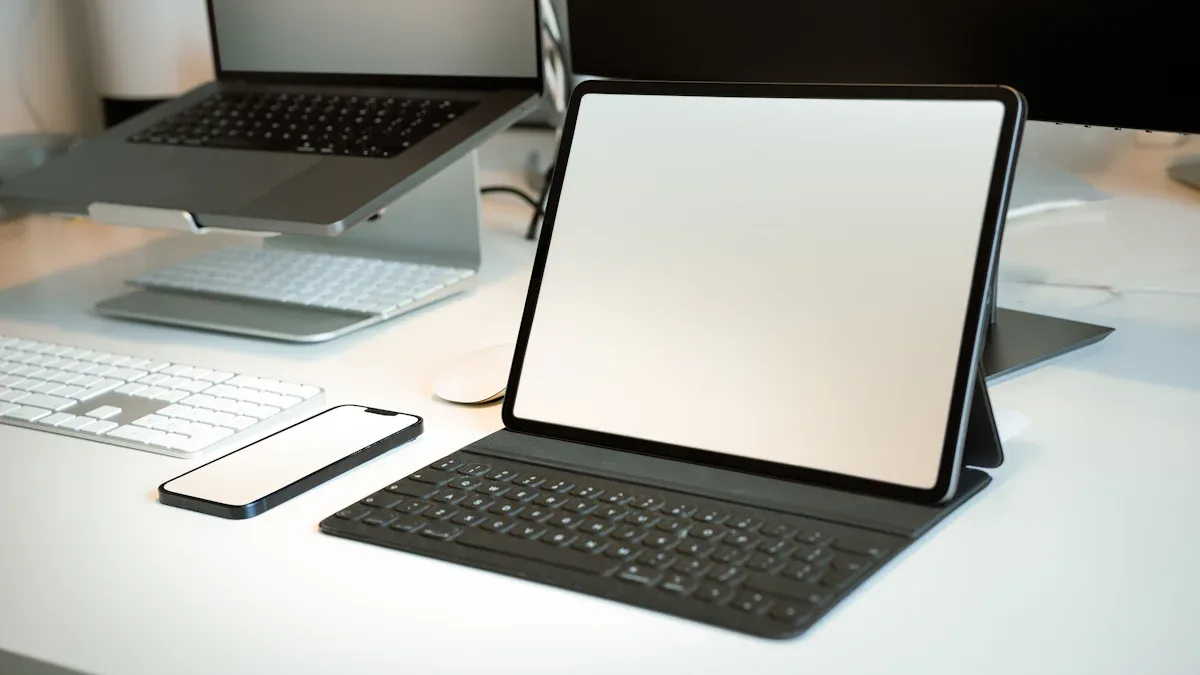
You may have seen devices that look like laptops but can also be tablets. These are called 2-in-1s. They let you use a keyboard, then flip or remove the screen to use touch and pen. This makes them very flexible for school, work, or fun.
Here’s a table that shows how 2-in-1 Windows devices compare to regular tablets and laptops:
Feature | 2-in-1 Windows Devices | Traditional Tablets/Laptops |
|---|---|---|
Versatility | Switch between tablet and laptop modes | Fixed function |
Performance | Powerful, good for multitasking | Varies, sometimes less powerful |
Software Access | Full desktop apps | Mobile apps or desktop only |
Hardware Features | Detachable keyboards, kickstands | Fixed keyboard or none |
Port Options | Many ports, like USB-C | Fewer ports |
Battery Life | Long-lasting | Varies a lot |
There are many popular 2-in-1s you can buy today. Some top choices are:
Lenovo Yoga 9i
HP Spectre x360 14
Microsoft Surface Pro
Lenovo Yoga 7 2-in-1
Asus ProArt PX13
ROG Flow X13
Flow X16
These devices let you go from typing to drawing or watching videos quickly. You get a device that matches your needs.
Who Should Consider a Hybrid?
You might ask if a 2-in-1 is good for you. If you want a device that does more than a regular windows tablet or laptop, a hybrid could be great. Many students, creators, and people who travel for work like 2-in-1s. You can take notes with a pen, type papers, or sketch ideas all on one device.
People who work in IT or telecom use hybrids often. They need to move around, fix things, and show stuff to clients. A 2-in-1 helps them switch tasks fast. Field engineers and technicians also like the long battery life and light weight.
Here’s a table to help you see if a hybrid fits your needs:
Feature | Laptops | |
|---|---|---|
Portability | Ultra-portable, lightweight | Heavier |
Performance | Fast, varies by model | Consistent, strong |
Battery Life | Often longer | Depends on model |
Input Methods | Touch, pen, keyboard | Keyboard, trackpad |
Best For | Creators, students, pros | Heavy typing, big jobs |
Tip: If you want one device for everything—work, play, and creativity—a 2-in-1 Windows device gives you the freedom to do it all.
You’ve seen how Windows tablets and laptops stack up. Tablets last longer on battery and feel lighter in your bag. Laptops give you more power for multitasking and creative work. Check out this quick table:
Tablet | Laptop | |
|---|---|---|
Travel, study | ✅ | |
Office, editing | ✅ |
To pick the right device, follow these steps:
Decide what you do most—drawing, typing, or multitasking.
If you need portability, grab a tablet. If you need power, go for a laptop.
Think about your daily routine. Your priorities will help you choose the best fit!
FAQ
What is the main difference between a windows tablet and a laptop?
You get a windows tablet that is lighter and easier to carry. Laptops give you more power for multitasking. Both devices offer different features, but you should think about your needs and the price before you decide.
Can I use a windows tablet for school or work?
You can use a windows tablet for school or work. It works well for note-taking, reading, and simple tasks. If you need to run heavy software or multitask, a laptop might fit you better. Always check the price and value for money.
How does price affect my choice between a tablet and a laptop?
Price plays a big role in your decision. Tablets often cost less, but you may pay more for extra accessories. Laptops can be expensive, especially high-end models. Compare the price and features to find what suits you.
Are windows tablets good for gaming?
You can play simple games on a windows tablet. Most tablets do not have strong graphics or fast processors for big games. If gaming matters to you, check the price and specs of laptops that offer better performance.
What should I look for to get the best value for money?
You should look at battery life, performance, and price. Compare models and see which device gives you the features you need. Make sure you get the best price and value for money by checking reviews and user ratings.
See Also
Evaluating Performance And Value Of Business Touch Screen Kiosks
Understanding The Pros And Cons Of LCD Display Screens
Pros And Cons To Consider For LCD Display Screens
Effective Solutions For Common Kiosk Problems And Troubleshooting
Essential Features To Look For In Modern Touch Screen Kiosks
