Why Drive Thru Restaurants Should Switch to Digital Menu Boards
Shenzhen TopAdkiosk Display Technology Co., Ltd.
Add.: 2F, Bldg 10, Changfeng Industrial Park, Dongkeng, Fenghuang, Guangming, Shenzhen, China 518132
Mobile/WHATSAPP: 86-138 25769658
Email: marketing@topadkiosk.com topadkiosk@gmail.com
Skype: pghenry1
Wechat: adkioskhenry
English Web.: https://www.topkioskdisplay.com/
http://www.ad-kiosk.com/
https://www.toplcddisplay.com/
http://www.multitouchdigitalsignage.com/
https://www.youtube.com/channel/UCYVYNJHxLVEcQD8fuUxXNTA/videos?view_as=subscriber
https://www.facebook.com/TOPADKIOSKSHENZHEN/?ref=bookmarks
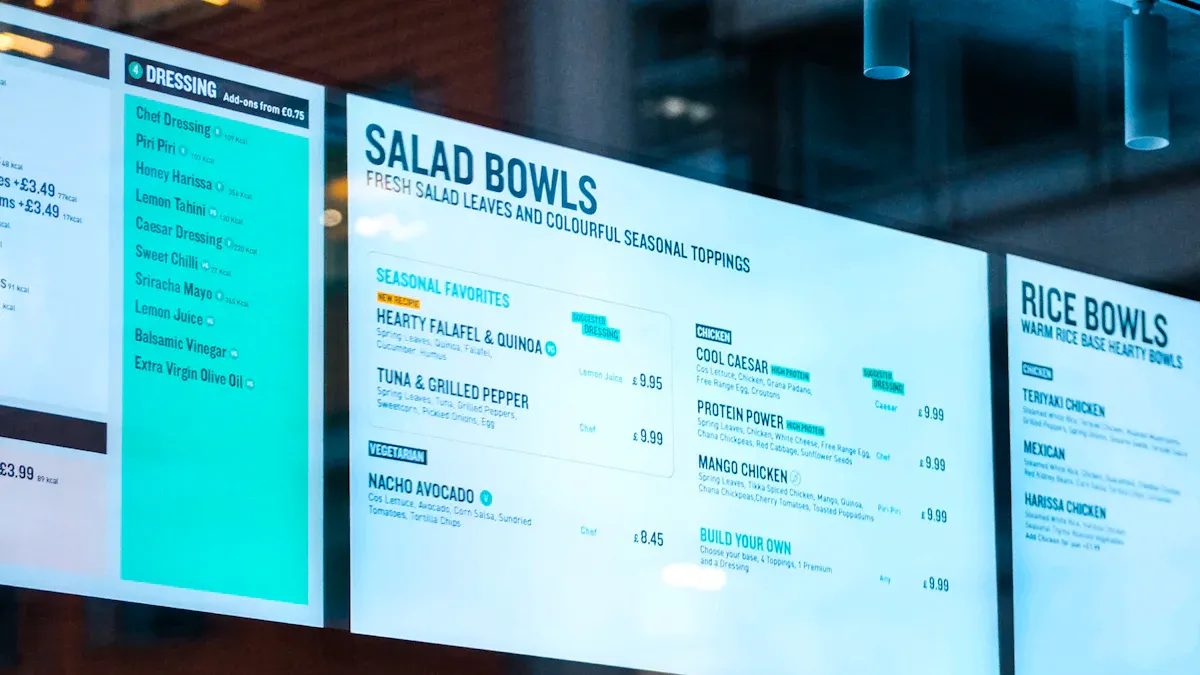
Drive thru digital menu boards help your restaurant in many ways. You get faster service, better order accuracy, and happier customers. Digital drive-thru menu boards show chosen items to customers before they pay. This makes customers happier and lowers mistakes. Moving graphics catch people’s eyes and show off new products. These get more attention than still pictures. You can suggest popular add-ons and combo upgrades. This makes ordering easier and helps you sell more.
Key Takeaways
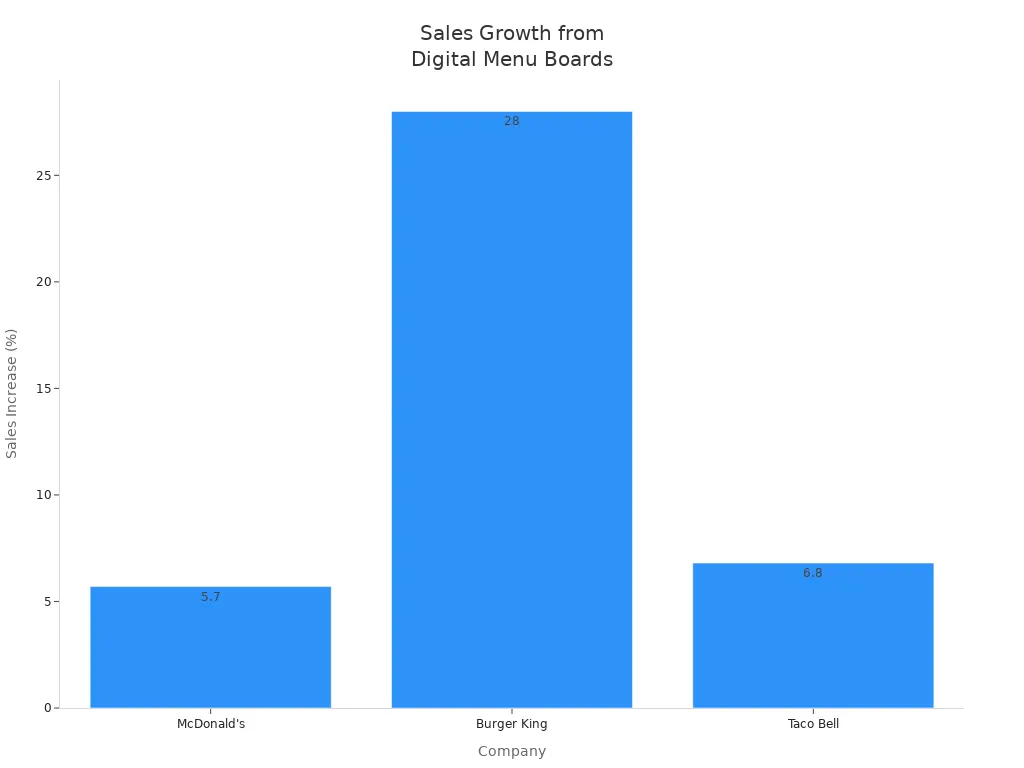
Digital menu boards help workers get orders right. They also make service faster. This makes customers happier. Real-time updates let restaurants change menus right away. This keeps the menu fresh and correct. Bright pictures and deals on digital boards can boost sales. They can also make people buy more each time. Digital boards make it easier for customers to see menus in any weather. They also help the restaurant look modern. Switching to digital menu boards can raise sales by up to 28%. The money spent can be earned back in 12 to 18 months.
Drive Thru Digital Menu Boards Boost Efficiency
Faster Service and Order Accuracy
Drive thru digital menu boards change how drive-thrus work. You see bright screens that show menu items and prices right away. These boards update fast, so you always see the latest choices. You do not have to worry about old info or missing items. When you use digital drive-thru menu boards, customers pick what they want faster. The menus are easy to follow and have real food pictures. This helps people know what to order. Customers can check their orders before paying. This means fewer mistakes and less confusion. Big chains get about 86% order accuracy, but digital boards can do even better. At McDonald's, order accuracy went up by 15% after using digital boards. You also help people order more by showing combos and popular add-ons.
Digital menu boards give you:
Fast updates for menu items and prices
Screens to check orders for mistakes
Simple layouts that help people choose fast
Groups of items for quick picking
Reduced Wait Times
You want faster service and more cars served in your drive-thru. Digital drive-thru menu boards make this happen. Customers find their favorite meals faster because the menus are clear and easy to read. Special highlights for combos and top items help people decide quickly. Clear pictures and prices make people feel sure, so they order faster.
Evidence Type | Description |
|---|---|
Improved Operational Efficiency | Digital menu boards let you change menus and prices fast, making things run better. |
Enhanced Order Accuracy | AI can suggest items for each person, so orders are more correct and people are happier. |
Streamlined Customer Interactions | Digital boards help people choose faster, so service is quicker in the drive-thru. |
Quick-service restaurants get shorter lines and serve more people at busy times. You see smoother lines and happier customers. Digital drive-thru menu boards help you serve more people in less time, so your drive-thru is faster and more accurate.
Easy Updates and Remote Management
Real-Time Menu Changes
You want your drive thru to work well every day. Digital menu boards help you do this. These boards use screens and software to show your menu. You can control all the boards from one spot, even if you have many stores. If you need to change a price or add a new item, you just click a few buttons. The change shows up right away on every screen. You do not need to print new signs or wait for someone to change boards.
Tip: Real-time updates let you react fast to things like weather, market changes, or what you have in stock.
Here is how digital menu boards and static boards are different:
Feature | Digital Menu Boards | Static Menu Boards |
|---|---|---|
Update Speed | Instant updates through software | Manual reprinting required |
Cost of Updates | No re-printing cost | Reprinting costs apply |
You save both money and time. Your menu is always correct. Customers only see what you want them to see. If you run out of something, you can take it off the menu right away. You can also show daily specials or limited-time offers to help sell more. Many restaurants now change their menus in minutes instead of days. This helps your business stay quick and keeps your customers happy.
Integration with POS Systems
Digital menu boards work best when they connect to your POS system. This keeps your menu and prices up to date. When you change something in your POS, the menu board changes too. This stops mistakes and makes sure customers do not order things you do not have.
Advantage | Description |
|---|---|
Digital menu boards engage customers before they talk to staff, making their visit better. | |
Enhanced Brand Image | Using new technology like digital boards makes your brand look better. |
Increased Service Speed | Faster service means shorter lines and fresher food for customers. |
Connecting to your POS system makes updates automatic and cuts down on mistakes.
You only show items you have, so customers are not let down.
Automation means fewer errors and faster service.
Your team spends less time fixing problems and more time helping customers.
Digital menu boards also help you follow menu labeling rules. You can change calorie counts and nutrition facts right away, so your restaurant follows the law. With remote management, you can control every screen from your office or even your phone. You get a modern and flexible system that grows with your business and keeps your customers coming back.
Increased Sales and Upselling
Promoting Offers and Limited-Time Items
You want your drive-thru to sell more with every order. Digital drive-thru menu boards help you do this by making your best deals stand out. You can show limited-time offers, daily specials, or seasonal items right when customers pull up. These boards let you update your menu in real time, so you can promote what you want, when you want. If you have extra stock or a new product, you can highlight it instantly.
Restaurants using digital drive-thru menu boards see big growth in average order value.
You can reduce the time customers spend deciding, which keeps your line moving.
The way you present your menu matters. Bright pictures and smart placement catch attention and drive sales.
You can show dynamic, real-time content to promote seasonal items and flash deals.
High-margin products can be placed where customers look first, making them more likely to buy.
Quick-service restaurants use these boards to push high-profit items and combos. You can change your promotions based on the weather, time of day, or what you have in stock. For example, you can show ice cream and cold drinks on hot days. This keeps your offers fresh and relevant.
Engaging Visuals for Upsell
Drive thru digital menu boards use high-resolution images and videos to make food look more appealing. When customers see tasty pictures of sides, desserts, or combo meals, they feel tempted to add more to their order. You can use animations to highlight new items or limited-time deals. This grabs attention and encourages bigger purchases.
Taco Bell saw a 20% jump in digital sales after adding interactive menu boards.
Average ticket sizes can go up by 3-5% with upselling.
Many restaurants report a 20% increase in check sizes by showing add-ons on digital screens.
Digital signage can boost average order value soon after installation.
Dynamic content can lead to a 20–30% rise in upselling and order value.
You can also use data to show the right items at the right time. For example, if you notice people buy more coffee in the morning, you can highlight breakfast combos. Digital drive-thru menu boards let you adjust your upsell strategy in real time. This means you always show the most tempting options, leading to higher sales and happier customers.
Enhanced Customer Experience and Branding
Consistent Visibility in All Conditions
You want every customer to see the menu easily. Digital menu boards use bright screens and special anti-glare features. These help people read the menu, even in sunlight or bright lights. Rain, snow, or hot weather will not block the menu. Your drive-thru stays open and simple to use, even when the weather changes quickly.
Feature | Benefit |
|---|---|
Makes the menu easy to read in sunlight and bright places. | |
Anti-Glare Technology | Cuts down on reflections, so people can see better in different lights. |
Weather-Resistant Durability | Keeps the menu working and clear in rain, snow, and heat. |
When you use digital menu boards, every customer gets a smooth visit. No one has to squint or guess what is on the menu. Your drive-thru works for everyone, every time. People trust your restaurant and want to come back.
Modern Brand Image
You want your restaurant to look new and stand out. Digital menu boards help you do this. You can change the design, layout, and colors to fit your brand. You can also update the menu for holidays or special events. This keeps your menu fun and interesting for customers.
Advantage | Description |
|---|---|
You can easily change the design, layout, and colors to match your brand. | |
Seasonal Promotions | You can update the menu for holidays or special deals, so it always feels new. |
Reinforced Brand Message | Digital menu boards help your restaurant look professional and match your brand’s style. |
A study by Intel found that 68% of people think restaurants with digital menu boards look more modern and cool. This can make people like your restaurant more and choose you over others. Digital menu boards use bright screens and clear pictures. These make the drive-thru more fun for people who like technology. When you use digital menu boards, you show you care about your customers and your brand.
Switching to digital menu boards transforms your drive-thru. You serve more cars each hour, boost order accuracy, and create a modern brand image. Restaurants see up to a 28% sales jump and pay off their investment in about a year.
Benefit | Result |
|---|---|
Sales Increase | 28% |
Payback Period | 12–18 months |
More Cars Served | +5 per hour |
Higher Order Value | +2.5% |
You can grow your business and delight customers. Now is the time to explore digital menu solutions and take your drive-thru to the next level.
please contact Shenzhen TopAdkiosk Display Technology Co.
🧩 The Three Pillars: Hardware, CMS, and POS
The magic happens when three core components work together. Here's what each one does.
Component | Role in the System | Key Requirements / Benefits |
|---|---|---|
🏗️ 1. Hardware | The physical, rugged "screens" built to withstand harsh outdoor conditions. | High Brightness (2,000-3,000+ nits): Ensures the menu is clearly visible in direct sunlight. |
☁️ 2. CMS (Software) | The cloud-based "brain" that manages content across all locations remotely. | Centralized Control: Update menus, pricing, and promotions across all locations from a single dashboard. |
🧠 3. POS Integration | The "central nervous system" that links sales data, pricing, and inventory to the menu board. | Live Inventory: Automatically remove out-of-stock items from the menu board. |
⚙️ The Complete Workflow: From Car to Confirmation
This diagram illustrates how a customer's order flows through the digital ecosystem:
✨ The Core Benefits: Why Go Digital?
This modern approach tackles the classic drive-thru challenges head-on.
Challenge | How Digital Solves It | Benefit |
|---|---|---|
Slow decision-making | High-impact visuals and strategic upselling prompts influence customer choices. | Increased average order value (e.g., sales surges of up to 8%) |
Long perceived wait time | Dynamic content and progress cues keep customers engaged and informed. | Improved customer experience & satisfaction |
High operational costs | Eliminates printing and staff time needed for manual poster changes. | Reduced operational spend |
Slow updates & errors | POS integration ensures real-time sync of pricing, promotions, and inventory across all screens. | Increased order accuracy & efficiency |
Loss of sales | A digital preview board "primes" customers for high-margin items before they order, boosting sales. | Increased speed of service & revenue |
🚀 Beyond the Basics: Advanced Capabilities
The technology is rapidly evolving. Here’s what’s on the horizon for 2026 and beyond.
AI Voice Ordering: New platforms integrate with AI to take orders, reducing staff workload and allowing them to focus on preparation and service.
Predictive Selling: Advanced systems can analyze customer data to suggest items based on preferences or past orders, personalizing the experience.
Modular & Scalable Systems: You can start with a simple setup and expand with additional screens as your volume grows without replacing the entire infrastructure.
Unified Platforms: Providers now offer complete systems that integrate POS, digital menu boards, audio systems, and AI ordering from a single vendor.
Vehicle Recognition: Some systems can identify a returning customer's vehicle and tailor the menu board or welcome message accordingly.
⚠️ Key Challenges and Considerations
A successful rollout requires careful planning to avoid common pitfalls.
Upfront Investment: The cost of durable outdoor hardware, software, and installation is significant, but it's offset by long-term operational savings and revenue growth.
Site-Specific Permits: Local regulations may have restrictions on outdoor illumination and motion graphics, which can affect your installation plans.
Network Reliability: The system depends on a stable internet connection for real-time updates and syncing. Power or network outages can disrupt service.
Staff Training: Your team must be trained on the new POS interface and how to handle any technical issues, such as verifying orders on confirmation screens.
🧐 Strategic Planning: How Many Screens Do You Need?
The number of screens in a drive-thru layout is a strategic decision that directly impacts your ROI.
Screen Type | Quantity | Placement | Function | ROI Driver |
|---|---|---|---|---|
Preview Board | 1 | At the entrance of the drive-thru lane | Priming & Pre-Selling: Promotes high-margin combos, LTOs, and seasonal items. | Increases Average Order Value (AOV) |
Main Menu Board | 1-2 | At the ordering point (speaker) | Primary Ordering: Displays the full menu, pricing, and daily specials. | Facilitates quick & accurate orders |
Order Confirmation Screen | 1 | Integrated into the main board or separate | Verification & Trust: Displays the customer's order for confirmation. | Reduces order errors & remake costs |
💎 Summary: A Smarter, Faster, More Profitable Drive-Thru
Modern drive-thru digital menu boards are a strategic investment that modernizes your business. By integrating durable outdoor hardware, a powerful CMS, and your POS system, you can achieve:
Higher Order Values: Through strategic upselling and "priming" techniques.
Greater Efficiency: Via automated updates and streamlined order confirmation.
Enhanced Customer Experience: With faster, more accurate service and engaging visuals.
In essence, it’s about transforming every drive-thru lane into a high-performing, data-driven sales channel that works smarter, not harder.
If you'd like to share more about your specific setup (like your budget, number of locations, or current POS system), I can offer more tailored advice on selecting the right components.
FAQ
How do drive thru digital menu boards work?
You control digital menu boards with easy software. You update prices, items, and promotions from your computer. The screens show your changes instantly. Customers see clear menus and make faster choices.
Are digital menu boards hard to install?
You do not need special skills. Providers handle installation for you. They set up screens, connect software, and test everything. You get support if you need help later.
Can I change my menu anytime?
Yes! You update your menu in real time. You add new items, remove sold-out products, and highlight specials. You keep your menu fresh and accurate every day.
Will digital menu boards help me sell more?
You boost sales with bright visuals and smart promotions. You highlight combos, upsell items, and limited-time offers. Customers see tempting choices and spend more.
See Also
Enhancing Restaurant Efficiency Through Digital Signage Innovations
Uncovering Key Advantages of Digital Signage in Dining
Seven Strategies to Enhance Customer Interaction via Digital Signage
