Where to buy good Windows touch screen LCD kiosk signage advertising players
Add.: 2F, Bldg 10, Changfeng Industrial Park, Dongkeng, Fenghuang, Guangming, Shenzhen, China 518132
Mobile/WHATSAPP: 86-138 25769658
Email: marketing@topadkiosk.com topadkiosk@gmail.com
Wechat: adkioskhenry
English Web.: http://www.topadkiosk.com/
https://www.topkioskdisplay.com/
http://www.ad-kiosk.com/
https://www.toplcddisplay.com/
If you're searching for where to buy good Windows Touch screen lcd kiosk s in 2026, the top options are trusted online retailers and direct manufacturers. Many customers looking for touch screen windows kiosks choose platforms like Amazon, Walmart, and reputable brands, as these sources offer a wide selection and fast shipping. Reliable sellers provide excellent support, consistent product quality, and quick responses to your questions.
Selecting a seller with a strong reputation ensures you receive top-notch service and products. When deciding where to buy good Windows Touch screen lcd kiosk s, always check customer reviews and the quality of support offered.
Key Takeaways
Buy from trusted online stores like Amazon and Walmart. They have many choices and ship fast.
You can buy straight from manufacturers. This can give you lower prices and help if you buy a lot.
Always read customer reviews and check seller ratings. This helps you know if the product is good and the service is reliable.
Ask questions about the device’s features and support before you buy it.
Find suppliers who give good after-sales support. This includes warranties and training for your staff.
Where to Buy in 2026

Online Marketplaces
You can find many Windows touch screen LCD kiosk signage advertising players online. These websites have lots of choices and fast shipping. Prices are often good, so you can save money. You can look at different brands and models in one place. Here are some top online marketplaces you should know:
Amazon: Amazon has many touch screen windows kiosks from different brands. You can read reviews and see ratings. Sometimes, you can get deals on new or used units. Shipping can be standard, fast, or even same-day.
Walmart: Walmart’s website sells reliable kiosk signage players. You can pick up in-store or get home delivery. There are simple and advanced models, so you can find one for your budget.
Displays2Go: This site is for digital signage and kiosk solutions. You can get help from experts and find strong commercial products.
Anything Display: Anything Display has many digital signage displays, including touch screen windows kiosks. They give discounts for buying a lot and offer custom business solutions.
XYZ Displays: XYZ Displays sells interactive displays and kiosks. You can pick different screen sizes and features.
Tip: Always check the seller’s ratings and return policy before you buy. This helps you avoid problems and makes sure you get help if needed.
Here is a table with price ranges for popular models you might see on these sites:
Product Name | Screen Size | Retail Price | Wholesale Price |
|---|---|---|---|
15.6" Digital Signage Display | 15.6" | $244.65 | $122.74 |
TouchWo 32" Capacitive Multi-Touch | 32" | $642.20 | $305.00 |
AZIJYV GPS Speedometer Digital | N/A | $12.84 | $5.01 |
Canlarriz 43" Touchscreen Digital | 43" | $1228.19 | $422.40 |
KEINONE 55" 4K LCD Touchscreen Display | 55" | $1699.00 | $235.00 |
All-Black Android Touchscreen Kiosk PC | 15.6"-27" | $862.00 | $200.12 |
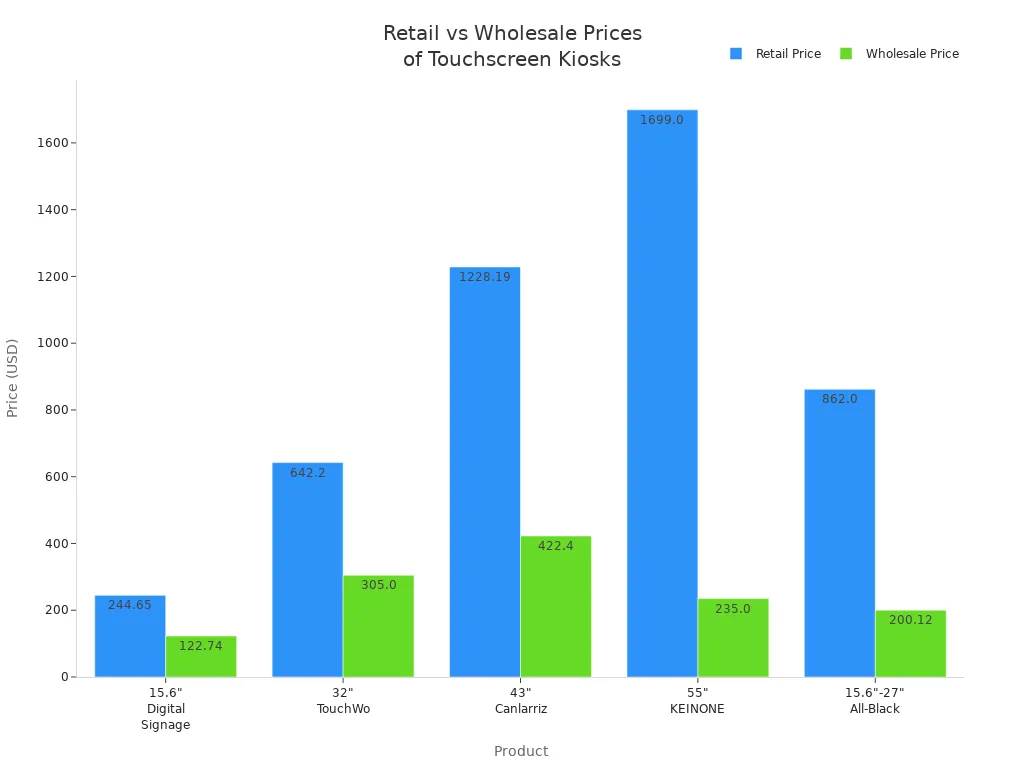
You will see that prices change with screen size, features, and brand. Most online stores have both retail and wholesale prices. You can save more if you buy a lot at once.
Direct Manufacturers
If you want the best deal and direct help, buy from manufacturers. They can give you more choices, better prices for big orders, and technical support. Here are some top manufacturers known for good touch screen windows devices:
Manufacturer | Location | Main Products |
|---|---|---|
Philips | Netherlands | Touch screen display, Monitors, Media Players |
Cincoze | Taiwan | Touch screen display, KIOSK, Industrial Panel PC |
Elo Touchscreen | U.S. | Mobile Computers, Touchscreen Monitors, POS Terminals |
Dell | U.S. | Touch screen display, Laptops, Desktops |
Jassway | China | Touch screen display, KIOSK, POS Terminal |
Samsung | South Korea | Touch screen display, Kiosks, Smartphones |
Acer | Taiwan | Touch screen display, Laptops, Desktops |
Tyco Touch | U.S. | Touch screen display |
Mimo Monitors | U.S. | Touch screen display, Display |
ASUS | U.S. | Touch screen display, Mobile, Laptops |
Many of these companies have certifications for quality and safety. For example, Eagle Touch has RoHS, FCC, and CE certifications. Xenarc Technologies is ISO9001 certified. These show the products meet world standards and help you feel safe.
When you buy from a manufacturer, you can ask for special features. You can pick from many screen sizes and get expert advice. Shipping can be worldwide, fast, or by freight for big orders.
Authorized Distributors
Authorized distributors connect manufacturers and buyers. They sell real products, give local help, and sometimes have special deals. You can trust them for warranty and technical support. Some well-known distributors are:
Shiningltd: Sells digital signage and kiosk solutions with many touch screen windows devices.
Advantech: Makes strong kiosks and digital signage for tough places.
Saturn Visual: Focuses on commercial digital signage and has great customer service.
Eflyn: Offers interactive kiosks and digital signage with cool features and custom options.
You will see that authorized distributors have the newest models. They can help with setup and fixing problems. They also have different shipping choices, like local delivery and setup.
Note: Buying from authorized distributors means you get real products and full warranty. This keeps your purchase safe and gives you expert help.
From all these sources, you can find many types of products. Windows touch screen LCD kiosk signage advertising players are popular for their easy-to-use interface and strong features. You can pick simple displays or advanced kiosks with multi-touch. This lets you find the best one for your business.
Choosing Touch Screen Windows Devices
Key Supplier Criteria
You want your touch screen windows devices to last a long time. Picking the right supplier is very important. You should look for these main things when you compare:
Description | |
|---|---|
Performance Specifications | Make sure the device fits your needs. Do not pay for extra features you will not use. |
Total Cost of Ownership | Think about all costs, like maintenance and energy, not just the price. |
Vendor Support | Pick a supplier who gives strong support and a clear warranty. |
Integration Requirements | Check if the device works with your current systems and accessories. |
You should check certifications. These show the supplier cares about safety and quality:
CE Marking means the device meets European safety rules.
RoHS shows the device limits dangerous materials.
WEEE means the device can be recycled safely.
ISO Standards show good quality management.
PCI DSS means payment security is strong.
Customer reviews help you know what to expect. One buyer said, “We just received the goods and are very satisfied. This is a great supplier, and we hope they continue to improve.” Another wrote, “The quality of the products is very good, especially in the details, can be seen that the company works actively to satisfy customer's interest, a nice supplier.” These comments show you can trust suppliers who care about customers.
Tip: Always check how long the warranty lasts. Some suppliers give one year, others give up to five years for parts. You can check warranty details through official support channels.
Questions to Ask
Before you buy touch screen windows devices, ask smart questions. This helps you avoid problems and get the best value.
Is the interactive panel made for your environment?
What display size and resolution do you need?
Does the device support multi-touch and stylus input?
Is there a built-in CPU or an OPS slot?
What software comes with the device?
Are there AI features to make it better?
What after-sales support and warranty do you get?
Is the device strong enough for your setting?
Does it work with your current equipment?
What is the total cost of ownership?
Asking these questions helps you make sure your touch screen windows device fits your needs now and later.
Buying Tips
Compare Prices and Features
You want to get the most for your money. First, look at prices and features from different brands and models. Expensive Windows touch screen LCD kiosk signage players usually have commercial-grade displays. These last longer and work better if you use them a lot. Cheaper models might seem good, but they can break sooner and may not have all the things you need.
Here is a table to help you compare important features:
Feature | Description |
|---|---|
Maximum power | Handles complex content and heavy usage |
Universal compatibility | Runs any Windows software |
Video wall capability | Supports multi-screen setups |
Touch integration | Advanced driver support for smooth touch experience |
Enterprise management | Works with AD, SCCM, Intune for easy control |
Cost | Includes hardware and Windows OS licensing |
Power consumption | Uses 30-100W+ depending on specs |
Complexity | Needs more IT management |
Size | Usually larger form factor |
Updates | Requires Windows update management |
Tip: Make sure the model works with your software. If you want easy control, look for advanced touch integration and enterprise management.
Check After-Sales Support
After-sales support is just as important as the product. You need a supplier who will help you if something goes wrong. Good support means you get answers fast, repairs when needed, and help with problems. The best brands give better warranties and more ways to get help.
Here are some important parts of after-sales service you should get:
Clear contracts that explain the service.
Help with setting up power and network.
Support for installing software and adding your brand.
Checks to make sure people with disabilities can use it.
User testing before you start using the kiosk.
Training for your staff and simple guides.
Tips to help people use your kiosk.
Aspect | Description |
|---|---|
Warranty | Pays for repairs or new parts for a set time |
Technical support | Gives help by phone, email, or chat |
Training | Shows your staff how to use and manage the kiosk |
Documentation | Gives you guides and manuals for easy reference |
🛠️ Note: Good after-sales support keeps your business running well. Pick a supplier who gives full support and stands by their products.
You have many great options for buying Windows touch screen LCD kiosk signage advertising players in 2026. Top choices like the Intel NUC 13 Pro offer strong performance and support multiple displays, making them perfect for busy environments.
Top Choice | Key Benefit |
|---|---|
Intel NUC 13 Pro | Handles 4K video, reliable |
To buy with confidence, follow these steps:
Learn about the main components.
Check security and compliance.
Plan your content.
Compare total costs.
Evaluate vendors for support.
Prepare for a smooth setup.
Choose a trusted supplier who offers full after-sales support. Take action now and reach out to recommended sources for your next project.
FAQ
Where can you buy good Windows touch screen LCD kiosk signage advertising players in 2026?
You can buy from Amazon, Walmart, Displays2Go, Anything Display, and direct manufacturers like Philips or Elo Touchscreen. Authorized distributors such as Shiningltd and Advantech also offer trusted options.
How do you know if a supplier is trustworthy?
Check for certifications like CE or ISO. Read customer reviews. Look for clear warranty terms. Reliable suppliers answer questions quickly and provide strong after-sales support.
What warranty should you expect?
Most suppliers offer at least a one-year warranty. Some provide up to five years. Always ask for details before you buy. A longer warranty gives you more peace of mind.
Do you need special skills to set up a kiosk?
No, you do not need special skills. Most kiosks come with easy instructions. Many suppliers offer setup help, training, and user guides. You can get started quickly.
For 2026, you have several solid options for purchasing a Windows touch screen LCD kiosk, ranging from sourcing directly from Chinese manufacturers to buying enterprise-grade solutions from global brands .
Here is a breakdown of the key suppliers and a buying guide to help you make the right choice.
🛒 Where to Buy in 2026
Your choice should depend on your project's scale, budget, and need for support. Below is a summary of the main types of suppliers.
Supplier Type | Examples | Best For | Key Advantage |
|---|---|---|---|
Chinese Manufacturers (OEM/ODM) | Qtenboard, Rowell Technology, Rcstars | Cost-effective, fully customizable kiosks | Lower prices, flexible customization on OS, logo, and peripherals |
Global Electronics Brands | Samsung, Axiomtek | Reliable, "out-of-the-box" solutions | High reliability, global support, enterprise-grade build quality |
Specialized Signage Integrators | AVI-SPL | Complete solutions with installation | Professional integration and support services |
1. Chinese Manufacturers (OEM/ODM)
If you need the best price or require specific customizations (like a unique shape, color, or integrated printer), Shenzhen-based manufacturers are your go-to option . Most offer comprehensive OEM and ODM services, allowing you to customize the operating system (Windows 10/11), processor (Intel i3/i5/i7), RAM, storage, touch technology (PCAP or IR), and even print your logo on the device .
Examples: Qtenboard, Shenzhen Rowell Technology Co., Ltd, Rcstars Industrial .
Where to find them: B2B platforms like Made-in-China.com or their direct websites.
2. Global Electronics Brands
For enterprise projects where reliability and support are critical, established brands are a safer choice, though they come at a higher price point.
Samsung: Offers an all-in-one "Kiosk" with a built-in Windows 10 IoT Enterprise OS and an 11th Gen Intel Core Processor. It's a complete, compact unit with support for various payment types and a shatterproof screen, available through authorized distributors like AVI-SPL .
Axiomtek: A specialist in industrial computers, Axiomtek launched the DSP522 player in 2026. This is a powerful, fanless media player designed for multi-display setups (supports up to four 4K screens), making it ideal for complex video walls or high-performance kiosks .
3. Specialized Signage Integrators
Companies like AVI-SPL are value-added resellers that stock products from major brands (like Samsung) and offer additional services, including consultation, custom configuration, and installation support .
⚙️ Windows vs. Android: Is Windows the Right Choice?
As our previous discussions focused on Android, it's important to confirm that a Windows-based player is the right fit for your 2026 project. A Windows kiosk is typically the superior choice for the following scenarios :
Complex, Interactive Applications: You need to run full-featured, custom Windows software, such as advanced wayfinding systems, interactive product catalogs with 3D models, or self-service check-in applications.
Seamless Peripheral Integration: Your kiosk must connect to multiple peripherals simultaneously, like high-resolution cameras, label printers, barcode scanners, and NFC/RFID card readers. Windows has mature, robust drivers for these devices .
High-Performance Video Walls: If you are driving multiple screens from a single kiosk, a Windows PC with a powerful GPU is necessary. A dedicated Windows media player like Axiomtek's DSP522 can drive up to four independent 4K displays .
Enterprise IT Environments: Your organization's IT team is already set up to manage, secure, and remotely access Windows devices using tools like Active Directory or remote desktop .
If your application only involves looping 4K videos or simple image slideshows, an Android-based player would be more cost-effective and easier to manage .
💡 How to Choose the Right Specifications
When you contact suppliers, use this 2026 buying guide to ensure you get a system that will perform reliably.
1. Define Your Hardware Requirements
Processor (CPU): For a responsive interactive kiosk, don't go below an Intel Core i5 (12th Gen or newer). For basic advertising playback, an Intel Celeron or N100 is sufficient .
Memory (RAM) & Storage: 8GB of RAM is the minimum for a smooth Windows 11 experience. For storage, a 128GB or 256GB SSD is recommended for the OS and your media content .
Touch Technology: For a sleek, premium, glass-front look with excellent multi-touch support, choose Projected Capacitive (PCAP) . For larger screens where budget is a concern, Infrared (IR) touch is a reliable alternative .
2. Choose a Trusted Partner (For Direct Sourcing)
If you decide to buy directly from a Chinese manufacturer on a platform like Made-in-China.com, take these steps to ensure quality:
Check Certifications: Look for ISO 9001 (quality management) and product-specific certifications like CE, FCC, or RoHS, which indicate compliance with international standards .
Request a Live Demo: Ask the supplier for a live video call to see the actual unit booting up, playing 4K content, and responding to touch commands. Don't rely solely on product photos .
Clarify the Warranty: A standard commercial warranty is 1-3 years. Understand their process for replacing a faulty unit or parts, especially if you are in a different country .
To help you narrow down the options, could you share a bit more about your project? Knowing the screen size you need (e.g., 32" vs 55"), the primary use case (e.g., retail advertising vs. interactive wayfinding), and your approximate budget will allow me to provide more targeted recommendations.
See Also
Finding Reliable LCD Display Kiosks for Shopping Centers
Leading Providers of Outdoor LCD Display Kiosks
Top LCD Display Kiosks for Retail Spaces in 2026
Selecting the Ideal LCD Display Kiosk Installation Service Locally
