What is an LCD Display Screen and How Does It Work
You see an lcd display screen almost everywhere today. An lcd display uses liquid crystals to control light. It shows clear images. This technology lets you see bright pictures on many devices. These include televisions, smartphones, and computer monitors. In 2023, lcd screens made up 37.7% of all electronic displays in the world. You can find lcds in many places:
Flat-panel TVs
Computer monitors
Smartphones and tablets
Digital signage
Appliances
Cars
Medical equipment
Industrial controls
Educational tools
Game consoles
E-readers
Smartwatches
Key Takeaways
LCD screens use liquid crystals to control light. This helps make images bright and clear on TVs and smartphones.
The main parts of an LCD are the liquid crystal layer, polarizers, color filters, and a backlight. These parts work together to make pictures.
There are different types of LCD panels like TN, IPS, and VA. Each type has its own benefits, such as speed, color accuracy, or contrast. These things change how you see the screen.
To take care of LCD screens, use a gentle cleaning solution. Do not use strong chemicals. This helps the screen last longer.
LCDs save energy and can be used in many ways. They work well for gaming and outdoor signs.
What is an LCD Display Screen
Simple Definition
You use an lcd display screen almost every day. You might not even notice it. This screen uses a technology called liquid crystal display. The idea is easy to understand. The screen has several layers that work together. Light goes through a layer of liquid crystals. These crystals move when electricity is added. This movement controls how much light can pass. The screen then shows pictures, words, or videos.
You may wonder how lcd screens are different from other screens. Here is a quick look at lcd, OLED, and Micro-LED displays:
Display Technology | Structure Description | Functionality Description |
|---|---|---|
LCD | Made of layers like top polarizer, glass, color filter, liquid crystal layer, TFT array, bottom polarizer, and backlight. | Changes light by moving liquid crystals and uses a backlight to show images. |
OLED | Has layers such as top polarizer, substrate, electrodes, and organic light layers. | Makes its own light with organic materials, so it can show deep blacks and strong contrast. |
Micro-LED | Has a simple structure with RGB Micro-LEDs and electrodes. | Each pixel makes its own light, so it is very bright and does not need a backlight. |
You can see that lcd screens need a backlight. OLED and Micro-LED screens do not need one. This makes lcds work differently and look different in bright or dark rooms.
Everyday Uses
You find lcd display screens in many places. At home, you use them in your TV, computer monitor, smartphone, and tablet. In your car, the dashboard and GPS often use lcds. Many appliances, like microwaves and washing machines, have small lcd panels.
In factories and offices, lcds are important. You see them in:
Industrial liquid crystal displays
Outdoor GPS devices
EV chargers
Industrial routers
Measurement devices
Human Machine Interface (HMI) panels
Factory automation systems
Diagnosis and process control screens
Smart routers
Charging devices
Industrial printers
You use lcds to get clear information and make things easy to control. The liquid crystal display helps you read data, follow steps, and have fun with entertainment. This technology changes how you use devices every day.
How a Liquid Crystal Display Works
Light Modulation with Liquid Crystals
You might wonder, how does an lcd work to show images? The answer starts with the way liquid crystals control light. In an lcd, the liquid crystal molecules sit between two layers of glass. When you turn on your device, electricity flows through the screen. This electricity changes how the liquid crystals line up.
The arrangement of liquid crystal molecules shifts when you apply different voltages.
These changes affect how much light can pass through the screen.
The way the crystals move creates different optical paths for the light, which changes how bright or dark each part of the screen looks.
This process lets the lcd turn electrical signals into the images you see.
The ability to control light in this way is what makes an lcd display screen so useful in many devices.
Role of Polarizers and Electrodes
The lcd uses polarizers and electrodes to manage light even more precisely. You can think of polarizers as special filters that only let light waves pass in one direction. Here is how the process works:
Light from the backlight first passes through a vertical polarizer, which lines up the light waves.
The liquid crystal layer twists the polarized light by about 90 degrees when no electric field is present.
This twisted light then moves through a second polarizer, which is set at a right angle to the first. The light passes through, and you see a bright display.
When you apply an electric field, the liquid crystals lose their twist. The light no longer turns and cannot pass through the second polarizer, so that part of the screen looks dark.
By turning the electric field on and off in different areas, the lcd can show numbers, letters, or images.
The science behind this involves polarization, birefringence, and Malus's Law. The liquid crystal layer acts like a programmable rotator for the light. When you change the voltage, you change the way the crystals twist the light. This controls how much light gets through, which sets the brightness of each pixel.
Tip: The teamwork between polarizers and electrodes is what lets you see clear images on your lcd, even in bright rooms.
Creating Images with Sub-Pixels
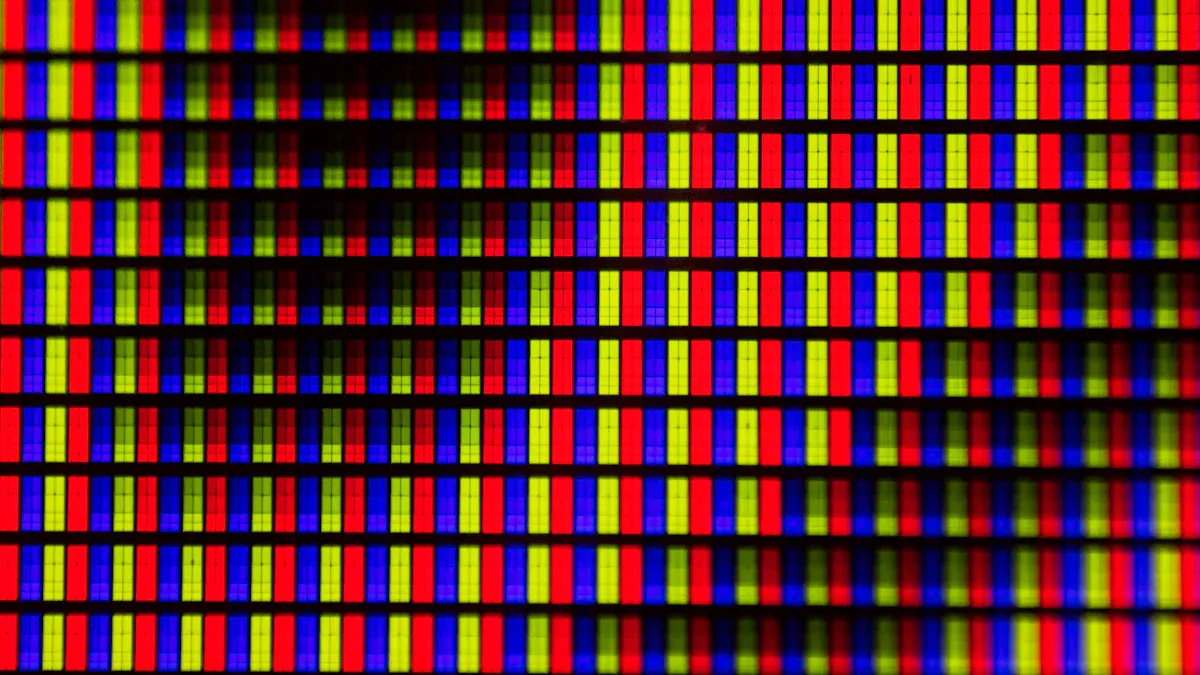
Every image you see on an lcd comes from millions of tiny dots called pixels. Each pixel splits into three smaller parts called sub-pixels—one red, one green, and one blue. These sub-pixels work together to create all the colors and details you see.
Aspect | Description |
|---|---|
Color Creation | Subpixels combine to produce millions of colors, essential for image formation. |
Resolution | More subpixels lead to higher resolution, resulting in sharper images. |
Clarity | Subpixel arrangements enhance the clarity of text and images on the display. |
When you look at your lcd display screen, your eyes blend the light from these sub-pixels. This blending creates smooth pictures, sharp text, and vibrant colors. The lcd controls each sub-pixel with electric signals, so you get the right color and brightness for every part of the image.
Main Components of an LCD
When you look at an lcd display screen, you see a clear image. This happens because several main components of an lcd work together. Each part has a special job in making the display bright, colorful, and easy to read.
Liquid Crystal Layer
The liquid crystal layer sits at the heart of every lcd. You find millions of tiny liquid crystal molecules here. When you apply electricity, these molecules twist or straighten. This movement controls how much light passes through each part of the screen. The liquid crystal layer lets you see different shades and colors by changing the way light moves. Without this layer, the lcd could not show images or text.
Polarized Glass Panels
You see two polarized glass panels in every lcd. These panels act like filters for light. The first panel lines up the light in one direction. The second panel only lets light through if it matches its direction. If the liquid crystals twist the light, it passes through both panels and you see a bright spot. If not, the spot looks dark. Polarizers help create contrast, so you can see sharp images and clear text.
Polarizers are added to the glass during production.
The direction of each polarizer matters for the display to work.
These filters make sure you see the right image on your screen.
Color Filters and Sub-Pixels
Each pixel in an lcd splits into three sub-pixels: red, green, and blue. Color filters cover these sub-pixels. The liquid crystals control how much light passes through each one. By mixing different amounts of red, green, and blue, the display shows millions of colors. Thin-film transistors manage each sub-pixel, so you get smooth pictures and bright colors.
Note: Color filters and sub-pixels work together to give you the full range of colors you see on your lcd.
Backlight Unit
The backlight in an lcd shines white light from behind the screen. This light passes through all the other layers. You find different types of backlights, such as edge-lit, direct-lit, and mini LED. Edge-lit backlights use LEDs around the edges. Direct-lit backlights place LEDs behind the screen. Mini LED backlights use thousands of tiny LEDs for better contrast. The backlight in an lcd makes sure you can see images and text, even in a dark room.
Component | Function |
|---|---|
LCD Panel | Renders images using liquid crystal molecules. |
Liquid Crystal Layer | Changes molecule orientation to control light and form images. |
Polarizing Filters | Filter light for better image quality and contrast. |
Color Filters | Create the colors you see on the display. |
Backlight | Provides the light needed to see images and text. |
LCD Controller | Sends image data and controls display timing. |
You now know the main components of an lcd and how each one helps create the images you see every day.
Types of LCDs
You can choose from several types of lcd panels. Each type has its own strengths and weaknesses. The three main types are TN, IPS, and VA. These types affect how your lcd display screen looks and works.
TN (Twisted Nematic)
TN panels are the oldest and most common type of lcd. You often find them in budget monitors and gaming screens. TN panels give you fast response times, which means less motion blur when you play games. They also cost less to make. However, TN panels have some downsides. You see poor color reproduction and limited viewing angles. If you look at the display from the side, colors may shift or fade.
Fast response times help with gaming.
Lower price makes them popular for basic use.
Limited viewing angles and color quality can be a problem.
IPS (In-Plane Switching)
IPS panels offer better color accuracy and wider viewing angles than TN panels. You see clear images from almost any angle, up to 178 degrees. IPS panels cover 98-100% of the sRGB color range, so you get millions of accurate colors. This makes them great for professional monitors, smartphones, and high-end TVs. IPS panels usually cost more and have slower response times than TN panels.
Note: If you want the best color and image quality, IPS panels are a top choice.
VA (Vertical Alignment)
VA panels give you higher contrast ratios and better color reproduction than TN panels. Blacks look deeper, and colors appear richer. You often see VA panels in TVs and monitors where contrast matters. VA panels do have some drawbacks. They respond slower than TN panels, and you might notice color shifting at extreme angles.
Here is a quick comparison to help you decide:
Panel Type | Advantages | Disadvantages | Common Uses |
|---|---|---|---|
TN | Fast response, low cost | Poor color, narrow viewing | Gaming, budget monitors |
IPS | Wide viewing, great color | Higher cost, slower response | Pro monitors, phones, TVs |
VA | High contrast, good color | Slower response, color shift | TVs, contrast-focused monitors |
You now know how each lcd type changes your viewing experience. When you pick an lcd, think about what matters most to you—speed, color, or contrast.
Image and Color Display
How Pixels Show Images
You see clear pictures on your lcd display screen because of how each pixel works. Each pixel contains three sub-pixels: red, green, and blue. Thin-film transistors (TFTs) control these sub-pixels. They switch each one on or off to let light pass through. The liquid crystals inside the lcd change their alignment when you apply electricity. This alignment decides if light gets blocked or allowed through each sub-pixel. When you look at the screen, your eyes blend the light from all the sub-pixels to form a complete image.
Each pixel has three sub-pixels: red, green, and blue.
TFTs control the sub-pixels by turning them on or off.
The alignment of liquid crystals changes the brightness and color.
Producing Colors with Filters
You see millions of colors on an lcd because of color filters and the way light passes through them. Each pixel uses red, green, and blue sub-pixels to filter the white backlight. When you want to see a certain color, the lcd lets the right sub-pixels shine while blocking others. By changing the brightness of each sub-pixel, the display creates many different hues.
Color filters in lcds help you see bright, pure colors and sharp images.
Here is how manufacturers make color filters:
They use three main colors: red, green, and blue.
They create filters using methods like dyeing, electrodeposition, pigment dispersion, or printing.
Pigment dispersion is the most common because it is reliable and cost-effective.
Refresh Rate and Response Time
The refresh rate tells you how many times per second the lcd updates the image. A higher refresh rate gives you smoother motion, which is important for gaming or watching fast videos. Most lcds for home or work use a refresh rate of 60 Hz, but some go up to 120 Hz or even 240 Hz for extra smoothness. Response time shows how quickly a pixel can change from one color to another. Lower response times mean less motion blur and clearer images.
Refresh Rate | Frame Time | Typical Application |
|---|---|---|
30 Hz | 33.33 ms | Static or low-motion displays; power saving |
60 Hz | 16.67 ms | Standard consumer LCDs |
90 Hz | 11.11 ms | High-end smartphones and VR |
120 Hz | 8.33 ms | Gaming and automotive |
240 Hz | 4.17 ms | Professional gaming |
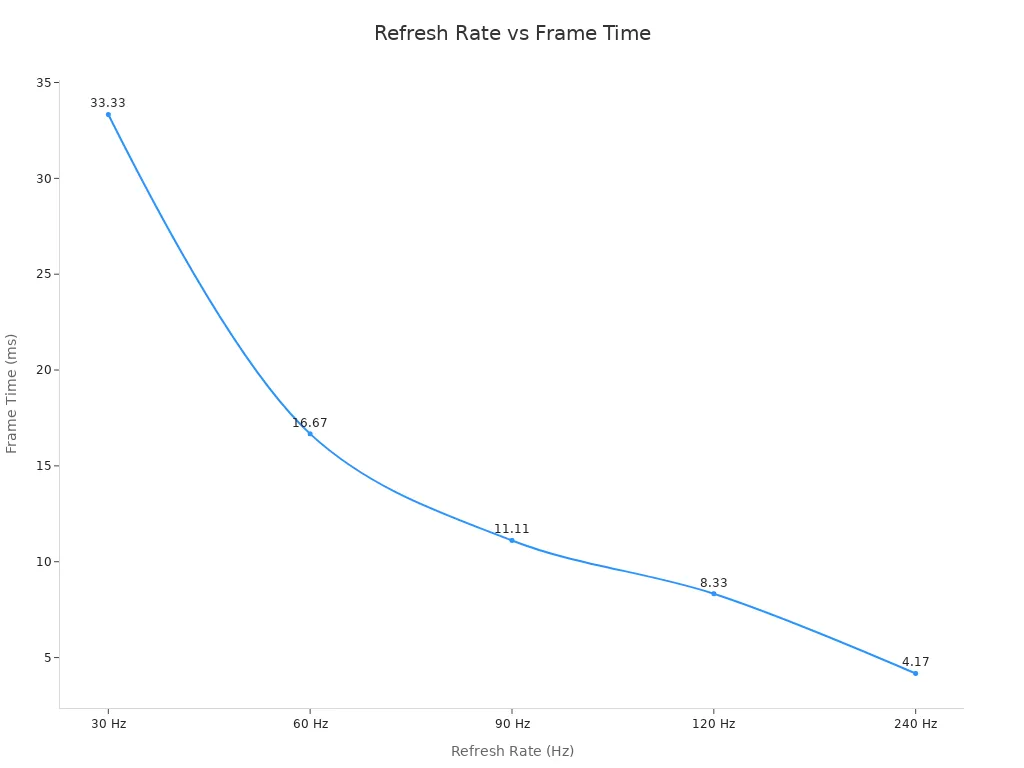
You get a better viewing experience when your lcd has a high refresh rate and a fast response time. This means less blur and smoother action on your screen.
LCD Pros and Cons
Advantages
LCD display screens have many good points. They show clear pictures and work well for a long time. Here are some main benefits:
LCDs are strong and last for years if you take care of them.
LCDs usually cost less than other screens, so you save money.
You can see the screen well outside or in bright rooms.
LCDs use less power when showing bright images, so you pay less for energy.
Tip: LCDs are a smart pick if you want a screen that works in many places and saves energy.
Disadvantages
LCDs have some problems too. You should know these before you buy one.
Disadvantage | Description |
|---|---|
Cost | LCDs cost more than CRTs, especially small ones. Making them can be pricey. |
Viewing Angles | Colors can look strange from the side. Watching with a group can be hard. |
Response Time | LCDs change slower than needed for fast games or videos. Most take about 40ms. |
Brightness and Contrast | LCDs need extra light. Some do not get bright or show strong contrast. |
Maintenance Problems | LCD screens use glass. They break easily. Pixels can fail and fixing them costs a lot. |
Note: Be careful with lcd screens so you do not break them or lose pixels.
Comparison with CRT and OLED
You may wonder how lcds are different from other screens. CRTs use old tube parts. They are big and heavy. LCDs are thin and light. You can hang them on walls or carry them. OLED screens make their own light. They show deep blacks and strong contrast. LCDs need a backlight, so blacks look lighter.
Technology | Pros | Cons |
|---|---|---|
CRT | Cheap, fast response | Heavy, large, old |
LCD | Thin, light, saves energy | Narrow viewing, slower response |
OLED | Deep blacks, bright colors | Costs more, does not last as long |
Pick the screen that fits what you need. LCDs are good for daily use, seeing outside, and saving energy.
Practical Use and Care
Durability and Cleaning
You want your lcd display screen to last a long time. Taking care of it is easy if you follow a few simple steps:
Turn off the device before you clean it. This keeps you safe from shocks.
Mix rubbing alcohol and water in equal parts for a gentle cleaning solution.
Use a lint-free microfiber cloth. This cloth will not scratch the screen.
Do not use paper towels. They can leave fibers and may damage the display.
Avoid glass cleaners. Many have harsh chemicals that can harm the lcd.
Tip: Clean your screen gently. Pressing too hard can damage the lcd layer.
Energy Efficiency
You may wonder how much power your lcd uses. The lcd always needs a backlight, so it uses the same amount of energy no matter what is on the screen. Other types of screens, like OLED, can save energy when showing dark images because they turn off some pixels. Here is a quick comparison:
Display Technology | Power Consumption Characteristics |
|---|---|
OLED | Power varies with content; can turn off pixels, leading to lower consumption for dark images. |
LCD | Constant backlight; power consumption remains high regardless of content, especially for dark images. |
If you want to save energy, lower the brightness or turn off the screen when you do not use it.
Best Uses (Gaming, Outdoor, Signage)
You see lcds in many places because they work well for different needs. Here are some of the best uses:
Application | Key Features | Brightness Level |
|---|---|---|
Outdoor Signage | Designed for tough environments, resistant to dust and water, high durability | Up to 5,000 nits |
Specialized Displays | Mechanical resilience, cooling systems for temperature extremes | Over 7,500 nits |
For gaming, lcds give you fast response times and clear images. Outdoor signage uses lcds because they stay bright even in sunlight and can handle rough weather. In factories or special places, you find lcds that work in extreme heat or cold.
Note: Choose the right lcd display screen for your needs. Think about where you will use it and what features matter most.
You now understand how an lcd display screen works and why it matters. LCDs use less energy, show clear images, and fit many devices. When you know about screen types, features, and new technology, you can choose the best display for your needs. Look for the right size, strong performance, and smart features. As LCDs keep improving, you will see even better screens in the future.
FAQ
What does LCD stand for?
LCD stands for "Liquid Crystal Display." You see this technology in many screens, like TVs, monitors, and phones. The name comes from the special liquid crystal layer inside the screen.
How do you clean an LCD screen safely?
Use a soft, lint-free microfiber cloth. Turn off your device first. Lightly wipe the screen. Do not spray water or cleaner directly on the screen. Avoid paper towels and strong chemicals.
Why do some LCD screens look better than others?
You notice differences because of panel type, backlight quality, and color filters. IPS panels show better colors and wider viewing angles than TN panels. Higher resolution and brightness also make images look sharper.
Can LCD screens get "burn-in" like old TVs?
No, LCD screens do not get permanent burn-in like CRT or plasma TVs. You might see temporary image retention if you leave one picture on for a long time, but it usually goes away after a short break.
See Also
Exploring OLED Displays: Functionality and Technology Explained
Understanding OLED Technology: How It Operates and Functions
Comparing OLED and LCD Displays: Key Differences Explained
