What is an LCD Display Inverter and How Does It Work
Shenzhen TopAdkiosk Display Technology Co., Ltd.
Add.: 2F, Bldg 10, Changfeng Industrial Park, Dongkeng, Fenghuang, Guangming, Shenzhen, China 518132
Mobile/WHATSAPP: 86-138 25769658
Email: marketing@topadkiosk.com topadkiosk@gmail.com
Skype: pghenry1
Wechat: adkioskhenry
English Web.: http://www.topadkiosk.com/
https://www.topkioskdisplay.com/
http://www.ad-kiosk.com/
https://www.toplcddisplay.com/
http://www.multitouchdigitalsignage.com/
https://www.youtube.com/channel/UCYVYNJHxLVEcQD8fuUxXNTA/videos?view_as=subscriber
https://www.facebook.com/TOPADKIOSKSHENZHEN/?ref=bookmarks
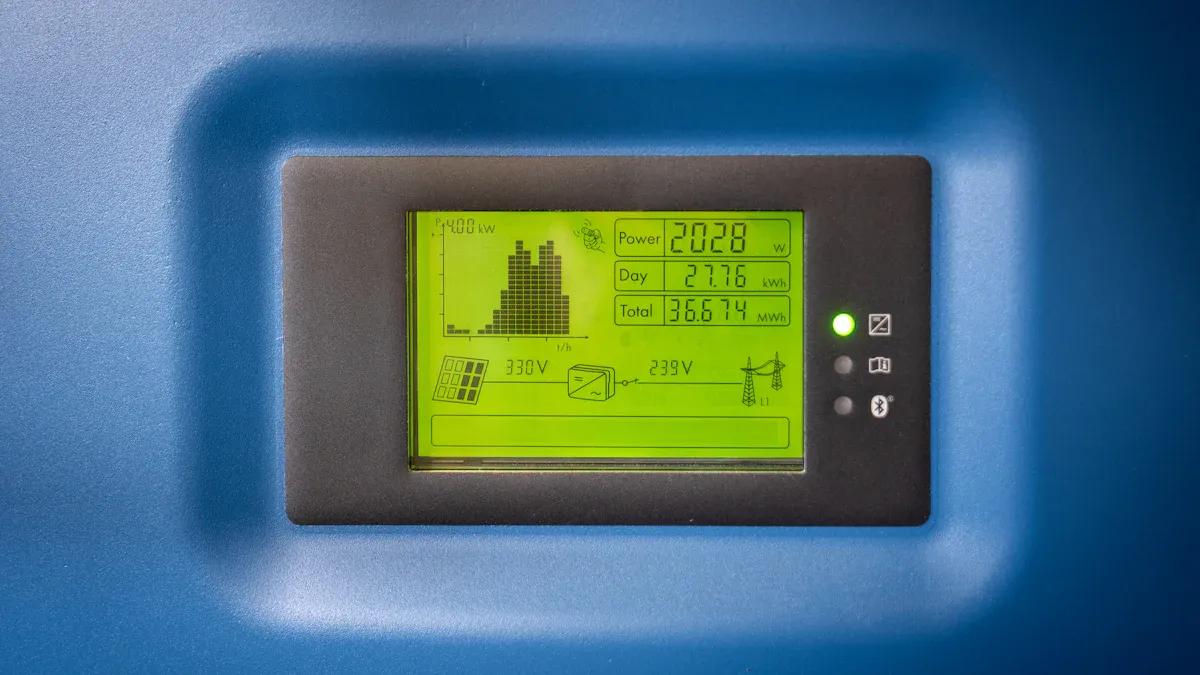
An lcd display inverter is a circuit that gives power to the backlight in many lcd screens. You see it mostly in screens that use cold cathode fluorescent lamps (CCFLs) for light. The inverter turns low-voltage DC from your device into high-voltage AC, sometimes over 600 volts, to make the backlight shine. The inverter also helps control how bright the screen is and keeps the lamp current steady. This stops flickering and makes it easier for you to see the screen.
Key Takeaways
An LCD display inverter gives power to the backlight in CCFL screens. It changes low-voltage DC into high-voltage AC. This helps the screen stay bright and clear.
If your screen flickers or turns dark, the inverter might be broken. Look for signs like dim screens or sudden changes in brightness. These signs can help you find problems.
LED screens do not need an inverter. This makes them more dependable and saves energy. They use a simple LED driver instead.
Check your device often for inverter issues. Finding problems early can stop more damage. It also keeps your screen working well.
If you must change an inverter, follow safety steps. Turn off the device and unplug it first. Handle all parts carefully so you do not get hurt.
LCD Display Inverter Overview
What Is an LCD Display Inverter
You find the lcd display inverter inside many devices with a lcd screen. This small circuit takes the low-voltage DC power from your device and changes it into high-voltage AC. The inverter sends this power to the backlight, which helps you see the images on your screen. You see lcd display inverters mostly in screens that use CCFL backlights. These lamps need a lot of voltage to work, so the inverter makes sure they get the right amount. Without the inverter, the backlight would not turn on, and your lcd screen would stay dark.
Manufacturers check the quality of the lcd display inverter before sending devices to stores. They use a voltmeter to test the voltage at the inverter’s input pins. If the inverter gets power but the screen stays dark, they connect a known good backlight lamp. When they turn on the device, if the test lamp lights up, the original lamp is faulty. If the test lamp does not light up, the inverter needs replacement. This process helps make sure you get a reliable lcd screen.
Why It’s Important
You depend on the lcd display inverter for a clear and bright screen. The inverter controls the brightness and keeps the lamp current steady. This stops flickering and protects your eyes. The importance of the lcd display inverter shows when you try to adjust your screen’s brightness. If the inverter works well, you can change the brightness easily. If it fails, your screen may become dim or flicker. You need to understand the importance of the lcd display inverter because it affects how you use your device every day. A good inverter gives you a better viewing experience and helps your device last longer.
Tip: If your screen suddenly goes dark or flickers, the lcd display inverter might be the cause. You can ask a technician to check it for you.
LCD Inverter in Different Screens
CCFL vs. LED Backlighting
There are two main types of lcd display inverters. One is for CCFL backlights, and one is for LED backlights. CCFL screens need an inverter. This is because the lamps need high AC voltage to work. The inverter takes low DC voltage from your device and makes it much higher AC voltage. Sometimes, this can be over 600 volts. This helps the CCFL lamp turn on and keeps your screen bright.
LED screens are different. They do not use an inverter. LED backlighting uses DC power instead. These screens use a simple LED driver. The driver takes 5 to 48 volts DC. It uses a DC/DC boost converter to give the right voltage to a constant-current driver for the LED string. LED backlights last longer and make screens brighter. LED screens can use an array or edge-lit format. This spreads light into a diffuser for even brightness.
Note: LED backlights do not need high AC voltages. You do not need an inverter. This makes LED screens more reliable and saves energy.
Screens Without Inverters
Some screens do not use any lcd display inverters. These screens use new technology or LED backlighting. For example, GenFlective screens keep the original power setup. They do not need extra power. This means they use less power and stay cooler. You do not need big cooling systems. Your screen lasts longer.
Screens with LED backlights also do not use an inverter. They run on +5VDC or sometimes 12VDC. These screens are brighter and last longer, often over 50,000 hours. LED backlights can be in arrays or edge-lit formats. The light spreads out evenly, so you see the screen clearly.
GenFlective screens:
No extra power needed
Use less power
Stay cooler
Fewer parts, so more reliable
LED screens:
No inverter needed
Last longer
Brighter display
Light spreads out evenly
Screens without inverters have many good points. They are more reliable, make less heat, and last longer.
How Does an LCD Display Inverter Work
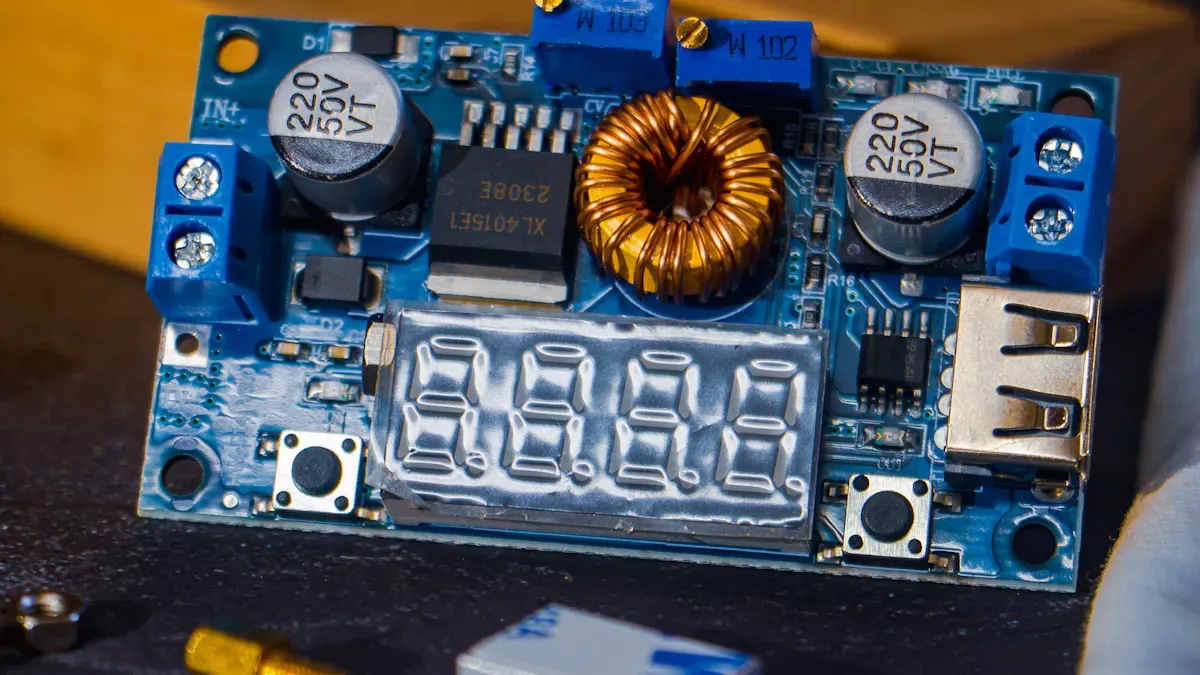
DC to AC Power Conversion
You may wonder how an lcd display inverter lights up your screen. It all starts with changing power. Your device gives the inverter low-voltage DC, like 12V or 24V. The inverter changes this DC into high-frequency AC power. This AC can be over 600 volts. The high-voltage AC makes the CCFL backlight tubes glow in your LCD.
Here is what happens in order:
The inverter gets low-voltage DC from your device’s power.
It uses circuits to turn the DC on and off very fast.
This fast switching makes a high-frequency AC signal.
The inverter raises the voltage so it can power the CCFL lamp.
The backlight turns on, and your screen looks bright and clear.
Without this process, your LCD would not light up. The lcd display inverter gives the backlight the right power to work.
Regulating Frequency and Brightness
You need more than just power for a good screen. The inverter also controls how often and how bright the backlight shines. This is a big part of how an lcd display inverter works.
The inverter must match its frequency with the LCD and the pictures on your screen. If the frequencies do not match, you might see weird patterns or moving bars. The inverter uses pulse width modulation (PWM) to change brightness. By changing how long the lamp stays on each cycle, the inverter lets you make the screen brighter or dimmer.
Here are some key things about frequency control:
The inverter’s frequency must fit the LCD and graphics to stop noise or problems.
The PWM frequency should not mess with the LCD’s optical system. If it does, the screen looks worse.
The inverter should match the video scanning frequency. This stops things like moving bars.
If the inverter runs too fast, it can hurt the backlight tube and make electrical noise. This can make the screen look bad.
Tip: If your screen flickers or has moving lines, the inverter’s frequency may be wrong.
Switching and Modulation Techniques
The lcd display inverter uses special ways to switch and control power. These methods help the inverter work well and keep your screen looking good. Here is a table with common modulation techniques:
Modulation Technique | Main Good Point | Main Bad Point | Where It Is Used |
|---|---|---|---|
SPWM (Sinusoidal PWM) | Simple, low extra signals | More switching losses | Cheaper or older inverter designs |
SVPWM (Space Vector) | Less switching loss, better DC use | Harder to use | High-performance commercial and utility inverters |
DPWM (Discontinuous) | Least switching loss | Can make more extra signals | Efficiency-focused uses with heat limits |
You do not need to know every detail, but these ways help the inverter save energy and keep the backlight steady. They also help stop heat and make your device last longer.
Note: Good switching and frequency control help your LCD stay bright and clear for many hours.
Identifying LCD Inverter
Signs of Inverter Issues
You may notice your screen acting strangely when the inverter starts to fail. The most common symptoms of lcd inverter failure include a dim or completely dark screen, flickering backlight, sudden changes in brightness, or even visible damage on the inverter board. If you see these problems, you should check your display right away.
Here are some frequent causes of inverter malfunction:
Faulty backlight
Inverter failures
Connection failures
Environmental stress
Power fluctuations
Physical stress
If you want to know how to replace or repair an lcd inverter, you first need to spot these warning signs. When you see the common symptoms of lcd inverter failure, you can act quickly to prevent more damage.
Tip: If your screen flickers or goes dark, do not keep using it. Turn off the device and check for these symptoms.
How to Check for an Inverter
You can find out if your display uses an inverter by looking at the model or by opening the device. Some models always have an inverter, while others do not. Here is a simple table to help you:
Model | Inverter Presence |
|---|---|
Dell Latitude D620 | All screens have an inverter |
Dell Vostro 1720 | CCFL screens do not have an inverter |
If you want to know how to replace or repair an lcd inverter, you should follow these steps for CCFL-based screens:
Power off and unplug your device to stay safe.
Remove the LCD bezel carefully to reach the inverter board.
Disconnect cables from the inverter and remember their positions.
Remove screws or adhesive holding the inverter.
Install a new inverter and reconnect the cables.
Reassemble your device and test the backlight.
Safety first! Always turn off the power and unplug your equipment before you start. Use insulated tools and wear gloves and goggles. Make sure your work area is dry and well-lit.
You can also use a multimeter to check the output voltage of the inverter. If you see abnormal voltage or the screen stays dark, disconnect the power and check for problems.
If you follow these steps, you can spot and fix inverter issues quickly. This helps you keep your screen bright and working well.
You need the LCD display inverter to keep your screen bright. It helps make colors look right and clear. The inverter controls the backlight, so your screen stays bright everywhere. If your device has a CCFL backlight, you can check for an inverter. Look for signs like a dim screen or flickering. If you see these problems, you might need help from a professional. Experts can fix heat problems, change inverters, and make your screen look good again.
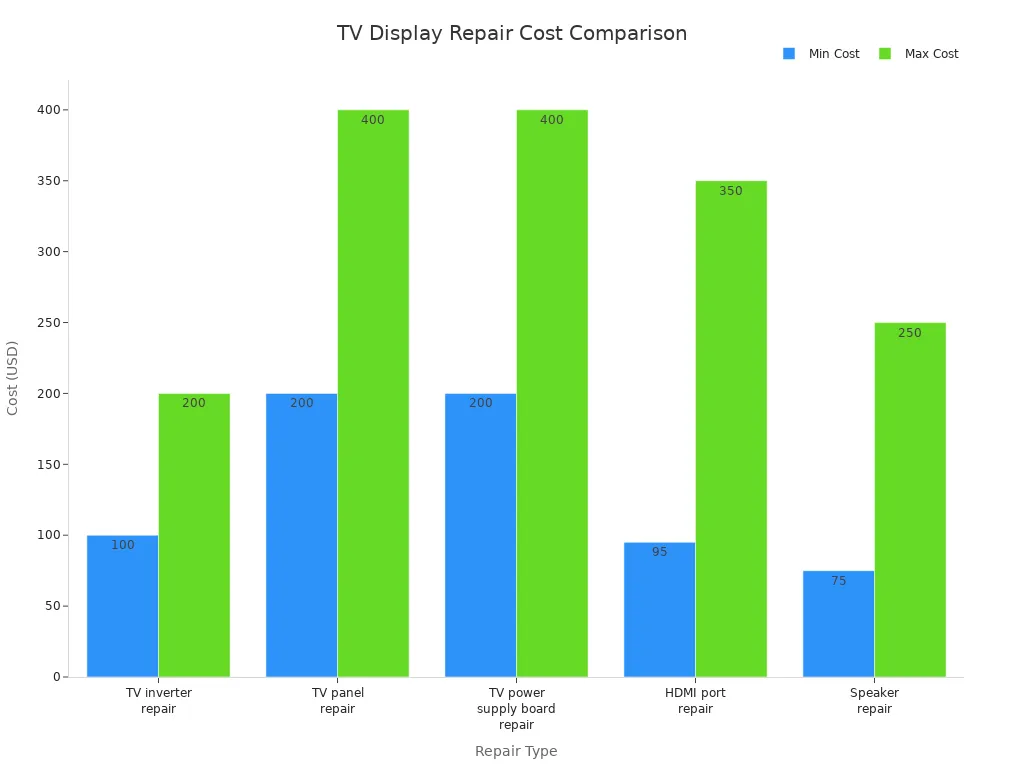
Repair Type | Cost Range |
|---|---|
$100 - $200 | |
TV panel repair | $200 - $400 |
TV power supply board repair | $200 - $400 |
HDMI port repair | $95 - $350 |
Speaker repair | $75 - $250 |
Professional repair shops can find and fix inverter problems.
Skilled technicians help with backlight checks.
Fixing issues early stops more damage.
Tip: If your screen uses LED backlighting, you do not need an inverter. Repairs are different for LED screens.
Critical Safety First: High Voltage Risks
Before starting, it's crucial to understand the dangers. An inverter generates a high-voltage, high-frequency signal to power the backlight. Typical operating voltages are around 800V, but startup voltage can reach 1500V. Always completely disconnect the device from its power source and wait a few minutes to allow capacitors to discharge before servicing. Never touch a working inverter, as this can cause a serious electric shock.
Step 1: Identify the Symptoms
The first step is to recognize the common signs of an inverter failure, which can vary based on the type of protection circuit that activates.
🔋 For Battery-Powered Devices (Laptops, Portable Screens)
Screen is Dim or Flickering: The backlight is the most likely culprit; the issue is often a failing inverter.
Screen is Dark, but a Faint Image Exists: This symptom strongly points to an inverter or backlight issue, rather than a failed LCD panel.
Won't Turn On: The backlight might fail to ignite, or the device might not power up at all.
🖥️ For AC-Powered Monitors (Desktop Displays)
Backlight Flashes On then Dies (Most Common): The screen lights up for a second and then goes dark. This happens because the inverter's protection circuit detects a fault and shuts down the system.
Backlight Turns Off After Several Minutes: You can use the monitor for a while before it fails. This is sometimes due to a faulty ballast capacitor heating up.
Backlight Stays On for 1-2 Seconds Before Shutdown: This time difference can help pinpoint the issue. A 1-2 second delay often suggests an over-voltage protection (OVP) fault.
Backlight Shuts Off Almost Instantly: This immediate shutdown usually indicates an over-current protection (OCP) fault.
Indicator Light Blinks: A specific number of blinks, like "six" on some Sonys, can be a diagnostic code pointing to an "inverter error".
Audible Buzzing or Hissing: Strange sounds can point to a failing transformer or a loose connection.
Step 2: Diagnose the Problem with a Visual & Multi-meter Inspection
Once you've identified the symptoms, you can begin the physical inspection. Note: This should only be done with the device powered OFF.
Visual & Sniff Check: Open the device and carefully examine the inverter board for obvious physical damage. Look for swollen or leaking capacitors, darkened or burnt areas on the board, broken solder joints, and any damaged cables or connectors. Check for any unusual smells, which can indicate burnt components.
Multi-meter Tests (Use with Caution): For advanced troubleshooting, a digital multi-meter is invaluable. Do not attempt to measure the high-voltage output with a standard meter as it can damage the meter or injure you.
Check Input Power: Measure the DC voltage going into the inverter board. It should be close to the specified value (e.g., 12V). Low or unstable input voltage will cause the inverter to malfunction.
Check Backlight On Signal: The inverter is turned on and off by a control signal from the main board. This is often labeled "BLON" or "ON/OFF". Measure the voltage on this pin; it should typically measure around 3V or 5V when the screen should be on.
Compare Components: If your board has multiple identical components (like two transformers for a dual-lamp setup), you can use the resistance function on your meter to compare them. Measure the resistance of the secondary winding on each transformer and compare the results. A defective part will often have a significantly different reading (open circuit, very high, or very low resistance).
Check Critical Components: Using the resistance setting (Ω) on your multi-meter, test key components for shorts or opens without powering the device. Check the primary and secondary windings of the transformers, the diodes, and the transistors.
🔧 Intermediate Troubleshooting with Hot Checks
These procedures involve the device being powered on and require extra caution.
Spark Test: With the device powered on and just before the protection circuit activates (which may take 10-15 seconds when cold), use a single multi-meter probe to touch the high-voltage output pin on the inverter. The presence of a small blue spark suggests the inverter is generating high voltage, and the issue is likely a defective CCFL or a poor connection. If there is no spark, the problem is more likely within the inverter circuit itself.
Voltage & Signal Measurement: Use an oscilloscope to check for the presence of the BLON (Backlight On) signal and the PWM (Pulse Width Modulation) dimming control signal. These are low-voltage signals from the main logic board. Without them, the inverter will not turn on.
Step 3: Perform Repairs
If you've pinpointed the faulty component, you can proceed with a repair.
Basic Repairs:
You can often fix a loose connection by reseating any ribbon or plug-in cables on the inverter board or reflowing a broken solder joint.
Replacing bulging or leaking capacitors is a common repair for power-related instability.
Ensure the inverter board is properly grounded to the chassis to prevent interference.
Advanced Component Replacement: If you have experience with soldering, you can replace specific failed components. These can include:
Short-circuited MOSFETs (the switching transistors).
Defective PWM controller ICs (the chip that controls the inverter's operation).
Faulty high-voltage ceramic capacitors that cause over-voltage protection to trip.
Step 4: Whole Board Replacement (Simplest Solution)
If you're not comfortable with fine soldering, or if complex ICs or transformers have failed, the easiest and most reliable fix is to simply replace the entire inverter board.
Finding Your Board: Search for the exact part number printed on your original inverter board.
Installation: Replacement is usually straightforward — disconnect the old board, unscrew it, put the new one in, and reconnect the cables. Inverter boards are often inexpensive, costing as little as 12−12−16 on marketplaces like eBay for older models.
Beyond the Guide
If you want to dive deeper, many comprehensive books and manuals on the market provide a wealth of knowledge on this subject. Some are known for their systematic approach and detailed case studies.
Remember, if you're ever in doubt about a step or uncomfortable working with high-voltage circuits, it's always best to consult with or hand it over to a professional repair service.
FAQ
What does an LCD display inverter do?
You use the inverter to power the backlight in CCFL LCD screens. It changes low-voltage DC into high-voltage AC. This process lights up your screen so you can see images clearly.
How do you know if your screen has an inverter?
You can check your device’s manual or look up the model online. If your screen uses a CCFL backlight, it has an inverter. LED-backlit screens do not use inverters.
What are signs of a bad LCD inverter?
You might see a dim screen, flickering, or sudden darkness. Sometimes, the screen lights up for a second and then goes dark. These signs mean you should check the inverter.
Can you replace an LCD inverter yourself?
You can replace an inverter if you feel comfortable opening your device. Always unplug the device first. If you feel unsure, ask a technician for help.
See Also
Understanding LCD Display Screens: Functionality and Features Explained
Exploring OLED Displays: Their Functionality and Applications
A Comprehensive Guide to OLED Displays and Their Operation
