Explore 10 Surprising Touch Screen Kiosk Uses in 2026
Have you ever thought about what cool touch screen kiosk uses we might see in 2026? Imagine you walk into a hospital or store. You see a kiosk that says hello and helps you. It can help with health check-ins or even let you shop online. These kiosks change how you talk to businesses and use public places. Reports say the touch screen kiosk business will be worth over $41 billion by 2029. Healthcare and retail are making the biggest changes. You might not think a kiosk could refill prescriptions or take cryptocurrency. But new technology makes almost anything possible now.
Key Takeaways
Touch screen kiosks make things faster in healthcare. They help people check in much quicker, from 8-12 minutes to only 2-3 minutes.
Kiosks make shopping better by giving personal tips. This makes customers happier by up to 20%.
Multilingual kiosks help more people use them. Users can pick their language and feel safer in public places.
AI-powered kiosks give help all day and night. They make things faster and better. They also collect important data for businesses.
Interactive kiosks at events get people involved with live info and fun things to do. This makes their time at the event better.
Health Check-In Touch Screen Kiosks
Self Check-In and Scheduling
When you walk into a clinic, you might see a touch screen kiosk near the door. You do not have to wait in a long line. You just tap the screen and check yourself in. These kiosks let you make appointments, change your records, and check your insurance. It only takes a few minutes to do these things. You do not need to talk to a receptionist or fill out paper forms. The self service kiosks make everything faster and easier for you.
Did you know? Digital check-in kiosks can make your wait time much shorter. Most people finish signing in within two or three minutes. Before kiosks, it took eight to twelve minutes.
Here is a simple chart that shows how kiosks change your visit:
Metric | Before Kiosks | After Kiosks |
|---|---|---|
Check-In Time | 8-12 minutes | 2-3 minutes |
Front-Desk Staff Workload | High (manual entry) | Reduced by 40% |
Patient Satisfaction | 3.5/5 stars | 4.6/5 stars |
Data Entry Errors | 15% | <2% |
You get more privacy and control over your check-in. Many kiosks let you choose your language. These tools help clinics work better and let staff help patients more. You can even check in after hours if you need to.
Prescription Refills
If you need a prescription refill, you do not have to wait for a pharmacist. You can use a kiosk in the pharmacy. You scan your ID, pick your medicine, and say yes to the refill. It takes less than five minutes to finish. Kiosks help the pharmacy work better and make patients happier.
Patient satisfaction goes up from 71% to 89% after kiosks are used.
Pharmacists spend less time answering questions and more time filling prescriptions.
Fewer people leave without their medicine, with walk-away rates dropping by 34%.
Touch screen kiosk applications in healthcare are not just about being fast. They help make fewer mistakes, lower stress, and make your visit nicer. You can find these kiosks in hospitals, clinics, and even in ads for health services.
Retail Interactive Information Kiosks
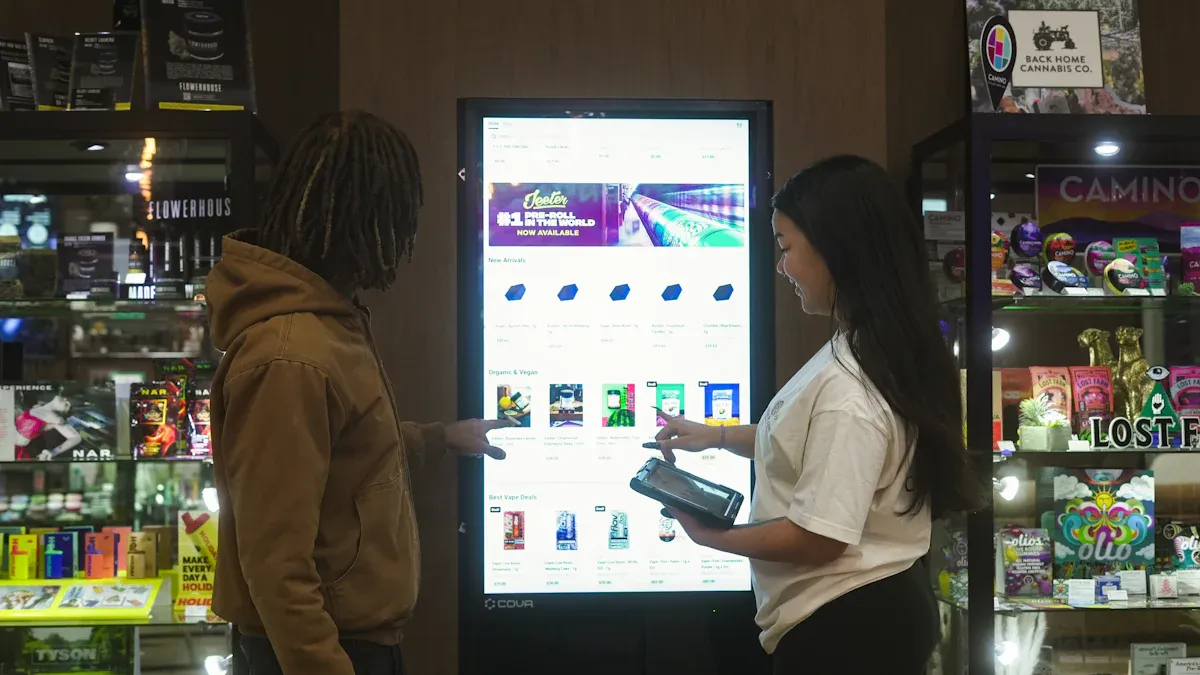
When you walk into a store, you might see a bright touch screen kiosk. These kiosks help you shop faster and make better choices. You can learn about products, try things on using the screen, and get ideas just for you. Stores use these kiosks to make shopping more fun and special.
Virtual Try-On Experiences
Have you ever wanted to see how glasses or a shirt look on you without putting them on? Now you can do that with a kiosk. Many stores have kiosks that let you try on things using virtual try-on. You stand in front of the kiosk, and it uses augmented reality to show you what you look like. This makes shopping easier and more fun.
Look at how virtual try-on helps big brands sell more:
Brand | Evidence | Conversion Rate Increase |
|---|---|---|
Sephora | AR mirror trials | |
Estée Lauder | AR experiences for lipstick | 2.5 times higher |
Clinique | AI-driven AR mirror | 30% increase in basket size |
Shopify | Products with 3D/AR content |
Tip: Products with 3D or AR can sell up to 94% more. You get to try before you buy, so you return less and feel happier.
Personalized Product Recommendations
Kiosks do more than show you things to buy. They use what you like and what you bought before to give you ideas. For example, The Home Depot uses your shopping data to help you find what you need. Macy’s uses a loyalty program and technology to make shopping feel special.
You get ideas based on what you like.
The kiosk can show you deals or new things just for you.
Stores get more happy shoppers and sell more.
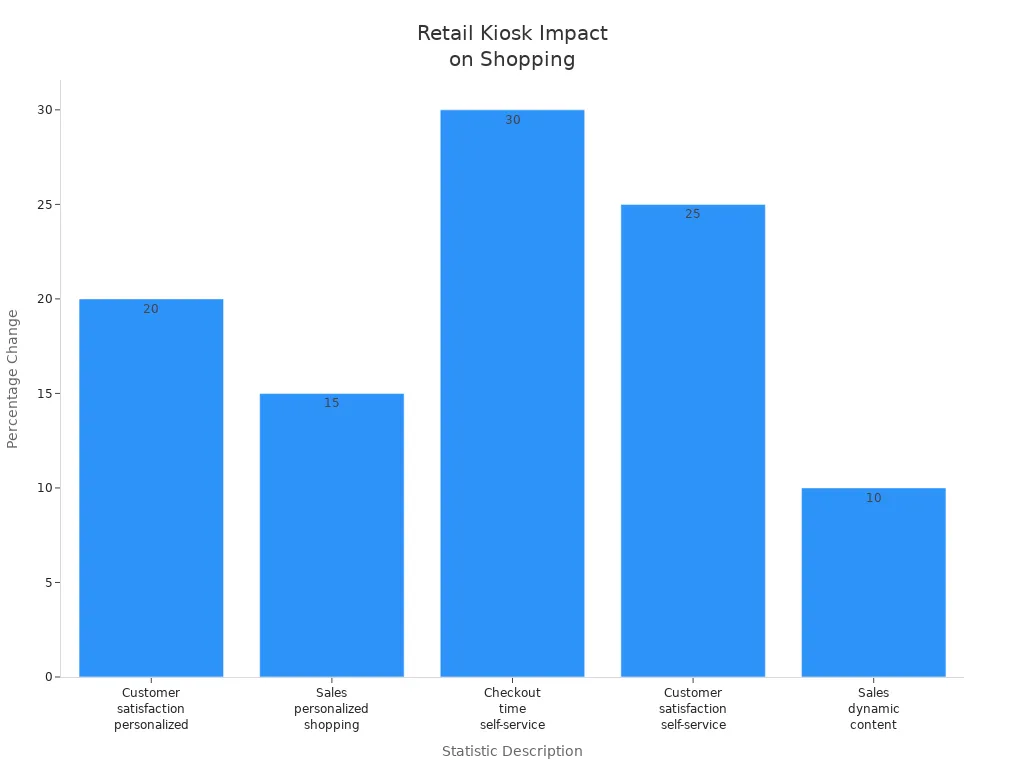
Here is how kiosks change shopping:
Statistic Description | Value |
|---|---|
Improvement in customer satisfaction with personalized kiosks | |
Increase in sales due to personalized shopping experiences | 15% |
Reduction in checkout time with self-service kiosks | Up to 30% |
Increase in customer satisfaction with self-service kiosks | 25% |
Increase in sales when paired with dynamic content delivery | Up to 10% |
Most shoppers (90%) say they like stores that are easy to walk through. Touch screen kiosk applications help you find things fast. These kiosks also show ads and special offers while you shop. With kiosks, your shopping trip feels made just for you.
Hospital Navigation Kiosks
Wayfinding for Patients
Have you ever gotten lost in a hospital? Many people feel this way. Hospitals are big and hard to understand. Sometimes, departments move or change names. Signs do not always help you find your way. A hospital navigation kiosk can help you with this problem.
A touch screen kiosk gives you maps and directions right away. You tap where you want to go. The kiosk shows you the fastest way. You do not have to walk down the wrong hall. You will not miss your appointment. If a department moves, the kiosk updates fast. You always get the newest information.
Here are some problems and how kiosks help:
Challenge | Description |
|---|---|
Hospitals have many floors and halls. People get lost easily. | |
Frequent Changes in Departments | Departments move or change names. Signs do not always change. |
Diverse User Needs | Hospitals help many people. Some have disabilities or speak other languages. |
Anxiety and Stress | People feel nervous in new places. They might miss their appointments. |
Visual Clutter | Too many signs can confuse people and slow them down. |
Tip: Digital wayfinding kiosks give clear directions. You can check in fast. This helps you get to your appointment on time and feel calm.
You can check in without waiting in line. This makes your visit easier. The hospital works better too. Many people say kiosks help them feel less worried and more sure of themselves.
Multilingual Support
Hospitals help people from many places. Not everyone speaks English. Some people need extra help. Modern kiosks fix this with strong multilingual support.
You can choose your language on the kiosk. Some kiosks have up to 13 languages and audio help. This makes it easier to find your way. It does not matter what language you speak. People who use these features feel more independent and less scared.
Multilingual kiosks help everyone use the hospital.
Audio and language tools help non-English speakers find their way.
Hospitals see more people arrive on time and feel happy.
Touch screen kiosk applications in hospitals show how technology can help everyone get care and feel welcome.
AI-Powered Customer Service Kiosks
Have you ever wanted help from a business at any time? AI-powered kiosks make this happen. These smart machines use artificial intelligence to help you. They answer your questions and remember what you like. You can find them in airports, restaurants, and malls. They change how you talk to companies and make things easier for you.
Intelligent Assistance
When you use a touch screen kiosk with AI, you get help fast. You do not need to wait in line or talk to a person. These kiosks answer common questions and help you order things. They can also guide you through services. At McDonald's, self service kiosks let you order food quickly. The staff can spend more time making your meal better. You feel in control and get your food faster.
Here are some ways intelligent assistance helps you:
You can do your own orders.
Service is faster, so you wait less.
Your orders are right, so you are happier.
Many people agree with this. About 79% say kiosks make things easier. You see these smart kiosks in airports, where Emirates uses them for special help. You also see them at train stations, where you can buy a SIM card in seconds. These kiosks save you time and help you feel less stressed.
Benefit | Description |
|---|---|
AI kiosks give help all day and night, so you can get help anytime. | |
Cost Efficiency | They start at $60 per agent each month, which saves money compared to regular staff. |
Increased Customer Satisfaction | Businesses say customers are happier because service is always good. |
Operational Efficiency | Kiosks do simple jobs, so staff can help with harder problems. |
Positive Customer Feedback | People like getting help right away from AI agents. |
Tip: You can get help from a kiosk even if the store is closed. You do not have to wait for answers.
Data Collection for Businesses
AI-powered kiosks do more than help you. They also collect information for businesses. These kiosks use computer vision and data transformation to learn what people like. They watch how you act and what you choose. This helps companies make their services and ads better. Privacy is important, so many kiosks blur faces or turn pictures into shapes. This keeps your information safe but still helps businesses learn.
Kiosks collect data to make your next visit better.
They keep your details private by hiding who you are.
Businesses use this data to give you better deals and services.
Touch screen kiosk technology keeps getting better. You will see more smart kiosks soon. They will make your life easier and your choices more personal.
Event Engagement Kiosks
You walk into a busy conference. Right away, you notice touch screen kiosk applications. These kiosks make the event fun and simple. You can connect with brands and get information fast. You do not have to wait for staff. You do not need to look through paper guides. Everything you need is on the screen.
Interactive Product Demos
Interactive kiosks let you try products in new ways. You tap the screen to watch a demo. You see how products work and look at them from all sides. Many kiosks use high-definition screens and AR or VR technology. You get a full view and can test features by yourself. This helps you feel sure about what you want to buy.
You see how things work before you choose.
You explore at your own speed, with no pressure.
You learn more about each product.
Self service kiosks make joining in easy. You can play games, answer polls, and share your thoughts on live social walls. These activities help you join in and show brands what you like.
Attendee Information Access
Event kiosks give you fast access to schedules, maps, and speaker info. You check in quickly and find your way with no stress. Organizers use kiosks to collect data and make events better next time. You spend less time waiting and more time having fun.
Feature | Description |
|---|---|
Streamlined Check-in Process | Kiosks make registration faster and cut down wait times. |
Easy Access to Information | Attendees can find event details and schedules quickly. |
Interactive Engagement | Kiosks let you join in with fun and interactive content. |
Data Collection Capabilities | Organizers can learn what attendees like for future events. |
Self service kiosks help stop mistakes and make things smoother. Event staff can spend more time helping you. You leave happy and ready for the next event.
Tip: Interactive kiosks mean you do not need as much paper. You help the planet and save money for the event.
Campus Information Kiosks
University and Hospital Maps
When you walk onto a big campus, you might feel lost. Campus information kiosks help you find your way fast. These kiosks are in busy places like entrances or lobbies. You tap the screen to see a map of the university or hospital. You can zoom in on buildings, parking lots, or departments. The kiosk gives you simple directions, so you do not get confused.
You can pick what you want to see on the kiosk. You can search for a classroom, a lab, or the cafeteria. If you need to go to a hospital department, the kiosk shows you the fastest way. You get directions that fit what you need. Staff do not have to stop working to help you. You feel sure of yourself and save time.
Here’s what these kiosks give you:
Interactive maps that help you find places
Directions that change based on what you need
Updates for new buildings or closed roads
Schedules and emergency alerts on one screen
Tip: You can use a touch screen kiosk to check for campus events or find your next class in just a few seconds.
Real-Time Updates
Campus information kiosks do more than show maps. They keep you up to date with real-time news. You see live alerts about weather, emergencies, or schedule changes. If there is a road closure or a new event, the kiosk updates right away. You always know what is happening.
Digital kiosks are like information centers. They show event lists, transport times, and emergency alerts. You do not need to check your phone or ask someone for news. The kiosk gives you everything you need in one spot.
Real-time directions and event news
Instant alerts for emergencies or weather
Live transport times and campus messages
Feature | Benefit |
|---|---|
Stay informed and safe | |
Interactive Maps | Find your way quickly |
Event Notifications | Never miss important events |
Touch screen kiosk applications make campus life easier. You get information fast, feel safer, and spend less time looking for answers.
Multilingual Service Kiosks
Have you ever felt lost in a new city or airport because you could not read the signs? Multilingual service kiosks change that for you. These touch screen kiosk applications help you feel at home, no matter where you come from. You can find them in airports, hotels, shopping centers, and even public offices. They make sure you get the help you need in your own language.
Language Selection Features
When you walk up to a kiosk, you see a simple menu. You tap your language, and the whole screen changes. You do not have to guess what buttons mean. You get clear choices in English, Spanish, French, Chinese, and more. Some kiosks even talk to you, so you do not have to read everything. This helps if you have trouble with small text or if you just like to listen.
Here’s a quick look at what these features do for you:
Feature | Impact on User Experience |
|---|---|
Text-Based Language Selection | Makes it easy for you to pick your language |
Audio Assistance | Helps if you prefer listening over reading |
Accurate Translation | Makes sure you understand every step |
Language-Based User Interfaces | Gives you a familiar look and feel |
You feel included when you see your language. You pay more attention and make better choices. Tourists with little English can use these kiosks without stress.
Accessibility for Diverse Users
Multilingual kiosks do more than just switch languages. They help everyone, including people with disabilities. Some kiosks have ADA modes. The screen gets bigger, and buttons move lower for easy reach. If you have vision problems, the text becomes larger and clearer. You can also hear instructions if you need them.
You feel comfortable and supported when you use these kiosks.
Telenor Pakistan’s kiosks let you pick your language, which means you wait less and get help faster.
RoveiQ’s ADA mode changes the screen for better reading and touch, so everyone can use it.
These features make public spaces friendlier for all. You see higher satisfaction rates and fewer people walk away confused. Multilingual service kiosks open doors for everyone, no matter where you come from or what you need.
Tip: Next time you travel, look for a touch screen kiosk. You might find help in your own language, right when you need it.
Smart Food Service Kiosks
You walk into your favorite restaurant and see a touch screen kiosk waiting for you. These kiosks make ordering food easier and safer. You can check ingredients, pick meals, and pay without talking to a cashier. Smart food service kiosks change how you eat out and help you make better choices.
Allergen Detection
If you have allergies, you know how scary it feels to order food. Smart kiosks help you stay safe. You tap the screen and see which foods have allergens. The kiosk updates in real time, so you always get the latest menu information. You can use apps like AllergyEats or Spokin to check for allergen risks right at the kiosk.
Modern POS systems with allergen alerts spot risks fast.
You get real-time updates about menu changes.
Mobile apps give you instant allergen info for safer dining.
You feel confident when you order. You do not worry about hidden ingredients. The kiosk helps you avoid allergic reactions and enjoy your meal.
Dietary Recommendations
Smart kiosks do more than keep you safe. They help you eat healthier. You see dietary recommendations based on your preferences. The kiosk shows you which foods are low in sugar or calories. It nudges you to pick better options by placing healthy items at the top of the menu.
Nudging Strategy | Effectiveness |
|---|---|
Healthy items at the top boost sales, like zero-calorie cola. | |
Variety of non-sugar beverages | More choices mean you pick healthier drinks more often. |
Combination of nudges | Using several nudges helps you make smarter decisions. |
You get suggestions that fit your needs. You see more non-sugar drinks and healthy meals. The kiosk makes it easy to choose what is best for you.
Smart food service kiosks improve order accuracy and customer satisfaction. You enter your own order, so mistakes drop. Orders go straight to the kitchen, which speeds up service. You pay quickly and securely. Here’s how kiosks help:
Description | |
|---|---|
Order Accuracy | You enter your order, so errors are rare. |
Customer Satisfaction | Faster service and less waiting make you happier. |
Efficiency in Operations | The ordering process is smooth, with fewer mistakes to fix. |
Integration with POS Systems | Orders go right to the kitchen, so there is no confusion. |
Payment Processing | Secure payments mean less stress and less work for staff. |
Touch screen kiosk applications in food service help you eat safer, smarter, and faster. You get more control and enjoy your dining experience.
Emergency Response Kiosks
When there is an emergency, you need help fast. Emergency response kiosks give you quick help when you need it most. You can find these kiosks in busy places like hospitals, parks, and tourist spots. They use touch screen kiosk technology to connect you to emergency services and share important news right away.
Direct Connection to Help
If you see someone hurt in a park, you can use a kiosk. You tap the screen to call for help. The kiosk connects you to emergency responders right away. You do not have to look for a phone or remember a number. The kiosk sends your location and what happened to the right team.
Studies show self-service kiosks in emergency rooms make care safer. Digital check-in kiosks also help people wait less and move faster. Hospitals use them to collect important information for triage. This helps people get care faster. When more people come to the emergency room, kiosks help keep things organized.
Tip: If you feel unsafe or see an emergency, find a kiosk with a red help button. You can get help in just a few seconds.
Crisis Information Access
Kiosks do more than call for help. They also give you new information during a crisis. If there is a fire or storm, the kiosk shows safety tips and maps. You can see where to go and what to do next. In tourist spots, kiosks show safety tips in many languages so everyone can understand.
Here are some places you might see emergency response kiosks:
Public Space Type | Notable Examples |
|---|---|
Public Parks | |
Hospitals | Emergency kiosks that work with hospital systems |
Tourist Areas | Kiosks with safety instructions in popular places |
These kiosks help you stay safe and know what to do, no matter where you are. Touch screen kiosks make it easy to get help and find the right information fast.
Entertainment and Leisure Kiosks
Local Experience Suggestions
You walk into a museum or a busy mall. Right away, a touch screen kiosk greets you with a friendly display. These kiosks know how to make your visit special. You tap the screen and see a list of local attractions, events, and hidden gems. The kiosk can suggest a new art exhibit, a food festival, or even a quiet park nearby. You get ideas that match your interests and your time.
Many kiosks use smart technology to give you personalized recommendations. If you love music, the kiosk might show you a concert happening tonight. If you travel with kids, you see family-friendly activities. You do not have to search for hours or ask for help. The kiosk does the work for you.
Here’s a quick look at how kiosks make your visit better:
Benefit | Description |
|---|---|
Convenience | Kiosks make the park experience faster and more convenient for guests. |
Reduced Wait Times | They prevent long lines for tickets, saving time and reducing frustration for visitors. |
Interactive Displays | Touchscreen displays provide information on rides, maps, and schedules, helping families plan. |
Personalized Recommendations | Kiosks can suggest extras like photo packages or premium experiences, enhancing guest satisfaction. |
Tip: Next time you visit a new place, check the kiosk for local tips. You might find something you never expected!
Interactive Games and Media
Kiosks do more than give you information. They turn waiting time into play time. You can play games, watch videos, or join a trivia challenge right on the screen. Kids love these features, but adults join in too. Some kiosks let you compete for high scores or unlock special rewards.
You might see these applications in amusement parks, movie theaters, or even hotel lobbies. The games keep you entertained while you wait for your turn or your friends. You can also watch short films or learn about the place you are visiting. These kiosks make every moment fun and interactive.
Play games while you wait for a ride or movie.
Watch local stories or fun videos.
Join contests and win small prizes.
Touch screen kiosk technology brings entertainment to your fingertips. You get more than just directions—you get a full experience.
You have seen how touch screen kiosk ideas are changing things around you.
Interactive technology like AR makes things more fun and just for you.
Kiosks now help in places like hospitals, buses, and schools. They make life simpler.
Green designs help the planet and keep the earth clean.
AI lets kiosks give smart advice and talk to you like a real person.
Data analytics help companies learn what you like and need.
Think about how these kiosks could change your day. What new things do you want kiosks to do? Tell us your thoughts in the comments!
FAQ
What is a touch screen kiosk?
A touch screen kiosk is a digital station with a screen you can tap. You use it to get information, check in, or buy things. You see these kiosks in stores, hospitals, airports, and more.
How do touch screen kiosks help in daily life?
Touch screen kiosks save you time. You can check in, order food, or find directions without waiting for help. These kiosks make tasks faster and easier for you.
Are touch screen kiosks safe to use?
Yes, most touch screen kiosks have safety features. You can clean the screen with wipes. Many kiosks use privacy screens and secure payment systems to protect your information.
Can I use a touch screen kiosk if I don’t speak English?
You can! Many touch screen kiosks let you pick your language. You tap your choice, and the kiosk shows everything in your language. This helps you feel comfortable and confident.
See Also
Seven Key Digital Signage Player Trends For 2026
Current Outdoor Kiosk Trends To Watch In 2025
Selecting The Ideal LCD Digital Signage For 2026
Leading In-Store Digital Signage Innovations For Retail 2026
