Top 10 Companies Specializing in Touchscreen Kiosks for 2026
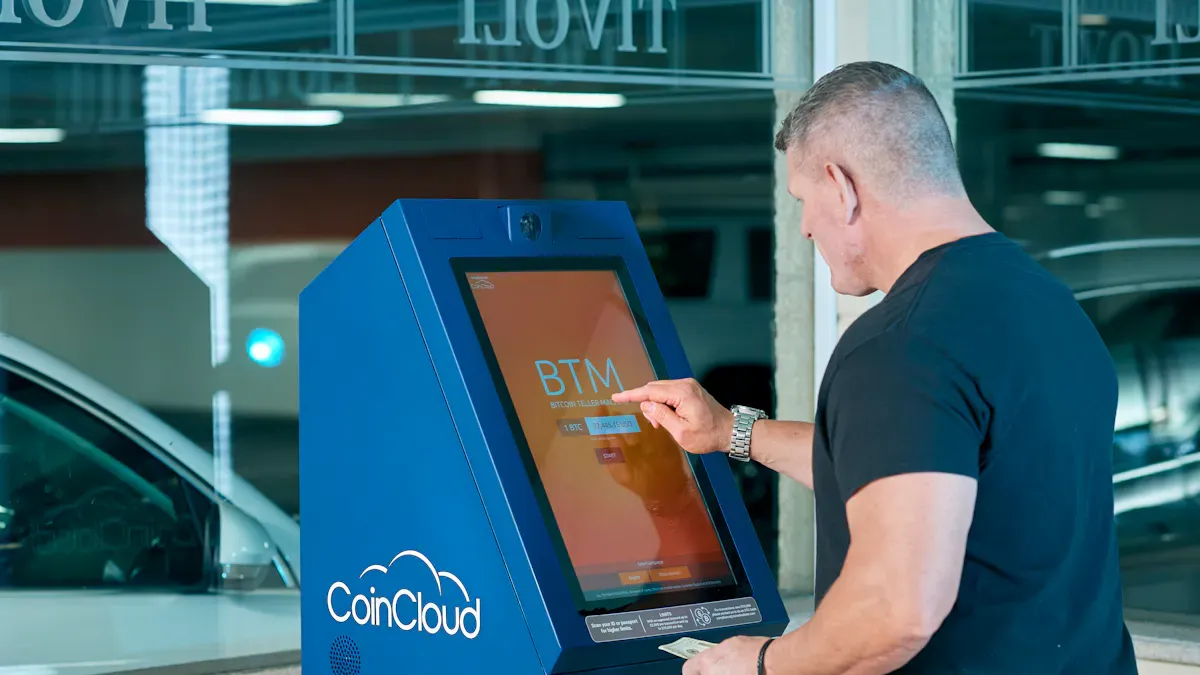
Here’s a quick look at the top 10 companies specializing in touchscreen kiosks for 2026:
Elo Touchscreen
Dell
Jassway
Touch International
Digital Touch Systems
SMARTEK
Advanced Kiosks
Olea Kiosks
KioWare
NCR Corporation
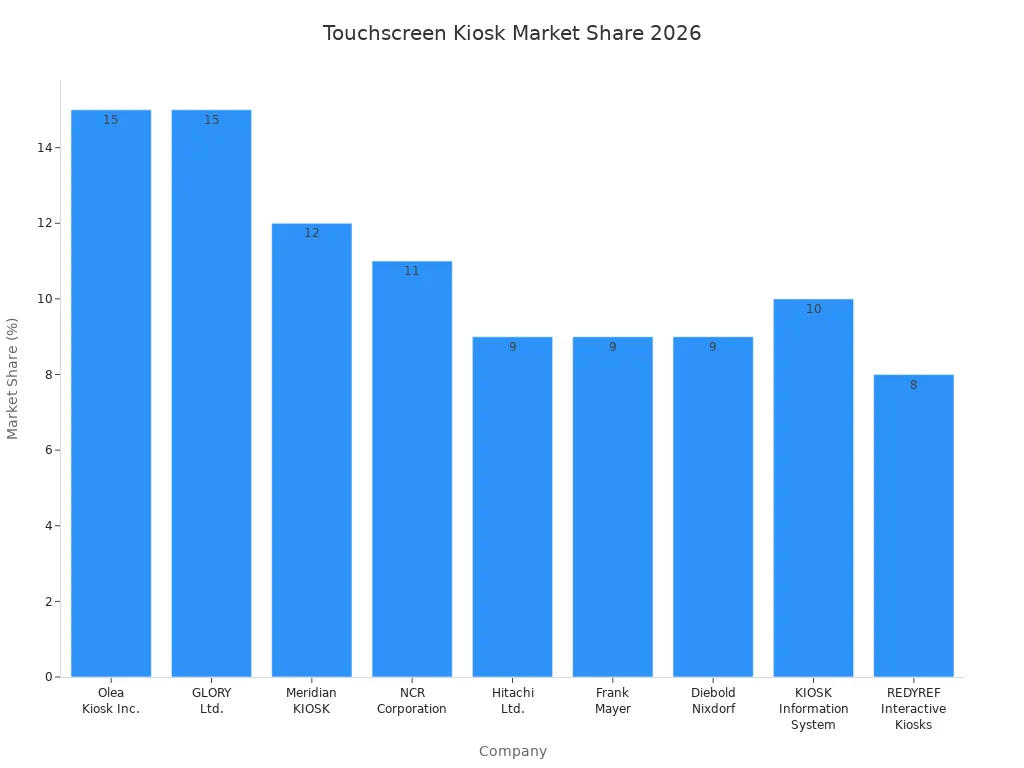
You can see these companies lead the market. They do this because they focus on new ideas, being dependable, and making things just for you. They help you find a kiosk that matches what you need. Look at the newest market share numbers for companies that make touchscreen kiosks below:
Company | Market Share (%) |
|---|---|
Olea Kiosk Inc. | 15 |
GLORY Ltd. | 15 |
Meridian KIOSK | 12 |
NCR Corporation | 11 |
Hitachi Ltd. | 9 |
Frank Mayer | 9 |
Diebold Nixdorf | 9 |
KIOSK Information System | 10 |
REDYREF Interactive Kiosks | 8 |
What makes these companies different? You get the newest features, strong help around the world, and choices for every kind of business. If you want more options, go to http://www.topadkiosk.com/ to see many kiosk solutions from companies specializing in touchscreen kiosks.
Key Takeaways
Check out the best companies making touchscreen kiosks for 2026, like Elo Touchscreen and NCR Corporation. They offer reliable options for your business.
Find kiosk makers that use new technology, like AI and gesture control. This makes using the kiosk easier and faster.
Pick a company that lets you customize the kiosk. You can change how it looks and what features it has.
Make sure the company provides good support worldwide. This helps keep your kiosk working and reduces problems.
Look at what other customers say about the company. Read reviews and case studies to pick a trusted partner.
Criteria for Best Kiosk Manufacturers
If you want the best kiosk manufacturers, you need to know what makes them special. You should check some important things before picking a kiosk machine manufacturer. These things help you find the right one for your business. It does not matter if you need a healthcare check-in kiosk, a payment station, or an interactive kiosk for a store.
Innovation and Technology
You should look for kiosk manufacturers that use the newest technology. The best kiosk manufacturers have features like artificial intelligence, computer vision, and advanced analytics. These tools help you get more from your touch screen display. Some kiosk machine manufacturer choices give you facial recognition, gesture control, or real-time translation. Here is a quick list of what you might see:
Technology Type | Applications |
|---|---|
Artificial Intelligence | Voice interaction, smart content, real-time translation |
Computer Vision | Facial recognition, gesture control, object tracking |
Augmented Reality | Virtual customization, maintenance help, mobile overlays |
Advanced Analytics | Heatmaps, engagement prediction, conversion tracking |
Product Range and Customization
You want kiosk manufacturers that have many kiosk solutions. The best kiosk manufacturers let you pick the size, shape, and features you want. Top touch screen display manufacturers help you design custom interfaces, add multi-touch, or pick different touch screen display types. Here is what you can get from a top kiosk machine manufacturer:
Customization Type | Description |
|---|---|
Pick your size, shape, and features | |
Engineering Support | Get help with hardware and software integration |
Touchscreen Technologies | Choose from capacitive, resistive, or projected capacitive |
Interface Customization | Add gesture control, multi-touch, or custom software |
Global Support and Service
You should pick kiosk hardware manufacturers that give strong support. The best kiosk manufacturers help with installation, maintenance, and repairs. Many kiosk machine manufacturer teams have global networks, so you get service anywhere. This is important for self-service kiosks, payment kiosks, and secure transaction kiosks.
Tip: Always ask about customer service hours and when technicians are available before you choose a kiosk machine manufacturer.
Reputation and Client Base
You should see what other businesses say about kiosk manufacturers. The best kiosk manufacturers have a good history and many happy clients. Look for references, case studies, and reviews. Good kiosk solution providers show their past work and explain how they handle payment, installation, and support.
If you use these criteria, you can find a kiosk machine manufacturer that fits your needs. You get a touch screen display that works for your business. It does not matter if you want a self-service payment kiosk, an interactive kiosk, or a secure transaction kiosk. The right kiosk manufacturers help your business grow and make your touch screen display stand out.
Leading Companies Specializing in Touchscreen Kiosks
Elo Touchscreen
Elo Touchscreen is a trusted name for kiosks. They make many touch screen display products for different businesses. If you want a kiosk machine supplier with good quality and new ideas, Elo Touchscreen is a smart pick.
Many products to choose from | PCAP and resistive touchscreen solutions |
Good help around the world | Systems for retail, hospitality, healthcare, and business use |
Strong product quality | Works well for big business projects |
Elo Touchscreen uses TouchPro PCAP technology. You can use up to 10 fingers at once. This helps your kiosk work in busy places. They give a 3-year warranty, and you can get 5 years if you want. Their touch screen display products are in stores, hotels, and factories. You only need one USB Type-C cable to set up, so it is easy.
Feature | Elo Touchscreen | Competitors |
|---|---|---|
Technology | TouchPro PCAP | Different types |
Touch Points | Up to 10 | Usually less |
Warranty | 3-5 years | Different |
Applications | Retail, hospitality | Not as many |
Setup | One cable | More cables |
Performance | Fast and accurate | Not always the same |
Design | Sleek and strong | Not always the same |
You can count on Elo Touchscreen for good quality, easy setup, and strong support. That is why many people choose them as their kiosk machine supplier.
Dell
Dell is a big name in technology and makes kiosks too. They do more than just computers. Dell brings new ideas to every kiosk machine supplier project. Dell made Andie, a digital human, to make kiosks more fun to use. They use Synapse™ and large language models to help customers.
Evidence | Explanation |
|---|---|
Made Andie, a digital human | Dell uses new tech to make kiosks better for users. |
Synapse™ and LLMs | Dell uses smart tools for better service and customer help. |
When you pick Dell as your kiosk machine supplier, you get new touch screen display choices, strong safety, and good support. Dell is known for quality, so many people like them as kiosk manufacturers.
Jassway
Jassway is a kiosk machine manufacturer that makes good touch screen display products. You can use their kiosks in stores, hotels, and other places. Jassway is a good kiosk machine supplier because they have many products and let you change things.
Main Products | Unique Features |
|---|---|
Touch screen display | Good displays for many uses |
KIOSK | Kiosks you can change for stores and hotels |
POS Terminal | Fast terminals for quick payments |
POS System | Systems that help things run smoothly |
POS Peripherals | Extra parts to make POS better |
If you want a kiosk machine supplier that lets you change your kiosk, Jassway is a good choice. Their products help you take payments fast and keep your business working well.
Touch International
Touch International is a kiosk machine manufacturer with over 20 years of experience. Their touch screen display products are in more than 80 countries. They have many kiosk solutions, from small to big sizes.
Aspect | Details |
|---|---|
Company Background | Over 20 years in touch solutions, in 80+ countries, 4M+ installs |
Product Range | All-in-One touch systems, Pcap, PIT, SAW, IR touchscreens (sizes 7” to 86”) |
Industries Served | Gaming, Kiosks, POS, Banking, HMI, Healthcare, Public Transportation |
Commitment to Customers | Focus on making customers happy and giving custom options |
You can trust Touch International as your kiosk machine supplier for custom solutions. They help you pick the right touch screen display for your kiosk, no matter what you do.
Digital Touch Systems
Digital Touch Systems is a kiosk machine manufacturer known for creative touch screen display ideas. You get kiosks that fit what you need, like self-service, interactive displays, or payment stations. Digital Touch Systems works as a kiosk machine supplier for stores, schools, and hotels.
You can pick from many touch screen display sizes and features. Their kiosks let you use multi-touch, gesture control, and smart analytics. If you want a kiosk machine supplier that keeps up with new trends, Digital Touch Systems is a good choice.
SMARTEK
SMARTEK is a kiosk machine manufacturer that leads with new ideas and a strong market spot. You get cool features like thermal printers, barcode scanners, and payment tools. SMARTEK’s kiosks let you offer self-service even when your store is closed.
Feature | Description |
|---|---|
Modern Features | Thermal printers, barcode scanners, payment tools |
Interactive Experiences | Self-service kiosks for after hours |
Omni-channel Integration | Mixes old and new retail for a smooth experience |
Engaging Interaction | Multiuser games on big interactive screens |
Versatile Display Formats | Kiosks for virtual shelves and more uses |
Digital Signage Solutions | Touch screens, displays, interactive shop windows |
You can use SMARTEK as your kiosk machine supplier for fun customer experiences. Their kiosks work in many places, like stores and entertainment spots. SMARTEK is special among kiosk manufacturers for their flexible and interactive kiosks.
Advanced Kiosks
Advanced Kiosks is a kiosk machine manufacturer that makes tough and changeable kiosks. You get hardware made for hard places, even outside. Their ZAMOK™ software gives you safety and easy control.
Product Category | Unique Selling Points |
|---|---|
Hardware Configuration | Changeable kiosk models and extra parts |
Management and Security Software | ZAMOK™ software for safety and control |
UI Design & Software Development | Expert design and setup help |
Complete Turn-Key System | Ready to use, easy to set up, all software included |
Kiosk Software | Safe from hackers, remote control, alerts, usage stats |
World Class Support Options | Helpful staff and project advice |
You can use Advanced Kiosks for managing papers, paying bills, filling forms, printing, and video calls. Their kiosks have strong screens and can be changed with things like privacy filters. You get a 1-3 year warranty for peace of mind.
Tip: Advanced Kiosks has expert engineers and custom options. You can work with them to make the right kiosk for your business.
Olea Kiosks
Olea Kiosks is a kiosk machine manufacturer with a long history of new ideas. You get ADA-compliant kiosks, good cooling, and strong safety. Olea’s kiosks take many payment types, even cash, and work when the internet is down.
Feature/Benefit | Description |
|---|---|
Meets ADA rules to avoid fines | |
Temperature Control System | Good cooling for less power and better work |
Enhanced Security | Outdoor locks for better safety |
Payment Bracket | Modular design for many devices and payment types |
Remote Monitoring | Software for fixing and updates from far away |
Stereo Sound | Strong speakers for a better experience |
Customizable Presentation | Menus in many styles, brand colors, and animations |
Intelligent Upsell | Custom rules or AI tips to sell more |
PCI Level 1 Certified | Safe payment processing |
Works Offline | Takes orders when internet is down |
Multi-language Support | Lets people order in many languages |
Accept Cash Payments | Takes cash and gives change |
Hardware Options | Vertical, Horizontal, Floor Standing, Counter Top, Wall Mount |
Trusted by Many Industries | Used by fast food, stadiums, airports, and small businesses |
Custom kiosk design and building for your needs
Flexible shipping and setup services
Custom warranty and service for OEMs
Special help for big orders
"Olea has fixed outdoor maintenance problems for its clients," said Nandini Bhattacharya, Industry Manager, with Frost & Sullivan.
Olea Kiosks has put in over 400 drive-thru kiosks in the US. You can trust them as your kiosk machine supplier for safe, strong, and flexible kiosks.
KioWare
KioWare is a kiosk machine manufacturer that makes software for kiosk safety and control. You get software that locks your kiosk, so people only use what you want. KioWare’s software works on Windows, Android, and soon Linux.
KioWare’s software works on many operating systems.
You can keep all kinds of kiosks safe, even tablets.
Their software lets you use only allowed apps or websites.
KioWare works with companies like Payroc for more features.
KioWare is special among kiosk manufacturers because they focus on safe browser and kiosk mode software for Android. You can use their products in stores, hotels, and public places. If you want a kiosk machine supplier that cares about safety, KioWare is a great pick.
NCR Corporation
NCR Corporation is a top name among kiosk machine manufacturers. You get many kiosk choices, like self-service kiosks, POS systems, and digital transaction tools. NCR uses AI analytics, touch-free payment, and omni-channel platforms.
Key Players | Market Share (%) |
|---|---|
NCR Corporation |
NCR Voyix is a leader in interactive kiosks.
You get self-service kiosks, POS systems, and digital transaction tools.
NCR uses AI analytics and touch-free payment.
Their omni-channel platforms help you reach customers everywhere.
NCR Corporation is a kiosk machine supplier for many industries, like stores, healthcare, and hotels. Their focus on new ideas and working better helps you make customers happy and run things smoothly. The interactive kiosk market is growing fast, and NCR is one of the top kiosk manufacturers for the future.
Other Notable Kiosk Machine Manufacturers
The biggest companies are the leaders, but some others are important too. Diebold Nixdorf and KIOSK Information Systems are two companies that offer special features. They have a strong place in the kiosk market.
Diebold Nixdorf
Diebold Nixdorf is a big name in ATMs. In 2017, they had about 32% of the global market. In Latin America, they had 63% of the market. They make kiosks that are safe and good for the environment. Their kiosks use less energy and help the planet. You can pay in many ways with their kiosks. Businesses like that they can check and fix kiosks from far away. Diebold Nixdorf is great at keeping payments safe. They are trusted by banks and big stores. Their kiosks are made for places that need high security. You can feel safe using them in important spots.
Eco-friendly kiosks use less power.
Easy payment features help customers.
Remote management saves money.
Many payment options work with new tech.
Security keeps customer information safe.
KIOSK Information Systems
KIOSK Information Systems is known for making custom kiosks. They have teams that build kiosks for busy places. Custom kiosks help businesses connect with customers better. You can get kiosks for stores, hotels, or hospitals. Their kiosks can be changed to fit your needs. They make strong kiosks that work well in tough spots. Many groups like their kiosks because they are made just for them.
If you want a kiosk with cool features and custom parts, these companies are good choices. They have lots of experience and care about quality. They can help your business reach its goals.
How to Choose the Right Kiosk Manufacturer
Assessing Business Needs
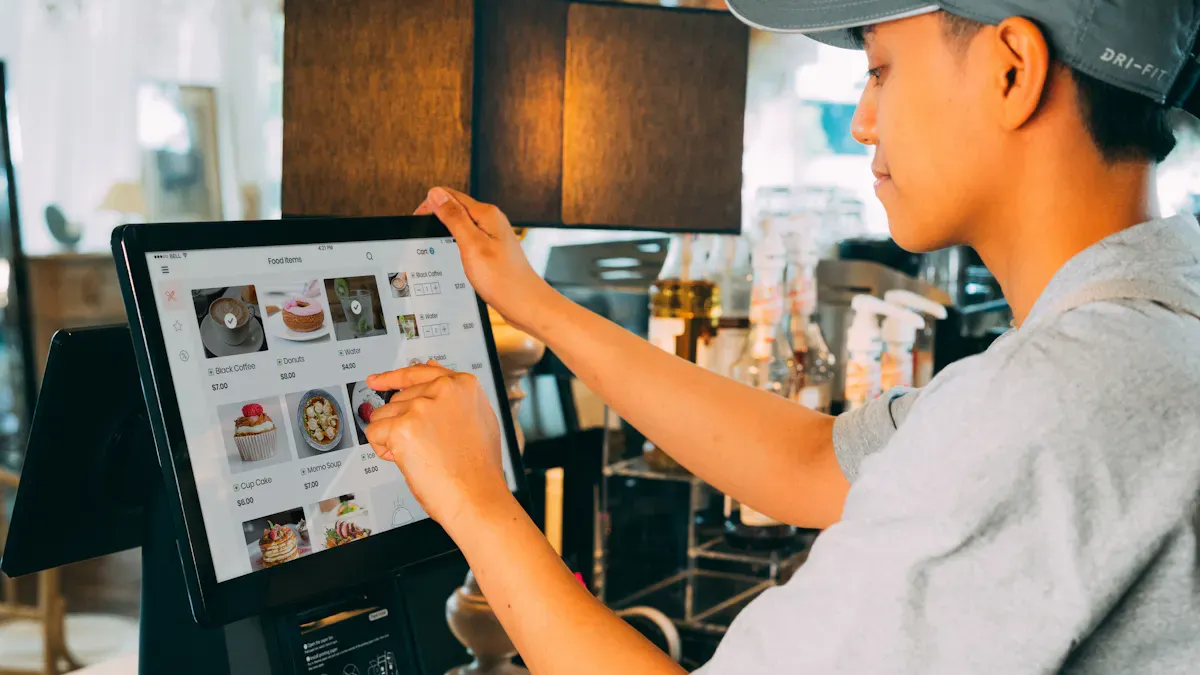
You want your self-service kiosk to fit your business perfectly. Start by thinking about what you need your kiosk to do. Do you want a touch screen display for quick payments, or do you need a retail self-checkout that handles lots of customers? Write down the main jobs your kiosk must handle. Some businesses need a kiosk machine manufacturer that can build custom solutions. Others want a simple touch screen display for basic tasks. Always match your needs with what the kiosk machine manufacturer offers.
Here’s a quick table to help you focus on what matters:
Description | |
|---|---|
Operational Needs | What features do you need? |
Customer Volume | How many people will use the kiosk each day? |
Hardware Quality | Will the touch screen display last in your location? |
Software Compatibility | Does it work with your current systems? |
Evaluating Support and Service
You should always check the support from your kiosk machine manufacturer. Good support means less downtime for your self-service kiosk. Ask about training for your team. Find out if the company offers help after you buy. A strong support team can fix problems fast. You want your touch screen display to work all the time, especially in busy places like retail self-checkout areas.
Tip: Ask about warranty and return policies before you choose a kiosk machine manufacturer.
Comparing Pricing and Value
Price matters, but value matters more. Don’t just pick the cheapest kiosk machine manufacturer. Look at what you get for your money. Some companies offer extra features for your touch screen display, like better security or longer warranties. Think about how long your self-service kiosk will last. A good kiosk machine manufacturer gives you a fair price and strong value for your business.
Reviewing Case Studies
You can learn a lot from other businesses. Ask your kiosk machine manufacturer for case studies or client stories. See how their self-service kiosk worked in real stores or hotels. Look for examples in retail self-checkout or other places like yours. Reviews and stories show if the touch screen display and service are reliable. This helps you trust your choice.
Note: The best kiosk machine manufacturer will share real results and happy customer feedback.
Choosing the right kiosk manufacturer can help your business grow and keep your customers happy. The top companies on this list offer strong products, great support, and new features. Use the tips and company profiles to find the best fit for you.
Make a list of your needs
Check out product demos
Contact a few companies for more info
Ready to get started? Reach out to your favorite manufacturer today!
How to Choose the Right Kiosk Company
Choosing the right kiosk company is critical because these machines are often a high-visibility, high-cost investment that needs to be durable, user-friendly, and maintainable. A poor choice can lead to constant downtime, frustrated customers, and unexpected fees.
Here is a step-by-step framework to guide your decision-making process, moving beyond a simple feature checklist.
Step 1: Prioritize Your "Non-Negotiables" (The 5 Core Filters)
Before contacting any company, decide which of these factors matters most to your project.
Industry-Specific Experience (The #1 Filter)
Why it matters: A kiosk for a fast-food drive-thru needs a weather-resistant speaker and a payment reader that works in 10 seconds. A kiosk for a hospital check-in needs a HIPAA-compliant privacy screen and a card swiper for insurance IDs. A generalist won't know the hidden complexities.
Ask: "Show me 3 case studies of kiosks you've deployed in my specific industry (e.g., QSR, banking, parking, healthcare). What were the top 3 lessons learned?"
Total Cost of Ownership (TCO), Not Just Purchase Price
Why it matters: A cheap kiosk might cost $3,000 but require $500/month in remote monitoring fees, use a proprietary printer that costs $200 to replace, and have a motherboard that fails after 18 months.
Ask: "Provide a 5-year TCO estimate including: purchase price, mandatory software subscription fees, typical annual maintenance contract cost, and the price of common consumables (receipt paper, thermal transfer ribbons)."
Remote Management & Analytics Capabilities
Why it matters: A kiosk is useless if it's offline or out of paper. You need to know its status, cash levels, and error codes from a dashboard, not a site visit.
Ask: "Does your software allow me to remotely reboot the kiosk, check paper levels, view cash cassette status, and get real-time error alerts? Is this included in the base price or a premium add-on?"
Repairability & Parts Availability
Why it matters: Kiosks are often placed in remote or high-traffic areas. When a touchscreen fails on a Friday at 4 PM, you need a replacement part overnight, not in 3 weeks from a foreign warehouse.
Ask: "What is your guaranteed Mean Time to Repair (MTTR) for a common failure like a touchscreen or printer? Do you have a depot repair center in my country/region? Can I buy a spare parts kit upfront?"
Software Ecosystem & Integration
Why it matters: The kiosk is just a physical shell. Its value comes from connecting to your POS, payment gateway, loyalty program, or inventory system. A company that locks you into a closed software system is a major risk.
Ask: "Do you have open APIs (Application Programming Interfaces) so my in-house team can integrate the kiosk with our existing systems? Or do you require us to use your end-to-end software stack?"
Step 2: Create a Shortlist & Conduct "Pressure Tests"
Once you have 3-4 companies that pass the filters above, dig deeper.
Test | What to Do | Red Flag |
|---|---|---|
The "Silent Support" Test | Call their main sales number at 4:45 PM on a Friday. Ask a technical question about a past project. | They can't find an answer or rush you off the phone. |
The Parts Request | Ask for a quote for a replacement touchscreen or thermal printer for a model they sold 3 years ago. | They say "that's obsolete, you need a new kiosk" or take >2 days to respond. |
The References Call | Ask for 2 references from customers who have had their kiosks for >2 years. Ask those customers: "What's the #1 thing you wish you'd known before buying?" | The company hesitates, only provides recent customers, or the reference says "they're fine, but..." |
The Total Cost Worksheet | Ask for a line-item breakdown: hardware, software license (annual vs perpetual), installation, training, first year of support, shipping. | They give a single bundled price or say "software is included" without specifying terms. |
Step 3: Understand the Two Main Business Models
Kiosk companies generally fall into two camps. Your choice depends on your long-term strategy.
The "Vertical Solution" Provider (e.g., NCR Voyix, Diebold Nixdorf)
Model: They sell you the hardware, software, payment processing, and ongoing support as a complete package. Often requires a multi-year contract.
Best for: Large enterprises (500+ locations) that want a single throat to choke and don't want to manage multiple vendors.
Downside: Higher monthly fees, less flexibility to swap out components, and potential vendor lock-in.
The "Hardware + Open API" Provider (e.g., Olea Kiosks, Meridian, KIOSK Information Systems)
Model: They build the custom or semi-custom hardware shell, install standard PC components and peripherals (Elo touchscreen, Epson printer, Magtek card reader), and provide an open operating system (Windows or Android) with APIs.
Best for: Mid-size companies or those with an internal IT team that wants to control the software and integrations themselves.
Downside: You are responsible for integrating components and managing software updates. Support may be piecemeal (e.g., call Epson for printer issues).
Step 4: A Practical Decision Matrix
Create a simple scorecard. Weight each factor by importance to your project (1=low, 5=high).
Factor | Weight (1-5) | Company A Score (1-10) | Weighted Score | Company B Score | Weighted Score |
|---|---|---|---|---|---|
Industry Experience | 5 | 9 | 45 | 6 | 30 |
5-Year TCO (Lower is better) | 4 | 7 | 28 | 9 | 36 |
Remote Management Capability | 5 | 8 | 40 | 5 | 25 |
Repairability / Parts Access | 4 | 6 | 24 | 8 | 32 |
Software Integration (Open API) | 5 | 4 | 20 | 9 | 45 |
Total | 157 | 168 |
Final Step: Don't just pick the winner. Call the top two companies back and say, "Your score was close, but we're concerned about [their lowest-weighted factor]. Can you address that specifically?" Their response will tell you everything about their honesty and flexibility.
A final word of caution: Avoid any company that cannot provide a clear, itemized quote, refuses to give customer references older than 12 months, or claims their software "does everything" without showing you a live demo. Those are nearly always signs of a problematic partnership.
Henry Fang
General Manager
Shenzhen TopAdkiosk Display Technology Co., Ltd.
Add.: 2F, Bldg 10, Changfeng Industrial Park, Dongkeng, Fenghuang, Guangming, Shenzhen, China 518132
Mobile/WHATSAPP: 86-138 25769658
Email: marketing@topadkiosk.com topadkiosk@gmail.com
Skype: pghenry1
Wechat: adkioskhenry
English Web.: http://www.topadkiosk.com/
FAQ
What is a touchscreen kiosk?
A touchscreen kiosk is a self-service machine. You use your finger to pick options on the screen. You can check in, pay, or get information fast.
How do I pick the right kiosk for my business?
Start with your needs. Make a list of what you want the kiosk to do. Check if the company offers support and custom options. Ask for a demo.
Can I customize my kiosk’s look and features?
Yes! Most top kiosk manufacturers let you choose the size, color, and features. You can add your logo or special software.
How long does it take to install a kiosk?
Most kiosks take a few hours to set up. Some custom kiosks may need more time. Ask your supplier for a timeline before you buy.
Do kiosks need regular maintenance?
You should clean the screen and check for updates. Many companies offer service plans. Regular care keeps your kiosk working well.
See Also
Discover 10 Unexpected Applications for Touch Screen Kiosks in 2026
Leading 10 Manufacturers of LCD Display Kiosks for 2026
Best Outdoor LCD Display Kiosk Firms to Monitor in 2026
Essential Features of Contemporary Touch Screen Kiosks Explained
