Top Micro LCD Displays to Upgrade Your DIY Electronics
Add.: 2F, Bldg 10, Changfeng Industrial Park, Dongkeng, Fenghuang, Guangming, Shenzhen, China 518132
Mobile/WHATSAPP: 86-138 25769658
Email: marketing@topadkiosk.com topadkiosk@gmail.com
Skype: pghenry1
Wechat: adkioskhenry
English Web.: https://www.topkioskdisplay.com/
http://www.ad-kiosk.com/
https://www.toplcddisplay.com/
http://www.multitouchdigitalsignage.com/
https://www.youtube.com/channel/UCYVYNJHxLVEcQD8fuUxXNTA/videos?view_as=subscriber
https://www.facebook.com/TOPADKIOSKSHENZHEN/?ref=bookmarks
As long as we have the blueprints, Shenzhen TopAdkiosk Display Technology Co., Ltd no worse than anyone else.
please contact Shenzhen TopAdkiosk Display Technology Co.
Judging "top‑tier" Micro LED and Micro OLED displays is very different from evaluating large TVs. In the cutting‑edge world of micro‑displays, the real competition happens across resolution, brightness, power consumption, and physical size. In fields like AR/VR, the latest 2025–2026 products can achieve pixel densities above 5000 PPI, peak brightness of several hundred thousand nits, while keeping power consumption in the milliwatt range.
Today’s top solutions are offered by several key manufacturers, each providing "optimal" answers for different types of near‑to‑eye (NTE) products. The table below summarises the mainstream options.
📊 Top Micro Display Solutions (2025–2026)
Technology | Manufacturer & Product | Key Specifications | Applications |
|---|---|---|---|
Micro OLED | SeeYA Technology | Wide product line (0.23″–1.35″). 0.61″ model: 2560×1600, 5000 PPI, 8000 nits | High‑end AR/VR/MR headsets, electronic viewfinders |
Micro OLED | YunGuang Technology | Proprietary Micro‑OLED chip. Supports >3600Hz ultra‑high refresh rate & HDR – eliminates motion blur | Next‑gen VR/MR headsets |
Micro OLED | XITAI Technology | Complete portfolio from 0.23″ to 1.35″ – covers entry‑level AR to flagship VR/MR | AR/VR/MR devices |
OLEDoS | Samsung Display | RGB OLEDoS (OLED on Silicon). ~5000 PPI. Direct RGB pixel integration on silicon for accurate colour output | XR (Extended Reality) devices |
Micro OLED | INT Tech (Taiwan) | Full‑colour native RGB Micro OLED. Brightness up to 100,000 nits, 100% DCI‑P3 | AR glasses, professional near‑eye displays |
LCoS | Himax × AUO | Self‑emissive LCoS. 720×720 resolution. Only 200mW power consumption, 350,000 nits brightness, extremely small size | AR smart glasses, wearable devices |
LCoS | OmniVision | OP03021 panel: 0.26″ optical size, 1632×1536 resolution. Low‑power single‑chip design for next‑gen smart glasses | Next‑generation smart glasses |
LCoS | RAONTECH (Korea) | 0.13″ P13 module: only 6.25mm × 4.65mm, yet 800×800 resolution. Single‑panel design | Ultra‑miniaturised smart glasses |
✨ Cutting‑Edge Technology Highlights & Trends
LCoS (Liquid Crystal on Silicon)
The solution demonstrated by Himax and AUO at CES 2026 is particularly noteworthy. They have shrunk LCoS to an extreme 0.09 cc volume and 0.21 g weight, with 720×720 resolution and only 200 mW power consumption – while delivering 350,000 nits brightness. This is a major step toward truly sunglasses‑style AR.
Micro LED
Widely recognised as the ultimate next‑generation display technology, Micro LED promises even higher brightness, contrast, and durability. However, the industry is still solving the “mass transfer” manufacturing bottleneck before it becomes cost‑effective for micro‑displays.
DLP (Digital Light Processing)
Uses an array of micromirrors to reflect light. While dominant in projectors, DLP also has a place in micro‑displays where high brightness and high refresh rates are critical.
LBS (Laser Beam Scanning)
Uses RGB lasers as the light source with MEMS scanning. It offers small size, high efficiency, and wide colour gamut – making it attractive for AR/VR and automotive HUDs where volume and brightness are demanding.
🤔 How to Understand These “Top‑Tier” Specifications
Specification | What It Means | Why It Matters for Micro‑Displays |
|---|---|---|
PPI (Pixels Per Inch) | Pixel density on the physical panel | Higher PPI means a sharper image, but for optically magnified AR/VR, PPD (Pixels Per Degree) is more relevant to perceived clarity. |
Nits | Unit of luminance (brightness) | AR displays need very high nits (tens of thousands) to remain visible in bright outdoor light against the real world. |
Power consumption (mW) | Energy used by the display | For lightweight, comfortable, long‑lasting wearables, low power (hundreds of mW or less) is critical. |
Refresh rate (Hz) | How many times per second the image updates | High refresh rates (e.g., 3600Hz) reduce motion blur and latency, essential for immersive VR/MR. |
💎 Summary
The most advanced micro‑displays today are pushing the boundaries of what’s possible in AR, VR, and smart glasses. The key trade‑offs remain between:
Brightness (needed for outdoor AR) vs. power consumption (needed for battery life)
Resolution / PPI (image sharpness) vs. manufacturing cost (especially for Micro LED)
Refresh rate (smoothness) vs. driver complexity
If you have a specific application in mind (e.g., lightweight AR glasses, high‑end VR headset, or industrial viewfinder), I can help narrow down which technology or specific display might be the best fit.
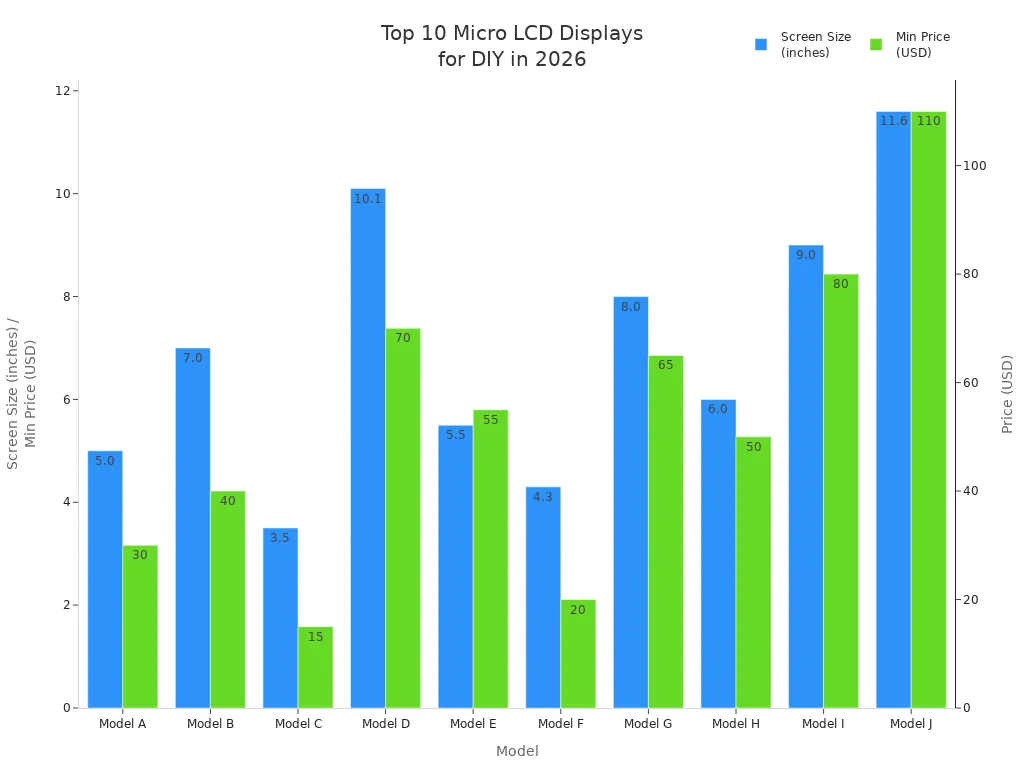
Here are the top 10 micro LCD displays for your DIY projects in 2026:
Model | Screen Size | Resolution | Connectivity | Price Range | Best For |
|---|---|---|---|---|---|
Model A | 5.0 inch | 800x480 | HDMI, VGA | $30 - $50 | DIY Projects |
Model B | 7.0 inch | 1024x600 | USB, HDMI | $40 - $70 | Home Automation |
Model C | 3.5 inch | 480x320 | SPI, I2C | $15 - $25 | Embedded Systems |
Model D | 10.1 inch | 1280x800 | HDMI, DP | $70 - $120 | Gaming |
Model E | 5.5 inch | 720x1280 | HDMI, USB | $55 - $95 | Multimedia Applications |
Model F | 4.3 inch | 480x272 | GPIO, HDMI | $20 - $35 | Prototyping |
Model G | 8.0 inch | 1024x768 | USB-C, HDMI | $65 - $110 | Touchscreen Projects |
Model H | 6.0 inch | 720x1280 | HDMI, DSI | $50 - $85 | IoT Devices |
Model I | 9.0 inch | 1280x800 | HDMI, USB | $80 - $140 | Commercial Displays |
Model J | 11.6 inch | 1920x1080 | HDMI, VGA | $110 - $180 | Educational Projects |
You want the best lcd for your builds. Makers now see displays with OLED, TFT, touch support, and strong power efficiency. Every project needs the right display.
You want the best lcd for your builds. Makers now find displays with OLED and TFT. Some displays have touch support. Many displays use less power. Each project needs the right display.
## Key Takeaways
- Pick the best micro LCD display for your project. Think about screen size, resolution, and how it connects. This helps make sure it will work with your project. - A better micro LCD display can make your DIY projects nicer. Good brightness and contrast help you see the screen better. This makes your projects look more professional. - Try to find displays that do not cost too much money. Small displays or ones with SPI/I2C can save you money. They can still work well for your project.
## Best Micro LCD Displays for DIY Projects
### Top Picks for 2026
If you want a mini lcd display for your diy electronics, you need one that fits your project. In 2026, there are more choices than before. The best ones work well and are easy to use. They can be used in raspberry pi projects, wearables, or custom gaming builds. Many mini lcd displays have hdmi, so you can connect them to many boards. Some have a capacitive touch screen, which lets you add touch features.
Here’s a quick look at what makes these displays special:
| Feature | Why It Matters for DIY Projects |
|------------------------|------------------------------------------------|
| [Resolution](https://www.alibaba.com/ranking/mip-lcd-display.html) | You get clear images and sharp text |
| Screen Size | Good for both small and big projects |
| HDMI | Easy to connect to most diy boards |
| Color Depth | Shows bright and rich colors |
| Platform Compatibility | Works with many systems like raspberry pi |
### Why These Displays Stand Out
You want your projects to look nice and work well. The best micro lcd displays have high resolution and bright colors. They also refresh fast. These mini lcd displays use less power, so your diy projects last longer. Many displays do not reflect much light, so you can use them outside. You can find mini lcd displays that work with hdmi for many projects. Makers like these displays because they are reliable and simple to use. With the right lcd, your projects will look great and work their best.
## Why Upgrade Your Micro LCD Display
### Benefits for Makers
You want your diy electronics to be special. Getting a new micro lcd display can really help your projects. When you use mini lcd displays with [better brightness and contrast](https://www.panoxdisplay.com/solution/mini-lcd-display-vs-other-technologies/), you see clear pictures in any light. These displays are also stronger, so your prototypes last longer, even if you move them a lot.
Here’s how a new lcd can help you:
| Benefit | Description |
|---------------------------------|----------------------------------------------------------------------------------------------|
| [Accelerated Development Timelines](https://www.guition.com/knowledge/what-are-the-benefits-of-colour-lcd-display-modules) | You finish projects faster because color lcd modules are easy to connect and code. |
| Versatility Across Application Domains | One display works for many projects, so you save money and space. |
| Enhanced System Scalability | You can add new features or expand your projects without starting over. |
> 💡 Tip: If you use hdmi mini lcd displays, you can switch between raspberry pi projects and other boards without any hassle.
### Enhanced Project Functionality
You want your projects to do more things. Advanced mini lcd displays let you change how the screen looks, so you can make each project unique. These displays use less power, so your portable devices last longer. They also work well with tools like Arduino or Raspberry Pi, which makes building easier.
See what you get with these mini lcd displays:
| Feature/Benefit | Explanation |
|----------------------------------|--------------------------------------------------------------------------------------------|
| [Customizable visual outputs](https://www.panoxdisplay.com/solution/dot-matrix-lcd-display-module-working/) | You control every pixel, so your projects look exactly how you want. |
| Low power consumption | Your devices run longer on batteries, perfect for wearables or portable gaming. |
| Versatile interface options | You get hdmi, spi, and even capacitive touch screen support for more project ideas. |
| Recent advancements | New lcd technology means better quality, durability and performance for your diy builds. |
You can count on these displays to make your projects better. With high resolution and hdmi support, your mini lcd displays will handle any challenge. Makers like you enjoy how useful and strong these displays are for diy electronics.
## Specs Comparison of Mini LCD Displays
### Size and Resolution Overview
When you choose mini lcd displays, think about size and resolution. Some displays are very small, like [1.28 inches with 240×240 resolution](https://www.panoxdisplay.com/knowledge/round-tft-lcd-robot-eyes-esp32-2026.html). These are good for tiny robots or plush toys. Others are bigger, like a 2.1-inch display with 480×480 resolution. Bigger screens show larger icons and text. If you want a high-resolution mini lcd display, you can get screens up to 11.6 inches with full HD. These screens give you sharp pictures and make your projects look professional.
| Model | Size | Resolution | Best Use Case |
|---------|--------|------------|------------------------------|
| Model C | 3.5" | 480x320 | Embedded systems, wearables |
| Model F | 4.3" | 480x272 | Prototyping, hobbyists |
| Model A | 5.0" | 800x480 | General DIY projects |
| Model J | 11.6" | 1920x1080 | Educational, gaming builds |
> Tip: Bigger displays are great for more details or touch. Smaller displays save space and use less power.
### Connectivity and Price Points
You want mini lcd displays that are easy to connect. Most displays now have hdmi, so setup is simple. Some displays have hdmi capacitive touch, so you can add touch features. If you want to save money, look for models with spi or i2c. These are good for makers who want to spend less but still get good displays.
| Model | Connectivity | Price Range | Best For |
|---------|--------------------|-------------|-------------------------|
| Model C | SPI, I2C | $15-$25 | Small projects |
| Model G | USB-C, HDMI | $65-$110 | Touchscreen projects |
| Model H | HDMI, DSI | $50-$85 | IoT devices |
| Model J | HDMI, VGA | $110-$180 | High-end prototypes |
You might want to know how display types are different. [OLED displays have better contrast](https://www.topfoison.com/News/LCD-Technology/OLED-vs-TFT.html) and bright colors. They use less power when showing dark images. TFT lcd displays have lower contrast and use more power because their backlight is always on. OLEDs also let you see the screen from more angles. Standard lcds are strong and last a long time, but their colors are not as good as OLED or TFT.
If you want the best, pick displays with hdmi, high resolution, and a capacitive touch screen. These displays make your projects look better and last longer. You can find mini lcd displays for any budget, so you do not have to lose out on features or quality.
## Choosing the Right Display for Your DIY Project
### Display Quality and Durability
You want your projects to last and look sharp. When you pick a micro lcd display, you should check the quality and durability. High-quality displays show clear images and bright colors. You can see every detail, even in bright rooms or outside. If you use your display for raspberry pi projects or diy electronics, you need something that can handle bumps and long hours.
Let’s look at what matters most for durability and performance:
| Technology | Lifespan Comparison | Issues |
|--------------|---------------------------------------------|---------------------------------|
| TFT LCD | Noted for [long lifespan](https://pt.dght-oledlcd.com/resources/comparison-tft-lcd-vs-oled-vs-micro-led.html), longer than OLED | High power consumption |
| OLED | Potentially long lifespan but prone to burn-in | Image retention (burn-in) |
| Micro LED | Long lifespan, fast response time | N/A |
TFT lcd displays last a long time, but they use more power. OLED displays look amazing, but they can get burn-in if you show the same image for too long. Micro LED displays last even longer and react fast, but you may not find them in every size yet. If you want a display for prototypes or hobbyists, think about how much you will use it and where you will put it.
> Tip: If you want your diy projects to survive lots of use, pick a display with a strong frame and a good backlight. Look for a brightness of at least 300 cd/m² for indoor use.
### Connectivity Options for Makers
You want to connect your display without trouble. Mini lcd displays come with many options. HDMI is the most popular. You can plug your display into many boards, like Arduino or Raspberry Pi. Some displays have hdmi capacitive touch display support, so you can add a capacitive touch screen to your project. This lets you control your device with your finger.
Here are some things you should check before you buy:
| Factor | Description |
|-------------------------------|------------------------------------------------------------------------------------------------------|
| [Verify interface compatibility](https://electronics.alibaba.com/buyingguides/lcd-guide-how-to-choose-the-right-display-for-your-use-case) | Make sure your microcontroller supports the right protocol, like I²C or SPI. |
| Interface protocol | Choose I²C for simple projects or SPI for faster performance. |
| Controller compatibility | Check if your display works with standard controllers, like HD44780. |
| Connectivity | HDMI, USB, DSI, and GPIO are common. HDMI is best for versatility and easy setup. |
You can find versatile mini lcd displays with hdmi, spi, or i2c. HDMI makes setup easy for most makers. If you want to save space or power, try spi or i2c. Some displays even let you use usb-c for fast data and power. You can pick the best one for your needs.
> Note: If you want to add touch, look for a display with capacitive touch screen support. This feature makes your diy electronics more interactive.
### Budget-Friendly Picks
You do not need to spend a lot to get a good display. Many cost-effective mini lcd solutions give you great performance and features. You can find mini lcd displays for every budget. If you are a budget-conscious makers, you can still get high resolution and hdmi support.
Here are some tips for picking a cost-effective display:
- Choose a smaller screen if you want to save money and power.
- Look for displays with spi or i2c if you do not need hdmi.
- Check for models with simple mounting and easy wiring.
- Compare the features you need, like touch or high brightness.
You can find mini lcd displays that work well for prototypes, wearables, and other diy projects. Many displays offer durability and performance, even at a low price. If you want more functionality, you can pick a display with hdmi and touch, but you will pay a bit more.
> 💡 You can always start with a basic lcd and upgrade later as your projects grow. This gives you flexibility and keeps your budget safe.
You have many choices. With the right display, your diy projects will look better, last longer, and do more. Makers love the versatility of mini lcd displays, and you will too.
## Recommendations for Popular DIY Projects
### Wearables and Compact Devices
You want your wearable projects to be special. Small lcd displays are best for these devices. You can use a compact lcd, like a [0.72 inch TFT](https://www.hemlcd.com/blog/enhancing-wearables-with-072-tft-display-gc9d01n-ic.html) or a 1.6 inch OLED. These displays use little power and show bright pictures, even outside. You can see the screen clearly with brightness up to 800 cd/m². Many displays work in tough places, from -20℃ to 70℃. If you make portable device prototypes, pick a display with one LED backlight to save energy.
| Display Type | Size | Brightness (cd/m²) | Power Use | Outdoor Visibility |
|----------------------|-----------|--------------------|-----------|-------------------|
| 0.72 inch TFT | 0.72 inch | [450](https://www.panoxdisplay.com/solution/sunlight-readable-display-panel-applications) | Low | Excellent |
| 1.39 inch round OLED | 1.39 inch | 800 | Low | Excellent |
| 1.6 inch OLED | 1.6 inch | 500 | Low | Excellent |
> Tip: For wearables, choose lcd displays with high brightness and low power use. This helps your battery last longer and keeps screens easy to see.
### Prototyping and Development Boards
You need lcd displays that connect to your boards easily. Look for hdmi, spi, or i2c interfaces. These displays can have capacitive touch screen, so you can try more features. You should check [voltage needs](https://forum.digikey.com/t/how-to-pick-a-display-so-many-factors/48145), like 3.3V or 5V, before starting. Many displays work with popular microcontrollers. You can use OLED, E-Paper, or HMI displays for different projects.
- Pick displays with hdmi for fast setup.
- Make sure your board supports the display protocol.
- Choose displays with simple connectors for breadboarding.
> Note: Displays with hdmi help you build faster and let you test new ideas.
### Portable Gaming and Retro Builds
You want clear pictures for gaming projects. Mini lcd displays like the ILI9341 and ST7789 show bright colors and have lots of support from makers. These displays have resolutions of [240x320](https://www.emleddisplays.com/blog/best-mini-lcd-displays-for-your-project/), but you can get lcd displays with 480x272 or 800x480 for even clearer images. Higher resolution makes your games look better. Many displays use hdmi, so you can connect them to your boards easily.
| Display Model | Resolution | Key Features |
|---------------|------------|------------------------------------|
| ILI9341 | 240x320 | Bright colors, hdmi support |
| ST7789 | 240x320 | Great visuals, hdmi, easy to use |
> For gaming, pick lcd displays with hdmi and high resolution. You get more features and a better experience.
---
You now know the best micro LCD displays for your DIY projects. Check out this quick table to help you choose:
| Feature | Why It Matters |
|------------------------|------------------------------|
| Screen Size & Resolution | Fits your project’s needs |
| Touch Capabilities | Adds easy control |
| Durability | Lasts through tough use |
Start by picking a display that matches your project. You can find great options online for under $5. When you get your new screen, follow the setup steps in the manual. Your next DIY build will look amazing!
## FAQ
### What is a micro LCD display?
A micro LCD display is a small screen that shows images or text. You use it in DIY electronics, wearables, or portable devices.
### How do you connect a micro LCD display to your project?
You connect a micro LCD display using HDMI, SPI, or I2C. Check your board’s ports and follow the wiring guide for your display.
### Can you use a micro LCD display outdoors?
Yes, you can use a micro LCD display outside. Pick one with high brightness and low reflection for clear viewing in sunlight.
## See Also
[Leading Brands and Manufacturers of LCD Screens for Projects](https://blog.topadkiosk.com/top-lcd-display-screen-manufacturers-brands-2026/)
[Creating High-Quality Touch and Non-Touch LCD Mirror Displays](https://blog.topadkiosk.com/high-quality-touch-non-touch-lcd-mirror-display-2026/)
[Understanding the Pros and Cons of LCD Display Screens](https://blog.topadkiosk.com/lcd-display-screen-advantages-disadvantages-pros-cons-guide/)
[Highly Rated High-Resolution LCD Kiosks for Your Exhibitions](https://blog.topadkiosk.com/reviews-high-resolution-lcd-display-kiosks-for-exhibitions/)
[Essential Tips for Enhancing Your Project with OLED Displays](https://blog.topadkiosk.com/oled-display-tips-choosing-the-right-oled-display-project/)
