Top Interactive Wayfinding Kiosk Suppliers for Modern Spaces
Add.: 2F, Bldg 10, Changfeng Industrial Park, Dongkeng, Fenghuang, Guangming, Shenzhen, China 518132
Mobile/WHATSAPP: 86-138 25769658
Email: marketing@topadkiosk.com topadkiosk@gmail.com
Skype: pghenry1
Wechat: adkioskhenry
English Web.: chttps://www.topkioskdisplay.com/
http://www.ad-kiosk.com/
https://www.toplcddisplay.com/
http://www.multitouchdigitalsignage.com/
https://www.youtube.com/channel/UCYVYNJHxLVEcQD8fuUxXNTA/videos?view_as=subscriber
https://www.facebook.com/TOPADKIOSKSHENZHEN/?ref=bookmarks
When you look for interactive wayfinding kiosk suppliers, you want names like Rocket Alumni Solutions, Intuiface, PandaSuite, and http://www.topadkiosk.com/. These companies are known for new ideas, being reliable, and working well with modern wayfinding solutions. Top suppliers give strong kiosks, software you can change, and help you can count on. Choosing the right company is important. This is true in busy places like airports, hospitals, offices, or shopping malls. Interactive wayfinding helps everyone find where they need to go.
Here’s a quick look at adoption rates and key benefits across sectors:
Sector | Adoption Rate | Market Value (2025) | Key Developments |
|---|---|---|---|
Retail | 24.7% | $3.11 billion | Big AI-powered changes in stores and malls |
Healthcare | 21.3% | N/A | Happier patients and fewer missed appointments |
Airports: Real-time flight info and directions
Shopping Malls: Easy store and amenity location
Hospitals: Smoother visitor experience
Key Takeaways
Pick trusted suppliers like NCR Voyix and Mappedin for good wayfinding in busy places like airports and malls. - Find kiosks that are easy to use and have features for people with disabilities so everyone can get around. - Choose suppliers with software you can change to fit your needs and that lets you update things right away. - Think about the full cost, like hardware, software, and upkeep, so you can plan your budget well for your kiosk project. - Stay away from mistakes by looking at supplier reviews, trying out products, and making sure they have good customer help.
Best Interactive Wayfinding Kiosk Suppliers
Supplier List and Profiles
When you look for interactive wayfinding kiosk suppliers, you want to find the best. The top kiosk companies are known for new ideas and being dependable. They help you set up digital wayfinding solutions in busy places. These places include airports, malls, hospitals, and offices. You need suppliers who give you good hardware and flexible digital signage software. They also make touchscreen experiences easy for everyone.
Here’s a quick look at the top kiosk companies for 2026:
Supplier | Recognition Type | Key Features |
|---|---|---|
Industry Leader | Global reach, AI-driven analytics, contactless payments, wide product range | |
Pyramid Computer | Emerging Leader | Modular design, customizable hardware, advanced display integration |
Rocket Alumni Solutions | Top Innovator | User-friendly digital signage wayfinding, strong campus and hospital focus |
Intuiface | Best for Custom UI | Drag-and-drop digital signage software, real-time data integration |
PandaSuite | Flexible Platform | No-code digital wayfinding solutions, fast deployment |
NoviSign | Cloud-Based Leader | Easy updates, scalable digital signage wayfinding, strong analytics |
Touchpros | Education Focus | Interactive touchscreen kiosk for schools, universities, and libraries |
Arreya | Remote Management | Cloud-based digital signage software, remote content control |
Venue Specialist | Advanced mapping for airports, malls, hospitals, and campuses | |
Pickcel | Affordable Choice | Budget-friendly digital signage wayfinding, simple implementation |
eKiosk GmbH | European Leader | High-quality hardware, secure digital signage solutions |
KIOSK Information Systems | Custom Hardware | Durable interactive kiosks, custom builds for any environment |
Olea Kiosks | Design Excellence | Sleek touchscreen designs, ADA-compliant interactive touchscreen kiosk options |
ACRELEC | Retail Expert | Fast-food and retail digital signage wayfinding, self-service focus |
REDYREF | Manufacturing Power | In-house production, robust digital signage software and hardware |
Visitron | Visitor Management | Smart check-in and digital wayfinding solutions for offices and hospitals |
Each supplier has something special to offer. NCR Voyix is known for its global reach and smart analytics. Pyramid Computer stands out with modular kiosks and great displays. Rocket Alumni Solutions and Mappedin focus on digital wayfinding solutions for schools, malls, and hospitals. Intuiface and PandaSuite let you build custom touchscreen experiences without needing to code.
Unique Strengths and Differentiators
You want the best kiosk companies for your space. Each supplier is good at different things. Let’s see what makes these interactive wayfinding kiosk suppliers unique and where they work best.
NCR Voyix has a strong global network and advanced AI features. You get reliable kiosks in airports, malls, and big venues. Their digital signage wayfinding supports contactless payments and real-time updates.
Pyramid Computer gives you modular kiosks. You can change hardware for any place. Their touchscreen quality is great, so they are good for growing businesses.
Mappedin is great for digital wayfinding solutions in airports, malls, and hospitals. You get touchscreen kiosk maps that help visitors find their way.
Rocket Alumni Solutions works with schools and healthcare. Their digital signage wayfinding helps students and patients get around quickly.
Intuiface lets you build custom digital signage software with drag-and-drop tools. You can connect real-time data and make unique touchscreen layouts.
PandaSuite gives you a no-code platform. You can launch digital wayfinding solutions fast, even if you don’t know much about technology.
Touchpros and Visitron help schools and offices manage visitors and guide them with digital signage wayfinding.
Olea Kiosks and KIOSK Information Systems make strong, ADA-compliant interactive touchscreen kiosk hardware. You know their products are accessible and high quality.
Arreya and NoviSign are known for cloud-based digital signage software. You can update content from anywhere, which makes things easy.
Pickcel is a good choice if you want affordable digital signage wayfinding. You get simple setup and reliable help.
eKiosk GmbH and REDYREF focus on quality manufacturing and secure digital signage solutions. Their hardware lasts a long time.
ACRELEC is a leader in retail. Their digital signage wayfinding helps customers order and find stores easily.
Tip: If you need digital signage wayfinding for airports, malls, or hospitals, pick suppliers like Mappedin, NCR Voyix, and Boruit. They have shown success in these places.
You should match the supplier’s strengths to your needs. For example, if you run a hospital, Mappedin and Rocket Alumni Solutions offer digital wayfinding solutions that help visitors. If you manage a shopping mall, NCR Voyix and Pyramid Computer provide interactive kiosks with advanced touchscreen displays and easy setup.
The best kiosk companies also help you connect with your current systems. They make sure you meet accessibility rules and keep your data safe. You get digital signage software that fits your brand and helps you grow in the future.
Choosing the right interactive wayfinding kiosk suppliers means you get quality, easy setup, and digital signage wayfinding that fits your space. You can trust these top kiosk companies to give you the best results for your project.
Key Features of Interactive Touchscreen Kiosks
User Experience and Interface
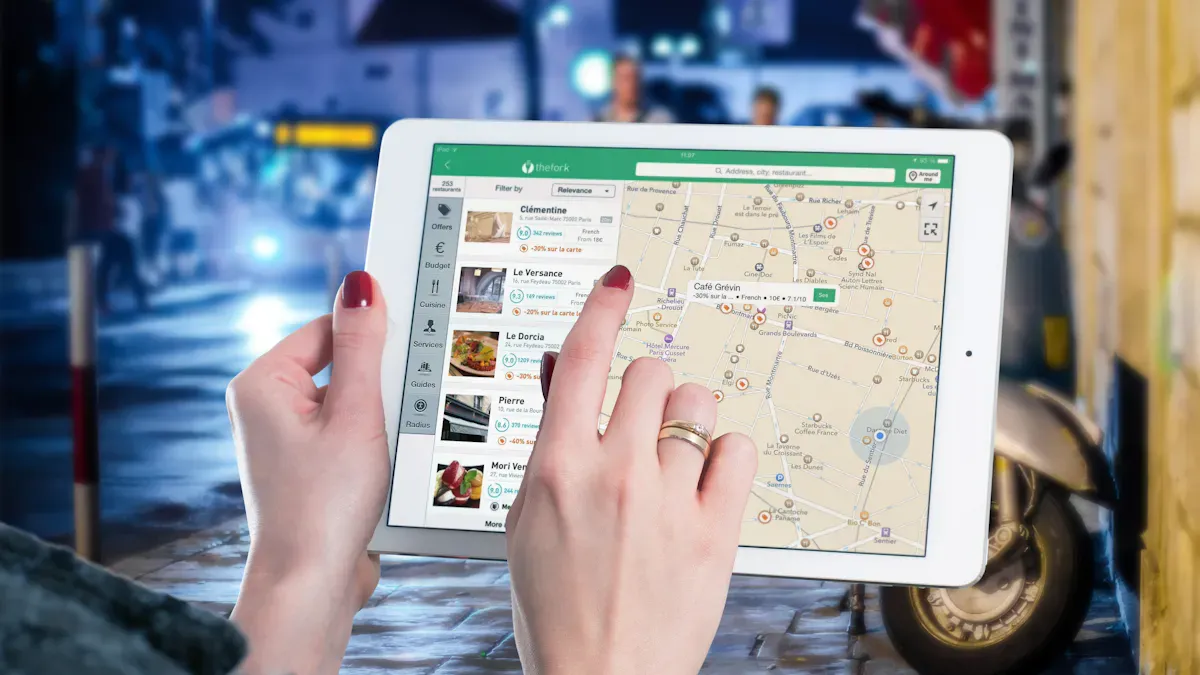
You want visitors to feel comfortable using a touchscreen kiosk. The best digital signage wayfinding uses a simple, friendly interface. Big touchscreen displays help people search for places and get directions. Accessibility features are important. These include multi-language choices and help for people with disabilities. Real-time updates give everyone the newest info about routes, events, or closures.
Here’s a quick look at the most important user interface features:
Feature | Description |
|---|---|
Large Touchscreen Displays | Easy searching and directions for all users |
Accessibility Features | Multi-language, disability support |
Real-time Updates | Accurate info about routes, events, or closures |
Clear prompts and touch controls for better user experience quality | |
High-definition Displays | Bright visuals for more engagement |
Ergonomic Design | Kiosks at the right height for all ages and abilities |
Top suppliers use content personalization and sometimes augmented reality for special experiences. Some kiosks connect to your phone, so you can take directions with you.
Hardware and Durability
You need kiosk hardware that is strong and lasts a long time. Commercial-grade displays can handle lots of use in public places. These touchscreens are large, usually 32 inches or more. This makes them easy to see and touch. Good hardware is important for digital signage wayfinding in busy areas.
Suppliers make kiosks to work in tough places:
Weatherproof enclosures with high IP ratings
High-brightness screens for sunlight
Advanced temperature control systems
Durable touchscreens that resist scratches and impact
Vandal-resistant designs with shatterproof glass and tamper-proof locks
This focus on quality means your digital signage wayfinding works every day, no matter the weather.
Software and Customization
Digital signage software lets you update and manage your content. You can show maps, give the best routes, and see how people use the kiosk. Top suppliers let you add other software, connect to the cloud for real-time updates, and use many languages.
Here’s what you get with leading digital signage wayfinding software:
Feature | Description |
|---|---|
Mapping | Detailed maps for easy navigation |
Routing | Best paths to each destination |
Content Management | Simple updates and management |
Third-party Software Support | Connects with other digital signage solutions |
Cloud-based Updates | Change info instantly from anywhere |
Analytics Tracking | See how people use your kiosks |
Helps all visitors | |
Scalability | Grows with your needs |
IT Compatibility | Works with your current systems |
You can make custom interactive experiences that match your brand and needs. With interactive touchscreen software, your digital signage wayfinding fits your space and can grow with you. Suppliers also help you set up your kiosks, so everything works well from start to finish. This support helps you get the most from your kiosks and gives users a great experience.
Integration and Accessibility
System Integration
When you start a digital signage wayfinding project, your kiosks should work with your current systems. You may want your kiosks to connect with payment, barcode scanning, or printing. This makes setting up your kiosks easy. Visitors can get what they need quickly.
Here’s a table showing common integration needs for digital signage wayfinding:
Requirement Type | Description |
|---|---|
Payment Processing Integration | Lets you accept credit cards, NFC, and mobile payments. |
Barcode and QR Code Scanning | Helps with ticket validation and check-ins. |
Receipt and Document Printing | Prints tickets or receipts for visitors. |
Accessibility Features | Adds adjustable displays, audio, and alternative input methods. |
You can also link your kiosks to building management, scheduling, and emergency systems. This gives visitors real-time information. Your digital signage wayfinding stays updated. You get a good experience that fits your space.
Accessibility Standards
You want everyone to use your digital signage wayfinding kiosks. Suppliers follow ADA rules and WCAG standards. This means your kiosks help people with disabilities. You see features like big text, high-contrast screens, and text-to-speech. Kiosks offer touch and voice controls, so more people can use them.
Here are some accessibility features you might find:
Adjustable font sizes and high-contrast displays
Screen reader support and text-to-speech
Visual alerts and closed captioning
Physical buttons and voice controls
Easy-to-reach screens and controls
Rules change in 2026. Kiosks must meet WCAG 2.1 AA standards. Following Section 508 makes your digital signage wayfinding more inclusive. You help more people and make customers happier.
Security and Privacy
You want your kiosks to keep user data safe. Suppliers use strong locks and tough designs. They manage how kiosks store personal information. You see whitelisting and blacklisting for web access.
Here’s a table of security features for touchscreen kiosks:
Security Measure | Description |
|---|---|
System Performance Management | Keeps kiosks running well and protects user info. |
Tamper-Resistant Features | Stops physical tampering with strong locks and tough materials. |
Data Authorization and Storage | Controls who can access and store personal data. |
Suppliers follow rules like GDPR, CCPA, and HIPAA. You get lockdown software, audit trails, and reports. These steps help you follow the law and keep your kiosks safe.
Tip: When you plan your project, make sure your kiosks meet accessibility and security rules. This gives you good digital signage solutions and keeps visitors safe.
Suitability for Modern Spaces
Offices and Corporate Buildings
You want your office to be friendly and simple to use. Interactive touchscreen kiosk solutions help people find rooms or departments. They can even show where the coffee spot is. Advanced Kiosks and REDYREF are great for offices. They give you interactive maps and self-service kiosks. These make it easy to get around. You get help with setup, so your kiosks work well from the start. These suppliers design information kiosks that match your office look. They also help everyone work better.
Supplier | Offering Description |
|---|---|
Advanced Kiosks | Interactive maps for wayfinding in corporate environments, enhancing navigation and user experience. |
REDYREF | Tailored digital wayfinding solutions for large office complexes, improving navigation for employees and visitors. |
Shopping Malls
Shopping malls need kiosks that can handle many people every day. You want clear touchscreen displays and updates in real time. Multi-language support helps shoppers from different places. These features help people find stores, events, and restrooms fast. NCR Voyix and Pyramid Computer are top suppliers for malls. They give you high-definition touchscreen kiosks with accessibility options. You get self-service and information kiosks that make shopping easier and more fun.
Key Feature | Importance |
|---|---|
Provide clear and engaging visual information for users. | |
Real-time updates | Ensure that visitors have the most current information about store locations and events. |
Accessibility options | Make kiosks usable for all individuals, including those with disabilities. |
Multi-language support | Cater to a diverse customer base by providing information in various languages. |
Airports and Transit Hubs
Airports and transit hubs are always busy. You need kiosks that work all day and night. These places have big crowds, so kiosks must be strong and quick. Mappedin and NCR Voyix are good choices here. They offer self-service kiosks that follow safety and accessibility rules. You get help with setup, so your kiosks stay safe and work well.
Kiosks work all day for everyone
Handles lots of people with easy directions
Follows safety and accessibility rules
Hospitals and Healthcare
Hospitals need kiosks that are simple for everyone to use. You want hardware that lasts and software you can change. Good support is important too. Rocket Alumni Solutions and Mappedin are leaders for hospitals. Their kiosks have voice help and easy modes. They connect with hospital systems. You get self-service kiosks that help patients and visitors find their way. This makes hospital visits less stressful.
Consideration | Description |
|---|---|
Hardware Specifications | Durable and user-friendly hardware for hospital settings. |
Software Flexibility | Customizable platforms for specific needs and branding. |
Accessibility Features | Voice guidance and simplified modes for users with disabilities. |
Integration Capabilities | Connects with existing healthcare IT systems and workflows. |
Support Quality | Responsive technical support and clear service agreements. |
Total Cost Transparency | Clear pricing structure for easy budgeting. |
Scalability | Grows with the facility's needs over time. |
Other Public Spaces
You see kiosks in places like schools, museums, and government buildings. These information kiosks help people find classrooms, exhibits, or offices. They support many languages and help everyone, even those with disabilities. Self-service kiosks keep lines short and visits smooth.
Tip: Pick suppliers who give strong support and easy updates. This helps your kiosks work well in any public space.
How to Choose Interactive Wayfinding Kiosk Suppliers
Picking the right interactive wayfinding kiosk supplier is important. The right partner will know what you need. They help you get the best from your touchscreen and self-service kiosks. Here is an easy guide to help you choose well.
Evaluation Criteria
First, think about what matters most for your touchscreen kiosk project. Use this table to compare different suppliers:
Criteria | Description |
|---|---|
Purpose-built software | Check if the digital signage software is made for wayfinding or just a general tool. |
Content management | See how easy it is to update and manage your content. |
Technical performance | Review how well the touchscreen kiosks work and their speed. |
Vendor support | Talk to other customers about the supplier’s help and service. |
Budget expectations | Plan your budget for the next five years, not just the first year. |
Scalability | Make sure the solution can grow with your needs over time. |
Future-proofing | Pick technology that won’t become outdated quickly. |
Ask your team to help with the decision. Think about how the touchscreen kiosks will work with your other systems. If you plan ahead, your project will go smoother and cost less.
Cost Factors
You should know all the costs before you start your self-service kiosk project. Here is a list of what you might pay over three years:
Cost Category | Year 1 | Year 2 | Year 3 | 3-Year Total |
|---|---|---|---|---|
Hardware (kiosk unit) | $8,000 | — | — | $8,000 |
Installation | $400 | — | — | $400 |
Software / SaaS licensing | $1,200 | $1,200 | $1,200 | $3,600 |
Maintenance / support | $800 | $800 | $800 | $2,400 |
Connectivity | $480 | $480 | $480 | $1,440 |
Parts & consumables | $200 | $300 | $400 | $900 |
Total TCO | $11,080 | $2,780 | $2,880 | $16,740 |
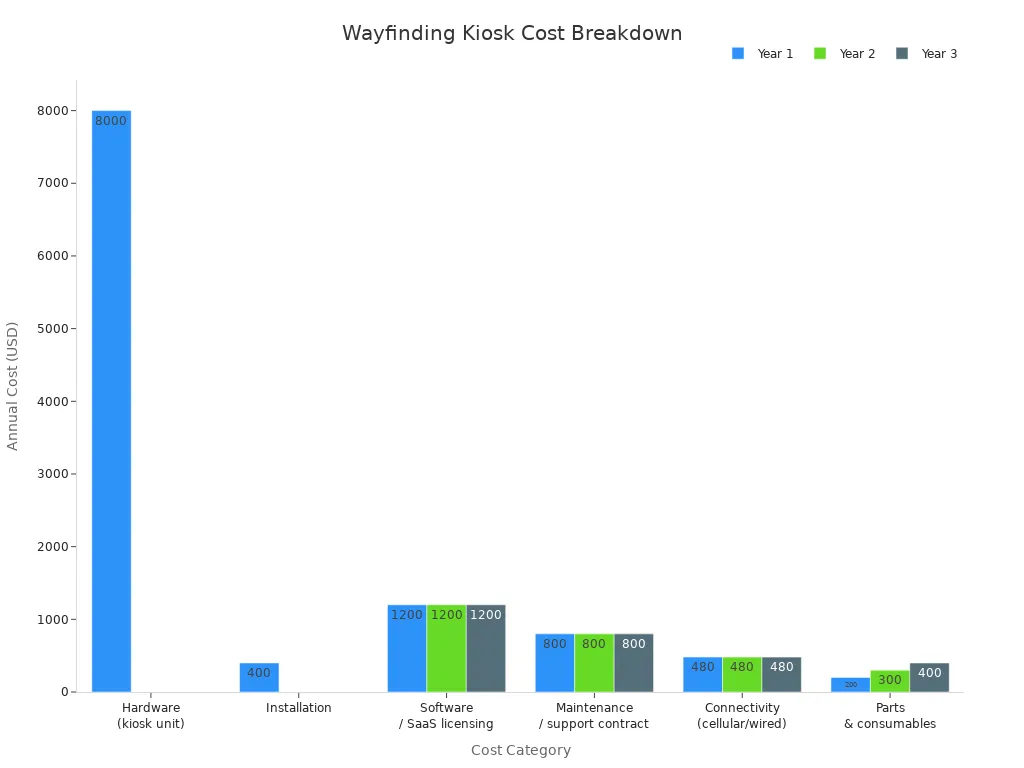
Remember to count software licensing, network fees, and parts. Digital signage software can cost $30 to $300 each month for every touchscreen kiosk. You might also pay for payment processing and content updates. Extra warranties can help protect your kiosks.
Mistakes to Avoid
People often make the same mistakes with self-service kiosk projects. Here is how you can avoid them:
Always check if the supplier has happy customers.
Get a good warranty and fast support for your kiosks.
Decide your main use before you buy anything.
Ask for a demo and test the features yourself.
Check references from other groups who used the supplier.
Read the contract so you know what you are getting.
Tip: If you plan for growth and pick a supplier with great support, your touchscreen kiosk project will be much easier.
If you follow these steps, you will find a supplier who helps you do well with digital signage software, touchscreen, and self-service solutions in any place.
When you pick a wayfinding kiosk supplier, look for these key things:
Make sure the system keeps data safe and follows privacy rules.
Choose a solution that can grow with your space and future needs.
Match the supplier’s strengths to your industry, like healthcare or retail.
Use the guide above to compare your options. Reach out to suppliers or ask for a demo to see what fits best for your space.
Option 1: Direct & Powerful
Get the kiosks you need with our OEM/ODM services – featuring unbeatable cost control, ultra‑flexible production, and the ability to handle any requirement, big or small.
Option 2: Benefit‑Driven (Focus on customer wins)
Scale your business with our OEM/ODM kiosk solutions. We deliver exceptional cost efficiency, agile manufacturing, and full customization – so you get exactly what you want, without blowing your budget.
Option 3: Short & Punchy (Great for headlines)
OEM/ODM kiosks that save you money, adapt to your needs, and scale with your business. Fast. Flexible. Affordable.
Option 4: Full Sales Pitch (Ideal for website or brochure)
*Looking for a kiosk supplier that won't break the bank or limit your creativity? Our OEM/ODM services give you total control over design and functionality, backed by rigorous cost management and lightning‑fast production turns. Whether you need 10 units or 10,000, we deliver quality, flexibility, and value – every time.*
Option 5: Bullet Points for High Impact
Why choose our OEM/ODM kiosks?
Lower your costs – without compromising quality.
Adapt on the fly – flexible production for any order size.
Meet any requirement – from unique designs to complex integrations.
Looking for wayfinding kiosks that are as unique as your building – yet still affordable? We deliver.
With our OEM/ODM capabilities, you can tailor every detail: screen size, enclosure material, software integration, mounting style – you name it. And because we control production costs from the ground up, you get premium quality without the premium price.
Why businesses choose us:
Cost‑effective – lower upfront and long‑term costs.
Flexible manufacturing – from pilot runs to mass production.
Any requirement – indoor, outdoor, touch, non‑touch, single‑ or multi‑language.
Let’s build wayfinding kiosks that guide your visitors and grow your brand.
FAQ
What is an interactive wayfinding kiosk supplier?
An interactive wayfinding kiosk supplier gives you both hardware and software. These tools show digital maps and directions. The companies help set up kiosks in places like malls, airports, and hospitals. Visitors use these kiosks to find where they need to go quickly.
What makes a supplier “top” in this industry?
A top supplier brings new ideas and strong support. They make sure their kiosks are reliable and easy to use. Their software can change to fit your needs. They help you from start to finish. Top suppliers also make sure their kiosks work well in busy places.
Why does picking the right supplier matter?
The right supplier helps visitors feel welcome and find places easily. Fewer people get lost, and reviews are better. Good suppliers keep your kiosks working well. They also help you grow and improve over time.
Can these kiosks work with my current systems?
Yes! Most top suppliers design kiosks that connect with your building’s systems. You can link them to schedules, security, or payment tools. This makes everything work together and saves you time.
Are interactive kiosks easy for everyone to use?
Yes, they are. Suppliers make kiosks with big touchscreens and clear menus. There are options for people with disabilities. You can add more languages and voice help. Everyone can use the kiosks without problems.
See Also
6 Essential Guidelines For Selecting Interactive Kiosks
Leading Providers Of Outdoor LCD Display Kiosks
Essential Features To Look For In Touch Screen Kiosks
Best 10 Firms Focused On Touchscreen Kiosks In 2026
Innovative Outdoor Digital Signage Trends Shaping Public Areas
