Top Digital Signage Products for Retail Stores in 2026
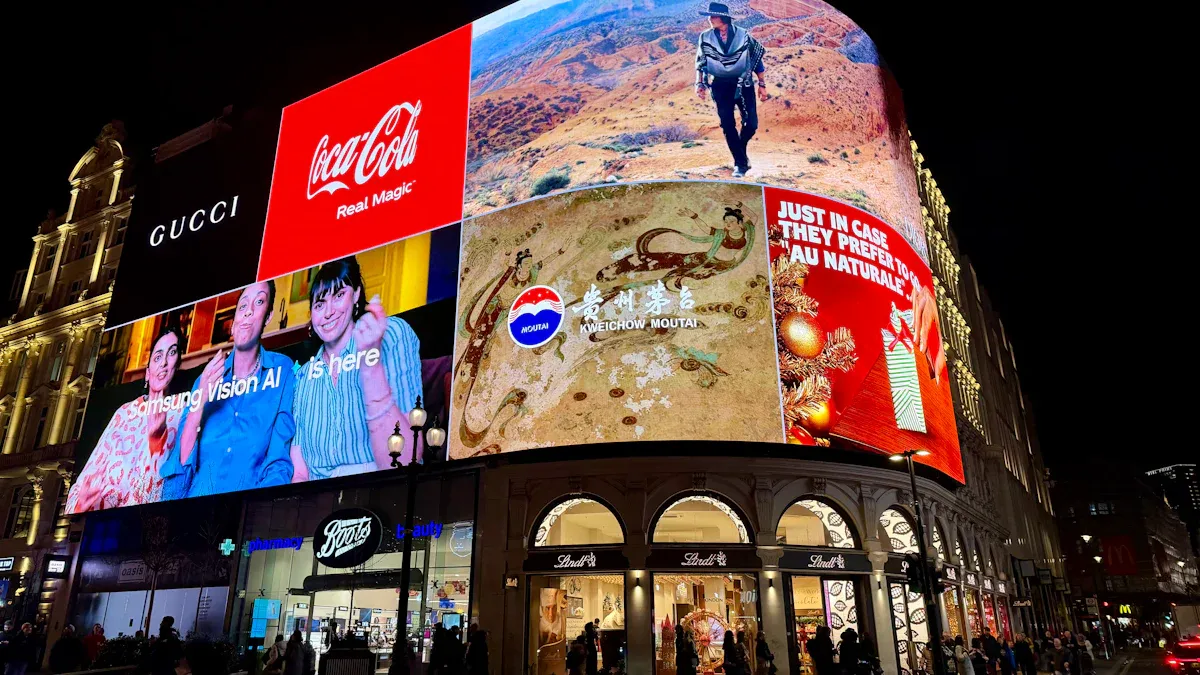
You see screens all around when you go into a store in 2026. Retailers use in store digital signage to catch your eye and make shopping simple and fun. Right now, about 21% of the world’s digital signage market is in retail, and this group is best at advertising and showing off products. Technology keeps improving, so stores now use smart displays and real-time data to give you a better time. Good retailers choose solutions that help them grow and work well.
Key Takeaways
Pick digital signage that works with many media types. This helps you keep customers interested. - Choose systems that let you update content from far away. This saves time and keeps your content new. - Pick solutions that can grow as your business grows. This way, you do not need to change them often. - Buy content management systems that are easy to use. This makes updates and scheduling simple. - Think about using energy-efficient displays in your store. This lowers costs and helps the environment.
Criteria for Top Digital Signage
Key Features for Retail
When you look for the best in store digital signage, you want features that make your life easier. You need displays that show all kinds of media, like videos, images, and even PDFs. You also want to update your screens from anywhere, using your phone or computer. Security matters too. You don’t want hackers messing with your store’s screens. Price is important, but you should pick a system that fits your needs and can grow with your business.
Here’s a quick table to help you see what matters most:
Criteria | Why It Matters for You |
|---|---|
Media support | Shows videos, images, and more to grab attention |
Remote monitoring | Lets you update screens from anywhere, anytime |
Scalability | Grows with your store, no need to switch later |
Stability | Keeps screens running without crashes |
Security | Protects your network and content |
Price | Lets you choose what fits your budget and goals |
Scalability and Integration
You want your digital signage to keep up as your store grows. If you open new locations, you don’t want to start over with a new system. Good signage lets you control everything from one dashboard. You can run promotions in all your stores at once. Modern systems use APIs, so they connect with your other tools, like inventory or sales software.
You can update promotions and product highlights fast, even from home.
Each screen can show something new every day, which keeps shoppers interested.
Central control saves you time and helps you stay ahead in a busy market.
Tip: Choose a system that works with your current tech and can add new features as you grow.
Content Management
Managing content should feel simple. The best platforms let you upload images, videos, or even live data feeds. You can build playlists and schedule what plays on each screen. Some systems, like NowSignage or Scala, let you control everything from a web browser. Others, like Yodeck or OptiSigns, give you tools to organize content and set up rules for when things play.
You can use Wi-Fi or Ethernet to update screens in real time.
No more running around the store to change USB drives.
A good content management system helps you keep your messaging fresh and on-brand.
If you pick the right system, you’ll find that in store digital signage becomes a powerful tool for your retail success.
Top Digital Signage Displays
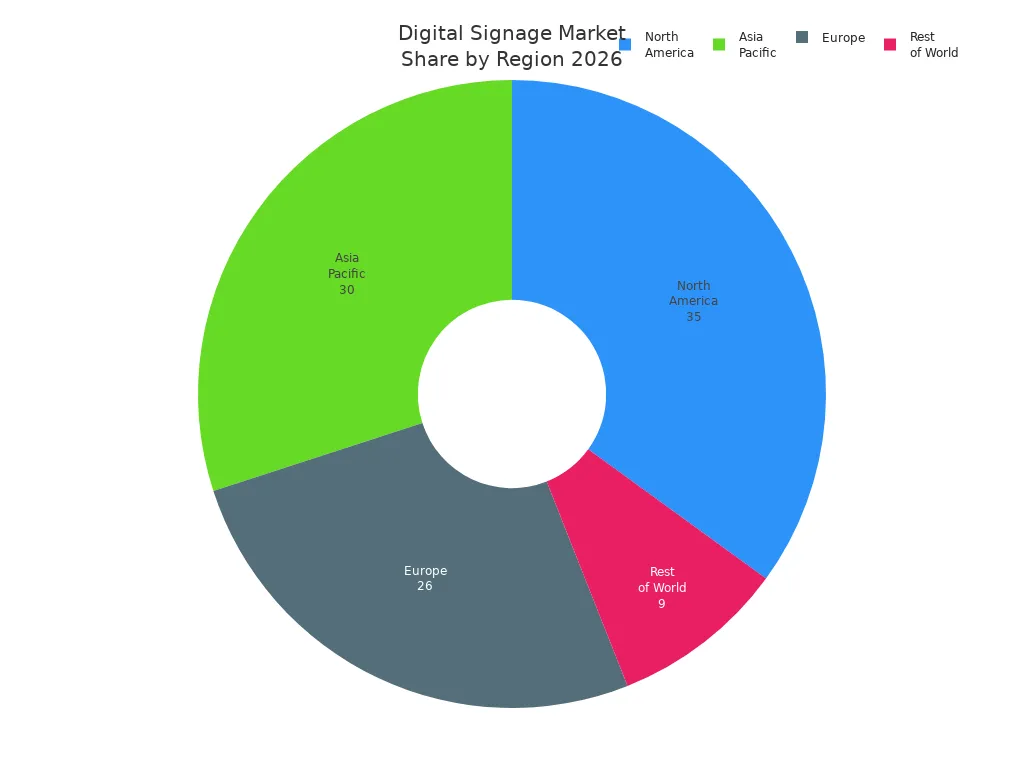
Digital signage displays have become the heart of modern retail. You see them everywhere, from big screens behind the checkout to small labels on shelves. In 2026, the retail digital signage market is booming. It is expected to reach $26.11 billion, with retail taking up 31% of the market and growing by 9% each year. North America leads with a $12.3 billion market size, followed by Asia Pacific and Europe.
Let’s look at the top displays you can use to make your store stand out.
LG G-Series
You want a display that looks sharp and works all day. The LG G-Series gives you both. You can pick from huge sizes, like 86 inches or even 110 inches. These screens show everything in 4K, so your videos and images look crisp and clear. The brightness hits 500 nits, which means your content pops, even under bright store lights. You also get a wide viewing angle, so shoppers see the same picture from anywhere.
Here’s a quick look at the specs:
Specification | 86UH5Q | 110UM5K |
|---|---|---|
Screen Size | 86" | 110" |
Native Resolution | 3840 x 2160 (4K) | 3840 x 2160 (4K) |
Brightness | 500 nit | 500 nit |
Contrast Ratio | 1,200 : 1 | 1,200 : 1 |
Refresh Rate | 120 Hz | 120 Hz |
Power Consumption (Typ/Max) | 170W / 280W | 440W / 570W |
Operation Temperature | 0°C to 40°C | 0°C to 40°C |
Built-in Speaker | Yes (10W x 2) | Yes (10W x 2) |
Software Compatibility | SuperSign CMS, SuperSign Cloud | SuperSign CMS, SuperSign Cloud |
You also get a dynamic contrast ratio of 1,000,000:1 and a fast 8 ms response time. These displays last up to 50,000 hours and run 16 hours a day, seven days a week. You can trust them for your busiest days.
Tip: If you want a display that grows with your business, LG G-Series works with top content management systems. You can update your screens from anywhere.
Samsung 8K QLED
If you want to wow your customers, Samsung’s 8K QLED is hard to beat. This display packs four times the pixels of 4K, so every detail looks lifelike. You get 7,680 by 4,320 pixels, which means even close-up shots look sharp. Samsung uses high dynamic range (HDR) to make bright spots and dark areas stand out. Your ads and videos look rich and colorful.
Samsung also uses smart AI to upscale your old 4K content to 8K. This saves you time and energy because you don’t need to create new videos for every screen. The display uses energy-saving tech, so you can run it all day without worrying about your power bill.
Attribute | Details |
|---|---|
Resolution | 8K (7,680 x 4,320) |
Brightness | HDR for vivid highlights and deep blacks |
Energy Efficiency | AI upscaling reduces the need for new content and saves power |
Note: Samsung 8K QLED works well for flagship stores or high-traffic areas where you want to make a big impression.
Philips 4000 Series
You want a display that works anywhere in your store. The Philips 4000 Series gives you that flexibility. These screens shine bright, with up to 3,000 cd/m² on the 75-inch model. That means your content stays visible, even in sunlight. The design is slim and modern, so it fits in tight spaces or on stylish walls.
Philips adds smart thermal sensors to keep the display cool. You don’t have to worry about overheating. The display also saves energy by adjusting brightness when the store gets darker. You can manage your content from the cloud, so updates are quick and easy.
Advantage | Description |
|---|---|
High Brightness | Up to 3,000 cd/m² for clear images in any light |
Slim Design | Up to 34mm thinner than before, fits anywhere |
Intelligent Thermal Management | Sensors keep the display cool and reliable |
Energy Efficiency | Auto-brightness saves power |
Remote Management | Cloud-based control for easy updates |
Versatile Installation | Works in portrait or landscape mode |
Enhanced User Experience | Easy setup and operation, based on real user feedback |
You can use Philips 4000 Series for window displays, aisle ends, or even menu boards. It’s that versatile.
E Ink Kaleido
Sometimes you need a display that saves energy and works in any light. E Ink Kaleido does just that. This display uses a special reflective surface and a front light. You get clear images, even in low light or bright sunlight. The screen only uses power when you change the image, so it can last for days without charging.
E Ink Kaleido is perfect for electronic shelf labels. You can show prices, product info, or even QR codes. The display is tough and glare-free, so shoppers always see the right price. You also help the planet by using less paper and less power.
You get great visibility for both black-and-white and color content.
The display is durable and lasts a long time.
You can update prices and info in real time, making inventory management easy.
If you want to make your store smarter and greener, E Ink Kaleido is a smart choice for in store digital signage.
Leading Digital Signage Software
Scala Platform
You want software that helps your digital signs stand out. Scala Platform gives you many ways to do this. You can change it to fit your store. The interface is simple, so anyone can use it. Scala helps you talk to shoppers in different ways. You can use digital signs, phones, or kiosks.
Here’s what Scala lets you do:
Shoppers can try on outfits with interactive fitting rooms.
Kiosks help with self-checkout or give product info.
Menu boards update right away with new items or prices.
Digital ads reach the right people at the right time.
Wayfinding tools help customers find what they want.
In-store targeting gives special deals and offers.
Scala helps you make your store smart and fun. You can pick the features that match your brand.
NoviSign Cloud Suite
NoviSign Cloud Suite helps you control digital signs in one or many stores. You can update screens from anywhere you want. The platform uses the cloud, so you do not need to be in the store. NoviSign gives you tools to build, plan, and control your content easily.
Look at what NoviSign can do:
Feature | Description |
|---|---|
Drag-and-drop editor | Lets you design displays fast and simply. |
Remote screen updates | Sends changes to all screens, no matter where you are. |
Cloud-based CMS | Manages your content from any device, anywhere. |
Customizable templates | Gives you ready-made designs for many retail needs. |
Advanced scheduling | Plans when and where your content shows up. |
Adds cool and helpful features to your screens. | |
Offline playback support | Keeps screens working, even if the internet stops. |
Remote management | Controls all your screens from any browser. |
You can add more screens as your business grows. NoviSign keeps your digital signs new and exciting.
Intuiface Builder
Intuiface Builder lets you make interactive content for your digital signs. You do not need to know how to code. You can drag and drop images, videos, and live data onto your screens. Want to add touch? You can do that too. Shoppers can tap, swipe, or look at products on the display.
Intuiface is great for stores that want to impress customers with hands-on fun. You can use it for demos, games, or surveys. If you want your digital signs to feel cool and modern, Intuiface Builder has the tools you need.
All-in-One Signage Systems
All-in-one signage systems make your life easier. You get everything you need in one package—screen, software, and sometimes even a stand. These systems help you set up in store digital signage fast. You can grab attention, share updates, and even let shoppers interact with your displays.
Elo Touch Solutions
Elo Touch Solutions brings touchscreens to your store. You can let customers explore products, check prices, or even get help without waiting for staff. These displays make shopping more fun and personal. You can show special deals, guide shoppers to products, or collect feedback right on the screen.
Feature | Impact on Customer Engagement |
|---|---|
Personalized experiences | Shoppers feel special and get what they need fast. |
Product discovery | Customers can compare items and learn more on their own. |
Assisted selling | Staff can use screens to help with questions and sales. |
Queue engagement | People stay busy with promos while they wait. |
Navigation | Shoppers find products quickly and easily. |
Real-time feedback | You learn what shoppers like and want. |
Tip: Use Elo Touch Solutions to make your store more interactive and welcoming.
ViewSonic Kiosk Series
ViewSonic Kiosk Series gives you a ready-to-use digital kiosk. You can set it up at the entrance, in aisles, or near checkout. These kiosks help shoppers find products, see ads, or get info without asking for help. You need to keep them clean and safe. Place them away from water and sunlight. Always use a soft cloth for cleaning. If something goes wrong, call a pro.
Description | |
|---|---|
Keep user guide accessible | You might need it later. |
Avoid moisture | Keeps the kiosk safe. |
Use a soft cloth for cleaning | Protects the screen. |
Ensure stable placement | Stops falls and damage. |
You can trust ViewSonic kiosks to work hard every day.
Sharp/NEC Modular Systems
Sharp/NEC Modular Systems give you power and flexibility. You can build a system that fits your store, big or small. These displays change with your needs. You can show different messages to different shoppers. The screens even adjust content based on who is watching.
You can scale up as your business grows.
The system helps you deliver the right message to the right customer.
You get better marketing results and happier shoppers.
If you want in store digital signage that grows with you, Sharp/NEC Modular Systems are a smart pick.
Trends in Store Digital Signage

AI-Driven Content
You see more stores using AI to make digital signs smarter. AI helps you show the right message to the right shopper. When you use AI, your signs can change based on who is looking at them. This makes people pay more attention. In fact, stores have seen a 40% jump in how long shoppers look at screens. Some fast-food places in New York used AI to change menu boards for local tastes. They saw sales go up by 8–12%. AI also helps you save money by making new content quickly and keeping your brand message the same everywhere.
Measurable Outcome | Metric |
|---|---|
Sales increase | 8–12% |
Attention time | 2× higher |
Engagement | 40% higher dwell time |
Recall improvement | Up to 83% over static signage |
Sales uplift | 20–30% |
Cloud Platforms
Cloud platforms let you control your digital signs from anywhere. You can update screens in one store or many stores at once. This makes it easy to keep your messages fresh. Cloud tools help you connect your signs with other systems, like inventory or sales. You can change promotions fast if you run low on stock. Cloud platforms also help you use less paper, which is better for the planet.
Tip: Use cloud management to keep your in store digital signage up to date and save time.
LED Accessibility
LED screens used to be expensive. Now, you can find affordable LED displays for stores of any size. Small shops can use bright, energy-saving LED signs to stand out. These displays use less power and last longer. You help the environment and save money at the same time. More stores can now use LED signs, not just big brands.
LED displays are brighter and easier to see.
You spend less on energy bills.
Even small retailers can use high-quality digital signs.
Sector-Specific Solutions
Different stores need different digital signs. Grocery stores use screens to show deals and product info. Restaurants use digital menus that change for breakfast, lunch, or dinner. Hotels use signs to give guests real-time updates and personal messages.
Store Type | Solution Description | Benefits |
|---|---|---|
Grocery Stores | Digital displays for promotions and product info | Better shopping experience, more sales |
Restaurants | Interactive menus that update for each meal | More impulse buys, less food waste |
Hospitality | Real-time updates and personalized content for guests | Happier customers, better engagement |
You can pick the solution that fits your store best. This helps you connect with shoppers and grow your business.
Product Comparison & Recommendations
Feature Comparison
You want to know what makes each digital signage product special. Here is a table to help you compare the top choices for your store:
Product | Key Features | Benefits |
|---|---|---|
NowSignage | Browser-based CMS, Ad Booking, Proof of Play | Fast content updates, easy to scale, total control |
Scala | Central network control, server-side scheduling | Smooth management for many screens, synced messaging |
Poster Booking | Browser management, scheduled playlists | Reliable playback, great for multi-screen setups |
OptiSigns | Playlist framework, access permissions | Easy ad management, good for teams |
Yodeck | Cloud sync, layered content | Simple dashboard, precise control |
Navori | Hybrid deployment, local/cloud integration | Grows with your network, structured content |
Pickcel | Network communication, playlist segmentation | Consistent operation, strong monitoring |
AppSpace | Unified communication, template libraries | Consistent branding, version control |
NoviSign | Template-driven CMS, playback zones | Mixes interactive and static content, reliable |
ScreenCloud | App-based system, data connectors | Flexible messaging, custom rules |
Tip: Choose a system that fits your store’s needs. Make sure your team can manage content easily.
Best for Small Retailers
If you have a small shop, you want digital signage that is easy and not too expensive. Here are things you should look for:
Software that is simple to use and quick to learn
Tools to update and schedule content fast
Prices that fit your budget
Works with your other tools
Screens that last a long time
Control screens from anywhere with remote management
Good support to fix problems fast
Security to keep your data safe
NoviSign, Yodeck, and OptiSigns are smart picks for small stores. They have easy dashboards, good prices, and features to help you start quickly.
Best for Large Stores
Big stores need strong systems that can handle lots of screens and tough jobs. Here is a table to show you some top choices:
Solution | Best For | Key Features |
|---|---|---|
Portworld Commercial Android Signage | Retail, Hospitality, Smart Offices | Interactive displays, advanced chipsets, multi-touch, easy integration |
Samsung Smart Signage QMR-T Series | High-End Retail & Corporate | Ultra-clear 4K, robust OS, seamless system integration |
LG One:Quick Flex & Works | Collaboration & Education | Interactive touch, video calls, whiteboard tools |
BrightSign | Large Retail Deployments | Reliable, supports media monetization, trusted for big networks |
You get strong performance and easy ways to connect everything. These systems help you run many screens at once. They are great for busy stores that want to impress shoppers and keep things working well.
Future Considerations
Sustainability
You want your store to look great and help the planet. In store digital signage can do both. When you switch from printed posters to digital screens, you cut down on paper and ink. That means less waste. Many new displays use energy-efficient LEDs, so you save power every day. Some stores even use solar panels to run outdoor signs. You can also use your screens to teach shoppers about eco-friendly products or your own green efforts.
Here’s how digital signage supports sustainability:
Uses less power with energy-saving LED displays.
Lasts longer, so you replace screens less often.
Can run on solar power for outdoor signs.
Shares your store’s green message with customers.
Security & Privacy
You want your store to feel safe for everyone. Modern in store digital signage helps with that. Some systems use AI-powered video surveillance to spot problems fast. Others can detect weapons in real time and send alerts. Touchless screens let shoppers use gestures or voice, so they don’t have to touch anything. This keeps things clean and safe.
Feature | Description |
|---|---|
AI-powered video surveillance | Scans your store and finds threats quickly. |
Real-time weapon detection | Spots weapons and sends alerts without extra security staff. |
Touchless interactions | Lets shoppers use gestures or voice, so they don’t touch the screen. |
Facial recognition | Shows custom content based on who’s looking, but you need to think about privacy concerns. |
You should always check how your system handles customer data. Make sure you follow privacy rules and keep information safe.
Upgrade Paths
You want your investment to last. When you pick in store digital signage, think about how it will grow with your store. Look at things like your store’s layout, lighting, and how people move around. Make sure your screens fit your style and decor. Good digital signage pays off fast. For example, if you spend $20,000, you could save $2,500 each month and see a 50% return in the first year. Most stores get their money back in 12 to 24 months.
Investment | Monthly Savings | Annual Benefit | ROI Year 1 | Payback Period |
|---|---|---|---|---|
$20,000 | $2,500 | $30,000 | 50% | 12-24 months |
Pick a system that lets you add new features or screens as you grow. That way, your digital signage keeps working for you, year after year.
You have many great choices for in store digital signage in 2026. Each product brings something special to your store, like bright screens, smart software, or easy setup. Think about what your store needs most. Pick a system that helps you grow and keeps shoppers happy. The future looks bright as in store digital signage keeps changing how you connect with customers.
FAQ
What is in store digital signage?
You see in store digital signage as screens or displays inside shops. These show ads, deals, or helpful info. They make shopping easier and more fun for you.
How do I update content on my digital signs?
You can use a computer or phone to change what shows on your screens. Most systems let you upload new images or videos from anywhere. It feels simple and quick.
Is in store digital signage expensive?
You can find options for every budget. Small shops use basic screens. Big stores pick advanced displays. Many brands offer monthly plans, so you pay only for what you need.
Can I use digital signage if I have more than one store?
Yes! You can control all your screens from one place. You send updates to every store at once. This saves you time and keeps your message the same everywhere.
Do I need special skills to manage in store digital signage?
No, you don’t. Most systems use easy drag-and-drop tools. You can learn fast, even if you’re not a tech expert.
how to build up in store digital signage and how they work?
Shenzhen TopAdkiosk Display Technology Co., Ltd.
Add.: 2F, Bldg 10, Changfeng Industrial Park, Dongkeng, Fenghuang, Guangming, Shenzhen, China 518132
Mobile/WHATSAPP: 86-138 25769658
Email: marketing@topadkiosk.com topadkiosk@gmail.com
Skype: pghenry1
Wechat: adkioskhenry
English Web.: http://www.topadkiosk.com/
This is a great question, as in-store digital signage has moved from simple TV screens to complex, data-driven systems.
Here is a clear, step-by-step guide on how they work and how to build one for your store.
Part 1: How In-Store Digital Signage Works (The Core Components)
Think of it like a home computer network, but specialized for screens. Every system has 4 key layers:
The Display (The Screen): Commercial-grade LCD, LED, or OLED screens. Unlike home TVs, these are designed to run 16 hours a day, handle heat, and not burn in.
The Media Player (The Brain): A small computer (often Android, ChromeOS, or Windows) that plugs into the screen. It stores the schedule and content, then decodes and plays it. Modern "SoC" (System on Chip) screens have the player built-in.
The Content Management System (CMS) (The Software): This is the online dashboard where you upload images/videos, design layouts, set schedules (e.g., "breakfast menu 6-10am"), and publish to your screens.
The Network (The Connector): The player connects to the internet (WiFi or Ethernet) to download new content from the CMS. The screen connects to the player via HDMI or similar cable.
The Simple Workflow:
You (on a laptop) → Upload a video to the CMS → CMS sends it to the cloud → Your store's media player downloads it → Player sends the video to the screen.
Part 2: How to Build Your Own System (5-Step Process)
Skip the "just buy a TV and USB stick" approach. That breaks quickly. Here is a reliable, scalable method.
Step 1: Define Your Goals & Content Strategy (Do this first!)
Goal: Increase sales? Reduce perceived wait time? Guide customers to a sale section?
Content type: Mostly text (price lists), photos (specials), or video (ads)?
Update frequency: Daily specials (needs easy editing) or seasonal (set and forget)?
Step 2: Choose Your Display Hardware
For this location... | Recommended display type | Why |
|---|---|---|
Small counter (coffee shop) | 22"-32" Commercial LCD | Cheap, good for close viewing. |
Main aisle (retail store) | 43"-55" Commercial LCD | High brightness, wide viewing angle. |
Window (sunlight hits it) | High Brightness (2500+ nits) | Regular screens look black in sunlight. |
Large video wall | Direct-View LED (DVLED) | No bezels, seamless, very bright. |
Budget tip: Buy used commercial displays from AV rental companies. Avoid consumer TVs for 24/7 use.
Step 3: Choose the Media Player & CMS (The critical decision)
You don't buy players and CMS separately. You pick a platform (e.g., OptiSigns, ScreenCloud, Yodeck, or NoviSign).
Decision tree:
1-2 screens, simple content? → Use a Fire TV Stick or Roku with an app from a CMS provider (~$10-20/month per screen).
3-20 screens, need scheduling? → Use a Raspberry Pi 4 or Android media player from your CMS provider (~$50-100 one-time + monthly fee).
Mission-critical, interactive (touchscreen)? → Use a Windows Pro player ($300-500 + higher monthly fee).
Popular all-in-one solutions:
OptiSigns (best for ease of use, works on Fire TV)
Yodeck (free player hardware with annual plan)
ScreenCloud (best for retail with POS integration)
Step 4: Install & Connect
Mount the screen securely (use a VESA mount).
Connect the media player to the screen via HDMI.
Connect player to power and to your store's WiFi/Ethernet.
Critical: Use a commercial timer or the screen's built-in scheduler to turn the screen off at night (saves power and lifespan).
Step 5: Create & Schedule Content
Don't just show a static image. Use the CMS's drag-and-drop editor to create playlists with:
80% of time: High-value content (promos, new items)
20% of time: "Softer" content (social feed, weather, clock, fun facts)
Schedule example:
8am-10am: Breakfast menu + coffee specials
10am-2pm: Lunch combos + upsell items (e.g., "Add a cookie for $1")
2pm-6pm: Happy hour + clearance items
6pm-close: Dinner features + loyalty sign-up
Part 3: Real-World Example (Coffee Shop vs. Clothing Store)
Coffee Shop | Clothing Store | |
|---|---|---|
Hardware | 32" commercial screen + Fire TV Stick | 55" high-brightness screen + Android player |
CMS | OptiSigns ($20/mo) | ScreenCloud ($50/mo) |
Content | Static menu with rotating "drink of the day" | 15-second video loops of models wearing new arrivals |
Integration | None. Staff updates specials via phone app. | Pulls real-time from POS to show "Last XL size!" |
Success metric | Reduced "um, what do you have?" questions | 20% increase in sale item sell-through |
Two Critical Warnings:
Avoid "USB autoplay": Playing a video loop from a USB stick in the TV's port seems easy, but there is no scheduling, no remote updates, and the TV will fail quickly (no cooling).
Plan for content failure: What happens when WiFi goes down? A good media player stores the last content locally and keeps playing. Cheap players show a black screen.
Final advice: Start with one screen in a high-traffic area (e.g., above the checkout). Use a free trial of OptiSigns or Yodeck. Prove it works for 30 days, then scale to 10 screens.
See Also
Innovative Digital Signage Trends Transforming Retail Experiences in 2026
Exploring Cutting-Edge Digital Signage Developments for 2026
Key Factors That Make Digital Signage Essential for Success in 2026
Current Digital Signage Trends That Will Define 2026
Enhancing Restaurant Efficiency Through Digital Signage Solutions in 2026

