Top Digital Signage Hardware Compared for 2026
You will see a big competition in digital signage hardware in 2026. The market will grow from $22.89 billion in 2025 to $25.12 billion in 2026. This is a fast growth of 9.7% each year. Interactive displays, video walls, and transparent LED screens are the most popular now. You should look at display quality, processing power, how it connects, and price. Things like 4K or 8K support, fast RAM, and built-in media players make some hardware better than others. For more information on the best hardware, visit https://www.topkioskdisplay.com/.
Key Takeaways
Digital signage hardware is getting more popular. The market will grow from $22.89 billion in 2025 to $25.12 billion in 2026.
When you pick hardware, think about display quality, processing power, connectivity, durability, and scalability. These things help your business.
Try to get displays with 4K or 8K resolution. These show clear pictures. This is important in busy places or outside.
Think about the total cost. This includes setup and support. This helps you get the best deal for your digital signage.
Pick hardware that can use new features. It should also work with your current software. This helps you be ready for the future.
Digital Signage Hardware Comparison Criteria
When you compare digital signage hardware for your business, you should think about the most important things. This guide helps you pick the best hardware for what you need. Experts say you should look at display quality, processing power, how it connects, how long it lasts, if it can grow with your business, and price. You also need to check if it has 4K or 8K support, at least 8GB RAM, 64GB SSD, and built-in media players.
Display Quality and Resolution
You want your display to look great. The right resolution makes pictures and words clear. Full HD is good for most indoor screens. 4K is better for big screens or if people are close. 8K is now used for fancy setups. Brightness is important too. Indoor screens need 500–700 nits. Outdoor screens need over 2,500 nits so people can see them in sunlight.
Resolution | Ideal Use Case | Notes |
|---|---|---|
4K | Bigger screens (55"+) and when people are close | Good for many layouts and clear text |
8K | Very big screens and fancy setups | Used for high-end places |
Processing Power and Storage
You need strong processing power for smooth videos and cool features. External players have special GPUs and enough RAM (3–4GB or more) for high-quality content. Smart TVs can be slow because they use weaker chips. Pick hardware with strong CPUs and at least 8GB RAM so it works well.
Connectivity and Management
Good connections keep your screens working. Ethernet gives you a steady connection, which is good for high-quality video. Wi-Fi lets you move things around but can have problems. Cloud integration lets you change content from anywhere and control screens easily. Central control, real-time checks, and planned updates make things safer and easier.
Durability and Reliability
Your display should last in tough places. Commercial-grade displays can run all day and night. They have stronger lights, better cooling, and longer warranties. Outdoor screens need to handle weather and be very bright. Always check the warranty and how long the screen should last before you buy.
Scalability and Value
Scalability means you can add more screens as you grow. Cloud platforms help you add screens without buying lots of new hardware. This saves money as you get bigger. Prices go from $600 for normal indoor screens to over $8,000 for outdoor ones. Plan ahead to get the best value and spend less.
Leading Digital Signage Hardware for 2026
This section shows the best digital signage hardware for businesses. You will see how each product is different. Each one has special strengths. This comparison helps you choose what works for your business.
Samsung QM Series
Samsung QM Series is a top choice in digital signage hardware. It has a 55-inch screen with 4K resolution. Edge LED technology makes the screen bright at 500 nits. The SMART Signage Platform is built in, so you do not need another media player. The display can run all day and night. This makes it good for busy places.
Feature | Specification |
|---|---|
Screen Size | 55" |
Panel Technology | Edge LED BLU |
Resolution | 3840 x 2160 |
Brightness | 500 nit |
Contrast Ratio (Typical) | 4000:1 |
Viewing Angle (H/V) | 178/178 |
Response Time | 8ms (Typical) |
Power Supply | AC 100 - 240 V~ (+/- 10 %), 50/60 Hz |
Power Consumption (Typical) | 108 W/h |
Operating Temperature | 0℃~ 40℃ |
Operating Humidity | 10~80% |
SMART Signage Platform | Yes |
24/7 Operation | Yes |
Built-in Speaker | 10W + 10W |
Key Features:
System on Chip (SOC) is inside, so you do not need another computer.
Tizen OS runs basic tasks well.
It has a quad-core Cortex A72 processor and 2.5GB memory.
Storage is 8GB (16GB in QMR series).
Pros:
Works well indoors.
Looks nice.
Built-in platform means less extra hardware.
Cons:
Not good for outdoor use.
Storage is small for big content.
Ideal Use Cases:
You can use Samsung QM Series in stores, offices, and schools. It is good for menu boards, meeting rooms, and information screens.
Indicative Pricing:
Prices start at about $1,200 for a 55-inch screen.
LG High Brightness Displays
LG High Brightness Displays are great for outdoor and bright places. They can reach up to 3,000 nits of brightness. Your content stays clear even in sunlight. Anti-reflection coating and auto-brightness help your message show up. The IP56 rating keeps the display safe from water and dust.
Key Features:
Up to 3,000 nits brightness for outdoor use.
Anti-reflection coating keeps images clear.
Auto-brightness saves energy.
Anti-discoloration keeps colors true.
Advanced cooling stops overheating.
IP56 design protects from weather.
M+ panel uses less power.
Pros:
Perfect for outdoor use.
Lasts a long time.
Saves energy.
Cons:
Costs more than indoor screens.
Heavier and harder to set up.
Ideal Use Cases:
You can use these screens for outdoor ads, bus stations, and store windows.
Indicative Pricing:
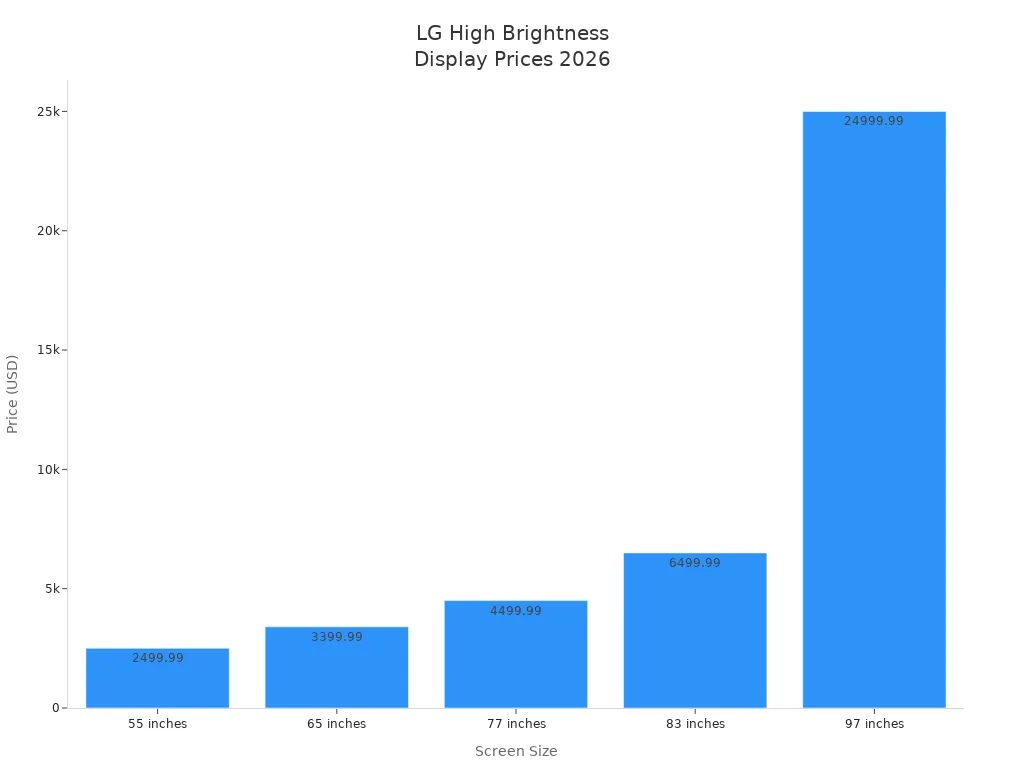
Model | Screen Size | Price |
|---|---|---|
OLED97G6WUA | 97 inches | $24,999.99 |
OLED83G6WUA | 83 inches | $6,499.99 |
OLED77G6WUA | 77 inches | $4,499.99 |
OLED65G6WUA | 65 inches | $3,399.99 |
OLED55G6WUA | 55 inches | $2,499.99 |
Philips 4000 Series
Philips 4000 Series is reliable for digital signage hardware. It gives you steady video signage and keeps your content running. The CMND & Control system lets you manage many screens from one place. Fail Over switches to backup if the main input stops, so your screen stays on. Smart Power cuts energy use by half. You can add an OPS media player for upgrades.
Feature | Description |
|---|---|
Dependable Video Signage | Reliable solution for maximum productivity. |
CMND & Control | Manage, monitor, and maintain displays over a local network. |
Fail Over | Switches between primary and secondary inputs to keep content on screen. |
Smart Power | Reduces power use by up to 50%. |
Optional OPS Slot | Add hardware upgrades with an OPS-compatible media player. |
Note: Philips 4000 Series is known for reliability and built-in media players. You can count on it for important business needs.
Pros:
Very reliable.
Easy to control many screens.
Saves energy.
Cons:
Has fewer advanced features than some others.
May need upgrades for special content.
Ideal Use Cases:
You can use Philips 4000 Series in banks, hospitals, and public places where uptime is important.
Indicative Pricing:
Prices start at about $1,000 for standard models.
BrightSign Media Players
BrightSign media players are top digital signage media players. They are made for nonstop use. The special OS keeps your system safe. These players support HTML5, 4K content, and interactive features. You can use them with many content management systems.
Unique Selling Point | Description |
|---|---|
Reliability | Built for 24/7 operation |
Security | Proprietary OS with minimal attack surface |
Support | Industry-leading technical support |
Ecosystem | Wide CMS compatibility |
Features | HTML5, 4K, interactive, synchronization |
Pros:
Very reliable.
Safe and stable.
Works with lots of software.
Cons:
No screen built in.
Needs separate screens.
Ideal Use Cases:
You can use BrightSign media players in stores, hotels, and bus stations. They are good for video walls, kiosks, and interactive screens.
Indicative Pricing:
Prices go from $350 to $900, depending on the model.
IAdea Digital Signage Players
IAdea digital signage players are flexible for many industries. You can use them in banks, schools, hospitals, stores, hotels, stadiums, and airports. These players help with lines, campus messages, patient flow, ads, and real-time updates.
Key Features:
Helps with line management and brand messages.
Works for campus alerts and directions.
Handles patient messages and health content.
Runs menu boards and digital ads.
Boosts fan fun in stadiums.
Gives real-time info in airports.
Pros:
Works for many industries.
Easy to add more.
Supports interactive and changing content.
Cons:
Needs separate screens.
Some advanced features cost more.
Ideal Use Cases:
You can use IAdea players in banks, schools, hospitals, stores, hotels, and airports.
Indicative Pricing:
Prices start at about $300 for basic models.
ViewSonic CDE Series
ViewSonic CDE Series is a good choice for digital signage hardware. It has 4K resolution, built-in media players, and easy wireless sharing. The screens can run all day and night and can be managed from far away. You can use them for presentations, menu boards, and info screens.
Key Features:
4K Ultra HD resolution.
Built-in media player for easy playback.
Wireless screen sharing.
Remote device management.
24/7 operation.
Pros:
Good price for what you get.
Easy to set up.
Reliable for business.
Cons:
Not as bright as outdoor screens.
Fewer advanced features.
Ideal Use Cases:
You can use ViewSonic CDE Series in offices, schools, and stores.
Indicative Pricing:
Prices start at about $800 for a 55-inch screen.
This digital signage hardware comparison gives you strong choices for every need. You can pick the best one by matching features to your business goals.
Digital Signage Hardware Comparison Table
Digital Signage Hardware Showdown for Modern Enterprises: Check out this chart to see how each device compares.
You want to pick the best hardware for your business. This chart shows the top digital signage hardware for 2026. It lets you see how each device does in display quality, processing power, connectivity, durability, scalability, and price.
Hardware | Display Quality | Processing Power | Connectivity | Durability | Scalability | Price Range |
|---|---|---|---|---|---|---|
Samsung QM Series | 4K LCD, 500 nits | SoC, quad-core, 2.5GB RAM | Ethernet, Wi-Fi | 24/7 operation | Cloud-ready | $1,200+ |
LG High Brightness | LED, up to 3,000 nits | SoC, advanced cooling | Ethernet, Wi-Fi | IP56, outdoor rated | Modular, cloud-ready | $2,499–$24,999 |
Philips 4000 Series | LCD, 700 nits | SoC, optional OPS | Ethernet, Wi-Fi | Fail Over, 24/7 | Easy upgrades | $1,000+ |
BrightSign Media Player | N/A (external display) | Dedicated player, 4K | Ethernet, Wi-Fi | 24/7, secure OS | Wide CMS support | $350–$900 |
IAdea Player | N/A (external display) | Dedicated player, 4K | Ethernet, Wi-Fi | Commercial grade | Flexible, cloud-ready | $300+ |
ViewSonic CDE Series | 4K LCD, 350 nits | SoC, built-in player | Ethernet, Wi-Fi | 24/7 operation | Remote management | $800+ |
There are big differences in display quality. LCD screens are good indoors and cost less. LED screens are brighter and work outside. Video walls use many screens to make one big display. Interactive touch displays let people use the screen in places like malls and museums.
Processing power is important for smooth videos. System-on-Chip displays do simple jobs. External media players are stronger and play cool videos and 4K content.
You can connect with Ethernet for a steady link. Wi-Fi lets you move things around more easily. Commercial displays run all day and night, so they last longer. You can add more screens with cloud platforms and modular upgrades.
Mounting options include wall mounts, ceiling mounts, and stands. These help you set up the hardware safely. Every device needs a good power source.
This chart makes it easy to compare hardware. You can find what fits your needs and make a smart choice for your business.
Best Hardware by Use Case
Retail Environments
Stores want to be noticed. Digital signage hardware helps stores stand out. In retail, displays catch eyes and help shoppers. You can use interactive kiosks, menu boards, and video walls. These tools help customers find things and make choices faster. They also stop confusion and help stores sell more.
Interactive kiosks let shoppers look for items or check prices.
Digital menu boards show deals and new products.
Video walls make a big impression near entrances.
Samsung QM Series and BrightSign Media Players are good for stores. They show clear pictures and let people interact. You get reliable hardware for busy shops.
Corporate Offices
Offices need digital signage hardware for many uses. Meeting rooms, lobbies, and break areas all need different screens. The right hardware helps you share news, show schedules, and welcome guests.
Feature | Description |
|---|---|
Display Types | Use different screens for meeting rooms, lobbies, and hallways. |
Pick screens that stay visible in bright or dim spaces. | |
Durability | Choose hardware that lasts and works every day. |
Commercial-Grade | Use business displays, not home TVs, for better results. |
Interoperability | Make sure your hardware works with your software. |
Multi-Screen Support | Control many screens from one place for easy updates. |
Philips 4000 Series and ViewSonic CDE Series are strong for offices. You can manage many screens and keep your team updated.
Outdoor Installations
Outdoor screens face tough weather and bright sunlight. You need hardware that can handle rain, heat, and cold. High brightness and weatherproofing are important.
Specification | Requirement |
|---|---|
Brightness | 2,500+ nits for sunlight |
Weatherproofing | IP65 or higher |
Temperature Range | -30°C to 50°C+ |
Screen Treatment | Anti-glare, anti-reflective |
Design | Vandal and UV resistant |
Drainage | Stops water from pooling |
Media Player | Outdoor-rated or sealed |
Ventilation | Keeps hardware cool and dry |
LG High Brightness Displays are best for outdoor signs. They stay bright and clear, even in direct sun.
Interactive Kiosks
You want customers to use your brand. Interactive kiosks help people find info, order food, or check in. These need touch screens and fast media players.
Touch screens make self-service simple.
Fast processors keep things running smoothly.
Strong cases protect the hardware from heavy use.
IAdea Digital Signage Players and BrightSign Media Players are top for kiosks. They support touch features and work all day.
Small Businesses
Small businesses want value and easy setup. Cost-effective solutions work well for them. You can use LCD displays or Android-based media players for most needs.
Category | Price | Typical Use |
|---|---|---|
Basic | $50-$100 | 1-3 screens |
Professional | $100-$250 | Most commercial uses |
Enterprise | $250-$500 | Large setups, more features |
LCD displays are good indoors. LED displays are best for outdoor signs. Interactive touch displays help with self-service. Renting equipment for events can save money.
ViewSonic CDE Series and low-cost Android boxes are affordable. You get reliable digital signage without spending too much.
Digital Signage Hardware Buying Guide
Assessing Business Needs
First, think about what your business wants to do. A small shop might only need one screen. A big company could need lots of screens in many places. Write down where you want each screen. Also, write what you want to show on them. This will help you pick the right media player and display. You should choose hardware that fits your content and where you put it. This makes sure people see your message clearly.
Budget and Value
Decide how much money you can spend before you shop. Prices are very different for each device. Some digital signage software solutions work with cheap devices. Others need special hardware that costs more. Consumer devices are cheaper but may not work well with many screens. Commercial-grade options cost more but last longer and break less. Always check the total price, including setup and support.
Technical Requirements
Check the technical details and features for each device. You need enough RAM and storage for your content. For smooth and clear digital signage, pick displays with 4K or 8K support. Features like kiosk mode, secure boot, and remote management help stop problems. Xibo recommended hardware usually has these features. Make sure your hardware can handle all your screens.
Software Compatibility
See if your hardware works with your digital signage software solutions. Some devices only work with one platform. Others work with many, so you have more choices. Here is a quick look:
Hardware Option | Platform Compatibility | Notes |
|---|---|---|
BrightSign | Works with most digital signage software solutions. | |
Amazon Signage Stick | 61 CMS partners | Open-platform, flexible. |
Yodeck Player | Yodeck only | Locked to one platform. |
ScreenCloud Station P1 Pro | ScreenCloud only | Locked to one platform. |
Windows Mini PCs | Any CMS with Windows app | Very flexible. |
If you want to change your digital signage software solutions later, open-platform hardware is best. This lets you keep your hardware and just change the platform as you grow.
Future-Proofing
Pick hardware that will last a long time. Look for specs that support new features and updates. Choose devices that can run all day and night. Make sure you can add more screens as your business gets bigger. Future-proof hardware keeps your system strong and working well. This saves you money and worry later.
Tip: Always ask about technical support and warranty before you buy. This helps you get help fast if something breaks.
You saw the digital signage hardware comparison for businesses. Every device has something special. Samsung and LG have screens that are bright and clear. Philips and ViewSonic are easy to use and dependable. BrightSign and IAdea give you media players that work in many ways. When picking hardware, think about what your business needs. Check for features like AI-powered analytics, saving energy, and remote control. The best digital signage platform helps your business grow and change with new trends. This guide helps you make smart choices for the future.
cery, quick‑service restaurants)?
Digital Signage Hardware Showdown for Modern Enterprises
This showdown compares the four main hardware categories, breaks down the key vendors and specifications that matter most for business environments, and provides a decision framework for selecting components that balance performance, reliability, and total cost of ownership.
1. The Four Hardware Categories
Digital signage hardware consists of four interconnected layers, each with distinct decision criteria and trade-offs.
Display Hardware – The visual foundation of your network. Choice hinges on environment (indoor/outdoor), viewing distance, and brightness requirements. Commercial-grade displays are purpose-built for 16–24-hour continuous operation, with warranties that remain valid in commercial settings [10†L10-L16].
Media Player – The "engine" that downloads, stores, and renders content. This component directly impacts reliability, content capabilities, and total cost of ownership [8†L3-L6]. Media players can be dedicated hardware (like BrightSign), standard computing platforms (Android/Windows), or built into the display itself.
Content Management System (CMS) – The software "brain" that creates, schedules, and manages content across your network. While technically software, the CMS must be considered alongside hardware decisions.
Support Infrastructure – Networking equipment (Ethernet, Wi-Fi, PoE switches), mounting hardware, and cabling. Often underestimated, these elements account for significant installation costs and long-term maintenance requirements.
2. Display Hardware: Commercial vs. Consumer
The most common mistake in digital signage deployments is using a consumer TV in a commercial environment. Consumer TVs are designed for 4–8 hours of daily use in controlled environments [10†L8-L9]. Commercial displays are built for 16–24-hour continuous operation with enhanced cooling, higher brightness (350–700+ nits standard, up to 3,000–5,000+ nits for high-bright models), and 3–5-year warranties [10†L9-L16].
Factor | Consumer TV | Commercial Display |
|---|---|---|
Designed run time | 4–8 hours/day | 16–24 hours/day (24/7 capable) |
Warranty | 1–2 years | 3–5 years |
Brightness | 250–400 nits | 350–700+ nits (up to 3,000–5,000+ nits) |
Orientation | Landscape only | Portrait and landscape |
Thermal design | Basic | Enhanced cooling for continuous operation |
Remote management | Basic IR | RS232, LAN control, IP management |
Price (55″) | $300–500 | $800–1,500 |
5-Year TCO Comparison – A consumer TV ($400) may require two replacements over five years (total $1,200 in hardware) plus downtime and IT costs, while a commercial display ($1,200) lasts the full term with minimal operational disruption [10†L25-L30].
3. Media Player Options: The Engine of Your Signage
The media player determines reliability, content capabilities, and long-term management complexity.
Player Type | Cost | Power | Reliability | Best For |
|---|---|---|---|---|
BrightSign | $$ | Medium-High | Excellent | Enterprise, mission-critical |
Windows PC | $–$$ | Highest | Good | Complex content, video walls |
Android | $ | Medium | Good | Cost-sensitive, standard content |
Raspberry Pi | $ | Low | Fair | DIY, education, basic content |
System-on-Chip (SoC) | $* | Medium | Good | Simple deployments |
Amazon Signage Stick | $ (99.99) | Medium | Good | Affordable commercial-grade |
*SoC cost included in display purchase [8†L14-L20]
BrightSign is the market leader with over 2 million units deployed worldwide, running a proprietary OS designed specifically for 24/7 signage operation [8†L21-L24]. Its built-in Neural Processing Units (NPUs) run AI applications (motion, gaze detection, audience measurement) directly on the player, enabling privacy-forward real-time interactivity without impacting video performance [16†L18-L23]. BrightSign Series 6 models (HD225: $200–250 for 1080p basic; HD1025: $300–400 for standard commercial; XD235: $400–500 for 4K dual output; XT1145: $800–1,000 for enterprise/video walls) cover the full spectrum from simple menus to complex installations [8†L30-L38].
Amazon Signage Stick ($99.99) is the newest commercial-grade entrant, offering 4K output, Wi-Fi 6E, kiosk mode, secure boot, remote management API, and Amazon's 3‑year security update guarantee. It works with 61 different CMS platforms [11†L33-L37].
External media players generally handle demanding content better than SoC displays, deliver higher performance for ultra-high-definition video, interactive menus, video walls, and real-time dashboards, and are easier to upgrade as technology evolves [14†L29-L38].
4. SoC Displays: When Built-In Players Make Sense
System-on-Chip (SoC) displays integrate the media player directly into the display. Samsung (Tizen/SSSP), LG (webOS for Signage), and Philips (Android SoC) are the three major SoC signage ecosystems [15†L8-L14].
Platform | Operating System | CMS Options | 55″ Price Range |
|---|---|---|---|
Samsung Tizen | Tizen OS | MagicINFO (free Lite), 100+ third-party | $700–900 |
LG webOS | webOS | SuperSign (free, up to 100 displays), third-party | $700–900 |
Philips Android | Android | Broadest third-party app compatibility | Slightly higher |
Advantages of SoC signage include cleaner installations (one device instead of two, no external player, fewer cables, fewer failure points), centralized management (some platforms let you manage display settings alongside signage content from one dashboard), and lower upfront hardware cost compared to commercial display plus dedicated player [15†L34-L46].
Disadvantages include higher upfront cost vs. consumer TV setups (a $700 Samsung commercial display with built-in SoC replaces a $400 consumer TV plus a $200 BrightSign player — that's $100 savings plus one fewer device to maintain. But it doesn't save money compared to a $350 consumer TV plus a $35 Fire TV Stick) [15†L37-L50], locked ecosystems (Samsung Tizen apps must be written specifically for Tizen, not generic Android), and potential performance limitations with advanced content [15†L47-L50].
5. Brightness Requirements by Environment
Choosing the right brightness level (measured in nits/cd/m²) is critical for content visibility. Most buyers get this wrong because they pick a screen first, then figure out where to put it [9†L18-L20].
Environment | Required Brightness | Notes |
|---|---|---|
Office/indoor (controlled) | 300–500 nits | Standard commercial displays suffice |
Retail (general indoor) | 450–700 nits | Competing with store lighting |
Lobby with windows | 700–1,000 nits | Ambient sunlight exposure |
Window-facing (inside) | 1,500–2,500 nits | Direct sunlight through glass |
Outdoor (shaded) | 2,000–3,000 nits | Reflected sunlight |
Outdoor (direct sun) | 3,000–5,000+ nits | Full sun visibility required |
Reference points: Consumer TV ~300 nits (washes out in retail lighting). Standard commercial: 450–700 nits (adequate for most indoor). High-brightness: 1,000–3,000 nits (window and outdoor). Ultra-high-brightness displays can reach 4,500+ nits for direct sunlight [10†L31-L43].
6. LCD vs. LED vs. OLED: Display Technology Tradeoffs
Technology | Best For | Key Trade-offs |
|---|---|---|
Commercial LCD (IPS panels) | Indoor signage (menu boards, wayfinding, corridors) | Cost-effective, up to 178° viewing angles, 4K support, runs reliably in continuous use. The "workhorse" of indoor signage [9†L28-L32]. |
Direct-View LED (dvLED) | Outdoor signage, large open venues, video walls | 5,000+ nits, no bezel, unlimited panel size. Lower pixel density at close range, higher upfront cost. GOB surface protection for rental/event use [9†L39-L47]. |
OLED | Boardrooms, flagship retail, automotive showrooms | Self-emissive, infinite contrast, ultra-thin. Expensive, burn-in risk with static content [9†L48-L51]. |
LCD continues to dominate as the "industry's workhorse" for digital signage [0†L49-L50]. dvLED excels in outdoor and large-format, high-brightness applications, with higher upfront cost but longer lifespan [0†L12-L15].
7. Major Vendor Comparison
Brand | Core Platform | Key Products | Price Range | Best For |
|---|---|---|---|---|
Samsung | Tizen (SSSP) | QBR/QBB/QBC series (43–85″), OH series (outdoor), The Wall (MicroLED) | $500–$15,000+ | Enterprise-wide signage, MagicINFO ecosystem [17†L11-L18] |
LG | webOS for Signage | UH5N/UH7N/XE4F series | $500–$3,000+ (43–55″) | Simple deployments, free SuperSign CMS [18†L18-L22] |
BrightSign | BrightSignOS | XD5/XD6, HD series, XT series | $200–$1,000 | Mission-critical, 24/7 operations, AI-powered signage [8†L21-L41] |
CrownTV | Cloud-based CMS | Purpose-built player | Varies | Retail chains, QSRs, zero-downtime deployments [12†L39-L49] |
8. Decision Framework: Building Your Signage System
Step 1 – Define the environment. Brightness requirements are dictated by location, not screen specs. A 350-nit display fails in a sun-drenched atrium; a $5,000 outdoor-rated panel is overkill indoors [9†L18-L23].
Step 2 – Choose commercial vs. consumer. For 24/7 operation, portrait orientation, window-facing installations, or any enterprise deployment requiring warranty coverage, commercial displays are essential [10†L20-L23].
Step 3 – Select media player architecture. SoC displays simplify deployment for basic content. External players (BrightSign, Windows) are required for demanding content, interactive applications, video walls, and enterprise-scale remote management [14†L18-L26].
Step 4 – Evaluate total cost of ownership. Commercial hardware costs more upfront but often delivers lower TCO over 3–5 years when downtime, replacement costs, and IT support are factored in [10†L24-L30].
Step 5 – Plan for remote management. If managing more than a few screens, hardware with built-in remote management capabilities (remote reboot, health monitoring, content updates) is essential [14†L38-L42].
9. Emerging Trends for 2026
AI at the edge — BrightSign's built-in NPUs enable real-time audience measurement and object detection directly on the player, without cloud latency or privacy concerns [16†L18-L23].
SoC adoption — SoC technology is a key factor driving the global digital signage market's 5.8% CAGR through 2036 [3†L44-L45]. Samsung, LG, and Philips continue to expand their SoC platforms.
Glasses‑free 3D — Samsung's Spatial Signage (85″ 4K UHD) launched in 2026 for retail, exhibitions, and entertainment, with 32″ and 55″ models following [2†L24-L28].
MicroLED — Samsung's 130‑inch Micro RGB signage debuted for commercial audiences at ISE 2026, offering "the most advanced Micro LED technology to date" for ultra-premium installations [2†L6-L10].
10. Common Mistakes to Avoid
Picking a screen first, location second. This leads to over-engineered or under-spec'd hardware [9†L18-L23].
Using consumer TVs in commercial environments. Short warranties, insufficient brightness, portrait orientation voids warranties, and inadequate cooling lead to premature failure [10†L8-L16].
Underestimating brightness requirements. A 500-nit display in a window-facing installation fails; budget for 1,500–2,500 nits in these environments [10†L35-L37].
Ignoring remote management needs. For any network beyond a handful of screens, hardware without remote management capabilities becomes an operational nightmare [14†L38-L42].
Locking into a proprietary CMS. Choose hardware that supports multiple CMS platforms to avoid vendor lock-in and retain flexibility.
Would you like a detailed vendor shortlist based on your specific deployment environment, number of screens, and content complexity?
FAQ
What is digital signage hardware?
Digital signage hardware means things like screens, media players, and mounts. You use these to show videos or pictures in public places. You also need digital signage software to control what is on the screens. The hardware works best when you use it with the right software.
Why do I need digital signage software with my hardware?
Digital signage software helps you manage your content. It lets you pick what shows up and when. Without the software, your hardware cannot show the right message at the right time. Using both together gives you more value.
How do I choose the best digital signage software for my business?
Pick digital signage software that matches what you need. Make sure it works with your hardware. Check if it lets you update from the cloud, manage screens from far away, and schedule easily. Good software helps you grow and keeps your content new.
Can I use any digital signage software with all hardware?
Not every digital signage software works with all hardware. Some only work with certain brands or models. Always check if they work together before you buy. The best software is flexible and works with many types of hardware in a digital signage hardware showdown.
What features should I look for in digital signage software?
Look for software that makes it easy to update content and control screens from anywhere. It should have strong security. Good digital signage software lets you manage lots of screens in one place. It should support images, videos, and live data. The right software helps you do well in the digital signage hardware showdown for modern businesses.
See Also
Innovations in Digital Signage Technology Coming in 2026
Best Digital Signage Solutions for Retailers in 2026
Popular Digital Signage Options Gaining Attention in 2026
Selecting The Ideal LCD Digital Signage For Your Business in 2026
