Top Bank Digital Signage Providers Compared for 2026
Shenzhen TopAdkiosk Display Technology Co., Ltd.
Add.: 2F, Bldg 10, Changfeng Industrial Park, Dongkeng, Fenghuang, Guangming, Shenzhen, China 518132
Mobile/WHATSAPP: 86-138 25769658
Email: marketing@topadkiosk.com topadkiosk@gmail.com
Skype: pghenry1
Wechat: adkioskhenry
English Web.: https://www.topkioskdisplay.com/
http://www.ad-kiosk.com/
https://www.toplcddisplay.com/
http://www.multitouchdigitalsignage.com/
https://www.youtube.com/channel/UCYVYNJHxLVEcQD8fuUxXNTA/videos?view_as=subscriber
https://www.facebook.com/TOPADKIOSKSHENZHEN/?ref=bookmarks
You will see Samsung Electronics, LG Electronics, and Panasonic are top in bank digital signage for 2026. Banks use bank digital signage to help talk to people and build trust in branches. The market for bank digital signage is getting bigger. In 2026, money made is expected to be USD 7.21 billion. This shows a 7.40% yearly growth rate. Banks pick digital signage software to follow new trends and reach customers. You want solutions with good features, fair prices, strong security, and helpful support. Bank digital signage matches your need for better service and more efficiency.
Key Takeaways
Digital signage helps banks talk to customers and make their visit better.
Picking a provider, such as Samsung, LG, or Panasonic, depends on what your bank wants and needs.
Buying digital signage can cut costs by half and make customers pay more attention.
When choosing digital signage software, check for things like cloud management, security, and updates that happen right away.
Interactive screens and content made just for each person can make banking more fun and help customers learn more.
Bank Digital Signage Market 2026
Market Growth and Trends
Banks are changing quickly in 2026. Digital signage software helps banks follow new trends. You want to know what affects the market. Market analysis shows banks use more interactive screens. There is more personalized content and live financial feeds. Touchless and smart signage solutions are becoming more popular. Banks want to make customer experiences better.
Trend Description |
|---|
More Personalized Content Using Data |
More Real-Time Financial Information Feeds |
More Touchless and Smart Signage Solutions |
More Focus on Making Customer Experience Better |
Market analysis says banks spend money on digital signage software to stay ahead. Banks use these tools to connect with customers and share important news fast.
Why Banks Invest in Digital Signage
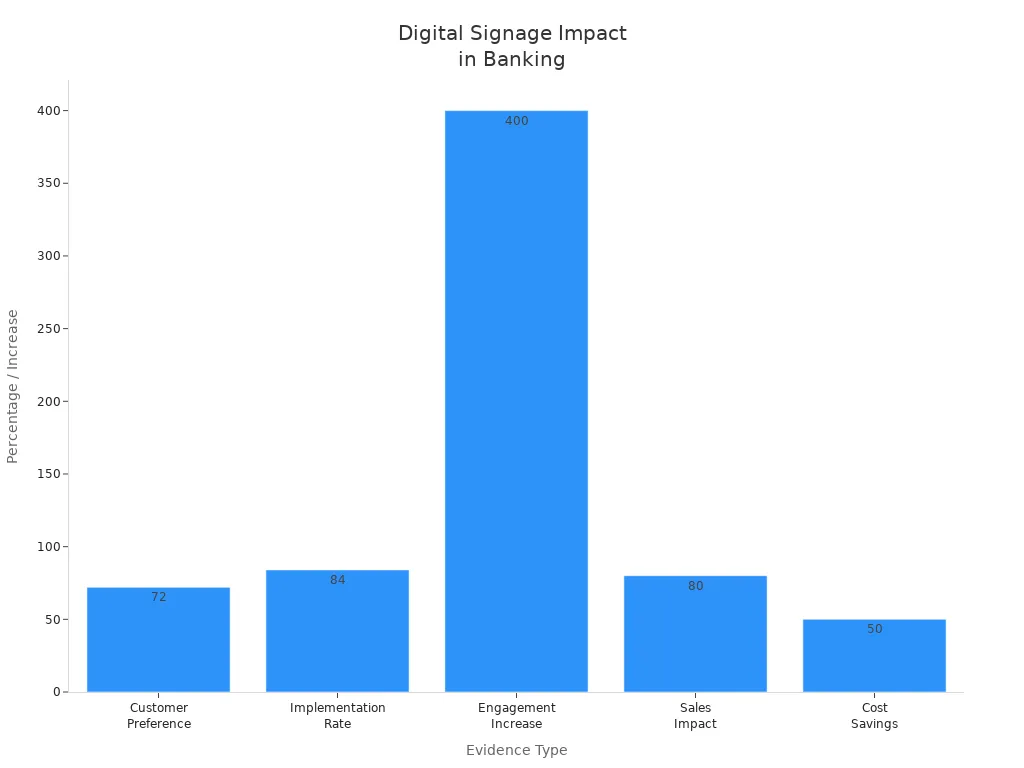
You want your bank to be different. Digital signage software lets you reach customers with special messages. Most banks in the U.S. use digital signage. You see that 84% of retail branches have these tools. Customers like digital-first experiences. You notice that 72% of banking customers want personalized content.
Digital signage software gets more attention than regular displays. Recall rates go up to 83%. Banks using digital signage see more sales. You save money by cutting print and admin costs by up to 50%.
Digital signage software helps you talk to customers with live updates.
You make work easier by using less paper.
Interactive screens let customers help themselves and work faster.
Banks use digital signage software to give better service and save money. These tools help banks grow and handle new problems.
Leading Digital Signage Software Providers
Samsung Electronics Overview
Samsung Electronics is a top choice for banks. They have many products. You can pick LED video walls, commercial displays, or touchscreens. Their cloud system lets you change messages fast. Many banks like Samsung for new ideas and clear screens. The screens work well even in bright places. Sharon Cook from Mountain America says, “The video walls are a big part of our branch changes and Samsung displays are better than we hoped.” Samsung is trusted for lasting screens and a strong name.
Aspect | Details |
|---|---|
Market Position | Top company in North America |
Product Portfolio | LED video walls, commercial displays, touchscreens, cloud management |
Customer Engagement | Makes digital experiences better and gets people involved |
Reputation | Famous for new ideas, clear screens, and lasting quality |
Samsung screens help you send updates and special messages. You can make visits better and help customers trust your bank.
LG Electronics Overview
LG Electronics gives banks smart digital signage tools. You can use Beacon and Bluetooth® Low Energy (BLE) to send special messages. LG’s OLED and Direct View LED screens make your branch look modern. You can change content from far away for all branches. Touch screens help customers find what they need and move around easily.
Get customers interested with digital signage.
Make visits special using BLE technology.
Use great screens for a fancy look.
Change content from anywhere and interact with customers.
Benefit | Description |
|---|---|
Send messages right away and keep branches running well | |
Accurate information | Show rates, currency info, and product changes for rules |
Queue management | Show wait times and guide visitors for a better visit |
Compliance messaging | Show needed notices and rule updates |
Enhanced engagement | Share money tips and customer stories |
Customization | Make solutions fit your bank’s needs |
Panasonic Overview
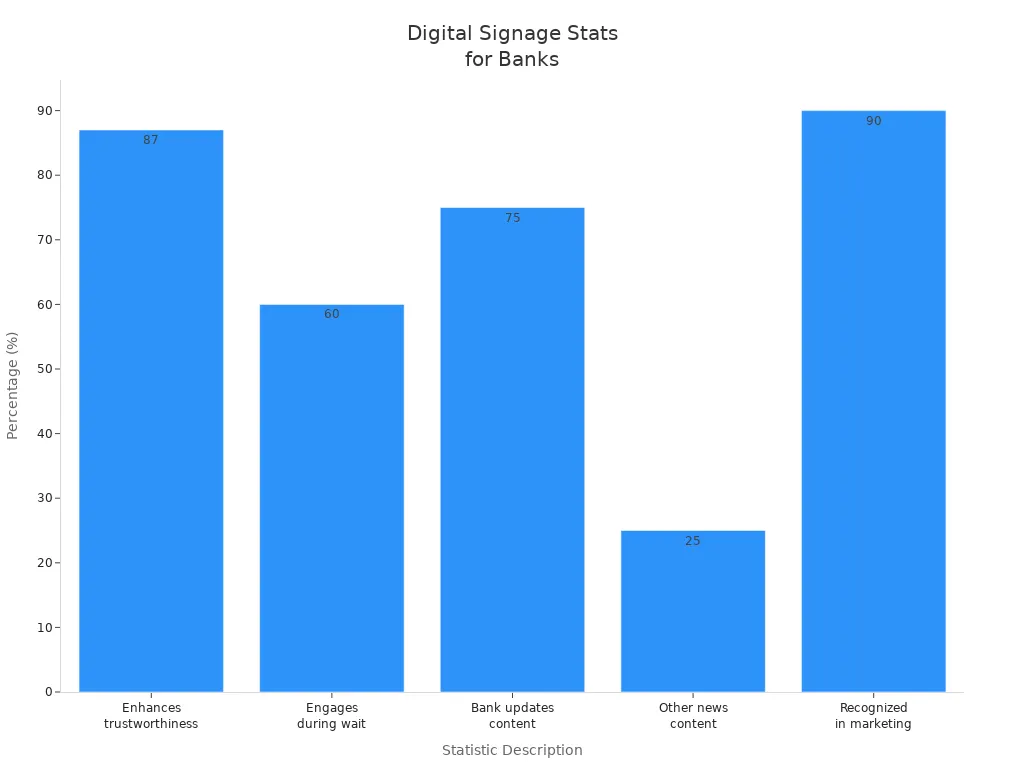
Panasonic is known for trust and keeping people interested. You can use their digital signage to share news while customers wait. Most banks think digital signage is important for marketing. Panasonic helps you send updates, news, and key information. Their screens help your brand and make your bank feel safe.
Statistic | Description |
|---|---|
87% | Customers think digital signage makes banks more trusted |
60% | Banks use signage to keep customers busy while waiting |
75% | Content is about bank updates |
25% | Content is about other news |
9 out of 10 | Banks say signage is very important for marketing |
Panasonic digital signage helps you build trust, keep customers interested, and reach your bank’s goals.
Digital Signage Software Comparison
Feature Comparison
You want software that is easy to use and lets you make changes. Samsung, LG, and Panasonic all have many features for banks. Samsung lets you plan when things show on screens. You can control what is on each screen. Their cloud system helps you manage screens from anywhere. LG has screens you can touch and change. You can send messages to people in real time. You can also control what is on screens in all your branches. Panasonic makes it simple to use their system. They focus on keeping your screens safe. You can plan what shows and check your screens with their system.
Here is a table to help you see what is different:
Provider | Advanced Content Scheduling | Granular Control | Interactive Displays | Cloud-Based CMS | Scalability | Content Management Systems |
|---|---|---|---|---|---|---|
Samsung | Yes | Yes | Yes | Yes | High | Yes |
LG | Yes | Yes | Yes | Yes | High | Yes |
Panasonic | Yes | Limited | Yes | Yes | Medium | Yes |
You can use content scheduling to show messages at the best time. Granular control lets you pick what each branch sees.
Pricing and Value
You want to know how much the software costs and what you get. Samsung lets you pay every month or year. You can pick a plan that fits your bank. LG gives you both hardware and software together. You pay for the platform and get help with the system. Panasonic has one price for the software. You get basic help when you buy it.
Here is a table to compare prices and value:
Provider | Pricing Model | Value Added | Scalability | Bundled Hardware | Customization |
|---|---|---|---|---|---|
Samsung | Subscription-based | Cloud management | High | Optional | High |
LG | Bundled packages | BLE technology | High | Included | High |
Panasonic | One-time purchase | Easy integration | Medium | Optional | Medium |
You can grow your network as your bank gets bigger. Bundled hardware and custom options help you get what you need.
Security and Compliance
You want your bank’s data to be safe. Samsung, LG, and Panasonic all work to keep your data private. Samsung uses strong security and follows CCPA rules. LG has high-level security and meets PIPEDA rules. Panasonic follows both CCPA and PIPEDA. You can trust their systems to keep customer data safe.
Regulation | Description |
|---|---|
CCPA | Requires companies to implement stringent data protection measures. |
PIPEDA | Mandates transparency and security in managing viewer data to avoid legal and ethical issues. |
You can trust these companies to keep your screens safe. They use tools like encryption and access controls to protect your content.
Support and Implementation
You need help when you start using new software. Samsung gives you help all day and night. You can get training for your team. It is easy to use their system. LG gives you help online or in person. You can fix problems fast and update your screens. Panasonic gives you basic help and step-by-step guides. You can call them if you need help.
Provider | Support Type | Implementation Speed | Training | Remote Management | On-site Help |
|---|---|---|---|---|---|
Samsung | 24/7 support | Fast | Yes | Yes | Optional |
LG | Remote/on-site | Fast | Yes | Yes | Yes |
Panasonic | Basic support | Moderate | Yes | Yes | Optional |
You can get help from experts to set up your screens. Training and remote help make it easy to use your network.
Key Differences and Benchmarks
Samsung and LG are good for big banks that need lots of screens. Panasonic is good for banks that want simple systems and basic help. Samsung and LG let you control more and give strong support. Panasonic is easy to use and keeps your data safe. You can look at how big your bank is and what you need most.
Samsung and LG: Best for banks with many screens and need for strong security.
Panasonic: Good for banks that want simple systems and basic help.
You can pick the company that fits your bank best. Look at features, price, safety, and help to choose the right one.
Digital Signage Solutions for Banks
Use Cases in Banking
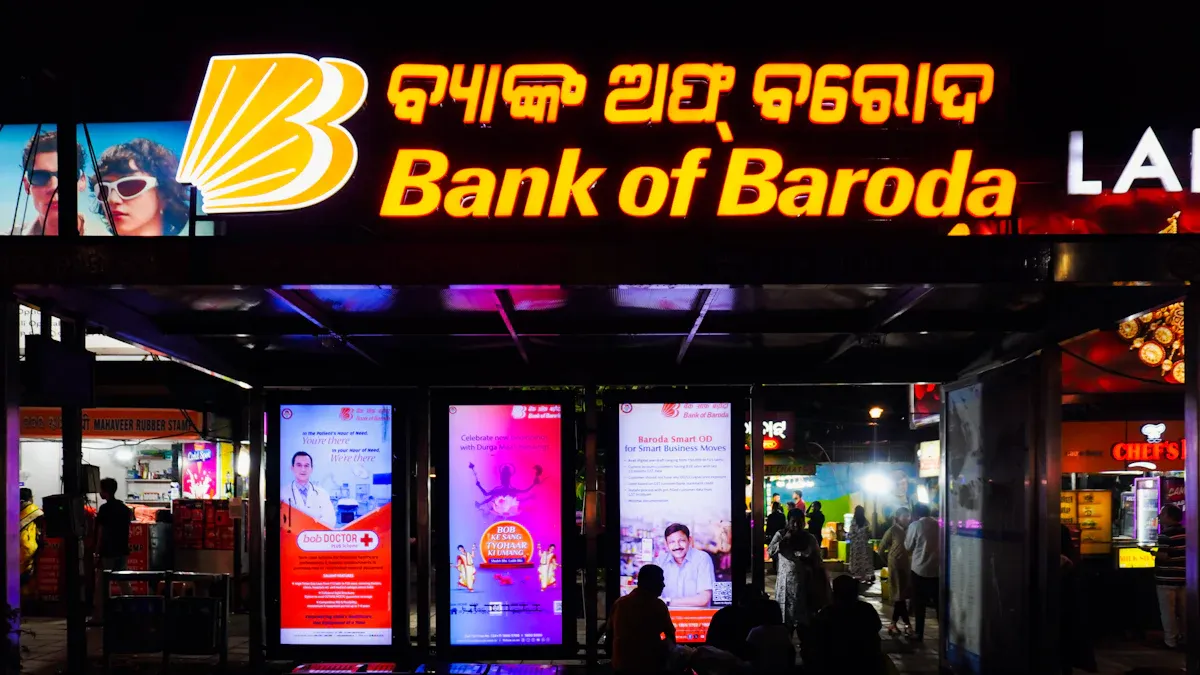
Banks can use digital signage solutions in many ways. When people wait in the lobby, screens can show news or fun facts. This makes waiting feel shorter for everyone. At the teller line, screens can show special offers or new products. It is easy to share updates with all customers this way.
Interactive touchscreen displays are helpful in advisory rooms. These screens show pictures and charts about loans or savings. Customers can touch the screen to see more details. This makes learning about banking simple and fun.
Digital signage solutions help teach customers about money. Banks can show videos about saving or spending. People can play games or take quizzes on the screens. This keeps customers interested and helps them remember what they learn.
Digital signage solutions also help manage lines. A screen can show which counter is open. This helps people move faster and feel less stressed. Screens can connect to the queue system. Customers know how long they need to wait.
Digital signage solutions make banks friendlier and help build trust with customers.
Matching Solutions to Bank Needs
Banks should pick digital signage solutions for each area. In the welcome area, a video wall display can greet people and share news. At the drive-thru, outdoor screens talk to people in their cars. Near the ATM, special displays give tips or safety messages.
Interactive touchscreen displays are good in advisory rooms. They help guide customers through forms or show new services. These digital signage solutions help answer questions fast.
Here is a table to match digital signage solutions to each area:
Area of Bank | Type of Digital Signage | Purpose |
|---|---|---|
Welcome Area | Video Wall Display | Inform and entertain customers |
Drive-Thru | Outdoor Display | Connect with customers |
ATM | Specialty Display | Provide specific information |
Advisory Room | Interactive Touchscreen | Support advisory conversations |
Banks should think about what customers need. If there are many young customers, use games or quizzes on touchscreens. For older customers, use big letters and clear words. Digital signage software lets banks change messages for each branch.
Digital signage solutions help banks save money by using less paper. Screens can update messages in seconds. Banks can make sure all messages follow the rules. With the right digital signage solutions, every visit can be better for customers.
Selection Framework and Recommendations
Decision Factors
You want to pick the best digital signage provider for your bank. Before you choose, you should think about some key things. Here are the main points to check:
Security Measures: You have to keep customer data safe. Look for things like two-factor authentication and strong safety rules. Banks need enterprise-grade security, such as data encryption and safe content delivery.
Uptime Rates: Your screens should always be on. Choose a provider with at least 99.5% uptime. This helps your messages show up without stopping.
Cloud-based Solutions: You want to control your screens from anywhere. Cloud systems let you update content quickly and help your bank grow.
Compatibility with Hardware: Make sure the software works with many kinds of screens. This saves money and lets you use what you already own.
Built-in Content Editor: You need to make and change messages easily. A good editor helps you save time and share news fast.
Banks also care about these three things:
Aspect | Description |
|---|---|
Security | You need strong security to protect data and follow rules like GDPR and the Gramm-Leach-Bliley Act. |
Scalability | You want a system that grows with your bank and adds new features when you need them. |
Customization | You need to change messages for different customers and branches while keeping data safe. |
Security is the most important thing. Customers trust you to keep their information safe. You must follow all rules and be clear about how you use data.
You can pick Samsung, LG, or Panasonic for bank digital signage. Each company is good in its own way. You should think about what your bank needs. Look at facts and compare before you choose. Getting help and updates later is important too:
Managed solutions make things work better and cost less to fix.
System-on-chip technology makes updates simple.
Good support means screens break less and customers stay happy.
Working with top tech companies helps your bank stay modern.
Pick a provider that can grow with your bank.
How Banks Can Use Digital Signage to Improve Customer Experience
Banks are transforming from transactional "service counters" into customer‑centric financial wellness hubs. Digital signage plays a central role in this shift by reducing perceived wait times, guiding customers, personalizing offers, and building trust. Below are the most effective strategies and use cases.
1. Lobby & Entrance: Make a Positive First Impression
The moment a customer walks in, digital signage sets the tone.
Welcome wall – A large-format video wall displaying the bank’s brand values, community involvement, or rotating customer testimonials. Creates a modern, trustworthy image.
Personalized welcome (with consent) – Integrate with appointment system: “Welcome John Smith – your relationship manager, Maria, is ready for you at desk 3.”
Real‑time lobby status – Show current wait times, available tellers, and busiest hours so customers can decide to wait or return later.
Customer benefit: Feels recognized, informed, and in control.
2. Queue Management: Reduce Perceived Wait Time
Waiting is the top complaint in bank branches. Digital signage makes wait time productive and less frustrating.
Virtual queue displays – Show ticket numbers, estimated wait times, and which counter is serving which number. Customers can see progress without crowding the counter.
Entertainment while waiting – Display financial tips (e.g., “How to save for a down payment”), local weather, or community event news. Reduces anxiety.
Countdown timers – “Your estimated wait: 4 minutes” – sets clear expectations and reduces repeated counter inquiries.
Customer benefit: Feels transparent and respectful of their time.
3. Digital Menu Boards for Products & Promotions
Instead of static posters, dynamic screens showcase products based on time, customer profile, or branch goals.
Dayparting – Morning: promote mobile deposit and coffee discounts. Afternoon: retirement planning and loan consultations. Evening: credit card rewards and weekend hours.
Video explainers – 30‑second animations explaining features of a new credit card, mortgage, or investment account.
Success metrics – “Over 500 customers saved an average of $1,200 by refinancing with us this month.” Social proof drives interest.
QR code direct apply – Scan to pre‑fill an application on the customer’s phone, reducing paper forms.
Customer benefit: Easy to discover relevant products without waiting for a banker.
4. Interactive Kiosks: Self‑Service for Common Tasks
Free up tellers and reduce lines by empowering customers to help themselves.
Check cashing & deposit kiosk – Accepts checks and cash, prints receipts, and updates balance. Available 24/7 outside or during branch hours.
Account opening & document scanning – Upload ID, scan signature, submit forms – all without standing in line.
Loan application terminal – Guided workflow for personal loans, credit cards, or mortgage pre‑approval.
Branch map & staff directory – Touchscreen showing “You are here” and where to find mortgage specialists, notary, or safety deposit boxes.
Customer benefit: Faster service, more privacy for sensitive tasks.
5. Teller Areas: Upsell & Cross‑Sell with Visual Cues
Teller counters are prime real estate for secondary offers.
Teller‑facing customer screen – Small secondary display showing “While you wait, would you like to learn about our high‑yield savings account?” with a simple yes/no button.
Promotional carousel – Rotate three short messages: “Ask about overdraft protection,” “Free credit score check available,” “Next CD special: 4.5% APY.”
Transaction confirmation screen – After a deposit, show a thank you message and a relevant offer (“Would you like to round up your change to savings?”).
Customer benefit: Relevant offers presented at the right moment, not aggressively pitched.
6. Drive‑Thru & ATM Areas: Extend the Experience
Even outside the branch, digital signage reinforces the brand and improves convenience.
High‑brightness outdoor screens – Display current loan rates, CD specials, and ATM withdrawal limits clearly visible in sunlight.
Wait time at drive‑thru – Estimated time at the speaker, plus a QR code to check in and receive a text when ready.
Touchless service guide – Animated instructions on how to deposit checks via ATM with no envelope (walk‑up customers).
Customer benefit: Efficient, modern, and informative even without entering the lobby.
7. Private Office & Wealth Management Areas: Build Trust
High‑net‑worth clients expect a premium, personalized experience.
Digital portfolio dashboard – In the wealth manager’s office, a large screen shows the client’s portfolio performance, asset allocation, and market news – all in real time.
Interactive scenario planning – Use touchscreen to adjust retirement age or contribution rate and see projected outcomes instantly.
Brand reinforcement – Loop subtle brand videos, market insights, and client success stories while the client waits.
Customer benefit: Feels like a partnership, not a transaction.
8. Staff Areas (Indirect Customer Benefit)
Happy, informed employees provide better service. Back‑of‑house digital signage improves internal communication.
Sales leaderboards – Friendly competition among tellers for cross‑sell achievements (privacy‑protected).
Training reminders – Brief compliance or product knowledge refreshers.
Shift schedules & announcements – Reduced confusion, fewer coverage gaps.
Customer benefit: More knowledgeable, motivated staff.
Key Performance Indicators (KPIs) to Track
Metric | Expected Improvement |
|---|---|
Average wait time | 20‑30% reduction |
Customer satisfaction (CSAT) | 15‑25% increase |
Cross‑sell success rate | 10‑20% lift |
Self‑service usage | 30‑50% of routine transactions |
Front desk call volume | 30‑40% reduction (wayfinding & info) |
Printing & poster costs | 60‑80% savings |
Implementation Tips for Banks
Integrate with core systems – Connect digital signage to appointment calendar, queue management, CRM, and transaction data for real‑time personalization.
Start with one branch – Pilot program in a high‑traffic branch, measure results, then roll out.
Use cloud‑based CMS – Allows central management across all branches, remote updates, and compliance control.
Train staff – Show tellers and relationship managers how the signage supports them (reduces repetitive questions, highlights their offers).
Keep content fresh – Assign a branch marketing coordinator to update rates, promotions, and tips weekly.
Conclusion
Digital signage transforms a bank branch from a place of long lines and passive posters into an efficient, empowering, and engaging financial center. By reducing wait anxiety, guiding self‑service, promoting relevant products at the right moment, and building trust through transparency, banks can significantly improve customer experience while also increasing operational efficiency and cross‑sell revenue.
FAQ
What is digital signage software for banks?
Digital signage software helps you control screens in your bank. You can show news, deals, or safety tips. You can change messages quickly. This makes your bank look new and cool.
How does digital signage improve customer experience?
You give customers updates and helpful tips right away. Screens can show how long to wait, special deals, or fun facts. This makes visits easier and more fun.
Is digital signage secure for banks?
Yes. Top providers use strong security tools. You get data encryption, access controls, and regular updates. This keeps your customer information safe.
Can you update content on all screens at once?
You can. Cloud-based systems let you change messages for every branch from one place. This saves time and keeps information correct everywhere.
What support do banks get with digital signage?
You get help by phone, online, or in person. Providers give training, guides, and quick answers to your questions. This helps you use your screens without worry.
See Also
Best Digital Signage Solutions for Retail in 2026
Latest Developments in Digital Signage Tech for 2026
Exploring Digital Signage Trends Influencing 2026 Today
