Top 10 Miniature LCD Displays for Electronics Projects in 2026
Add.: 2F, Bldg 10, Changfeng Industrial Park, Dongkeng, Fenghuang, Guangming, Shenzhen, China 518132
Mobile/WHATSAPP: 86-138 25769658
Email: marketing@topadkiosk.com topadkiosk@gmail.com
Skype: pghenry1
Wechat: adkioskhenry
English Web.: https://www.topkioskdisplay.com/
http://www.ad-kiosk.com/
https://www.toplcddisplay.com/
http://www.multitouchdigitalsignage.com/
https://www.youtube.com/channel/UCYVYNJHxLVEcQD8fuUxXNTA/videos?view_as=subscriber
https://www.facebook.com/TOPADKIOSKSHENZHEN/?ref=bookmarks
As long as we have the blueprints, Shenzhen TopAdkiosk Display Technology Co., Ltd no worse than anyone else.
please contact Shenzhen TopAdkiosk Display Technology Co.
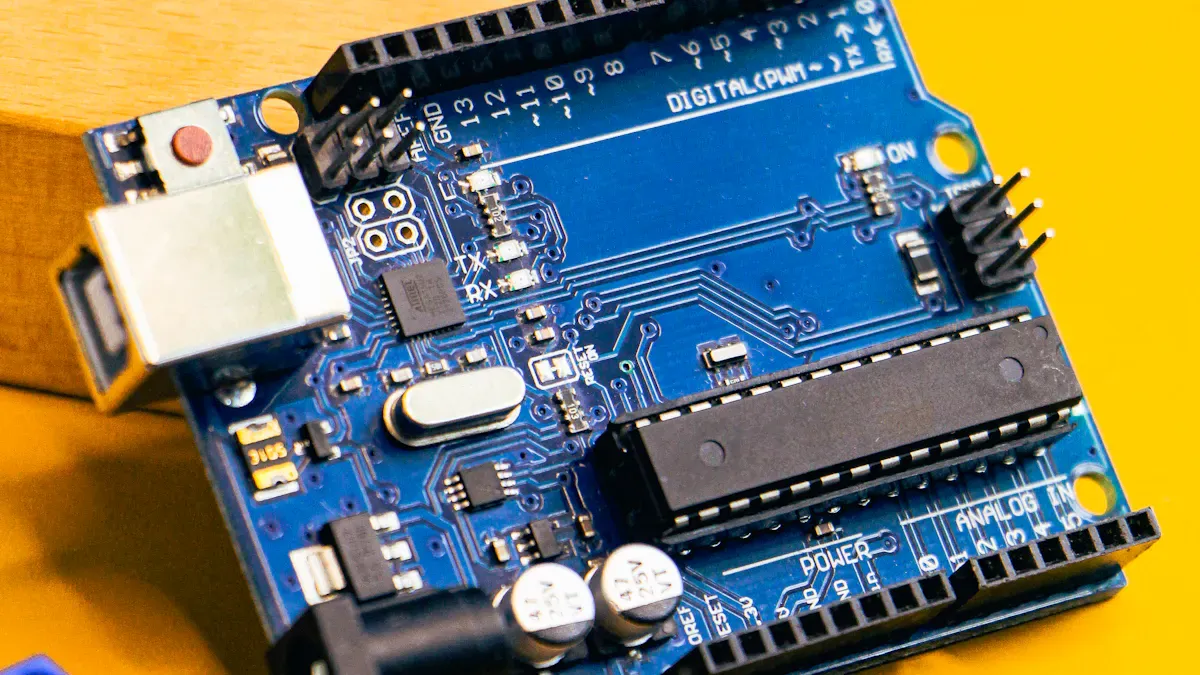
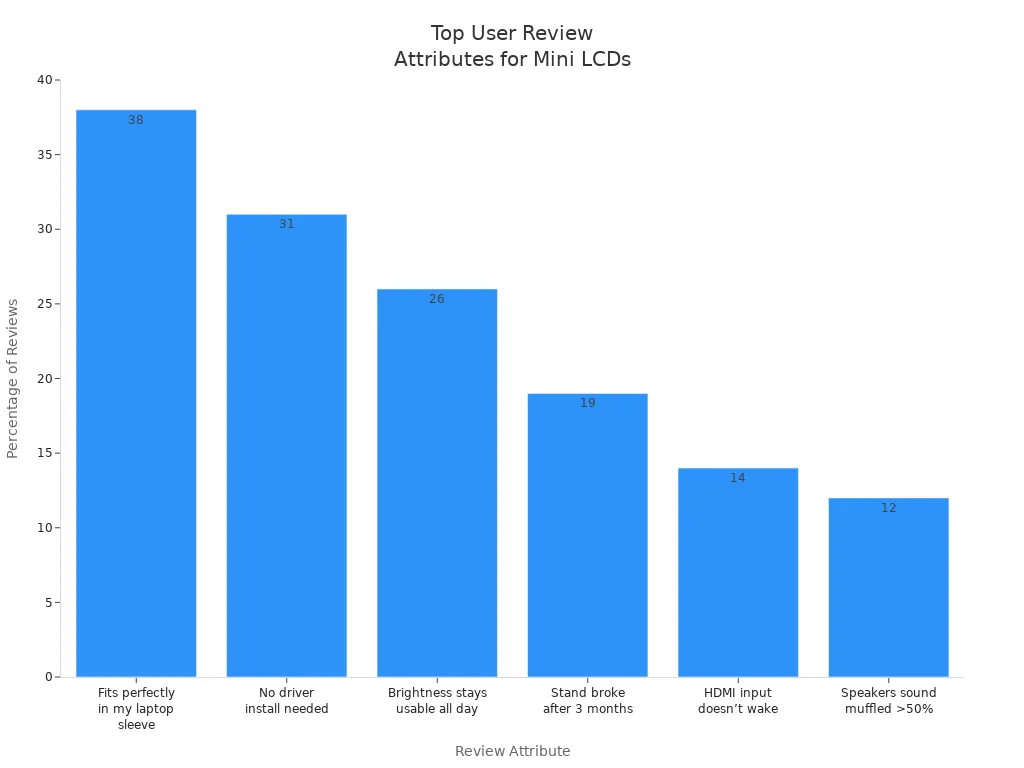
You want the best for your electronics project, right? Check out these top 10 miniature LCD displays for 2026. Choosing the right display matters for DIY and makers. User reviews highlight easy setup and great brightness. See how people rate features in the chart below!
Key Takeaways
Pick the right size and shape for your miniature LCD display so it fits your project and is easy to see. - Find displays with high resolution, at least 800x480, for sharp pictures and words. Also, think about how clear the screen looks and from what angles you can see it. - Make sure your display works with your microcontroller, like Arduino or Raspberry Pi, so you can connect it easily and get help if needed.
Miniature LCD Display Selection Guide
Size & Form Factor
You want your miniature lcd display to fit just right. Think about where you will put it. Will you look at it from the front or side? Will you use it outside in bright sunlight? These questions help you choose the best panel and backlight. Most mini lcd displays are small. They fit well in tight spots. Portability is important for diy electronics. It makes your projects easy to move.
Resolution & Image Quality
A high-resolution mini lcd shows sharp pictures and clear words. If you pick a low-resolution display, you might see blurry pixels. The colors may not look as good. Many people now use displays with at least 800x480 resolution. This gives you better images. But don’t just look at the resolution. You should also check the contrast and how wide you can see the screen.
Connectivity & Compatibility
You need to connect your lcd to your arduino or Raspberry Pi. Check what kind of interface it uses before buying. Here’s a quick look:
Interface Type | Description |
|---|---|
SPI | Uses fewer GPIO pins and is fast for complex data. |
I2C | Saves GPIO pins but is slower than SPI. |
For arduino projects, displays with 320x240 resolution or less work best. Higher resolutions can make things run slower. Look for displays with ZIF tails or easy-to-solder holes. You do not want to solder tiny pins. Make sure your display works with your board and has good library support.
Price & Value
Mini lcd displays do not cost much. They fit almost any budget. Many types cost just over $10. You can find 16x2 character lcd and small TFT displays. Most are simple to use. They have easy interfaces and libraries. There are more choices every year as the market grows.
Application for DIY & Makers
Mini lcd displays are great for diy and makers. You can use them to test electronic projects or try ideas before building bigger things. They work with Raspberry Pi and arduino. This gives you lots of options. High-definition displays help you see your projects better. If you want to save money, you will like these displays. They help your projects without costing too much.
Top 10 Miniature LCD Displays for Projects
Adafruit 1.3" Color TFT
This display is bright and fits in small spaces. The Adafruit 1.3" Color TFT shows clear pictures. It has 240x240 pixels and 16-bit color. You see sharp images and smooth movement. It uses a 4-wire SPI interface. You can connect it to arduino or Raspberry Pi easily. There is a microSD card holder for more storage.
Specification | Details |
|---|---|
Display Size | |
Resolution | 240x240 pixels |
Pixel Density | 260 ppi |
Viewing Angle | Up to 80 degrees off-axis |
Interface | 4-wire SPI |
Color Depth | 16-bit full color |
Driver | ST7789 |
Use Cases | Smartwatches, small devices, compact projects |
Additional Features | MicroSD slot, open source graphics library |
Tip: You can use this lcd for smartwatches or small devices. It is good for projects needing a tiny, colorful screen. It works well with Raspberry Pi for fun apps.
Pros:
High-resolution mini lcd
Wide viewing angle
Easy to use with arduino and Raspberry Pi
Open source graphics library
Cons:
Small size may not fit all projects
SPI interface needs more wires than I2C
Waveshare 2.0" IPS
This lcd shows bright colors and wide angles. The Waveshare 2.0" IPS lcd uses IPS technology. You see clear images from almost any side. The 320x240 resolution gives crisp text and graphics. You connect it to arduino or Raspberry Pi with SPI. It works well for games, meters, and gadgets.
Key Specs:
Size: 2.0 inches
Resolution: 320x240 pixels
Interface: SPI
Technology: IPS panel
Best Use Cases:
Handheld gaming consoles
Portable meters
Colorful dashboards for arduino projects
Pros:
Great color quality
Wide viewing angle
Good for graphics-heavy projects
Cons:
Costs more than basic lcds
Uses more power than monochrome displays
SparkFun 1.8" Serial
This lcd is simple and reliable. The SparkFun 1.8" Serial lcd uses a serial interface. You only need a few wires to connect it to arduino. The 128x160 pixel resolution is good for basic graphics and text. It is perfect for projects needing a small screen and easy setup.
Key Specs:
Size: 1.8 inches
Resolution: 128x160 pixels
Interface: Serial (UART/SPI)
Color: Full color
Best Use Cases:
Simple arduino projects
Wearable gadgets
Data loggers
Pros:
Easy wiring
Low power use
Good for beginners
Cons:
Lower resolution
Not good for detailed images
DFRobot 2.4" Touch
This lcd adds touch to your project. The DFRobot 2.4" Touch lcd has a 320x240 pixel display. It uses a resistive touch panel. You can tap and draw on your electronics. It connects to arduino with SPI or parallel interfaces. It is great for control panels and smart home devices.
Key Specs:
Size: 2.4 inches
Resolution: 320x240 pixels
Interface: SPI/Parallel
Touch: Resistive
Best Use Cases:
Touch control panels
Smart home projects
Interactive arduino projects
Pros:
Touchscreen adds interactivity
Good resolution
Works with many arduino boards
Cons:
Touch is resistive, not as smooth as capacitive
Needs more pins for parallel mode
Seeed Studio 1.54" LCD
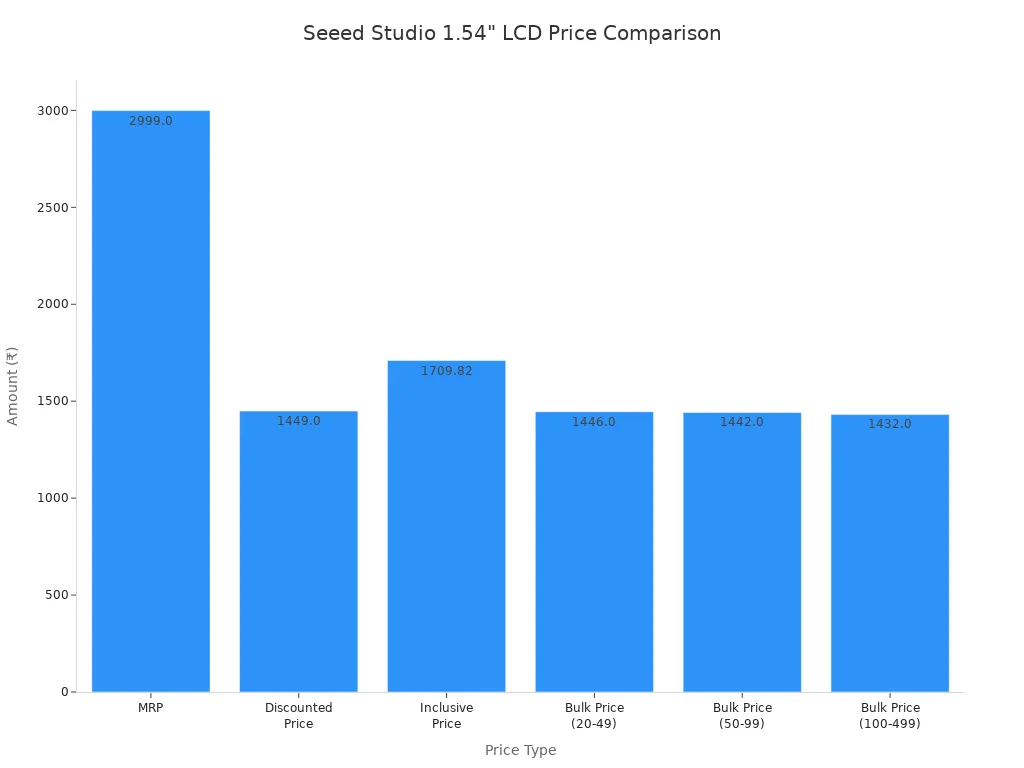
This lcd is cheap and still looks sharp. The Seeed Studio 1.54" lcd gives you a clear display. It fits well in small projects. The price is good for people who want to save money. You can see the price comparison below.
Key Specs:
Size: 1.54 inches
Resolution: 240x240 pixels
Interface: SPI
Price: Affordable for most budgets
Best Use Cases:
Budget diy projects
Wearables
Compact meters
Pros:
Low price
Good resolution for size
Easy to use with arduino
Cons:
Smaller screen
Not as bright as some other displays
Newhaven 2.8" TFT
This lcd is bigger and shows bright colors. The Newhaven 2.8" TFT lcd has a 320x240 pixel display. You can get a resistive touch option for more control. It works with arduino and Raspberry Pi. It is good for dashboards and portable devices.
Key Specs:
Size: 2.8 inches
Resolution: 320x240 pixels
Interface: Parallel/SPI
Touch: Optional resistive
Best Use Cases:
Control panels
Portable dashboards
Prototyping with arduino
Pros:
Large, clear display
Touch option
Good for detailed graphics
Cons:
Needs more space
Uses more power
OLED SSD1306 0.96"
This lcd is tiny and uses little power. The OLED SSD1306 0.96" lcd is popular with hobbyists. It is easy to connect to arduino or Raspberry Pi. The display is easy to read, even in low light. Many people use this lcd for diy electronics and IoT projects.
Low power use
Easy to connect with microcontrollers
Very readable screen
Top seller for hobbyists and mass production
Great for diy, embedded, and IoT projects
Key Specs:
Size: 0.96 inches
Resolution: 128x64 pixels
Interface: I2C/SPI
Color: Monochrome (white or blue)
Best Use Cases:
Battery-powered projects
Wearables
Simple data displays
Pros:
Super low power
Easy wiring
Great for text and icons
Cons:
Small size
No color
Nextion 2.4" Intelligent
This lcd is smart and does more. The Nextion 2.4" Intelligent lcd has a built-in processor. You can design your interface on a computer. Then upload it to the display. It handles buttons and graphics by itself. You only send simple commands from arduino. This lcd is good for advanced projects and smart devices.
Key Specs:
Size: 2.4 inches
Resolution: 320x240 pixels
Interface: Serial (UART)
Processor: Built-in
Best Use Cases:
Smart home controls
Advanced arduino projects
Prototypes with complex interfaces
Pros:
Handles graphics and UI
Easy to program
Reduces load on arduino
Cons:
Costs more than basic lcds
Needs special editor software
SunFounder 1.44" LCD
This lcd is small and colorful. The SunFounder 1.44" lcd has a 128x128 pixel display. It uses SPI for easy connection to arduino. It is good for simple games, meters, and status screens.
Key Specs:
Size: 1.44 inches
Resolution: 128x128 pixels
Interface: SPI
Color: Full color
Best Use Cases:
Mini games
Status indicators
Simple arduino projects
Pros:
Small and colorful
Easy to wire
Good for quick builds
Cons:
Lower resolution
Not for detailed graphics
SainSmart 2.0" LCD
This lcd is versatile for many projects. The SainSmart 2.0" lcd has a 220x176 pixel screen. It shows bright colors. You connect it with SPI to arduino or Raspberry Pi. It works well for meters, clocks, and dashboards.
Key Specs:
Size: 2.0 inches
Resolution: 220x176 pixels
Interface: SPI
Color: Full color
Best Use Cases:
Meters and clocks
Dashboards
arduino projects
Pros:
Versatile mini lcd displays
Good color quality
Easy to use
Cons:
Not the highest resolution
Uses more power than monochrome lcds
Note: If you want something even simpler, try the classic 16x2 I2C lcd or Nokia 5110. These displays are good for text and basic graphics. They work well with arduino.
Mini LCD Displays Comparison Table
It can be hard to choose the right display. There are many choices for your electronics project. This table lets you compare the top 10 displays easily. You can see the screen size and how clear the picture is. The table also shows how each display connects and how much it costs. You can check what each display is best for. Use this table as a quick guide before you buy anything.
Model | Screen Size | Resolution | Connectivity | Price Range | Best For |
|---|---|---|---|---|---|
Adafruit 1.3" Color TFT | 1.3 inch | 240x240 | SPI | $15 - $20 | Smartwatches, compact DIY |
Waveshare 2.0" IPS | 2.0 inch | 320x240 | SPI | $18 - $25 | Handheld games, meters |
SparkFun 1.8" Serial | 1.8 inch | 128x160 | UART/SPI | $12 - $18 | Wearables, data loggers |
DFRobot 2.4" Touch | 2.4 inch | 320x240 | SPI/Parallel | $20 - $28 | Touch panels, smart home |
Seeed Studio 1.54" LCD | 1.54 inch | 240x240 | SPI | $10 - $15 | Budget builds, meters |
Newhaven 2.8" TFT | 2.8 inch | 320x240 | Parallel/SPI | $25 - $35 | Dashboards, prototypes |
OLED SSD1306 0.96" | 0.96 inch | 128x64 | I2C/SPI | $5 - $10 | IoT, battery projects |
Nextion 2.4" Intelligent | 2.4 inch | 320x240 | UART | $30 - $45 | Smart interfaces, advanced |
SunFounder 1.44" LCD | 1.44 inch | 128x128 | SPI | $8 - $12 | Status screens, mini games |
SainSmart 2.0" LCD | 2.0 inch | 220x176 | SPI | $14 - $20 | Meters, clocks, dashboards |
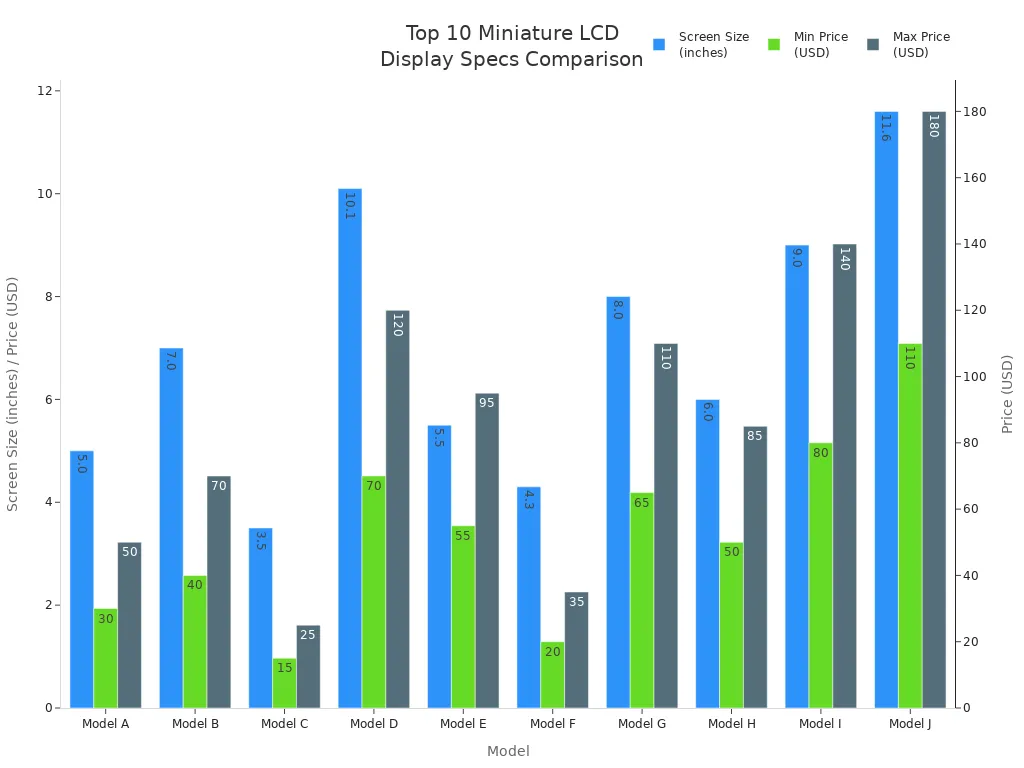
You can quickly see what makes each display different. Some displays let you use touch. Others use less power or show bright colors. If you want a display for a watch or small gadget, pick a small screen and easy connection. For dashboards or smart home controls, you may want a bigger screen with touch. This table helps you find the best display for your project.
Tip: Always make sure your board works with the display before you buy. This will save you time and problems.
Best Miniature LCD Displays for DIY & Makers
Top Picks for DIY Projects
You want a mini lcd display that makes your diy project look cool. Many hobbyists like displays that are simple to use and show clear pictures. If you want good performance and help from other users, try these displays:
ILI9341: This display shows bright colors and sharp details. Many arduino users pick it for their diy projects.
ST7789: Makers like this display because it is reliable and high quality. It works well in small electronics and shows smooth images.
You can use these displays for arduino projects, meters, or fun gadgets. They are cheap mini lcd choices for people who want to save money. You get high-resolution mini lcds without paying a lot. These displays help your project look nice and clear.
Recommended for Makers & Prototypes
If you build prototypes or want to impress others, you need flexible mini lcd displays. Round TFT-LCD displays are now popular in robots and electronics. You see them in robot eyes and smart toys. Many makers use them for new projects because they make users feel connected.
You can find these displays on Amazon, AliExpress, and Crystalfontz. Crystalfontz has sold good displays since 1998. They ship fast and have helpful customer service. You get arduino displays with strong connections and support. These displays fit many budgets and work well for beginners and advanced makers.
Tip: Try different displays for your prototypes. You will learn which ones work best for your electronics and display needs.
You want your project to work well, so choose a display that fits your needs and how much you want to spend. Look at reviews and ask questions in maker forums if you need help. Use this table to compare trusted sellers:
Sourcing Approach | Pros | Cons |
|---|---|---|
Direct-from-Manufacturer | Custom options | High minimum orders |
Distributor Stock | Fast shipping | Higher price |
B2B Marketplace | Low cost, many choices | Quality may vary |
Keep in mind, picking the right display is very important for your project.
What Is a Miniature LCD Display and How Does It Work?
At its core, a miniature LCD is fundamentally the same as the screens on your phone or computer – just shrunk down to an extreme degree. The key to keeping the image sharp despite the small size lies in Thin‑Film Transistor (TFT) technology and high‑density pixel designs. Miniature LCDs are critical components in countless modern compact and portable smart devices, enabling intuitive visual interaction.
📺 What Is a Miniature LCD Display?
This is a broad term. Based on size and application, miniature LCDs typically fall into three overlapping categories:
Category | Typical Diagonal Size | Key Characteristics | Main Applications |
|---|---|---|---|
Microdisplay | < 1 inch (≤ 2.54 cm) | Extremely small physical size; used in optical systems as the source image for projection. | Head‑mounted displays (AR/VR glasses), digital cameras, projectors, smart glasses. |
Mini TFT Display | 0.9″ to 2.0″ | Provides colour display in very tight spaces – can show icons, text, and simple graphics. | Smartwatches, small smartphones, fitness trackers. |
Small LCD Display | 1″ to 7″ | The “sweet spot” for embedded systems – good balance of size, power, and display capability. | Industrial controllers, handheld terminals, medical devices, IoT products, smart home panels. |
⚙️ How Does It Work?
Let’s break down how a miniature LCD actually creates an image.
1. Pixel Control – One Transistor Per Pixel
On the glass substrate of the LCD, there are millions of independent “switches” called Thin‑Film Transistors (TFT). Each TFT controls one corresponding pixel on the screen, deciding whether that pixel is on or off.
2. Liquid Crystal Rotation – The Light Gate
Inside each pixel is a special liquid crystal material. In their natural state, the crystals are “twisted” and allow light to pass through. When the TFT switch is turned on, an electric field aligns (untwists) the crystals, blocking the light. By precisely controlling the voltage, the amount of light passing through can be varied – this is the birefringence principle of liquid crystals.
3. Colour Synthesis – RGB Mixing
The colour image you see is made of countless tiny red, green, and blue sub‑pixels. By independently controlling the brightness of each sub‑pixel and mixing them together, millions of colours are created, producing a rich final image.
🤔 Miniature LCD vs. Other Micro‑Display Technologies
Traditional micro‑LCDs face competition from newer technologies. Here’s a quick comparison:
Technology | Strengths | Weaknesses |
|---|---|---|
Traditional Micro‑LCD | Mature, low cost | Low light efficiency → lower brightness; poor contrast (black appears grey). |
LCOS (Liquid Crystal on Silicon) | Higher resolution and light efficiency. Brightness up to 350,000 nits at only 200mW power. | More complex manufacturing; higher cost than traditional LCD. |
Micro LED | Excellent brightness, contrast, lifespan, and response speed. Each pixel is a self‑emitting high‑quality LED. | Extremely expensive; not yet cost‑effective for most applications. |
🌱 Future Development – Miniaturisation Without Limits
In recent years, miniature LCD technology has made significant leaps in integration, power efficiency, and performance, driving growth in IoT, wearables, and industrial automation.
Key Innovations
Power efficiency: Always‑on power consumption as low as 0.3 mW – a coin cell battery can last a full year. Adaptive dynamic refresh rate (1Hz – 60Hz) saves up to 40% power.
Performance improvements: Full lamination reduces the air gap between layers to 0.1 mm. Wide temperature operation from -40°C to 85°C for industrial reliability.
Expanding applications: Miniature LCDs are becoming the intelligent sensor interface in IoT devices (showing real‑time data), acting as secondary smartwatch displays (improving battery life), and replacing traditional LED indicators in industrial controls (increasing information density by 10x).
I hope this explanation helps. If you’re interested in a specific application area (AR glasses, industrial control, smart wearables, etc.), feel free to ask for more details
FAQ
What is a miniature LCD display and how does it work?
A miniature LCD display shows images or text using liquid crystals and a backlight. You send signals from your electronics project, and the screen lights up to show information.
Can I use these displays with Arduino or Raspberry Pi?
Yes! You can connect most miniature LCD displays to Arduino or Raspberry Pi. Just check the interface type and use the right library for your board.
Which display is best for battery-powered projects?
You want an OLED SSD1306 0.96" display. It uses very little power and works great for small, portable electronics that run on batteries.
See Also
Leading Manufacturers of LCD Kiosks to Watch in 2026
Optimal LCD Kiosks for Retail Spaces in 2026
Premier Brands for LCD Display Screens in Your Upcoming Project
