Top 10 Digital Signage Solutions for 2026 You Need to Know
Shenzhen TopAdkiosk Display Technology Co., Ltd.
Add.: 2F, Bldg 10, Changfeng Industrial Park, Dongkeng, Fenghuang, Guangming, Shenzhen, China 518132
Mobile/WHATSAPP: 86-138 25769658
Email: marketing@topadkiosk.com topadkiosk@gmail.com
Skype: pghenry1
Wechat: adkioskhenry
English Web.: http://www.topadkiosk.com/
https://www.topkioskdisplay.com/
http://www.ad-kiosk.com/
https://www.toplcddisplay.com/
http://www.multitouchdigitalsignage.com/
https://www.youtube.com/channel/UCYVYNJHxLVEcQD8fuUxXNTA/videos?view_as=subscriber
https://www.facebook.com/TOPADKIOSKSHENZHEN/?ref=bookmarks
You want to find out which digital signage solutions will be best in 2026. The numbers are clear. 60% of businesses want to use digital signage. 67% of people who already use it will spend more money.
Statistic Description | Percentage |
|---|---|
Businesses planning to invest in digital signage | 60% |
Current users intending to increase spending on digital signage | 67% |
AI-powered content, touchless interactivity, and mixed reality are changing digital signage solutions. Each solution has special features to help you reach your audience. Think about what you want and how these tools can help your business as you look at them.
Key Takeaways
Digital signage is now very important for businesses. About 60% of them want to use it by 2026.
AI-powered content and touchless technology help customers get more interested. They also make experiences feel special for each person.
Picking the best digital signage solution depends on what your business needs. It also depends on how much money you have and how many screens you want.
Find platforms that let you update things right away. Make sure you can manage content easily to keep your displays new and useful.
Think about eco-friendly choices and if your system can grow. This will help your digital signage work as your business gets bigger.
Digital Signage Solutions in 2026

What Is Digital Signage?
Digital signage is everywhere today. In 2026, it does more than show ads. It helps businesses talk to customers in new ways. These screens are now smart and interactive. They help you work better and connect with people. AI-powered displays can react to each person. They make every visit feel special. These systems are like digital helpers. They do more than just show pictures or menus.
Helps businesses talk to customers in new ways
Makes work easier and connects with people
Uses AI and cool tech for special experiences
Changed from simple screens to smart helpers
Key Trends for 2026
Digital signage is changing quickly. Some big trends are coming soon:
AI-powered content changes for each person
Touchless tech lets you use gestures or voice
3D and hologram screens grab your attention
Programmatic DOOH ads reach the right people
Here’s what experts say about the market in 2026:
Source | Projected Value in 2026 | CAGR (2026-2033) |
|---|---|---|
Coherent Market Insights | 8.0% | |
Market.us | USD 34.7 Bn | N/A |
Meticulous Research | USD 23.5 Bn | N/A |
Why Businesses Need Digital Signage Solutions
Businesses want to stand out and work well. Digital signage helps with both. It makes customers more interested and helps things run smoothly. Cloud management makes it easy to control signs. Data analytics let you give each person a special experience. Touchless screens and augmented reality make things safer and more fun. Many companies pick eco-friendly hardware to help the planet.
Smart displays can suggest products, entertain guests, and help keep people safe.
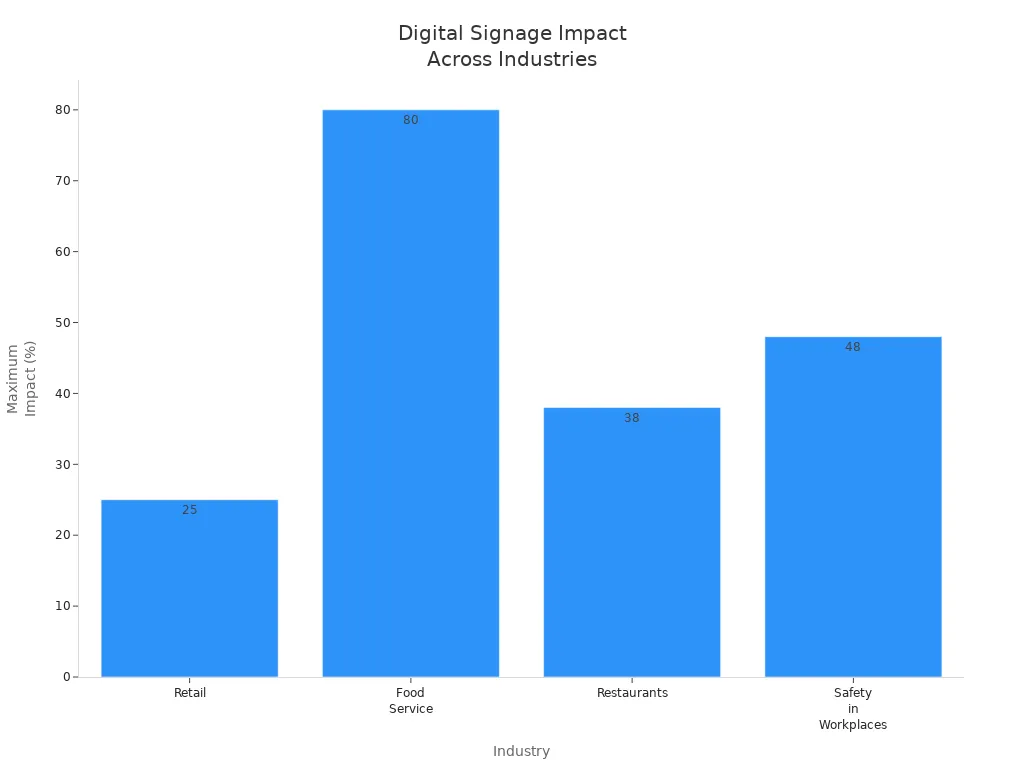
See how digital signage helps different industries:
Industry | Impact on Sales/Engagement |
|---|---|
Retail | Sales can go up by 5% to 25% with the right message at checkout. |
Food Service | Unplanned buys can rise by up to 80% with digital signs. |
Restaurants | Featured menu items can sell up to 38% more. |
Safety in Workplaces | 48% fewer accidents happen when screens show safety tips. |
You can find digital signage in many places. It is in schools, restaurants, and more. It helps share news, guide people, and keep everyone updated. Picking the right solution gives your business the best results.
Top 10 Digital Signage Solutions for 2026
Yodeck
Yodeck lets you control digital signage screens easily. You can make playlists with images, videos, YouTube, PDFs, and weather. The platform has templates you can use, so you do not need to be a designer. Yodeck is good for small businesses because it costs only $8 per screen each month if you pay for a year. You can also try it for free.
Feature | Description |
|---|---|
Playlist management | Make and control playlists on many screens. |
Versatile media support | Shows images, videos, YouTube, PDFs, and live data. |
Customizable templates | Use ready-made templates for your messages. |
Pricing | $8 per screen per month (annual billing), free trial available. |
Pros and Cons
Pros | Cons |
|---|---|
Very affordable for small businesses | No interactivity features |
Free hardware with annual subscriptions | Not many advanced tools for big companies |
Simple layout editor for basic messaging | Raspberry Pi hardware is not tough in hard places |
Yodeck gets high scores on review sites, like 4.9 on Capterra and 4.8 on G2. If you want simple digital signage for menus, waiting rooms, or stores, Yodeck is a good choice.
Appspace
Appspace is known for its strong scheduling and management tools. You can control your devices and content from one place. Appspace works best for big companies that need to handle many screens and want to grow.
Feature/Aspect | Appspace Description |
|---|---|
Content Scheduling | Lets you schedule content in layers for big projects |
Management Tools | Manage devices and content together |
Scalability | Made for large groups of screens |
Accessibility | Needs software setup and updates |
Ideal Use Cases
Use Case | Description |
|---|---|
Workplace Communication | Connects workers and manages office spaces |
Digital Signage | Improves screens in team spaces |
Space Reservation | Makes booking rooms simple |
Content Publishing | Shares info on many platforms |
Workflow Management | Helps teams work better together |
Appspace is great for companies that want to use digital signage with workplace tools. Pick Appspace if you need strong scheduling and want to control many screens in different places.
ScreenCloud
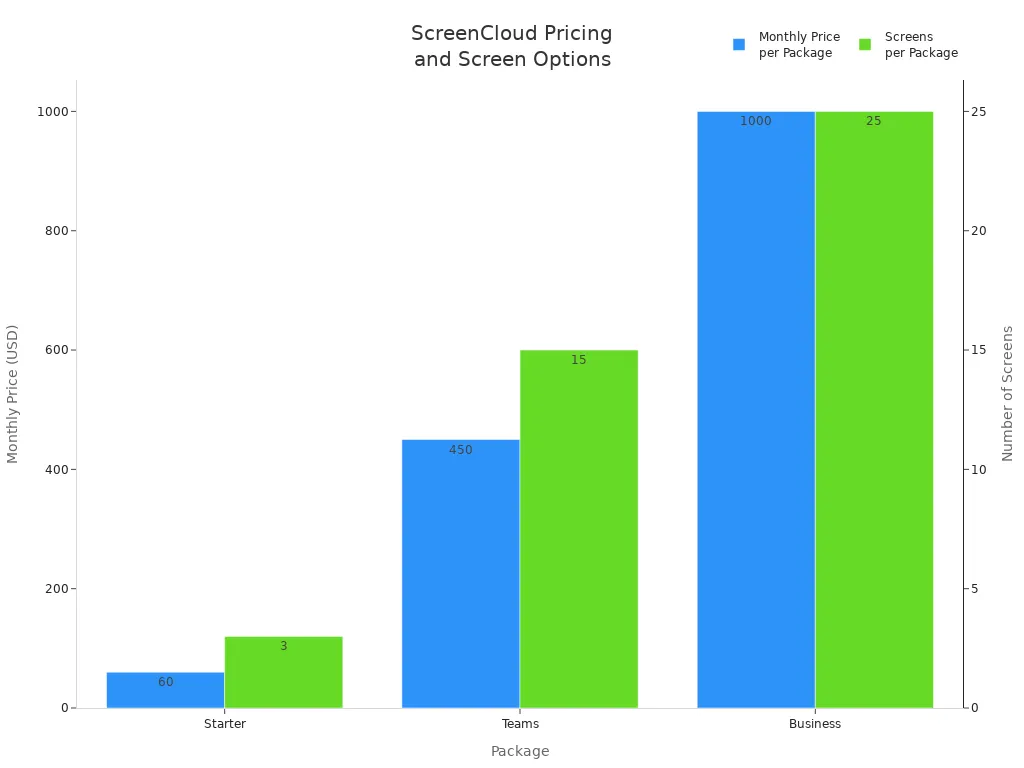
ScreenCloud gives you flexible digital signage software with over 60 integrations. You can connect Google Slides, YouTube, Twitter, and more. The Canvas tool lets you make content without extra programs. ScreenCloud has plans starting at $60 per month for three screens.
Feature/Package | Description |
|---|---|
Over 60 Integrations | Connects with Google Slides, YouTube, Twitter, and more |
GraphQL API | Lets you add custom features |
Canvas | Built-in tool for making content |
Starter | |
Teams | $450/month for 15 screens, more features |
Business | $1,000/month for 25 screens, better security |
Enterprise Plus | Custom pricing |
Advantages
Screens help with learning and safety.
Updates happen in real time.
Good for companies with workers who do not have desks.
Disadvantages
Costs more at the start.
Needs tech help to keep running.
ScreenCloud is good for schools, offices, and factories that want to keep everyone updated with new info.
OptiSigns
OptiSigns lets you make digital signage with over 100 templates. You can show images, videos, weather, traffic, and world clocks. The platform works with many file types and lets you update screens from your phone. Prices start at $10 per screen each month.
Feature | Description |
|---|---|
Editable Templates | Over 100 templates for your brand |
Compatible Media Formats | Works with jpg, png, gif, and more |
Real-Time Applications | Shows weather, traffic, and world clocks |
Auto-Restarts | Keeps screens working well |
Interactive Experiences | Make content without coding |
Pricing Plans | From $10/month per screen |
Pros
Easy to make and change what is on screens.
Updates happen right away.
Mobile app lets you control screens from anywhere.
Cons
Customer support can be slow.
Some tools need more expensive plans.
OptiSigns is good if you want to start fast and need to control many screens with different content.
Kitcast
Kitcast is digital signage software for Apple TV, Android TV, and Fire TV Stick. It is made to run all day and night without stopping. Kitcast can send emergency alerts to every screen and show safe data. It is easy to set up, and AI-powered tools help you make safety posters fast.
Feature | Description |
|---|---|
Multiplatform Support | Works on Apple TV, Android TV, and Fire TV Stick |
Industrial Reliability | Runs all day for factories and production lines |
Emergency Override | Sends safety alerts right away |
Secure Data Integration | Shows inside data and dashboards safely |
User-Friendly Setup | Easy to install and use |
AI-Powered Features | Makes safety posters and messages |
Use Cases
Use Case | Limitation |
|---|---|
Easy for groups to use | No screen sharing |
Good for 10+ screens | Not WCAG A certified |
Emergency alerts on all devices | Fewer CAP integrations |
Kitcast is great for factories, warehouses, and schools that need screens that always work and can send alerts.
Navori
Navori gives you flexible digital signage software for small and big businesses. You can choose cloud or self-hosted options. The platform works with touchscreen displays and updates content often.
Licensing Model | Description | Pricing Options |
|---|---|---|
Cloud Essential | For small businesses, under 250 screens | |
Cloud Professional | All features, no backend work needed | Quote required |
Enterprise Self-hosting | Scalable, buy once or subscribe | Quote required |
Advantages and Disadvantages
Advantages | Disadvantages |
|---|---|
Costs less than old-style displays | Costs more at first |
Works in many places | Needs tech skills |
Touchscreen and saves energy | Can distract if used too much |
Updates often, less waste | Too many screens can be overwhelming |
Navori is good for banks, airports, and stores that want strong features and sharp displays.
Scala
Scala has been in digital signage for over 30 years. Now, it is part of STRATACACHE and has more resources. Scala’s software is easy to use and works with many APIs. You can use it in stores, transport, and more.
Long history in digital signage
Easy-to-use software
Strong API connections
STRATACACHE gives hardware and support
Pros and Cons
Pros | Cons |
|---|---|
Makes people work better | Hard to learn at first |
Great visuals | Not many developers |
Features get better quickly | Does not work with all systems |
Scala is best for companies that want strong features and help for big digital signage networks.
Rise Vision
Rise Vision is popular with schools and healthcare groups. You can use your own hardware or buy from them. There are over 600 templates, so you do not need a designer. Rise Vision works with Google Workspace and Microsoft 365. You can send emergency alerts and share your screen wirelessly.
Works with most hardware
Over 600 templates for easy content
Google and Microsoft work with it
Emergency alerts with CAP
Share screens without wires
Rise Vision is not expensive and gives free training and support. Schools like Weslaco ISD use it to keep students and staff updated. If you want easy digital signage for schools or healthcare, Rise Vision is a great pick.
Look Digital Signage
Look Digital Signage helps stores make shopping more fun. You can show live deals, guide shoppers, and make displays personal. The platform helps people get involved and find their way.
Advantages | Disadvantages |
|---|---|
More people pay attention | Costs money to start |
Shopping feels personal | Need to keep content fresh |
Easier to find things | |
Live deals shown |
Look Digital Signage is best for stores that want to stand out with bright, moving displays.
STRATACACHE
STRATACACHE is made for big brands that need lots of digital signage. You get full control and expert help all day, every day. The cloud system lets you control screens at each place, so you can be flexible.
Feature | STRATACACHE Description |
|---|---|
Scalability | Handles lots of screens with custom choices |
Support | Expert help all day, every day |
Cloud-based | Control screens anywhere with location tools |
STRATACACHE makes the most money, but as more people want software and analytics, big companies should see if it still fits their needs.
STRATACACHE is best for banks, fast-food places, and stores that need strong, clear screens and lots of help.
If you want to choose the best digital signage for your business, think about what you need, your budget, and how many screens you want. Each platform has good points, so match the features to your goals for the best results.
Comparison Table: Best Digital Signage Software
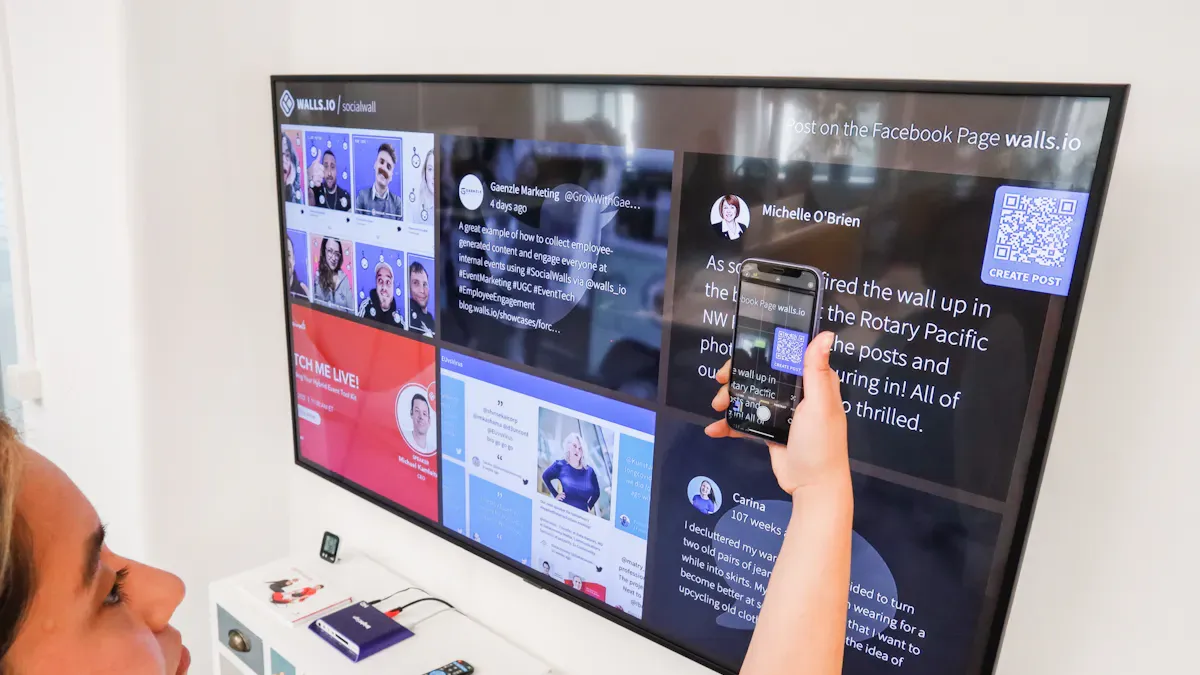
You want to know which digital signage software is best. This table helps you compare the top choices. It shows important things like features, price, and how many screens each can use. You can also see where each one works best. If you need sharp images or moving content, you will find a good choice here.
Tip: Think about how big your business is and how many digital signage displays you need. The best digital signage software will fit your goals and budget.
Software | Key Features | Pricing (per screen) | Scalability | Ideal Use Cases | Resolution Support |
|---|---|---|---|---|---|
Yodeck | Playlist, templates, remote control | $8/mo (annual) | Small to medium | Menus, waiting rooms, retail | Up to 4k resolution |
Appspace | Scheduling, device management | Custom/Quote | Enterprise | Offices, workplace comms | 4k resolution |
ScreenCloud | 60+ integrations, Canvas tool | $20/mo | Medium to large | Schools, factories, offices | 4k resolution |
OptiSigns | 100+ templates, mobile app | $10/mo | Small to large | Retail, events, restaurants | 4k resolution |
Kitcast | Emergency alerts, AI content | Custom/Quote | Medium to large | Factories, schools | 4k resolution |
Navori | Touchscreen, cloud/self-hosted | Custom/Quote | Small to enterprise | Banks, airports, retail | 4k resolution |
Scala | API support, easy interface | Custom/Quote | Enterprise | Retail, transport, QSR | 4k resolution |
Rise Vision | 600+ templates, alerts | $11/mo | Small to medium | Schools, healthcare | 4k resolution |
Look Digital Signage | Personalization, live deals | $15/mo | Small to medium | Retail, wayfinding | 4k resolution |
STRATACACHE | Full control, 24/7 support | Custom/Quote | Enterprise | Banks, QSR, large retail | 4k resolution |
Most digital signage software can show 4k resolution. This means your screens will look clear and bright. If you want people to notice your messages, pick software with dynamic content and playlist tools. Some platforms are better for lots of screens. Others are good for small businesses.
If you want more screens later, choose a solution that can grow. For busy places, pick software that shows bright and sharp images. Always make sure the software fits your budget and your screen needs.
How to Choose the Best Digital Signage Solutions
Assessing Your Needs
First, think about what you want your screens to do. Do you need a menu for a restaurant or signs that people can touch in a busy store? Write down your main goals. Maybe you want to show numbers in a factory or share news at school. The best digital signage solutions help you talk to your audience and make your messages easy to see. If you need your screens to be bright, pick professional displays. These work well in places with lots of light.
Key Features to Consider
You want a platform that is easy to use. It should let you manage your content without trouble. Look for a system that lets you schedule, update, and organize your playlist easily. A cloud-based platform lets you change your digital content from anywhere. Good software supports 4k resolution for clear images. If you work in a big company, you need your screens to always play right and show strong messages. Make sure your system can handle new content and real-time updates.
Tip: Pick a system that matches how you make content. This helps you keep your screens fun and up to date.
Here’s a quick table to help you compare:
Criteria | Why It Matters |
|---|---|
Professional Displays | Bright and tough for long use |
Content Management | Easy to update and schedule your screens |
Flexibility & Scalability | Grows with your business, big or small |
Real-Time Updates | Change messages fast for new things or alerts |
Budget and Scalability
Decide how much money you can spend before you start. Some digital signage solutions cost more but give you extra features for big companies. Think about how many screens you need now and later. If you want to grow, pick a system that lets you add more screens easily. There are choices for every budget, from small stores to big companies.
Integration and Support
Check if the platform works with your other tools. Good integration means you can use your content management with apps you already have. Support is important too. You want help when you need it, especially in big companies. Look for companies that give training and answer your questions fast.
Remember: The right digital signage solution makes it easy to manage your content and helps your business get noticed.
You need to pick a digital signage solution that fits your business goals. Compare features, pros, and cons to find what works best for you. Look for tools that use AI, offer real-time updates, and help you reach your audience. Make sure your platform can grow with your business and connect with your other systems. Choose eco-friendly options and keep up with new trends. If you set clear goals and use smart tools, you can boost engagement and grow your revenue.
Stay curious! Digital signage keeps changing, so revisit your choices as your business grows.
How to Choose the Right Digital Signage Solution for Your Business
Choosing the right digital signage solution for your business is essentially a process of matching technical capabilities with your business goals. With so many options available, following this systematic four‑step approach will help you efficiently narrow down the best fit.
🗺️ Step 1: Clarify Your Core Needs
Before contacting any vendors, you need to define your objectives. This is the foundation of your selection. Ask yourself these questions:
What is your primary goal? Increase sales, improve customer experience, enhance internal communication, or all three?
What type of content will you display? Videos, static images, social media feeds, or real‑time data (e.g., weather, KPI dashboards)?
Where and how many screens? Indoor, window‑facing, or outdoor? How many screens do you need now, and how many do you plan to scale to in the future?
Do you need interactivity? Touch, QR code interaction, or just one‑way display?
🔍 Step 2: Evaluate Core Features & Capabilities
Once you have your requirements, assess solutions across three key areas.
1. Content Management System (CMS) – Ease of Use & Features
A user‑friendly CMS is critical. Look for:
Intuitive interface – Drag‑and‑drop, WYSIWYG (what you see is what you get) editors that non‑technical staff can use.
Scheduling capabilities – Can you schedule content by time, day of week, or specific events?
Multi‑screen management – Does the platform allow you to manage all screens across different locations from a single dashboard?
Role‑based permissions – Can you set different access levels (e.g., head office admin, store manager)?
2. Hardware Reliability
Hardware is the physical foundation of your solution. Investing in reliable hardware avoids many long‑term operational headaches.
Environment:
Indoor: Typically 350‑500 nits brightness commercial displays.
Window‑facing / semi‑outdoor: At least 750‑1000 nits to combat ambient light.
Full outdoor: 1500‑2500+ nits with IP65/IP66 waterproof rating.
Commercial vs. consumer grade – Prioritise commercial‑grade displays designed for 24/7 operation. They offer better cooling, longer lifespan, and stronger warranties.
Media player – Simple static content: built‑in SoC or low‑cost media stick. 4K video or complex interactivity: high‑performance players (e.g., BrightSign, Intel NUC).
3. System Integration Capabilities
The true power of digital signage lies in becoming part of your existing business ecosystem.
Data integration – Can it connect with your POS system, inventory system, CRM, or social media accounts for real‑time automatic content updates? (e.g., price changes on the POS automatically sync to the menu board.)
Open API – Evaluate the quality of the API documentation and support for third‑party development.
🚀 Step 3: Leverage 2026 Technology Trends
Understanding emerging trends helps you make a forward‑looking investment that won’t become obsolete quickly.
AI intelligence – AI is no longer a gimmick. Modern solutions use AI for content generation, personalised recommendations, smart scheduling based on time/weather, and even audience analysis via cameras to optimise content.
Interactive & immersive experiences – Beyond standard touch, AR‑powered QR codes and voice interaction are increasing engagement. For high‑end settings, consider new technologies like transparent OLED or digital art displays to enhance brand image.
Cloud‑native & scalability – SaaS (Software as a Service) is mainstream. No server maintenance, and you can easily scale screen count as needed.
Power over Ethernet (PoE) – Mature PoE displays transmit both power and data over a single Ethernet cable, dramatically simplifying installation – especially ideal for multi‑site deployments (chain stores).
✅ Step 4: Evaluate Vendors & Decision Shortcuts
Finally, put your shortlisted vendors to the test.
Request demos and trials – Ask at least 2‑3 vendors for scenario‑based demos. Request free trial accounts and try creating and scheduling content yourself.
Check local support – Particularly for markets like Singapore, ensure the vendor provides local installation, training, and responsive after‑sales technical support.
Calculate total cost of ownership (TCO) – Don’t be lured by low hardware quotes. Calculate TCO over 3‑5 years, including hardware, software subscription, installation, maintenance, and content creation.
📋 Quick Decision Framework
If the above feels abstract, here is a simplified decision matrix:
Your Situation | Recommended Solution | Key Reason |
|---|---|---|
Small independent shop (e.g., café) | Low‑cost subscription software + consumer TV (or a commercial display with built‑in OS) | Budget priority, sufficient features, simple deployment |
Medium to large chain brands | Mid‑tier SaaS platform (e.g., OptiSigns, ScreenCloud) + commercial‑grade displays | Stable, reliable, supports centralised multi‑site management, good integrations |
Mission‑critical environments (hospitals, transport) | Enterprise hardware players (e.g., BrightSign) + industrial‑grade displays | 24/7 operation, excellent cooling, high hardware reliability |
Interactive & data‑driven retail | AI‑ and POS‑integrated platforms (e.g., Reflect) + touchscreens | Real‑time data enables personalised recommendations, improves conversion |
Maximum convenience & all‑in‑one | Commercial displays with built‑in systems (e.g., Samsung MagicINFO, LG webOS) | No external player needed, clean installation, simple management |
💎 Summary
There is no single “best” digital signage solution – only the one that best fits your business scenario. I hope this guide helps you make a confident decision. If you share more details about your business type and specific needs, I can offer more targeted recommendations.
FAQ
What is digital signage for manufacturing?
Digital signage for manufacturing lets you show updates and alerts on screens. You can share safety tips and production numbers with your team. This helps everyone know what is happening. It makes it easy to show messages where all workers can see them.
How can digital signage for manufacturing improve safety?
You can use digital signage for manufacturing to show safety tips and alerts. These screens remind people about dangers and safe actions. Fast updates help stop accidents. This makes your workplace safer for everyone.
What are the main benefits of digital signage for manufacturing?
Digital signage for manufacturing helps teams talk and work better. It shows schedules, goals, and team wins. These screens help workers stay on task and feel proud each day.
How do I choose the right digital signage for manufacturing?
First, write down what you want to do. Do you need to make things safer or share info? Pick digital signage for manufacturing that matches your needs and works with your screens. Make sure it fits with your other tools. Ask about help and updates.
Tip: Try a few choices before picking one. The best digital signage for manufacturing should be simple and able to grow with your company.
Can I use digital signage displays in other areas besides manufacturing?
Yes! Digital signage displays work in offices, schools, stores, and hospitals. You can use them to share news, help visitors, or show products. They help you talk to people wherever you need.
See Also
Best Video Wall Digital Signage Options to Explore in 2026
Latest Innovations in Digital Signage Technology for 2026
Exploring Key Digital Signage Trends Influencing 2026 Today
Why Digital Signage Displays Are Essential for Business Growth in 2026
