Top 10 digital signage advertising displays for businesses in 2026
Shenzhen TopAdkiosk Display Technology Co., Ltd.
Add.: 2F, Bldg 10, Changfeng Industrial Park, Dongkeng, Fenghuang, Guangming, Shenzhen, China 518132
Mobile/WHATSAPP: 86-138 25769658
Email: marketing@topadkiosk.com topadkiosk@gmail.com
Skype: pghenry1
Wechat: adkioskhenry
English Web.: http://www.topadkiosk.com/
https://www.topkioskdisplay.com/
http://www.ad-kiosk.com/
https://www.toplcddisplay.com/
http://www.multitouchdigitalsignage.com/
https://www.youtube.com/channel/UCYVYNJHxLVEcQD8fuUxXNTA/videos?view_as=subscriber
https://www.facebook.com/TOPADKIOSKSHENZHEN/?ref=bookmarks
You see digital signage ad displays everywhere in 2026. They catch your eye and pull you in. These screens come in many types, like LCD, LED, and OLED. You can find smart software that helps you manage them with ease. When you pick the best digital signage, your business stands out and attracts more customers. Better screens mean better results for you.
Key Takeaways
Pick the best digital signage display to help people see your business and bring in more customers. - Look at things like how clear the screen is, how big it is, and how much energy it uses when you pick a display for your ads. - Use easy-to-use software so you can change what shows on the screen and make your ads new and interesting. - Make a plan for your digital signage that fits your business size and where you are to get the best results. - Change your content often and check how well it works to make sure your ads stay good and important.
Best digital signage ad displays
Samsung QMR Series
The Samsung QMR Series is great for clear images and simple control. These screens use advanced LCD technology and come in many sizes, from 43" to 75". You get 4K UHD resolution, so everything looks sharp. The QMR Series can be used in portrait or landscape mode. This makes it fit almost any space. You can use these displays in stores, airports, or offices. The Tizen OS helps you manage content fast. The slim design means it fits in small places. The anti-glare coating keeps ads easy to see, even when it is bright. This series is good for ads that need to run all day.
LG Ultra Stretch 86BH5C
The LG Ultra Stretch 86BH5C lets you show your content in a new way. This display is very wide, with a 58:9 aspect ratio. It grabs attention where normal screens do not fit. The screen is 86" with 3840 x 600 Ultra HD resolution. The wide viewing angle means everyone can see your message.
Specification | Details |
|---|---|
Screen size | 86" |
Resolution | 3840 x 600 (Ultra HD) |
Aspect Ratio | 58:9 |
Contrast Ratio | 1,100:1 |
Viewing Angle | 178° x 178° |
Orientation | Landscape & Portrait |
You can use this display in train stations, stores, banks, and museums. The wide shape lets you show cool content that stands out. You can split the screen to show different things at once with Picture-by-Picture. The easy interface helps you update your ads fast. If you want your ads to work better and get more people interested, this is a top choice.
Feature | Benefit |
|---|---|
Lets you show cool ads that stand out. | |
4K Ultra HD resolution | Makes pictures look clear and bright. |
Picture-by-Picture (PBP) | Lets you show more than one thing at a time. |
User-friendly interface | Makes it easy to change your ads. |
Seamless connectivity | Easy to connect and use in many places. |
Sony BRAVIA BZ40H
Do you want a screen that saves energy and looks great? The Sony BRAVIA BZ40H does both. It uses 4K HDR LCD screens, so colors are bright and details are sharp. It can run all day and night, so it is good for hotels, malls, or lobbies. The BZ40H saves energy, so you do not have to worry about big power bills.
Feature | Sony BRAVIA BZ40H | Other Displays |
|---|---|---|
Made for all-day use and saves energy | Some may not run all the time | |
Image Quality | Bright 4K HDR images | Some may not have 4K HDR |
You can use this display for ads that never stop. The Android OS makes it easy to plan what shows on the screen. You get a strong, high-quality screen that makes your business look good.
Philips D-Line 4K
Philips D-Line 4K displays help you make great digital signs for any business. These screens use 4K UHD LCD panels and come in sizes from 43" to 98". The content is bright and clear, so people notice it. The D-Line works in portrait or landscape mode, so it fits anywhere. You can use these screens in stores, schools, or offices. The Android OS helps you manage content easily. You can even update the screen from far away using the cloud. The D-Line is a good pick if you want strong screens for big ads.
ViewSonic CDE Series
The ViewSonic CDE Series gives you many choices for digital signs. You can pick standard or ultrawide screens, up to 98". These displays use LCD technology and have 4K or 5K resolution for great pictures. Some models have Android OS, so you can manage apps and content right on the screen. Others do not have an OS for quick starts and more safety.
Feature/Advantage | Description |
|---|---|
CDE31 Series has Android OS for apps and remote control. | |
OS-free Displays | CDEG3 Series is safe and starts fast, just plug in. |
Ultrawide Options | 21:9 ultrawide screens with 5K for cool views. |
Simple Content Sharing | CDE12 Series gives strong messages for a good price. |
24/7 and 16/7 Operation | 24/7 screens for all-day use; 16/7 for normal hours. |
Installation & Connectivity | HDMI, USB-C, USB-A, and LAN ports for easy connection; USB-C sends video, data, and power. |
Management & Control | Remote control for updates, planning, and checking screens. |
Video Conferencing | USB-C makes meetings easy and fast. |
You can use these screens in offices, schools, or stores. The CDE Series works with many digital sign software, so your ads run smoothly.
Software Solutions | Integration Features |
|---|---|
AppSpace | Works right away, no extra player needed |
Navori | Easy control for planning and updates |
NoviSign | Fast setup for IT teams |
Revel Digital | Good for big groups of screens |
Q-SYS Ecosystem | Connects with Q-SYS LIBRARY VERIFIED plugin |
Crestron | Controls power, sound, and inputs |
Extron | Works with other control systems |
AMX | Makes IT management simple |
NEC MultiSync M
The NEC MultiSync M series gives you strong LCD screens for digital signs. You get 4K UHD resolution and sizes from 43" to 86". These screens work in both landscape and portrait mode. The MultiSync M series is known for good color and lasting a long time. You can use these screens in control rooms, airports, or stores. The built-in media player lets you plan what shows on the screen. You get many ways to connect, so you can add other devices or use the screen alone. If you want a screen that lasts and looks good, this is a smart choice.
Sharp PN-HB851
Sharp’s PN-HB851 is an 85" LCD screen that makes your ads pop. You get 4K UHD resolution and a slim look that fits in modern places. The PN-HB851 works in both portrait and landscape mode. You can use this screen in meeting rooms, stores, or public spaces. The built-in media player makes it easy to plan and change content. You get lots of ways to connect, so you can plug in almost anything. If you want a big, bold screen for your ads, this is a top pick.
BenQ SL Series
The BenQ SL Series gives you many choices for digital signs. You can pick from five sizes, from 43" to 86". All models use IPS LCD panels for bright colors and wide views. You get UHD 3840 × 2160 resolution, so everything looks sharp. The SL Series works in both landscape and portrait mode, so it fits anywhere.
Feature | SL4304 | SL5504/SH5504 | SL6504/SH6504 | SL7504/SH7504 | SL8604 |
|---|---|---|---|---|---|
Screen size | 43" | 55" | 65" | 75" | 86" |
Panel type | IPS | IPS | IPS | IPS | IPS |
Resolution | UHD 3840 × 2160 pixels | UHD 3840 × 2160 pixels | UHD 3840 × 2160 pixels | UHD 3840 × 2160 pixels | UHD 3840 × 2160 pixels |
Response time | 8 ms | 8 ms | 8 ms | 8 ms | 8 ms |
Aspect ratio | 16:9 | 16:9 | 16:9 | 16:9 | 16:9 |
Orientation | Landscape and Portrait | Landscape and Portrait | Landscape and Portrait | Landscape and Portrait | Landscape and Portrait |
Contrast ratio | 1,200:1 | 1,200:1 | 1,200:1 | 1,200:1 | 1,200:1 |
Color depth | 10-bit | 10-bit | 10-bit | 10-bit | 10-bit |
Panel brightness | 500 nits | 500 nits | 500 nits | 500 nits | 500 nits |
Backlight life | 50,000 hrs | 50,000 hrs | 50,000 hrs | 50,000 hrs | 50,000 hrs |
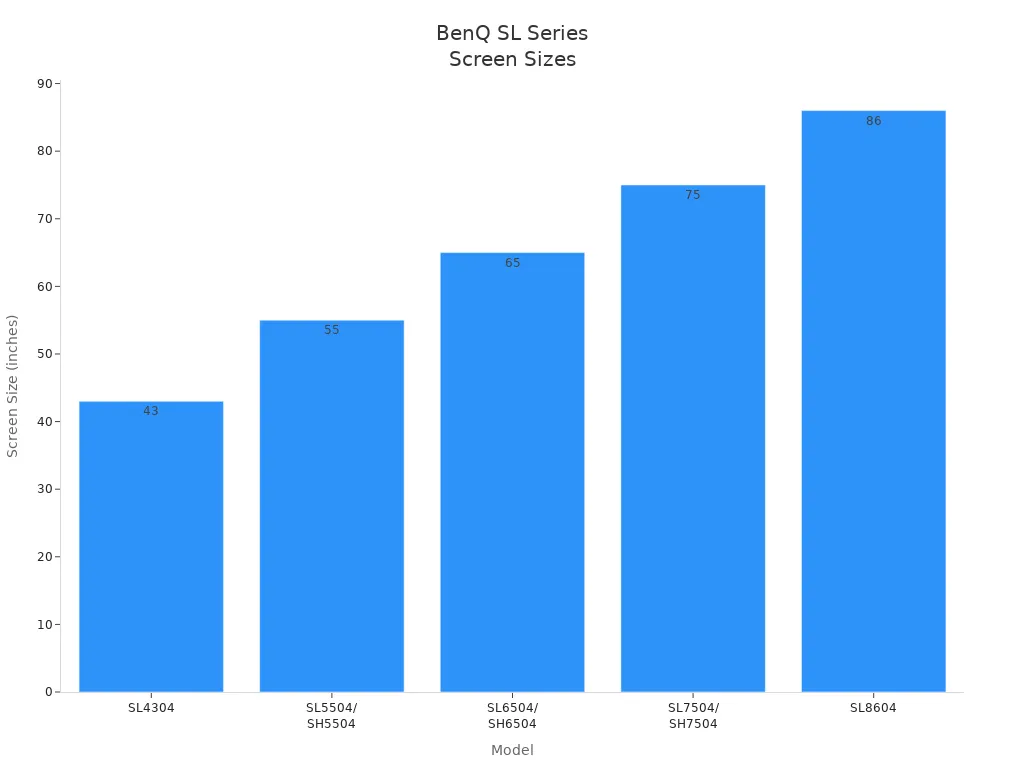
You get sharp pictures, long backlight life, and easy setup. These screens are good for stores, schools, or offices. The SL Series is a smart pick if you want screens that last a long time.
All models have UHD 3840 × 2160 pixels for clear images.
IPS panels give better color and wide viewing angles.
Many sizes (43" to 86") for different needs.
Works in both landscape and portrait mode.
Backlight lasts 50,000 hours, so it is strong.
Elo 4K Interactive Display
If you want people to join in, the Elo 4K Interactive Display is a great choice. This screen lets up to 40 people touch it at once. You get a smooth, fast feel because of the special glass and quick response. You can put the screen in landscape, portrait, or even flat on a table.
Feature/Advantage | Description |
|---|---|
Versatile Mounting Options | Can be put in landscape, portrait, or flat for more uses. |
Durability for Commercial Use | Made for all-day use in busy places, so it lasts. |
Integrated IoT Control | Easy to control with EloView, Crestron, or other tools. |
User Experience | Up to 40 touches at once with fast, smooth glass. |
You can use this screen for shopping, self-service, or finding your way. It also helps in healthcare, letting doctors and patients talk. The Elo 4K Interactive Display makes your ads fun and keeps people interested.
Feature | Description |
|---|---|
Touch Capability | Up to 40 people can touch the screen at once. |
Responsiveness | Fast response keeps people happy and interested. |
Design | Smooth glass makes it easy to use in stores. |
Versatility | Can be used with Elo Backpack or Brightsign player as a big tablet. |
Makes shopping more fun with endless aisle features.
Lets customers use self-service kiosks.
Helps people find their way with interactive maps.
Helps doctors and patients talk in healthcare.
Planar UltraRes X
The Planar UltraRes X is great for big video walls and eye-catching digital signs. You get high-resolution screens that make your ads look amazing, even when they are huge. Some models let you touch the screen, so people can work together. The UltraRes X is strong, so it works well in busy places. It is ENERGY STAR® certified, so it saves energy.
Feature | Description |
|---|---|
UltraRes W Series has sharp screens for big video walls. | |
Interactive functionality | Some models let people touch and work together. |
Robust design features | Made to last in many places, so it is reliable. |
ENERGY STAR® certified | Saves energy and money for businesses. |
You can use this screen in control rooms, conference centers, or anywhere you need a big, bold display. The Planar UltraRes X helps you make the best digital signs for ads that need to impress.
Tip: When you pick a digital sign, think about your space, your content, and how people will use the screen. The right display can make your ads work better and help your business grow.
Digital signage software solutions
Picking the best digital signage software helps your ads stand out. You need tools to manage content, plan updates, and get people interested. Here are the top choices for 2026.
TelemetryTV
TelemetryTV gives you a strong platform to handle content. You can plan when your ads show, use templates, and control many screens from one place. The software works with different hardware. Here is how it connects:
Hardware Option | Description |
|---|---|
TelemetryTV Box | Good for all-day use, safe, and steady for screens people see. |
TelemetryTV Droid-1 | Works well for small groups, especially if you use Android. |
Amazon Fire TV | Easy pick for simple ads and talking at work. |
You can try it for free. Paid plans fit small groups or big networks. The interface looks modern and is easy to use.
NoviSign
NoviSign is known for its easy drag-and-drop interface. You can design screens and change ads from anywhere. Fast syncing keeps your ads new. NoviSign is good for:
Simple content management, no tech skills needed.
Quick changes to ads over the internet.
You pay each month for the number of screens. Many businesses like how easy it is to run ads with NoviSign.
Hexnode
Hexnode gives you digital signage software with strong tools to manage content. You can plan when ads show, lock screens, and control devices from far away. The dashboard is clear, so you see all your screens at once. Hexnode works well for schools, stores, and healthcare. Pricing is flexible, with plans for different business sizes.
Reach
Reach helps you make, plan, and manage ads easily. The platform supports many file types and lets you set up content for different places. You get updates right away and can see analytics. The software works on most screens. Pricing is custom, so you pick what fits your business.
truDigital Signage
truDigital Signage gives you simple tools to manage content and plan ads. You can use templates or upload your own content. The platform supports many screens and lets you update from the cloud. Pricing is by subscription, and you get help when you need it.
Enplug Display OS
Enplug Display OS makes managing content easy with apps for social media, news, and more. You can plan ads and see reports on engagement. The interface is clean, and you can control screens from anywhere. Enplug works with many hardware types. Pricing is per screen, with discounts for more screens.
QuickESign
QuickESign is a low-cost digital signage software. You can manage content, plan updates, and use templates. The platform is simple, so you start fast. It works well for small businesses or anyone new to digital signage. Pricing is low, with a free version for basic needs.
Yodeck
Yodeck lets you manage content and plan campaigns from the cloud. You can use templates, upload videos, and control screens from far away. The interface is simple, and you get a free player with paid plans. Yodeck works with many hardware options and gives strong content management for all business sizes.
Tip: When you pick digital signage software, think about how you manage content, how many screens you have, and your budget. The right software helps you make, plan, and update ads for better engagement and results.
Display comparison
Key specs overview
You want to pick the best digital signage ad display for your business, but all the choices can feel overwhelming. Let’s make it simple. Here’s a quick table that shows the key specs for the top 10 screens. You can see the screen type, size, resolution, and what makes each one stand out for your advertising campaigns.
Display Model | Screen Type | Size Range | Resolution | Main Benefits |
|---|---|---|---|---|
Samsung QMR Series | LCD | 43"–75" | 4K UHD | Sharp content, anti-glare, flexible |
LG Ultra Stretch 86BH5C | LCD | 86" (58:9) | 3840 x 600 | Ultra-wide, unique content layouts |
Sony BRAVIA BZ40H | LCD | 43"–85" | 4K HDR | Energy saving, vivid content |
Philips D-Line 4K | LCD | 43"–98" | 4K UHD | Cloud updates, strong content |
ViewSonic CDE Series | LCD | 43"–98" | 4K/5K | Many sizes, easy content sharing |
NEC MultiSync M | LCD | 43"–86" | 4K UHD | Long life, built-in content player |
Sharp PN-HB851 | LCD | 85" | 4K UHD | Slim, big content impact |
BenQ SL Series | LCD | 43"–86" | 4K UHD | IPS panels, long backlight life |
Elo 4K Interactive | LCD | 55"–65" | 4K UHD | Touch, interactive content |
Planar UltraRes X | LCD | 75"–100" | 4K UHD | Video walls, interactive options |
Tip: If your screens will be close to viewers, like in coffee shops, pick 32 to 43 inches. For far viewing, like in food courts, go for 50 inches or bigger. Here’s a quick guide:
Viewing Distance | Recommended Screen Size |
|---|---|
Close (e.g., coffee shops) | 32 to 43 inches |
Far (e.g., food courts) | 50 to 65 inches or larger |
Advantages summary
Each display brings something special to your content strategy. Some screens, like the LG Ultra Stretch, let you show creative content in places where normal screens do not fit. Others, like the Elo 4K Interactive, help you boost engagement with interactive content. If you want to run campaigns all day, the Samsung QMR and Sony BRAVIA BZ40H offer reliable, energy-saving screens. For big impact, the Planar UltraRes X and Sharp PN-HB851 give you huge screens that make your advertising stand out.
You can use these screens to show videos, menus, or live updates. Many displays let you manage content from anywhere, so you can keep your campaigns fresh. When you match the right screen size to your space, you make the experience better for everyone. The right display helps your business connect with people and keeps your content looking sharp every day.
Choosing best digital signage
Business size and needs
You want your business to stand out, so you need the right digital signage solutions. First, think about how big your business is. Small businesses usually need just one or two screens for simple ads. Medium businesses might use a few screens to show different things in different places. Large businesses or enterprise digital signage setups often use many screens for big ads and special campaigns.
Here’s a quick table to help you match your needs:
Business Size | Best Display Setup | Key Focus |
|---|---|---|
Small | 1-2 screens, simple content | Easy setup, cost, clarity |
Medium | 3-10 screens, dynamic content | Scheduling, variety, engagement |
Large | Many screens, interactive campaigns | Integration, control, analytics |
You should also think about how close people are to the screens. If people are close, pick smaller screens. If people are far away, pick bigger screens. Using more than one screen can give you more choices than just one big screen.
Location and environment
Where you put your digital signage ad is very important. Indoor screens work best in stores, offices, and schools. Outdoor screens need to handle sun, rain, and dust. For outdoor marketing, pick screens that are bright and strong. Samsung OHF, LG XS4F, and NEC MultiSync XHB are good for outside. For indoor marketing, Samsung QM, Philips Q, and NEC ME are good digital signage platforms.
How long your screens are on matters too. Some screens run 16 hours a day, others run all day and night. Pick what matches your business hours. Always check the warranty so you feel safe.
Tip: Put screens where people wait or walk by. This helps more people see your ads and makes your marketing better.
Features and value
You want features that make your ads look great. Look for screens with 4K resolution, wide viewing angles, and anti-glare. Interactive screens make your ads more fun and help people join in. Good digital signage solutions let you control content scheduling, content delivery, and content optimization from anywhere.
Think about what you get for your money, not just the price. A good warranty, easy updates, and support for dynamic content help your screens last longer. Pick digital signage platforms that can grow with your business.
Design trends 2026
In 2026, simple and bold designs are popular. Clean layouts and big pictures get attention. Good fonts make your message easy to read. Digital integration lets you show live data, social feeds, and dynamic content. Interactive features keep people interested and help with custom advertising.
You want your ads to look new and modern. Use digital signage solutions that let you show video, animation, and real-time updates. This keeps your ads exciting and your content always fresh.
Step-by-step: Creating and scheduling a digital signage ad campaign
Want to make a great ad campaign? Here’s what to do:
Plan your content
Decide what you want to say. Use pictures, video, and dynamic content to make it stronger.Pick your digital signage solutions
Choose software that lets you control content scheduling and content delivery. Find tools that fit your business size.Set up display times
Plan your ads for the best times. Use content scheduling to show the right ads at the right time.Monitor and optimize
Check how your ads are doing. Use analytics from your digital signage platforms for content optimization and better marketing.
Note: Keep your ads new and update your campaigns often. This keeps your marketing strong and your audience interested.
Now you know which digital signage displays and software are best for 2026. These tools help you get noticed, share your message, and help your business grow.
Choose a display that works for your space and needs.
Pick software that makes it simple to control your content.
Want to make your business better? Start planning your digital signage now and see your business get more attention!
📝 Step 1: Plan Your Campaign with a Content Calendar
Before creating any assets, establish a content calendar—a repeatable system for planning what appears, when it appears, where it plays, and who's responsible.
Define Each Screen's Purpose
Screens in different locations have different jobs. A lobby display, a break room screen, and a retail menu board should have distinct content strategies. Separate content into these categories:
Content Category | Refresh Cadence | Examples |
|---|---|---|
Evergreen | Quarterly | Brand messaging, wayfinding, safety reminders, welcome slides |
Scheduled Campaigns | Weekly / per campaign | Promotions, seasonal menus, policy reminders |
Event-Based | Before events | Sales weekends, town halls, open houses |
Urgent Updates | As needed | Weather alerts, emergency instructions |
Build a Three-Layer Calendar
Always-on layer (30-40% of screen time): Core content that rarely changes
Weekly/Monthly layer: Promotional and seasonal content (planned 2-4 weeks in advance)
Real-time layer: Flash sales, live feeds, urgent alerts
Set a cadence: a monthly calendar with weekly check-ins works best for most organizations, rather than scrambling daily or planning too far ahead.
🎬 Step 2: Create Engaging Content
Content Duration Guidelines
Content Type | Recommended Duration |
|---|---|
Image / Graphic | 8–15 seconds |
Short Video | 15–30 seconds |
Long Video | 30–120 seconds |
Data Widgets | 15–30 seconds |
Interactive Prompt / CTA | 10–15 seconds |
Aim for a 3–10 minute playlist loop to balance variety and message repetition. Key messages need to appear frequently enough to be noticed, but not so often they feel annoying.
Industry-Specific Content Ideas
Retail: Promotional offers, new product highlights, customer testimonials, loyalty program info
Restaurants: Menu displays with high-quality food photography, daily specials, nutritional info
Corporate: Company news, KPI dashboards, employee recognition, meeting room schedules
Healthcare: Wait times, wellness tips, provider introductions, patient satisfaction prompts
⚙️ Step 3: Schedule Content Using Modern Tools
Modern digital signage software replaces manual USB updates and calendar reminders with automated scheduling powered by AI.
Core Scheduling Techniques
Dayparting (Time-of-Day Scheduling)
Deliver different content based on time of day, day of week, or seasonality. For example:
Time | Suggested Content |
|---|---|
Morning (5–11 AM) | Welcomes, daily priorities, safety reminders, opening times |
Afternoon (11 AM–5 PM) | Promotions, internal updates, well-being messages |
Evening (5–9 PM) | Closing reminders, upcoming events, happy hour teasers |
This aligns messaging with audience behavior and reduces "screen blindness".
Playlist-Based Scheduling
A playlist is an ordered sequence of content items that play in succession. Best practice suggests organizing playlists by purpose (promotional, informational, emergency), location (lobby, breakroom, storefront), or time (morning, evening, overnight).
Campaign Scheduling with Start/End Dates
The typical workflow is: create campaign content → test on preview → define schedule parameters → set start/end dates → assign to displays/groups. Set clear start and end dates for all time-bound content so promotions automatically stop when they expire—no manual removal needed.
Event-Based Triggers
Content can automatically change based on specific dates or pre-defined special events—perfect for announcing a flash sale, town hall, or seasonal menu without manual intervention.
Automation & AI in 2026
2026 digital signage platforms increasingly use AI to:
Predictively personalize messaging based on audience preferences and real-time conditions
Translate natural language into complex scheduling rules (e.g., "show this promotion during rainy weekends")
Automatically trigger content from live data feeds (weather, traffic, inventory)
This transforms digital signage from a static broadcast channel into an intelligent communication hub that behaves more like a responsive digital assistant.
📍 Step 4: Deploy Campaigns Across Your Network
Content Hierarchy
Most software uses a clear scheduling hierarchy:
Campaign / Schedule – What plays during a date range
Playlist – Ordered sequence of content
Daypart – Time-of-day content variations
Rules/Triggers – Conditional content changes (e.g., "if raining, show umbrella promo")
Default/Fallback – What plays when nothing else is scheduled
Distribution Workflow
Using cloud-based digital signage software, you can:
Upload content to a central media library
Build playlists by dragging and dropping assets
Assign schedule rules (start/end dates, dayparts, triggers)
Publish to individual screens or screen groups
Monitor remotely from a single dashboard
For multi-location networks, tag screens by location, region, or screen type to apply schedules across entire groups instantly.
📊 Step 5: Measure, Optimize, and Scale
Key Metrics to Track
Operational: Screen uptime, content freshness, schedule adherence
Reach: Dwell time, glance rates, audience count (using sensors or analytics)
Impact: Conversion lift from campaigns, reduced employee turnover (internal comms), sales attribution
AI-augmented analytics can forecast how schedule changes will affect engagement and suggest optimal content mixes automatically.
Update Frequency Guidelines (by audience revisit patterns)
Audience Visit Frequency | Content Refresh Required |
|---|---|
High (daily) – coffee shops, gyms | Promotions 2–3× per week, rotate menus daily |
Medium (weekly) – restaurants, retail | Promotions weekly, seasonal monthly, testimonials bi-weekly |
Low (quarterly) – medical offices, dealerships | Content monthly, educational quarterly |
Cardinal rule: If a customer visits twice and sees identical content, your update frequency is too low.
Scaling in Phases
Pilot (1–5 screens) – One location, basic schedule, learn the platform
Rhythm – Establish ownership (IC owns content, IT owns infrastructure), create repeatable workflows
Integration – Roll out by site readiness, centralize framework but decentralize content creation
🛠️ Recommended Digital Signage Software for 2026
Platform | Key Strengths |
|---|---|
OptiSigns | Cloud-based, campaign-level scheduling, multi-location targeting, AI audience intelligence; named FrontRunner by Software Advice in 2026 |
Yodeck | Cloud-based with free tier, remote display management, integrates with Google Docs and Trello; widely rated by users |
ScreenCloud | Intuitive channel and playlist system, screen zoning, integrations with Microsoft 365 and Google Workspace, easy drag-and-drop scheduling across multiple locations |
Fugo | Advanced scheduling automation, ideal for retail and hospitality, with free tier to start |
Scala | Enterprise-grade, suitable for global brands needing complex networks |
DotSignage | Cloud-based, drag-and-drop access to 750+ templates, day-and-time specific scheduling automation |
Clevertouch | "CleverLive Playlists" debut for 2026, designed for rapid multi-screen scheduling and event triggers |
Most platforms offer free trials and cloud-based management, eliminating USB drives and manual updates entirely.
💎 Summary Checklist
Step | Action Items |
|---|---|
1. Plan | Create content calendar; assign ownership; categorize content (evergreen → urgent) |
2. Create | Build 3–10 min playlists; use 8–15 sec assets; match content to screen purpose |
3. Schedule | Use dayparting; set start/end dates; apply event triggers; enable AI automation |
4. Deploy | Upload to cloud; assign to screen groups; test preview; publish live |
5. Measure | Track uptime, dwell time, conversion lift; optimize schedules to performance |
By treating digital signage as a strategic communication channel rather than a set-and-forget screen network, organizations consistently report higher engagement rates, fewer communication breakdowns, and measurable ROI on their signage investment.
If you let me know your industry or specific campaign goals, I can provide more tailored recommendations
FAQ
What is digital signage?
Digital signage is a screen that shows ads, menus, or messages. You control what shows up using special software. You can change content anytime to keep things fresh.
How do I create and schedule a digital signage ad campaign in 2026?
You pick your content, use your software to upload it, and set times for each ad to play. Most platforms let you drag and drop, then choose dates and times. It’s easy!
Can I use my own images and videos?
Yes! You can upload your own pictures and videos. Most digital signage software supports many file types. Just make sure your files look good on a big screen.
What if I need to update my ads quickly?
You can update your ads from anywhere using cloud-based software. Just log in, swap out your content, and hit save. Your screens will show the new ads right away.
