Which SPI LCD Display Module Is Best for Your Project in 2026
Shenzhen TopAdkiosk Display Technology Co., Ltd.
Add.: 2F, Bldg 10, Changfeng Industrial Park, Dongkeng, Fenghuang, Guangming, Shenzhen, China 518132
Mobile/WHATSAPP: 86-138 25769658
Email: marketing@topadkiosk.com topadkiosk@gmail.com
Skype: pghenry1
Wechat: adkioskhenry
English Web.: http://www.topadkiosk.com/
https://www.topkioskdisplay.com/
http://www.ad-kiosk.com/
https://www.toplcddisplay.com/
http://www.multitouchdigitalsignage.com/
https://www.youtube.com/channel/UCYVYNJHxLVEcQD8fuUxXNTA/videos?view_as=subscriber
https://www.facebook.com/TOPADKIOSKSHENZHEN/?ref=bookmarks
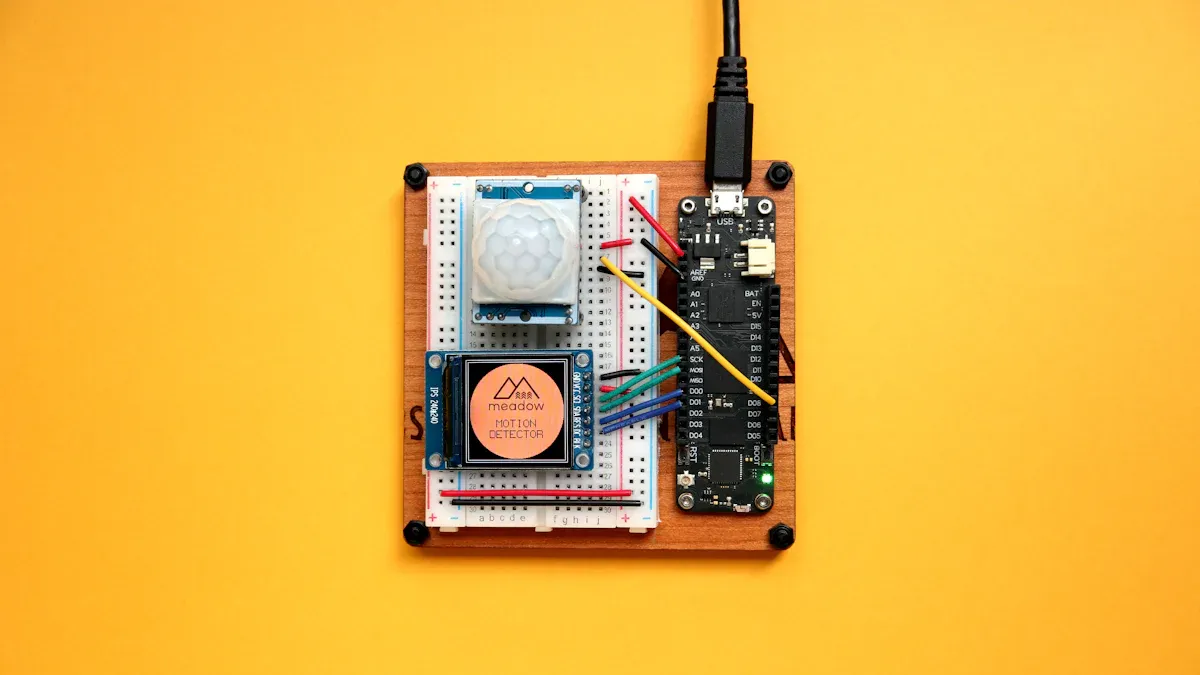
If you want a good tft display for your project, the 1.8" SPI lcd display module is a top choice in 2026. This display is cheap and can be used in many ways. The price for lcd display modules is low. You can see the prices in the table below:
Display Size | Average Price (USD) |
|---|---|
1.8" | $2.00 |
2.0" | $2.00 |
2.4" | $2.00 |
1.83" | $2.00 |
3.0" | $2.00 |
You may need another module if you want a bigger display, better color, or special spi compatibility. Think about your lcd, display quality, and color needs before you choose. Both new and skilled makers can find useful info at https://www.topkioskdisplay.com/.
Key Takeaways
The 1.8" SPI LCD display module is a great pick for cheap projects in 2026. It shows nice colors and does not use much power.
If you want clearer pictures, look at the 2.4" or 2.8" displays. These have better colors and bigger screens for fun projects you can touch.
When you pick a display, make sure its features fit your project. Think about size, color, and how fast it refreshes for the best results.
Power use is very important for things that run on batteries. Pick displays that use less energy so your battery lasts longer.
Look for help from other people and guides when you pick a display module. Good help can make your project and fixing problems easier.
SPI LCD Display Module Comparison Table
Top Models and Key Specs
You want to pick the right lcd for your project, so let’s look at the main display modules and their specifications. Here’s a table that shows the most popular options in 2026:
Module Size | Resolution | Color Depth | Refresh Rate | Power Use | Max SPI Size |
|---|---|---|---|---|---|
1.8" TFT | 128x160 pixels | 18-bit | 60Hz | Low | 3.5" |
2.4" TFT | 240x320 pixels | 18-bit | 50Hz | Medium | 3.5" |
2.8" TFT | 240x320 pixels | 18-bit | 50Hz | Medium | 3.5" |
3.2" TFT | 240x320 pixels | 18-bit | 45Hz | High | 3.5" |
3.5" TFT | 320x240 pixels | 18-bit | 40Hz | High | 3.5" |
Note: The largest lcd you can use with spi is 3.5 inches. If you go for higher resolutions, the image transfer gets slower. This makes big, high-res displays less practical for most projects.
You can see that each display module has its own specifications. Some have better color, while others use less power. You should check these details before you choose.
Best-Use Scenarios for Each Module
You might wonder which display fits your needs. Here are some tips:
If you want a small, low-power lcd for a simple sensor or portable gadget, the 1.8" tft module works best. It gives you good color and fast refresh.
For projects where you need more color and a bigger screen, try the 2.4" or 2.8" display. These modules show more detail and have better specifications for color.
If you build something advanced, like a control panel, the 3.2" or 3.5" lcd gives you more space and color options. Just remember, these modules use more power and refresh a bit slower.
You should always match the display specifications to your project. Think about color, size, and how fast you need the screen to update. This way, you get the best results from your lcd module.
Popular SPI LCD Display Modules in 2026
1.8" SPI TFT LCD Display Overview
You might want a display that is small, bright, and easy to use. The 1.8" SPI TFT LCD display stands out as the best tft display for most projects in 2026. This module gives you a compact screen with good color and low power use. You can fit it into almost any project, from simple sensors to smart gadgets.
Features:
128x160 pixel resolution
18-bit color depth for clear images
Fast refresh rate for smooth visuals
Pros:
Low cost makes it great for budget builds
Uses little power, so your battery lasts longer
Works well with many microcontrollers
Cons:
Small size limits how much info you can show
Not ideal for detailed graphics
Ideal Use Cases:
IoT sensors
Compact devices
DIY electronics
Tip: If you want a colorful screen for a small project, this lcd display module is a smart pick.
You can also check out the 1.69 inch LCD SPI display. It offers a 240×280 resolution and supports 262K RGB colors. This makes it perfect for IoT projects where you want vibrant visuals in a tiny package.
2.4" Full Color TFT Display Overview
If you need more space and richer color, the 2.4" full color tft display gives you a nice upgrade. You get a bigger screen and better detail, which helps when you want to show more information or use touch features.
Features:
240x320 pixel resolution
18-bit color depth for vibrant visuals
Touch panel support in many models
Pros:
Shows more detail than smaller screens
Touch support makes your project interactive
Still affordable for most budgets
Cons:
Uses more power than 1.8" displays
Slightly larger, so it needs more space
Ideal Use Cases:
Use Case | Description |
|---|---|
Smartphone Display | Gives you vibrant colors and touch for easy navigation. |
Point of Sale Systems | Makes transactions quick and simple with touch response. |
Navigation Devices | Offers clear visuals and fast feedback for real-time directions. |
Gaming Consoles | Delivers rich color and touch for fun gameplay. |
Touch Calculators | Helps users work fast and accurately in school or at work. |
You will find this display in many devices that need a full color tft display with touch. It balances size, color, and price, making it a favorite for both makers and pros.
2.8" and 3.2" LCD Display Module Options
When you want even more color and a bigger screen, the 2.8" and 3.2" lcd display modules are strong choices. These modules give you vibrant visuals and enough space for detailed graphics.
The 2.8" lcd display module is known for its bright color and cost-effectiveness. You get a good balance between price and performance.
The 3.2" lcd display module offers a larger viewing area, which helps when you need to show more data or graphics.
Pros:
Excellent color reproduction for photos and graphics
Affordable for most projects
Good for both hobby and commercial use
Cons:
Higher power use than smaller displays
Needs more space in your device
Best for:
Projects that need vibrant visuals
Devices that show lots of data or images
Makers who want a bigger, full color tft display without breaking the bank
Note: These modules work well for both DIY and professional projects. You get great color and a screen that fits many needs.
3.5" SPI LCD Display for Advanced Projects
If you build advanced projects, you might need a bigger display with top-notch color. The 3.5" SPI LCD display gives you a large screen and rich visuals. This module is perfect for control panels, dashboards, and other pro-level devices.
Feature | Specification |
|---|---|
LCD Size | |
Display Format | 320x240 |
Display Color | 16.7M |
Brightness | 300 cd/m² |
Contrast | 500:1 |
Touch Panel | Optional |
Viewing Direction | TN |
Backlight Type | WLED |
Pros:
Large screen for more info and graphics
High color depth for detailed images
Optional touch panel for easy control
Cons:
Uses more power than smaller modules
Slower refresh rate with SPI, so not ideal for fast-moving graphics
Best for:
Industrial control panels
Commercial dashboards
Projects that need a big, full color tft display
If you want a display that stands out and shows lots of color, the 3.5" SPI LCD display is a top pick for advanced builds.
No matter which module you choose, you get a display that fits your needs. The spi lcd display family offers something for every project, from tiny IoT gadgets to big, colorful dashboards.
Choosing the Right LCD Display Module
IoT and Compact Devices
When you build IoT or small gadgets, you need a display that fits in tight spots. It should not use much power. The 1.8" lcd is a smart choice for these projects. This display shows full color and clear pictures. It also refreshes quickly. Pick a module with good resolution and low energy use. Make sure the lcd display module can handle dust and water. This is important for outdoor sensors. A bright screen helps you see it in sunlight. You want a display that lasts a long time. Check the LED lifetime and supply guarantee.
Tip: Pick a display that works with your microcontroller. Good instructions make your project easier to build and fix.
Wearables and Portable Projects
Wearables need a display that is light and easy to read. Choose a module with bright color and sharp resolution. The best tft display for wearables is usually a small full color tft display. The 1.69" or 1.8" lcd are good picks. Make sure the display can handle shaking. It should work with gloves if needed. Battery life is important, so pick a module that uses little power. If you want to touch the screen, look for touch features.
Choose a display with a wide viewing angle.
Make sure the lcd does not scratch or get wet easily.
Check if you can buy the display for a long time.
Industrial and Commercial Applications
Industrial and commercial projects need a strong display. Look for a module with high brightness and strong color. It should have a glass cover for protection. The 3.5" spi lcd display is good for control panels and dashboards. The display must work in hot, cold, or wet places. High resolution helps show detailed data. Make sure the lcd display module meets EMI rules to stop interference.
Criteria | Description |
|---|---|
Application Needs | Where you use it changes how bright and tough it must be. |
Environmental Conditions | Humidity, temperature, and weather matter a lot. |
Technical Specifications | Resolution, pixels, interface, and touch features are important. |
Hobbyist and DIY Electronics
If you like to build things for fun, you want a display that is easy and cheap. The 2.4" full color tft display gives you a bigger screen and more color. You can try different modules to see what you like. Pick displays with good help from the community and software libraries. Do not choose a display just because it is cheap. It should be reliable and easy to change.
Note: Do not use displays with a narrow viewing angle or short LED life. You want your lcd to last and look good from any side.
You can find the right lcd display module by matching your project’s needs to the display’s features. Think about color, resolution, size, and how tough it is. This helps you build a project that works well and lasts.
Key Factors for SPI LCD Display Selection
When you choose a spi lcd display module, you want it to fit your project. There are some important things to think about. These will help you pick the best display for your electronics.
Compatibility with Microcontrollers
Your lcd module must work with your microcontroller. If you use Arduino or ESP32, you are lucky. Both can use the ST7735S controller. This makes setup simple. SPI only needs a few pins. You can connect it fast. This is good for small projects and quick tests. You do not need to worry about hard wiring or tricky software.
Microcontroller | Compatibility with SPI LCD Modules |
|---|---|
Arduino | Supported via ST7735S controller |
ESP32 | Supported via ST7735S controller |
If you use bigger screens or higher resolution, SPI can get slow. Small displays, like 2.8 inches or less, work smoothly. If you want sharp images or fast movement, you might see some lag. Simple projects work best with SPI.
Aspect | Description |
|---|---|
Design Simplicity | |
Low Pin Count | Needs fewer pins, great for microcontrollers. |
Limitations | High resolution and fast refresh can slow SPI. |
Best Use Cases | Small displays in wearables and handheld tools. |
Development Complexity | Easy software and simple wiring. |
Performance Concerns | High resolution can make the screen slow. |
Resolution and Color Accuracy
Resolution shows how clear your display looks. If you want sharp text or pictures, pick a higher resolution. Most projects use 128x160 or 240x320 pixels. These give you clear images and do not slow your device.
Color accuracy is important for bright and real colors. Full color tft display modules have 18-bit or more color depth. This gives you many colors and better pictures. If you want bright colors, look for high brightness and contrast. These help your screen look good, even in sunlight.
Feature | Benefit |
|---|---|
High Resolution | Sharp text and clear images |
Color Accuracy | True-to-life, vibrant colors |
Color Gamut | Wide range of colors |
Brightness | Easy to see in sunlight |
Contrast | Deep blacks and bright whites |
In 2026, places like hospitals, stores, and schools want full-color displays. These screens help people see better and learn more. You can find full color tft display modules in many devices, like patient monitors and learning tools.
Refresh Rate and Performance
Refresh rate tells how fast your screen updates. If you want smooth movement or quick menus, you need a high refresh rate. SPI can go up to 25 MHz. This works well for small and medium screens up to 320×240 pixels. If you use bigger screens or want fast graphics, SPI may not be fast enough.
Interface | Max Speed | Best For |
|---|---|---|
SPI | 25 MHz | Small/mid panels ≤ 320×240 |
Parallel Bus | 50 MHz+ | Mid-res up to 800×480 |
RGB Interface | 80 MHz+ | High-speed color graphics |
MIPI D-PHY | Gbps | High-res mobile/UHD panels |
LVDS | 1 Gbps+ | Large-format displays |
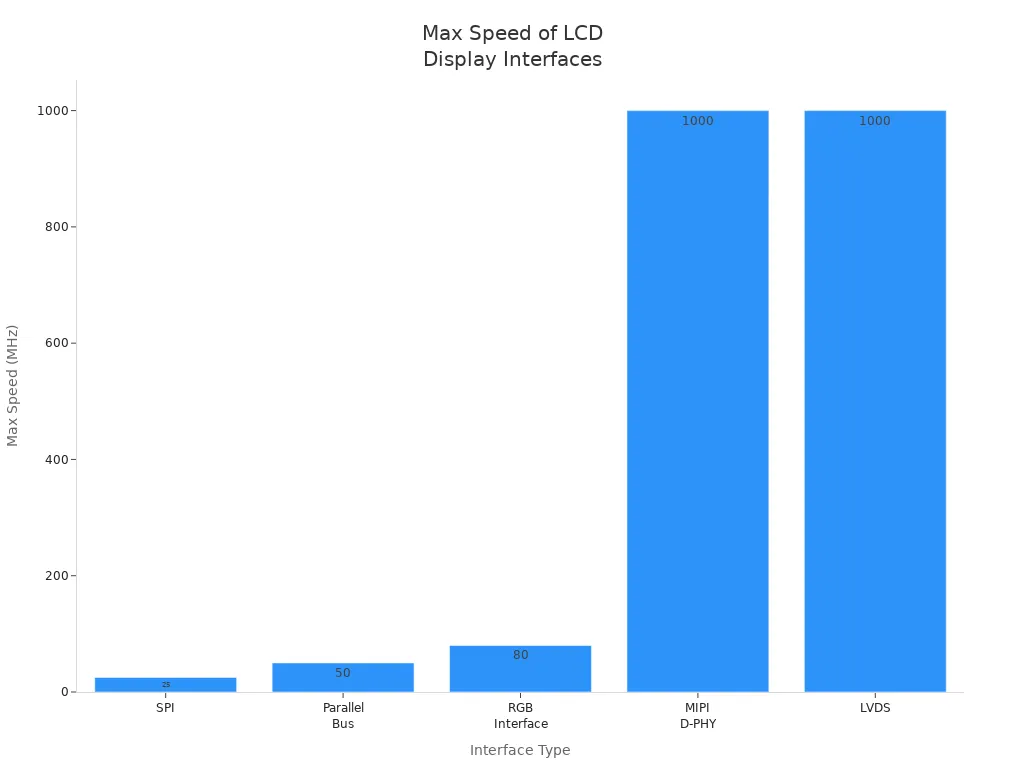
A 320×240 panel with SPI gives about 30 FPS. If you use a 7" screen with 800×480, SPI drops to 5 FPS. You need a faster interface for big screens and smooth pictures.
Tip: For most projects, use small or medium lcd modules for best SPI performance.
Power Consumption and Efficiency
Power use is very important for battery devices. You want your lcd to use little energy. Small screens, low backlight, and power-saving modes help save battery.
Power efficiency helps your battery last longer.
Screen size and backlight strength matter.
Power-saving modes lower energy use.
If you build wearables or sensors, pick a module that uses less than 15mA when on. For example, a UK company used a 1.8” TFT-LCD for an air sensor. The screen updated every minute and the battery lasted a long time.
Note: Always check power use before you buy. Bright screens can use more battery.
Price and Market Value
You want a display that fits your budget. In 2026, full color tft display modules are cheap and easy to get. Prices are low because more people use lcds. Hospitals, stores, and schools want full-color screens. You get bright colors and sharp images for less money.
New display tech, like Quantum Dot and bendable screens, make modules cheaper and better. You can find a module that fits your needs and wallet.
Community Support and Documentation
Good community support makes your project easier. You want clear diagrams, setup videos, and guides. Suppliers with good instructions help you build and fix things faster.
Evidence Type | Description |
|---|---|
Community Reviews | Reviews help you trust; missing guides cause problems. |
Documentation Quality | Clear diagrams and videos help you learn. |
Differentiation | Suppliers with better guides stand out. |
If you use a module with strong community help, you get answers from other makers. You can solve problems and learn new things. This makes your lcd project more fun and easy.
Tip: Always look for good guides and active forums before you buy a display.
You can see that picking the right spi lcd display module means checking compatibility, resolution, color, refresh rate, power use, price, and support. If you focus on these, you get a display that works well for your project.
Real-World LCD Display Module Examples
IoT Sensor with 1.8" SPI TFT LCD
You can make a smart sensor with the 1.8" SPI lcd. This module connects to ESP8266, ESP32, or Arduino Nano W. You see clear graphics and bright colors with good resolution. The display shows sensor data right away. You can use the ST7735 controller for images and charts. The color gamut and high brightness help you read the screen outside. You get strong contrast and steady performance for your IoT projects.
Works with popular microcontrollers
Shows sensor data with sharp resolution
Displays bright colors and clear graphics
Tip: Try using the lcd to check air quality or temperature. You can see updates fast on the screen.
Wearable Fitness Tracker Using Full Color TFT Display
You want a fitness tracker that looks cool and feels light. The full color TFT display module helps you make thin and sleek devices. This display makes the device lighter and more comfortable. You see bright colors and a wide color range. The module protects the screen layers and makes it last longer. You can show steps, heart rate, and calories with sharp resolution. The display works well even after lots of use.
Thin design with better looks
Comfortable for daily wear
Strong durability for active lifestyles
Note: The color and contrast make your tracker easy to read in sunlight.
Industrial Control Panel with 3.5" SPI LCD
Industrial panels need a tough display. The 3.5" SPI lcd module gives you a big screen and high brightness. You see strong contrast and a wide color range. The display meets military standards and works in harsh places. You can see all controls without scrolling. The module resists scratches and chemicals.
Feature | Benefit |
|---|---|
Size | Quick access to information |
Ruggedness | Reliable in tough environments |
Operating Temp Range | Works from -30 to 80°C |
Ingress Protection | IP65/IP68 water and dust resistance |
Material Resistance | Durable against chemicals |
Scratch Resistance | Stops fogging and scratches |
Military Standards | Meets MIL-STD-810 |
Visibility | Indoor and outdoor use |
DIY Hobby Project with 2.4" LCD Display Module
You can make fun projects with the 2.4" lcd display module. Custom sizes fit well in 3D printed cases. The module connects to ESP32, STM32, or Raspberry Pi. You see bright colors and a wide color range. The display lets you try unique shapes and strong performance. You can show graphics with sharp resolution and good contrast.
Easy wiring and coding for beginners
Flexible design for creative projects
Strong display performance and color accuracy
Tip: Try building a mini gaming console or weather station. The lcd makes your project stand out.
You want the best spi lcd display for your project. The 1.8" tft module gives you great color, low power, and fits most needs. If you need a bigger display or sharper color, try the 2.4" or 3.5" modules. Always check the comparison table and key factors before you decide.
Think about resolution, frame rate, and how much color you need. Share your project ideas or ask questions below!
Review the table for speed, wires, and device support.
Pick the display that matches your color and size needs.
How to Choose the Right SPI LCD Display for Your Electronics Project
When choosing an SPI LCD, you are making a trade‑off: relatively slower speed in exchange for minimal pin count and simple circuit design. Different projects have different requirements for screen size, refresh rate, power consumption, etc., but fortunately the path to selecting an SPI LCD is very clear.
🤔 Why Choose SPI?
The biggest advantage of the SPI interface is its low wiring count – usually only 6‑7 wires are needed to drive a colour screen, unlike parallel interfaces that require a dozen or more wires, keeping your project tidy and less error‑prone. Although SPI screen refresh is relatively slower, for embedded projects that need to display text and simple UIs, its performance is perfectly adequate.
It has several irreplaceable advantages in the embedded world:
Almost universal compatibility – Virtually any MCU supports it, from the smallest 8051 to high‑end STM32.
Saves precious I/O pins – It frees up pins for other core peripherals like sensors and SD cards.
Loved by mainstream libraries – The driver ecosystem is extremely rich. Libraries like
TFT_eSPIandAdafruit GFXget your screen running quickly.
🏆 The “Big Three” SPI LCD Driver Chips
Choosing a screen essentially means choosing its underlying driver chip. In 2026, the market is dominated by three major players.
Driver IC | Typical Resolution | Typical Size | Performance & Features | Ideal Use Cases |
|---|---|---|---|---|
ILI9341 | 320×240 (QVGA) | 2.4″ – 3.2″ | Stable, mature, all‑rounder. Most powerful, flexible interface (SPI/parallel), good colour, most mature community libraries. | Industrial HMI, complex data monitoring, touch‑enabled projects. |
ST7789 | 240×240 / 280 / 320 | 1.3″ – 2.0″+ | Compact, modern, fast. Optimised for square screens, often faster refresh than ILI9341, great for modern UIs. | Round smart watches, square small appliances, portable game consoles. |
ST7735 | 128×160 | 1.44″ – 1.8″ | Entry‑level, small, low power. Most economical, low resolution, power‑efficient, simplest SPI driver code. | Basic card devices, minimalist information terminals, low‑cost projects. |
⚡ Performance & Power Comparison
Performance (highest to lowest): ILI9341 > ST7789 > ST7735. ILI9341 with parallel interface excels at high‑speed refresh; ST7789 optimises refresh rate within SPI bandwidth.
Power consumption (lowest to highest): ST7735 > ST7789 > ILI9341. ST7735 is the first choice for battery‑powered projects.
👑 The “All‑Rounder”: TFT_eSPI Library
In the Arduino ecosystem, the TFT_eSPI library is the “standard answer” for driving SPI LCDs. Its strengths:
Very wide compatibility – Covers everything from ATmega328P to STM32, ESP8266/ESP32, RP2040, and many others.
Configure once, use forever – The core is the
User_Setup.hconfiguration file. You comment/uncomment to specify the driver chip and pin assignments.cpp
// Example in User_Setup.h
#define ILI9341_DRIVER          // Specify your driver chip
#define TFT_CS   Pin    // Chip select
#define TFT_DC   Pin    // Data/Command
#define TFT_RST  Pin    // Reset
#define TFT_MOSI Pin    // Master Out Slave In
#define TFT_MISO Pin    // Master In Slave Out (optional)
#define TFT_SCLK Pin    // Clock
Built‑in acceleration – Supports DMA (Direct Memory Access), refreshing the screen with very low CPU overhead. Also integrates JPEG/PNG decoding and touchscreen support.
🎯 Systematic 5‑Step Selection Process
Following these five steps will help you avoid many unnecessary detours.
Step 1: Calculate Data Bandwidth
For example, displaying a 240×320 16‑bit colour (RGB565) image on an ILI9341:Total pixels (240×320) × 16 bits / 8 = ~150KB of data. If you need 30 fps, that is ~4.5 MB/s bandwidth. SPI clock can typically go up to 40 MHz, which is theoretically sufficient, but for video playback consider parallel or RGB interfaces with LCD controllers.
Step 2: Check MCU Capabilities
SPI clock speed – The MCU’s SPI clock limit directly affects the refresh ceiling. High‑performance MCUs can reach 80 MHz; 40 MHz already gives a very smooth experience.
Framebuffer – Quick memory estimation:
No buffer – Minimal RAM, but flickering, non‑smooth drawing.
Full framebuffer – For ILI9341 (320×240×2 = ~150KB). Many low‑end MCUs have only 2KB RAM – not enough. You need 8‑bit or 32‑bit ARM cores, ESP8266 (82KB), ESP32 (520KB), etc.
CPU usage – Refreshing high‑resolution screens consumes many CPU cycles, making it hard to handle other tasks. For frequent refreshes or heavy interrupts, prefer SPI peripherals with DMA to offload the CPU.
Step 3: Match Physical Requirements
Resolution – Higher is not always better. Excessively high resolution increases memory and CPU load with little benefit on small screens. A 1.44″ screen at 128×128 is already sharp.
Brightness – Indoor: 300–500 nits. Semi‑outdoor/ bright ambient: choose 500+ nits (e.g., RCStars 1500‑nit high‑brightness version).
Touchscreen – Resistive: durable, cheap, works with gloves – good for industrial/control. Capacitive: multi‑touch, smooth – good for consumer electronics.
Step 4: Check Environment
Industrial environments – Must choose industrial wide‑temperature models (operating range
-30°C to +85°C) with higher reliability.Battery‑powered – Prioritise low‑power modules like
ST7735and use SPI deep sleep modes.
Step 5: Consider Community Resources
Buy screens that come with complete Wiki tutorials and full open‑source documentation – this will save significant development time.
⚠️ 3 Common Beginner Mistakes & Troubleshooting
Mistake #1: “Using the module as‑is without checking voltage” ⚠️ This is the biggest trap. Many modules include 3.3V LDO regulation and level shifting. If you bypass them and directly use the raw board, your 5V signal will go straight to the core chip! Always read the module schematic or ensure your MCU works at 3.3V logic.
1️⃣ White screen / No display – This is a high‑frequency issue.
Flat‑cable connection – Re‑seat the flat cable, especially the gold fingers at the connector.
Backlight – Check whether the backlight control pin is properly driven.
SPI clock – Reduce the SPI frequency; some modules cannot handle very high speeds.
2️⃣ Colours are wrong (e.g., inverted)
Incorrect LCD initialisation code. Check: SPI mode (usually
SPI_MODE0), colour format (RGB/BGR swap), bit order (MSB first), and whether you accidentally sent 16‑bit data in 8‑bit mode.
3️⃣ Screen flickering
Usually CPU overload. Try: increase SPI frequency, use DMA for refresh, or enable double buffering in the driver configuration.
💎 Summary: One Chart to Help You Decide
After reading this, you should have an answer in mind. If you are still undecided, start with one of these four mainstream paths:
Entry‑level / budget first – Choose 1.8″ ST7735 – low cost, abundant resources.
Best performance & features – Choose 2.8″ / 3.2″ ILI9341, especially if touch is needed.
Modern UI design – Choose 1.54″ or 2.0″ ST7789 – square/round form factor, fast refresh.
Industrial high quality – Choose industrial‑grade or automotive‑grade models – higher upfront cost but long‑term reliability.
If you would like to share details of your specific project (e.g., MCU model, content to display, power constraints), feel free to tell me – I can offer more targeted advice.
FAQ
What microcontrollers work best with SPI LCD modules?
You can use Arduino, ESP32, Raspberry Pi Pico, or STM32. These boards support SPI and connect easily to most LCD modules. You get fast setup and lots of community help.
Can I use SPI LCD displays outdoors?
Yes, you can use them outside. Pick a module with high brightness and good contrast. You see the screen better in sunlight. Some displays have water resistance for extra protection.
How do I connect an SPI LCD to my project?
You connect four main wires: MOSI, SCK, CS, and RESET. Most guides show clear diagrams. You follow the steps and use sample code to test your display.
Are SPI LCD modules good for battery-powered devices?
You get low power use with small SPI LCDs. They work well in battery gadgets like wearables and sensors. Check the specs for power ratings before you buy.
Where can I find help if I get stuck?
You find help on forums, YouTube, and maker websites. Many suppliers offer guides and videos. You ask questions and get answers from other makers.
See Also
Selecting The Ideal LCD Round Display For Your 2025 Project
Top LCD Kiosks Perfect For Retail Spaces In 2026
Selecting The Perfect LCD Video Wall For Your 2026 Space
