Sliding LCD DISPLAY screen with sliding rail
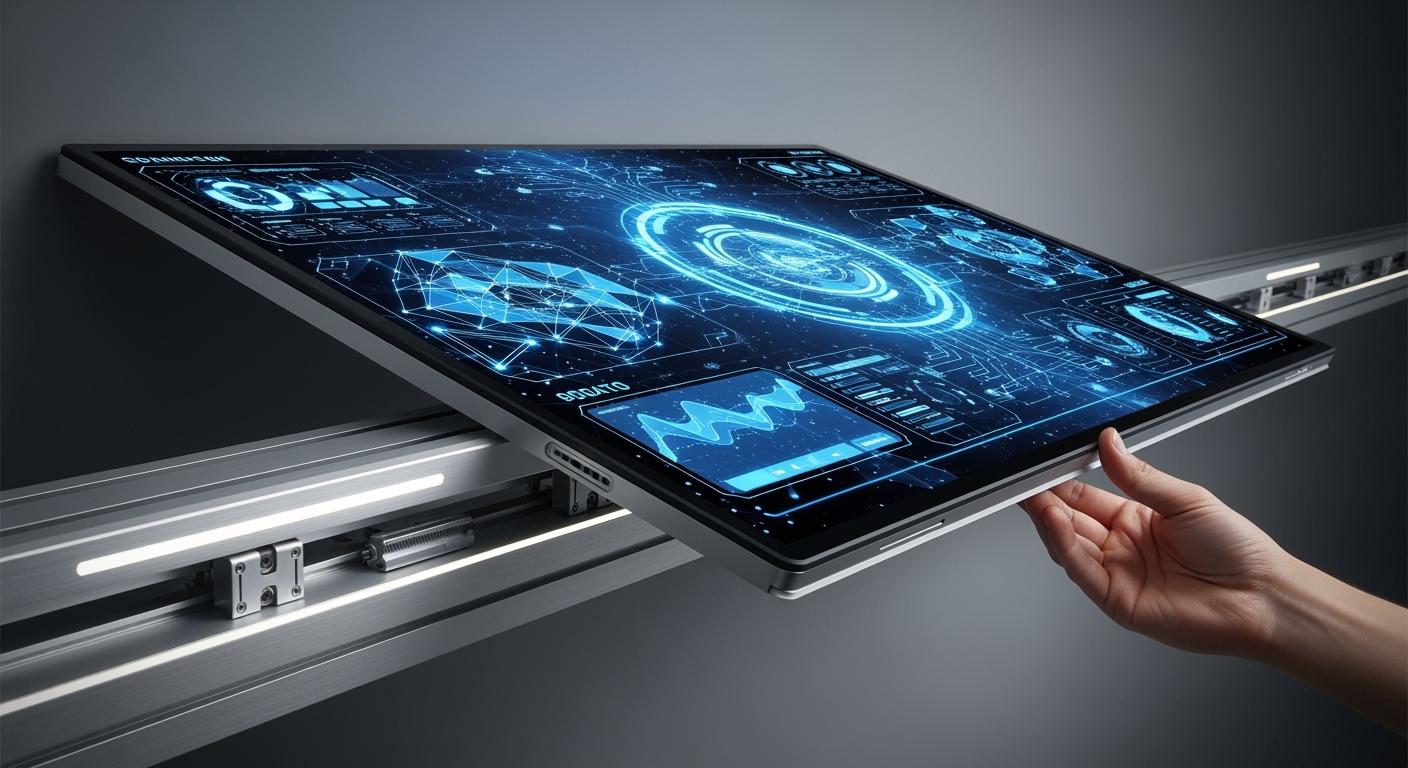
A Sliding LCD DISPLAY screen with sliding rail gives you a smart way to move your display across a room or space. You can slide the screen left or right, up or down, depending on how the rail is set up. Touch functionality lets you interact directly with the screen, while sensor points make every movement smooth and safe. You get better control during presentations, and your audience stays engaged.
Shenzhen TopAdkiosk Display Technology Co., Ltd.
Add.: 2F, Bldg 10, Changfeng Industrial Park, Dongkeng, Fenghuang, Guangming, Shenzhen, China 518132
Mobile/WHATSAPP: 86-138 25769658
Email: marketing@topadkiosk.com topadkiosk@gmail.com
Skype: pghenry1
Wechat: adkioskhenry
English Web.: http://www.topadkiosk.com/
https://www.topkioskdisplay.com/
http://www.ad-kiosk.com/
https://www.toplcddisplay.com/
http://www.multitouchdigitalsignage.com/
https://www.youtube.com/channel/UCYVYNJHxLVEcQD8fuUxXNTA/videos?view_as=subscriber
https://www.facebook.com/TOPADKIOSKSHENZHEN/?ref=bookmarks
Want to adjust the screen height or position? Just slide it.
Need to switch between content? Tap and go.
Key Takeaways
Sliding LCD DISPLAY screens can move in different ways. You can change the screen's position easily. This helps you see the screen better. - You can pick wall-mounted, floor-standing, or ceiling-hung displays. Choose what fits your space and what you like best. - You can use straight or curved tracks for the screen. These tracks help the screen move well. This works in places like classrooms or galleries. - You can move the screen by hand or use electric movement. Electric systems are better for bigger screens. - Safety features like sensor points help the screen work safely. They keep the screen and people safe from accidents.
Sliding LCD DISPLAY Types
You have many choices when it comes to a Sliding LCD DISPLAY. You can pick the style that fits your space and needs. Let’s break down the main types so you can see which one works best for you.
Wall-mounted, Floor-standing, Ceiling-hung
You can mount your Sliding LCD DISPLAY on a wall, stand it on the floor, or hang it from the ceiling. Each setup has its own benefits. Here’s a quick look at where you might use each type:
Typical Use Cases | Pros | Cons | |
|---|---|---|---|
Floor-Standing | Conference halls, retail stores, exhibition spaces | Portable, easy to assemble, suitable for rentals | Takes up floor space; less stable in high-traffic areas unless anchored |
Wall-Mounted | Control rooms, lobbies, permanent installations | Space-saving, clean appearance, high load capacity | Requires structural wall integrity; harder to service rear components |
Ceiling-Hung | Arenas, theaters, transportation hubs | Frees up floor and wall space; ideal for large audiences | Complex installation requiring engineering approval; higher risk if improperly installed |
Tip: If you want a clean look and save space, wall-mounted screens are a great choice. If you need to move your screen often, floor-standing models make things easy.
Track Options: Straight, Curved
You can choose between straight or curved tracks for your Sliding LCD DISPLAY. Straight tracks let you move the screen back and forth in a simple line. Curved tracks add a unique touch and let you slide the screen around corners or along walls. You can pick the track length based on your room size. Longer tracks give you more freedom to move the screen.
Straight tracks work well in classrooms and meeting rooms.
Curved tracks fit spaces like museums or galleries where you want to follow a wall or display area.
Touch functionality stays smooth no matter which track you pick. You can interact with the screen as it slides, making your presentations more dynamic.
Manual vs. Electric Movement
You can move your Sliding LCD DISPLAY by hand or use an electric motor. Manual movement feels simple and gives you direct control. Electric movement lets you slide the screen with a button or remote. This is handy if the screen is heavy or you want to impress your audience.
Manual systems are easy to set up and cost less.
Electric systems offer more convenience and work well for larger screens.
Sensor points help keep the movement safe. You don’t have to worry about the screen bumping into things or moving too fast. You can focus on your presentation and let the system handle the rest.
Note: If you plan to use the screen in a busy area, electric movement with sensors can make things safer and easier.
You can mix and match these options to create the perfect Sliding LCD DISPLAY for your space. Whether you want a wall-mounted screen on a curved track or a floor-standing screen with electric movement, you have plenty of choices.
Sliding Mechanism
Rail System & Precision Components
A Sliding LCD DISPLAY uses a strong rail system. Heavy-duty rails hold the screen and let it move easily. Modular roller tracks fit many spaces. You can mount the screen on a wall or ceiling. Linear guide systems use V rails on aluminum beams. These rails work for fixed and sliding mounts. Rack-driven carriages move the screen in any direction. HepcoMotion PRT2 rings tilt panels for better viewing.
Multi-layer projected capacitive touchscreens make the screen tough and last longer.
Industrial screens keep out dust, water, and heat. They work well in busy or rough places.
These displays last over 70,000 hours, so you get long use.
Screen Mounting & Movement
Mounting your screen the right way keeps it safe. Adjust the mounting bracket to move the screen up or down. Put the central hole of the LCD enclosure bracket at the halfway line. This keeps the screen balanced. Use only the brackets and bolts that are recommended. Do not change the enclosure. That can hurt the screen’s protection and warranty.
Best Practice | Description |
|---|---|
Adjusting the Mounting Bracket | Move the screen up or down with bolts and washers. |
Central Hole Positioning | Put the central hole at the halfway line for balance. |
Use Recommended Brackets | Attach brackets to the back with proper bolts. |
Avoid Altering the Enclosure | Do not drill extra holes. |
Secure Wall Plate | Use strong bolts for support. |
Proper Positioning | Slide brackets gently over the wall plate. |
Locking Mechanism | Use a padlock to keep it safe. |
Cable Management | Run cables from below to keep water out. |
Correct Fit | Use the right screws to secure the screen. |
Sensor Points & Safety
Sensor points help the screen move safely and smoothly. You do not have to worry about the screen hitting walls or moving too fast. Sensors find obstacles and stop the screen if needed. Electric motors give you extra control. You can move the screen with a button or remote. Safety features protect the screen and people nearby. Maintenance is easy. Check the rails and sensors sometimes to keep everything working well.
Tip: Check rails and sensors often. This helps your Sliding LCD DISPLAY last longer and work better.
Features & Benefits
Flexibility & Adjustability
A Sliding LCD DISPLAY lets you change how the screen looks and works. You can slide the screen to different places. You can tilt it to see better. You can make the screen brighter or dimmer. This helps everyone use the screen easily. People can see the screen from anywhere in the room.
Here’s how adjustable features help people:
Feature | Benefit |
|---|---|
Lets you tilt the screen for better viewing. | |
Brightness Settings | Lets you change brightness for your space. |
Tactile Feedback | Gives touch signals for people who cannot see well. |
Tip: If your group needs different things, you can change the screen settings. Move the screen or adjust it so everyone can use it.
Interactivity & Touch Functionality
Touch screens make using the display simple and fun. You can tap, swipe, or drag on the screen. This helps people work together and share ideas. Many people can use the Sliding LCD DISPLAY at the same time.
Here are some specs that make the screen interactive:
Specification | Details |
|---|---|
Touch Technology | PCAP (12 Touch), Infrared (20 Touch) |
Multi-User Interaction | |
Resolution | 1920 x 1080 @ 60hz |
Response Time | 6.5 msec |
High Performance | Works well with AV and IT systems |
You get clear pictures and fast touch response. Everyone can see and use the screen. Meetings and lessons become more exciting.
Ease of Use & Installation
You do not need special skills to set up a Sliding LCD DISPLAY. The system has easy mounting choices and simple instructions. You can put it on a wall, floor stand, or ceiling. Plug in the cables and adjust the screen. Then you are ready to use it.
Mounting brackets make setup quick.
Cable management keeps wires neat.
Safety features and sensors protect people and the screen.
Note: You can move and adjust the screen easily. This saves time and keeps your space clean.
Applications
Museums & Exhibitions
A Sliding LCD DISPLAY can make museum visits more interesting. These screens turn plain walls into cool video displays. Visitors see moving pictures instead of only reading words. You can use animations and videos to make exhibits exciting.
Show stories about artifacts.
Let visitors watch short history clips.
Make displays that react to touch.
Object recognition software lets you put real items on the screen. The display shows extra facts or videos when you do this. This makes learning fun and hands-on. Lightbox galleries let people try new things and give feedback. You help improve future exhibits by joining in.
Tip: Interactive screens help visitors try new things and learn together.
Digital Signage & Events
Sliding LCD DISPLAY screens work well for digital signs at events. These screens let you interact with multi-point touch. You can update content fast and show graphics, text, and animation together.
Save resources by changing messages quickly.
Make information easy to understand and interesting.
Here’s how these screens help at events:
Feature | Description |
|---|---|
High Brightness | Displays stay clear in bright rooms or outside. |
Wide Viewing Angles | Everyone sees good images from anywhere. |
Remote Content Management | Update signs from anywhere with LAN, Wi-Fi, or 4G. |
You keep your audience informed and entertained. You can change messages quickly and reach more people.
Home & Education
Sliding LCD DISPLAY screens are great for classrooms and homes. You help students work together and pay attention. Teachers use these screens for lessons and presentations.
Lessons become interactive and fun.
Check out these advantages:
Advantage | Description |
|---|---|
Enhanced Engagement | |
Ideal for Presentations | Teachers use screens to explain topics clearly. |
Support for Active Learning | Students take part in lessons instead of just watching. |
Interactive displays help students work together and stay motivated. You create a lively classroom where everyone gets involved.
You’ve seen how a Sliding LCD DISPLAY can change your space with flexible types, smooth movement, and interactive features. When you pick a system, keep these tips in mind:
Measure how far you want the screen to slide.
Match the screen’s size and weight to the rail.
Look for tilt options that keep the screen level.
Use strong anchors and test the setup.
Stay curious about new tech. Companies like Samsung often share the latest sliding screen ideas at big events.
FAQ
How do you move a Sliding LCD DISPLAY screen with sliding rail?
You can slide the screen by hand or use a remote if you have an electric model. The rail keeps the movement smooth and safe. You just push or press a button.
Can you use the touch screen while sliding the display?
Yes! You can tap, swipe, or draw on the screen even as it slides. The touch points work all the time, so you never lose control.
Is it hard to install a Sliding LCD DISPLAY screen with sliding rail?
No, you get clear instructions and easy-to-use brackets. Most people set it up in a few steps. You just need to follow the guide and use the right tools.
What safety features protect you and the screen?
Sensor points stop the screen if something gets in the way. The rail system holds the display steady. You stay safe, and your screen stays secure.
Where can you use a Sliding LCD DISPLAY screen with sliding rail?
You can use it in classrooms, museums, offices, or even at home. It fits many spaces and helps you share ideas in a fun way.
See Also
Top Touch Screen LCD Kiosks Available in 2026
Best Places to Purchase Sturdy LCD Kiosks for Malls
Leading LCD Kiosks for Retail Spaces in 2026
Creating High-Quality Touch and Non-Touch LCD Mirror Displays
