How to Set Up an Interactive Digital Signage Touch Screen Step by Step
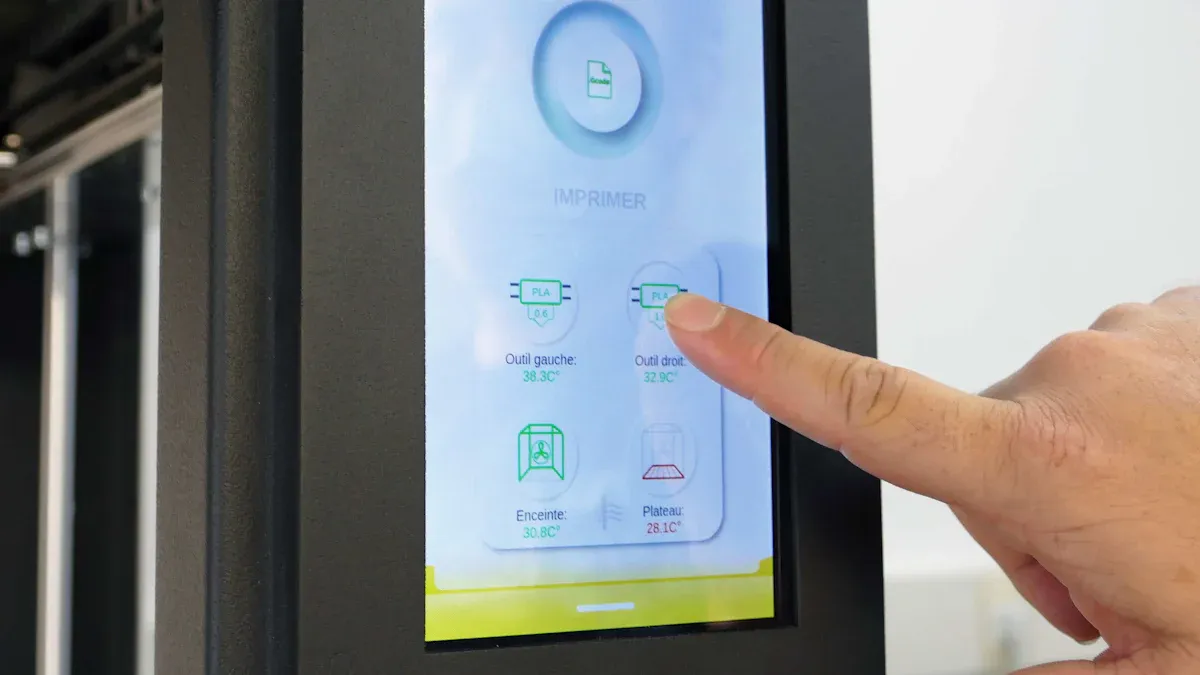
An interactive digital signage touch screen shows information, ads, or directions. It lets people use the screen by touching it. You can make your own system. First, pick the right hardware. Next, install software that is easy to use. Then, create content that people can interact with. Many businesses use these screens now. About 18% to 22% of all digital signage uses interactive displays. These are common in stores, schools, and airports.
Shenzhen TopAdkiosk Display Technology Co., Ltd.
Add.: 2F, Bldg 10, Changfeng Industrial Park, Dongkeng, Fenghuang, Guangming, Shenzhen, China 518132
Mobile/WHATSAPP: 86-138 25769658
Email: marketing@topadkiosk.com topadkiosk@gmail.com
Skype: pghenry1
Wechat: adkioskhenry
English Web.: http://www.topadkiosk.com/
https://www.topkioskdisplay.com/
http://www.ad-kiosk.com/
https://www.toplcddisplay.com/
http://www.multitouchdigitalsignage.com/
https://www.youtube.com/channel/UCYVYNJHxLVEcQD8fuUxXNTA/videos?view_as=subscriber
https://www.facebook.com/TOPADKIOSKSHENZHEN/?ref=bookmarks
At Santana Row in San Jose, California, two-sided touch screens made visits better and helped local businesses earn more money:
Aspect | Details |
|---|---|
Location | Santana Row, San Jose, California |
Challenges | Visitors had a hard time finding their way and event details. |
Solution | 55" touch screens showed maps, event lists, and ads. |
Results | Visitors got more involved, businesses got noticed, and more people went to events. |
You do not need to worry if you are new to this technology. Today’s platforms and step-by-step guides make it easy for anyone to start.
Key Takeaways
Figure out your goals and who will use the signage before you start. This makes it easier to pick the best features and content.
Pick the right touch screen technology for your space. Capacitive screens are good for stores. Resistive screens are better for factories or tough places.
Choose easy-to-use digital signage software to handle content. Cloud-based tools let you update and control things from far away.
Make fun content that gets people’s attention. Use simple layouts, live data, and things people can touch to keep them interested.
Take care of your screens so they work well. Clean them often, check the area around them, and change the content when needed.
Define Objectives & Audience
Purpose of Interactive Signage
Set your goals before you put up interactive digital signage. Many businesses use these screens to get people more involved. People do not just look at the screen. They can touch it and find out more. Touch screens let users search for details when they want. These screens also let people give feedback or make choices.
Here are some ways people use interactive digital signage touch screens:
Touchscreen directories let people sort by name, department, or event.
Interactive maps help visitors find their way with step-by-step directions.
Menu boards let customers order food or drinks in cafes and restaurants.
Different places use interactive screens for their own reasons. The table below shows how retail, healthcare, and education use them:
Sector | Primary Purpose |
|---|---|
Retail | Helps customers get involved, find product info, and buy things using touch screens. |
Healthcare | Gets people involved, shares info, and helps patients find their way with kiosks. |
Education | Makes learning better, gets students involved, and helps with group projects. |
Tip: Pick your goals based on where you are and who will use the screen. This helps you pick the best features and content.
Identify User Needs
You need to know your audience to make your signage work well. Start by thinking about their age, tech skills, and what they like. Change the layout and font size to fit what users want. Pick colors and ways to interact that feel normal to your audience.
Use touch screens that work with taps, swipes, pinches, and scrolls.
Give visitors a way to search for info fast.
Let users pick what they want to see, not just what is set up.
Start with clear spots that show value and how things are organized.
Leave space so the screen is easy to read.
Use pictures or signs to show users what to do next.
Learning about your audience helps you see how much they use your screens. The table below shows important things to measure:
Metric | Description |
|---|---|
Audience Demographics | Shows who is looking, like age and gender. |
Dwell Time Analysis | Tells how long people use the screens, which shows if they remember the message. |
Interaction Tracking | Counts taps, swipes, or QR code scans to see how much people use the screens. |
Behavior Segmentation | Puts people in groups based on how they use the screens for better campaigns. |
When you use this information, you can make better choices. You learn what works best and make your screens more fun to use.
Choose Hardware for Interactive Digital Signage Touch Screen
Select Touch Screen Display
You have to pick a display that is good for touch. The right screen makes your system simple and strong. There are different touch screen technologies. Each one has its own good points. You can look at the main types in the table below:
Touch Screen Technology | Description | Ideal Use Cases |
|---|---|---|
Capacitive | Responsive, durable, supports multi-touch gestures | Malls, retail stores, interactive digital signage touch screen |
Resistive | Works with pressure, less sensitive, durable | Industrial or outdoor environments, gloves or styluses |
Infrared | Uses light beams to detect touch, durable | Large-format displays, public information boards |
Capacitive screens are very accurate and quick. People use them in malls and stores. Infrared screens are tough and last a long time. Resistive screens work with gloves or a stylus. You should pick the technology that matches your place and what people need.
Tip: Some platforms let you change a normal monitor into an interactive digital signage touch screen. This can help you save money and make your old setup better.
Accessories & Connectivity
You need the right accessories and connections for your system. Good mounts keep your screens safe and looking nice. Strong enclosures protect your screens in busy or outdoor places. You can see common accessories in the table below:
Accessory | Purpose |
|---|---|
Proper mounts | Security and professional appearance |
Robust enclosures | Specialized uses like kiosk advertising |
For connections, you can use Wi-Fi or Ethernet inside. Outdoor screens often use 4G or 5G cellular. The table below shows these choices:
Connectivity Type | Use Case |
|---|---|
Wi-Fi | Indoor displays |
Ethernet | Indoor displays |
4G/5G Cellular | Outdoor units |
You can also use things like the Elo Backpack. It is a strong Android signage player for businesses. It connects to interactive displays and works with management software. You can add other devices to make your system fit different needs.
Note: Good accessories and strong connections help your digital signage system work well.
Set Up Interactive Touch Screens with Software
Pick Digital Signage Software
You need software that is simple to use and manage. Many platforms help you set up touch screens without coding. Cloud-based solutions like EasySignage, NoviSign, Rise Vision, and Yodeck let you control screens from anywhere. You can update content fast and manage many screens at once.
Modern digital signage software supports interactive touchscreen features. These platforms let you show maps, menus, or ads that people can explore by touch. You can manage screens in different places from one spot. You can track how people use your screens and see which content works best. These platforms follow accessibility standards so everyone can use them.
Here are some top software options:
Yodeck: Lets you manage screens easily and control displays from far away. Security features keep your system safe.
Navori: Offers tools for digital signage needs. The CMS is simple and gives you advanced reports.
Arreya: Helps you create and manage interactive content. You get many templates and drag-and-drop tools.
BroadSign: Makes it easy to control your signage network. You can publish content and build smart playlists.
Tip: Cloud-based solutions are flexible and simple. You do not need to worry about maintenance. On-premise options give you more control and security, but you need technical skills to manage them.
When you pick software, look for features that help you organize content, track user actions, and make navigation easy. The table below shows important criteria:
Criteria | Description |
|---|---|
Database Organization | Lets you use templates and map relationships for easy navigation. |
Search and Discovery | Powerful search and filtering help users find what they need. |
User Interface Design | Simple navigation and responsive touch make screens easy to use. |
Analytics | Tracks interactions and content performance for better results. |
Content Management | Helps you create and update content quickly. |
Training Considerations | Makes sure you and your team know how to use the software. |
Install & Configure
You can set up interactive touch screens in a few easy steps. Most platforms guide you through the process. You do not need to be an expert.
Choose the right display. Pick a screen size and type that fits your space.
Connect the display to your control system. Make sure the hardware works with your software.
Install the software. Follow the instructions to set up digital signage on your device.
Configure the software. Set up a central location to manage content and monitor your digital signage system.
Cloud-based solutions are great for small and medium setups. You can log in from any device and update content fast. The interface is easy to use, so you can add images, videos, or interactive elements with a few clicks. You do not need to worry about updates or maintenance. The software handles everything for you.
Note: On-premise solutions need more technical resources. You must manage updates and security yourself. Cloud-based options are easier for beginners and save time.
You can set up interactive touch screens and start engaging your audience right away. The software helps you organize playlists, track user actions, and improve your content. You make your screens more useful and fun for everyone.
Create Interactive Touchscreen Playlists & Content
Design Engaging Content
You should make content that gets people’s attention. It should also keep them interested. Use clear layouts and simple menus on your interactive digital signage touch screen. Put screens where lots of people walk by. This helps everyone see your messages.
Touchscreen directories and wayfinding maps help people find places. You can add QR codes for deals or more info. Games, contests, and surveys make people want to touch the screen. Make sure every button and menu is easy to use. Label things so users know what to do.
Keep your content new by showing real-time data. Show things like weather, news, or event times. This makes people want to come back and use your screens again. You can check how long people use the screens and how often they touch them. Use this to make your content better.
Try these design tips to get more people to use your screens:
Give users ways to give feedback.
Change your content to fit your place and audience.
Use good pictures, animations, and videos.
Tell people to use touch and gestures.
Make sure everyone can use your content easily.
Almost half of people remember digital video ads. Using dark overlays can help people remember your message even more. These ideas can help your interactive touchscreen playlists work better.
Tip: Use short messages in busy spots. Longer messages are good for places where people wait.
Upload & Organize Playlists
You can make an interactive playlist with easy tools. Many platforms have drag-and-drop features and templates. You do not need to know how to code to use digital signage or manage your content.
Here are some tools you can use for interactive touchscreen playlists:
Tool | Features | Use Case |
|---|---|---|
Intuiface | Lets you build with visuals and logic blocks | Good for kiosks with many screens and no coding needed |
TruVideo Player | Lets you add clickable spots and video paths | Great for interactive video experiences |
BrightSign | Runs interactive signage and event triggers | Good for kiosks that work offline |
Rise Vision | Lets you schedule and use templates | Helps manage lots of digital signage screens |
Xibo | Lets you manage in a browser and use templates | Works well for touch screens and asset management |
SignageLive | Has central control and role-based access | Good for campaigns with approval steps |
Scala | Uses templates and controls playback | Great for touchscreen menus and guided displays |
ScreenCloud | Has touch controls and easy updates | Good for meetings and training rooms |
You should organize your playlists to make things easy for users. Make a different playlist for each type of content. For example, use one for maps, one for deals, and one for surveys. Update your content often so it stays interesting.
Use screen zones to show more than one thing at once. You can put a map on one side and a video on the other. This keeps the screen neat and helps people find what they want.
Strategy | Description |
|---|---|
Separate Playlists for Content Types | Make different playlists for each kind of content. This helps you manage and change things easily. |
Keep Content Fresh | Update your content often so people stay interested. |
Use Screen Zones | Show more than one thing at a time without making the screen messy. |
A content management system lets you upload, schedule, and organize your playlists. You can put a playlist on your screen with just a few clicks. This makes it simple to handle many screens in different places.
Note: Easy-to-use tools help you make and change content fast. You can test your playlists and see how people use them. This helps you make your digital signage system better and reach your goals.
Set Up Digital Signage: Installation & Testing
Mount Hardware
You need to plan before you mount your interactive digital signage touch screen. Start by choosing the right equipment for your space and budget. Think about what you want your screens to show. Pick hardware that fits your goals. You can use wall mounts, stands, or kiosks. Each method works best in different places.
Wall mounts save space and look neat in hallways or lobbies.
Stands let you move screens to new spots for events or changing needs.
Kiosks work well in busy areas like malls or airports.
You must also keep safety in mind when you set up digital signage. The table below shows important safety steps:
Safety Consideration | Description |
|---|---|
Cable Management | Organize cables to stop damage and keep connections strong. |
Environmental Factors | Use weather-resistant hardware for outdoor screens. |
Power Supply | Make sure your screens have steady power to avoid shutdowns. |
Security Measures | Protect your system from hacking and unwanted access. |
Connect & Test System
After you mount your hardware, you need to connect and test your digital signage system. Follow these steps to make sure everything works:
Check the power supply and all connections. Fix any problems right away.
Look at the screen settings. Match them to the manufacturer's instructions.
Make sure your content files work with your software.
Update your software often. This helps your system support more media and stay safe.
Fix any connection issues quickly. This keeps your screens working and up-to-date.
Run health checks on your hardware. This helps you find problems before they get worse.
Testing helps you see if your interactive digital signage touch screen responds to touch and shows content the right way. You can ask a few people to try the screen and give feedback. This helps you make sure your setup is ready for everyone to use.
Tip: Careful installation and testing help your screens last longer and work better.
Maintenance & Updates
Regular Maintenance
You have to take care of your interactive digital signage touch screen. Doing regular checks helps your screens last longer and work well. Here are some steps you can follow to protect your digital signage system:
Clean the touch screen often with safe cleaners and a soft cloth. This keeps the screen clear and simple to use.
Keep the room at the same temperature. Try to stay between 68 and 72 degrees Fahrenheit. Humidity should be between 40 and 60 percent.
Put covers on the screen when you are not using it. This stops dust and dirt from causing problems.
Show people how to touch the screen the right way. This keeps the system safe and working well.
Plan for experts to check your screens. They can find hidden problems and fix them before they get worse.
You might see some common problems when you do maintenance. The table below shows what can happen and how to fix it:
Description | |
|---|---|
Cleaning Procedures | Use gentle dry wipes and safe cleaning solutions. Let the screens dry all the way. |
Environmental Monitoring | Watch the temperature and humidity to stop damage. |
User Education | Teach people how to use and care for the screens. |
Hardware Inspection | Check wires and mounts often to make sure they are safe. |
Software Maintenance | Update your software and check how it works for safety and speed. |
Troubleshooting Common Issues | Fix problems with the display, touch, or connection by checking each part one by one. |
Tip: Taking care of your screens often helps you save money and keeps them ready to use every day.
Content & Software Updates
You need to update your content and software often. This keeps your interactive digital signage touch screen new and helpful. Different places need updates at different times. The table below shows how often you should update for each industry:
Industry Type | Examples of Updates | |
|---|---|---|
Retail Digital Signage | Weekly or biweekly | Sales, special deals, new products |
Restaurant Digital Menu Boards | As needed (e.g., daily) | Price changes, food choices, new menu items |
Corporate Communication Screens | Monthly | News, work updates, event reminders |
Education Digital Displays | Dynamic updates | School events, campus news, emergency alerts |
Public Space Digital Boards | Automated updates | News, live data, weather |
You can use your digital signage system to plan updates and keep your screens up to date. When you set up digital signage, it is easy to change content and software. This helps your screens stay fun and safe.
Note: Updating often helps you share new information and keeps people interested. It also protects your system from security problems.
You can set up digital signage by taking a few easy steps. Interactive digital signage touch screens let you talk to your audience. You can change what is on the screen right away. You can also see how well your screens are working. The table below lists the main benefits:
Benefit | Description |
|---|---|
Engagement | Touch screens make things more fun and interesting. |
Real-time updates | You can switch content fast whenever you want. |
Increased foot traffic | Moving content brings more people to your area. |
Enhanced customer experience | People can look at details and check what is in stock. |
Advanced analytics | You can find out how people use your screens. |
You should take care of your system often to keep it running well. Later, you might add new things like AI-powered content or touchless screens.
FAQ
What is an interactive digital signage touch screen?
An interactive digital signage touch screen is a special display. You can touch the screen to get info, maps, or ads. You can tap, swipe, or scroll to look at things. Many businesses use these screens to help people and customers.
Do I need special software for interactive digital signage?
Yes, you need digital signage software for your screen. This software lets you make, manage, and change your content. Many platforms have easy drag-and-drop tools. You can control your screens from anywhere with cloud-based choices.
How do I keep my touch screen clean and working well?
Wipe your screen with a soft, dry cloth. Use safe cleaners made for electronics. Do not use strong chemicals. Check your screen often for dust or fingerprints. Show people how to touch the screen gently.
Can I update content on my screens from home?
You can update your interactive digital signage touch screen from anywhere. Most cloud-based platforms let you log in online. You can change messages, add pictures, or set updates without going to the screen.
See Also
Comprehensive Instructions for Setting Up a Touch Kiosk
A Complete Guide to Installing Digital Display Signage
Detailed Process for Configuring Local Server Digital Signage
Simple Steps for Installing and Configuring Signage Software
Guidelines for Choosing and Installing Outdoor Digital Signage
