Self Service Terminal For Exhibition boosts visitor engagement fast
Shenzhen TopAdkiosk Display Technology Co., Ltd.
Add.: 2F, Bldg 10, Changfeng Industrial Park, Dongkeng, Fenghuang, Guangming, Shenzhen, China 518132
Mobile/WHATSAPP: 86-138 25769658
Email: marketing@topadkiosk.com topadkiosk@gmail.com
Skype: pghenry1
Wechat: adkioskhenry
English Web.: http://www.topadkiosk.com/
https://www.topkioskdisplay.com/
http://www.ad-kiosk.com/
https://www.toplcddisplay.com/
http://www.multitouchdigitalsignage.com/
https://www.youtube.com/channel/UCYVYNJHxLVEcQD8fuUxXNTA/videos?view_as=subscriber
https://www.facebook.com/TOPADKIOSKSHENZHEN/?ref=bookmarks
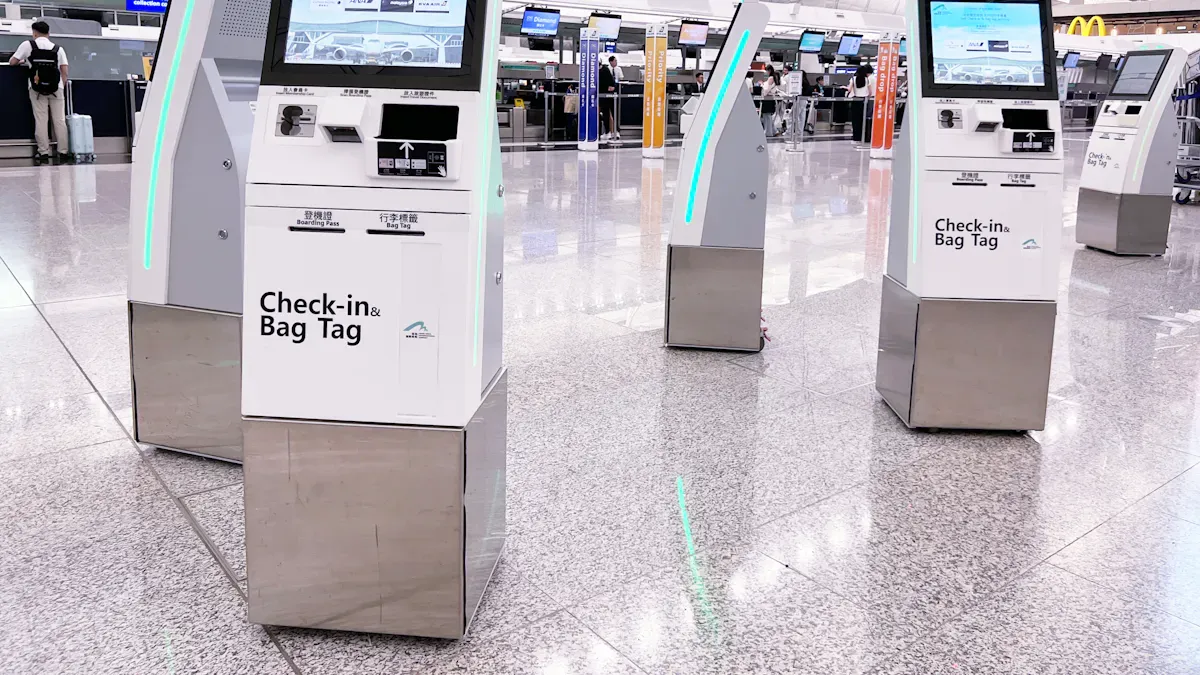
You get results quickly when you use a Self Service Terminal For Exhibition. These kiosks make things easy for everyone. Visitors can check in, buy tickets, and look at exhibits by themselves. You see shorter lines and happier faces. The interactive touchscreen helps people find their way easily. The table below shows how these terminals change exhibitions:
Visitor Experience | Kiosks make ticketing faster and lines shorter. |
|---|---|
Data Collection | Kiosks collect what visitors like for better exhibits. |
Health and Safety | Contactless features help keep everyone safe. |
Operational Efficiency | Multilingual support helps more people join events. |
Key Takeaways
Self-service terminals make check-in and ticketing faster. This cuts down wait times and makes visitors happier.
Interactive kiosks give quick information to visitors. People can look at exhibits when they want.
Kiosks show content that fits each visitor. This makes the visit more fun and makes people want to come back.
Kiosks let visitors give feedback right away. Organizers can fix things fast and make the event better.
Multilingual support helps all visitors feel welcome. Everyone can find their way in the exhibition, no matter their language.
What is a Self Service Terminal For Exhibition?
Definition and Purpose
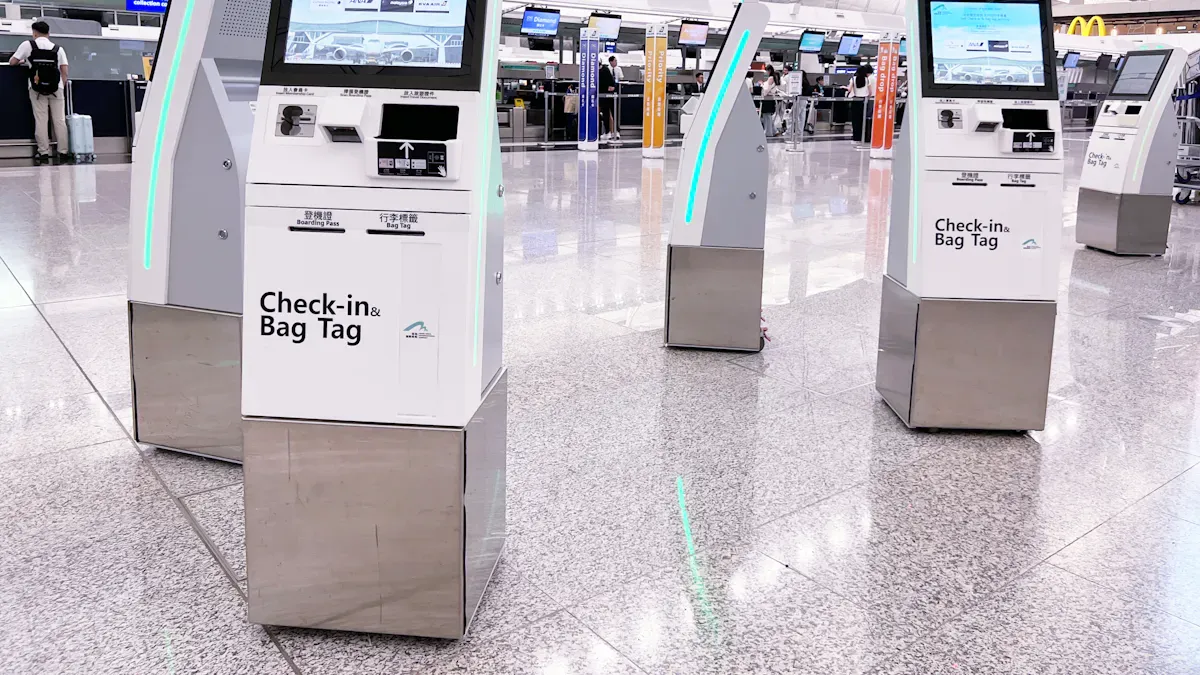
A Self Service Terminal For Exhibition is a kiosk you use by yourself. It has a touchscreen, voice controls, or motion sensors. You do not need staff to help you. You can check in, buy tickets, or find exhibit info fast. These kiosks help you move around the exhibition quickly. Your visit feels easier and smoother.
These terminals have several main purposes:
Increased Efficiency and Speed: You wait less in lines. The terminal helps you finish tasks fast, even when it is crowded.
Cost Savings: Organizers need fewer staff for simple jobs. They can use money for other parts of the event.
Improved Customer Experience: You choose your own pace. You can look at options and decide without feeling rushed.
Error Reduction and Order Accuracy: You enter your own details. This lowers mistakes and makes sure your requests are right.
Data Collection and Insights: The terminal gathers info about what you like. Organizers use this data to make future exhibitions better.
Tip: Using a Self Service Terminal For Exhibition helps you enjoy your visit more and helps organizers learn what works well.
Types of Exhibition Kiosks
You will see different kiosks at exhibitions. Each one has a special job:
Type | Main Function |
|---|---|
Information Kiosk | Gives you facts about exhibits and schedules. |
Ticketing Kiosk | Lets you buy or print tickets by yourself. |
Check-In Kiosk | Makes entry faster by handling registration. |
Interactive kiosks let you join in at the exhibition. You use touchscreens or voice commands to get info or finish tasks. This is not like regular signs, which only show info to read. With a Self Service Terminal For Exhibition, your experience feels more personal and fun.
How Self Service Terminals Boost Engagement
Instant Information Access
You want answers fast at an exhibition. A Self Service Terminal For Exhibition gives you information right away. You can check schedules and find booths easily. You learn about exhibits with just a few taps. This means you wait less and explore more.
Here is how instant information access helps you:
Benefit | Description |
|---|---|
You get quick service and short waits, so your visit is more fun. | |
Improved Order Accuracy | You pick your own choices, so you always get the right info. |
Enhanced Data Collection | The terminal remembers what you like, so future exhibitions fit your interests better. |
You feel in control and confident when you find answers yourself.
Interactive Experiences
You do not just read information—you interact with it. A Self Service Terminal For Exhibition lets you touch and swipe. These features make your visit exciting and fun. You can play games, watch videos, or join quizzes about exhibits.
Interactive experiences help you stay longer and enjoy more. The table below shows how these features help:
Evidence Type | Details |
|---|---|
Interactive displays make you stay two to five times longer. | |
Engagement Among Family Groups | Families enjoy activities together and spend more time. |
Replay Behavior | You may want to try activities again, so you have more fun. |
Design Elements | Clear instructions and feedback keep you interested. |
You remember more and feel connected to the exhibition when you join in.
Personalized Content
You want an experience that feels special to you. Self-service kiosks remember your likes and suggest things you might enjoy. This makes your visit unique and fun.
Personalized kiosks remember your favorites and suggest new things.
Smart technology helps you find exhibits that match your interests.
You get quick service and accurate information.
You feel important, so you want to come back.
Personalized content helps you enjoy your visit and builds loyalty for future events.
Fast Check-In and Management
You do not want to wait in long lines. A Self Service Terminal For Exhibition lets you check in quickly and print your badge right away. You can register yourself, which saves time for you and staff.
You spend less time waiting at the entrance.
The terminal handles busy times well, so you do not feel rushed.
You can fix problems or update details without asking for help.
The event looks more professional and organized.
Fast check-in means you start your visit happy and have more time to enjoy.
Real-Time Feedback
You can share your thoughts right away using feedback terminals. These kiosks let you rate your experience with a tap or smiley face. Organizers see your feedback instantly and can make changes if needed.
You give feedback quickly and easily.
Organizers learn what works and what needs to change.
Your opinions help shape future exhibitions.
The process saves time and money compared to paper surveys.
Some terminals work even without internet, so your feedback is always collected.
Benefit | Description |
|---|---|
You feel heard and important when you share your thoughts. | |
Real-Time Information | Organizers can fix problems right away, making your visit better. |
Actionable Insights | Your feedback helps make decisions for future events. |
Cost and Time Efficiency | Quick feedback collection saves resources and keeps things running smoothly. |
Independent Operation | Feedback is always collected, even if the internet is down. |
Real-time feedback helps you feel involved and makes every exhibition better.
Key Features for Exhibitions
Touchscreen Interface
You use a touchscreen to work with self-service terminals. This makes things simple and smooth for you. The screen reacts when you tap or swipe. You can zoom in to see things better. You pick what you want to look at and how you want to explore. The touchscreen shows videos and 3D models to help you learn more. You can also play games or take quizzes for extra fun. Multi-touch screens let you and your friends use the kiosk together.
Feature | Benefit |
|---|---|
Self-directed learning paths | You choose your own path and look at what you like. |
Videos and pictures keep you interested and help you learn. | |
Interactive challenges | Games and quizzes make learning more fun. |
Social engagement | You can share the kiosk with others at the same time. |
Accessibility options | Bigger text and sound help everyone use the terminal. |
Multilingual Support
You might speak a different language than other people. Multilingual support helps you feel welcome and sure of yourself. You pick your language on the kiosk, so you know what to do. This is important at big events where people come from many places. It helps you check in, find info, and enjoy the event without trouble.
Multilingual screens make it easy for everyone to use the kiosk.
You can do things like register or buy tickets in your own language.
This makes sure all visitors have a good and easy time.
Wayfinding and Navigation
You want to find your way fast in a busy hall. Self-service terminals show you maps and clear directions. You tap the screen to see where you are and where to go. This saves you time and keeps you calm. Managers can update maps right away, so you always get the newest info.
Benefit | Description |
|---|---|
You get easy directions and do not need to search for signs. | |
Reducing Stress and Saving Time | You spend less time lost and more time looking at exhibits. |
Effective Crowd Control | The system sends people to less crowded spots, so the event is safer and more fun. |
Integration with Event Systems
You get help when kiosks connect with event systems. This lets you check in fast and get your badge right away. Organizers can see who comes and get feedback easily. The system makes lines shorter and lets staff help you more. You also get tips and special offers during your visit.
Benefit | Description |
|---|---|
You move through lines fast and start your visit sooner. | |
Improve order accuracy | Your info is right, so you get the correct tickets or badges. |
Capture guest data | Organizers learn what you like, so future events fit you better. |
Scale during peak periods | The system works well even when lots of people come. |
Tip: Look for these features when you go to your next exhibition. They help you have a faster, better, and more fun time.
Implementation Tips
Strategic Placement
You want people to see the self-service terminals right away. Put kiosks where lots of people walk, like at the entrance or by the registration desk. Make sure everyone can reach the kiosks, even people with disabilities. Use big signs so visitors know where to go. Place kiosks sideways near doors to stop crowds from blocking the way. Set the kiosk height between 40 and 42 inches so it is easy for everyone to use. Give each kiosk steady power and its own internet so it works all the time.
Best Practice | Description |
|---|---|
Put kiosks where most people walk, like entrances and registration desks. | |
Clear Directional Signage | Use signs so people find kiosks fast. |
Ergonomic Furniture Height | Make kiosks the right height for all visitors. |
Queue Management | Leave space for lines so the area stays neat and safe. |
Tip: Draw a map of how people will move before the event. This helps you pick the best places for your kiosks.
User-Friendly Design
Make kiosks simple so everyone can use them easily. Use menus that are not confusing and give clear steps. Add things like bigger words and sound for people who need help. A simple design makes people happy and more likely to try the kiosks. Use bright colors and buttons that are easy to see. Fast check-in and payment help visitors get through the event quickly.
Kiosks that are easy to use help people find their way and wait less.
Self-check-in lets people sign up by themselves.
Good design makes people feel good and want to use the kiosk.
Note: Let real people try the kiosk before the event. This helps you find problems and fix them.
Staff Training
Teach your staff how to help visitors use the kiosks. Greeters can show people what to do and help if someone is confused. Staff should learn new things about the kiosks often. Managers should also learn so they can help their teams. Use online guides to help staff learn faster.
Training Method | Description |
|---|---|
Continuous Training | Teach staff often with new lessons and reviews. |
Management Involvement | Managers learn too so they can help their teams. |
Use of Digital Tools | Online guides make learning quick and easy for staff. |
Tip: Friendly staff and good help make visitors feel happy and welcome.
Success Stories
Engagement Metrics
You can check how well self-service terminals work by using simple engagement metrics. These metrics show how visitors use kiosks and how their experience gets better. You count check-ins, session scans, dwell time, and poll answers. You also count booth visits and demo attendance. Fast surveys after sessions help you know what visitors think right away.
Metric | Description |
|---|---|
Check-ins | How many people check in at the terminal. |
Session scans | How many sessions visitors join and scan. |
Dwell time | How long visitors stay at the terminal or in certain areas. |
Poll and Q&A volume | How much visitors take part in polls and Q&A sessions. |
Lead scans with notes | How many leads are scanned and notes taken by staff. |
Quick post-session surveys | Feedback collected right after sessions to see how happy visitors are. |
You notice these numbers go up when you use self-service terminals. Visitors spend more time looking at exhibits and joining activities.
Visitor Satisfaction
You see higher satisfaction scores after using self-service terminals. Visitors wait less and have more control over their visit. They feel more relaxed and staff can give better personal help.
Benefit | Impact on Visitor Satisfaction |
|---|---|
Lets more visitors check in at once, especially when it is busy. | |
Greater customer control | Lets guests choose what to do at their own speed, so they feel less upset. |
Increased comfort for guests | Gives choices for people who do not want to talk face-to-face. |
Staff can focus on personalized service | Staff can spend more time helping visitors, making the visit better. |
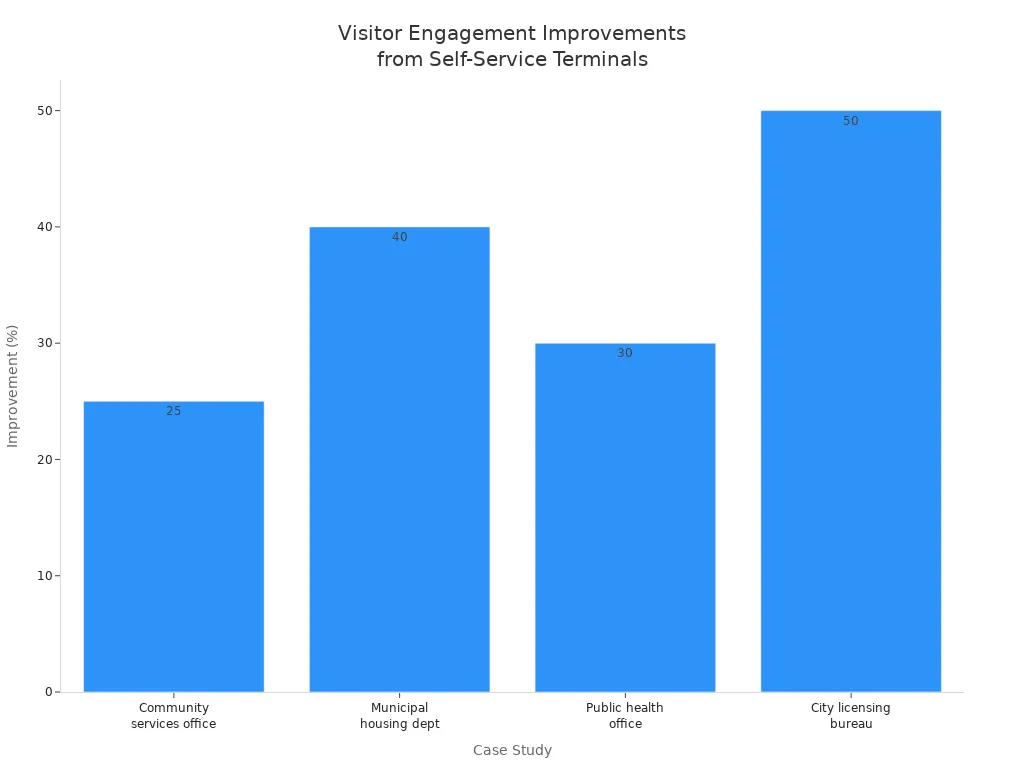
You can see real improvements in case studies. For example, a community services office in a bilingual city saw a 25% rise in satisfaction scores for non-English speakers. A housing department had 40% fewer people waiting at the front desk. A public health office had 30% fewer mistakes on intake forms. A city licensing bureau had 50% fewer visitors sent to the wrong place.
Case Study Description | Measurable Improvement |
|---|---|
Community services office in a bilingual city | 25% rise in satisfaction scores for non-English speakers |
Municipal housing department | 40% fewer people waiting at the front desk |
Public health office | 30% fewer mistakes on intake forms |
City licensing bureau | 50% fewer visitors sent to the wrong place |
Most visitors like self-service kiosks because they are fast and easy. Connecting kiosks to event systems and training staff well helps you get these good results.
You see that self-service terminals make exhibitions more fun and better for everyone.
You can see that self-service terminals make exhibitions more fun and efficient. These kiosks let you check in fast, find info quickly, and share your thoughts easily. Organizers notice happier visitors and smoother events.
Benefit | Description |
|---|---|
Reduces Staff Workload | Kiosks do jobs for staff, so fewer people are needed. |
Enhances Attendee Tracking | Kiosks show which sessions are popular and help plan better. |
Improves Operational Efficiency | Check-in is faster, so visitors spend less time waiting. |
Increases Attendee Satisfaction | Quick check-in makes visitors happier and improves their experience. |
Old check-in takes 2 to 4 minutes for each person. Kiosks check in people in 30 to 60 seconds. Four kiosks can do the work of 8 to 10 staff.
Self-service reports give organizers answers in minutes, not days. Teams can make changes fast and improve events quickly.
You can help visitors have more fun and make your exhibition better. Try self-service kiosks and see how much they help.
FAQ
How do you use a self-service terminal at an exhibition?
You tap the screen to start. Follow the simple steps to check in, buy tickets, or find information. The terminal gives clear instructions. If you need help, staff can assist you.
Can you choose your language on the kiosk?
Yes! You can pick your language from the menu. The terminal supports many languages. This helps you understand every step and enjoy your visit.
What if you need help while using the terminal?
If you have questions, look for staff nearby. They can guide you or show you how to use the kiosk. Most terminals also have on-screen help.
Are self-service terminals safe to use?
Self-service terminals use contactless features. You do not need to touch cash or paper. The screens are easy to clean. This helps keep you and others safe during your visit.
See Also
7 Strategies to Enhance Customer Interaction Using Digital Signage
Top High-Quality LCD Kiosk Displays for Your Next Exhibition
Comparative Analysis of Touch Screen Kiosks for Businesses
