Round LCD screen touch and non touch
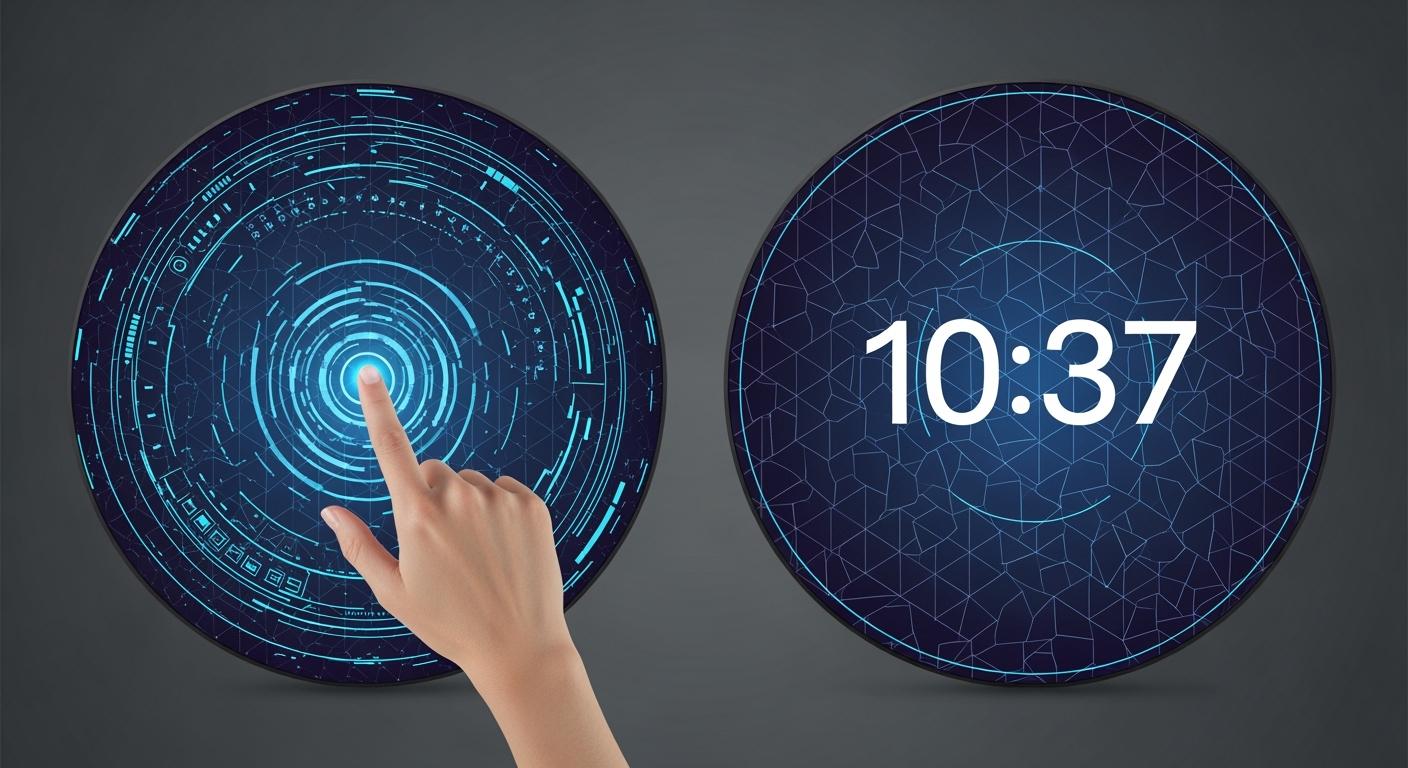
You see round LCD screens everywhere now. The main difference between touch and non-touch versions comes down to how you interact with them. Touch screens let you tap and swipe, while non-touch screens rely on buttons or dials. The circular shape stands out and changes how you use devices. Think about your needs and where you plan to use a Round LCD screen touch and non touch. The right choice depends on your application.
Touch screens: Easy to use, direct interaction
Non-touch screens: Great for simple display or physical controls
Shenzhen TopAdkiosk Display Technology Co., Ltd.
Add.: 2F, Bldg 10, Changfeng Industrial Park, Dongkeng, Fenghuang, Guangming, Shenzhen, China 518132
Mobile/WHATSAPP: 86-138 25769658
Email: marketing@topadkiosk.com topadkiosk@gmail.com
Skype: pghenry1
Wechat: adkioskhenry
English Web.: http://www.topadkiosk.com/
https://www.topkioskdisplay.com/
http://www.ad-kiosk.com/
https://www.toplcddisplay.com/
http://www.multitouchdigitalsignage.com/
https://www.youtube.com/channel/UCYVYNJHxLVEcQD8fuUxXNTA/videos?view_as=subscriber
https://www.facebook.com/TOPADKIOSKSHENZHEN/?ref=bookmarks
Key Takeaways
Touch round LCD screens let you interact directly. They are good for things like smartwatches and dashboards. Non-touch round LCD screens work well where you need things to stay clean. You use buttons or dials to control them. Think about the size and resolution you need. A higher resolution gives you clearer pictures and a better experience. Check where you will use the screen. It should be strong and able to handle tough conditions to last longer. Also, think about how much money you want to spend. Non-touch screens usually cost less. Touch screens have more advanced features.
What is a round LCD screen
Circular display basics
Round LCD screens do not look like normal rectangle screens. Their circle shape makes them stand out. This shape lets designers be more creative. You can find these screens in smartwatches, dashboards, and home gadgets. The round shape fits well on your wrist or in a car. It saves space and gives devices a modern look.
The active area of a round LCD screen is a circle or almost a circle. This matches the curves of your body or device. It feels more natural and comfortable to use. Many round LCD screens use Thin Film Transistor (TFT) technology. This helps show bright colors and clear images. You can see the screen from the side and still see it well. These screens also use less power, which is good for things with batteries.
Note: Round LCD screens are strong and last a long time. Many have built-in drivers, so you can add them to your project easily.
Size and resolution options
Round LCD screens come in many sizes and resolutions. Some are tiny and work well in wearables. Others are bigger and fit in cars or control panels. The resolution tells you how clear the images look. More pixels mean sharper text and better pictures.
Here’s a quick look at how size and resolution affect your experience:
Aspect | Impact |
|---|---|
Clarity and sharpness | Higher resolution means more pixels and clearer images. |
User experience | Different resolutions change how things look on each device. |
Content fit and layout | More pixels let you fit more on the screen and keep it neat. |
Responsive web design | Good resolution makes designs work and look nice. |
Performance considerations | Very high resolution needs more power, so you must balance quality and speed. |
When picking a Round LCD screen touch and non touch, think about where you will use it. A smartwatch needs a small, sharp screen. A car dashboard needs a bigger one. The right size and resolution make your device look and work its best.
Round LCD screen touch and non touch: Comparison
Touch technology overview
You see touch technology everywhere now. It makes using devices feel easy and natural. When you look at a Round LCD screen touch and non touch, you notice that touch screens use special sensors. These sensors let you tap, swipe, and even pinch the screen. Most round touch screens use either capacitive or resistive technology.
Here’s a quick look at the main types:
Touch Technology | Characteristics | Applications |
|---|---|---|
Capacitive | Senses your finger using an electric field. Very sensitive. Supports multi-touch. | Smartphones, smartwatches, tablets |
Resistive | Needs pressure to work. You can use a finger, stylus, or even gloves. | Medical devices, industrial tools, low-cost gadgets |
You might also find 4-wire, 5-wire, and 8-wire touch screens. These work well in tough places like factories or hospitals. Multi-touch screens let you use two or more fingers at once. You can zoom in on a map or scroll with two fingers. This feels smooth and modern.
Tip: Multi-touch screens make your device more fun and easy to use. You can do more things at once.
Non-touch features
Non-touch round LCD screens work differently. You can’t tap or swipe them. Instead, you use buttons, dials, or other tools to control what you see. Some screens use rotary knobs. You turn the knob to move through menus or change settings. Others use digitizers or even voice commands.
Here’s a table showing some common non-touch features:
Technology | Description |
|---|---|
Lets you turn a dial to pick options or adjust settings. | |
Lets you wave your hand or finger near the screen to control it. | |
Contactless Touchscreen | Works when your finger gets close, not when you touch. Gives audio feedback. |
Voice Activation | Lets you talk to the device to control it. |
zForce Touch Solutions | Creates a space above the screen for contactless control. |
Non-touch screens can be great for places where you want to avoid fingerprints or need to wear gloves. They also work well in cars or machines where you need to keep your eyes on something else.
User interaction methods
You interact with Round LCD screen touch and non touch in different ways. Touch screens let you use your fingers. You can tap, swipe, or use gestures. Multi-touch lets you do things like pinch to zoom or scroll with two fingers. This feels fast and natural.
Non-touch screens use other methods. You might turn a rotary knob, press a button, or use a remote. Some screens even let you use your voice or wave your hand. Here’s a table to show the main ways you can interact:
Interaction Method | Description |
|---|---|
Direct Touch | Tap or swipe right on the screen. |
Multi-Touch | Use two or more fingers for gestures like zoom or rotate. |
Rotary Control | Turn a knob to move through menus or change settings. |
Digitizer | Use a special pen or stylus for precise control. |
Voice Command | Speak to the device to give instructions. |
Contactless Gesture | Wave your hand near the screen to control it. |
Touch screens give you direct control. You finish tasks faster because you don’t need extra tools. Non-touch screens need buttons, dials, or other devices. This can slow you down, but it also keeps the screen clean and safe.
Let’s compare the main differences:
Feature | Non-Touch LCD Screens | |
|---|---|---|
Interaction Type | Direct control speeds up tasks | Relies on external inputs |
Tool Requirement | No extra tools needed | Needs buttons, dials, or remotes |
User Experience | Feels natural and fast | Can feel slower, but keeps screen clean |
Group Use | Easy for one person | Better for group settings |
When you choose between Round LCD screen touch and non touch, think about how you want to use your device. Touch screens work best when you want quick, easy control. Non-touch screens shine in places where you need to keep things clean or use special tools.
Pros and cons
Touch: Pros & cons
Touch round LCD screens bring a lot of excitement to your devices. You get a modern look that stands out. These screens feel smooth and easy to use. You can tap, swipe, and zoom with your fingers. This makes smartwatches and dashboards more fun and simple to control. The round shape fits well on your wrist or in your car, and it helps save space. You also get more room for creative designs and custom layouts.
Here are some top benefits you’ll notice:
Improved visual appeal—your device looks stylish and unique.
Better ergonomics—easy to read and interact with, especially on wearables.
Customization flexibility—lets you try new user interfaces.
Space optimization—makes the most of small spaces.
Touch screens also use advanced technology. They last a long time and work well in many places. You can see clear images and bright colors.
But there are a few things to keep in mind:
Sometimes, the backlight is not even, so some parts of the screen may look brighter.
Older models might have limited viewing angles, so colors and brightness can change if you look from the side.
Tip: If you want a device that feels modern and lets you interact directly, a touch round LCD screen is a great choice.
Non-touch: Pros & cons
Non-touch round LCD screens offer a different set of strengths. You control these screens with buttons, dials, or even your voice. This works well in places where you need to keep the screen clean or wear gloves. You see these screens in medical tools, industrial machines, and outdoor devices. The round shape still gives you a modern look and saves space.
Let’s look at the main advantages:
Great for tough environments—these screens work well in fieldwork and emergency settings.
Durable and compact—perfect for handheld tools and portable devices.
Easy to use with physical controls—no need to touch the screen.
You might miss out on direct touch, but you gain more control in special situations. Non-touch screens also last a long time and handle rough use.
Feature | Touch Round LCD Screen | Non-Touch Round LCD Screen |
|---|---|---|
User Interaction | Tap, swipe, pinch | Buttons, dials, voice |
Visual Appeal | Modern, customizable | Clean, simple |
Best Use Case | Wearables, dashboards | Medical, industrial, outdoor |
Durability | High | Very high |
When you compare Round LCD screen touch and non touch, think about where and how you want to use your device. Each type brings its own set of benefits to your project.
Applications
Touch screen use cases
You see touch round LCD screens in many devices you use every day. These screens make gadgets feel smart and easy to control. Here are some common places where you find them:
Smartwatches let you check messages, track steps, and change settings with a tap or swipe.
Fitness trackers use round touch screens to show your heart rate, steps, and workout stats.
Automotive dashboards display speed, maps, and music controls. You can swipe or tap to switch between screens.
Smart home devices, like thermostats, let you adjust the temperature with your finger.
Industrial control panels use touch screens for quick changes and easy navigation.
Portable medical devices use round touch screens for simple, fast input.
Most of these screens are small, usually between 1.0 and 1.6 inches. They show sharp images with over 300 pixels per inch. You get bright colors and clear text, even in sunlight. These screens also use very little power, so your devices last longer.
Touch screens work well in places where you want fast, direct control. You can interact with the device right on the screen. This makes them perfect for wearables, smart gadgets, and modern cars.
Non-touch screen use cases
Non-touch round LCD screens play a big role in many tools and machines. You control these screens with buttons, dials, or even your voice. Here are some examples:
Industrial machines use non-touch screens for showing data and alerts. You turn a knob or press a button to change what you see.
Medical devices, like compact diagnostic tools, display results without needing touch. This keeps the screen clean and safe.
Outdoor terminals, such as parking meters or ticket machines, use non-touch screens. These screens work well in rain, dust, or bright sunlight.
Handheld instruments for fieldwork show readings and measurements. You use physical controls to move through menus.
Automotive displays sometimes use non-touch screens for showing speed or fuel levels.
Non-touch screens are tough and reliable. They work in places where you need to wear gloves or keep the screen free from fingerprints. Their small, round shape fits well in tight spaces. High brightness backlighting helps you see the screen, even in strong light.
Tip: If you need a display for rough environments or want to avoid fingerprints, a non-touch round LCD screen is a smart choice.
Choosing the right screen
User needs
You want your screen to fit your life. Start by thinking about how you will use the device. Will you tap with your finger, use a stylus, or wear gloves? If you need to use gloves, look for screens that support glove input or advanced touch technology. Some people need multi-touch for gestures, while others only need simple taps. If you plan to use the screen outdoors, make sure it has high clarity and brightness. Bigger touch targets help if you use your fingers. Always match the screen to your daily habits.
Use with gloves or stylus
Need for multi-touch or single-touch
Outdoor visibility and brightness
Size of touch targets for easy use
Tip: Think about who will use the device and how they will interact with it.
Environment & durability
Your screen must survive where you use it. Hot or cold weather, dust, and moisture can all affect performance. If you work in a factory or outside, you need a tough screen. Check for features like rugged coatings or laminated protection. Displays should handle vibration, shock, and bright sunlight. Here’s a quick look at what matters:
Description | |
|---|---|
Temperature Resistance | Works well in hot and cold places. |
Humidity Tolerance | Handles moisture without problems. |
Vibration and Shock Resistance | Stays strong in busy or bumpy settings. |
Backlight Brightness | Stays bright for a long time. |
UV Radiation and Strong Light | Does not fade in sunlight. |
Cost factors
You want the best value for your project. Touch screens usually cost more because they have extra sensors. Non-touch screens are more affordable and need less cleaning. Here’s a simple table to help you compare:
Feature | Non-Touch Monitors | |
|---|---|---|
Initial Purchase Price | Higher due to sensor technology | More affordable options |
Maintenance | Needs cleaning for fingerprints | Less maintenance needed |
If you have a tight budget, non-touch screens can save money. Touch screens give you more features, but you pay more up front.
Integration tips
You want your screen to work with your setup. Round screens fit in many places, like walls or dashboards. Look for plug-and-play options for easy setup. Some screens support many input sources, so you can connect different devices. Compact screens fit in small spaces. Good cable management keeps things neat. If you need more screens, choose ones that link together for bigger displays. Make sure your screen works with your power supply and network.
Integration Tip | Description |
|---|---|
Installation Flexibility | Mount the screen in many ways to fit your space. |
Modular Connections | Connect to different devices easily. |
Plug-and-Play | Quick setup with standard cables. |
Compact Form Factor | Fits where space is tight. |
Network Connectivity | Supports wired and wireless control. |
Scalability | Link screens for larger displays. |
Note: Always check if your screen meets safety and industry standards for your project.
You now know the main differences between touch and non-touch round LCD screens. Touch screens give you fast, precise control and work great for smart gadgets. Non-touch screens last longer and cost less. Here’s a quick look:
Type | Advantages | Disadvantages |
|---|---|---|
Touch | Fast, precise, multi-touch | Higher price, less scalable |
Non-Touch | Durable, affordable | Fewer ways to interact |
To pick the best one, think about:
Where you’ll use it
What you need it to do
How it fits with your other devices
Choose what matches your needs best!
FAQ
What makes a round LCD screen different from a square one?
You get a unique look with a round LCD screen. It fits better on your wrist or in a car. The round shape also lets you design creative interfaces that stand out.
Can I use a round touch screen with gloves?
Yes, you can. Some touch screens support glove input. You should check the product details to make sure. This feature helps in cold weather or work environments.
Where do I see non-touch round LCD screens most often?
You find non-touch round LCD screens in medical devices, industrial machines, and outdoor tools. These screens work well when you need to keep things clean or use physical controls.
Do touch round LCD screens use more power?
Touch screens can use a little more power because of the sensors. Most modern screens are energy efficient. You still get long battery life in wearables and smart devices.
How do I clean a round LCD screen?
Use a soft, dry cloth to wipe the screen. For touch screens, avoid harsh chemicals. If you need to clean often, non-touch screens stay cleaner since you do not touch them as much.
See Also
Creating Premium Touch and Non-Touch LCD Mirror Displays
Touch Screen Kiosks: Best LCD Displays for 2026
Leading LCD Screen Brands for Your Upcoming Project
Understanding LCD Display Screens: Functionality and Purpose
