Rental options for event kiosks
Add.: 2F, Bldg 10, Changfeng Industrial Park, Dongkeng, Fenghuang, Guangming, Shenzhen, China 518132
Mobile/WHATSAPP: 86-138 25769658
Email: marketing@topadkiosk.com topadkiosk@gmail.com
Skype: pghenry1
Wechat: adkioskhenry
English Web.: http://www.topadkiosk.com/
https://www.topkioskdisplay.com/
http://www.ad-kiosk.com/
https://www.toplcddisplay.com/
http://www.multitouchdigitalsignage.com/
https://www.youtube.com/channel/UCYVYNJHxLVEcQD8fuUxXNTA/videos?view_as=subscriber
https://www.facebook.com/TOPADKIOSKSHENZHEN/?ref=bookmarks
You want your event to stand out, and that’s where rental options for event kiosks come in. These kiosks offer so much more than just a digital screen. Some let guests order food, others help people find their way, and a few even let you charge your phone while you wait. Check out the table below to see what’s available and how each one works:
Kiosk Type | Features | Usage Examples |
|---|---|---|
Self-Ordering Kiosks | Lets you order and pay without waiting for staff | Fast food chains, supermarkets |
Information Kiosks | Touch screens for directions, maps, and local info | Malls, airports, offices |
Charging Kiosks | Charge devices and see ads or event info | Airports, cafes, event venues |
Ticketing Kiosks | Buy tickets quickly and easily | Train stations, cinemas, theme parks |
Interactive Kiosks | Play games, answer surveys, or try product demos | Retail stores, trade shows |
Touch screens and interactive kiosks make your event more fun and keep guests engaged.
Key Takeaways
Event kiosks enhance guest experiences by providing services like self-ordering, information, and charging stations.
Choose rental options based on your event's duration and needs. Short-term rentals offer flexibility, while long-term rentals can save costs for recurring events.
Select between full-service and self-service kiosks. Full-service provides support and setup, while self-service allows for faster check-ins and less staff.
Placement of kiosks is crucial. Position them in high-traffic areas to maximize visibility and engagement.
Custom-branded kiosks boost brand visibility and attendee satisfaction, making your event more memorable.
Event Kiosk Rental Options
Rental Models
You have a lot of flexibility when it comes to rental options for event kiosks. You can choose how long you want to rent, where you want your kiosks, and what services you need. Most providers offer daily, weekly, and monthly rates. This means you can pick what fits your event best. If you only need kiosks for a one-day conference, you can rent just for that day. If your event lasts a week or more, you can get a weekly or monthly plan.
Many companies offer nationwide service, so you can get kiosks delivered almost anywhere in the country. Here are some providers known for their reach and expertise:
Meeting Tomorrow handles hundreds of events every month in over 100 cities. They know how to manage logistics and make things run smoothly.
Nationwide Event Rentals gives you turnkey services for all kinds of events. They focus on quality and customer service.
Aria Av specializes in interactive touchscreen kiosks. You can use these for check-ins, wayfinding, or collecting data.
topadkiosk offers a wide range of kiosk solutions and supports events across the country.
Tip: Ask your provider about their experience with events like yours. This helps you find the best fit for your needs.
Short-Term and Long-Term
You might wonder if you should rent kiosks for a short time or a longer period. Short-term rentals work well for one-time events or when you want to try something new. Long-term rentals make sense if you have a series of events or need kiosks for several weeks.
Here’s a quick look at the pros and cons:
Pros of Renting | Cons of Renting |
|---|---|
Lower Upfront Cost | Limited Customization |
Faster Turnaround Time | Recurring Costs Add Up |
Logistics Are Handled | Inconsistent Brand Presence |
Modular Flexibility Across Events | Fewer High-End Finishing Options |
No Long-Term Storage or Maintenance | Less Control Over Quality Assurance |
Short-term rentals give you flexibility and save money up front. You don’t have to worry about storage or maintenance. Long-term rentals can cost more if you use kiosks at many events, but they let you keep the same setup for a longer time.
Full-Service vs. Self-Service
You can choose between full-service and self-service rental options. Full-service means the provider handles everything. They set up the hardware, install the software, and even train your staff. This makes things easy for you, but it usually costs more.
Self-service kiosks let you do more on your own. You don’t need as many staff members, and check-ins go much faster—sometimes in less than a minute per person. One kiosk can do the work of several people, which helps your event run smoothly.
Here’s what you get with each option:
Full-service: Hardware, software support, staff training, and on-site help.
Self-service: Easy setup, fast check-ins, and less need for staff.
Sometimes, self-service kiosks have issues like network problems or printer jams. You can fix these by checking your internet connection, keeping printers in good shape, and giving clear instructions to guests. If you expect a big crowd, add more kiosks to avoid long lines.
Note: Think about your event size and your team’s skills before you choose. Full-service is great if you want less stress. Self-service works well if you want speed and control.
You have many rental options to fit your event, your budget, and your goals. Take time to compare what each provider offers, and you’ll find the right solution for your next event.
Types of Event Kiosks
Touch Screen Kiosks
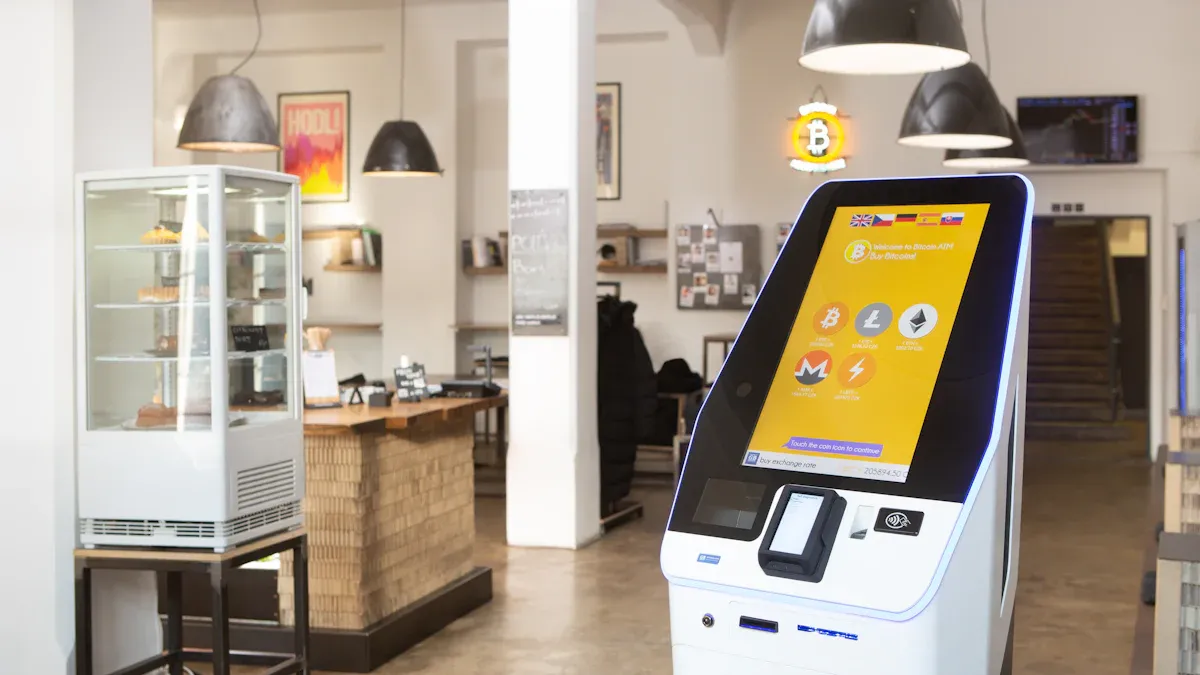
Touch screen kiosks make your event interactive and fun. You can use them for product demos, surveys, or even games. These kiosks come in different sizes, so you can pick what fits your space. For example, a 43-inch screen works well for one person, while a 75-inch screen grabs everyone’s attention. You don’t need tools to set them up, and they’re built to last all day. Many touch screen kiosks let you compare products side by side, scan badges for leads, or track how guests interact with your displays.
Specification Type | Details |
|---|---|
43-55 inch for individuals, 55-65 inch for groups, 75+ inch for high impact | |
Durability | 16+ hour operation, handles lots of touches, portable design |
Setup | Freestanding, easy assembly, compact packing |
LED Display Kiosks
LED display kiosks light up your event with bright visuals. You can show schedules, sponsor ads, or live feeds. These kiosks work well in busy areas where you want to catch people’s eyes. You can update the content quickly, so your information always stays fresh.
Check-In Stations
Check-in stations help you welcome guests fast. You can scan QR codes or badges, which means no long lines. These kiosks give you real-time data on who’s arrived and help keep your event secure. You also save money because you need fewer staff at the door.
Benefit/Use Case | Description |
|---|---|
Efficiency | Reduces wait times and keeps things moving |
Real-Time Data | Shows who checked in right away |
Enhanced Experience | Makes a great first impression |
Time and Cost Savings | Cuts down on staff needed |
Enhanced Security | Checks IDs to stop unauthorized entry |
Wayfinding Kiosks
Wayfinding kiosks guide your guests around the venue. You tap the screen to find rooms, booths, or restrooms. These kiosks offer maps and directions in different languages, so everyone can get where they need to go. You don’t have to worry about guests getting lost or confused.
Bulk Monitor Kiosks
Bulk monitor kiosks display event schedules, announcements, or sponsor messages on multiple screens. You can place them in lobbies or hallways for maximum visibility. These kiosks help reduce wait times and mistakes, and they give you valuable data about what your guests like.
Advantage | Description |
|---|---|
Always available for quick info | |
Improved accuracy | Clear messages mean fewer mistakes |
Reduced costs | Fewer staff needed for info delivery |
Enhanced customer insight | See what guests check most often |
Custom-Branded Kiosks
Custom-branded kiosks put your logo and colors front and center. You can use them as charging stations or interactive displays. When guests stop to recharge their phones, they see your brand every time. Interactive screens can match your brand’s style, making your event look polished and professional. LED displays on these kiosks also boost sponsor visibility and help your brand stand out.
Tip: Custom kiosks can increase attendee satisfaction and make your event more memorable.
Placement and Use Cases
Choosing the right spot for your event kiosks makes a big difference. You want your kiosks where people gather, so everyone sees them and uses them. Look at foot traffic patterns and place kiosks near entrances, registration desks, or busy hallways. If you put kiosks where guests naturally stop, you boost engagement and make your event feel lively. Accessibility matters, too. Make sure kiosks are easy to reach and don’t block walkways. When you place kiosks in open areas, you create space for social interaction and a positive vibe.
Registration Points
Registration kiosks help guests check in fast. You can use self-service kiosks that let people print badges and register themselves. This cuts down on wait times and keeps lines moving. One kiosk can check in hundreds of guests per hour, while a staff member can only handle a few. Guests like checking in at their own pace, and you need fewer staff at the door.
Trade Shows
Trade shows need kiosks that are flexible and easy to set up. You can use modular kiosks with graphics and storage options. These kiosks help you show off products and collect leads. Rental options let you pick the features you need without spending too much.
Festivals and Concerts
At festivals and concerts, kiosks offer charging stations, quick check-in, and easy ordering. You can set up kiosks fast and move them where needed. Remote monitoring helps you track usage and fix problems before guests notice. Kiosks also make it easy to manage payments and inventory.
Corporate Events
Corporate events use kiosks for check-in, wayfinding, and branding. You can place kiosks in lobbies or meeting rooms. Custom-branded kiosks show your logo and colors, making your event look professional.
Sporting Events
Sporting events need kiosks for ticketing, merchandise sales, and directions. You can place kiosks near entrances, concession stands, or seating areas. This helps fans find what they need and keeps things running smoothly.
Strategic Placement Tips
Think about mounting options for your kiosks. You can use wall-mounted kiosks for tight spaces, freestanding kiosks for open areas, or tabletop kiosks for small spots. Here’s a quick table to help you decide:
Mounting Option | Description | Usability Impact |
|---|---|---|
Wall-Mounted Kiosks | Mounted on a wall, saves space | Space-efficient and stable |
Freestanding Kiosks | Stand alone, easy to move | Versatile and repositionable |
Tabletop Kiosks | Placed on tables, good for small areas | Compact and easy for guests to use |
Branding is important, too. Add your logo, colors, or sponsor messages to kiosks. This makes your event memorable and boosts visibility.
Benefits of Renting Kiosks
Convenience and Flexibility
You want your event to run smoothly, and renting kiosks makes that possible. You can pick the number and type of kiosks you need, whether your event lasts one day or a whole week. Rental options let you scale up or down based on how many people you expect. You can even switch things up for different events without buying new equipment each time. Quick setup and teardown mean you spend less time worrying about logistics and more time focusing on your guests.
Cost Savings
Renting kiosks helps you save money in several ways. You avoid big upfront costs and skip the hassle of maintenance. You only pay for what you need, when you need it. Check out this table to see how renting helps your budget:
Benefit | Description |
|---|---|
Adjust the number and type of kiosks for each event, so you use resources wisely. | |
Flexibility | Choose short or long-term rentals to fit your schedule and avoid overcommitting. |
Renting kiosks means no large investments.
You don’t have to pay for repairs or storage.
Fast setup and breakdown save on labor costs.
You also get access to the latest technology without spending a fortune. If you need more kiosks during busy times, you can add them without a long-term commitment.
Enhanced Attendee Experience
Kiosks make life easier for your guests. They can check in quickly, find their way, or get information with just a tap. This smooth process keeps lines short and spirits high. When guests have a good experience, they remember your event for all the right reasons. Kiosks also collect real-time data, so you learn what your guests like and can make future events even better.
Brand Visibility
You want your brand to stand out. Kiosks help you do that by putting your logo and sponsor messages front and center. Interactive kiosks grab attention and encourage people to engage with your brand. Here’s how kiosks boost visibility:
Evidence Type | Description |
|---|---|
Interactive Kiosks | Draw crowds and get people involved, making your brand hard to miss. |
Lead Generation | Use QR codes and games to collect leads and connect with attendees. |
Brand Loyalty | Fun and useful experiences help guests remember your brand long after the event. |
Digital displays in busy spots rotate sponsor logos and videos.
Guests interact directly with sponsor content, which builds stronger connections.
Technical Support
You don’t want tech headaches during your event. Most rental companies offer skilled technical support to keep everything running. They handle setup, answer questions, and fix problems fast. You can update content in real time, so your event stays fresh and relevant. This support saves you time and lets you focus on making your event a success.
Tip: Reliable technical support means you can relax and enjoy your event, knowing help is always close by.
Choosing Rental Options
Assessing Event Needs
Start by figuring out what your event really needs. Make a list of your goals and what you want guests to experience. You can use a simple scoring system to rank what matters most. Visit your event site if you can. This helps you see where kiosks will fit best. Always check that your venue is easy for everyone to use, including people with disabilities.
Criteria | Description |
|---|---|
Needs Assessment | Create a scoring system based on identified needs to rank options effectively. |
Site Inspections | Conduct visits to shortlisted venues to evaluate their suitability in real-time. |
Accessibility Considerations | Ensure that the venue meets accessibility standards for all attendees, including those with disabilities. |
Comparing Providers
Not all kiosk companies are the same. You want to compare what each one offers. Look at the types of kiosks, how easy they are to use, and what kind of support you get. Check if you can customize the kiosks with your brand. Read reviews to see what other event planners say. Here’s a quick checklist:
Types of kiosks and features
Quality of equipment and user-friendliness
Instant sharing and digital features
Customer service and support
Company reputation
Tip: Ask providers about their experience with events like yours. This helps you find the best fit.
Evaluating Features
Think about which features will help your event the most. Some kiosks have barcode scanners, credit card readers, or NFC for fast check-ins. Others offer full branding or just a simple logo. Make sure the kiosks are easy to set up and strong enough for busy events. You can ask for help with setup if you need it.
Feature | Description |
|---|---|
Hardware Options | Table height between 30" and 32". Counter-height tables for kiosks without printers. |
Branding Opportunities | Full branding makes a big impact. Partial branding saves money. |
Barcode scanners, credit card readers, and NFC make check-ins and payments faster. | |
Durability | Lightweight but strong materials for event use. |
Setup Options | Technicians can help with setup and support. |
Budget Considerations
You want to get the most for your money. Costs can change based on the type of kiosk, how long you need it, and extra services like setup or software. Outdoor kiosks may cost more because they need to handle weather. Here’s a look at typical prices:
Kiosk Type | Daily Rental Cost | Weekly Rental Cost |
|---|---|---|
Interactive Monitors | $100 | $600 |
Touch Screen Kiosks | $150 | $900 |
Large Touch Displays | $200 | $1200 |
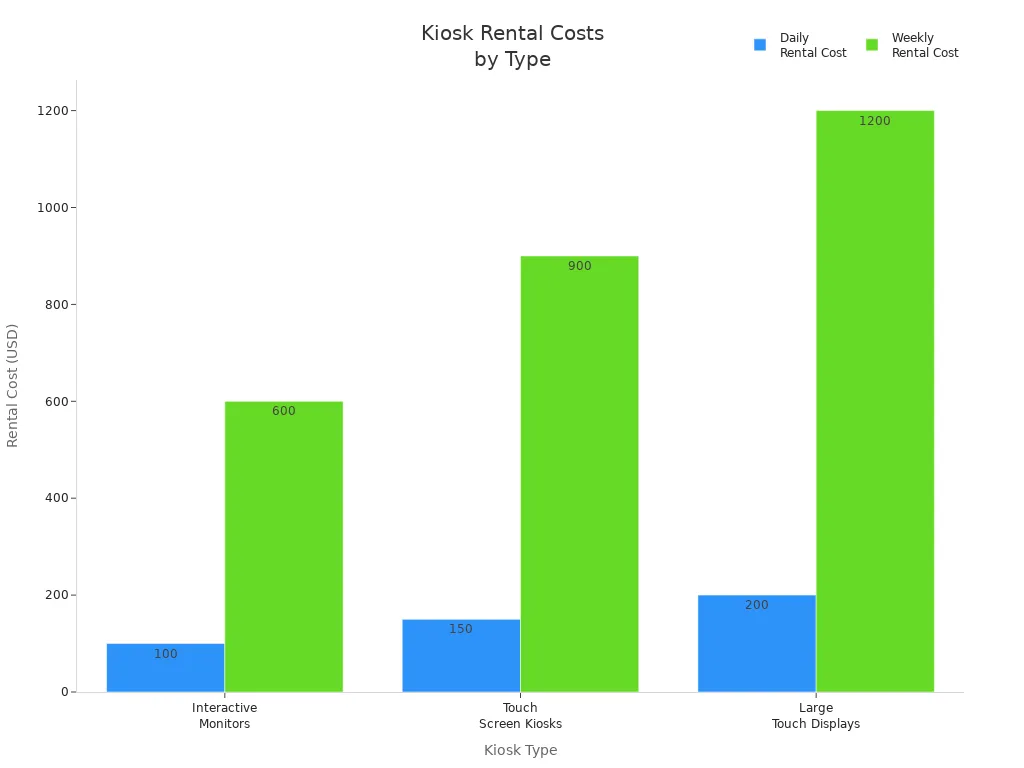
When you compare rental options, think about screen size, how long you need the kiosks, and any extra features. If you’re not sure, talk to an experienced provider. They can help you pick the best setup for your event and budget.
You have lots of choices when it comes to rental options for event kiosks. Think about what your event needs, where kiosks will work best, and how they can help your guests. Here’s what you should do next:
Make a list of your goals.
Compare kiosk types and placement ideas.
Talk to providers for expert advice.
Ready to make your event awesome? Explore kiosk rentals or reach out to a specialist today!
FAQ
How soon can I get kiosks delivered for my event?
You can usually get kiosks delivered in as little as 24 to 48 hours. Some providers offer rush delivery. It’s best to book early to make sure you get the type you want.
Can I customize the kiosk with my event branding?
Yes! You can add your logo, colors, and sponsor messages. Many providers offer full or partial branding options. Just send your artwork, and they handle the rest.
What happens if a kiosk stops working during my event?
Most rental companies include technical support. If something goes wrong, you can call their team. They help you fix issues fast, either by phone or with on-site support.
Do I need special staff to run the kiosks?
No, you don’t need special staff. Most kiosks are easy to use. Providers offer setup guides or quick training. You can also choose full-service rentals if you want extra help.
For event planners, renting high-resolution display kiosks is a flexible and cost-effective alternative to purchasing. It allows you to leverage the latest technology like 4K LCD, OLED, and LED video walls without long-term commitment.
To help you get started, I've broken down the rental landscape into three main display categories, each suited to different needs and budgets.
📊 Display Technology at a Glance
Technology | Key Feature | Best Use Case | Key Consideration |
|---|---|---|---|
LCD | High brightness, crisp static images & text | Standard info kiosks, menus, wayfinding | Excellent all-rounder, but lacks OLED's perfect blacks |
OLED | Perfect blacks, infinite contrast, vibrant colors | High-end brand activations, luxury product showcases | Premium rental cost |
LED | Modular, scalable, very high brightness | Large-scale video walls, immersive backdrops | Pixel pitch (e.g., 2.6mm) matters for viewing distance |
1. 📝 LCD & Touchscreen Interactive Kiosks
This is the most common and versatile rental category for events, offering a balance of quality and cost.
Common Sizes: 43", 55", 65", and up to 86".
Applications: Event check-in and badge printing, interactive wayfinding and directories, product catalogs, surveys, and self-service ticketing.
Example Providers:
Rentipads: Offers daily/weekly/monthly rentals for trade shows, with 24/7 tech support and a best-price guarantee.
Aria AV: Provides nationwide (US) digital kiosk rentals, with custom branding and tailored software solutions.
Popshap: A versatile touch kiosk that can function as digital signage, a photo booth, check-in station, or interactive directory.
Just Attend (BadgeBot): A low-cost, self-service badge-printing kiosk rental, specifically designed for efficient event check-in. It can even run on battery and 5G for up to ten hours.
Rental Costs:
General: Tablet-based kiosks are cheaper, while large touchscreen kiosks can cost hundreds more per day. Daily rates for a standard unit can be around $590.
Example (Estajer): A 43" Smart Interactive Kiosk Station rents for 400 SAR (approx. $107 USD) per day.
Example (Vernon Technology): For context, purchasing a single kiosk can cost $3,000–$8,000, highlighting the cost-effectiveness of renting.
2. 🖼️ OLED & High-End Digital Signage
For events where visual impact is paramount, OLED displays offer unmatched picture quality.
Applications: Brand immersion zones, high-end product showcases, art installations, and premium sponsorship areas.
Availability: OLED is less commonly listed as a standard rental than LCD but is available from specialized AV providers for premium activations.
Considerations: Be prepared to request quotes from high-end AV rental companies. The superior visual quality comes at a higher rental cost.
Example Provider: Yord Studio creates immersive installations using AI, sensors, and real-time visuals, which can be powered by high-end OLED or LED displays.
3. 🧱 LED Video Walls
Ideal for creating large, seamless displays that make a bold statement.
Common Specs: Pixel pitch (e.g., 2.6mm) determines resolution and optimal viewing distance. High brightness (up to 1500 nits) ensures visibility even in bright exhibition halls.
Applications: Main stage backdrops, immersive environments, high-impact brand messaging, and sponsor recognition walls.
Example Providers:
Yord Studio: Creates custom, large-scale immersive LED wall environments with real-time interaction and visuals.
Brilliant Event Lighting: Offers modular LED video walls from 6x4 to 16x9 panels, as well as 80" double-sided LED posters on wheeled bases for flexible placement.
Whimsical Exhibits: Provides turnkey booth packages that include dynamic video walls, offering a hassle-free, all-in-one solution.
🌍 Regional Rental Options
Rental availability varies by location. Here are some providers by region:
Asia:
Singapore: Rentosho offers digital signage kiosk rentals to boost marketing and customer connection.
India: STAIETECH LLP is a trusted manufacturer and rental provider for interactive kiosks. IndiaMART also lists multiple vendors for touchscreen kiosk rentals.
Middle East:
UAE: Connex Emirates provides Intel-powered, interactive touch screen kiosks for events like expos. Melody Kiosk is noted for providing high-quality, durable, and affordable kiosks for events across the UAE.
💡 Your Step-by-Step Rental Checklist
To ensure a successful rental experience, follow this practical checklist:
Define Your Core Objectives: What is the primary purpose of the kiosk? Be specific (e.g., "Reduce check-in wait times by 50%" or "Increase product demo engagement by 30%").
Assess Your Venue & Logistics: Measure the available space and note the ambient light levels. Also, verify power outlet availability and internet connectivity (Wi-Fi or Ethernet).
Consider Software & Integration: If you need specific software (e.g., for lead retrieval), confirm it's compatible with the rental hardware.
Get Multiple Quotes & Book Early: Prices and availability vary. Contact several providers with your detailed requirements to get accurate quotes.
Plan Your On-Site Management: Arrange for a staff member to be responsible for the kiosk(s) to assist users and handle any minor technical issues.
🔧 What to Ask Potential Vendors
When contacting rental companies, use these questions to ensure you get exactly what you need:
Hardware: "What is the exact model and size of the display? What are its brightness (nits) and resolution specs?"
Content & Software: "Can the kiosk run our own software or website? Does it come with a standard OS (e.g., Windows) that allows us to install our applications?"
Connectivity: "What connectivity options are available (Ethernet, Wi-Fi, HDMI, USB)?"
Installation & Support: "What does the setup process involve? Is on-site technical support included, and what are the hours?"
Renting kiosks for an event is a strategic decision that balances impact, functionality, and budget. By clarifying your goals and asking the right questions upfront, you'll be well on your way to creating a memorable and engaging experience.
To help you compare options, could you share which region you are planning the event in and the primary goal for the kiosks?
See Also
Selecting The Perfect Event Kiosk Rental For Your Requirements
Best Seven Event Kiosk Rental Services For 2026
Leading Providers Of Outdoor LCD Display Kiosks
