Emerging Innovations in QSR Digital Signage for 2026
Shenzhen TopAdkiosk Display Technology Co., Ltd.
Add.: 2F, Bldg 10, Changfeng Industrial Park, Dongkeng, Fenghuang, Guangming, Shenzhen, China 518132
Mobile/WHATSAPP: 86-138 25769658
Email: marketing@topadkiosk.com topadkiosk@gmail.com
Skype: pghenry1
Wechat: adkioskhenry
English Web.: https://www.topkioskdisplay.com/
http://www.ad-kiosk.com/
https://www.toplcddisplay.com/
http://www.multitouchdigitalsignage.com/
https://www.youtube.com/channel/UCYVYNJHxLVEcQD8fuUxXNTA/videos?view_as=subscriber
https://www.facebook.com/TOPADKIOSKSHENZHEN/?ref=bookmarks
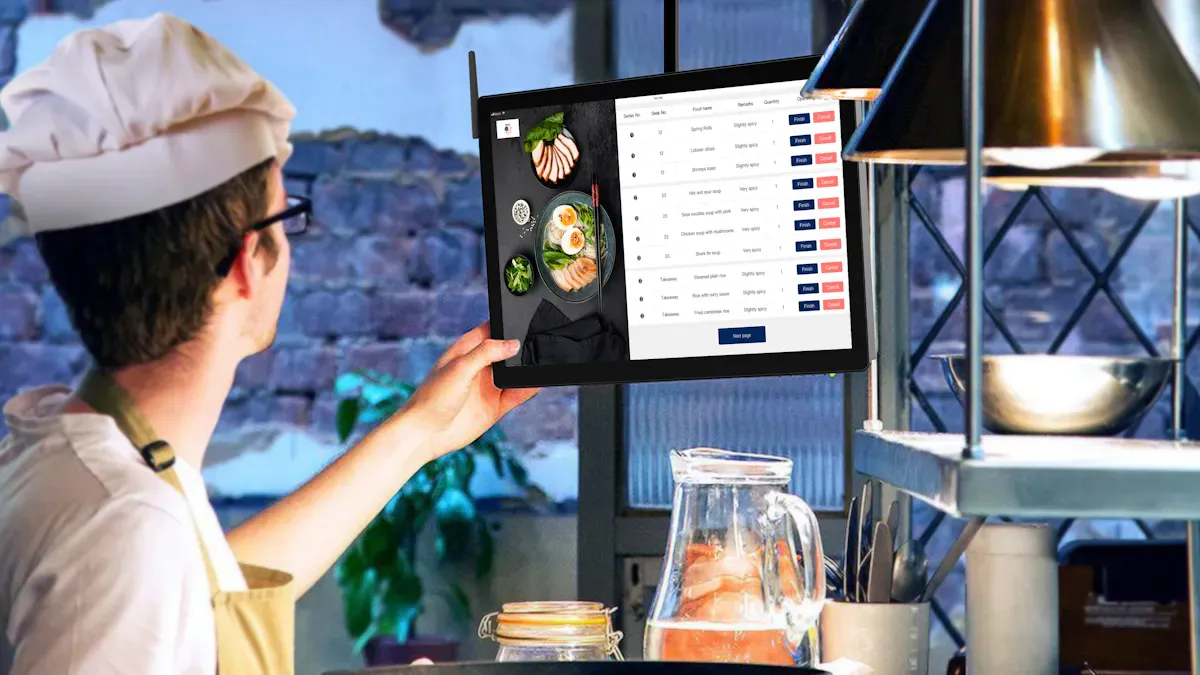
You see qsr digital signage changing quick service restaurants in 2026. The systems are smarter, faster, and more fun to use. These new signs help you work better, move customers faster, and sell more food. The biggest changes are dynamic menu boards, displays that are easy to read, and updates that happen right away in many places.
Trend Description | Statistic/Insight |
|---|---|
Throughput Improvement | 80% of restaurants with smart signs got more orders. |
Importance of Menu Clarity | 74% of guests want menus that are easy to read. |
Efficiency of Digital Menu Boards | Central software updates 1,000 locations in minutes. |
You can use qsr digital signage to help customers and make their visit better. It helps people choose faster and buy more. When there is more competition, you use digital signs to make the experience special and help your business grow.
Key Takeaways
Digital signage makes the customer experience better by showing clear and moving menus. These menus help guests choose food fast.
Real-time updates let restaurants change deals and menu items right away. This helps them sell more and makes customers happier.
AI-driven personalization gives menu ideas based on what each customer likes. This makes people come back more and builds loyalty.
Interactive kiosks make ordering easier and faster. They help cut down wait times and mistakes, so customers feel happier.
Eco-friendly digital signage uses less paper and energy. This shows that a restaurant cares about being green.
QSR Digital Signage Trends
You see digital signage changing fast food places in 2026. Keeping up with these trends helps you use new technology and meet what customers want. Digital signage makes it easier to change menus, helps you get orders right, and makes your brand stronger. You can control menus and deals right away, which helps you talk to customers better and sell more.
Note: The digital signage market in restaurants is getting bigger. In 2026, it will be worth $3.38 billion and grow by 13.1%.
Trend | Description |
|---|---|
Dynamic Digital Menu Boards | Menus change with time, stock, or customer info |
Real-Time Promotional Content Updates | Deals update everywhere right away |
AI-Driven Menu Personalization | Menus change for what customers like |
Integration With POS Systems | Signs link to point-of-sale for easy changes |
Interactive Self-Service Displays | Customers use the screens themselves |
Dynamic Menu Boards
Digital menu boards use moving pictures and clear images to get attention. You can show off items that make more money, combos, and special deals. When people see tasty pictures, they might buy bigger meals or try new things. Changing content helps you set prices, make people hurry, and suggest extras. These boards let you change menus fast, so you can show what you have or what people want. You work faster and sell more by showing the best menu at the best time.
Anchoring: Show a fancy item first so others look cheaper.
Scarcity: Show rare items to make people buy fast.
Suggestive Selling: Help customers pick upgrades and extras.
Real-Time Promotions
You use real-time deals to get people to spend more. Moving signs show combo meals and short-time offers to make customers buy more. You can change deals right away if you run out or see what people like. Putting high-profit items in good spots helps you sell more. Using real-time info lets you show deals that fit what people buy. Automatic ads start when customers do certain things, which makes them come back. Giving each person special deals helps you sell even more.
Dynamic menu boards help you sell more with smart deals.
Real-time changes let you try new spots for better sales.
Using data helps you give deals that fit what people want.
AI-Driven Personalization
Personalized Menus
AI-powered personalization is changing how restaurants serve people. AI looks at what you ordered before and what you like. It then suggests menu items that fit you. When you go to a quick service restaurant, the menu changes for you. If you buy salads a lot, the system shows healthy choices at lunch. On rainy days, it suggests comfort food you liked before. Mobile apps watch what you look at and use smart tools to suggest food you might enjoy. This kind of personalization keeps people interested and makes them happier.
AI looks at your old orders to guess what you want.
Personalized ideas help you find new foods to try.
Special menu picks make eating out better and make you want to come back.
Loyalty programs and special deals help you visit more often.
Menus change to match what you like. Restaurants get more repeat customers and sell more because people feel special.
Customer Data Integration
Restaurants use customer data to make digital signs work better. You see updates that show what is in stock and what is popular. AI connects with point-of-sale systems to show what is really on the menu. Cloud-based signs let restaurants change menus fast in many places. Smart tools find the best times to show deals and help pick the right menu items.
Restaurants use data to learn what people like and do.
AI changes menus based on the time and who is there.
Deals change by themselves to get more people interested.
Inventory numbers update right away so you are not let down.
You get correct info and a smooth visit. Restaurants work better and do more business by sharing real-time data.
Example Description | Outcome |
|---|---|
Multi-location restaurant chain using AI chatbots for reservations | |
Quick-service restaurant analyzing order histories for targeted offers | 25% increase in customer satisfaction and retention |
Mid-sized restaurant chain using AI for lead engagement | 35% growth in catering revenue in six months |
Personalized push notifications | 32% redemption rate compared to 2% for generic messages |
AI-driven food delivery personalization | 40% increase in customer retention and 35% boost in average order values |
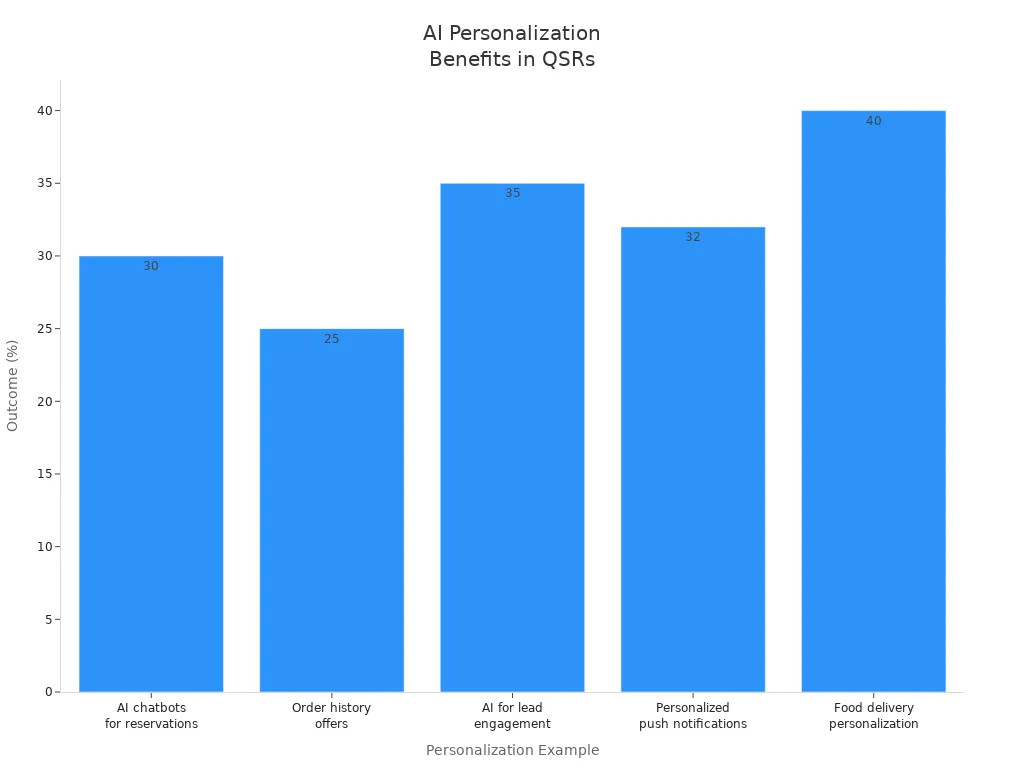
Tip: AI-powered personalized menus help restaurants get noticed. You have a better time, and restaurants get more loyal customers and make more money.
Interactive Ordering Displays
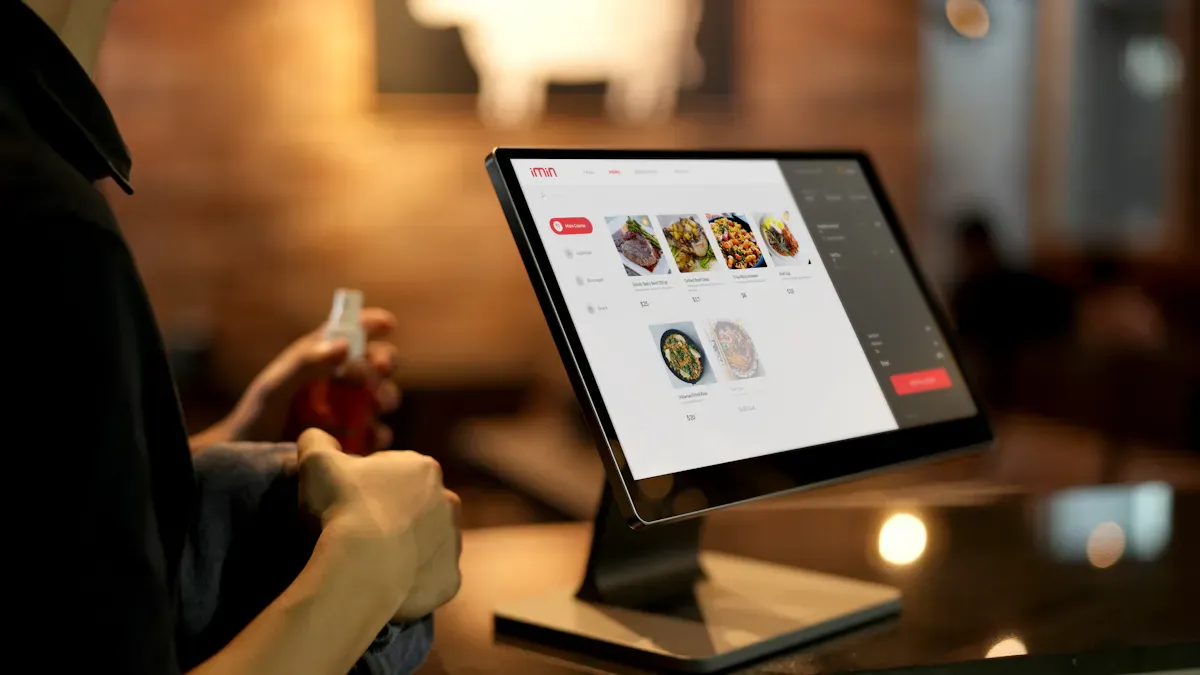
Touchscreen Kiosks
Interactive ordering displays are changing how you order food. Touchscreen kiosks let you pick your meal without waiting in line. You tap the screen and see bright video menus. You pick what you want to eat. These displays show nutrition and allergy facts to help you choose. You can change your order, add sides, and see prices right away. Self-ordering kiosks send your order to the kitchen fast. This means you get your food quicker and with fewer mistakes.
Impact Area | Description |
|---|---|
Labor Cost Reduction | Kiosks can save restaurant owners up to $6,000 per month on labor per kiosk. |
Customer Throughput | Kiosks can reduce wait times by up to 40%, enhancing customer experience and order efficiency. |
Touchscreen kiosks mean you do not need as many workers. You order at your own speed, which can make you buy more food. Orders go straight to the kitchen, so service is faster and more correct. You see fun video displays that keep you busy while you wait.
Self-Service Experience
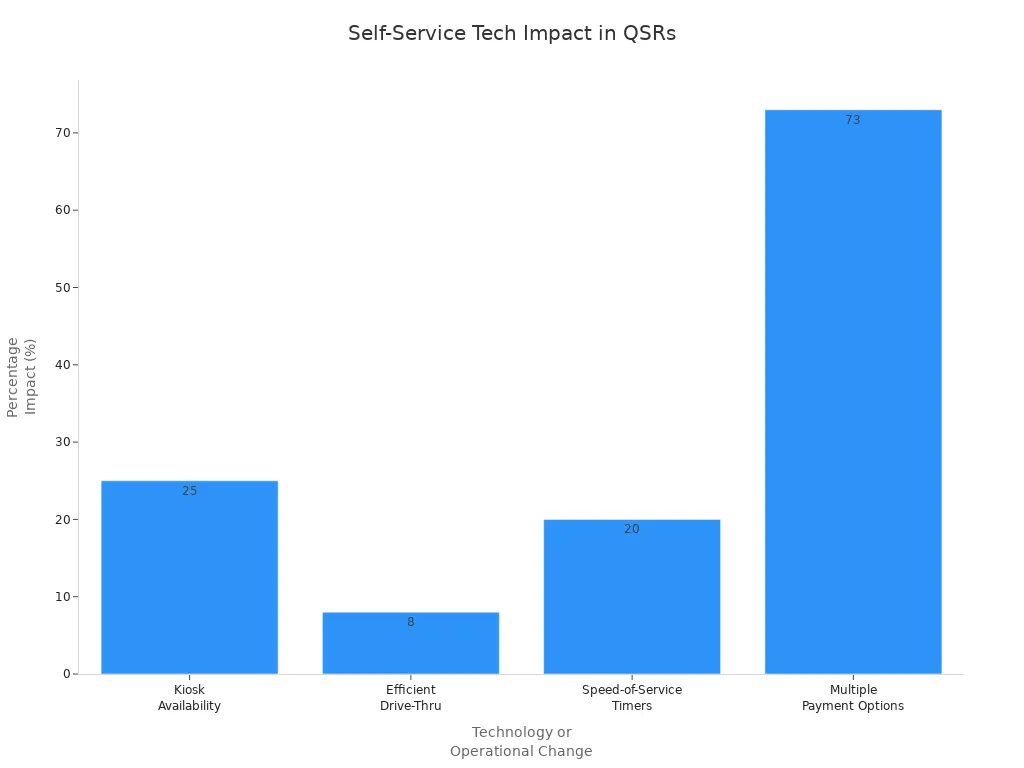
Self-service ordering gives you more control over your meal. You use a kiosk screen to build your meal and try new foods. You can pay in different ways, which makes things easier. New drive-thru systems use video and voice menus to help you order fast. You see cool video menus that make ordering fun and simple.
Self-service kiosks let you change your order and wait less.
Good POS systems make paying faster and better for you.
New drive-thru systems use video to help you order and make fewer mistakes.
Evidence Description | Impact on Order Speed and Customization |
|---|---|
Digital displays provide colorful and engaging visuals that keep customers interested while they wait. | Enhances customer engagement, leading to quicker decision-making. |
Touchscreen signage offers nutritional and allergy information. | Helps customers make informed choices, improving customization. |
Self-service kiosks allow for direct ordering without staff assistance. | Speeds up the ordering process and reduces human error. |
Centralized content management allows for instant updates across locations. | Enables real-time promotions and menu changes, enhancing customization options. |
Self-service kiosks do jobs like taking orders and payments. Workers can do other important things, so service gets better and lines move faster. You have a better time and feel happier when you visit.
Interactive ordering displays make your visit quicker, simpler, and more personal. Restaurants work better, spend less on workers, and have happier guests.
Real-Time Content Updates
Smart Menu Adjustments
You can use real-time content updates to keep your menu up to date. When you change your menu, you give people what they want and use what you have. If a dish gets popular, the system changes how much of each ingredient you need. You do not have to guess what people will pick. The system watches what sells best and helps you plan better.
Evidence | Description |
|---|---|
Automatic Adjustments | System changes ingredient needs when a dish gets more or less popular. |
Demand Reflection | Makes sure you have what customers want, not just what you think. |
Menu Popularity Tracking | Changes ingredient plans based on what dishes people like most. |
Waste Prevention | Stops you from buying too much of food that does not sell. |
You can add or take away menu items right away. Digital signage lets you change prices and menu items fast, based on what you have and what people want. This gives you more control and helps you waste less food. You can also use real-time pricing to change prices when it is busy or slow. This helps you make smart choices and grow your business.
Benefit | Explanation |
|---|---|
Improved Inventory Management | Helps you see what ingredients you use and plan what to buy. |
Better Staffing Decisions | Lets you change how many workers you need when it gets busy. |
Enhanced Customer Satisfaction | Makes menus better by showing what people like, so guests are happier. |
Tip: Smart menu changes help you serve what people want and keep your kitchen working well.
Time-Sensitive Promotions
You can use time-sensitive deals to sell more and make customers excited. Urgency marketing makes people want to act fast. If you run a quick deal when it is slow, you can fill empty tables and sell more food. Short-time offers make people want to come before the deal ends.
Urgency marketing makes people excited and ready to buy fast.
Special sales for a short time can get more people to join in.
Starbucks uses short BOGO deals to get more people to buy with quick messages.
Evidence Type | Description |
|---|---|
Last-minute available tables | Deals can fill tables that open up at the last minute. |
Flash deals during slow periods | These deals bring in more people when it is not busy. |
Exclusive promotions for loyal customers | Special deals for loyal guests make them want to come back. |
You can send special deals to your best customers. This makes them feel important and keeps them coming back. Real-time updates help you reach people at the best time. You can get more sales and happier guests when you use these tools.
Note: Time-sensitive deals and smart menu changes make your restaurant work better and help you succeed.
POS Integration
Streamlined Operations
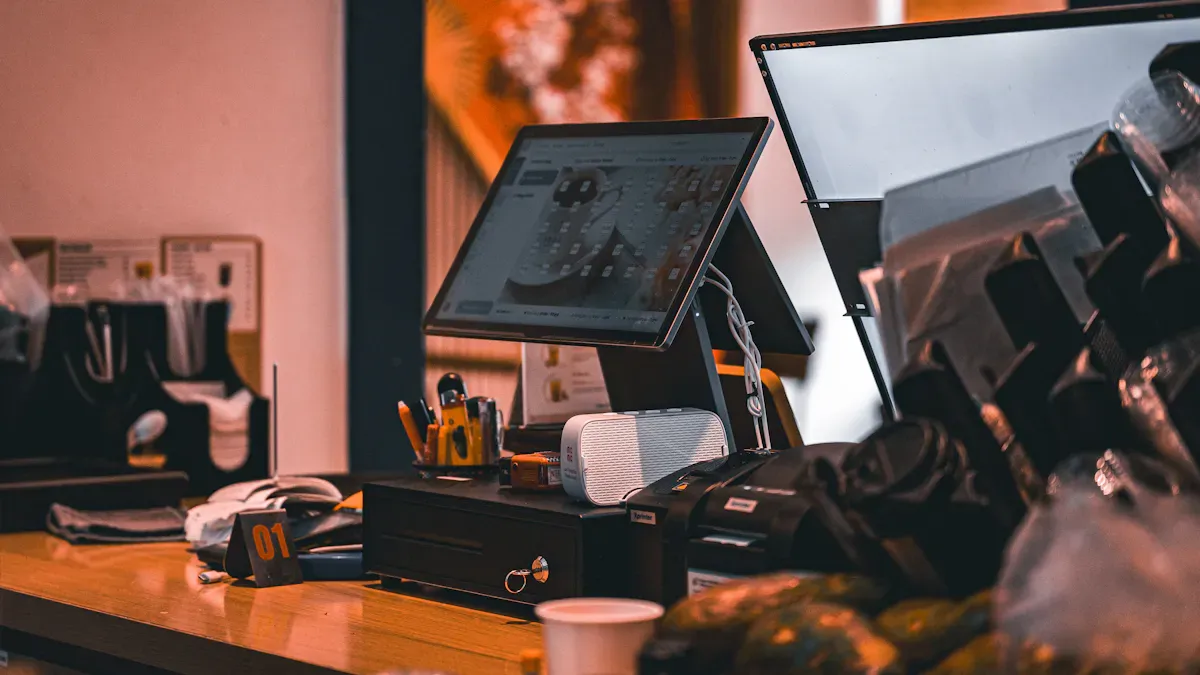
You can make your restaurant run smoother when you connect digital signage with your POS system. This integration lets you update your menu across all screens in seconds. You do not need to print new signs or wait for someone to change them by hand. Your frontline workers see the same menu as your customers, which helps everyone stay on the same page.
Benefit | Description |
|---|---|
Instant Content Updates | You can change digital content on the go, which keeps your menu fresh. |
Better Staff Communication | Digital signage helps your frontline workers know about new deals or changes. |
Real-Time Promotions | You can show new offers right away, which keeps customers interested. |
You help your team work faster and make fewer mistakes. When you use digital signage with your POS, you can also track what sells best. This helps you plan better and waste less food. Your frontline workers spend less time fixing mistakes and more time helping guests.
Tip: When you use digital signage with your POS, you boost both speed and accuracy in your restaurant.
Targeted Offers
You can use POS integration to give customers the right deals at the right time. Your system can schedule promotions for breakfast, lunch, or dinner. You can also show special offers in different regions or during certain seasons.
You can highlight breakfast deals in the morning and switch to lunch combos later.
You can show soups in colder areas and iced drinks in warmer places.
You can update your menu instantly if you run out of an item or want to try a new promotion.
Your POS system collects data about what people buy. You can use this data to create personalized offers that match your customers’ habits. This makes your promotions more effective and helps you sell more. You can also see which offers work best by looking at your sales numbers.
Note: Targeted offers make your customers feel special and keep them coming back.
Cleaner Display Design
Simplicity and Clarity
Cleaner display design makes your restaurant easier to use. Simple screens help people find food fast. Clear fonts and good colors make words easy to read. Small moving pictures show customers where to look next. These things make ordering fun but not confusing.
You use color and words to show what is important.
Small animations help people see new deals or special foods.
Simple screens stop confusion and help people pick food quickly.
When signs are simple, there are fewer mistakes. Orders go faster. People feel sure when they can read the menu easily. This helps them choose food faster. It also helps your restaurant work better and sell more.
Tip: Clean screens make your restaurant look new and help people feel good.
Customer Usability
You make things easier for customers by using clear choices and simple screens. Good kiosks give steps that anyone can follow. It does not matter if they know a lot about tech or not. Easy screens make people want to come back because ordering is smooth.
Clear steps help people move through the menu without trouble.
Simple choices make it easy to change orders.
Easy menus help people pick food fast and not feel lost.
People are happier when signs are easy and friendly. This makes them want to visit again and helps your restaurant look good. Clean screens also help workers because they answer fewer questions and serve faster.
Note: Clean display design makes customers happy and helps your restaurant do better. You make a place where guests feel welcome and your team works well.
Media Network Convergence
Unified Marketing
You can use digital signage to link all your restaurants. This makes one big marketing network. You show the same message in every place. Customers know your brand because they see it everywhere. You can change deals and menu items right away. You do not need to print new signs or wait for updates. Digital signage lets you share new deals and menu changes on every screen. You keep your content new and interesting. Customers see the same style and quality in each restaurant.
Benefit | Description |
|---|---|
Makes sure your brand looks the same in all locations. | |
Enhanced Customer Engagement | Gets customers interested with fun and moving content. |
Real-time Updates | Lets you change deals fast, so menus are always up to date. |
Digital signage turns old signs into cool moving displays. You can show fun content with new tech. You can change menu boards fast to help your business. You reach people with the right message at the best time. This helps you build trust and keep customers coming back.
Brand Visibility
You make your brand easier to see with digital signage. Customers notice your logo, colors, and menu in every store. You make your brand strong and easy to remember. Moving displays catch people’s eyes and keep them watching. You use videos, animations, and bright pictures to stand out. You tell your brand story and show what you care about on every screen. Customers remember your restaurant because each visit feels special.
You help people remember your brand by using the same look.
You get customers interested with screens they can touch and use.
You can change menu items and deals right away.
You use digital signage to make your restaurant work better and look good.
Digital signage helps you make customers happy and your business stronger. You make your work easier and your brand better. You use new tech to connect your restaurants and help your business grow.
Accessibility and Sustainability
Inclusive Features
You want every customer to feel welcome at your restaurant. Digital signage makes menus easier for everyone to use. Clear fonts and big letters help people read menus without problems. High color contrast makes words pop out so people can see better. Captions on videos help those who cannot hear well. Some screens have audio descriptions for people who cannot see well. QR codes let people get more info on their phones if they cannot read from far away.
Use easy steps so anyone can order food.
Let people change how fast the voice talks on audio menus.
Show pictures to help people who have trouble reading or speak another language.
Make paying simple for all customers.
Tip: Using these features helps more people enjoy your restaurant and makes ordering easy for everyone.
Eco-Friendly Solutions
You help the planet by using eco-friendly digital signage. These signs let you update menus without printing new paper signs, which cuts down on waste. You control all screens from one place, so you do not need to travel to each restaurant to make changes. This saves time and lowers pollution. Digital signs last longer because you can fix problems early, so you throw away fewer broken screens.
Feature | How It Helps the Environment |
|---|---|
No Single-Use Signage | Cuts paper waste by updating menus and deals digitally. |
Remote Management | Lowers travel and pollution by updating screens from one spot. |
Longer Display Life | Reduces e-waste by keeping screens working longer. |
Supports Sustainability Goals | Makes it easier to track and report your green efforts. |
You can use smart energy controls to save power. These tools change screen brightness and turn off signs when not needed. AI can guess when a screen might break, so you fix it before it stops working. This keeps your restaurant running well and helps the planet.
Note: Eco-friendly digital signage saves money, protects the planet, and shows your customers you care about the future.
You notice digital signage is changing fast food places. These tools help you change menus quickly and keep customers happy. You make things better by showing clear choices and deals at the right time. Digital signage lets you add new menu items fast and keep all stores the same. Experts say this technology makes drive-thrus faster and service better. You should look at your digital signage plan now to be ready for 2026.
How Digital Signage Benefits QSR Operations
Digital signage is fundamentally transforming quick‑service restaurant (QSR) operations, bringing significant improvements to ordering experience, back‑of‑house efficiency, and profitability. Below is a detailed analysis of the core benefits.
1. Increasing Average Check & Sales
1. Visually Appealing Food Displays
High‑definition food videos: Use dynamic footage of cheese pulling, gravy dripping, or steam rising – far more enticing than static images. Studies show dynamic menus can increase sales of featured items by 15‑30%.
Bundle combination animations: Burger + fries + drink fly into a combo box, showing “Combo saves $2 vs. à la carte” – guiding customers to higher‑margin bundles.
2. Smart Cross‑Selling & Upselling
Related item prompts: When a customer orders a burger, the screen automatically shows “Add onion rings for $1” or “Upgrade to large fries for only $0.50”.
Daypart‑aware recommendations: Morning – coffee + breakfast sandwich combos; lunch – main + drink; late night – snack platters.
Inventory‑driven suggestions: When an item is low in stock, automatically highlight an alternative with “Try our new crispy chicken”.
3. Creating Urgency with Limited‑Time Offers
Countdown timers: Screen corner shows “Limited offer ends in 03:15” – stimulating impulse purchases.
Sales counters: “250 signature burgers sold today” – leveraging social proof.
2. Improving Operational Efficiency & Reducing Errors
1. Higher Order Accuracy
Order confirmation screen: A customer‑facing secondary display shows the order (items, quantity, price). Customers can correct mistakes immediately – reducing remakes and food waste.
POS synchronisation: Menu prices and discounts are synced with the POS system in real time – eliminating manual entry errors.
2. Reducing Staff Repetitive Work
Remote menu updates: Headquarters can update menus, prices, and promotions across all stores instantly – no manual poster changes or file adjustments needed by store staff.
Smart scheduling: Menus automatically switch by preset times (breakfast/lunch/dinner) – no manual intervention.
3. Speeding Up Ordering
Clear information hierarchy: Large fonts, high contrast, well‑organised categories help customers find what they want quickly – shortening decision time.
Highlighting popular items: Use different background colours to frame high‑margin or best‑selling items, guiding fast choices.
3. Enhancing Customer Experience & Reducing Perceived Wait Time
1. Reducing Perceived Wait Time
Wait‑area entertainment: Play brand stories, kitchen live feeds, or fun short videos on queue‑area screens – making waiting feel shorter.
Progress indicators: Display “Your order is being prepared – 2 orders ahead of you” – transparent process reduces anxiety.
2. Personalised Interaction
Loyalty member recognition: After scanning a member code, the screen shows “Welcome John, you have a free fries coupon” – boosting loyalty.
Customisation options: Touchscreens allow customers to choose ingredients (e.g., “extra pickles”, “light ice”) – reducing verbal miscommunication.
4. Back‑of‑House Management & Data Analytics
1. Real‑Time Data‑Driven Decisions
Sales heatmaps: Management dashboard shows which items are clicked most, peak ordering times – guiding product development and inventory planning.
Menu A/B testing: Different menu layouts at different times in the same store – compare conversion rates to optimise design.
2. Remote Fault Monitoring
Device health dashboard: IT administrators can remotely check each screen’s online status, brightness, and playback content – automatic alerts for failures.
3. Integration with Kitchen Display System (KDS)
Orders are automatically sent to kitchen screens after checkout – eliminating lost paper tickets and order sequence confusion. Digital menu boards can also show “Peak hours – thank you for your patience”.
5. Cost Savings & Environmental Benefits
Traditional Pain Point | Digital Signage Solution | Savings Effect |
|---|---|---|
Frequent printing of menus and posters | Remote electronic updates – zero paper consumption | Thousands of dollars saved annually on printing |
Manual price tag changes | One‑click POS price sync | Labour hours saved, price inconsistency eliminated |
Storage of promotional materials | Fully digital – no physical materials | Frees up back‑of‑house/office space |
6. Typical QSR Deployment Strategy
Screen Location | Content Focus | Operational Goal |
|---|---|---|
Entrance welcome screen | Daily specials, new product teasers | Attract walk‑ins, increase average check |
Main ordering menu board | Clear categories, popular items, combo bundles | Shorten decision time, improve ordering efficiency |
Queue area side screen | Entertainment videos, brand stories | Reduce perceived wait anxiety |
Above cashier – secondary screen | Upsell prompts (“Add a drink and save $1”) | Assist staff upsell rates |
Pick‑up area waiting screen | Order progress, customer satisfaction survey | Increase transparency, collect feedback |
Conclusion
The value of digital signage for QSR operations is multi‑dimensional: it increases sales through visual menus and smart recommendations; reduces errors and labour through automatic updates and order confirmation screens; improves customer experience through queue entertainment and progress transparency; and optimises back‑of‑house decisions through data analytics and remote management. In the highly competitive fast‑food industry, digital signage has evolved from a “nice‑to‑have upgrade” into essential infrastructure, with a payback period typically shorter than 12 months.
FAQ
What is QSR digital signage?
QSR digital signage uses screens in restaurants. These screens show menus, deals, and info. The displays are bright and change fast. They help you order quickly and make your visit easier.
How does digital signage improve restaurant efficiency?
Digital signs update menus and deals right away. Staff do not spend much time changing signs. Orders move faster, and mistakes happen less often.
Tip: Digital signage lets your team help customers more.
Can digital signage personalize my experience?
Yes! AI-powered signs look at what you ordered before. They suggest menu items you might like. You see deals that match your tastes.
Personalized menus help you feel special
Targeted offers make you happier
Is digital signage eco-friendly?
Digital signage cuts down on paper waste. You can update screens from far away, which saves energy and travel.
Feature | Benefit |
|---|---|
No paper menus | Less waste |
Remote updates | Lower emissions |
See Also
Enhancing Restaurant Efficiency Through Digital Signage Innovations
Exploring Current Trends in Digital Signage for 2026
Latest Developments in Digital Signage Technology for 2026
Leading Digital Signage Innovations Transforming Retail Experience in 2026
