Understanding the Benefits and Drawbacks of Different Kiosk Types in 2026
Add.: 2F, Bldg 10, Changfeng Industrial Park, Dongkeng, Fenghuang, Guangming, Shenzhen, China 518132
Mobile/WHATSAPP: 86-138 25769658
Email: marketing@topadkiosk.com topadkiosk@gmail.com
Skype: pghenry1
Wechat: adkioskhenry
English Web.: http://www.topadkiosk.com/
https://www.topkioskdisplay.com/
http://www.ad-kiosk.com/
https://www.toplcddisplay.com/
http://www.multitouchdigitalsignage.com/
https://www.youtube.com/channel/UCYVYNJHxLVEcQD8fuUxXNTA/videos?view_as=subscriber
https://www.facebook.com/TOPADKIOSKSHENZHEN/?ref=bookmarks
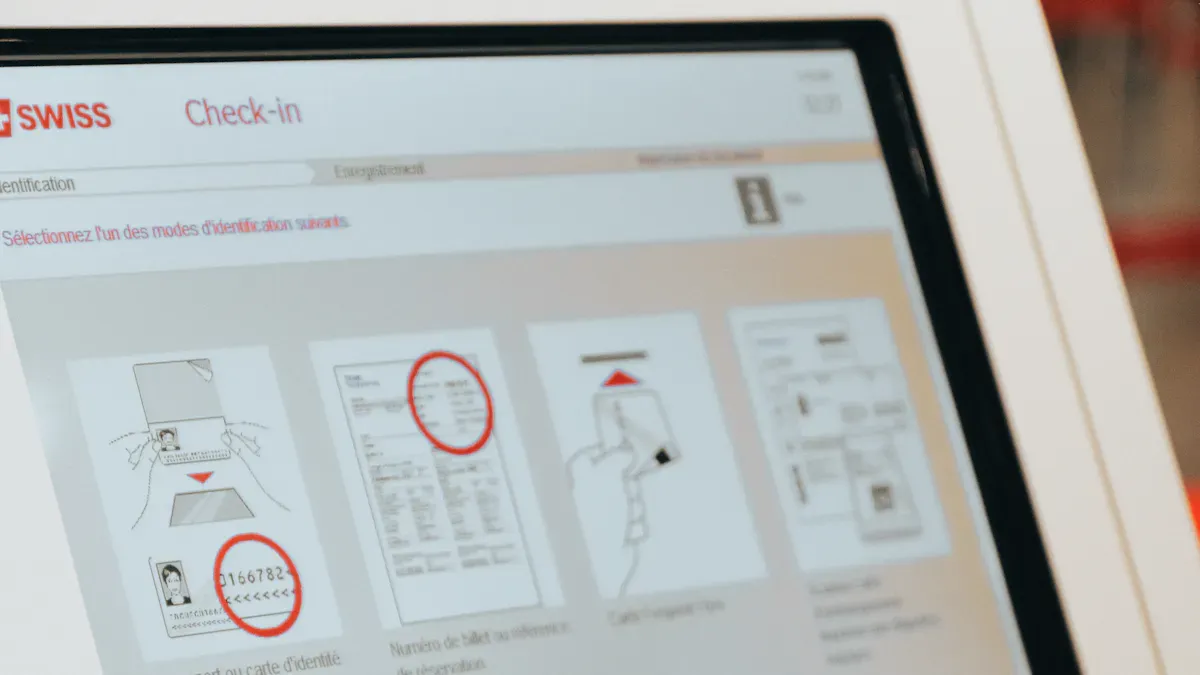
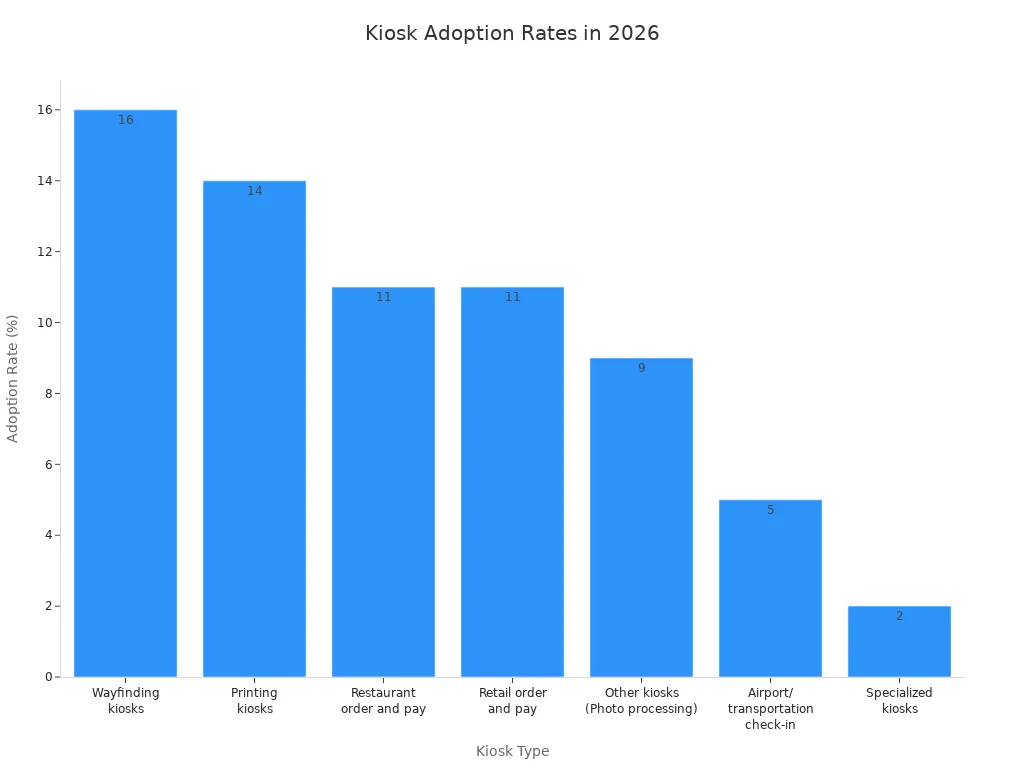
In 2026, you will discover the pros and cons of different kiosk types. Many companies opt for kiosks because they help save money and increase efficiency. The best kiosk can significantly contribute to your brand's growth and enhance customer satisfaction. Various kiosk types are utilized at different adoption rates, as illustrated below:
Kiosk Type | Adoption Rate (%) |
|---|---|
Wayfinding kiosks | 16 |
Printing kiosks | 14 |
Restaurant order and pay kiosks | 11 |
Retail order and pay kiosks | 11 |
Other kiosks (Photo processing, Bill payment, etc.) | 9 |
Airport/transportation check-in | 5 |
Specialized kiosks (Vehicle license, etc.) | 2 |
Before making a selection, it's essential to understand the good and bad sides of each kiosk type. Currently, about 71% of people enjoy using self-service kiosks, while 20% still have reservations about them. Your decision can impact costs, training requirements, and customer loyalty. For more information, visit http://www.topadkiosk.com/.
Key Takeaways
Kiosks help businesses spend less money. They do this by needing fewer workers and making things faster. Self-service kiosks make customers happier. They give fast and correct service. Kiosks can have security problems. Always look for signs of tampering. Use safe systems to protect information. Pick the kiosk type that fits your business goals. Make sure it also helps your customers. Learn about new kiosk technology. This can make your service and customer experience better.
Types of Kiosks in 2026
Self-Service Kiosks
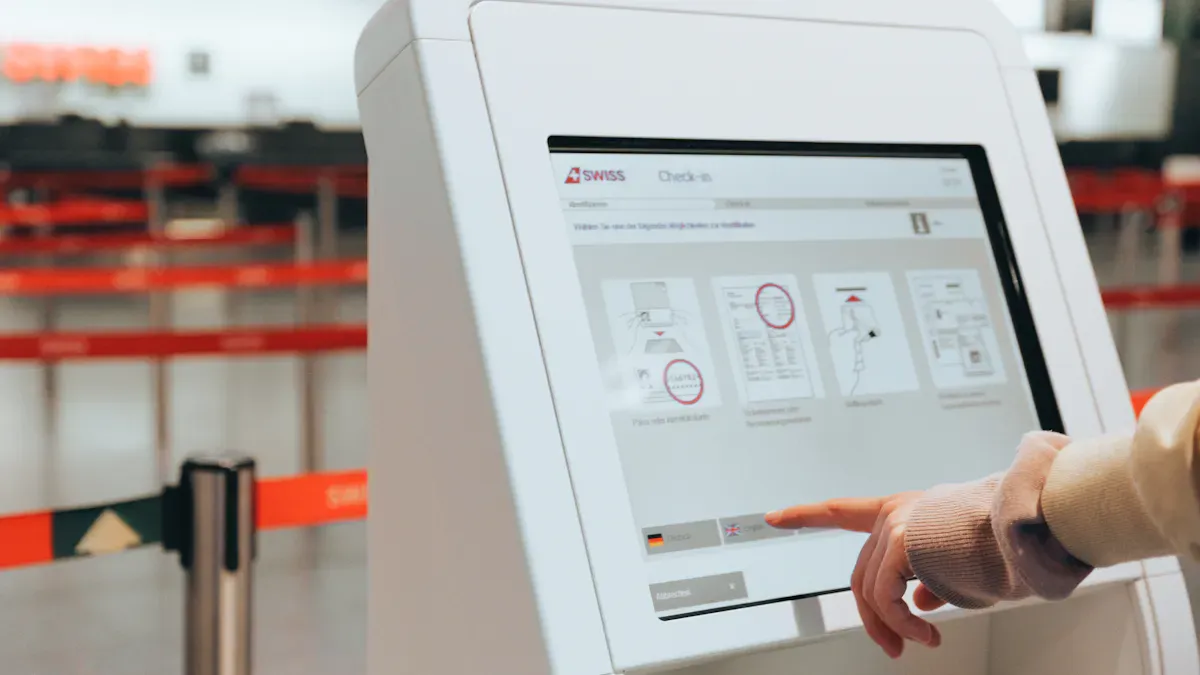
In 2026, self-service kiosks are everywhere you go. These interactive kiosks let you do things like check in, order food, pay bills, or get information. You do not need to wait for staff. Self-service kiosks include self-ordering kiosks, check-in kiosks, and bill payment kiosks. You can find them in airports, hospitals, restaurants, and your local mall kiosk. These kiosks help you save time and make things easier.
Tip: Self-service kiosks use touchscreens and simple menus. This helps you finish tasks fast.
Food Service Kiosks
Food service kiosks have changed how people order and pay for food. Restaurants use self ordering kiosks and self-ordering kiosks. You can pick your food, change your order, and pay with your phone or card. Many people like these kiosks because they are quick and make fewer mistakes. In the U.S., 66% of people enjoy using self-service kiosks for food. These interactive kiosks also help restaurants during busy times and lower staff quitting.
Healthcare Kiosks
Healthcare kiosks help you check in for appointments, pay bills, and talk to doctors with telemedicine. These interactive kiosks make hospitals and clinics less crowded. Staff can focus on important jobs. Patient registration kiosks now have over 30% of the market. This shows many people use them. You can find these kiosks in clinics, pharmacies, and mall kiosks that do health checks.
Employment Kiosks
Employment kiosks help you apply for jobs, fill out forms, or learn about open jobs. Retail stores, hospitals, and transportation centers use these interactive kiosks. They make hiring faster and service better. You can use an interactive kiosk at a mall kiosk to look for jobs or print your resume.
Bitcoin Kiosks
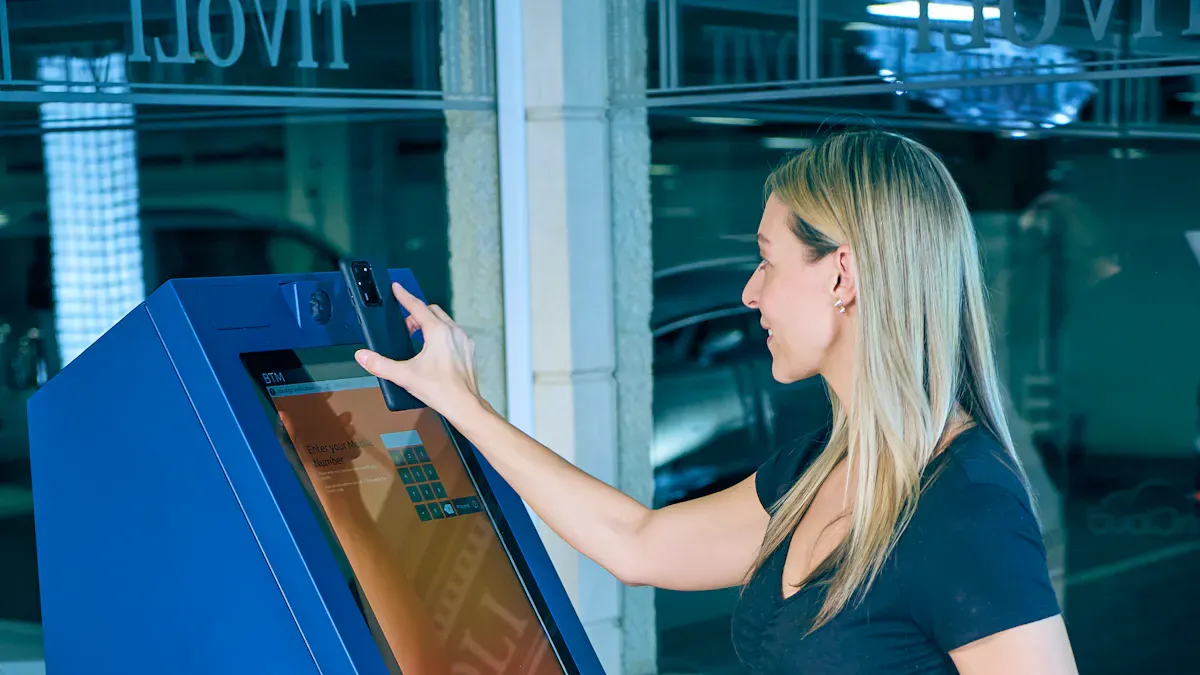
Bitcoin kiosks let you buy or sell cryptocurrency easily. These digital kiosks are common in malls and convenience stores. You can use an interactive kiosk to handle your digital money quickly and safely.
Photo Kiosks
Photo kiosks let you print photos, make gifts, or scan papers. You can connect your phone to an interactive kiosk and print nice pictures in minutes. Many mall kiosks have these services. It is easy to make memories right away.
Internet Kiosks
Internet kiosks give you web access in public places. You can check emails, join loyalty programs, or get directions using an interactive kiosk at a mall kiosk. These kiosks help you stay connected when you are out.
Freestanding Kiosks
Freestanding kiosks stand by themselves and do not need walls. You see these interactive kiosks in busy places like malls, airports, and fun spots. Their strong build and easy placement make them great for crowded areas. A mall kiosk that stands alone can do many things, like ticketing or giving information.
Note: Freestanding kiosks are easy to see and use. This makes them popular with businesses and customers.
Advantages of Kiosks
Cost Reduction
Kiosks help businesses spend less money. Many companies say self-service kiosks make management easier. They also lower labor costs. You do not need as many workers with kiosks. This helps companies earn more and work better. The table below shows how kiosks save money:
Evidence Type | Description |
|---|---|
Survey Result | 93.8% of companies said kiosks reduce labor costs. |
Employee Reduction | On average, companies cut 1.2 employees, saving about 1.38 million won monthly. |
Cost of Kiosks | Stand-type kiosks cost about 3.56 million won; table-type cost 1.33 million won. |
Increased Visibility and Branding
Kiosks make your brand easy to notice. Digital kiosks show videos and bright pictures. These displays grab attention and help people remember your brand. Self-service kiosks let you change messages fast. You can reach the right customers. The table below explains how kiosks help your brand:
Evidence Type | Explanation |
|---|---|
Dynamic Content Presentation | Shows videos and visuals that improve brand recall. |
Interactive Engagement | Lets users explore products and join surveys, creating a strong brand link. |
Real-time Updates | Changes messages quickly to match promotions or trends. |
Location-Based Targeting | Places kiosks in busy spots to reach more people. |
Social Media Integration | Connects with social media to expand your brand’s reach. |
Brand Consistency | Keeps your brand’s look and message the same everywhere. |
Improved Accuracy and Speed
Self-service kiosks give faster and more correct service. You use a simple screen that lowers mistakes. Features like AI and contactless payments help you finish tasks quickly. This means less waiting and happier customers. The table below shows how kiosks make things faster and more accurate:
Mechanism | Impact on Speed and Accuracy |
|---|---|
User Interface Design | Makes navigation easy and lowers errors. |
AI Integration | Speeds up scanning and reduces mistakes. |
Contactless Payments | Makes payments faster and smoother. |
Real-time Feedback | Guides you through each step for better accuracy. |
Secure and Reliable Access
Kiosks keep your information safe. Self-service kiosks use strong security tools like VPNs and firewalls. They get regular updates to stay safe. Kiosks follow rules like EMV and PCI-DSS to protect your data. They can work offline, so you do not lose service if the internet goes down. By following data protection laws, kiosks build trust and make customers happy. You get safe and reliable access every time you use self-service kiosks.
Disadvantages of Kiosks
Security and Data Risks
When you use kiosks, there are some risks. These machines handle private information. You need to watch out for dangers. The table below lists the main risks you might face:
Risk Type | Description |
|---|---|
Data Breaches and Hacking | Kiosks can be attacked by hackers. They may use malware or fake connections. |
Physical Tampering and Skimming | Criminals might put skimmers or keyloggers on kiosks. This happens more in places with few cameras. |
Unauthorized Access | Bad insiders or weak controls can let people steal or change data. |
Privacy Concerns | Kiosks collect private user data. This can cause problems with consent and session safety. |
Session Hijacking | If kiosks do not log out users, others can see their data. |
Shoulder Surfing | People nearby can see your information. This can lead to identity theft. |
Always look for signs of tampering before using a self-service kiosk.
Limited Functionality for Complex Tasks
Kiosks are good for easy jobs. But they have trouble with hard tasks. You might get upset if you need help or advice. Here are some common problems:
Many people feel nervous using self-service kiosks for hard things.
No staff means you cannot get tips or make smart choices.
Some customers want personal service, especially in small towns or if they do not like tech.
Not having a personal touch can make people confused or unhappy.
Higher Costs for Certain Types
Some kiosks cost more than you think. Fancy or special kiosks need better software and systems. This makes them more expensive. You also have to think about other costs:
You pay for fixing, software, and new parts over time.
Cheap kiosks can give customers a bad experience and hurt your business.
You must pay for hardware, setup, training, and special features.
You will have to pay for software, help, and fixing things again and again.
Upgrades, wiring, and teaching staff can surprise you with extra bills.
Maintenance and Support Challenges
Taking care of kiosks is not always easy. You may run into these problems:
Unwatched self-service kiosks can be used wrong or changed by people.
You need to update and check kiosks often to keep them safe from hackers.
Keeping kiosks up-to-date is important, but it can be hard work.
Fixing problems at many places takes a lot of time and effort.
Having many types and systems makes support harder.
If you want to use self-service kiosks, get ready for regular care and support.
Pros and Cons of Different Kiosk Types
Self-Service Kiosks: Pros and Cons
You find self-service kiosks in many places. They are in airports, stores, and malls. These kiosks help you do things fast. You do not have to wait for staff. Here is a table that shows the good and bad sides of self-service kiosks:
Pros | Cons |
|---|---|
Reduce wait time by processing orders quickly | Limited customization options for kiosks |
Optimize resource use by reallocating staff | High initial setup and maintenance costs |
Increase sales through upselling and customer engagement | Potential displacement of workers |
Provide detailed information to customers | |
Personalize customer experience |
Self-service kiosks are best for busy places. You can use them to check in, pay bills, or get information.
Food Service Kiosks: Pros and Cons
Food service kiosks have changed how you order food. You can order and pay by yourself. This helps restaurants serve more people. It also lowers mistakes.
Pros:
You enter your order and see it on the screen. This helps stop mistakes.
You make your order clear, so staff do not get it wrong.
Ordering is faster, which helps when it is busy.
The kitchen gets your order right away.
Cons:
Some people think kiosks are hard to use at first.
Older adults may want to talk to staff instead.
It costs a lot to buy and keep kiosks working.
Food service kiosks are great for fast food and cafeterias. You get your food faster and can control your order.
Healthcare Kiosks: Pros and Cons
Healthcare kiosks help you check in and pay bills. You can also find your way in clinics or hospitals. These kiosks make things easier for you and staff.
Pros:
You get more privacy at the front desk.
Paying is easier and less awkward.
You can find your way with clear directions.
Staff have less work to do.
You get the same service at different places.
It is easier to move through busy times.
Self-service makes patients more involved.
Cons:
Some people have trouble with technology.
Kiosks need updates and fixing to work well.
Healthcare kiosks are good for clinics, hospitals, and pharmacies. They help you get things done faster and with less stress.
Employment Kiosks: Pros and Cons
Employment kiosks help you apply for jobs or fill out forms. These kiosks make hiring and training easier for everyone.
Pros:
You can fill out forms and do training in one place.
Workers can update their info right away.
Cons:
Some people need help using the kiosks.
Tech problems can slow things down.
Not all jobs can use kiosks for hiring.
Employment kiosks are best for stores, hotels, and big companies. They help when there are lots of new workers.
Bitcoin Kiosks: Pros and Cons
Bitcoin kiosks let you buy or sell cryptocurrency. They are easy to use, but there are some risks.
Pros | Cons |
|---|---|
Convenience and accessibility | Potential for misuse by criminals |
Simple process for converting fiat to crypto | Lax identification requirements |
User-friendly for those new to technology | Increased scams targeting users |
No need for currency conversion | Lack of consistent regulations |
Bitcoin kiosks are good for people who want fast access to cryptocurrency. You find them in malls and stores.
Photo Kiosks: Pros and Cons
Photo kiosks let you print photos or make gifts. You can get nice prints fast and easy.
Pros:
The prints look good and make you happy.
Kiosks offer many services, like gifts and proofs.
Stores get more customers with instant photo printing.
Events can give guests printed photos right away.
Cons:
Some kiosks do not let you edit much.
Tech problems can slow down printing.
Not all places have the same services.
Photo kiosks are best in stores, malls, and events. You get fast and easy photo service.
Internet Kiosks: Pros and Cons
Internet kiosks let you go online in public places. They help you stay connected, but there are some problems.
Pros:
You can check email or browse the web.
People without computers can use the internet.
They are helpful in airports, malls, and libraries.
Cons:
Some kiosks are hard to use.
Many do not help people with disabilities.
Screens can be hard to see or reach.
To make internet kiosks better, designers should add voice and keyboard options. This helps more people use them.
Freestanding Kiosks: Pros and Cons
Freestanding kiosks stand alone and do not need walls. You see them in busy places with lots of people.
Pros:
They are easy to see and use.
You can put them anywhere you need.
They are strong and last a long time.
They can do many jobs, like ticketing or giving info.
Cons:
They take up more space than wall kiosks.
You may need extra security in public.
Strong materials and setup cost more.
Freestanding kiosks are best in malls, airports, and fun places. You get easy and reliable service.
Tip: When you look at the pros and cons, think about what your business and customers need. Picking the right kiosk can help you save money and stand out.
Practical Examples and Use Cases
Retail and Hospitality
Self-service kiosks are in stores and restaurants. You can order food or buy tickets. You can check in at hotels with kiosks. In fast food places, you pick your meal on a screen. You pay without waiting in line. Movie theaters use kiosks for fast ticket buying. Sports venues have kiosks for tickets too. Malls and city centers have kiosks with maps. These kiosks help you find stores.
Kiosk Type | Industry Examples | Benefits |
|---|---|---|
Fast food places, movie theaters | Quicker service, shorter lines | |
Self-Service Ticketing & Check-In | Airports, event venues, hotels | Less waiting, easier check-in |
Information & Wayfinding | Malls, campuses, city centers | Easier navigation, more engagement |
Tip: Kiosks in stores and restaurants make your visit better and easier.
Healthcare and Public Services
Hospitals and clinics use kiosks for check-in. You can pay bills or update info on the screen. Some kiosks let you talk to a doctor by video. This makes visits faster and gives you more privacy. Public offices use kiosks for forms and information. You do not need to wait for staff.
Benefit | Description |
|---|---|
Virtual face-to-face interaction | Talk to doctors on a screen |
Check in and get info easily | |
Reduced wait times | Spend less time in waiting rooms |
Reduced staffing and paper costs | Less need for staff and paper |
Enhanced data collection | Doctors see your info right away |
Transportation and Ticketing
Airports and train stations use kiosks for check-in and tickets. You print your boarding pass at an airport kiosk. You buy train tickets at a station kiosk. Event venues use kiosks for quick ticket pickup. These kiosks help people move faster. Travel is less stressful.
Check in for flights at an airport kiosk.
Buy train tickets at a station kiosk.
Get event tickets at a venue kiosk.
Financial Services and Bitcoin Kiosks
Banks and stores have kiosks for money tasks. Bitcoin kiosks let you buy or sell cryptocurrency. You find these kiosks in malls and stores. They make handling digital money easy. You do not need a bank teller.
Note: Bitcoin kiosks give fast access to cryptocurrency. Always check for security before using them.
Photo and Employment Kiosks in Daily Life
Photo kiosks let you print pictures from your phone or camera. You can make gifts or scan papers at these kiosks in stores or malls. Employment kiosks help you apply for jobs or fill out forms. You find them in stores or public offices. These kiosks make daily tasks easier. They save you time.
Print photos at a store kiosk.
Apply for a job at a retail kiosk.
Scan papers at a mall kiosk.
Mitigating Disadvantages of Kiosks
Security and Privacy Solutions
You can keep your information safe when using kiosks. Pick machines with strong security tools. Make sure kiosks use encrypted connections. This stops hackers from stealing your data. Always look for signs that someone messed with the kiosk. Many self-service kiosks have cameras and alarms to stop theft. Log out after you finish using the kiosk. This keeps your information private.
Tip: Use kiosks in bright places. This makes it harder for someone to steal your data.
Accessibility Improvements
You can make kiosks easier for everyone to use. Add big buttons and clear words on the screen. Some self-service kiosks talk to help people who cannot see well. You can add headphone jacks for audio help. Put kiosks at a height that works for wheelchair users. Test the machines with different people. This helps you find problems before customers do.
Accessibility Feature | Benefit |
|---|---|
Large buttons | Easier to press |
Voice guidance | Helps people with vision loss |
Adjustable height | Good for wheelchair users |
Maintenance Strategies
You can keep kiosks working well by checking them often. Clean screens and buttons so dirt does not cause trouble. Update software to fix bugs and add new features. Teach staff to spot problems early. Make a schedule for repairs. This keeps downtime low and customers happy. If you use many kiosks, write down problems in a logbook. This helps you see patterns and fix them faster.
Note: Fast repairs and updates make self-service kiosks work better for everyone.
Recommendations for Businesses
Matching Kiosk Types to Business Goals
You should start by thinking about your business goals. Each type of kiosk works best for different needs. If you want to serve more customers quickly, you can choose self-service kiosks. These help you reduce wait times and improve customer satisfaction. For restaurants, food service kiosks can speed up orders and lower mistakes. Healthcare providers can use kiosks to help patients check in and pay bills. Retail stores can use kiosks for product information and easy checkout.
You need to look at your budget. Some kiosks cost more to buy and keep working. Make a list of what you need most. Think about how many people will use the kiosk each day. You should also ask your customers what they want. Their feedback can help you pick the right solution.
Tip: Test a kiosk before you buy many. This helps you see if it fits your business.
Here is a simple table to help you match kiosk types to your goals:
Business Goal | Best Kiosk Type |
|---|---|
Faster service | Self-service |
Fewer staff needed | Food service |
Better patient flow | Healthcare |
Easy job applications | Employment |
Quick crypto access | Bitcoin |
Future Trends in Kiosks
You will see new trends in kiosks soon. Touchless screens will become more common. Voice commands will help people who cannot use touchscreens. Many kiosks will use artificial intelligence to give better service. You may see more kiosks that work with mobile apps. These changes will make kiosks easier and safer for everyone.
You should stay updated on new technology. This helps your business stay ahead. You can ask your kiosk provider about new features each year.
Note: Picking the right kiosk now can help your business grow in the future.
You see that kiosks offer faster service, lower costs, and better branding. Some types bring challenges like security risks and high maintenance. Choosing the right kiosk helps your business meet goals and keeps customers happy. The market for kiosks keeps growing, especially in healthcare and AI solutions.
Metric | Value |
|---|---|
Market projection (2026-2034) | |
Consumer preference (2026) | 71% globally |
Labor cost reduction (2026) | 28.6% |
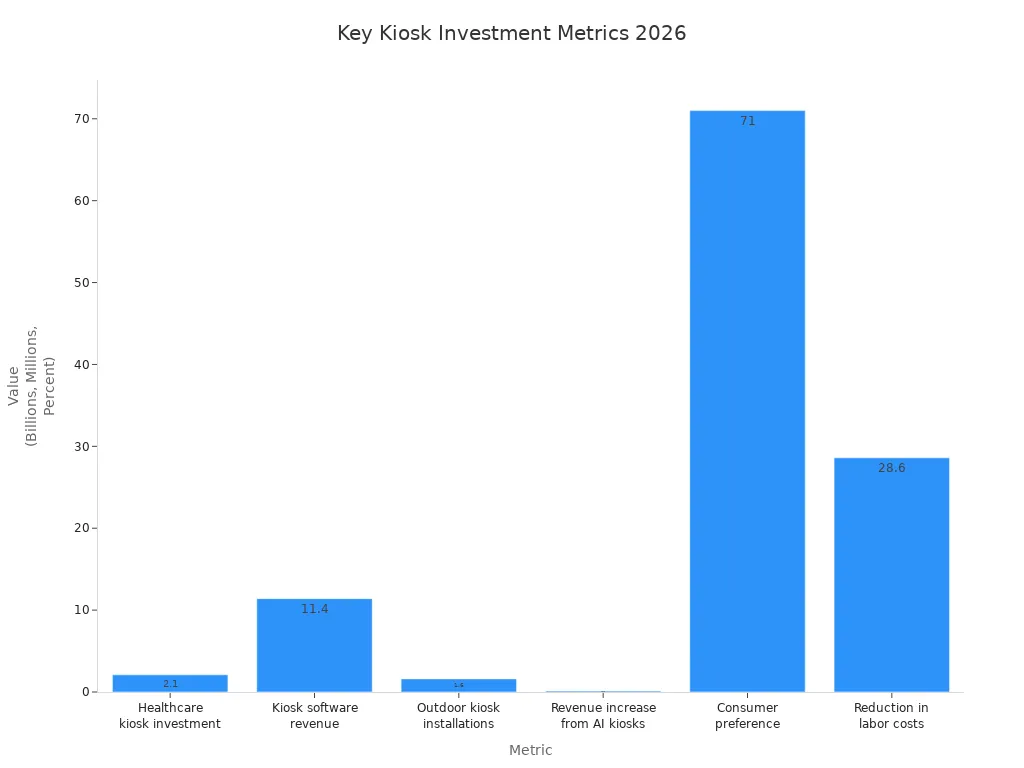
You can start by testing kiosks that fit your needs. Stay updated on new trends like touchless screens and AI. The future brings smarter kiosks that help you serve customers better.
The best choice for your business will depend on your specific goals, the environment, and the people using it.
This guide breaks down the most common types of kiosks, weighing their pros and cons to help you make an informed decision.
⚖️ A Quick Comparison of Kiosk Types
Kiosk Type | Key Advantage | Key Disadvantage | Primary Use Case |
|---|---|---|---|
Freestanding | Highly visible, fully equipped, versatile | High upfront cost, large footprint, can be intimidating | High-traffic areas needing a strong, standalone brand presence (e.g., malls, airports) |
Countertop | Small footprint, cost-effective, easy installation | Limited screen size, requires existing counter space | Businesses with limited floor space needing self-service (e.g., cafes, small retailers, check-in counters) |
Wall-Mounted | Saves floor space, secure, modern look | Fixed location, can be less accessible for some users | Information points, digital signage, or simple ordering in defined areas (e.g., hallways, waiting rooms) |
Informational/Wayfinding | Reduces staff burden, empowers users, real-time updates | High initial setup, requires accurate map data, regular updates | Large, complex venues needing to guide visitors (e.g., hospitals, universities, corporate campuses) |
Self-Service / Transactional | Boosts revenue, higher order accuracy, 24/7 operation | High initial investment, ongoing maintenance, potential user resistance | Restaurants, retail checkout, ticketing, banking, and any business aiming to automate transactions |
Payment Kiosk | Fast, secure transactions, reduces cash handling, 24/7 availability | PCI compliance complexity, transaction fees, potential for technical issues | Environments with high transaction volume or unattended payment needs (e.g., parking, retail, laundromats) |
Outdoor Kiosk | Durable, weather-resistant, high brightness, 24/7 accessibility | Very high cost, complex installation, requires robust security | Public spaces, transportation hubs, outdoor retail, or any location exposed to the elements |
LCD Display | Bright, crisp, cost-effective for general use | Blacks appear gray, limited contrast, narrower viewing angles | Most indoor applications where premium image quality is not critical |
LED Display | Very bright, energy-efficient, slim design, good for video | Can be expensive for high-quality versions | Environments with high ambient light, or where a sleek design is needed |
OLED Display | Perfect blacks, infinite contrast, vibrant colors, wide viewing angles | High cost, risk of burn-in with static images, shorter lifespan for commercial use | Premium applications where image quality is paramount, with content that changes regularly |
🏢 Form Factor & Deployment: Freestanding, Countertop & Wall-Mounted
This refers to the physical design and where you place the kiosk.
Freestanding Kiosks
These are the most common and are placed on the floor as a standalone unit.
👍 Pros: High visibility, can accommodate larger screens and multiple peripherals (e.g., printers, scanners), offers a professional and sturdy presence.
👎 Cons: Requires significant floor space, has the highest upfront cost, and can be physically intimidating for some users.
Countertop Kiosks
These are smaller units designed to sit on a counter, desk, or table.
👍 Pros: Compact and affordable, ideal for businesses with limited space. They offer the same functionality as a freestanding unit but are easier to install and relocate.
👎 Cons: Limited screen size and can be less visible in a busy environment. It also requires an existing counter or table for placement.
Wall-Mounted Kiosks
These are attached directly to a wall, saving valuable floor space.
👍 Pros: Space-saving, secure, and can offer a modern, clean look.
👎 Cons: Fixed location, may not be accessible to all users, and installation requires a suitable wall and electrical setup.
🎯 Primary Function & Use Case
This is about what the kiosk does.
Informational & Wayfinding Kiosks
These provide information, maps, and directions.
👍 Pros: Empower users to find their own way, reducing the burden on staff. They can offer interactive maps, real-time updates, and step-by-step directions, significantly improving the visitor experience.
👎 Cons: High initial setup cost for software and accurate mapping. Requires ongoing updates to ensure information remains current, and can be confusing if the user interface is poorly designed.
Self-Service & Transactional Kiosks
Designed for users to complete a specific task or transaction independently. This includes food ordering, ticketing, and check-in kiosks.
👍 Pros: Increases efficiency, reduces queue times, and lowers labor costs. Studies show they often lead to higher average transaction values due to effective upselling. They also empower customers and can offer 24/7 service.
👎 Cons: High initial investment for hardware and software integration. They require ongoing maintenance and can be a source of customer frustration if the interface is slow or unintuitive. Some customers may also resist using them and prefer human interaction.
Payment Kiosks
A specialized sub-category of transactional kiosks, focused solely on secure payment processing. This includes self-checkout and bill payment kiosks.
👍 Pros: Fast, secure, and efficient for processing cashless payments. They are excellent for high-traffic areas or for offering after-hours services like paying a parking ticket or utility bill.
👎 Cons: Must be PCI-compliant, adding to complexity and cost. Transaction fees can apply, and technical issues can lead to lost revenue and frustrated customers.
🌳 Environment & Display Technology
These factors relate to where the kiosk will live and the quality of its screen.
Indoor vs. Outdoor Kiosks
The core difference is durability.
Indoor: Designed for climate-controlled spaces, focusing on sleek aesthetics and integration with the surroundings. They are typically made of lighter materials and have lower brightness screens (250-300 nits).
Outdoor: Built to withstand extreme weather, temperatures, and potential vandalism. They use rugged materials like reinforced steel, have high-brightness screens (often exceeding 1500 nits) for direct sunlight, and feature thermal management systems. The trade-off is significantly higher cost and more complex installation.
Display Technology: LCD vs. LED vs. OLED
The choice of screen technology impacts image quality, cost, and longevity.
LCD: The most common and cost-effective option. LCDs offer good brightness and a long lifespan, making them a reliable workhorse for most indoor applications.
LED: Often refers to LED-backlit LCDs. These are typically brighter and more energy-efficient than standard LCDs, and can be made very thin for a sleek look.
OLED: Offers the best picture quality with perfect blacks, infinite contrast, and wide viewing angles. However, they are expensive, have a shorter lifespan for 24/7 commercial use, and are susceptible to "burn-in" if static images (like a logo or menu) are displayed for long periods.
💡 How to Make the Right Choice
To make the best decision for your business, ask yourself these key questions:
What is the core task? Is it to inform, transact, or navigate? A self-ordering kiosk for a restaurant has very different needs than a wayfinding kiosk for a hospital.
Where will it be used? Will it be indoors or outdoors? What are the space constraints? A countertop model is best for a tight space, while a freestanding unit is needed for a high-traffic lobby.
Who is the user? Consider their technical comfort level. A more senior or less tech-savvy audience will need a very simple, intuitive interface.
What is the total cost of ownership (TCO)? Don't just look at the purchase price. Factor in installation, software licensing, maintenance, and potential downtime costs.
Does it need to integrate? Will the kiosk need to connect with your POS, inventory, or CRM systems? This is critical for transactional kiosks to ensure data flows correctly.
Each kiosk type serves a distinct purpose and comes with its own set of trade-offs. By carefully evaluating your needs against these factors, you can choose the solution that provides the best return on investment for your business.
FAQ
What should you look for when choosing a kiosk for your business?
You should check your business needs, budget, and customer preferences. Test different kiosk types. Ask for feedback from your team and customers. Pick a kiosk that matches your goals and fits your space.
How do you keep your information safe when using kiosks?
Always check for signs of tampering. Use kiosks in well-lit areas. Log out after each use. Choose kiosks with secure payment systems and updated software.
Are kiosks easy for everyone to use?
Many kiosks have large buttons, voice help, and adjustable screens. Some people may still need help. You can ask staff for support if you have trouble.
How often do kiosks need maintenance?
Most kiosks need regular cleaning and software updates. You should check them weekly for problems. Quick repairs keep kiosks working well and help customers.
See Also
Discover 10 Unexpected Applications of Touch Screen Kiosks
6 Essential Tips for Selecting Interactive Kiosks for Spaces
Comparing Business Touch Screen Kiosks: Performance and Value Insights
