Power board type and features for commercial lcd display oled display and led display
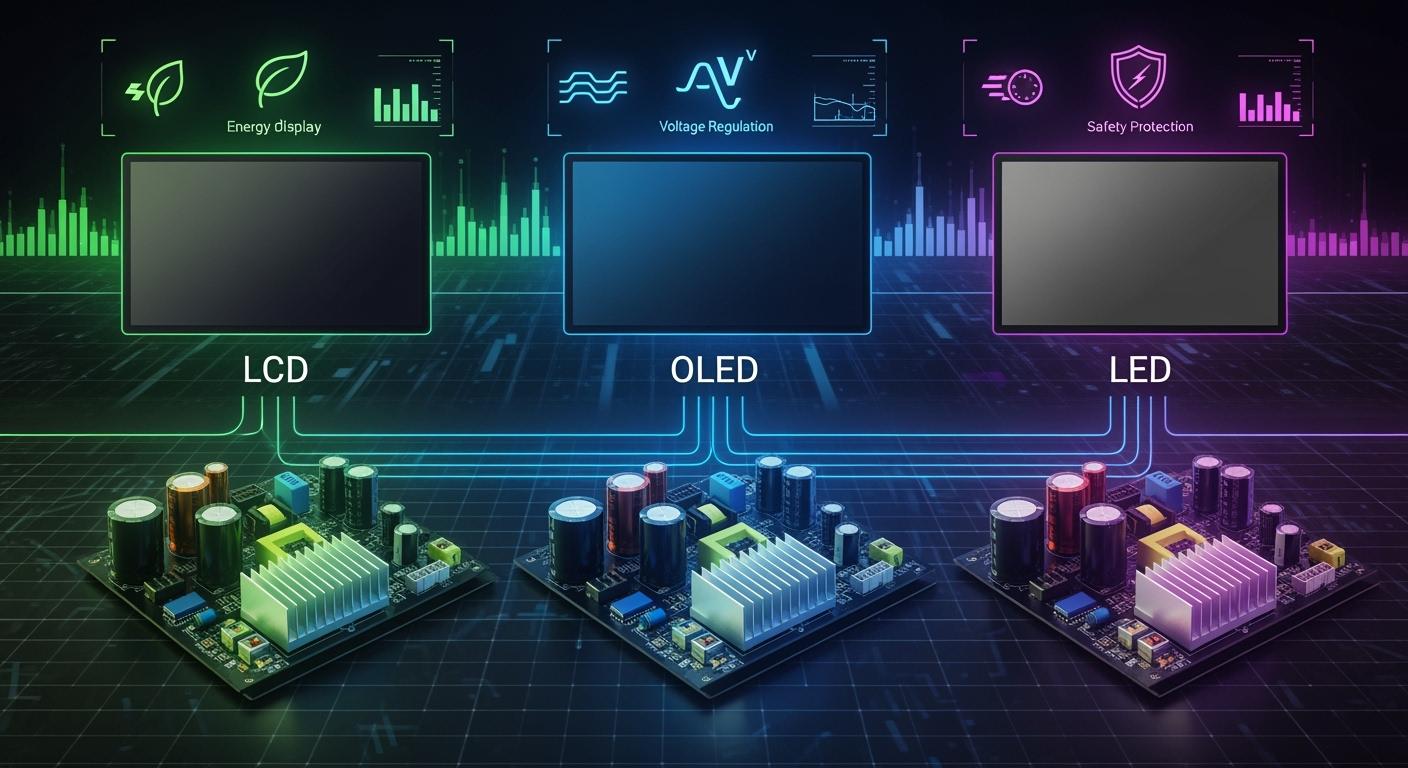
Choosing the right power board for your commercial display keeps it safe and working well. Each display, like LCD, OLED, or LED, needs a board that fits its special power needs. You should not use a board made for homes. Important features are power management, backup design, and real-time monitoring. These features help the system stay stable, fail less, and work better. When you care about safety and efficiency, you protect your display and save money by stopping long breaks.
Shenzhen TopAdkiosk Display Technology Co., Ltd.
Add.: 2F, Bldg 10, Changfeng Industrial Park, Dongkeng, Fenghuang, Guangming, Shenzhen, China 518132
Mobile/WHATSAPP: 86-138 25769658
Email: marketing@topadkiosk.com topadkiosk@gmail.com
Skype: pghenry1
Wechat: adkioskhenry
English Web.: http://www.topadkiosk.com/
https://www.topkioskdisplay.com/
http://www.ad-kiosk.com/
https://www.toplcddisplay.com/
http://www.multitouchdigitalsignage.com/
https://www.youtube.com/channel/UCYVYNJHxLVEcQD8fuUxXNTA/videos?view_as=subscriber
https://www.facebook.com/TOPADKIOSKSHENZHEN/?ref=bookmarks
Key Takeaways
Pick the correct power board for your display. LCD, OLED, and LED need different power and protection.
Make sure your power board has surge protection. This keeps your display safe from sudden voltage jumps. It also helps your display last longer.
Check the voltage and current numbers before you install. Matching these numbers stops flickering and keeps your display safe.
Think about energy efficiency when you choose a power board. Efficient boards use less power and make less heat. This saves money and helps the environment.
Find power boards with smart features like real-time monitoring and switched outlets. These features make your display safer and give you more control over power use.
Power board types
To pick the right power board, you need to know the types. Each type works in a different way and is used in certain places. This part will help you look at the main distribution board, sub distribution board, multi-compartment board, and multi-box board. You will learn how each one works with LCD, OLED, and LED displays.
Board Type | Mounting | Access | Typical Application |
|---|---|---|---|
Main Low-Voltage Distribution Board | Floor-standing | Front or Rear | Substation – primary power distribution |
Sub-main Distribution Board | Floor-standing | Front or Rear | Facilities / utilities sub-feeds |
Multi-compartment Board | Floor-standing | Front (each cell) | Motor control centers, expandable systems |
Multi-box Board | Floor / Wall | Front + Side | Industrial / outdoor dusty or humid areas |
LCD display boards
LCD display boards need steady power and good surge protection. A main distribution board controls power for big systems. LCD displays often use a sub distribution board for each floor or section. This setup keeps power steady and stops surges from hurting the screen. Multi-compartment boards are good for LCDs because you can add more panels later. LCD displays last longer than OLED displays. They can work for 60,000 to 70,000 hours before getting dim. LCD boards need a fuse box or breaker to stop surges and overloads.
LCD displays use a backlight that stays on all the time. The power use does not change much, even if the picture changes. The distribution board must handle this steady power. Surge protection is important because a sudden surge can break the backlight or panel. LCD boards are best for places that need long life and steady work.
Brightness Level | OLED Power Consumption | LCD Power Consumption | Power Savings (%) |
|---|---|---|---|
Low (100nit) | 50mW | 70mW | 28.6% |
Medium (300nit) | 150mW | 210mW | 28.6% |
High (500nit) | 250mW | 400mW | 37.5% |
Max (1000nit) | 500mW | 700mW | 28.6% |
HDR Peak (1500nit) | 450mW | 600mW | 25% |
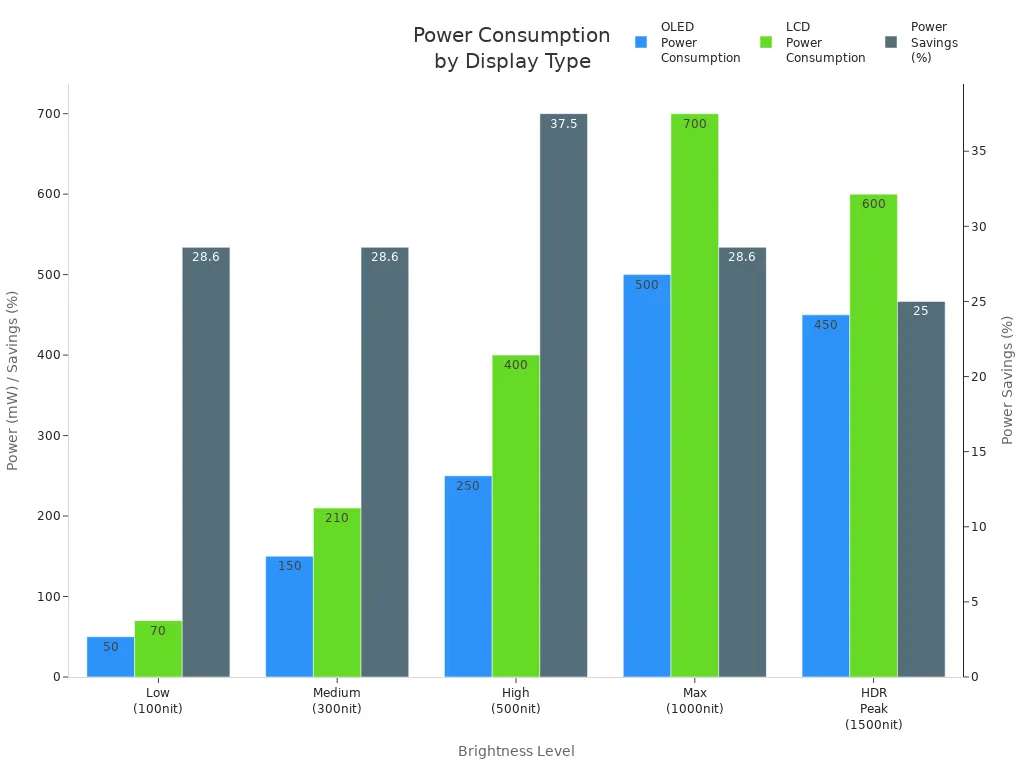
LCD boards need strong surge-protection and reliable distribution. Use a main distribution board for big jobs and a sub distribution board for smaller ones.
OLED display boards
OLED display boards use less power when the screen is dark. The distribution board must handle power that goes up and down. OLED displays connect to a main distribution board for big setups and a sub distribution board for small areas. Surge protection is very important because OLED panels can break from power spikes. Multi-compartment boards are good if you want to add more panels or control them one by one.
OLED displays look bright and colorful, but they do not last as long as LCD displays. If you show the same picture for a long time, you might see burn-in. You need a consumer unit with surge-protection to keep the panel safe. OLED boards are best for places where you want great image quality and can handle burn-in risk.
OLED displays save up to 67% power with dark images compared to LCDs.
OLED uses 450mW for HDR, while LCD uses 600mW, so you save 25%.
People use displays at 300nit or more for over 4 hours a day, where OLED is most efficient.
Display Type | Lifespan (Hours) | Burn-in Risk |
|---|---|---|
LCD | 60,000-70,000 | Low |
OLED | 30,000-50,000 | High |
OLED boards need surge-protection and flexible distribution. Use a main distribution board for big projects and a sub distribution board for smaller areas.
LED display boards
LED display boards use more power when the screen is bigger or brighter. The distribution board must handle high power loads. LED displays connect to a main distribution board for big screens and a sub distribution board for small panels. Surge protection is important because LED panels can break if a surge happens. Multi-box boards are good for dusty or wet places, like outside. This board keeps the panel safe and power steady.
LED displays use 150 to 600 watts for each square meter. LCD displays use 150–250 watts, and OLED displays use 90–150 watts. LED boards need strong surge-protection and good distribution to keep the panel safe.
Display Type | Energy Consumption (W) | Monthly Consumption (kWh) |
|---|---|---|
LED | 150–600 | N/A |
LCD | 150–250 | 110–180 |
OLED | 90–150 | 70–110 |
LED displays use 150 to 600 watts per square meter.
LCD displays use 150–250 watts (about 110–180 kWh/month if used all day).
OLED displays use 90–150 watts (about 70–110 kWh/month if used all day).
LED boards need surge-protection and strong distribution. Use a main distribution board for big screens and a sub distribution board for smaller panels.
Universal boards
Universal boards make installing displays faster and easier. You do not need many adaptors or to cut parts to fit panels. Universal boards put the back box, display mount, and AV device mount together. This saves time and money. Universal boards work with LCD, OLED, and LED displays. They last a long time and are easy to fix.
"With Wallmate Universal, you can finish your installation quickly. You do not need to carry many adaptors or cut parts. The new Wallmate series speeds installation and gives you the same reliability rpv is known for."
"Wallmate solutions are unique. They combine the back box, display mount, and AV device mounting into one SKU. This design lets you install faster and saves money."
Universal boards work with many display types. You need to check interface types, signal processing, power needs, and firmware compatibility.
Compatibility Factor | Description |
|---|---|
Interface Types | Different LCD screens use HDMI, DisplayPort, VGA, or LVDS. Each has unique pin configurations. Compatibility issues happen if the motherboard does not support the interface. |
Signal Processing | The motherboard must process signals from the LCD screen. Incompatibility can cause flickering or distortion. A high-performance graphics card improves compatibility and image quality. |
Power Requirements | Each LCD screen has specific power needs. If the motherboard cannot supply enough power or voltage levels mismatch, it may cause malfunctions or damage. You must understand these requirements for compatibility. |
Firmware Compatibility | Some LCD screens need special firmware to work with certain motherboards. Incompatible or outdated firmware can hurt performance or stop the display from working. Regular updates are important for compatibility. |
The 32Max mount holds displays up to 350 pounds and allows easy service access. It uses strong steel and metal parts for long-term reliability.
Universal boards are good for commercial places. You can use them for LCD, OLED, or LED displays. They give strong surge-protection, easy setup, and good power distribution. Universal boards help you avoid mistakes and keep your display safe.
Key features
Voltage and current ratings
You must check voltage and current before picking a power board. LCD, OLED, and LED panels all need different power. OLED displays often use a 3.3V power supply. They usually need about 20mA from this supply. The driver can change 3.3V-5V into higher voltage for OLEDs. Flexible LED screens must stay under 60V DC. Leakage current should be 0.5mA or less. This stops electric shock, especially if things get wet. Double insulation is used for surge protection.
If you use the wrong voltage or current, your panel might flicker or stop working. Bad power can hurt parts inside. Signal problems can make the display work poorly or not last as long. You can see these effects in the table below:
Issue | Effect on Lifespan |
|---|---|
Frequent Flickering | Can lead to component degradation |
Unstable Power Voltage | May cause internal component issues |
Signal Interference | Affects overall performance and longevity |
Matching voltage and current keeps your display safe. This helps your panel last longer.
Overload and protection
Overload and protection features keep your display from getting damaged. Overload protection watches wires, motors, and devices. It turns on when current is too high for a while. Surge protection guards electronics and semiconductors. It works very fast when voltage spikes happen.
Protection Type | Focus | Activation Threshold | Duration |
|---|---|---|---|
Overload Protection | Wiring, motors, devices | Prolonged current exceeding design limits | Seconds to minutes |
Surge Protection | Sensitive electronics, semiconductors | Voltage spike superimposed on system voltage | Microseconds |
You should use IEC-compliant surge protectors. These can stop over 90% of lightning damage. Surge protectors and circuit breakers give extra safety. Fuse boxes, breakers, and consumer units are important. They help you avoid repairs and long breaks.
Tip: Always check the surge protection rating and features of your power board. This keeps your display safe during power spikes.
Energy efficiency
Energy efficiency is important for commercial displays. LCD, OLED, and LED panels use different amounts of power. OLED panels save power when the screen is dark. LED panels use more power if they are bigger or brighter. Efficient power boards help you save money and lower heat. Look for boards with switched outlets and LED lights. These let you control power and see status quickly.
Choosing energy-efficient boards saves money and protects your display. It also helps the environment by using less power.
Heat management
Heat management keeps your panel safe and working well. Good heat management uses airflow cooling, special plastic housing, aluminum fins, and surface coating. Air conditioning is used for wall-mounted screens. These things help your display stay cool and last longer.
Heat Management Practice | Description |
|---|---|
Airflow Cooling with Structural Design | The design of the LED screen shell guides airflow to naturally dissipate heat. |
Heat-Conductive Plastic Housing | Incorporates thermal materials in plastic for effective heat conduction while maintaining lightness. |
Aluminum Heat Sink Fins | Built into the screen's shell to increase surface area for faster heat escape. |
Radiative Surface Coating | A special paint that enhances heat radiation from the shell surface. |
Using Air Conditioning for Wall-Mounted Screens | Air conditioning is utilized for cooling large or high-temperature wall-mounted screens. |
If you do not manage heat, your panel may get dim, change color, or break. You might pay more for repairs and lose time. This can hurt your business and lower efficiency.
Installation flexibility
Installation flexibility makes setup simple and quick. Universal boards work for LCD, OLED, and LED displays. These boards fit many panels and let you change things fast. Child safety locks and easy access panels help with setup and care. You can put boards on the wall or floor. This gives you more choices for your space.
Note: Flexible installation saves time and money. You can upgrade or fix your display without big changes.
Smart features
Smart features make displays safer and easier to use. Some boards have LED lights, switched outlets, and real-time monitoring. These let you see power status and control use. Some boards have surge protection and child safety locks. You can use a smart power strip for many devices. Smart boards help protect your panel and keep it working well.
Callout: Smart features make your display safer and easier to use. You can watch power, stop overload, and keep your panel safe.
Always look for safety and strong protection when picking a power board. This keeps your panel safe and helps your display last longer.
Choosing power boards
LCD best practices
You have to pick a power board that matches your LCD panel. Always check the voltage and current before you set it up. LCD panels work best with a consumer unit that has a fuse box and breaker. This setup gives strong protection and keeps your display safe. Add a power strip with surge protection for more safety. Pick boards that fit the shape and size of your enclosure. Most LCD panels use a 4:3 aspect ratio, so make sure your board works with this. Older systems may use old software, so check if your consumer unit is compatible. Using boards that help keep the system running makes maintenance easier.
Tip: Check the fuse box and breaker before turning on your LCD panel. This helps stop damage and keeps your display working longer.
OLED best practices
You need a power board that can handle changing power for OLED panels. OLED displays use less power when the screen is dark. Pick a consumer unit with surge protection to stop power spikes. Most new OLED panels use a 16:9 aspect ratio. Choose boards that match this for better dashboard views. New designs let you upgrade later, so pick boards that are easy to update. Maintenance is simple if you use boards made for modern UI frameworks.
Aspect | LCD (4:3) Compatibility | OLED (16:9) Maintenance |
|---|---|---|
Mechanical Design | Fits legacy enclosures | Supports new designs |
Software Architecture | Works with SCADA | Uses modern frameworks |
User Interaction | Vertical workflows | Dashboard visualization |
Lifecycle Planning | System continuity | Scalability |
LED best practices
You need a power board that can handle lots of power for LED panels. LED displays use more power if the screen is bigger or brighter. Pick a consumer unit with strong surge protection. Multi-box boards are good for outdoor or dusty places. Make sure the board supports the voltage and current your panel needs. Use boards with good heat management to keep your panel cool. Maintenance is easier if you pick boards that let you reach the panel fast.
Note: Always use a power strip with switched outlets for LED panels. This lets you control power and check status quickly.
Mistakes to avoid
Common errors
There are many mistakes people make when picking a power board for commercial LCD, OLED, or LED displays. Some people do not check the voltage or current. Others forget surge protection, which can break screens. Bad wiring or missing grounding can cause faults. Connecting too many devices can overload circuits. Moisture or dust can hurt the board if installers ignore them. Using the wrong board type can cause short circuits or make the display not last as long.
Common mistakes include:
Choosing a board that cannot handle the display’s power
Not adding surge or overload protection
Using bad cables or loose connections
Forgetting proper grounding
Putting too many devices on the board
Not keeping circuits safe from water or dust
Tip: Always pick the right board for your display and check all connections before turning on the power.
Prevention tips
You can stop most mistakes by following some easy steps. Start with a good power distribution plan. This spreads the load and keeps voltage steady. Use leakage protection devices to catch strange current and lower system failure risk. Add overcurrent protection, like circuit breakers or fuses, to stop damage from overloads. Always ground your system to keep it stable and reduce interference. Surge protection is important, especially for outdoor displays, to absorb voltage spikes. Use good cables and make sure all connections are tight. Manage the load and turn on power in order for big displays. Keep circuits safe from water and moisture to help them stay stable.
Description | |
|---|---|
Proper Power Distribution Design | Spreads load evenly, stops circuit overload, and keeps voltage steady. |
Use of Leakage Protection Devices | Finds strange current, stops hazards, and lowers system failure risk. |
Overcurrent Protection | Uses circuit breakers or fuses to cut power during overload and protect parts. |
Grounding System | Keeps electrical performance stable and lowers interference. |
Surge Protection | Absorbs voltage spikes and protects sensitive parts, especially outside. |
Wiring and Installation Considerations | Uses good cables and tight connections to lower faults. |
Load Management and Power Sequencing | Handles high current during startup by turning on cabinets in order. |
Environmental Protection for Circuits | Includes waterproofing and moisture control to keep circuits stable. |
Remember: Good planning and the right protection keep your display safe and working longer.
You have learned about the main power board types and features for LCD, OLED, and LED displays. Picking the right board helps your display work better and keeps it safe.
LCD boards need steady power and good surge protection.
OLED boards need to handle changing power and help stop burn-in.
LED boards need to support high power and manage heat well.
Tip: Always check the voltage, protection, and if the board fits your display before you choose. Look for new smart features and ways to save energy in future power boards.
FAQ
What is the main difference between power boards for LCD, OLED, and LED displays?
LCD boards need steady power. OLED boards handle power that changes. LED boards support high power loads. Each board uses different ways to protect and cool the display.
How do I know if a power board is compatible with my display?
Look at the voltage and current ratings on your display and board. Make sure the board fits your display’s interface. Check if it has the right protection features.
Why is surge protection important for commercial displays?
Surge protection keeps your display safe from sudden voltage spikes. Without it, sensitive parts can get damaged. Using boards with surge protection saves money and stops long breaks.
Can I use a universal power board for any display type?
You can use a universal board for LCD, OLED, or LED displays if it matches voltage, current, and interface needs. Always check if the board works with your display before you install it.
See Also
Top LCD Kiosks for Retail Spaces in 2026
Selecting the Ideal LED or LCD Display for Malls
LCD Kiosks with Touch Screen Features Available in 2026
