PCAP Touch Screens Compared to Resistive and Infrared Touch Screens
If you want good performance and strength, try a pcap touch screen. Many people like pcap touch screens because they react fast. They also show clear images and let you use more than one finger. Resistive touch screens can cost less, but they break down sooner. Infrared screens are strong, but bright light can make them less accurate. Some people think all infrared screens work well outside. Others think more touch points always make things easier. These ideas are not always right. You should think about where and how you will use the screen before you pick one.
Shenzhen TopAdkiosk Display Technology Co., Ltd.
Add.: 2F, Bldg 10, Changfeng Industrial Park, Dongkeng, Fenghuang, Guangming, Shenzhen, China 518132
Mobile/WHATSAPP: 86-138 25769658
Email: marketing@topadkiosk.com topadkiosk@gmail.com
Skype: pghenry1
Wechat: adkioskhenry
English Web.: http://www.topadkiosk.com/
https://www.topkioskdisplay.com/
http://www.ad-kiosk.com/
https://www.toplcddisplay.com/
http://www.multitouchdigitalsignage.com/
https://www.youtube.com/channel/UCYVYNJHxLVEcQD8fuUxXNTA/videos?view_as=subscriber
https://www.facebook.com/TOPADKIOSKSHENZHEN/?ref=bookmarks
Key Takeaways
PCAP touch screens react quickly and look very clear. They are great for phones and tablets.
Resistive touch screens do not cost much money. They work well if things are dirty or wet. You have to press down to use them.
Infrared touch screens let you use more than one finger. You can use any object to touch them. They might not work as well in bright light.
Think about what you need, like how tough the screen is and how you want to use it, before you pick a type.
Buying PCAP screens can help you save money later. They last a long time and do not need much fixing.
Quick Comparison of Touch Screens
Main Differences
There are three main types of touchscreens. These are resistive, PCAP, and infrared. Each one works in its own way. Each type is good for different uses. The table below shows how they are different:
Feature | Resistive | PCAP |
|---|---|---|
Durability | Strong but gets weaker over time | Very strong and hard to scratch |
Sensitivity | Needs you to press down | Very sensitive, no pressing needed |
Visibility | Not as clear, layers block light | Very clear, sharp images |
Cost | Usually cheaper | Costs more to make |
Environmental Resistance | Handles water and dust well | Great, but can be affected by interference |
Infrared touch screens use light beams on the edges. When you touch the screen, you break the beams. Sensors find where you touched. This works well if you wear gloves or use a stylus. PCAP screens have a grid inside the glass. They sense your touch without needing pressure. You can use more than one finger at once. Resistive screens need you to press down. This can make them wear out faster.
Tip: If your workplace has lots of dust or water, resistive or PCAP screens are better than some other types.
Best Choice for Most Users
Most people pick PCAP touchscreens for daily use. They respond fast and show clear pictures. You can use many fingers at the same time. This is good for games and apps. PCAP screens work well on phones and tablets. You can use gloves or a screen protector with them. If you want a smooth and quick touchscreen, PCAP is a smart choice. Infrared screens are good for special jobs. They are used in kiosks or places where you cannot touch the screen. Think about what you need before you choose your touch technology.
How Touch Screens Work
PCAP Touch Screen Technology
You use a pcap touch screen by touching the glass. The screen senses the electrical charge from your finger. It detects changes in the electrostatic field when you touch it. This makes the screen very accurate and fast. You can do gestures like pinching or swiping. These are like what you do on a smartphone. Capacitive touch screen monitors have a grid inside the glass. This grid helps the screen sense touches from more than one finger. Surface capacitive screens show sharp images and react quickly. Pcap touchscreen monitors let you use complex gestures and many touches. You get a smooth experience because of these features.
Note: Capacitive touch screens work best with bare fingers or special styluses. Gloves may make the screen less sensitive unless it is made for glove use.
Resistive Touch Screen Basics
Resistive touchscreens work in a different way. You must press down on the screen to make it respond. The screen has two layers with a space between them. When you press, the layers touch and send a signal. This method uses pressure, so you can use a finger, stylus, or glove. Resistive touch screens are not as accurate as capacitive screens. They usually only let you touch one spot at a time. You see resistive touchscreens in factories and control panels. They are good for rough places and cost less.
Infrared Touch Screen Operation
Infrared touchscreens use invisible light beams across the screen. When you touch the screen, you break the beams. Sensors find where the break happens. Infrared touch screens work with any input, like fingers, gloves, or objects. IR touchscreen monitors show clear displays and detect touches well. They are a little less accurate than pcap touch screens. Infrared touch screens are great for big displays, boards, and kiosks. They work well, but bright light can make them less accurate.
Unique Features | Practical Applications | |
|---|---|---|
Capacitive (PCAP) | Senses electrical charge, supports multi-touch, sharp images, quick response | Common in phones and tablets |
Infrared (IR) | Uses invisible light beams, works with any input, very clear display | Ideal for large displays and kiosks |
Resistive | Relies on pressure, less precise, cheaper | Suitable for industrial settings |
Tip: If you want fast gestures like on a smartphone, pick a capacitive touch screen. If you need a tough screen for rough places, resistive touch screens are better. For big displays, infrared touchscreens are a good choice.
Touch Accuracy and Responsiveness
Capacitive Touch Screen Precision
Capacitive touch screens are very accurate and fast. When you touch the glass, it senses your finger right away. You do not have to press hard. The response time is about 5 to 8 milliseconds. This means you see what you do almost at once. You can pinch, zoom, and swipe with no wait. These features make capacitive screens great for quick moves and clear feedback.
In jobs where every touch matters, pcap screens help a lot. They give you both accuracy and quick response. Even light touches get picked up by the screen. This helps stop ghost touch problems. Ghost touch happens when the screen reacts to things you did not mean to touch. Capacitive screens can sense more than one finger at once. This is good for new apps and games.
Note: Capacitive touch screens stay sensitive even after lots of use. You can trust them for long projects and busy places.
Resistive Touch Accuracy
Resistive touch screens work in another way. You must press down to make them work. The response time is usually 10 to 20 milliseconds. This is a little slower than capacitive screens, but still quick for most uses. Some resistive screens can take up to 50 milliseconds, especially with gloves or a stylus.
Resistive screens need pressure to work. This can make them less accurate for small buttons or fine lines. You might see a small delay if you move your finger fast. Sometimes, resistive screens pick up ghost touch if they get dirty or something presses on them by mistake.
Feature | Resistive Touchscreens | Capacitive Touchscreens |
|---|---|---|
Responsiveness | 10-20 ms |
You can use resistive screens with gloves or tools. They work well in factories and outside. But you may need to press harder, and light touches may not always work.
Infrared Touch Response
Infrared touch screens use light beams to sense touch. When you break a beam, the screen knows where you touched. Infrared screens respond fast, almost like capacitive screens. You can use any object, like a finger, glove, or stylus.
Infrared screens are good for big displays. They give fast response and smooth moves. But sunlight or dust can cause ghost touch. The sensors might pick up things that are not your finger, like bugs or dirt. This can make the screen less accurate in some places.
Tip: If you want a big screen for a classroom or kiosk, infrared screens give quick and easy touch. Just keep the area clean and away from strong light.
Summary Table: Touchscreen Response Times
Touch Technology | Typical Response Time | Touch Detection Method |
|---|---|---|
Capacitive (PCAP) | Senses electrical charge | |
Resistive | 10-20 ms (up to 50 ms) | Needs pressure |
Infrared Touch | Short (not specified) | Breaks light beams |
Pick your touch screen based on how fast and accurate you need it. Capacitive screens give the best speed and accuracy. Resistive screens are good if you use gloves or tools. Infrared screens are great for big displays, but watch out for ghost touch in bright or dusty places.
Durability and Environmental Suitability
PCAP Touch Durability
You can count on pcap touch screens for long-lasting use. These screens use capacitive technology, which means they sense your touch through a glass layer. This glass makes them very strong and hard to scratch. You will find that capacitive screens often last for many years, even with heavy use. Some medical-grade panels can work for over 80,000 hours. You do not need to worry much about wear from daily tapping or swiping. However, if you use pcap screens in places with a lot of dust or oil, you may see some problems. The screen might not always sense your touch if it gets too dirty. Most pcap screens do not work well with regular gloves unless they are made for glove use.
Resistive Touch in Harsh Environments
Resistive touch screens work well in tough places. You can use them in factories, outdoors, or anywhere with dust and moisture. These screens sense pressure, so you can use gloves, tools, or even a stylus. You do not need bare fingers. Resistive screens last about 5 to 7 years under normal use. They have a protective outer layer, but they can get scratches over time. If you keep the screen clean, it will keep working. You may see some wear if you press hard or use sharp objects. Still, resistive screens handle dirt and water better than many other types.
Resistive screens work with gloves and tools.
They keep working in dusty or wet places.
Scratches can happen, but the screen still works.
Infrared Touch Screen Vulnerability
Infrared touch screens use a grid of light beams to sense your touch. You do not need to press down, and you can use gloves or any object. These screens work well in places where people use gloves or where the screen gets wet. However, the sensors can pick up dust, bugs, or dirt, which may cause false touches. Bright sunlight can also make the screen less accurate. Infrared screens do not have a glass layer over the sensors, so they are less likely to get scratched, but you need to keep the frame clean.
Touch Screen Technology | Common Physical Damage Vulnerability |
|---|---|
Resistive | |
Capacitive | Very scratch-resistant glass |
Infrared | Sensors can be blocked by dust or dirt |
Tip: If you need a screen for a dirty or wet place, resistive or infrared touch screens are good choices. For long life and scratch resistance, choose capacitive screens.
Display Clarity and Design
Optical Quality of PCAP
You want a screen that looks bright and clear. PCAP touch screens give you high optical quality. These screens let more light pass through, so you see sharp images and vivid colors. Most PCAP screens have over 90% light transmission. This means you get a display that looks almost as good as a screen with no touch layer. Resistive touch screens block more light. They only let 75% to 85% of light through. You may notice that colors look duller and the screen appears darker. Infrared touch screens offer the highest clarity. They let 100% of light pass because the sensors sit outside the display area.
Here is a quick comparison:
Specification | PCAP | Infrared | Resistive |
|---|---|---|---|
Light transmission | 90%+ | 100% | 75-85% |
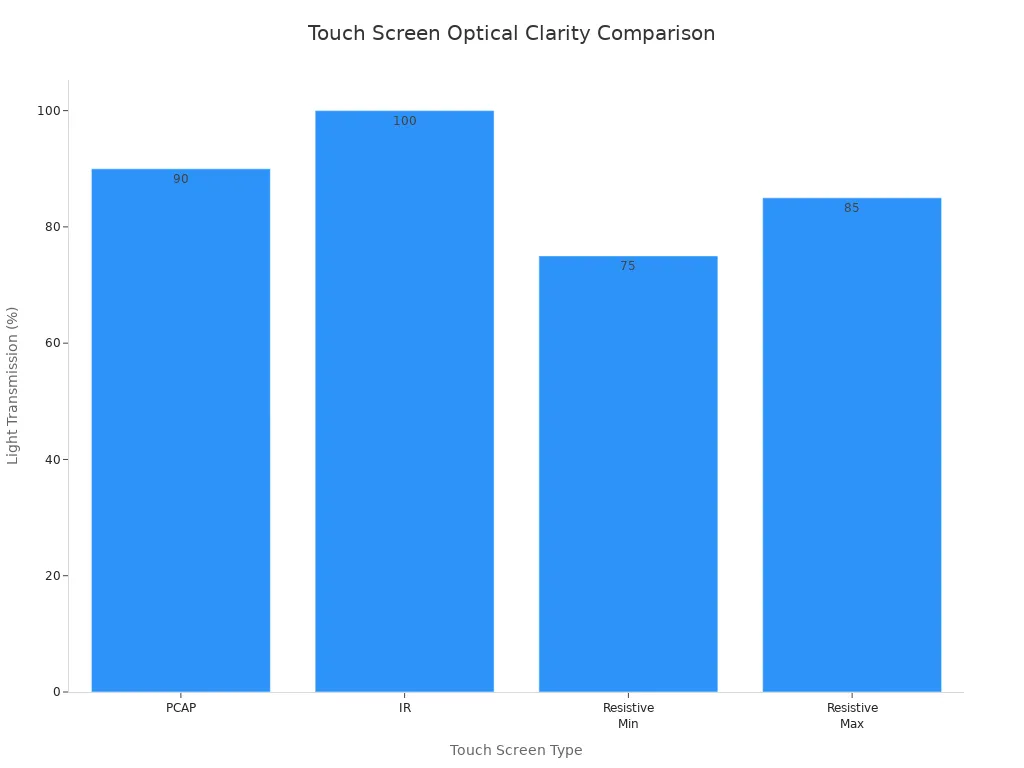
PCAP touch screens give you over 90% light transmission.
Infrared screens reach 100% clarity.
Resistive screens show lower clarity at 75-85%.
Tip: If you want a screen for watching videos or viewing photos, PCAP and infrared screens help you see every detail.
Impact on Device Design
You care about how your device looks and feels. PCAP touch screens help designers make thin, modern devices. The sensors sit behind the glass, so you get a borderless look. Your phone or tablet feels sleek and stylish. Infrared touch screens need a thick bezel around the edge. This bezel holds the sensors and makes the device look less modern. Resistive touch screens are thicker and less popular in new devices.
PCAP screens support thin, borderless designs.
Infrared screens require a prominent bezel for their optical system.
Resistive screens add thickness and look less sleek.
Note: If you want a device that looks modern and feels light, PCAP touch screens are the best choice.
Multi-Touch and Input Methods
PCAP Multi-Touch Features
Projected capacitive touch screens give you a big benefit. You can use many fingers at once on these screens. Some models let you touch up to 100 spots at the same time. You can pinch, zoom, and turn pictures like on your phone. This makes games and drawing apps much easier to use. Creative tools are also simpler with multi-touch.
Capacitive screens react fast to your fingers. You do not need to press down hard. You can use special styluses or thin gloves if you want. Most phones and tablets use capacitive screens because they feel smooth and easy. Every time you touch the screen, you see a quick response and clear feedback.
Tip: If you want to use gestures or have more than one person touch the screen, pick a capacitive screen with multi-touch.
Touchscreen Type | Simultaneous Touch Points |
|---|---|
PCAP | Up to 100 |
Resistive | 1 |
Infrared | Multitouch (quality varies) |
Resistive and Infrared Input Options
Resistive touch screens work with almost anything. You can use your finger, any glove, or a stylus. These screens only sense one touch at a time. You cannot use gestures like pinch or zoom. If you wear thick gloves or use tools, resistive screens are flexible.
Infrared touch screens let you use many input methods too. You can touch the screen with gloves, a stylus, or even a pen cap. These screens support multi-touch, but it is not as good as capacitive screens. Sometimes, the screen does not track fast moves or many fingers as well.
Here is a quick look at input options:
Touchscreen Technology | |
|---|---|
Resistive | Fingers, Styluses, Any Gloves |
Capacitive | Fingers, Special Styluses, Gloves* |
Infrared | Gloves, Multiple Touch Tools |
*Some capacitive screens work with thin or special gloves.
Resistive screens: Use any glove or tool, but only one touch at a time.
Infrared screens: Use many objects, but multi-touch may not be as smooth.
Note: Pick your touch screen based on how you want to use it. If you need many fingers or gestures, capacitive is best. If you use gloves or tools, resistive or infrared screens are good choices.
Cost and Maintenance
PCAP Touch Screen Cost
You will notice that a capacitive touch screen usually costs more at the start. The glass and sensor technology make it more expensive to produce. If you want a device that lasts a long time, this higher price can be worth it. Over five years, you spend less on repairs and upkeep because these screens resist scratches and wear. You also get excellent multi-touch features and high durability.
Here is a quick look at the costs and durability:
Touch Screen Type | Initial Cost | Maintenance Cost Over 5 Years | Durability | Multi-Touch Capability |
|---|---|---|---|---|
Capacitive | Higher | Lower | High | Excellent |
Tip: If you want a touchscreen for heavy use, a capacitive touch screen saves money in the long run.
Resistive and Infrared Affordability
Resistive screens cost less when you buy them. You can use them in many places, like factories or outdoor kiosks. Over time, you may pay more for repairs. These screens can wear out faster, especially if you press hard or use sharp tools. Infrared screens have a moderate price. They work well for large displays and public spaces. The cost to keep them running can change. Dust or sunlight can cause problems, but you do not need to replace the glass often.
Touch Screen Type | Cost Considerations | Durability | Maintenance Requirements |
|---|---|---|---|
Resistive | Lower initial cost, higher upkeep | Moderate | Low |
Infrared | Good for big screens, variable | Moderate | Low |
Note: If you want to save money at first, resistive or infrared screens are good choices. You may need to fix them more often.
Maintenance Needs
You should think about how much work each touchscreen needs. A capacitive touch screen needs only basic cleaning. It does not break easily. Resistive screens need more care. You may see scratches or worn spots after a few years. Infrared screens need you to keep the frame clean. Dust or dirt can block the sensors and cause ghost touches.
Below are common problems you might see:
Failure Mode | Description |
|---|---|
Intermittent touch response | Touch does not always work |
Ghost inputs | Screen reacts when you do not touch it |
Micro-cracking in sensor layers | Small cracks cause touch problems |
Moisture-related issues | Water can make the screen stop working |
Tip: Clean your touchscreen often. This helps it last longer and work better.
You can choose the best touchscreen by thinking about cost, how long it lasts, and how much care it needs.
Application Suitability
Best Uses for PCAP
Pcap touch screens are used in many places. You see them in phones, tablets, and laptops. Factories use pcap for machines and kiosks. Hospitals pick pcap for medical tools because you can clean the glass. Car companies put pcap in dashboards and GPS systems. Stores use pcap for checkout and digital signs. Airplanes use pcap for cockpit screens.
Here is a table that shows where pcap touch screens are used and why people like them:
Industry | Applications |
|---|---|
Consumer Electronics | Smartphones, tablets, laptops, smartwatches |
Industrial Controls | HMIs, factory automation, kiosks, panel PCs |
Medical Devices | Monitoring and diagnostic equipment |
Automotive | Infotainment systems, dashboard controls |
Retail | POS terminals, digital signage, self-service kiosks |
Aerospace and Defense | Avionics displays, tactical systems |
People like pcap because it reacts fast and lets you use many fingers. The glass is strong. You can pinch and zoom with your fingers. The screen looks bright and clear. Pcap screens last a long time.
Where Resistive Excels
Resistive touchscreens are good for rough places. You can use gloves or a stylus with them. They cost less than other screens. Old machines and medical tools use resistive screens. They work even if the screen is dirty or wet.
Here is a table that shows where resistive screens are best:
Advantages | Applications |
|---|---|
Works with gloves/stylus | Legacy industrial equipment |
Cost-effective | Medical devices |
Suitable for dirty environments |
Pick resistive if you need a screen for a factory or a place with dust and water. You can touch the screen with any tool. Resistive screens are simple and work well.
Infrared Touch Screen Applications
Infrared touch screens are good when many people use the same device. You see them in self-serve kiosks and checkout systems. Schools use infrared for smart whiteboards. Hospitals and factories use infrared when people wear gloves.
This table shows where infrared touch screens are used most:
Application Area | Advantages |
|---|---|
Interactive Kiosks and Self-Service | Easy for everyone to use in public places |
Point-of-Sale (POS) Systems | Fast and smooth for retail transactions |
Industrial and Medical Equipment | Reliable when users wear gloves |
Educational Tools | Makes learning fun with interactive whiteboards |
Pick infrared if you want a big screen for a classroom or a busy store. Infrared touch screens work well for lots of people at once.
You see three main touch screen types. Each one has strengths and weaknesses. The table below shows what experts say:
Touch Technology | Strengths | Weaknesses |
|---|---|---|
PCAP | High accuracy, fast response, strong glass | Needs tuning for gloves or styluses |
Infrared | Works with any object, good for big screens | Less durable, sunlight can cause problems |
Resistive | Works with gloves and tools, low cost | Less clear, wears out faster |
You get the best results with PCAP for most uses. Think about your environment, budget, and how you plan to use the screen before you choose.
FAQ
What is the main advantage of PCAP touch screens?
You get fast response and clear images. PCAP screens let you use many fingers at once. Most phones and tablets use this technology.
Can I use gloves with resistive touch screens?
You can use any glove or stylus with resistive screens. They sense pressure, not electrical charge. This makes them great for factories and outdoor use.
Do infrared touch screens work outside?
Condition | Performance |
|---|---|
Bright sunlight | May lose accuracy |
Indoors | Works well |
You should keep infrared screens away from strong light for best results.
Which touch screen lasts the longest?
PCAP screens have strong glass and resist scratches.
Resistive screens wear out faster.
Infrared screens need clean sensors.
You get the longest life from PCAP screens.
Are resistive touch screens good for drawing?
Resistive screens let you use a stylus for drawing. You can make simple sketches, but the accuracy is lower than PCAP screens. For detailed art, PCAP is better.
See Also
Evaluating Performance And Value Of Business Touch Screen Kiosks
Essential Features To Look For In Modern Touch Screen Kiosks
How Touch Screen Displays Enhance Modern Casino Gaming Experience
Top LCD Display Kiosks With Touch Screen Features For 2026
Creating High-Quality Touch And Non-Touch LCD Mirror Displays
