Outdoor Digital Signage Installation Checklist for Beginners

Shenzhen TopAdkiosk Display Technology Co., Ltd.
Add.: 2F, Bldg 10, Changfeng Industrial Park, Dongkeng, Fenghuang, Guangming, Shenzhen, China 518132
Mobile/WHATSAPP: 86-138 25769658
Email: marketing@topadkiosk.com topadkiosk@gmail.com
Skype: pghenry1
Wechat: adkioskhenry
English Web.: http://www.topadkiosk.com/
https://www.topkioskdisplay.com/
http://www.ad-kiosk.com/
https://www.toplcddisplay.com/
http://www.multitouchdigitalsignage.com/
https://www.youtube.com/channel/UCYVYNJHxLVEcQD8fuUxXNTA/videos?view_as=subscriber
https://www.facebook.com/TOPADKIOSKSHENZHEN/?ref=bookmarks
You can use this full guide to help you start learning about digital signage. Outdoor digital signage helps more people see your business and gets customers more interested in what you offer. Many businesses notice that 46% more customers are happy, and the average amount people spend goes up by 29.5%. The right guide helps you not make mistakes and helps you get the most from your money. Look at the table below to see how outdoor digital signage kiosk totem can help your business.
Statistic | Impact |
|---|---|
46% increase in customer satisfaction | Better experience |
29.5% increase in average purchase amount | People spend more |
Over 40% of buyers influenced | More people decide to buy |
Tip: Planning your installation well stops problems like bad color choices, forgetting to take care of the sign, and putting it up the wrong way.
Key Takeaways
Outdoor digital signage can make customers happier by 46%. It can also make them spend 29.5% more money. Use it to bring in more people.
Plan your setup with care. Check the power, network, and area first. This helps you avoid expensive errors.
Always get the right permits. Follow local rules. This stops fines and keeps your project on time.
Pick the best display for your needs. Think about how bright it is and if it can handle weather. This helps it last longer.
Regular care is important. Clean your signage every month. Look for damage to keep it working well.
Pre-Installation Planning for Outdoor Digital Signage
Define Objectives
Set your goals before you begin. This helps you pick the right tools and plan your money. Most groups want to:
Get more sales by making your brand easy to see.
Spend less by not printing or advertising as much.
Make customers happier by helping them find your business.
When you know your goals, you can use this guide to make smart choices.
Site Survey and Assessment
Doing a site survey is a good idea. Check the place where you want your outdoor digital signage. Look for these things:
Power: See if there are enough outlets or if you need new wires.
Network: Make sure you have strong WiFi or network close by.
Structure: Check if the wall or ceiling can hold the sign.
Space: Measure how far people will stand and how high the ceiling is.
Lighting: Look to see if sunlight or glare will bother the screen.
Safety: Follow fire rules and make sure people can walk by safely.
Environment: Think about temperature, humidity, and dust.
Tip: Always check power and network before buying anything.
Permits and Regulations
You must follow local rules before putting up your sign. Many places have laws about outdoor digital signage. You need a permit for most signs. Here are some common rules:
Regulation Type | Description |
|---|---|
Permitting Processes | Ask your local government if you need a permit. |
Size Restrictions | Your sign may need to be a certain size. |
Brightness Rules | Some places limit how bright your sign can be at night. |
You might need more than one permit, so ask your city office. Rules can change, so check them before you start. Getting the right permit stops fines and delays.
Budgeting matters too. Plan for the cost of tech, setup, and care. Main costs are display hardware, software, installation, permits, and upkeep. Good planning helps you avoid problems and keeps your project going.
Select the Right Outdoor Digital Signage

Choose Display Type
You have to pick the best display for your project. Each display type has its own special features. The table below shows the main types of digital displays and what they do.
Type of Display | Features | Ideal Uses |
|---|---|---|
LED Signage Displays | High brightness, wide aspect ratios, visible from far away | Highway billboards, stadium signage, store fronts |
LCD Signage Displays | Higher resolution, accurate colors, best for close viewing | Kiosks, menu boards, transit info, hotel entrances |
Projection and Hybrid Displays | Unique applications, combines projection and LED technology | Large format projections, immersive events |
Freestanding, weatherproof, interactive, easy to install | Shopping malls, city squares, transportation hubs |
An outdoor digital signage kiosk totem stands on its own. You can put it in places where many people walk. It is good for showing maps, ads, and information. This display is made to handle bad weather and is simple to set up. You often see kiosk totems in malls, airports, and busy city spots.
Weatherproofing and Brightness
Outdoor digital signage needs to survive rain, dust, and sun. You should check if the display is weatherproof and bright enough. The tables below show important standards you need to know.
IP Rating | Description |
|---|---|
IP65 | Dust-tight, protected against low-pressure water jets |
IP66 | Dust-tight, protected against powerful water jets and heavy rainfall |
Brightness Level (nits) | Description |
|---|---|
1,500 - 4,000 | Visible in direct sunlight, ideal for outdoor displays |
Outdoor displays must be very bright. Indoor displays use less brightness, but outdoor ones need much more. You should pick displays with strong build and IP65 or IP66 ratings. These displays work in very hot or cold weather, from -40°C to +50°C.
Tip: Always look at the IP rating and brightness before buying a display.
Mounting Solutions
You need to keep your display safe from theft and damage. Strong mounts and waterproof cases help protect your digital displays. Use screws that do not rust and strong glue. Banners with reinforced hems and grommets can stand up to strong winds.
Stops people from breaking or drawing on the screens.
Keeps people from touching the display, so it is safer.
Makes it tough for anyone to damage or paint on the display.
Feature | Description |
|---|---|
Durability | Made from strong materials for harsh outdoor conditions |
Weather Resistance | Designed to be water-resistant, protects displays from rain and moisture |
Security | |
Installation | Low-cost, install-friendly design for high-traffic areas |
Usage | Used in over 59,000 locations across 58 countries |
You should pick outdoor digital signage with strong mounts and waterproof cases. This helps your display last longer and stay safe.
Site Preparation for Digital Signage Installation
Power Supply and Network
Your outdoor digital signage needs steady power. Make sure your equipment uses the right voltage for your area. Surge protectors stop your sign from turning off suddenly. Backup power helps your sign stay on if the power goes out. You should ask a licensed electrician to set up the electricity. Your network must be strong and safe. Put your router or access point near the sign for a better signal. Test the network before you put up the sign.
Note: A professional site survey can cut down changes by 63%. Always check power and network before you begin.
Trenching and Cable Management
It is important to keep your cables safe. Here are steps to protect your wiring: First, plan where your cables will go. Pick the best path from the power source to the sign. Next, dig a trench that is at least 6 inches deep. Put PVC, metal, or flexible conduits in the trench. PVC conduits help stop electrical problems. Feed the cables through the conduits. Keep the cables neat and not tangled. Cover the trench with dirt and pack it down. You can add mulch or gravel for more safety.
Use raised trays, raceways, or underground ducting to organize cables. This stops tangles and makes fixing things easier.
Safety and Accessibility
Safety and accessibility are important for every sign. Use high-bright displays so people can read them in sunlight. Enclosures keep your sign safe from weather and people who might damage it. Surge protection keeps your sign safe from power spikes. Check your sign often to make sure it works well. Your sign must follow ADA rules. This helps you avoid big fines, which can be $75,000 for each problem. Make sure walls and poles are strong enough to hold your sign.
Safety Feature | Purpose |
|---|---|
Surge Protection | Stops electrical damage |
Durable Enclosures | Protects from weather and vandalism |
ADA Compliance | Makes signs easy to use and avoids fines |
Structural Checks | Makes sure mounting is safe |
Tip: Always check if walls and poles are strong before you put up your sign.
Digital Signage Installation Steps
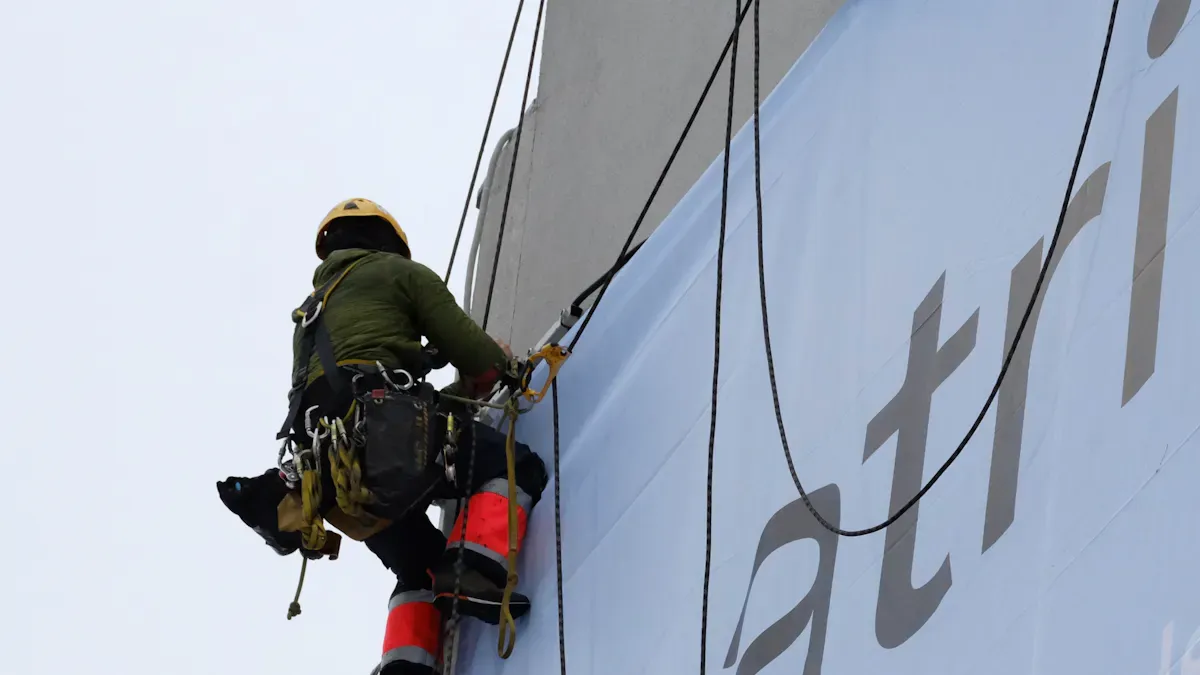
You need to follow easy steps to put up your digital signage. This guide will show you what to do at each part. If you use the right tools and follow safety rules, you can stop mistakes and keep your sign safe.
Secure Mounting
First, pick the best way to hold up your sign. Use strong parts and follow the right steps. This keeps your display from falling or moving in storms. Use hardware that does not rust and covers that stop people from breaking your sign.
Here is a table of important tools and equipment for putting up your sign:
Tool/Equipment | Purpose/Use |
|---|---|
Hammer drills | Penetrate solid surfaces for mounting installations. |
Impact drivers | Secure heavy-duty fasteners efficiently. |
Laser levels | Ensure perfect horizontal alignment across multi-display setups. |
Electronic stud finders | Detect metal and AC in walls for secure mounting. |
Cable trays and raceways | Manage cables in commercial installations. |
Network cable certifiers | Verify performance of network cables. |
Personal fall arrest systems | Keep you safe during elevated work. |
Outdoor-rated electrical connections | Ensure safe and compliant electrical installations outdoors. |
Vandal-resistant hardware | Secure signage against tampering and damage. |
Anti-glare coatings | Minimize glare from sunlight on displays. |
Ground equipment | Provide proper lightning protection. |
Use poles or brackets that are made for your sign’s weight. Always check if the sign can handle wind or shaking. Put your sign where it does not block people or make it hard to walk.
Tip: Use a cover that stops people from opening your outdoor digital signage kiosk totem without permission.
Wiring and Connections
You need to be careful when you set up wires and plugs. Use cables that can handle rain and sun. Make sure all plugs are tight and cables are held down. Use cables that do not break in sunlight. These last longer outside.
Make a drip loop in every cable. This stops water from getting inside your sign. Use clean power and surge protectors to keep your sign safe from power spikes. Ask an electrician to check how much power your sign needs. Remote monitoring helps you fix power problems fast.
Here are some tips for putting in and taking care of your sign:
Use cables that can handle rain and sun.
Hold all cables in trays or raceways to keep them neat.
Use remote monitoring to fix power problems quickly.
Use network cable certifiers to check if cables work well.
Put in surge protectors to keep your display safe.
Note: Always do what the manufacturer says when you set up wires and plugs for your digital signage.
Weatherproof Sealing
Weatherproof sealing keeps your sign safe from rain, dust, and hot or cold weather. Use enclosures with at least an IP65 rating to keep out dust and water. Laminates and overlays stop scratches and water from hurting your sign. Use UV-protected vinyl for graphics so colors do not fade. Heavy aluminum cabinets and steel legs make your sign strong and stop rust.
Get surfaces ready before you glue anything. This helps seals stay strong. Powder-coat finishes protect your sign from bumps. Fans or air conditioning keep your sign working in hot or cold weather.
Here are some ways to seal your sign from weather:
Use IP55 or IP65 enclosures to keep out water and dust.
Use UV-protected vinyl and good inks for graphics.
Put on laminates and overlays to protect surfaces.
Pick aluminum and Dibond for signs that do not bend.
Use powder-coat finishes and strong cabinets for long life.
Add fans or air conditioning for very hot or cold places.
Tip: Always use materials that do not rust and weatherproof plugs for a good installation.
Think about sunlight, rain, wind, and dust when you put up your sign. Weatherproof enclosures help your sign last longer and work better.
Reminder: Always do what the manufacturer says for every step. This keeps your sign safe and working for a long time.
System Setup and Testing
Software Installation
You have to put in the right software before your digital signage can work. Pick software that is strong and easy to use. This helps you control your sign without trouble. Make sure the software fits your display and hardware. Many systems let you use a computer or phone to control your sign. Always do what the manufacturer says when you install the software. This helps stop mistakes and keeps your system safe. Good software should work well with other tools. This makes your marketing plan better.
Tip: Always update your software. Updates fix problems and add new things.
Content Management
Managing your content well is very important for your sign to work. A simple CMS lets you plan and change content easily. You can do this at the sign or from far away. Good content makes your outdoor digital signage work better. Use smart scheduling to change messages for things like weather. Change your messages often to keep people interested.
Choose a CMS that is simple to use.
Plan content for different times of the day.
Change your content often so people keep watching.
Use data to see what works best.
Make sure your content looks nice and loads quickly.
Keeping your content new and made for your viewers helps you get the most from your digital signage tutorial.
Testing and Troubleshooting
Testing your system after you set it up is very important. You want to be sure everything works right. Use this table to help you check your system:
Step | Description |
|---|---|
1 | Test if content shows at the right time and changes smoothly. |
2 | Check if touch screens and sensors work. |
3 | See how fast content loads and plays. |
4 | Write down where you put each part and how you ran cables. |
5 | Make guides to help your team fix problems. |
6 | Teach staff how to use and fix the system. |
7 | Make a plan for taking care of the system and give out jobs. |
8 | Sign up for warranties and keep proof of professional setup. |
If you find any problems, fix them before you start using your sign. This helps your outdoor digital signage work well and last a long time.
Post-Installation Maintenance Guide
Routine Checks
Make a plan to check your digital signage often. These checks help your sign last longer and work better. First, look at the display for dirt or damage. Clean the screen with a soft cloth that will not scratch it. Check all wires to see if they are still tight. After heavy rain, look for water leaks. Make sure the enclosure is still weatherproof and meets IP65 or IP66 rules. Watch the temperature inside the enclosure. Good airflow stops the sign from getting too hot. Surge protectors and backup power keep your sign safe during storms. Update your software often so you do not have problems and your content stays new.
Doing regular checks helps your sign work well and saves money on repairs. Your sign will keep working without many problems.
Cleaning and Upkeep
Cleaning is important for your digital signage. Use a microfiber cloth and special cleaner for the screen. Do not use strong chemicals because they can hurt the display. Clean the screen every month to keep it bright and clear. Check cooling fans and vents to make sure they work right. After cleaning, look for scratches or other damage. If you have an outdoor digital signage kiosk totem, check the base and sides carefully. Make sure no dirt or water is stuck there. Keep the area around your sign clean and free of trash. This stops accidents and keeps your sign looking nice.
Practice | Description |
|---|---|
Regular Cleaning & Screen Care | Use a soft, non-abrasive cloth and special cleaner; do not use strong chemicals. |
Weatherproofing & Protection | Make sure enclosures are IP65/IP66 and check for leaks after rain or snow. |
Temperature & Ventilation Management | Use cooling or heating systems and check airflow to stop overheating. |
Electrical Safety & Power Management | Use surge protectors, check power cables, and do regular electrical checks. |
Software & Content Optimization | Update software often and use remote monitoring to find problems fast. |
Documentation and Support
Write down details for every sign you install. Record the brightness, power, and network setup for each display. Save all permits and certificates in a safe place. Write down every time you check or clean your sign. This helps you know if your sign is healthy. If something goes wrong, you can show your records to get help. Some signs need to follow local rules and may need ETL certification. Good records help you prove you follow the rules and avoid trouble. Keep all manuals and warranty papers safe. If you do these things, your outdoor digital signage will work well for a long time.
If you use a full guide, your outdoor digital signage can work really well. Good planning and checking your sign often help stop problems like glare, bad weather, or someone stealing it. Many companies see sales go up by as much as 33%. People also remember ads 83% of the time. This checklist helps you put up your sign safely and makes it last longer. You can start your project feeling sure of yourself. Ask for help if you are not sure what to do.
Metric | Benefit |
|---|---|
More visitors after installation | |
Direct Engagement | Higher interaction with your content |
Brand Recall | Customers remember your promotions better |
FAQ
What is outdoor digital signage?
You use outdoor digital signage to show messages, ads, or information outside. These signs work well in sunlight, rain, and dust. They help you reach more people and make your business stand out.
How do you keep your sign safe from weather?
You pick a sign with a high IP rating. You use weatherproof enclosures and seal all cables. You check for leaks after storms. This keeps your sign working in rain, snow, and heat.
Do you need a permit for installation?
You usually need a permit before you install a sign. You check with your city office. You follow local rules for size, brightness, and placement. This helps you avoid fines.
How often should you clean your sign?
You clean your sign every month. You use a soft cloth and gentle cleaner. You check for dirt, water spots, or damage. Regular cleaning keeps your sign bright and easy to read.
See Also
Key Guidelines for Setting Up Outdoor Digital Displays
Comprehensive Instructions for Choosing Outdoor Digital Signage
Tips for Discovering Ideal Outdoor Digital Signage Options
Guide to Installing and Configuring Digital Display Signage
Selecting the Optimal Outdoor Digital Signage for Your Company
