OLED Touch Displays Compared to Mini-LED and LCD Screens in 2026
Shenzhen TopAdkiosk Display Technology Co., Ltd.
Add.: 2F, Bldg 10, Changfeng Industrial Park, Dongkeng, Fenghuang, Guangming, Shenzhen, China 518132
Mobile/WHATSAPP: 86-138 25769658
Email: marketing@topadkiosk.com topadkiosk@gmail.com
Skype: pghenry1
Wechat: adkioskhenry
English Web.: https://www.topkioskdisplay.com/
http://www.ad-kiosk.com/
https://www.toplcddisplay.com/
http://www.multitouchdigitalsignage.com/
https://www.youtube.com/channel/UCYVYNJHxLVEcQD8fuUxXNTA/videos?view_as=subscriber
https://www.facebook.com/TOPADKIOSKSHENZHEN/?ref=bookmarks
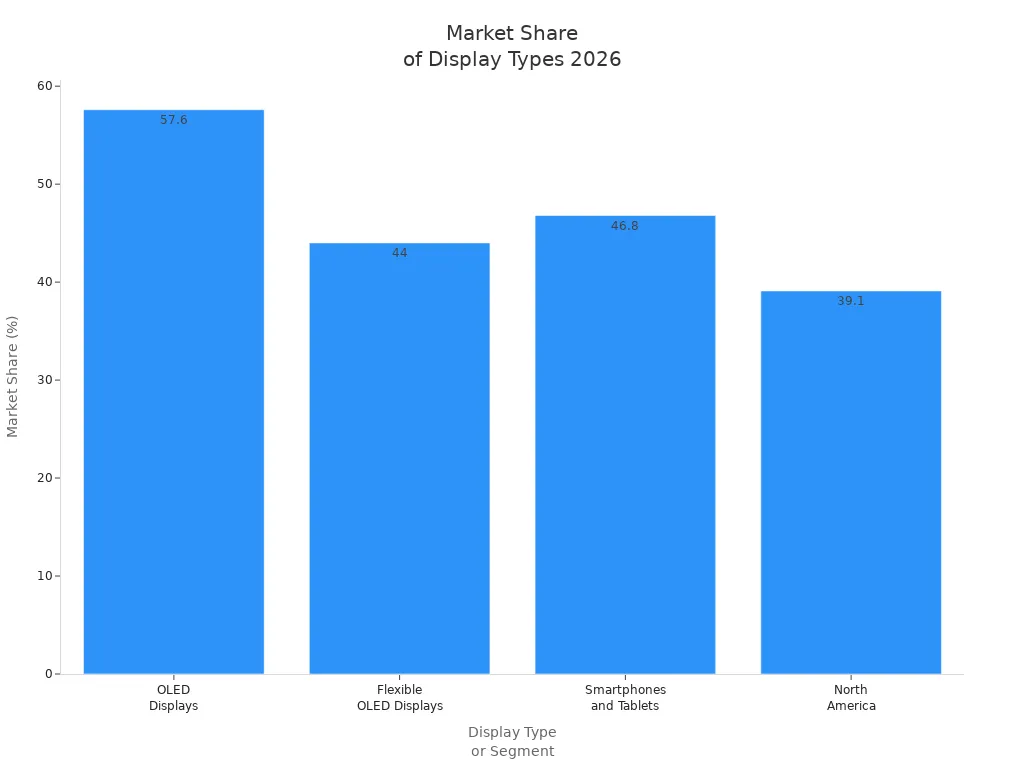
In 2026, OLED touch displays give you the best screens for most things. OLED is the top choice in TVs and phones. It shows perfect blacks, bright colors, and quick response times. You can see this in the numbers:
Mini-led screens are very bright and do not get burn-in. LCD screens are strong and cost less money. Each display type has its own good points. These include picture quality, how long it lasts, battery use, and price. As better screens come out, you get a nicer viewing experience. But you still need to pick the right screen for what you want.
Key Takeaways
OLED displays show great picture quality. They have deep blacks and bright colors. This makes them good for movies and games.
Mini-LED screens are very bright. They do not get burn-in. They work well in bright places. They last a long time.
LCD screens cost less and are strong. They are good for daily use. They fit people who want to save money.
Think about how you will use your screen. For games and watching shows, pick OLED. For bright rooms, pick Mini-LED. For saving money, pick LCD.
Always look at the display type before you buy. Make sure it fits what you want and need.
2026 Display Tech Verdict
Best Choice for Most Users
You want a screen that looks good, lasts long, and is not too expensive. In 2026, most people choose OLED or AMOLED screens for phones, tablets, and TVs. These screens show deep blacks, bright colors, and fast images. You notice this when you watch movies, play games, or edit photos. OLED touch displays use pixels that light up by themselves. Each pixel turns on or off, so you see true blacks and strong contrast. This makes OLED and AMOLED screens better in the AMOLED vs LCD debate.
Mini-led screens are great if you need extra brightness. You might pick mini-led for a laptop or TV in a sunny room. These screens do not get burn-in as easily as OLED. They also have good contrast and color, but not as deep as OLED. LCD screens are still useful. You might choose LCD if you want a tough, cheap screen. LCDs are good for daily tasks and last a long time. The Hisense U8QG Series gives you nice picture quality for less money. Many experts say this LCD/LED TV is the best value for most people who want good performance without paying more for OLED.
You should think about what you do most. If you like movies, games, or creative work, OLED or AMOLED screens give you the best experience. If you want a bright screen for a sunny room, mini-led is a smart choice. If you need a cheaper option, LCD screens offer solid performance and last long.
Tip: Always check the screen type before you buy a new device. The best choice depends on how you use your screen every day.
Key Differences at a Glance
You can compare AMOLED vs LCD screens with this table. It shows how each screen works and what you get:
Parameter | AMOLED | LCD |
|---|---|---|
Display Principle | Self-emissive pixels | Backlight-based display |
Black Levels | True blacks, pixels turn off | Blacks limited by backlight |
Contrast | Much higher perceived contrast | Lower than AMOLED in dark scenes |
Color Impact | More vivid and striking | More neutral, depends on tuning |
Brightness Behavior | Excellent, varies by device | Strong with powerful backlight |
Battery Behavior | Efficient with dark UI | Consistent across all content |
Outdoor Visibility | Depends on panel and tuning | Depends on brightness and reflectance |
Response Time | Typically faster | Usually slower than AMOLED |
Burn-In Risk | Possible with static images | Much lower risk |
Eye Comfort | Device and dimming dependent | Often safer for PWM-sensitive users |
Thickness/Flexibility | Thinner, flexible designs | Thicker, less flexible |
Cost | Usually higher | More cost-effective |
Best For | Premium, gaming, media | Budget, practical, static content |
You see that AMOLED and OLED screens win in contrast, color, and response time. Mini-led screens are very bright and avoid burn-in. LCD screens are the best for price and strong build. When you compare AMOLED vs LCD, you see that AMOLED screens are thinner and more flexible. LCD screens are thicker but often last longer and cost less.
OLED and AMOLED screens: Best for bright visuals, fast response, and flexible designs.
Mini-led screens: Best for high brightness and no burn-in.
LCD screens: Best for low cost and strong build.
You can now pick which screen fits your needs. Think about what matters most to you: picture quality, price, or durability. Each screen type has its own strengths in 2026.
OLED Touch Display Features
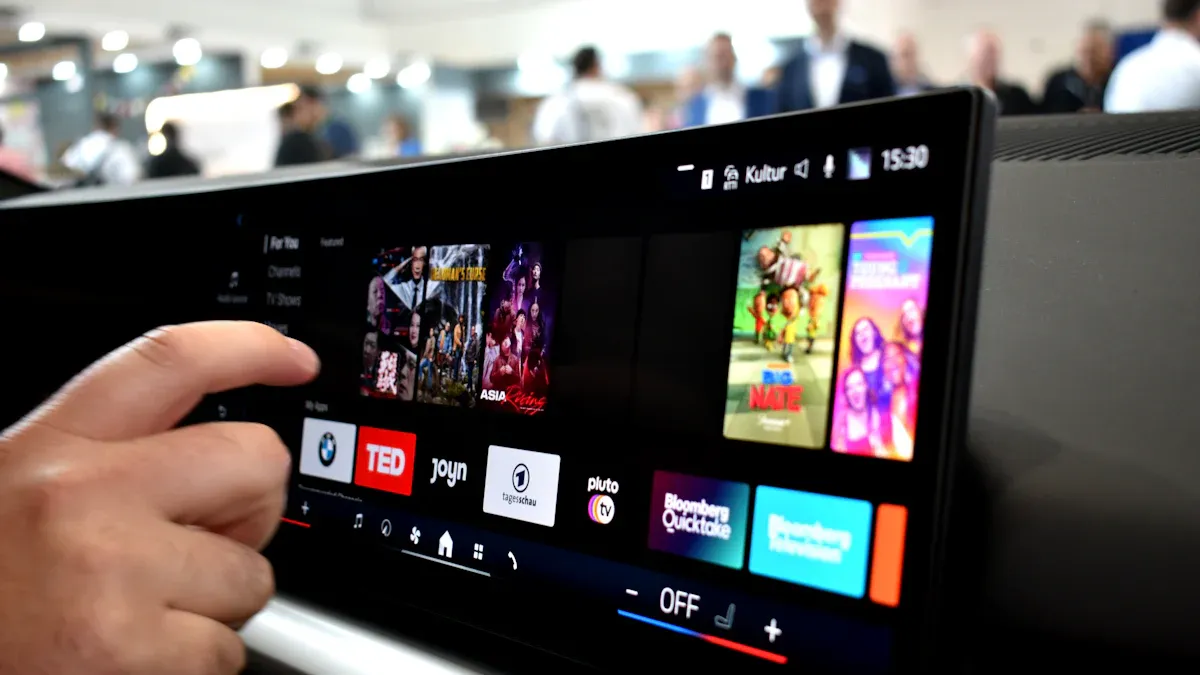
An oled touch display gives you a screen that lights up each pixel on its own. This type of display uses organic materials that glow when you send electricity through them. You do not need a backlight. Each pixel can turn on or off by itself. This lets you see deep colors and sharp images. The touch part means you can tap, swipe, or pinch the screen to control your device. Oled touch displays work in phones, tablets, and even laptops. You get fast response and smooth touch actions.
Contrast and Black Levels
You notice the biggest difference with oled displays when you look at dark scenes. Oled screens show true black contrast because each pixel can turn off completely. This gives you perfect black levels. You do not see any gray or light glow in dark areas. Oled touch display panels make movies and games look more real. You get a high contrast display that makes colors pop. Oled displays also keep their black levels strong even in bright rooms. Many people say oled gives the best black levels you can find.
Note: True black contrast helps your eyes see more detail in shadows and dark scenes.
Gaming and Response Time
If you play games, you want a screen that reacts fast. Amoled and oled displays give you very quick response times. Each pixel changes color almost right away. This means you see less blur when things move fast on the screen. Amoled screens also support high refresh rates. You get smooth action in racing games or sports. Oled touch display panels let you tap and swipe with no lag. Many gamers pick amoled for this reason. Oled displays also help you see every detail in dark game levels because of their strong black levels. You get a better gaming experience with oled and amoled displays.
Amoled screens: Fastest for gaming and touch.
Oled touch display: Best for deep blacks and quick actions.
Oled displays: Great for both movies and games.
Mini-LED and LCD Overview
Mini-LED Strengths in 2026
You see big changes in mini-led displays in 2026. Mini-led technology now uses RGB mini-leds. These separate red, green, and blue LEDs give you brighter screens and a wider color range. You notice colors look more vivid and lifelike. Mini-led displays also improve local dimming. This means the screen can control light in small zones, so you get better contrast and more detail in dark scenes. You find this helpful when you watch movies or play games with lots of shadows.
Many mini-led displays now use SQD technology. This combines mini-led backlighting with quantum dots. You get better color accuracy and a more natural look. Mini-led displays reach high brightness levels, so you can use them in bright rooms or outside. You do not worry about burn-in, which can happen with oled or amoled screens. Mini-led displays last a long time and work well for both gaming and watching videos.
RGB mini-leds boost brightness and color.
Local dimming gives you deeper blacks and sharper details.
SQD mini-led displays improve color accuracy.
High brightness helps in sunny spaces.
No burn-in risk, unlike oled or amoled.
You find mini-led displays in many devices, like TVs, monitors, and laptops. They give you a good balance between picture quality and durability. You may choose mini-led if you want a bright, long-lasting display that works well for many uses.
LCD Advantages and Limitations
LCD screens remain popular in 2026. You see lcd displays in budget devices, office monitors, and some tablets. LCD screens use a backlight, so they do not show true blacks like oled or amoled. Still, lcd displays offer good value and last a long time. You spend less money on lcd screens, which helps if you want to save on cost.
Here is a quick look at lcd advantages and limitations:
Advantages | Limitations |
|---|---|
Cost-effectiveness | Lower color accuracy |
Longevity | Limited viewing angles |
Power efficiency | Lower contrast ratios compared to oled |
You get reliable performance from lcd displays. They use less power than some older screens, so your device battery lasts longer. You may notice that lcd screens do not look as rich as oled or amoled, especially in dark scenes. Viewing angles are also smaller, so colors may shift if you look from the side. Still, lcd displays work well for daily tasks and basic entertainment.
You can pick lcd if you want a strong, affordable display that lasts. For the best color and contrast, you may prefer oled, amoled, or mini-led displays.
Image and Performance Comparison
Brightness and HDR
You want your display to look bright and colorful, even in a sunny room. In 2026, you see big differences in brightness and hdr between oled, amoled, mini-led, and lcd screens. Oled and amoled displays give you deep blacks, but they do not reach the highest brightness. Mini-led screens shine much brighter and show improved hdr performance. Lcd screens offer good brightness for the cost, but they do not match the high brightness level of mini-led.
Here is a quick look at how these displays compare:
Technology | HDR Performance | |
|---|---|---|
OLED | 400-450 | Struggles with color saturation at high brightness |
Mini-LED | 500-600 (some models 800+) | High HDR due to localized brightness control |
LCD | 350-400 | Basic HDR, less dynamic than others |
You notice that mini-led displays stand out when you want a high brightness level and strong hdr. Oled and amoled screens look amazing in dark rooms, but they can lose color at the highest brightness. Lcd displays work well for everyday use, but they do not show the same high dynamic range as the others.
Color Accuracy
Color accuracy matters when you edit photos, watch movies, or play games. Amoled and oled displays show rich, vivid colors. You see every detail pop on the screen. Mini-led displays also give you bright and accurate colors, especially with quantum dot layers. Lcd screens show more neutral colors, but they can look washed out from the side. In the amoled vs lcd debate, amoled wins for color. You get more lifelike images and better performance for creative work. Mini-led displays come close, but oled and amoled still lead in color quality.
Tip: If you want the best color for art or video, choose amoled or oled displays.
Motion and Refresh Rate
You want smooth action when you watch sports or play games. Amoled and oled displays give you the best motion clarity. You see fast scenes with no blur, especially with a 120Hz refresh rate. Mini-led screens have improved motion handling in 2026. Some models show great performance, but you may still notice trailing or ghosting on certain brands. Lcd displays handle motion well for basic use, but they do not match amoled vs lcd for gaming or fast videos.
Amoled and oled: Stunning motion clarity, top choice for sports and games.
Mini-led: Improved hdr performance and better motion, but some models vary.
Lcd: Good for daily tasks, but not as smooth as amoled vs lcd in fast scenes.
You get the best performance for motion and refresh rate with amoled and oled displays. Mini-led comes close, but lcd screens focus more on cost and durability.
Durability and Longevity
Burn-In and Lifespan
When you choose a display, you want it to last. In 2026, amoled, mini-led, and lcd screens each offer different lifespans and risks. Amoled displays look amazing, but you need to watch out for burn-in. Burn-in happens when the same image stays on your screen for a long time. This can leave a faint mark that does not go away. You see this most often with amoled and oled screens. On average, amoled displays last about 3 to 6 years before you notice changes in color or brightness. Mini-led displays last much longer, often between 70,000 and 100,000 hours. Lcd screens can last up to 5 years and do not have burn-in problems.
Here is a quick table to help you compare:
Screen Type | Average Lifespan | Burn-in Concern |
|---|---|---|
amoled | 3 to 6 years | Moderate |
mini-led | 70,000 to 100,000 hours | Low |
lcd | Up to 5 years | None |
If you want a burn-in free experience, mini-led and lcd displays are your best options. Amoled screens give you the best colors, but you need to use them carefully to avoid burn-in. You can lower the risk by changing your wallpaper and using dark mode.
Physical Robustness
You want your display to handle daily bumps and drops. Amoled screens use thin organic layers, so they feel more fragile. These displays can get damaged by water, heat, or even strong sunlight. Lcd and mini-led displays are tougher. They resist pressure and damage better, especially if you use your device outside. Mini-led displays also avoid burn-in and chemical damage.
Here is a table to show how each screen type compares:
Screen Type | Durability | Resistance to Damage |
|---|---|---|
amoled | More fragile due to thin organic layers | Prone to chemical degradation and burn-in |
mini-led lcd | More robust and resistant to damage | Immune to burn-in and pressure damage, good outdoors |
Lcd and mini-led displays give you peace of mind if you drop your device or use it in rough places. Amoled screens need more care, but they reward you with stunning visuals. If you want a display that lasts and does not break easily, lcd and mini-led are smart choices. You also save on repair cost with these screens.
Power and Efficiency
Battery Life in Daily Use
You want your device to last all day. The type of display you choose makes a big difference. In 2026, amoled screens help you save battery because they light up only the pixels you need. If you use a dark theme, amoled displays use even less power. This means your phone or tablet can last longer between charges.
Lcd screens work differently. They use a backlight that stays on for the whole screen, even if you see mostly black. This uses more energy, so your battery drains faster. Mini-led displays improve on this by using small lights that can turn off in dark areas. You get better battery life than regular lcd, but amoled still leads when you use dark apps or watch movies with lots of shadows.
If you like to watch videos or play games, amoled displays give you smooth action and deep blacks without using too much power. Lcd and mini-led displays do well in bright rooms, but they use more energy when you turn up the brightness. You should think about how you use your device every day. If you want to save battery, amoled is the smart choice.
Tip: Use dark mode on amoled screens to get the most battery life.
Energy Consumption
You care about how much energy your device uses. Laboratory tests show that amoled displays are more efficient than lcd screens. Amoled can turn off each pixel, so black areas use no power. Lcd displays need the whole backlight to stay on, which uses more energy. Mini-led displays use local dimming, so they get closer to amoled in some cases.
When you use your device in low light, amoled displays keep their efficiency. Lcd and mini-led displays use more power in bright settings. If you turn your screen to maximum brightness, amoled uses more energy than lcd or mini-led. For most daily tasks, amoled displays help you save energy and keep your device cool.
Here is a quick table to compare energy use:
Display Type | Energy Use (Dark Content) | Energy Use (Bright Content) |
|---|---|---|
amoled | Very low | Higher at max brightness |
mini-led | Low with local dimming | Moderate |
lcd | Always moderate-high | High |
You can lower your energy use by picking the right display for your needs. Amoled displays give you the best mix of battery life and power savings. Lcd and mini-led displays work well if you need a bright screen, but they use more energy. You also save on the cost of charging your device less often.
Practical User Concerns
Eye Comfort
You spend many hours looking at screens every day. Eye comfort matters for your health. Amoled and lcd displays use different ways to show images. Amoled screens can dim each pixel, which helps reduce eye strain in dark rooms. You can use dark mode on amoled to make the screen softer on your eyes. Lcd displays use a backlight, so the whole screen stays bright. Some people feel more comfortable with lcd because it does not flicker as much as some amoled screens. Mini led displays also offer good comfort, but you may notice more brightness in dark spaces. You should adjust brightness and use blue light filters to protect your eyes. If you feel tired, take breaks and look away from the display.
Outdoor Visibility
You want to see your screen clearly outside. Different displays work better in sunlight. Lcd displays stand out for outdoor use. They reach high brightness and use special coatings to cut glare. You can read lcd screens even in direct sunlight. Amoled displays look great indoors, but they struggle outside. Lower brightness and reflections make amoled hard to see in bright light. Mini led displays get very bright, but they focus more on image quality than sunlight readability.
Here is a table to help you compare outdoor visibility:
Display Technology | Outdoor Visibility | Sunlight Readability |
|---|---|---|
TFT lcd | Superior due to high brightness and transflective designs | Excellent, ideal for direct sunlight |
Mini led | High peak brightness, but less suited for direct sunlight | Good, but image quality prioritized |
Amoled | Struggles with lower brightness levels | Poor, potential burn-in issues |
You see lcd displays in kiosks, digital signs, and transportation boards. These displays use 2,000–3,000 nit brightness and anti-reflective coatings. Mini led displays work well in premium retail spaces. Amoled displays are not the best choice for outdoor use.
Maintenance
You want your display to last and look good. Amoled, mini led, and lcd displays need care. Amoled screens can get burn-in if you leave the same image for too long. You can protect amoled by using a black wallpaper, hiding the taskbar, and moving windows often. Set your screen to sleep after a short time. Use dark mode to help amoled displays last longer.
Here are some tips for all displays:
Regularly clean the screen with a dry or lightly damp microfiber cloth.
Avoid harsh cleaners like alcohol or ammonia.
Check cables and connections for damage.
Keep brightness and contrast at safe levels.
Do not place your display in direct sunlight.
You should dust your lcd or mini led TV often. This keeps the display clear and bright. Good maintenance helps you avoid extra cost and keeps your screen working well.
Device Suitability
Phones and Tablets
You see a big change in phones and tablets in 2026. Most new devices now use OLED or amoled screens. Apple’s iPhone SE 4th generation uses an OLED display, moving away from older LED screens. Samsung’s popular mid-range phones also use amoled. This shift means you get brighter colors, deeper blacks, and smoother touch. Amoled screens make your apps and games look sharp. You also get better battery life because amoled only lights up the pixels you need. LCD screens are rare in new phones and tablets. You might still find lcd in some budget models, but most users now enjoy the benefits of amoled. If you want the best experience, choose a device with an amoled display.
Laptops and Monitors
You have more choices when you pick a laptop or monitor. Each display type offers something different:
Amoled gives you top color and fast motion. You see every detail in games and movies. These displays are thin and light, perfect for travel.
Mini-LED displays work well in bright rooms. They last longer and do not get burn-in. You get strong brightness and good color.
LCD screens are best if you want a lower cost. They last a long time and handle daily work well. You might notice less color and contrast, but lcd displays are tough.
If you play games, amoled is the best for smooth action. For office work or school, lcd displays save money and last. Mini-LED displays fit well in pro monitors and bright spaces.
TVs and Entertainment
You want your TV to look great for movies and sports. Here is how each display compares:
Technology | Performance Highlights | User Satisfaction |
|---|---|---|
OLED | High, but limited by cost | |
Mini-LED | Improved brightness and color saturation | Gaining popularity for value |
LCD | Big improvements with mini-LED backlight | Varies, depends on features |
OLED TVs give you the best picture. You see deep blacks and bright colors. Many people love these displays, but the cost is high. Mini-LED TVs are bright and colorful. They are more affordable and last longer. LCD TVs have improved with mini-LED backlights. You get good value, but picture quality depends on the model. If you want the best, pick OLED. For a balance of price and performance, mini-LED is a smart choice. LCD TVs work well for basic needs and save money.
Recommendations by User Type
For Content Creators
You need a display that shows true colors and fine details. In 2026, amoled and OLED displays give you the best results for photo editing, animation, and video work. You see deep blacks and clear motion. If you work in a dark studio, OLED displays help you spot every detail. Mini-LED displays work well if you create HDR content or design in bright offices. You do not worry about burn-in with mini-LED, and you get high brightness for print design. The table below helps you compare:
Technology | Ideal Use Cases | Environment | Cost Range | Key Values |
|---|---|---|---|---|
OLED | Dark UI, photography, animation | Home studio | £1,500-£2,500 | True blacks, motion clarity |
Mini-LED | HDR, bright brand work, print design | Bright workspace | £3,000-£6,000 | No burn-in, high brightness |
Tip: Choose amoled or OLED for color accuracy and smooth editing. Pick mini-LED if you need a bright screen and long life.
For Gamers
You want fast action and sharp images. Amoled displays give you the quickest response time, less than 0.1ms. You see smooth motion in racing games and shooters. OLED displays also show deep blacks, so you spot enemies in dark scenes. Mini-LED displays offer high brightness and good HDR, but the response time is slower than amoled. LCD displays work for casual gaming, but you may notice blur in fast scenes.
Amoled: Best for speed and color.
OLED: Great for dark levels and motion.
Mini-LED: Good for bright rooms, less for speed.
LCD: Fine for basic games, not for eSports.
For Everyday Use
You want a display that lasts, looks good, and fits your budget. Modern amoled displays now have minimal burn-in risk for daily tasks. You get bright colors and fast touch. LCD displays are strong and cost less. Mini-LED displays give you high brightness and work well in sunny rooms. The table below shows what matters most:
Factor | OLED | Mini-LED | LCD |
|---|---|---|---|
Burn-In Risk | Minimal | None | N/A |
Response Time | <0.1ms | 4-8ms | N/A |
Price for Performance | 20-40% cheaper for color | Higher | N/A |
Brightness | Excellent for HDR | >500 nits | N/A |
Color Accuracy | High | Competitive | N/A |
Amoled: Best for color and speed, now more affordable.
LCD: Best for low cost and strong build.
Mini-LED: Best for bright spaces and HDR.
For Professionals
You need a display that works all day and handles many tasks. Amoled displays give you top color and fast response for presentations and design. Mini-LED displays last longer and do not get burn-in, so you can use them in meetings or shared offices. LCD displays are reliable and save money, but you may see less color depth. If you want the best mix of performance and durability, mini-LED displays fit well in busy workspaces.
Note: For long meetings or shared devices, mini-LED and LCD displays offer peace of mind. For creative work, amoled displays give you the edge.
You see that amoled and lcd displays each offer unique strengths in 2026. Amoled displays give you deep blacks, fast response, and energy savings. Lcd displays last long and handle daily use well. Mini-LED displays shine in bright rooms and use new tech for better color. Amoled screens use less plastic, making them more eco-friendly than mini-LED. Lcd screens keep your cost low. As you choose a display, think about your needs. QNED and quantum dot displays will soon bring even better color and efficiency.
What Is an OLED Touch Display?
An OLED touch display is a screen that combines two technologies:
OLED (Organic Light Emitting Diode) – each pixel produces its own light when electricity passes through organic compounds. No backlight is needed.
Touch sensing – a capacitive or resistive layer integrated into the screen allows the display to detect touch input (finger or stylus).
The result is a display that offers vivid colours, perfect blacks, wide viewing angles, and fast response – all while being touch‑interactive.
How Does an OLED Touch Display Work?
1. OLED Display Technology – Light from Each Pixel
Unlike LCDs that rely on a backlight, OLED displays are emissive – each pixel is a tiny light source.
Basic structure of an OLED pixel:
Anode (positive electrode)
Organic layers (hole transport, emissive, electron transport)
Cathode (negative electrode)
How it produces light:
A voltage is applied across the anode and cathode.
Electrons and “holes” move into the organic layers.
When they meet in the emissive layer, they recombine and release energy as light.
The colour of light (red, green, or blue) depends on the organic material used.
By varying the voltage, the brightness of each sub‑pixel is controlled.
No backlight means:
True black (pixels can be turned completely off)
Extremely high contrast ratio (theoretically infinite)
Very thin and flexible displays possible
2. Touch Sensing – Detecting Your Finger
A transparent touch layer is placed on top of the OLED panel. The two most common technologies are:
Capacitive Touch (most common in modern displays)
A grid of tiny electrodes is embedded in the glass.
Your finger (conductive) distorts the electrostatic field at the touch point.
The controller calculates the exact position (X, Y) by measuring capacitance changes.
Resistive Touch (older, less common)
Two flexible layers separated by tiny spacers.
Pressure pushes the layers together, completing an electrical circuit.
The voltage ratio determines the touch location.
Most OLED touch displays use capacitive technology because it is more sensitive, supports multi‑touch (pinch, zoom), and does not require pressure.
3. Integration – Combining OLED + Touch
The touch sensor can be implemented in two ways:
On‑cell: The touch layer is embedded between the OLED panel and the cover glass. This makes the display slightly thinner.
In‑cell: The touch function is integrated directly into the OLED pixel structure (more advanced, used in some smartphones). This is rarer for larger OLED displays.
The touch controller continuously scans for input and communicates with the device’s processor (via I2C, USB, or other interfaces). The processor then responds – moving a cursor, opening an app, drawing a line, etc.
Key Advantages of OLED Touch Displays
Feature | Benefit |
|---|---|
Perfect blacks | Infinite contrast, no light bleeding – ideal for dark mode and HDR. |
Wide viewing angles | Colour and brightness remain accurate even at 80° off‑axis. |
Fast response | <1 ms response time – no motion blur. |
Thin and light | No backlight layer, so the display can be very thin. |
Energy efficient | Only lit pixels consume power – dark content saves energy. |
High touch sensitivity | Capacitive touch is fast, accurate, and supports multi‑touch. |
Limitations
Burn‑in risk: Static images (e.g., a logo) can cause uneven ageing of the organic materials over years of heavy use.
Higher cost: OLED manufacturing is more expensive than LCD.
Shorter lifespan (compared to high‑quality LED‑backlit LCDs), though modern OLEDs last 30,000‑50,000+ hours.
Sensitivity to moisture: Organic materials degrade if exposed to water or oxygen – good sealing is essential.
Common Applications
Device | Why OLED Touch Is Used |
|---|---|
Smartphones | Thin, vibrant colours, power efficiency, touch‑friendly. |
Smartwatches | Deep blacks (saves battery on dark watch faces), always‑on display capability. |
Tablets (high‑end) | Colour accuracy for creative work, smooth scrolling. |
Laptops | Premium viewing experience, HDR support. |
Automotive | Curved and flexible OLED dashboards with touch control. |
Medical devices | High contrast and clarity for diagnostic images. |
Summary
An OLED touch display is a self‑emissive screen where each pixel is an organic LED that generates its own light. A capacitive touch layer on top detects finger position via changes in an electrostatic field. The combination delivers stunning image quality (true blacks, infinite contrast, wide angles) and responsive, accurate touch interaction. It is the technology behind premium smartphones, smartwatches, and high‑end monitors, though it remains more expensive than LCD and requires careful protection against burn‑in and moisture.
FAQ
What is an OLED touch display and how does it work?
You see an OLED touch display in many new devices. It uses organic materials that light up when you send electricity through them. Each pixel lights up on its own. You control the screen by touching it. This makes amoled screens bright and responsive.
How does amoled compare to mini-LED for gaming?
You get faster response times with amoled. This means less blur in fast games. Amoled screens show deep blacks and bright colors. Mini-LED screens are brighter, but amoled gives you smoother action. Many gamers choose amoled for its speed and color quality.
Is amoled better for battery life than LCD?
You save battery with amoled, especially when you use dark themes. Amoled only lights up the pixels you need. LCD uses a backlight for the whole screen, which uses more power. Amoled helps your device last longer between charges.
Can amoled screens get burn-in?
You may see burn-in on amoled screens if you leave the same image for a long time. This happens less often now because new amoled screens have better protection. You can lower the risk by changing your wallpaper and using screen timeouts.
Which devices use amoled displays in 2026?
You find amoled displays in most new phones, tablets, and some laptops. Many TVs also use amoled for better picture quality. Companies choose amoled because it gives you bright colors, deep blacks, and fast touch response.
See Also
Evaluating Top Transparent OLED Displays Set for 2025
Identifying LCD Kiosks with Touch Screen Features for 2026
Essential LCD Display Innovations to Discover in 2026
Key Transparent OLED Developments Influencing 2025 Display Designs
