OLED display mini tips for picking the perfect fit
Shenzhen TopAdkiosk Display Technology Co., Ltd.
Add.: 2F, Bldg 10, Changfeng Industrial Park, Dongkeng, Fenghuang, Guangming, Shenzhen, China 518132
Mobile/WHATSAPP: 86-138 25769658
Email: marketing@topadkiosk.com topadkiosk@gmail.com
Skype: pghenry1
Wechat: adkioskhenry
English Web.: http://www.topadkiosk.com/
https://www.topkioskdisplay.com/
http://www.ad-kiosk.com/
https://www.toplcddisplay.com/
http://www.multitouchdigitalsignage.com/
https://www.youtube.com/channel/UCYVYNJHxLVEcQD8fuUxXNTA/videos?view_as=subscriber
https://www.facebook.com/TOPADKIOSKSHENZHEN/?ref=bookmarks
Choosing the right oled display mini for your project matters. You need to match the display size, interface type, and power needs to your design. Make sure you check the resolution and brightness so your screen looks clear. Set a budget before you start shopping. When you focus on these details, you find the best fit every time.
Tip: Write down your project needs before you compare screens. This step saves time and avoids mistakes.
Key Takeaways
Make sure you know what your project needs. Think about the size, resolution, and brightness to pick the best OLED display.
See if the display works with your microcontroller. Make sure the display's interface fits your system so it is easy to set up.
Pick displays that use less power. This helps your battery last longer, which is important for portable devices.
Look at how bright the display is and the viewing angle. Choose displays that are very bright for outdoor use and have wide viewing angles so you can see them better.
Try to get the features you need without spending too much. Focus on the most important features that help your project work well.
Define project needs
Project goals and constraints
You need to start by understanding what your project must achieve. Think about where you will use the oled display mini and how long you want it to last. For example, a wearable device needs a compact screen that works well outdoors and stays readable in sunlight. If you design for an IoT device, you may care more about how the display connects to your system.
Here are some important steps to guide you:
Decide where you will use the display and how long it should work.
Set clear targets for size, resolution, and brightness.
Check if the display matches your system’s interface.
Plan for screen burn-in and design your user interface to avoid it.
Make sure you can get enough displays and customize them if needed.
You should also look at voltage needs, how the display starts up, and if it works with your microcontroller or breakout board. These details help you avoid problems later.
Tip: Write down your main goals and any limits you have, like power or space. This step makes it easier to compare options.
Size and resolution
Choosing the right size and resolution depends on your project type. Wearables often need a small, thin oled with high pixel density for sharp graphics. These displays usually range from 1.38 to 2.4 inches and support always-on features. For outdoor use, make sure the screen stays bright and clear.
The table below shows common size and resolution ranges for different uses:
Panel Size Category | Size Range (inches) | Resolution Range (pixels) | Application Context |
|---|---|---|---|
Small | < 0.5 | 1024x768 to 1920x1200 | Camera viewfinders, smart glasses |
Medium | 0.5 to 0.9 | 1080p to 2K | Consumer AR/VR headsets |
Large | > 0.9 | 4K per eye | Next-gen headsets, automotive AR-HUD |
If you want a color display, check that the resolution matches your needs for images or graphics. Power use goes up with more lit pixels, so dark themes help save energy, especially in wearables. Always match the display’s features to your project’s main goals for the best results.
Oled display mini features
When you pick a microdisplay, you need to check some key features. Each feature changes how well the oled display mini works for you. Let’s look at the main things you should notice.
Interface options (SPI, I2C, MIPI)
You have to connect your microdisplay to a microcontroller or processor. The interface type decides how simple this will be. Here are the most common types:
SPI (Serial Peripheral Interface): Many microdisplays, like the SSD1306 0.96, use SPI. SPI is good for fast data and is easy to use. You see SPI a lot in small devices.
I2C (Inter-Integrated Circuit): Some microdisplays use I2C, which needs fewer wires. I2C is slower than SPI but works well for simple projects or when you want to connect many things.
MIPI (Mobile Industry Processor Interface): MIPI is used in mid-size AMOLED microdisplays. You find it in phones and tablets. MIPI lets you send data fast and supports high resolutions.
Parallel RGB: This interface lets you connect directly and is used in embedded systems.
Interface Type | Description | Application |
|---|---|---|
MIPI | High-speed, high-res | Smartphones, tablets |
SPI | Simple, fast | Small microdisplays, wearables |
Parallel RGB | Direct, flexible | Embedded systems |
You should always check if your microcontroller works with your oled display mini interface. If they match, it is easier to set up and you do not need extra work.
Tip: Count the pins on your microdisplay. Three pins usually mean I2C. Seven pins can mean SPI and I2C.
Power and voltage
Power and voltage are important, especially for portable things. Microdisplays that use less power help your battery last longer. Here are some facts:
Most microdisplays use 10-20mA even when off, unless you cut the power.
With a 3,000mAh battery, your device can run for 6-25 days, depending on how often the screen wakes up.
If you remove extra LEDs and use good sleep settings, you can lower power use to 3-15mA.
Some low-power boards use under 50µA, which can make your battery last for months.
You should always check the voltage range. Many microdisplays work at 3.3V or 5V. Make sure your power supply matches what the display needs.
Note: Using a dark theme on your microdisplay saves energy. Black pixels use less power because AMOLED pixels turn off when black.
Brightness and viewing angle
Brightness helps you see your microdisplay in different places. You want a screen that is clear inside and outside.
Small devices often use 400–700 nits for good visibility.
Automotive or outdoor displays need over 800 nits to stay readable in sunlight.
Microdisplays offer high contrast and a wide color range, making images sharp and bright.
Viewing angle matters too. A wide viewing angle lets you see the screen from the side. This is important for wearables and shared screens.
Tip: If you want to use your oled display mini outside, pick one with high brightness and a wide viewing angle.
Color vs. monochrome
You need to choose if your project needs color or monochrome. Each has its own good points:
Color microdisplays show images, icons, and graphics in full color. They are great for smartwatches, AR/VR, and any project that needs rich visuals.
Monochrome microdisplays use only one color, like white or blue. They use less power and cost less. Monochrome is good for simple data, text, or sensor readings.
Color microdisplays give you more design choices, but they use more power and may cost more. Monochrome displays are simple and save energy.
Note: If you want a great ar/vr microdisplay, pick a color model with the newest near-eye display technology.
Touchscreen and extra features
Some microdisplays have extra features that make your project more fun to use.
Touchscreen capability: Lets users tap, swipe, or use gestures. Capacitive touchscreen models support multi-touch and even work with gloves.
Gesture control: Some microdisplays let you use hand movements for control.
Additional sensors: You can add sensors for light, proximity, or motion.
Feature | Impact on Complexity and Cost |
|---|---|
Touchscreen capability | Increases interactivity, may raise costs |
Size and resolution | Higher specs increase both complexity and cost |
Additional sensors | Adds to project complexity and overall cost |
Adding things like a capacitive touchscreen or sensors makes your project stronger. These features also make it cost more and harder to design. You should only add what your project really needs.
Tip: Start with basic features. Add advanced options only if your project needs them.
When you compare microdisplays, always match the features to your project needs. The right oled display mini gives you the best mix of performance, battery life, and user experience.
Compatibility and integration
Microcontroller support
You must check if your mini OLED display works with your microcontroller. Not all microcontrollers work with every display chip. Some microcontrollers, like ESP8266 and ESP32, support popular OLED drivers well. These chips work with many libraries. They make setup simple for you.
Here is a quick guide showing which microcontrollers and display chips work with common libraries:
Library Name | Supported Microcontrollers | Supported Display Chips |
|---|---|---|
ESP8266, ESP32 | SSD1306 | |
OLED SSD1306 - SH1106 | N/A | SSD1306, SH1106 |
OLED_Display_SSD1306 | N/A | SSD1306 |
Oled UI Components | N/A | SSD1306 |
Check your microcontroller’s datasheet before buying a display. This step helps you avoid problems later. If you use Arduino, ESP8266, or ESP32, you will find many guides and libraries for SSD1306 and SH1106 displays.
Tip: Choose a microcontroller that matches your display’s interface and has good library support. This choice saves you time and effort.
Libraries and software
You need the right software library to control your OLED display. Some libraries are for simple text. Others let you draw shapes or show graphics. The right library makes your project easier to build and fix.
Here is a table comparing popular libraries for mini OLED displays:
Library Name | Focus Area | Ease of Use |
|---|---|---|
U8G2 Library | Monochrome displays, text output | More complex, needs practice |
SH110x displays, advanced drawing | Easier setup with ESPHome |
If you want to show simple text, U8G2 works well but may take practice. For advanced graphics, Adafruit GFX with Adafruit_SH110x gives you more features and is easier to set up, especially with ESPHome.
Note: Always check if your library supports your display chip and microcontroller. This step helps you avoid software errors.
Match your microcontroller and display with the right library. This way, your OLED display mini will work well and be easy to use.
Quality and reliability
Manufacturer reputation
You need to trust the company that makes your mini OLED display. Good companies use strong materials and test their screens a lot. This helps the screens last longer. Things like heat and water can hurt OLED displays. If water or heat gets inside, the screen can get dim or change colors. Good companies add special layers to protect the screen from water and heat. These layers help your screen stay bright and show colors right for a long time.
You should also look at the warranty and support you get. Many top brands give you a promise to fix problems like defects or burn-in. The table below shows what some big companies offer:
Manufacturer | Warranty Information | Support Link |
|---|---|---|
Newhaven Display | Warranty & Guarantees available on their website | |
ASUS | 36 months warranty for PG32UCDM model, including OLED burn-in policy |
Tip: Always check the warranty before you buy. A longer warranty means the company stands behind its product.
User reviews
User reviews show how mini OLED displays work for real people. Many people like OLED screens because the colors are bright and details look sharp. These screens look great in dark rooms. You can see small details and strong contrast. But some people say the screen is not bright enough in sunlight. They have trouble seeing shadows and fixing the colors. For games or bright rooms, some people like MiniLED displays more because they are brighter.
Strengths of OLED:
Great for dark scenes
Bright colors and sharp details
Weaknesses of OLED:
Hard to see shadow details
Colors can be hard to adjust
You should read reviews to find out what is good and bad about each display. Look for comments about how long the screen lasts, how good it looks, and if support is helpful. This helps you pick the best display for your needs.
Note: If you live where it is humid, pick a display with moisture protection. This keeps your screen working longer.
Sourcing and budget
Where to buy
You can buy a mini OLED display from many places. Trusted online stores, electronics distributors, and brand websites have lots of choices. Always check if the brand is good and if they help customers. Big brands usually give better warranties and help if your hdmi oled display has problems.
Here is a table to help you compare important things:
Factor | Description |
|---|---|
Brand Reputation | Big brands usually give better support and longer warranties. |
Customer Support | Look at reviews and compare brands to find quality and reliability. |
Product Availability | Compare features and prices because there are many options. |
Tip: Read customer reviews and check the warranty before you buy. This step helps you avoid problems.
If you need many displays for a big project, ask about bulk discounts. Some sellers lower the price if you buy more units. Flexible OLEDs cost less to ship because they are light and easy to pack.
Cost vs. quality
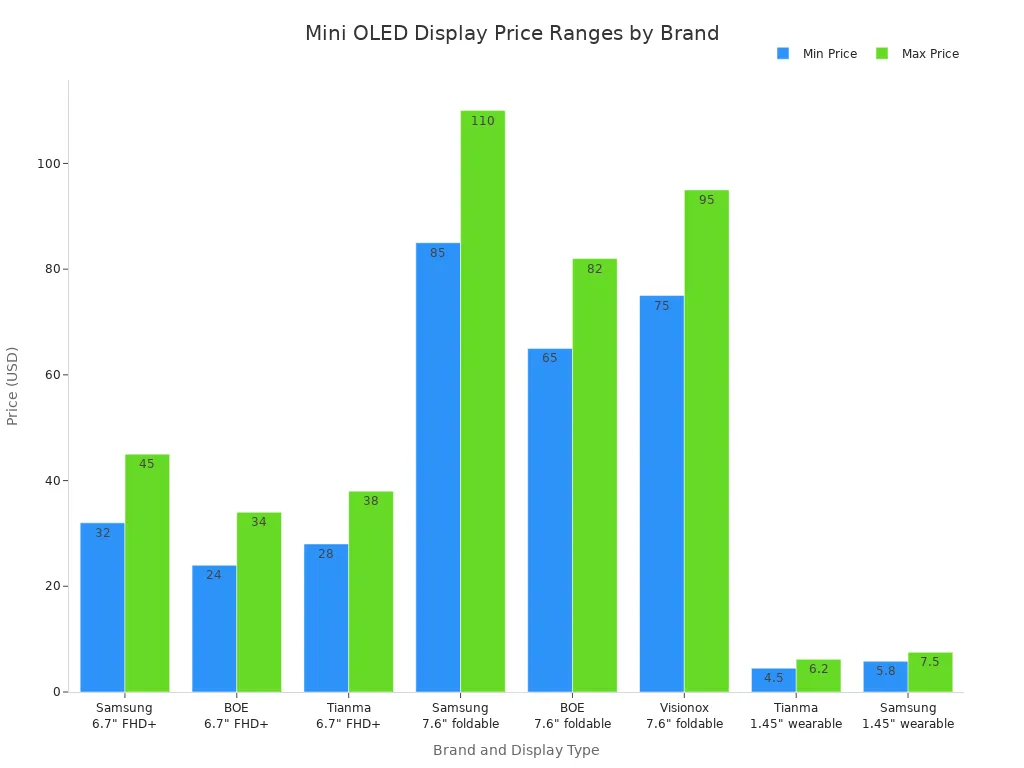
The price of a mini OLED display depends on the brand, size, and features. A hdmi oled display with more features usually costs more. Displays from Samsung, BOE, and Tianma have different prices based on type and size.
Brand/Supplier | Display Type | Price Range |
|---|---|---|
Samsung | 6.7" FHD+ rigid AMOLED | $32–$45 |
BOE | 6.7" FHD+ rigid AMOLED | $24–$34 |
Tianma | 6.7" FHD+ rigid AMOLED | $28–$38 |
Samsung | 7.6" foldable UTG AMOLED | $85–$110 |
BOE | 7.6" foldable UTG AMOLED | $65–$82 |
Visionox | 7.6" foldable UTG AMOLED | $75–$95 |
Tianma | 1.45" wearable AMOLED | $4.50–$6.20 |
Samsung | 1.45" wearable AMOLED | $5.80–$7.50 |
You should also think about the total cost. This includes the unit price, driver chips, energy use, and shipping. If you buy a lot, you can get a better deal. Displays with extra features, like touch or sensors, cost more but can save you time and effort.
Note: Balance your budget with the features you need. Sometimes, paying more means better quality and longer life.
If you want an easy way to choose, do three things: pick a trusted seller, compare price and features, and check for good support. This helps you find the best mini OLED display for your needs.
Best mini oled display checklist
Quick comparison points
You want to make the right choice for your project. Use this checklist to compare and pick the best mini screen for your needs. Each point helps you focus on what matters most.
📝 Main Selection Criteria
Screen size: Pick a size that fits your device and shows your content clearly.
Resolution: Higher resolution gives you sharper images and more detail.
Interface compatibility: Make sure your mini display works with your microcontroller (I2C, SPI, or Parallel).
Power consumption: Lower power means longer battery life, especially for portable projects.
Viewing angle and brightness: Wide angles and high brightness help you see the screen in any light.
Color or monochrome: Choose color for rich graphics or monochrome for simple data and lower power use.
Touch and extra features: Decide if you need a capacitive touchscreen or sensors for your project.
Build quality and mounting: Check if the display is easy to install and strong enough for your environment.
Budget: Balance price with the features you need.
Tip: Write down your top three must-haves before you start comparing models.
📊 Model Comparison Table
You can use this table to compare popular mini OLED displays side by side:
Model | Size | Resolution | Interface | Driver | Price Range |
|---|---|---|---|---|---|
Adafruit 938 | 0.96" | 128x64 | I2C/SPI | SSD1306 | $11.95 |
Generic ZH OLED-096 | 0.96" | 128x64 | I2C/SPI | SSD1306 | $6.50 |
Seeed Studio Grove OLED v1.1 | 0.96" | 128x64 | I2C | SSD1306 | $12.50 |
Look at the size, resolution, and interface. These details help you match the display to your project.
✅ Step-by-Step Decision Guide
Define your main use. Think about what you want your mini display to do.
List your limits. Write down your budget, size needs, and interface type.
Remove displays that do not meet your brightness or feature needs.
Check for burn-in protection. Look for displays with pixel-refresh cycles.
Watch out for common mistakes. Do not assume all OLEDs are the same.
🔍 Key Factors to Compare
Types of OLEDs: Grayscale or RGB. Each works best for different projects.
Resolution and pixel density: More pixels mean more detail but use more power.
Display interface: I2C, SPI, or Parallel. Pick what matches your controller.
Viewing angle and contrast: Wide angles and high contrast make screens easier to read.
Power use: Monochrome uses less power than color.
Voltage: Make sure your power supply matches the display.
Build quality: Strong displays last longer and are easier to mount.
3 easy ways to choose your OLED display mini
Match your project’s main goal: Start by thinking about what you want your display to do. If you need bright colors and touch, look for a model with a capacitive touchscreen. If you only need simple text, a basic monochrome display works well.
Check compatibility first: Make sure your microcontroller supports the display’s interface. Look for models with good library support, like SSD1306-based screens.
Balance features and price: Compare the features you need with your budget. Sometimes, the best mini oled display is not the most expensive one. Look for a model that gives you the right mix of quality and value.
Note: You do not need every feature. Pick the ones that help your project work best.
Use this checklist every time you shop for a new oled display mini. You will feel confident and find the best mini screen for your project.
You can pick the best mini OLED display by following a few simple steps. First, define your use case and check if your microcontroller supports the display. Next, measure your space and review power needs. Look for displays with good software support and clear documentation. Always match features to your project goals. Use the checklist to compare models. When you follow these steps, you make smart choices and build great projects.
FAQ
What is the difference between OLED and LCD mini displays?
OLED displays use organic materials that light up on their own. You get deeper blacks and better contrast. LCDs need a backlight, so blacks look gray. OLEDs save more power, especially with dark images.
Can I use any microcontroller with a mini OLED display?
You need to check if your microcontroller supports the display’s interface, like I2C or SPI. Some microcontrollers work better with certain drivers. Always read the datasheet before you buy.
How do I prevent burn-in on my mini OLED display?
You can lower the risk of burn-in by using screen savers, moving images, or turning off unused pixels. Try to avoid showing the same image for long periods.
Are mini OLED displays good for outdoor use?
Some mini OLED displays work well outside if they have high brightness. Look for models with at least 800 nits. Sunlight can make screens hard to see, so always check the brightness rating.
Do I need a special power supply for my mini OLED display?
Most mini OLED displays use 3.3V or 5V. You should match your power supply to the display’s voltage. Using the wrong voltage can damage the screen.
See Also
Enhance Your Project With These OLED Display Tips
Selecting The Ideal LCD Rack Monitor For Your Requirements
Finding The Perfect LCD Round Display For 2025 Projects
