Choosing Between LCD LED and OLED Monitors for Computers in 2026
Add.: 2F, Bldg 10, Changfeng Industrial Park, Dongkeng, Fenghuang, Guangming, Shenzhen, China 518132
Mobile/WHATSAPP: 86-138 25769658
Email: marketing@topadkiosk.com topadkiosk@gmail.com
Skype: pghenry1
Wechat: adkioskhenry
English Web.: https://www.topkioskdisplay.com/
http://www.ad-kiosk.com/
https://www.toplcddisplay.com/
http://www.multitouchdigitalsignage.com/
https://www.youtube.com/channel/UCYVYNJHxLVEcQD8fuUxXNTA/videos?view_as=subscriber
https://www.facebook.com/TOPADKIOSKSHENZHEN/?ref=bookmarks
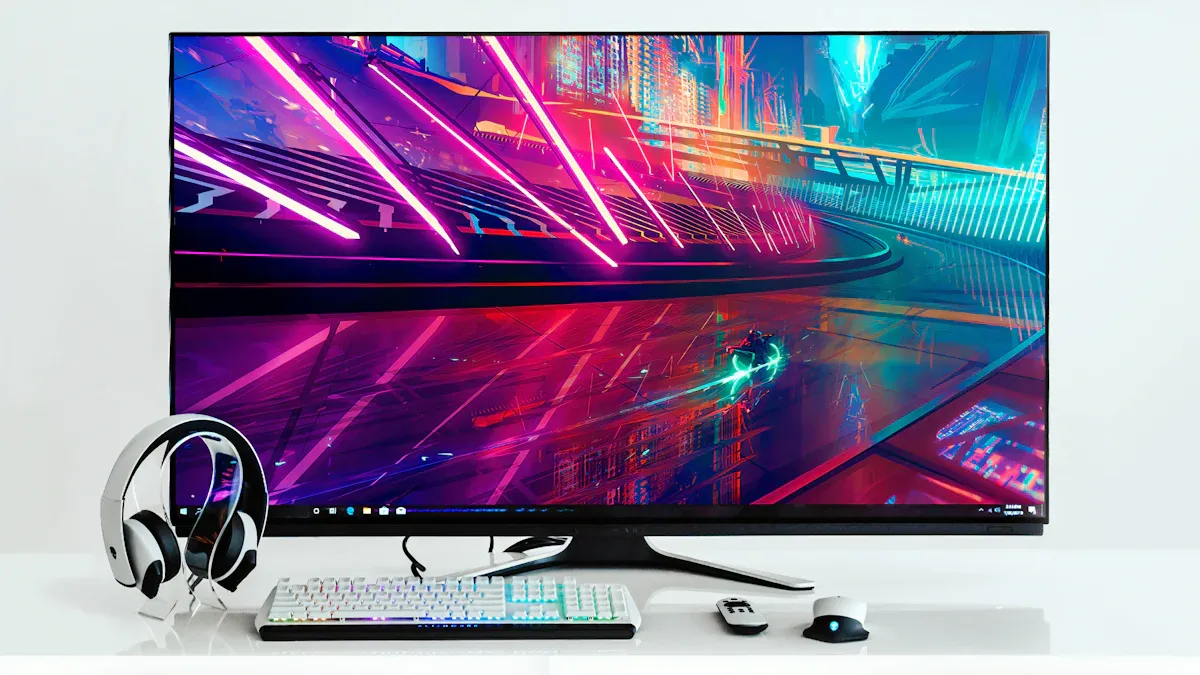
If you want the best monitor for your computer in 2026, OLED gives you perfect black levels and great color accuracy. Mini-LED monitors work well in bright rooms and last a long time. Many people still choose LCD because it is a good deal. You can see how users like each type in the table below:
Monitor Type | User Percentage | Reasons for Preference |
|---|---|---|
OLED | 42% | Black level important for seeing shadows, Lower price for color accuracy, Good for home studios |
Mini-LED | 38% | Good for bright rooms, No burn-in problems, Works with old calibration tools |
Standard IPS | 20% | N/A |
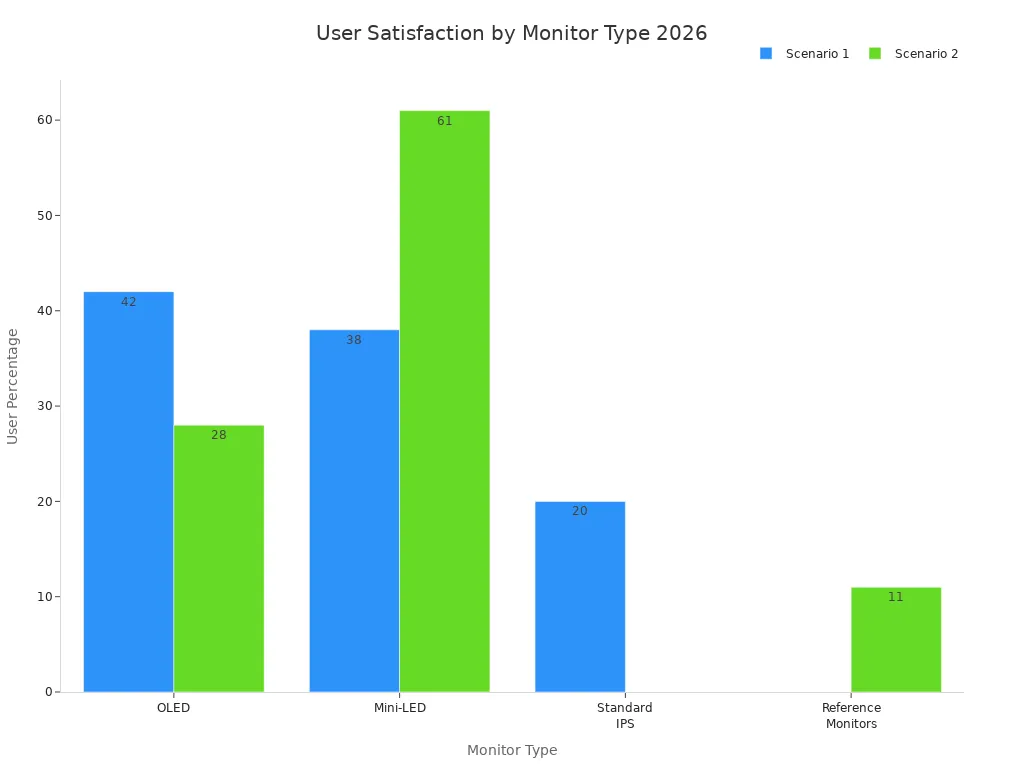
You should always pick a monitor that fits what you do most, like gaming, art, or just browsing the web. For more choices, look at monitor computer lcd models at https://www.topkioskdisplay.com/.
Key Takeaways
OLED monitors show the best picture quality. They have deep blacks and bright colors. This makes them great for gaming and art work.
Mini-LED monitors work well in bright rooms. They give very good HDR and do not get burn-in.
LCD monitors cost less and last a long time. They are a good pick for daily use and are very strong.
Think about your room’s light and how you use your monitor. This helps you pick the best one for you.
Keep checking for new models and reviews. This helps you find the right monitor for your needs and money.
Quick Recommendation for 2026

Best Overall OLED Monitors
You want the best picture quality for your computer. In 2026, oled stands out as the top choice for most users. You see deep blacks and high contrast ratios that make images look real. You notice colors that pop and details that stay sharp, even in dark scenes. Oled monitors give you fast response times, so games and videos look smooth. You do not see much motion blur. New technology makes oled less likely to have burn-in problems. You also find that oled costs less than before, so more people can buy it.
You get superior image quality with deep blacks and high contrast.
You enjoy faster response times, which help with gaming and watching movies.
You worry less about burn-in because of new improvements.
You find oled more affordable in 2026.
If you work in a dark room or care about color accuracy, oled monitors fit your needs. You see every shadow and highlight, which helps with art, design, and movies. You also get a great experience for gaming.
When to Choose LCD, LED, or Mini-LED
You may want to pick lcd, led, or mini-led instead of oled in some cases. These monitors work better in bright rooms or when you want a display that lasts longer. You also save money with lcd and led. Mini-led gives you high brightness and strong HDR performance. You do not worry about burn-in with lcd, led, or mini-led.
Here is a quick comparison:
Feature | Mini-LED | OLED |
|---|---|---|
Brightness | Can achieve very high peak brightness | Limited peak brightness |
Cost | Generally cheaper than oled | More expensive |
HDR Performance | Excellent due to local dimming | Excellent, but can suffer from burn-in |
You choose mini-led if you want a bright screen for a sunny room. You pick lcd or led if you want a monitor that lasts many years and costs less. Some users buy mini-led because they want to spend less than $600. Mini-led gives you good performance for the price.
You pick lcd or led for long life and lower cost.
You choose mini-led for high brightness and strong HDR.
You use lcd, led, or mini-led if you work in a bright office or need a monitor for many hours each day.
Tip: Think about your room lighting and how long you use your monitor each day. Oled works best in dark rooms and for creative work. Lcd, led, and mini-led work better in bright spaces or for long-term use.
You now have a clear idea of which monitor type fits your needs in 2026.
Monitor Computer LCD, LED, OLED, and Mini-LED Explained
What Is an LCD Display?
You see lcd screens in lots of homes and offices. An lcd has a layer of liquid crystals that control light. A backlight shines through these crystals to make pictures. Lcd gives you good colors and clear images. Many people pick monitor computer lcd because it works well in bright rooms and costs less. Lcd screens last a long time and use less power than old screens.
What Is an LED Display?
You find led screens almost everywhere. An led screen is a kind of lcd that uses light-emitting diodes for the backlight. These diodes make the screen brighter and save energy. You get better colors and thinner screens with led. Many monitor computer lcd models use led backlights. Led screens are popular for everyday use and office work.
What Is an OLED Display?
You notice oled screens look special. Oled means organic light-emitting diode. Each pixel in an oled makes its own light. You see real blacks because pixels can turn off. Oled gives you strong contrast and bright colors. You get thin screens and cool designs. Many people choose oled for movies, games, and art. Oled works best in dark rooms. You might see color changes or burn-in after a while, but new oled tech helps stop these problems.
What Is a Mini-LED Display?
You see mini-led as a new kind of screen in 2026. A mini-led screen uses thousands of tiny leds for the backlight. This gives you more brightness and better local dimming. You notice deeper blacks and stronger hdr than regular lcd. Mini-led screens are good for gaming and watching shows. Many monitor computer lcd models now use mini-led to make pictures look better. Mini-led costs less than oled and lasts longer.
Key Differences
You can look at the main features of each screen type in this table:
Technology | Key Features | Advantages | Disadvantages |
|---|---|---|---|
OLED | Pixels make their own light, true blacks, very strong contrast | Thinner screens, flexible shapes, great for dark rooms | Harder to make and costs more, colors can change over time |
IPS LCD | Uses a backlight, good colors, made for many years | Even brightness, cheaper, good for bright rooms | Blacks look gray in dark scenes, not as much contrast as oled |
Mini-LED | Better backlight for IPS LCD, can dim parts of the screen | More contrast and brightness than regular IPS LCD | Still needs a backlight, cannot get true blacks like oled |
LED | Simple backlight for lcd, used a lot | Cheaper, good for most uses | Not as much contrast or black levels as oled and mini-led |
Note: In 2026, mini-led screens are getting more popular. You see more mini-led monitors because people want brighter screens, better hdr, and to save energy. Mini-led helps monitor computer lcd models compete with oled.
Display Quality Comparison
Contrast and Black Levels (OLED vs LCD/LED)
You want the deepest blacks and the highest contrast for your monitor. OLED gives you true black levels because each pixel turns off completely. This means you see the best image quality in dark scenes. Mini-LED comes close, but you still notice a little light in dark areas. LCD and LED monitors use a backlight, so black levels look more like dark gray. You see this difference most when you compare oled vs ips lcd in a dark room.
Here is a table to help you see the contrast and black levels:
Monitor Type | Contrast Ratio | Black Level |
|---|---|---|
OLED | Effectively infinite | True black (0 nits) |
Mini-LED | Lower than OLED | 0.02-0.05 nits |
LCD/LED | Not specified | Not specified |
OLED stands out for the deepest blacks and the highest contrast. Mini-LED improves black levels over standard LCD, but only OLED gives you perfect control. You get the best image quality for movies and games with OLED.
Color Quality and Accuracy
You care about color quality and accuracy when you edit photos or watch videos. OLED and Mini-LED both give you excellent color coverage and low Delta E values, which means colors look real and true. LCD and LED monitors also show good color, but you see the best color accuracy with OLED and Mini-LED. When you compare oled vs ips lcd, you notice that OLED covers almost all the main color spaces, and Mini-LED covers even more.
Monitor Type | Average Delta E | sRGB Coverage | Adobe RGB Coverage | DCI-P3 Coverage | Rec. 2020 Coverage |
|---|---|---|---|---|---|
OLED | 1.2 | 100% | 96.8% | 99.2% | 73.4% |
Mini-LED | 1.4 | 100% | 99.1% | 97.8% | 80.2% |
You get the best color accuracy and image quality with OLED and Mini-LED. LCD and LED monitors still work well for most uses, but you see the biggest difference in creative work. If you want the best color accuracy, OLED is a top choice.
Brightness and HDR Performance
You need high brightness for a sunny room or for HDR content. Mini-LED monitors reach the brightest highlights, with peak brightness over 1000 nits. OLED monitors reach 900 nits at peak, but usually stay around 400-450 nits for normal use. LCD and LED monitors can get bright, but Mini-LED leads in this area. When you compare oled vs ips lcd, you see that OLED shines in dark rooms, while Mini-LED and LCD work better in bright spaces.
Technology | Sustained Brightness (nits) | Peak Brightness (nits) | HDR Performance Description |
|---|---|---|---|
Mini-LED | 500-600 | 1000+ | Excellent for HDR mastering; suitable for bright environments. |
OLED | 400-450 | 900 | Exceptional HDR in dark rooms with clean separation between dark and bright areas. |
You get the best HDR quality with Mini-LED in bright rooms. OLED gives you the best image quality in dark rooms. LCD and LED monitors offer good brightness for everyday use, but do not match the HDR quality of OLED or Mini-LED.
Tip: If you want the best ROI from oled vs ips lcd, think about your room lighting and what matters most—contrast, color, or brightness.
Performance for Gaming and Work
Response Time and Refresh Rate
You want games to look smooth and fast. In 2026, gaming monitors use different tech to get high refresh rates and quick response times. OLED gaming monitors change pixels almost instantly, between 0.1 and 0.3 ms. You see clear pictures with little blur. These monitors can reach up to 240 Hz or even 360 Hz. IPS LCD gaming monitors also go up to 240 Hz or 360 Hz, but their response times are between 1 and 4 ms. Mini-LED gaming monitors use an LCD layer, so their speed is like IPS LCD. High refresh rates make games feel smooth and quick.
OLED: 0.1–0.3 ms response time, 240–360 Hz refresh rates
IPS LCD: 1–4 ms response time, 240–360 Hz refresh rates
Mini-LED: Similar to IPS LCD for response and refresh
Tip: For fast games, pick a monitor with high refresh rates and low response times. This helps you play better in quick games.
Input Lag and Motion Clarity
You want your moves to show up right away on the screen. OLED gaming monitors have almost no input lag because each pixel lights up by itself. You feel your actions match what you see. LCD and Mini-LED gaming monitors have a small delay because the LCD layer is slower. Mini-LED gaming monitors can also lag more if the dimming zones cannot keep up. OLED gaming monitors give you the smoothest motion and the least blur. LCD and Mini-LED gaming monitors sometimes show more blur, especially in fast games.
OLED: Lowest input lag, best for fast gaming
Mini-LED: Slightly higher input lag due to LCD layer
LCD: More motion blur and lag than OLED
Note: Most people think both OLED and fast IPS LCD gaming monitors feel quick, but OLED has the clearest motion.
Professional Use Cases
You need good colors and sharp images for work like editing photos or making videos. In 2026, many workers use OLED, Mini-LED, or IPS LCD monitors. OLED monitors are great for photos because they show real blacks and bright colors. Mini-LED monitors are best for video and motion graphics because they get very bright and have strong HDR. Standard IPS LCD monitors are still used by people who want a good screen for office work.
Technology | Video & Motion Graphics | |
|---|---|---|
OLED | 42% | 28% |
Mini-LED | 38% | 61% |
Standard IPS | 20% | N/A |
You should choose a monitor that fits what you do most. OLED is best for work where color matters and for gaming. Mini-LED and IPS LCD monitors are good for both games and work.
Longevity and Burn-In
OLED Monitors Burn-In Risk
You may worry about burn-in when you use an OLED monitor. Burn-in happens when a static image stays on the display for a long time. In 2026, modern OLED monitors have new features that help prevent this problem. Pixel refreshing and logo detection work in the background to keep your display safe. Real-world tests show that you do not see burn-in with normal use. You can compare burn-in risk for each monitor type in the table below:
Monitor Type | Burn-in Risk | Notes |
|---|---|---|
OLED | Minimal | Modern OLEDs have improved with pixel refreshing algorithms and logo detection. Real-world tests show no visible burn-in with varied use. |
Mini-LED | None | No burn-in risk as it does not degrade from static images. |
LCD/LED | None | Similar to Mini-LED, no burn-in risk. |
You get peace of mind with Mini-LED and LCD/LED monitors because they do not have burn-in risk.
Lifespan of LCD, LED, and Mini-LED
You want your monitor to last a long time. Lifespan means how many hours your display works before it starts to fade. OLED monitors now reach about 100,000 hours if you use them for 8 hours each day. LCD monitors last between 30,000 and 60,000 hours with the same use. Mini-LED monitors use an LCD layer, so their lifespan matches the higher end of LCD. If you want the longest lifespan, you should look at Mini-LED and LCD monitors.
OLED monitors: About 100,000 hours of lifespan.
LCD monitors: 30,000 to 60,000 hours of lifespan.
Mini-LED monitors: Similar to the top range of LCD lifespan.
You can trust LCD and Mini-LED for long-term use. OLED also lasts many years for most users.
Maintenance Tips
You can help your monitor last longer with simple steps. Good habits protect your display and keep colors bright. Try these tips:
Enable pixel refresh and screen shift if your monitor has these features.
Use a smart plug or inactivity timer to turn off your display when not in use.
Keep brightness at a moderate level. Do not use peak brightness all the time.
Mix up what you watch or play. Change content often to avoid static images.
Clean your monitor and vents to stop dust from building up.
Use dark mode themes and auto-hiding taskbars.
Power down or let your monitor sleep when you are away.
Tip: You can get the longest lifespan by following these habits, no matter which display you choose.
Price and Value in 2026
Cost Comparison
You want to know how much you will pay for a new monitor in 2026. Prices change based on the type of display and features. LCD monitors cost less than OLED and Mini-LED monitors. You see lcd monitors in many homes and offices because they fit most budgets. OLED monitors now cost less than before, but they still cost more than lcd. Mini-LED monitors cost the most, especially for larger sizes and high-end features.
Here is a table that shows the price range for each monitor type:
Monitor Type | Entry Price | Mid Price | High Price |
|---|---|---|---|
OLED | £1,599 | £2,299 | £3,499 |
Mini-LED | £1,899 | £3,299 | £5,799 |
LCD monitors usually cost less than £1,000. You can find lcd monitors for under £500 if you want a basic display. OLED and Mini-LED monitors cost more because they offer better picture quality and brightness.
Note: You save money with lcd monitors, but you pay more for OLED and Mini-LED if you want top features.
Price-to-Quality Ratio
You want the best value for your money. LCD monitors give you good quality for a low price. OLED monitors offer great color and contrast, but you pay more. Mini-LED monitors give you high brightness and strong HDR, but they cost the most.
Here is a table that compares price and quality for popular sizes:
Monitor Type | Size | Resolution | Price | Brightness | Dimming Zones |
|---|---|---|---|---|---|
OLED | 27" | 1440p | $700 | 800 nits | N/A |
Mini-LED | 27" | 1440p | $900 | 1,400 nits | 1,152 |
Mini-LED | 32" | 4K | $2,100 | 1,400 nits | 1,152 |
OLED | 32" | 4K | $1,400 | 800 nits | N/A |
Mid-range Mini-LED | N/A | N/A | $500-800 | N/A | <500 zones |
You get the best price-to-quality ratio with lcd monitors if you need a simple display. OLED monitors give you better color and contrast for a higher price. Mini-LED monitors offer the brightest display and best HDR, but you pay more for these features.
LCD monitors: Best value for everyday use.
OLED monitors: Great for color and contrast.
Mini-LED monitors: Best for brightness and HDR.
Tip: You should choose lcd monitors if you want good quality at a low price. Pick OLED or Mini-LED monitors if you want advanced display features.
Best Use Cases by Display Type
Gaming
You want the best experience when you play games. OLED technology gives you the fastest response time. You see almost no blur because OLED can reach 0.1ms, and some models like the Alienware AW3423DWF go even lower. You notice your actions match what happens on the screen. Many gamers say they track enemies better in games like Valorant and Apex Legends with OLED. Mini LED also works well for gaming, but its response time is slower, around 2-3ms. LCD displays are common, but they do not match the speed of OLED. You get the most out of your gaming with OLED, especially in fast-paced games.
OLED: Best for fast gaming and smooth motion.
Mini LED: Good for gaming in bright rooms.
LCD: Works for casual gaming but slower than OLED.
Tip: Choose OLED if you want the top gaming performance.
Professional Work
You need a monitor that helps you do your job well. The right display depends on your work. If you edit photos or videos, you want high resolution and good color. Many professionals use 4K or even 5K monitors for creative work. You see more detail and can multitask better. The table below shows which resolution fits each use:
Resolution | Best Use Case | Ideal Size |
|---|---|---|
1080p | Budget-friendly, good for office tasks | N/A |
1440p | Mixed work and play, good detail | 27 inches |
4K | Creative work and multitasking | 27 to 32 inches |
5K | Color-critical tasks | Best with pro tools |
You get the best results with a 4K or 5K display for design or editing. LCD monitors are popular for office work because they cost less and last long.
General Use
You want a monitor that does everything well. Many users pick 4K displays for general use. You see sharp text and clear images. These monitors balance resolution, refresh rate, and work with most computers. You can use them for gaming, watching videos, or browsing the web. LCD monitors are a good choice for everyday tasks. They give you good quality and do not cost much.
LCD: Best for value and long life.
Mini LED: Good if you want extra brightness.
Note: You get a display that fits all your needs when you choose a 4K LCD monitor.
Buying Guide
Matching Needs to Technology
You want your monitor choice to fit your daily tasks. Start by thinking about how far you sit from your screen. If you sit close, you need a sharp display for clear text. If you read or write small text often, a higher pixel density helps your eyes. You can adjust scaling settings for the best look. Here is a simple way to match your needs:
Check your viewing distance for clarity.
Decide if you need to see small text or details.
Choose if you want to adjust scaling for comfort.
You can pick from these common resolutions:
1080p works for basic tasks and saves money.
1440p balances work and play.
4K fits creative jobs and multitasking.
5K helps with detailed work and needs a strong computer.
Key Features to Consider
You should look for features that make your lcd monitor better. These features help you get the most out of your monitor choice:
Resolution gives you clear and detailed images.
Pixel density (PPI) makes text and pictures sharp.
Refresh rates keep games and videos smooth.
Ergonomic design lets you adjust the screen for comfort.
You can find lcd monitors with these features for every budget.
Future-Proofing
You want your monitor to last for years. Pick a display with a high resolution and strong build. Look for lcd monitors that support new ports and standards. You can choose a monitor choice with a wide color range for future software. If you plan to upgrade your computer, make sure your monitor supports higher refresh rates and more pixels.
Tip: A good lcd monitor with modern features will serve you well as technology changes.
Now you know that OLED monitors give the clearest motion and best colors for most people in 2026. Mini-LED monitors are great if your room is bright and they do not have burn-in problems. You can use this table to see how they compare:
Monitor Type | Strengths | Weaknesses |
|---|---|---|
OLED | Fast response, perfect blacks | Minimal burn-in risk |
Mini-LED | High brightness, no burn-in | Slower pixel response |
Think about what you do most and how much you want to spend before you pick a monitor.
Always look at new reviews and models so you get the best deal.
Tip: Choose a monitor that fits what you do every day for the best results.
Top 10 LCD Computer Monitors to Buy in 2026
The 2026 monitor market is vibrant, with OLED and Mini‑LED technologies becoming more accessible. Outstanding image quality and high refresh rates are no longer exclusive to flagship models. Here are 10 monitors across different categories to help you find the right fit.
📊 Quick Primer: Key 2026 Monitor Specs
Before diving into the list, understanding a few key parameters will help you make a faster decision:
Panel Technology – Three main types: OLED offers infinite contrast and ultra‑fast response (best image quality, higher price). Mini‑LED uses many local dimming zones to dramatically improve LCD brightness and contrast – a great upgrade for LCD lovers. Fast IPS maintains wide viewing angles and good colour while boosting refresh rates – the mainstream choice.
Refresh Rate (Hz) – How many frames per second the screen can show. Higher = smoother. 60Hz is fine for office work; 144Hz+ delivers fluid gaming; eSports players may want 360Hz+.
Response Time (ms) – How quickly a pixel changes colour. Lower = less motion blur. 1ms GTG is the current standard; OLED panels achieve 0.03ms.
Colour Gamut & Accuracy – sRGB for web content, DCI‑P3 for video/film, Adobe RGB for print. Accuracy is measured by Delta E (ΔE); ΔE < 2 is excellent for professional work.
Sync Technology – Eliminates screen tearing. G‑Sync (NVIDIA) and FreeSync (AMD) are the main standards.
Ports – HDMI 2.1 and DisplayPort 2.1 are essential for high resolution and high refresh rates, especially for next‑gen consoles and high‑end PCs.
🚀 Top 10 LCD / OLED Computer Monitors for 2026
1. 🥇 Best Overall (Flagship All‑Rounder)
Model: Dell UltraSharp 32 4K QD-OLED Monitor (U3226Q)
Price: ~$1,800 USD
Key Specs: 32″ 4K (3840×2160) QD‑OLED | 240Hz | 0.03ms | DisplayHDR True Black 500
Why buy: Combines top‑tier QD‑OLED panel, 4K resolution, high refresh rate, and professional colour accuracy. It satisfies both creators and high‑end gamers. The infinite contrast and precise colour are unmatched for professional imaging.
2. 🎨 Best for Creators (Professional Colour)
Model: ASUS ProArt Display OLED PA279CDV
Price: ~$1,100 USD
Key Specs: 27″ 4K (3840×2160) QD‑OLED | 120Hz | ΔE < 2 | 99% DCI‑P3
Why buy: The ProArt series is a benchmark for design. This model delivers top colour performance and features LuxPixel anti‑glare low‑reflection (AGLR) technology, reducing eye strain during long sessions. A trustworthy tool for designers, video editors, and photographers.
3. 💼 Best for Productivity (Office & Business)
Model: Dell UltraSharp 27 4K USB-C Hub Monitor (U2725QE)
Price: ~$650 USD
Key Specs: 27″ 4K (3840×2160) IPS | 120Hz | 140W Thunderbolt 4
Why buy: Excellent IPS Black technology and Thunderbolt 4 connectivity make it a top choice for multitasking. One cable delivers video, data, and up to 140W charging – a very clean desk setup.
4. 🎮 Best 4K Gaming Monitor
Model: ASUS ROG Swift OLED PG32UCDM3
Price: ~$1,200+ USD
Key Specs: 32″ 4K (3840×2160) QD‑OLED | 240Hz | 0.03ms
Why buy: Solves the problem of OLED screens in bright rooms. Its BlackShield Film technology reduces reflections and purple tint, delivering top‑tier gaming visuals even during daytime.
5. 💰 Best Value (Budget OLED)
Model: AOC AGON AG276QZD
Price: ~$480 USD
Key Specs: 26.5″ 2K (2560×1440) OLED | 240Hz | 0.03ms
Why buy: The value king of 2026. This entry‑level OLED gaming monitor is priced competitively against many premium LCDs – a great starting point for experiencing OLED image quality.
6. 🎯 Best for eSports (Extreme Speed)
Model: LG UltraGear 27GX790A
Price: ~$1,000+ USD
Key Specs: 27″ 2K (2560×1440) OLED | 480Hz | 0.03ms
Why buy: For hardcore FPS players, 480Hz is a powerful weapon. It provides unmatched motion clarity, giving you an edge in fast‑paced games.
7. 💻 Best Mainstream Office (Great Value)
Model: BenQ GW2486TC
Price: ~$180 USD
Key Specs: 24″ 1080p (1920×1080) IPS | 75Hz | 65W USB‑C
Why buy: Offers excellent features on a tight budget, especially for laptop users. 65W USB‑C power delivery means one cable does it all – a superb office companion.
8. 🏫 Best Student / Entry Gaming
Model: AOC 24G2SPAE
Price: ~$130 USD
Key Specs: 24″ 1080p (1920×1080) Fast IPS | 165Hz | 1ms
Why buy: A classic entry‑level gaming monitor. It delivers a smooth 165Hz experience at a very low price. 27″ 1440p high‑refresh monitors are also worth considering around $250.
9. 🎬 Best Ultrawide (Immersive)
Model: Samsung Odyssey OLED G9 (G95SC)
Price: ~$1,500+ USD
Key Specs: 49″ DQHD (5120×1440) QD‑OLED | 240Hz | 0.03ms
Why buy: The definition of immersive gaming. The 32:9 aspect ratio is like two 27″ monitors side by side – stunning for racing, flight sims, or professional multitasking.
10. 🖥️ Ultimate Productivity (Large Flagship)
Model: Dell UltraSharp 52 Thunderbolt Hub Monitor (U5226KW)
Price: ~$2,500+ USD
Key Specs: 52″ 6K curved IPS | 120Hz | Thunderbolt 4 hub
Why buy: The world's first 52″ 6K curved screen. For financial traders, data analysts, and professionals who need massive screen real estate, it replaces multiple monitors.
💎 Final Buying Advice
Follow this simple process:
Define your budget and primary use – Office/productivity, content creation, or gaming? Different needs prioritise different specs.
Choose size and resolution – 24″ 1080p for entry / FPS gaming; 27″ 1440p is the sweet spot; 32″ 4K is ideal for image quality and creative work.
Prioritise key specs within budget – Creators focus on colour gamut/accuracy; gamers focus on refresh rate; then consider extras like HDR and connectivity.
Choosing a monitor is about matching your needs with product strengths. Think about what you do most, and invest your budget in the one or two features that matter most to you.
FAQ
What is the main difference between OLED and Mini-LED monitors?
You see the main difference in how each screen creates light. OLED uses self-lit pixels for perfect blacks. Mini-LED uses many small LEDs behind an LCD layer for high brightness and strong HDR.
Can you use an OLED monitor for office work all day?
You can use an OLED monitor for office work. Modern OLED screens have features that reduce burn-in risk. You should use screen savers and let your monitor sleep when not in use.
Which monitor type lasts the longest?
Mini-LED and LCD monitors last the longest. You get many years of use with these screens. OLED monitors also last a long time, but you should avoid static images for best results.
Is Mini-LED better than standard LED for gaming?
You get better brightness and HDR with Mini-LED. This helps games look more vivid. Mini-LED also reduces blooming in dark scenes. Standard LED monitors work for gaming, but Mini-LED gives you a better experience.
Do you need a special computer to use a 4K monitor?
You do not need a special computer, but you need a graphics card that supports 4K. You should check your computer’s ports and make sure they match your monitor’s input.
See Also
Evaluating Top Transparent OLED Displays Available in 2025
Selecting The Ideal LCD Round Display For Your 2025 Project
Comparing Digital Signage And LED Signs For Businesses In 2026
