Miniature PC Guide for Beginners: Easy Choices Ahead
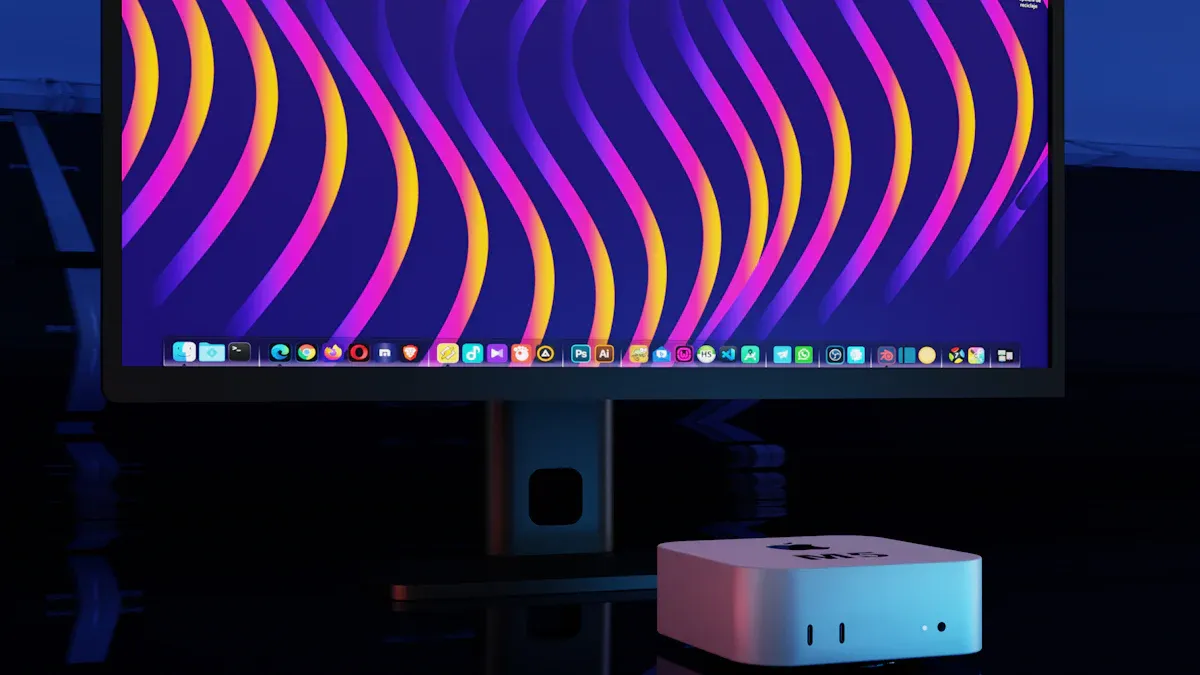
Welcome! If you want a strong miniature PC for your desk, you have good choices in 2026. The Apple Mac Mini (M4) is fast and easy to set up. You can also look at the Geekom A9 Max, GMKtec G10, Asus ROG NUC, and BeeLink SER9 Pro Ai. The Apple Mac Mini is great for beginners. It has simple controls and good support. Many miniature PCs now have better cooling and AI features. The Apple Mac Mini is easy to use and very quick.
More people want miniature PCs for school and remote jobs. You see new small devices every year.
Metric | Value |
|---|---|
Projected CAGR (2026-2033) | |
Key Drivers | Tech advancements, energy efficiency, cloud computing |
Challenges | High competition, pricing pressures, regulatory changes |
Key Takeaways
Miniature PCs like the Apple Mac Mini and Geekom A9 Max are small but strong. They work well and do not take up much space. This helps you keep your desk neat.
Find easy-to-use features like pre-installed operating systems. Look for clear setup guides to help you start quickly. These things make using the PC simple.
Think about what you need before you buy. Are you gaming, working, or just using it for fun? Pick a model that matches what you want to do.
Check warranty and support from brands like Apple and Geekom. This makes sure you get help if something goes wrong.
Always compare prices and specs to get the best deal. Make sure you get good performance for your money.
Miniature PC Features in 2026
Key Features Overview
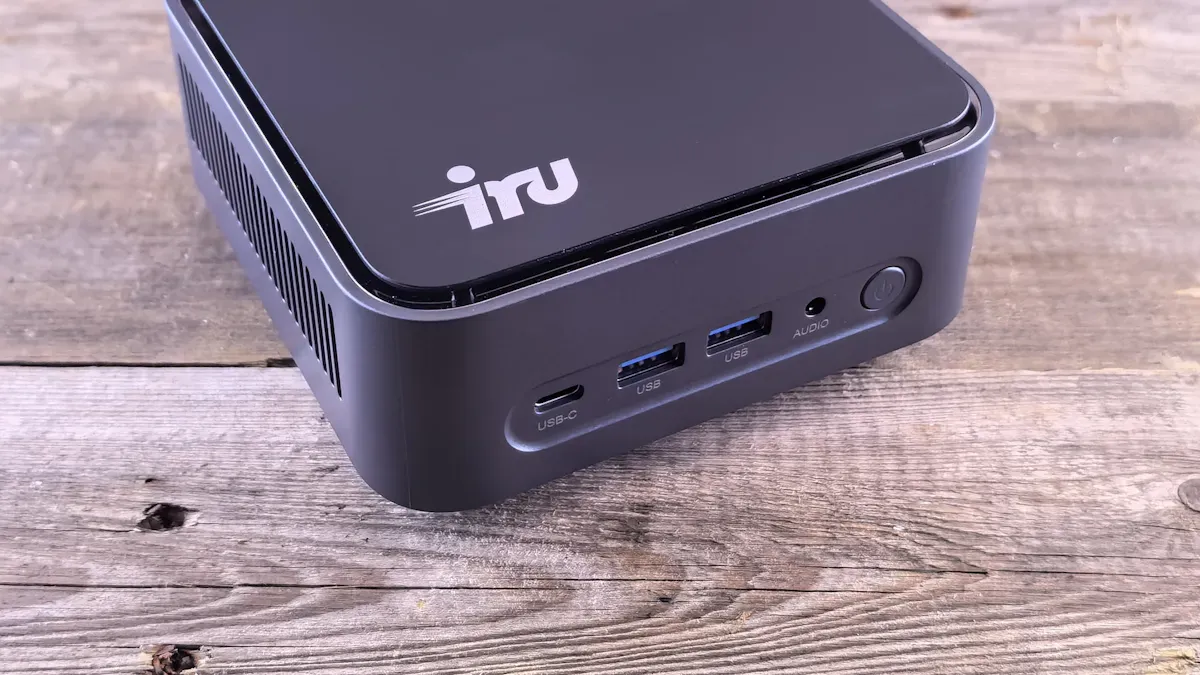
You might wonder what makes a miniature pc special in 2026. These mini devices fit easily on your desk and save space. You get a compact design that works well in small form factor setups. Most mini pcs weigh very little, so you can move them around for gaming or work. They use less power than big desktops, which means lower bills and less heat. You see models like the apple mac mini, Geekom A9 Max, GMKtec G10, Asus ROG NUC, and BeeLink SER9 Pro Ai leading the mini pc category.
Here’s a quick look at the most common features:
Feature | Description |
|---|---|
Fits in tight spots and keeps your desk neat. | |
Portability | Easy to carry for gaming or travel. |
Energy efficiency | Uses less power than older desktops. |
Processor | Strong cpu options like AMD Ryzen 7 or Intel Core i7/i9. |
Graphics card | Dedicated graphics solution for modern gaming and content creation. |
RAM | At least 32GB for everyday productivity and multitasking. |
Storage | SSDs for fast loading and quick access. |
Performance Highlights
You want high performance from your mini pc. The apple mac mini gives you desktop-class performance for everyday productivity. Geekom A9 Max and GMKtec G10 offer strong cpu performance and good gaming performance. You can play esports and older games at 1080p with models like BeeLink SER9 Pro Ai. Mini pcs now match entry-level gaming desktops in gaming performance, thanks to dedicated graphics cards.
Check out this table for performance details:
Model | Graphics | CPU | RAM | |
|---|---|---|---|---|
Geekom AX8 Pro | AMD Radeon 780M | AMD Ryzen 9 8945HS | 32GB DDR5-5600 | F1 2024: 73fps, Cyberpunk 2077: 43fps |
Minisforum AI X1 Pro | AMD Radeon 890M | AMD Ryzen AI 9 HX 370 | 32GB/64GB/96GB DDR5-5600 | 45-80fps (low settings) |
Corsair One i500 | Nvidia GeForce RTX 4080 Super | Intel Core i9 14900K | 32GB DDR5-6000 | N/A |
Minisforum UM773 Lite | AMD RDNA 2 680M | AMD Ryzen 7 7735HS | 32GB DDR5 | Good for esports at 1080p |
Mini pcs use less energy than traditional desktops. You save money and help the environment.
Ease of Use
You don’t need to be a tech expert to use a mini pc. The apple mac mini stands out for easy setup and simple controls. Most mini pcs come with clear instructions and quick start guides. You plug in a usb-c cable, connect your monitor, and you’re ready. Security features like Windows Hello and TPM 2.0 protect your files and passwords. You get strong support and warranty from brands like Apple and Geekom. If you want value, high performance, and easy use, a mini pc fits your needs.
Best Mini PC Comparison
Specs and Price
You want to find the best mini pc for your needs, but the choices can feel overwhelming. Let’s break it down. You can see how each mini stacks up in terms of specs and price. This way, you get a clear picture of what you pay for and what you get.
Here’s a handy table that compares some of the top mini models in 2026. You’ll see options for every budget, from entry-level to high-end. This makes it easy to spot the best mini pc for your wallet and your needs.
Model | Processor | RAM | Storage | Price |
|---|---|---|---|---|
Beelink SER10 MAX | Ryzen AI 9 HX 470 | 32GB DDR5 | 1TB NVMe | $1,799 |
MINISFORUM AI X1 Pro-470 | Ryzen 7 4700U | 32GB DDR5 | 1TB NVMe | $1,359 |
Beelink SER9 | Ryzen 7 H 255 | 32GB LPDDR5 | 1TB NVMe | $859 |
origimagic A3 | Ryzen 7 8745HS | 32GB DDR5 | 1TB SSD | $609 |
Budget Tier | Intel N100/Ryzen | 16GB | N/A | $250-$400 |
Mid-Range Tier | Ryzen 7 7735HS/Intel Core Ultra | 32GB | N/A | $400-$650 |
High-End Tier | 64GB RAM + eGPU-Ready | 64GB | N/A | $800-$1,500 |
You can also check out this chart to see how the price of each mini compares at a glance:
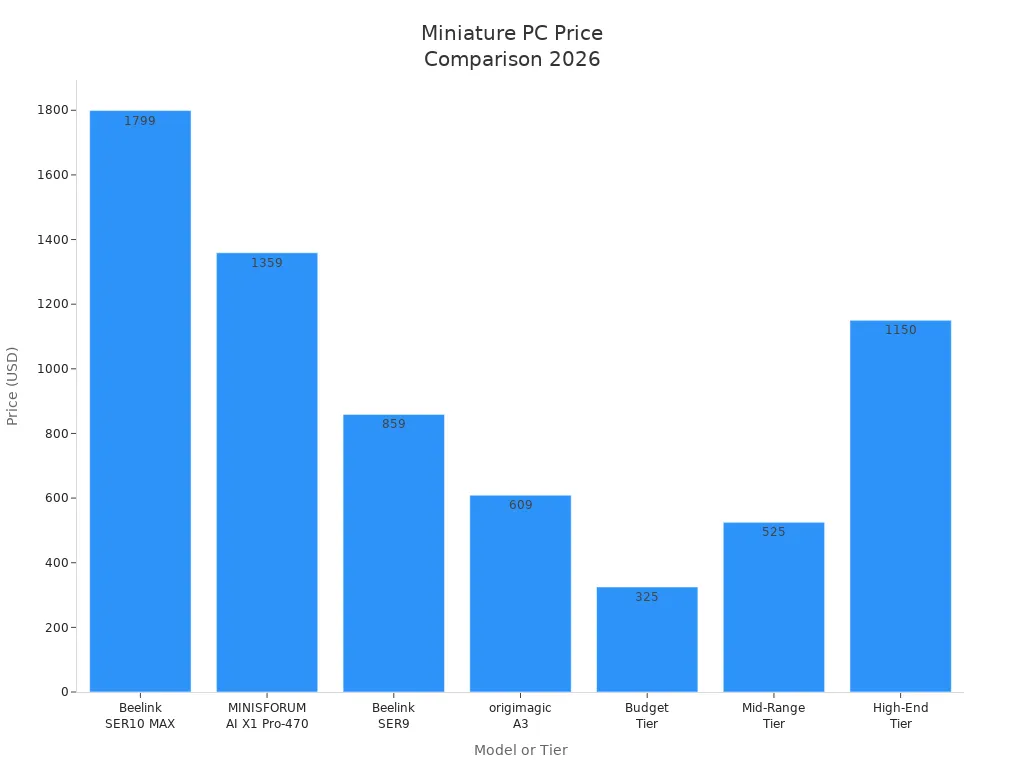
When you look at the price, you notice that the best mini pc for you depends on your budget and what you want to do. If you just need a mini for web browsing or homework, the budget tier works well. If you want more performance for gaming or creative work, you might want to spend more for a mid-range or high-end mini.
You also see different brands and what they offer. For example, GEEKOM focuses on high performance and build quality, while Beelink gives you affordable choices for everyday use. Minisforum AtomMan G7 PT is great for gaming, and the Mac Mini M4 is perfect if you love macOS. Here’s a quick look at some standout models and their price range:
Brand/Model | Price Range | Notable Features |
|---|---|---|
GEEKOM | Premium | High performance, strong build |
Beelink | Budget | Affordable, good for general use |
Minisforum AtomMan G7 PT | $800-$1,100 | Excellent gaming, discrete graphics |
GMKtec K8 Plus | $500-$650 | Great value, strong AMD Ryzen 7 |
AOOSTAR GEM12 | $350-$450 | Budget-friendly, good performance |
MSI Cubi NUC AI+ | $600-$800 | Intel Core Ultra 7, AI features |
Mac Mini M4 | $599-$1,199 | Best for macOS users |
Pros and Cons
Every mini has its strengths and weaknesses. You want to know what makes each one special and where it might fall short. Here’s a simple list to help you compare the best mini pc models:
Beelink SER10 MAX
👍 Top-tier performance for demanding tasks
👍 Plenty of RAM and storage
👎 High price, not for tight budgets
MINISFORUM AI X1 Pro-470
👍 Great performance for work and play
👍 Good value for specs
👎 Still pricey for some users
Beelink SER9
👍 Solid performance for most needs
👍 Lower price than high-end models
👎 Not as powerful as premium options
origimagic A3
👍 Affordable, good for students or home use
👍 Decent performance for daily tasks
👎 Not built for heavy gaming or editing
Mac Mini M4
👍 Best mini pc for macOS fans
👍 Easy to use, strong support
👎 Limited upgrade options, higher price for top specs
Budget Tier Minis
👍 Lowest price, easy on your wallet
👍 Good for basic tasks and web browsing
👎 Lower performance, not for gaming or heavy work
Mid-Range Minis
👍 Balance of price and performance
👍 Handles most tasks, some light gaming
👎 May lack some premium features
High-End Minis
👍 Best performance, ready for gaming and creative work
👍 Lots of RAM and storage
👎 High price, may be more than you need
Tip: Most mini models let you upgrade RAM and storage, but some have soldered RAM. Always check before you buy if you want to upgrade later. CPUs and GPUs usually stay fixed, unless you use an external GPU.
When you compare the best mini pc models, think about what matters most to you. Do you want the highest performance? Do you care more about price? Maybe you want something small and quiet for your desk. Each mini gives you a different mix of features, performance, and price. You get to pick what fits your life best.
Mini Desktop PCs for Beginners
User-Friendly Models
You want a computer that feels easy from the start. Some mini desktop pcs stand out because they make your life simple. The Geekom A5 2025 Edition, GMKtec NucBox M5 Plus, and Apple Mac mini (M4 Pro) are the best mini pc choices for beginners. These models have features that help you get started fast and keep things running smoothly.
Let’s look at what makes these mini desktop pcs user-friendly:
Feature | Description |
|---|---|
These mini pcs fit anywhere. You can place them on a shelf, a desk, or even behind your monitor. | |
Pre-installed Operating System | You don’t need to install Windows or macOS. The system is ready when you turn it on. |
Connectivity Options | You get lots of ports for your keyboard, mouse, and monitor. |
You also get:
At least four USB ports, including USB Type-C or Thunderbolt.
More than one way to connect your screen, like HDMI, DisplayPort, or USB-C.
Fast Wi-Fi 6 or 6E and Bluetooth 5.0, so you don’t need extra adapters.
If you want the best for portability, these mini pcs are light and easy to move. You can take your small desktop computer to school, work, or a friend’s house. The Apple Mac mini is best for portability if you use macOS. The GMKtec NucBox M5 Plus is best for portability if you want Windows.
Simple Setup
You don’t want a long setup process. The best mini pc models for beginners come ready to use. You just plug in the power, connect your monitor and keyboard, and turn it on. The Apple Mac mini gives you a welcome screen and step-by-step guide. The Geekom A5 and GMKtec NucBox M5 Plus also walk you through setup with clear instructions.
Here’s why setup feels easy:
The operating system is already installed.
You see a simple setup wizard when you start.
You can connect to Wi-Fi in a few clicks.
Most mini pcs update themselves, so you get the latest features and security.
If you want the best for portability, you can unplug your mini and set it up in a new place in minutes. You don’t need to worry about heavy towers or lots of cables. The Apple Mac mini is best for portability if you use Apple devices. The GMKtec NucBox M5 Plus is best for portability if you want a Windows mini.
Support and Warranty
You want to feel safe with your new mini. The best mini pc brands give you strong support and long warranties. If you have a problem, you can call or chat with the company for help. Apple, Geekom, and GMKtec all offer support that helps you fix issues fast.
In 2026, top brands like HP, Lenovo, and Dell also sell refurbished miniature pc models. These come with a 2- or 3-year warranty. You get a guarantee that your mini will work, or you get help or a replacement. This is much better than buying a used computer from a stranger.
Here’s a quick look at warranty periods:
Brand | Warranty Period |
|---|---|
GEEKOM | |
Beelink | Shorter terms |
GEEKOM gives you longer warranty coverage. Apple also offers strong support and warranty for the Apple Mac mini. If you want the best for portability and peace of mind, these brands make it easy.
You might run into small problems, like slow speed or trouble connecting to Wi-Fi. Most of the time, you can fix these by updating your software or restarting your mini. If you need more help, support teams can guide you step by step.
Mini desktop pcs are great for beginners because they are simple, portable, and backed by good support. You can use your mini for remote work, school, or even fun projects at home. The best mini pc models give you strong performance, easy setup, and help when you need it.
Buying Tips for Mini PCs
How to Choose
Picking the right mini can feel tricky, but you can make it simple. Start by thinking about how you want to use your new computer. Do you need it for gaming, school, or just browsing the web? Your answer helps you find the best fit. Check out this table to see what matters most:
Criteria | Description |
|---|---|
Usage | Decide if you want your mini for gaming, work, or casual use. |
Workload | Think about if you run big programs or just a few apps at once. |
Processor (CPU) | Pick a strong CPU for multitasking and better performance. |
Web Browsing | Heavy browsing needs more power and a bigger display. |
Editing Skills | If you edit photos or videos, look for more storage and a fast processor. |
Gaming Type | Love complex games? You need a mini with a good graphics card. |
Mobility | Want to move your mini around? Choose a lightweight model. |
You should also compare the price and performance of each mini. Look for a good price-to-performance ratio so you get the most value.
Common Mistakes
Many first-time buyers make the same mistakes. You can avoid them if you know what to watch for:
You might buy a mini that is not ready-to-go. Some models need extra parts before you can use them.
You may forget to check if the operating system is included. Some minis do not come with Windows, which means more cost and setup.
You could miss checking the ports. If your mini does not have enough ports, you cannot connect all your devices.
You might pick a mini that does not have enough power. This can hurt performance and make your mini slow.
Tip: Always read the product details before you buy. Make sure you get everything you need in the box.
Where to Buy
You want to buy your mini from a store you trust. Big retailers like Best Buy and Microsoft make returns easy. Best Buy gives you 15 days to return your mini if you are a standard member. If you join My Best Buy Plus or My Best Buy Total, you get 60 days. Microsoft lets you return your mini within 60 days if it is still like new.
Retailer | Return Period (Standard) | Return Period (Premium) |
|---|---|---|
Best Buy | 15 days | 60 days |
Microsoft | 60 days | N/A |
You should always check the return policy before you buy. This way, you can return your mini if it does not meet your needs. Look for deals that give you the best price, but do not forget about support and warranty. A good price is important, but strong performance and easy returns matter too. When you shop, compare the price of each mini and see which one gives you the most for your money.
You have many great choices when picking your first miniature pc. The Apple Mac mini and GMKtec NucBox M5 Plus both make setup easy. If you want strong support, Geekom A5 is a smart pick. Think about what you need and how much you want to spend. You can find a mini that fits your life. Choosing your new mini can feel simple and fun!
FAQ
What is a miniature PC?
A miniature PC is a small computer that fits on your desk or in your bag. You get the same power as a regular desktop, but in a much smaller box.
Can I use a miniature PC for gaming?
Yes! Many miniature PCs can run popular games. If you want better graphics, pick a model with a strong graphics card. You can play esports and older games easily.
How do I set up a miniature PC?
Plug in the power cable.
Connect your monitor, keyboard, and mouse.
Turn it on and follow the setup guide.
Connect to Wi-Fi and start using your PC.
Do miniature PCs need a lot of maintenance?
Task | How Often? |
|---|---|
Update apps | Every month |
Clean vents | Every few months |
Check storage | When needed |
You don’t need to do much. Just keep your software updated and dust off the vents sometimes.
See Also
Current Trends in Android Motherboards You Must Understand
Comprehensive Instructions for Setting Up a Touch Screen Kiosk
Selecting the Ideal LCD Round Display for Your 2025 Project
Top Reviewed Outdoor LCD Kiosks for the Year 2026
Six Essential Tips for Selecting Interactive Kiosks in Public Areas
