Comparing Mini PCs and Desktop Towers Which Wins for Performance
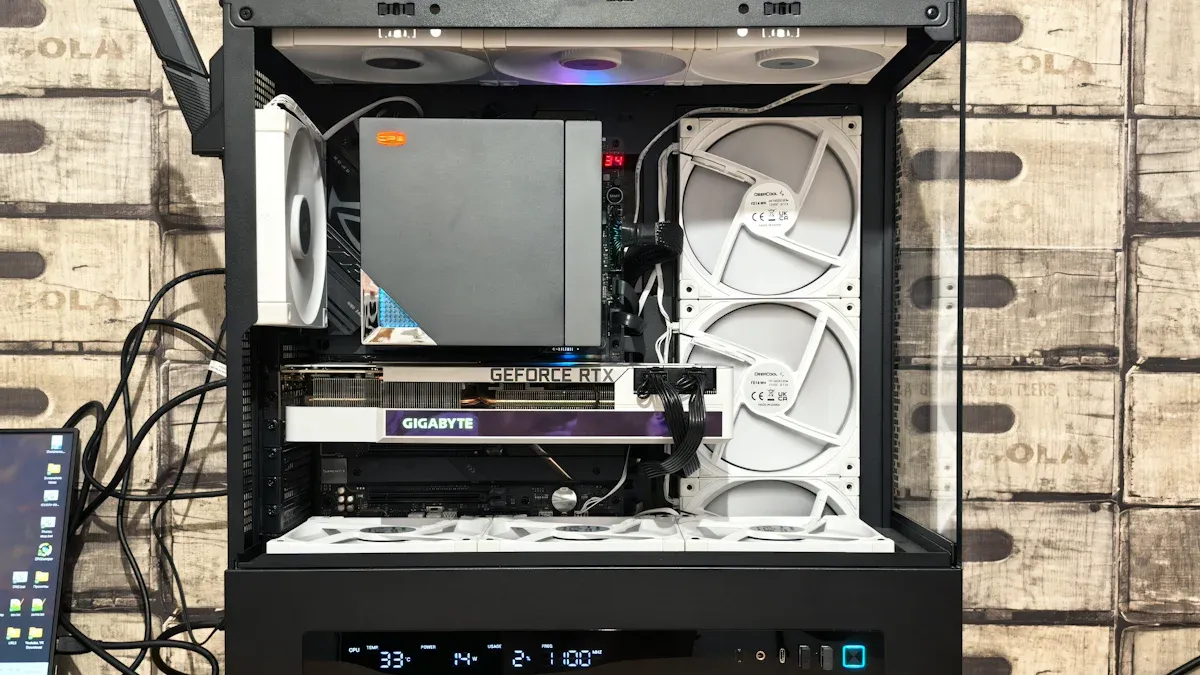
You want the best performance in 2026, right? Desktop towers still win for raw speed and heavy tasks like gaming or engineering. Check out these numbers:
H90Pro scores 2,422 single-core and 11,424 multi-core.
GH8 hits 78 FPS in 3ds Max, 120 FPS in SolidWorks.
MINI PC models now use less power and make less noise.
Shenzhen TopAdkiosk Display Technology Co., Ltd.
Add.: 2F, Bldg 10, Changfeng Industrial Park, Dongkeng, Fenghuang, Guangming, Shenzhen, China 518132
Mobile/WHATSAPP: 86-138 25769658
Email: marketing@topadkiosk.com topadkiosk@gmail.com
Skype: pghenry1
Wechat: adkioskhenry
English Web.: http://www.topadkiosk.com/
https://www.topkioskdisplay.com/
http://www.ad-kiosk.com/
https://www.toplcddisplay.com/
http://www.multitouchdigitalsignage.com/
https://www.youtube.com/channel/UCYVYNJHxLVEcQD8fuUxXNTA/videos?view_as=subscriber
https://www.facebook.com/TOPADKIOSKSHENZHEN/?ref=bookmarks
Metric | Mini PCs | Desktop Towers |
|---|---|---|
Performance | Great for daily work | Top for demanding jobs |
Power Use | Much lower | Higher |
Space Needed | Very compact | Needs more room |
Think about your workspace and what you need most—speed, quiet, or saving space.
Key Takeaways
Desktop towers are better for gaming and hard jobs. They are great for people who need lots of power.
Mini PCs are small and use less energy. They are good for simple things like browsing the web or doing office work.
Think about your space. Pick a mini PC if you want a quiet and neat area. Pick a desktop tower if you want more speed and ways to upgrade.
Mini PCs save money on your power bill. They use much less energy than desktop towers.
Think about what you might need later. If you want to change parts in the future, a desktop tower is best.
Performance Comparison
Mini PC Performance for Daily Work
You may ask if a mini pc can do your daily jobs. The answer is yes. Mini pcs have improved a lot lately. They have fast multi-core CPUs. They also have enough RAM for multitasking. SSDs make loading files quick. For office work, web browsing, video calls, and light photo editing, mini pcs work well.
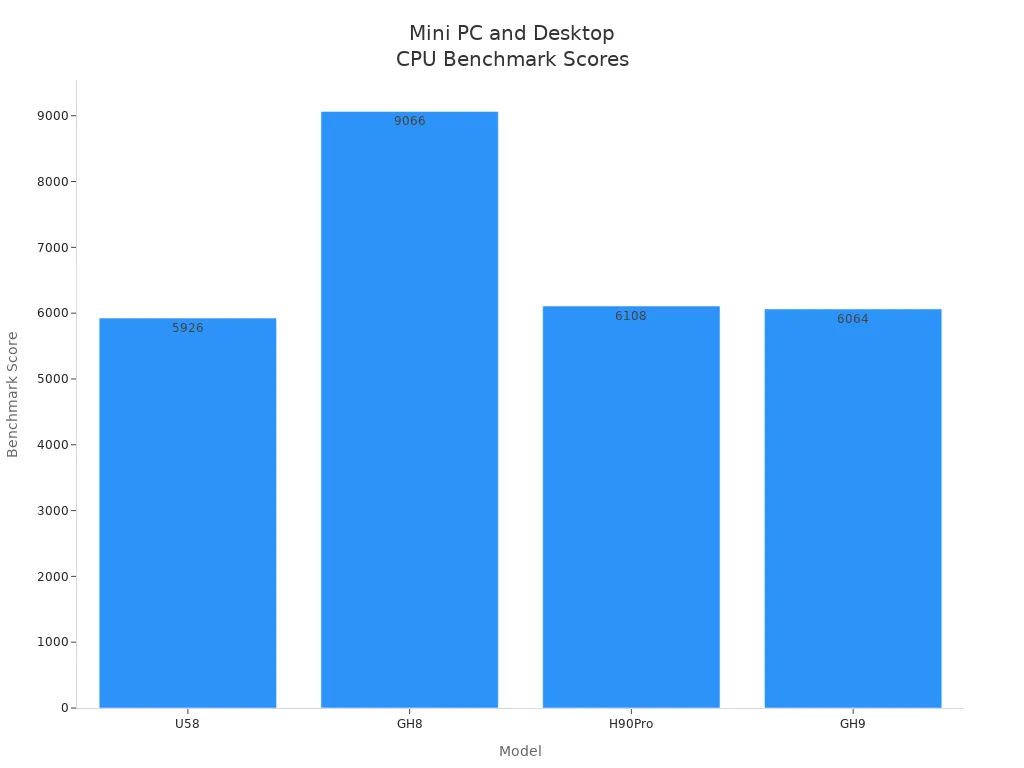
Look at these benchmark scores for popular mini pcs:
Model | CPU | RAM | SSD | Power Consumption | Benchmark Score |
|---|---|---|---|---|---|
U58 | Ryzen7 5825U | 16GB | 512GB SSD | 15W | 5,926 |
GH8 | Ryzen 9 8945Hs | 32GB | 1TB SSD | 45W | 9,066 |
H90Pro | Ryzen 7 8745Hs | 16GB | 1TB SSD | 40W | 6,108 |
GH9 | Intel Core i9 | 16GB | 1TB SSD | 40W | 6,064 |
Mini pcs now have strong scores and use less power. Most models have 16GB or 32GB of RAM. This is good for running many apps at once. SSD storage makes files and programs load fast.
Mini pcs are small and fit almost anywhere. You can put one on a small desk or behind a monitor. They run quietly and use less energy than desktops. If you want a neat, quiet workspace, a mini pc is a smart pick.
Desktop Tower Performance
Now let’s talk about desktop towers. If you need the best speed, a desktop tower is still better. You get bigger CPUs and stronger GPUs. There is more space for upgrades. You can play new games at high settings. You can edit 4K videos or run engineering software without slowdowns.
The newest hardware has powerful CPUs like Intel's Core Ultra 9 385K with 32 cores and 6.2GHz boost clocks. NVIDIA's GeForce RTX 5090 has 32GB of GDDR7 memory. It can push 4K gaming past 240 FPS. These systems are great for gaming and engineering. They handle professional apps easily.
Desktops can have 32GB or even 64GB of RAM. This is good for virtual machines or big creative projects. Many gamers and professionals use high-end desktop towers for work and play.
CPU: Look for high clock speeds and 6–16 cores.
GPU: Needed for ray tracing and high-res gaming.
RAM: DDR5 is common, with 16GB minimum and 32GB recommended.
Storage: NVMe SSDs for OS and games, HDDs for media.
CPU & GPU Differences
When you compare mini pcs and desktop towers, you see big differences in CPU and GPU choices. Mini pcs use mobile CPUs. These save power and stay cool. They work well for most jobs. But they are not as fast as desktop CPUs. Desktop towers use full-size CPUs with more cores and higher speeds. This gives better performance for tough jobs.
For graphics, most mini pcs use integrated GPUs. These are fine for web browsing, streaming, and light gaming. But for new games or 3D modeling, you will hit limits fast. Desktop towers can use strong discrete GPUs like the RTX 4060 Ti or RX 7700 XT. This lets you play games at 1440p or 4K. You can also run pro apps that need lots of graphics power.
Category | Mini PCs | Desktop Towers |
|---|---|---|
Limited to integrated graphics | Supports discrete GPUs, high settings at 1440p or 4K | |
FPS in Esports Titles | 60 FPS at 1080p | Capable of much higher FPS |
Performance in New Titles | 30-45 FPS at medium settings | High performance with RTX 4060 Ti or RX 7700 XT |
Upgradeability | Limited | Easily upgradeable to next-gen GPUs |
Category | Mini PCs | Desktop Towers |
|---|---|---|
Professional Workloads | Good for average tasks | Better for tough workloads (3D, simulations) |
Feature | Mini PCs | Desktop Towers |
|---|---|---|
Thermal Management | Can get hot under load | Good airflow, stays cool |
Upgradability | Limited (RAM, storage) | Many upgrades possible (GPU, CPU, RAM, etc.) |
Price-to-Performance | Higher cost for less performance | Better performance for similar price |
Gaming Performance | Integrated graphics, limited FPS | Discrete GPUs, high settings possible |
Thermals | Not great cooling | Strong cooling solutions |
Both mini pcs and desktops now offer 16GB of RAM. This is good for most users. If you need more, like for virtual machines or big projects, 32GB is available in both. But desktops are easier to upgrade.
Use Case Description | |
|---|---|
8 GB | Fine for very light use |
16 GB | Best balance of price and speed |
32 GB | Great for Proxmox, Docker, VMs, and development |
So, if you want a small, quiet, and energy-saving computer for daily jobs, a mini pc is a great choice. If you need top speed for gaming, engineering, or creative work, a desktop tower is still the best.
Thermal Management & Noise
Cooling in Mini PCs
Mini PCs pack a lot of power into a tiny box, so keeping them cool is a big deal. Most mini PCs use heat sinks with fans made from copper or aluminum. These materials pull heat away from the CPU and other parts fast. Some high-end models even use liquid cooling systems. These systems move coolant around to soak up heat and keep things running smoothly. You might also find heat pipes or vapor chambers inside, which help move heat away from the hottest spots.
Because everything sits so close together, mini PCs need smart cooling tricks. If the cooling system can’t keep up, the mini PC might get too hot. When that happens, the computer slows down to protect itself. This is called thermal throttling. Over time, too much heat can even damage the hardware. That’s why good cooling is so important in these small machines.
Mini PCs face heat challenges because of their size.
Overheating can slow down your computer during tough jobs.
Strong cooling helps your mini PC last longer.
Cooling in Desktop Towers
Desktop towers have a big advantage when it comes to cooling. There’s more space inside, so you can use bigger fans and even add extra ones. Many towers use air cooling, which works well for most people. If you want to push your computer to the limit, like overclocking, you can use liquid cooling. Liquid cooling uses copper pipes and a radiator to pull heat away from the CPU and GPU.
Cooling Type | Key Features | Overclocking Impact |
|---|---|---|
Liquid Cooling | High cooling power, copper pipes, great for hot parts | Keeps things stable when you push your PC hard |
Air Cooling | Standard fans, less powerful than liquid cooling | Might struggle with lots of heat during heavy use |
With these options, desktop towers stay cool even when you run demanding games or apps.
Noise Levels Compared
You probably want a quiet computer, especially if you work or study at home. Mini PCs are almost silent when you do light tasks. Their fans spin slowly, and the chips inside don’t get very hot. But when you push them hard, the small fans can get loud as they try to keep up.
Desktop towers can be quiet, too, especially if you use big, slow-spinning fans. But if you have a powerful graphics card or lots of fans, you might hear more noise. Hard drives and even optical drives can add to the sound.
Device Type | Noise Level (Heavy Use) | |
|---|---|---|
Mini PC | Nearly silent | Can get loud |
Desktop Tower | Usually quiet | Depends on setup |
Tip: You can cut down on noise by using soundproofing materials, fan control software, or picking parts that run quietly. Keeping your PC clean and dust-free also helps fans work better and quieter.
Upgradeability & Customization
Mini PC Expansion Options
Mini PCs are very small. This makes them fit in tight spots. But being small means you can’t upgrade them much. You can change the storage drive or add more RAM. But there are some limits.
Mini PCs use SO-DIMM RAM. This RAM is smaller than what desktop towers use.
Most mini PCs have only two RAM slots. You can’t add a lot of memory.
You can upgrade storage, but there are only one or two slots for SSDs or hard drives.
You can’t upgrade graphics inside most mini PCs. Some let you use an external GPU, but this costs more and takes up space.
Here’s how mini PCs and desktop towers compare:
Component | Mini PC Limitations | Desktop Tower Advantages |
|---|---|---|
Storage | Can upgrade, but may have limited slots | Typically more slots available |
RAM | Limited to SO-DIMM, often only two sticks | Can use full-size DIMMs, more slots available |
GPU | Some allow external GPUs, but limited internal options | Can accommodate larger, more powerful GPUs |
If you want a neat and small computer, a mini PC is good. But you can’t upgrade it as much as a desktop tower. Think about what you need in the future before you buy.
Desktop Tower Upgrades
Desktop towers are easy to upgrade. They have big cases and parts that are simple to swap. If you want a better graphics card, you can add one. If you need more storage, just put in another drive. You can also upgrade the CPU, RAM, cooling, or power supply.
You can upgrade the GPU for better games or creative work.
You can swap the CPU for more speed.
There are extra RAM slots for running many things at once.
You can add more SSDs or hard drives.
You can pick custom cooling for less noise or cooler parts.
You don’t need a new computer to get more power. You can just upgrade one part. This saves money and keeps your PC up to date. If you like to change parts or want a computer that grows with you, a desktop tower is best.
Tip: If you want your computer to last a long time and stay strong, pick a desktop tower. It is the best for upgrades.
Value Comparison
Price vs Performance
When you look at computers, you want the best value for your money. Mini PCs often cost less up front, especially if you only need them for daily work or school. You get a good price-to-performance ratio with these small machines. They handle web browsing, office apps, and streaming without breaking a sweat. If you want to save money and space, a mini PC gives you solid value.
Desktop towers usually cost more at first, but you get more power for your dollar. These machines shine when you need top performance for gaming, video editing, or engineering. You can upgrade them over time, which adds value in the long run. If you want a computer that grows with you, a desktop tower is a smart investment.
Type | Upfront Cost | Upgrade Potential | Value for Power Users | Value for Everyday Use |
|---|---|---|---|---|
Mini PC | Lower | Limited | Moderate | High |
Desktop Tower | Higher | Excellent | Very High | Moderate |
Tip: Think about what you need most—speed, upgrade options, or saving money. That will help you find the best value.
Energy Efficiency & Total Cost
You might not notice it right away, but efficiency matters for your wallet. Mini PCs use much less power than desktop towers. Here’s how they compare:
Mini PCs usually use between 15 and 65 watts.
Desktop towers can use 150 to 600 watts or more.
This big difference in efficiency means you pay less for electricity with a mini PC. Over a few years, the total cost of ownership drops because you save on your energy bill. If you want a computer that runs cool and keeps your costs low, a mini PC is hard to beat.
Desktop towers use more power, so your electricity bill goes up, especially if you run heavy programs or play games a lot. You get more performance, but you pay for it in energy use.
Note: If you care about efficiency and want to keep your total cost down, mini PCs offer great value over time.
Choosing Based on Use Case
Mini PC for Office & Everyday Tasks
You want a computer that helps you get things done at work or home. A mini pc fits right into most office setups. Its small size saves space on your desk. You can even hide it behind your monitor. If you care about workspace efficiency, this is a big win.
A mini pc handles web browsing, emails, and video calls with ease. You can open many apps at once and switch between them. This boosts your productivity. Most mini pcs support multi-monitor setups. You can spread out your work across two screens. Multi-monitor support makes tasks like spreadsheets and research much easier.
You also get quiet operation and low power use. This means less noise and lower bills. If you want stability for long work hours, a mini pc delivers. You do not need to worry about overheating or crashes during your busy day.
Tip: For office setups, a mini pc gives you the right mix of size, quiet, and productivity.
Desktop Tower for Enthusiasts & Power Users
You love gaming, creative work, or engineering. You need more power. A desktop tower gives you top performance. You get strong CPUs and powerful graphics cards. This means you can play the latest games or edit videos without slowdowns.
A desktop tower supports more upgrades. You can add extra RAM, swap out storage, or upgrade your graphics card. This keeps your system fast for years. If you use multi-monitor setups for gaming or design, a desktop tower handles it with ease.
You also get better cooling and stability. Long gaming sessions or heavy workloads will not slow you down. If you want the best productivity for tough jobs, a desktop tower is the way to go.
Use Case | Best Choice | Why It Wins |
|---|---|---|
Office setups | Mini PC | Size, quiet, workspace efficiency |
Home & School | Mini PC | Easy setup, low power, stability |
Gaming | Desktop Tower | Graphics, upgrades, multi-monitor |
Creative/Engineering | Desktop Tower | Productivity, stability, graphics |
Think about what you do most. Choose the computer that matches your needs and boosts your productivity.
You want the best fit for your needs. For top performance in 2026, desktop towers still win. If you want value, quiet, and a small space, a mini PC is a smart pick. Here’s a quick guide:
Need max speed or upgrades? Go with a desktop tower.
Want quiet, low power, and a tidy desk? Choose a mini PC.
Pick the one that matches your main use. You’ll get the best results!
FAQ
Can a mini PC handle gaming?
You can play some games on a mini PC. Most mini PCs work best with older or less demanding games. If you want high graphics or fast frame rates, a desktop tower with a strong GPU works better.
Is a mini PC good for students or remote work?
Yes! A mini PC fits small desks and runs quietly. You can use it for homework, video calls, and web browsing. It saves space and uses less power, so it works well for students or anyone working from home.
How hard is it to upgrade a mini PC?
Upgrading a mini PC is easy for storage and RAM. You can swap out the SSD or add more memory. You cannot upgrade the graphics card or CPU in most models.
Do desktop towers last longer than mini PCs?
Desktop towers usually last longer. You can upgrade parts like the GPU, RAM, or storage. This keeps your system up to date. Mini PCs have fewer upgrade options, so you may need a new one sooner.
Which is quieter, a mini PC or a desktop tower?
Mini PCs run almost silent during light tasks. They can get noisy under heavy use. Desktop towers can stay quiet if you use large, slow fans. Noise depends on your setup and how hard you push your computer.
See Also
Evaluating Touch Screen Kiosks for Quality and Cost Efficiency
An In-Depth Look at Digital Signage Options for Retail
Comparing Pricing of Freestanding LCD Kiosks from Leading Brands
Selecting the Ideal LCD Rack Monitor for Your Requirements
Comparative Analysis of LED, LCD, OLED, and QLED Technologies
