A Complete Guide to LCD Display Screen Types and Choosing the Best One
You have many options when choosing an lcd display screen. Each type—TN, VA, and IPS—has its own good points. TN screens have fast response times. This makes them great for gaming monitors. IPS panels show colors very well. They also let you see the screen from many angles. This is good for design work. VA panels have strong contrast. You can watch movies with deeper blacks. Your choice affects how clear, bright, and colorful your lcd display will be.
Shenzhen TopAdkiosk Display Technology Co., Ltd.
Add.: 2F, Bldg 10, Changfeng Industrial Park, Dongkeng, Fenghuang, Guangming, Shenzhen, China 518132
Mobile/WHATSAPP: 86-138 25769658
Email: marketing@topadkiosk.com topadkiosk@gmail.com
Skype: pghenry1
Wechat: adkioskhenry
English Web.: http://www.topadkiosk.com/
https://www.topkioskdisplay.com/
http://www.ad-kiosk.com/
https://www.toplcddisplay.com/
http://www.multitouchdigitalsignage.com/
https://www.youtube.com/channel/UCYVYNJHxLVEcQD8fuUxXNTA/videos?view_as=subscriber
https://www.facebook.com/TOPADKIOSKSHENZHEN/?ref=bookmarks
Key Takeaways
Pick the best LCD type for what you need. TN is good for gaming. IPS is best for design. VA works well for movies. - Look at important specs before you buy an LCD display. Check the resolution, refresh rate, and response time. - Think about viewing angles and color accuracy. IPS panels show the best color. TN panels are the fastest. - Try to match your budget with quality. TN panels cost less. IPS panels look better. VA panels are in the middle.
Shenzhen TopAdkiosk Display Technology Co., Ltd.
Add.: 2F, Bldg 10, Changfeng Industrial Park, Dongkeng, Fenghuang, Guangming, Shenzhen, China 518132
Mobile/WHATSAPP: 86-138 25769658
Email: marketing@topadkiosk.com topadkiosk@gmail.com
Skype: pghenry1
Wechat: adkioskhenry
English Web.: http://www.topadkiosk.com/
https://www.topkioskdisplay.com/
http://www.ad-kiosk.com/
https://www.toplcddisplay.com/
http://www.multitouchdigitalsignage.com/
https://www.youtube.com/channel/UCYVYNJHxLVEcQD8fuUxXNTA/videos?view_as=subscriber
https://www.facebook.com/TOPADKIOSKSHENZHEN/?ref=bookmarks
What Is an LCD Display Screen?
LCD Technology Overview
You see lcd display screens in many places. They are in phones and TVs. An lcd, or liquid crystal display, uses a special way to show pictures. The screen does not make its own light. It needs a backlight to shine through layers. Each layer has a different job. The liquid crystal layer controls how much light gets through. This makes the picture you see.
Here is a simple table that lists the main parts of a liquid crystal display and what they do:
Component | Function |
|---|---|
Backlight module | Provides the light source for the display. |
Polarized plates | Form polarized light and control the passage of light. |
TFT Glass Substrate | Supports the liquid crystal and controls pixel activation. |
Liquid crystal | Modulates light to create images but does not emit light itself. |
Color filter | Generates the primary colors (Red, Green, Blue) for the display. |
ITO transparent conductive layer | Provides a transparent conductive path for electrical signals. |
Photo Spacer | Maintains the height of the color filters and supports the glass layers. |
All the parts work together to make clear pictures. The liquid crystal changes shape when it gets electricity. This lets more or less light pass through. The color filter adds red, green, and blue. This makes the full-color image you see.
Tip: You can find lcd display screens in lots of devices. They use less power and make sharp pictures.
LCD vs Other Display Technologies
You might wonder how lcd display screens are different from other types. LCD screens use liquid crystal to control light. Other screens, like OLED, use organic stuff that glows when powered. Plasma screens use gas to make light.
LCD display screens have good and bad points. Here is a table that compares the main types:
Type | Advantages | Disadvantages |
|---|---|---|
TN | Fast response times, low cost | Limited viewing angles, less accurate color reproduction, lower contrast ratios |
IPS | Excellent viewing angles, accurate color reproduction | Slower response times, higher cost |
VA | High contrast ratios, deep blacks | Slower response times, some color shift at wider angles |
TN panels are good for fast action. IPS panels show better colors and let you see from more angles. VA panels show deeper blacks and higher contrast. LCD screens are good for many things, but you should pick the type that works best for you.
Types of LCD Display Screens
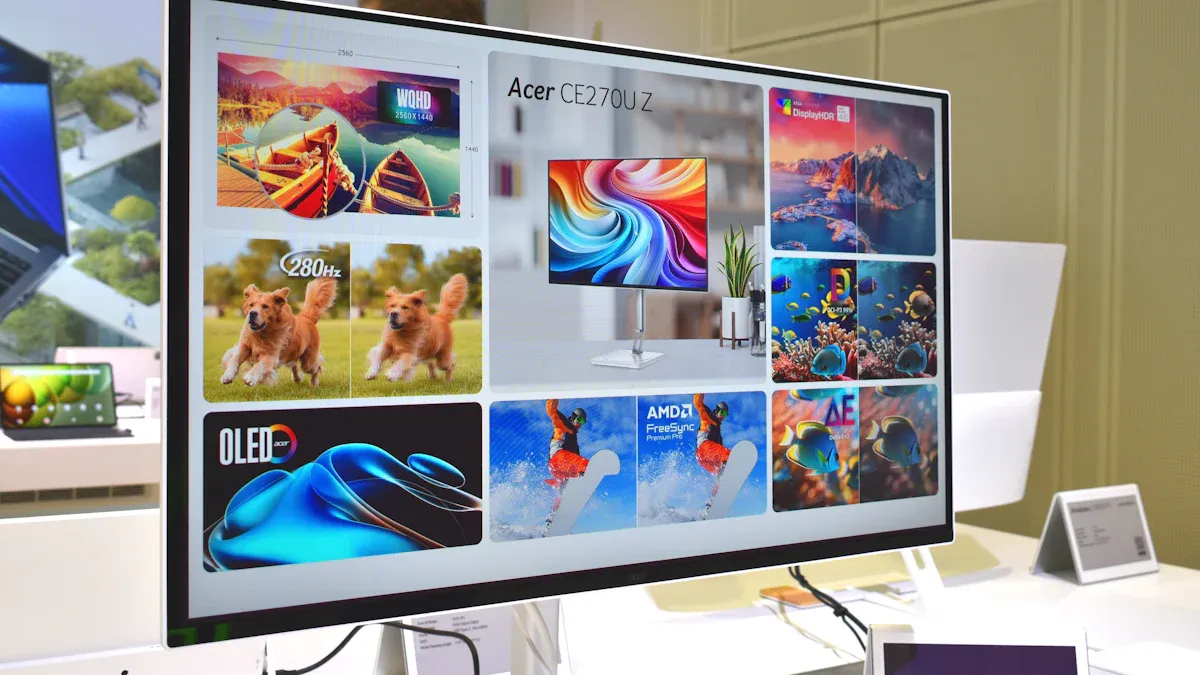
There are many kinds of lcd display screens. Each lcd display type has special features. The main types of lcd panels are TN, VA, and IPS. These lcd screens are used for different things. Let’s learn about the types of lcd panels and what they are used for.
TN (Twisted Nematic) LCD
TN is a very common lcd type. You can find TN panels in cheap monitors and gaming monitors. TN technology uses twisted liquid crystals to move light. When you add voltage, the crystals untwist and block the light. This makes TN panels very fast. They can have response times as low as 1 millisecond. TN panels also have high refresh rates, up to 360Hz. TN panels cost less because they are cheaper to make.
TN panels are good for fast games and arcade machines. But you might see bad colors and small viewing angles.
Specification | Details |
|---|---|
Refresh Rate | Up to 360Hz |
Response Time | 1-2 milliseconds |
Contrast Ratio | 600:1 to 1200:1 |
Viewing Angles | 170° horizontal, 160° vertical |
Color Gamut | Usually 100% sRGB |
Manufacturing Cost | Lower than IPS panels |
VA (Vertical Alignment) LCD
VA is another well-known lcd display type. VA panels use crystals that stand up straight. You get great contrast ratios, from 2000:1 to 6000:1. VA panels show darker blacks and better colors than TN. You see VA panels in TVs and monitors that need strong contrast. VA panels can help your eyes feel better when you look at still pictures or text.
VA panels are best for watching movies and working with spreadsheets. But you might see motion blur because they are slower, from 14 to 30 milliseconds.
IPS (In-Plane Switching) LCD
IPS is a high-quality lcd display type. IPS panels line up the crystals flat with the glass. You get wide viewing angles and very good color accuracy. IPS panels keep colors the same from different sides. You see IPS panels in pro monitors, smartphones, and fancy TVs.
IPS panels are great for design work and group projects. You might see lower contrast and a little glow in dark scenes.
Panel Type | Advantages | Disadvantages |
|---|---|---|
TN | Cheapest, fastest to make, useful for many things | Bad color, small viewing angles |
IPS | Great color accuracy, wide viewing angles | Lower refresh rates, IPS glow |
VA | Great contrast, good color | Slower response, can have motion blur |
Display Type | |
|---|---|
TN | Cheap monitors, gaming monitors, arcade games, handheld game consoles, simple devices, low-power IoT devices, business/industrial machines |
IPS | Pro monitors, smartphones, fancy TVs |
VA | TVs and monitors that need deep blacks and strong contrast |
TFT Technology in LCDs
TFT means Thin Film Transistor. All main lcd panels use TFT technology. You see TFT in active-matrix lcds. TFT helps lcd screens show better colors and contrast. It makes lcd screens look sharp and bright. TFT lcds are used in factory machines, medical tools, and home electronics.
TFT technology makes lcds strong and work well. You get better viewing angles and smooth gray colors.
Now you know the main types of lcd displays. Each lcd display screen type is good for something special. You can pick the right lcd display for games, movies, art, or work.
Comparing LCD Display Screen Types
Color Accuracy
You want your display to show colors that look real. Color accuracy means how close the colors on your lcd match the real world. TN panels have less accurate colors. VA panels do better, but IPS panels give you the best color accuracy. You see this difference when you edit photos or watch movies. If you need true colors, you should choose an IPS lcd display.
Panel Type | Color Accuracy |
|---|---|
TN Displays | Less accurate |
VA Displays | Good |
IPS Displays | Superior |
Viewing Angles
Viewing angle tells you how the picture looks from the side. TN panels have narrow viewing angles. Colors can look strange if you move away from the center. VA panels are better, but you still see some color shift at wide viewing angles. IPS panels stand out because they keep colors and brightness steady, even at 178 degrees. You can share your lcd screen with friends and everyone sees the same image.
TN Panels: Limited viewing angles, colors wash out from the side.
VA Panels: Better than TN, but some color and contrast loss at extreme angles.
IPS Panels: Very wide viewing angles, colors stay true from almost any spot.
Response Time
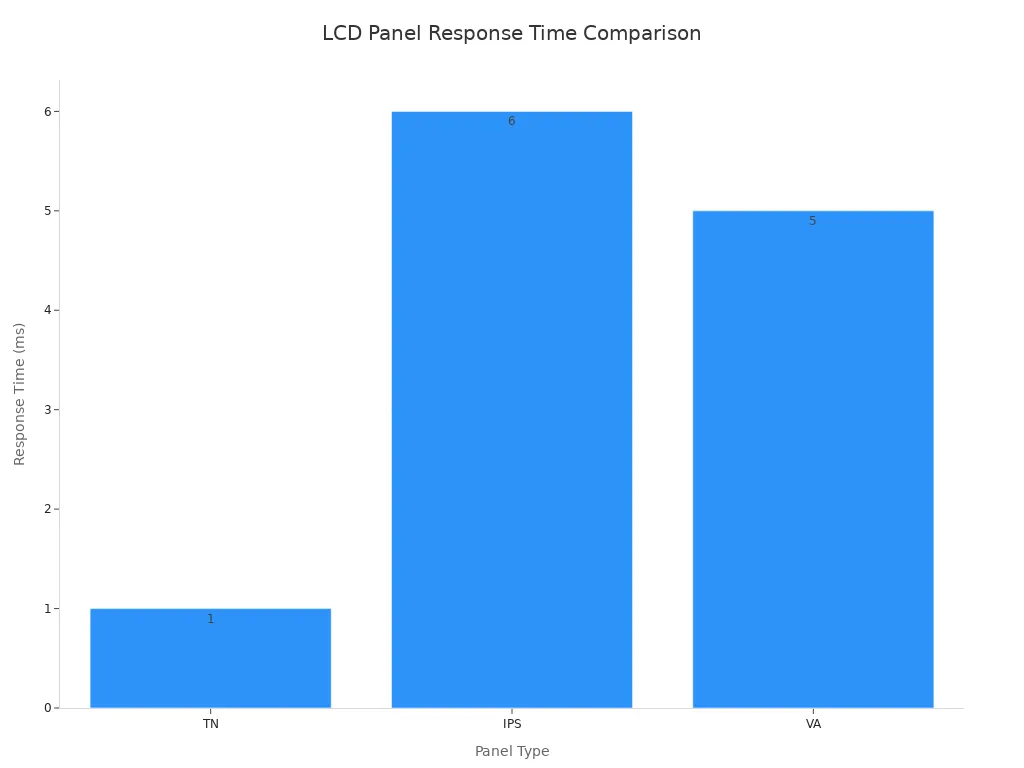
Response time means how fast a pixel changes from one color to another. Fast response times help you play games without blur. TN panels have the fastest response times. IPS panels are moderate, and VA panels are slower. If you love fast-paced games, you will notice less motion blur on a TN lcd display. Slower panels can make videos look less sharp.
Panel Type | Response Time |
|---|---|
TN | Fastest |
IPS | Moderate |
VA | Slower |
Tip: Faster response times reduce ghosting and motion blur, which is important for gaming.
Contrast Ratio
Contrast ratio shows how deep the blacks and how bright the whites look on your display. VA panels have the highest contrast ratios, from 2000:1 to 6000:1. You see deep blacks and sharp details. IPS panels have moderate contrast, usually between 1000:1 and 1200:1. TN panels have the lowest, so blacks can look gray.
Panel Type | Contrast Ratio Range | Characteristics |
|---|---|---|
TN | 600:1 to 1000:1 | Lower contrast, washed-out blacks |
IPS | 1000:1 to 1200:1 | Moderate, blacks may look grayish |
VA | 2000:1 to 6000:1 | Highest, deep blacks, sharp visuals |
Best Use Cases
You should match your lcd display screen to your needs. Here is a quick guide:
Feature | TN LCD | VA LCD | IPS LCD |
|---|---|---|---|
Viewing angles | Narrow | Better than TN | Very wide viewing angles |
Color accuracy | Basic | Good | Excellent |
Response time | Fastest | Moderate | Fast in modern panels |
Contrast | Moderate | Highest | Moderate |
Applications | Office, gaming | TV, entertainment | Design, mobile, premium |
For professional design, you should pick IPS for its color accuracy and wide viewing angles.
For gaming, TN works well for speed, but modern IPS panels also perform great.
For movies and TV, VA gives you deep blacks and strong contrast.
Note: Always think about what you need most—color accuracy, viewing angle, speed, or contrast—before you choose your lcd display.
How to Choose an LCD Display Screen
Picking the right lcd display screen can be tricky. It is hard for new buyers. You want a screen that fits your needs. It should show clear images. This section will help you know what to check. It will also help you avoid mistakes.
Application and Usage Needs
Think about how you will use your lcd. Each panel type is best for certain jobs. Use the table below to match your needs:
Feature | TN Panels | IPS Panels | VA Panels |
|---|---|---|---|
Strengths | High-speed performance | Better color accuracy | Superior contrast ratios |
Weaknesses | Limited viewing angles | Slower response times | Limited color reproduction |
Best Use Cases | Gaming and fast-paced content | Professional graphics work | Multimedia and TV displays |
TN is good for games and fast action.
IPS is best for art and photo editing.
VA is great for movies and TV.
You should also think about these things:
Display type
Power use
Viewing angles
Durability
Interface compatibility
Tip: Always check the specs for your main use. Many people forget details that change how the display works.
Image Quality and Performance
Image quality is important for all tasks. You want sharp pictures and smooth motion. Each lcd panel has its own strengths:
Feature | TN (Twisted Nematic) | IPS (In-Plane Switching) | VA (Vertical Alignment) |
|---|---|---|---|
Response Time | Fastest | Moderate | Slower |
Viewing Angles | Limited | Wide | Moderate |
Color Accuracy | Lowest | Highest | Moderate |
Contrast Ratio | Lower | Moderate | Highest |
Black Levels | Lighter Grays | Moderate | Deeper Blacks |
Cost | Lowest | Higher | Moderate |
Budget Gaming Monitors, basic displays | Professional monitors, smartphones, tablets | Televisions, monitors with emphasis on contrast |
For gaming, you need fast response and high refresh rate. For design, you need good colors and wide angles. For movies, you want deep blacks and strong contrast.
Here are the minimum specs you should look for:
Resolution: 1080p is the starting point. 1440p is better for most people. 4K is best for top setups.
Refresh Rate: 60-75Hz is okay for normal use. 144-165Hz is good for gaming. 240Hz is for serious players.
Response Time: 1ms is best for games.
Specification | |
|---|---|
Resolution | 1080p (1920x1080) |
Refresh Rate | 60Hz (basic), 144Hz (gaming) |
Response Time | 1ms (GtG) |
HDR | DisplayHDR 400 minimum |
Color Depth | 8-bit (minimum for HDR) |
Brightness | 400 nits (DisplayHDR 400) |
Higher resolution makes images sharper.
Higher refresh rate makes motion smoother.
Lower response time means less blur.
Note: Many people forget to check these specs. Always read the details before buying.
Budget and Cost Considerations
You need to balance price and quality. TN panels are cheaper and good for games. IPS panels cost more but have better color and angles. VA panels are in the middle for price and performance.
Think about these things when you compare prices:
LCD panel fluid type
Temperature range
Color ability
Touch screen technology
Knowing what changes the price helps you choose wisely. Do not buy features you do not need. Focus on the specs that matter for you.
Size, Resolution, and Features
Screen size and resolution change how you see things. Bigger screens give more space, but need higher resolution for sharp images. Full HD and 4K screens show more detail and make work easier.
Feature | Description | |
|---|---|---|
Resolution | Number of pixels, affects image sharpness and detail | Higher resolution means clearer, more detailed image |
Aspect Ratio | Width to height ratio of the screen | Changes how content looks and feels |
Intended Use | What you plan to do (gaming, work, movies) | Different uses need different resolutions |
Higher resolution gives more space for data and layers.
Always check resolution and aspect ratio for the best view.
Extra features like touch support and brightness control can help. Touch screens are important for kiosks, tablets, and some laptops. If you need touch, make sure your lcd display has it.
Power Consumption and Durability
Power use and durability are important for long use. TN panels use less power than IPS panels. TN is good for battery devices. IPS uses more power but keeps brightness longer.
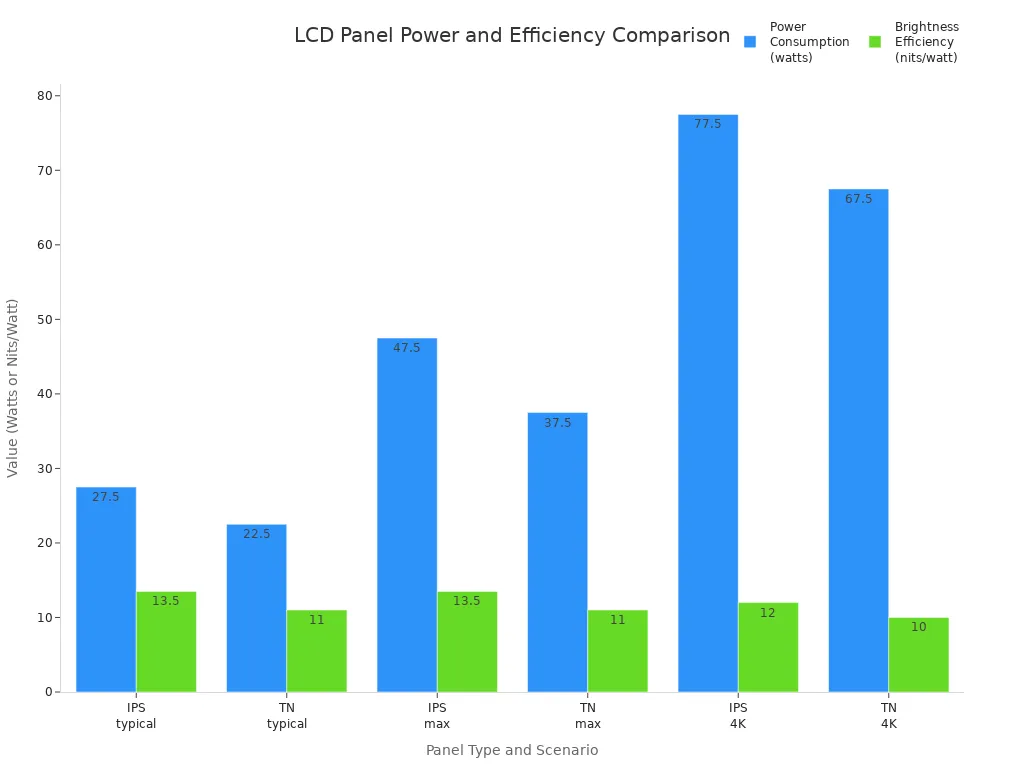
TN panels save more energy.
IPS panels keep brightness longer, losing only 10–15% over 50,000 hours.
TN panels lose more brightness, about 20–25% over the same time.
To make your display last longer, follow these tips:
Challenge | Strategy |
|---|---|
Environmental Stress | Pick displays with UV coatings and good sealing. |
Mechanical Durability | Use displays with strong design and protective cases. |
Electrical Failures | Make sure the electrical design is solid and uses protective circuits. |
Manufacturing Defects | Choose displays from brands with strict quality checks. |
Wear and Tear | Look for displays known for long life and ask experts for advice. |
Tip: Many people forget about power and durability. Always check these before buying.
Common Mistakes to Avoid
Do not skip important specs like resolution or refresh rate.
Avoid electrical mistakes, like missing capacitors or wrong resistors.
Watch out for heat problems. Too much heat can hurt your lcd.
Do not pick a display just because it is cheap. Make sure it fits your needs.
If you follow these steps, you will get a good lcd. It will fit your needs and last a long time.
You have learned how each lcd display screen type fits different needs. TN works best for fast games. IPS gives you bright colors and wide views. VA offers deep blacks for movies. Always match the lcd to your main use. Check the display specs before you buy a screen. Review this guide when you shop for your next display.
FAQ
What is the main difference between TN, VA, and IPS panels?
You will find that each lcd display panel has a unique strength. TN offers speed, VA gives you high contrast, and IPS provides the best color accuracy. You should pick the type that matches your main use.
Can I use an lcd display for gaming?
Yes, you can use an lcd display for gaming. TN panels work best for fast games. IPS panels also perform well if you want better colors. Always check the refresh rate and response time before you buy a screen.
How do I clean my lcd screen safely?
You should turn off your lcd screen first. Use a soft, dry cloth to wipe the surface. Do not spray water or cleaner directly on the display. Avoid using paper towels or rough materials.
Does screen size affect image quality?
Screen size does not change image quality by itself. You need to check the resolution. A higher resolution on a large display gives you a sharper picture. For the best view, match the size and resolution to your needs.
How long does an lcd display last?
Most lcd displays last many years. You can expect good performance for 30,000 to 60,000 hours. Keep your display cool and clean to help it last longer.
See Also
Selecting The Ideal LCD Round Display For Your 2025 Project
Leading LCD Display Manufacturers And Brands For Your Upcoming Project
Understanding The Pros And Cons Of LCD Display Screens
