LCD Display Screens: What You Need to Know About Their Advantages and Disadvantages
You see lcd display screen technology in many homes and offices. Many people pick lcd because it gives sharp and clear pictures. These screens use less energy, and they do not get very hot. People say lcd screens are small and light, so you can move and set them up easily. Some users see that the viewing angles are not wide, and the response time is slower. You may also notice that bigger screens have higher prices. These things help you choose which screen is best for you.
Key Takeaways
LCD screens show clear pictures and high detail, so they are good for work and fun. - These screens use less power, which helps you save money and is better for the planet. - LCDs are light and thin, so you can move and set them up easily in many places. - Watch out for problems like small viewing angles and blurry pictures when things move fast, especially in games or action videos. - When picking an LCD, think about how you will use it, how much you want to spend, and where you will put it to make sure it works well for you.
What Is an LCD Display Screen?
LCD Technology Overview
You can find lcd display screens in lots of places. These screens use a special way to show pictures. The main parts are two pieces of polarized glass and a layer of liquid crystals. When you turn on the screen, light goes through the first glass. The liquid crystals line up and let the light move to the second glass. The second glass sits at a right angle to the first one. When you send electricity, the crystals twist and block the light. This makes some parts of the screen look dark and some look bright.
An LCD works by using two pieces of polarized glass with a layer of nematic liquid crystals in the middle. When light hits the first filter, it becomes polarized. The liquid crystal molecules line up so light can pass to the second filter, which is turned at a right angle. When electricity is used, the liquid crystals untwist and stop the light, making dark spots on the screen.
You can change how bright and colorful the screen is by changing the electricity. This helps lcd screens show clear pictures and sharp words. These screens are good for many jobs because they work well and do not use much power.
Common Applications
You can see lcd display screens in many jobs and machines. These screens help people see information and control things. Here are some ways lcd screens are used:
Automotive Manufacturing: LCDs are used for control panels and dashboards.
Electronics Production: They serve as displays for various electronic devices.
General Machinery: LCDs provide interfaces for machinery control.
Heavy Industries: Used in monitoring and control systems for heavy equipment.
You also see lcd screens in computers, TVs, and smartphones. Many people use them every day because they look good and are easy to use. You can trust lcd screens for both work and fun.
Advantages of LCD Display Screens
When you look for a new monitor or screen, you want to know what makes lcd display screen technology a smart choice. Here are the main advantages of lcds that help you get the best experience.
High Resolution
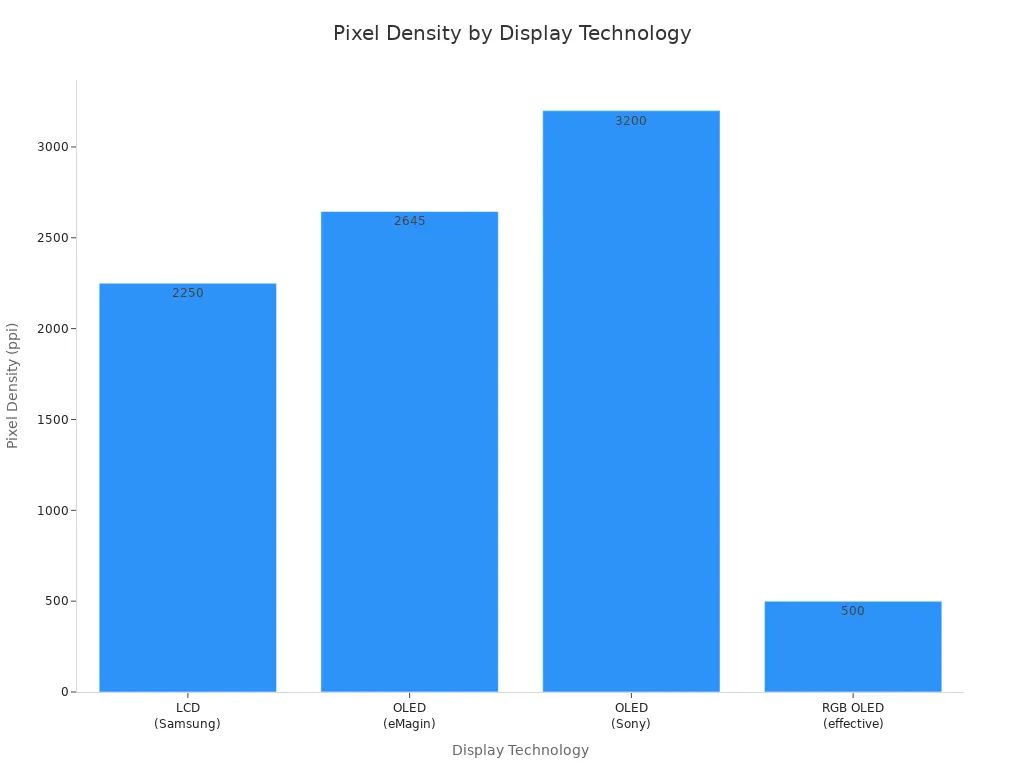
You get sharp and clear images with lcd monitors. The resolution tells you how many pixels fill the screen. More pixels mean better detail. Many lcds have very high pixel density. For example, some Samsung lcd screens reach 2250 pixels per inch (ppi), and the Sony Xperia Z5 Premium has over 1000 ppi. This means you see smooth lines and tiny details, even when you sit close to the screen.
Display Technology | Pixel Density (ppi) |
|---|---|
LCD (Samsung) | 2250 |
OLED (eMagin) | 2645 |
OLED (Sony) | 3200 |
LCD (Sony Xperia Z5 Premium) | >1000 |
RGB OLED (effective) | ~500 |
Excellent Picture Quality
You enjoy bright colors and clear text when you use an lcd display screen. The picture quality depends on several things:
Resolution
Contrast
Color reproduction
Energy consumption
Component costs
Number of pixels per LED
Processing speed
Lcds show images with good contrast and color. You can watch movies, play games, or read documents with comfort. The screen does not flicker, so your eyes feel less tired.
Energy Efficiency
You save power with lcds. These screens use less energy than older types like CRTs. This helps you lower your electric bill and protect the environment. Here is a simple table to compare energy use:
Display Type | Energy Consumption | Notes |
|---|---|---|
CRT | High | |
LCD | Low | Consumes less power than CRT |
OLED | Varies | Uses 40% of the power of an LCD for black images, but can use over three times as much for white images |
You see that lcd display screen technology is a great choice for energy saving. You can use your monitors for long hours without worrying about high costs.
No Burn-In Issues
You do not have to worry about burn-in with lcds. Burn-in happens when a picture stays on the screen for too long and leaves a mark. Lcds avoid this problem because of their design:
LCD/LED/QLED/Mini-LED displays do not experience burn-in.
Liquid crystal shutters do not degrade under static voltage.
LED backlights lose very little brightness over time.
If you use your screen for work or games, you can leave images on for hours. Any image persistence is usually temporary and goes away after a short time.
Slim and Lightweight
You can move and set up lcd monitors easily. These screens are thin and light. You can hang them on a wall or place them on a small desk. This makes them perfect for homes, offices, and even cars. You do not need strong furniture to hold them.
Minimal Heat Production
You notice that lcds stay cool during use. High-brightness lcd panels use between 250W and 350W when very bright, but most home screens use much less. About 75% of the energy turns into heat, but lcds still make less heat than other types. Less heat means your room stays cooler, and your screen lasts longer. If the screen gets too hot, the brightness can drop by 3% to 5% for every 10°C rise. You should keep your lcd in a cool place for the best results.
Long Lifespan
You can trust lcd display screen technology to last for many years. The parts do not wear out quickly. The backlight and liquid crystals keep working well for a long time. You get a good value for your money because you do not need to replace your monitors often.
Tip: If you want a screen that gives you high resolution, saves energy, and lasts a long time, lcds are a smart choice.
The advantages of lcds make them popular for many uses. You see them in homes, schools, offices, and factories. You get clear images, low power use, and a screen that fits your space.
Disadvantages of LCD Display Screens
When you pick a screen for your home or office, you should know about lcd disadvantages. These problems can change how you see and use your monitor. Here are the main things you need to think about:
Limited Viewing Angles
Lcd monitors can look different from the side. If you move around, colors and brightness may change. This happens because the liquid crystals do not spread light in every direction. The panel type inside the lcd matters a lot.
Display Type | Specific Issues | |
|---|---|---|
VA Panel | Contrast drops to 30% at 20-degree tilt | Brightness uniformity below 75% at 30-degree angle, color gamut coverage degrades by 15-25% at 45-degree angle |
TN Panel | Maximum horizontal angle ~170 degrees, noticeable color inversion | Color difference Delta E exceeds 10 at 30-degree tilt |
IPS Panel | Usable contrast ratio above 100:1 at 60-degree angle | Oblique light leakage raises black level, reducing contrast to around 200:1 |
Some panels, like IPS, let you see better from the side. But even these can lose color and contrast if you do not look straight at them. This is a common problem with lcds.
Backlight Performance
All lcd screens need a backlight to show pictures. How the backlight works can cause problems with color and brightness. Not every lcd uses the same backlight style.
Backlight Type | Description | Impact on Uniformity | Performance in Varying Lighting Conditions |
|---|---|---|---|
Direct-Lit | LEDs are evenly placed behind the panel | Superior uniformity | Enhances diagnostic reliability and detail detection |
Edge-Lit | LEDs are placed on the sides for a slimmer profile | Compromised brightness consistency | May lead to missed details due to brightness variations |
Edge-lit lcds can have bright spots or dark corners. This makes it hard to see details in dark scenes. Direct-lit screens are better but are thicker and heavier.
Higher Cost for Larger Sizes
Big lcd screens can cost a lot of money. The price goes up as the screen gets bigger. Lcds are usually cheaper than OLED, but large ones are still expensive.
Display Type | Accessibility | |
|---|---|---|
LCD | Generally lower than OLED | More accessible and budget-friendly |
OLED | Carries a premium | Less accessible, especially at larger sizes |
LED | Ranges from a few hundred to several thousand dollars | Overall more accessible than OLEDs |
You can get lcds for less than OLED, but very big screens still cost a lot. Think about this before you buy.
Color Accuracy Limits
Lcds do not always show colors the right way. This is a big problem if you want true colors. Here are some things that can go wrong:
lcds have trouble showing true black and dark gray. This makes colors look less deep.
Gamma and gray-scale can be uneven. Some colors may look wrong or missing.
Brightness, contrast, and color can change if you move to the side. Sometimes, colors even flip at wide angles.
You might see yellowish colors, uneven shades, or weak brightness from the side.
If you work with photos or videos, these color problems can be a big deal.
Motion Blur
Fast-moving scenes can look blurry on lcds. This happens because the liquid crystals cannot move fast enough. Here is what you should know:
A top lcd model has an average response time of 8 milliseconds. Each pixel changes in about 4 milliseconds.
Motion blur shows up when the screen cannot update fast. You see smears or ghosting in action scenes.
Standard video runs at 60 frames per second. Each pixel must update in 16.7 milliseconds. If not, you see lag and blur.
This problem can make games and sports less fun to watch.
Fragility
Lcd screens are thin and light, but they break easily. You need to be careful with them.
TFT lcd monitors use thin glass. This glass can crack or scratch if you bump or drop it.
CRT monitors are stronger because they use thick glass tubes.
OLED screens are also easy to break, but for a different reason. Their organic parts can get damaged by water or air.
If you move your monitor a lot, protect it from bumps and drops.
Note: Lcd disadvantages do not mean you should not use them. You just need to know what to expect and how to use your screen the right way.
LCD Display Screen vs. Other Technologies
LCD vs. CRT
LCD display screens and CRTs are very different. CRTs use glass tubes, but lcd monitors use flat panels. LCDs show sharper pictures because they have a set resolution. CRTs can change resolution, but lcds look best at their own setting. CRTs are better for fast-moving scenes. You see less blur with CRTs. LCDs can show smears or ghosting when things move quickly.
Aspect | CRT Displays | LCD Displays |
|---|---|---|
Resolution | Works at many resolutions | Made for one main resolution |
Motion Handling | Shows fast video well | Slower, may blur or ghost |
Viewing Angle | Looks good from any angle | Best from a small angle |
Color Reproduction | Colors are accurate | Colors change if you move |
Vibrancy of Colors | Colors are more lively | Colors are less bright in dark or light spots |
LCD monitors use less energy than CRTs. For example, a 19-inch lcd uses about 28 watts. A 32-inch CRT uses 120 watts. This means you pay less for power each year.
Display Type | Average Power Consumption (Watts) | Annual Cost (at $0.085 per kWh) |
|---|---|---|
LCD (19 inch) | 28 | $0.83 |
CRT (32 inch) | 120 | $4.46 |
LCD vs. LED
You may see "LED" screens in stores. These are lcd screens with a different backlight. Standard lcd screens use CCFLs. LED screens use light-emitting diodes. LED screens use less energy and are brighter. You get higher contrast with LED screens.
Feature | LCD Screens | LED Displays |
|---|---|---|
Light Source | CCFLs | Light-emitting diodes |
Energy Efficiency | Not as efficient as LEDs | More efficient and better brightness |
Picture Quality | Lower contrast and brightness | Higher contrast and brightness |
LED screens last longer than lcd screens. An LED screen can work for up to 15 years. An lcd screen usually lasts about 8 years.
Display Type | Lifespan (Years) | Lifespan (Hours) |
|---|---|---|
LCD | 8 | 30,000 - 60,000 |
LED | 15 | 50,000 - 100,000 |
LCD vs. OLED
OLED screens are different from lcd screens. OLED screens light up each pixel by itself. You get pure blacks and very bright colors. OLED screens keep their color and brightness from the side. LCD screens lose color and brightness at wide angles. At a 45-degree tilt, OLED screens have a color difference Delta E of less than 3.0. IPS-LCDs reach 5.0-7.0 and VA-LCDs go even higher.
OLED screens cover over 95% of the DCI-P3 color space. You see very pure colors. Some lcd screens with quantum dots can match this, but most lcds cannot. OLED screens use less power with dark images because they turn off pixels. LCD screens use the same power all the time since the backlight stays on.
OLED screens save power with dark images because pixels turn off.
LCD screens use less power with bright images since the backlight stays the same.
If you want the best color and viewing angles, OLED screens are the best. LCD screens still give you good value and steady performance for most jobs.
Choosing the Right LCD Display Screen
Usage Needs
You should think about how you plan to use your display. If you want a screen for gaming, you may like TN panels because they cost less and respond faster. IPS panels work well for games too, but they show better colors and wider viewing angles. For office work, IPS panels are a smart choice. They give you clear text and true colors from many angles. If you use your display in an office, look for brightness between 250 and 350 nits. This level helps reduce eye strain. For gaming, you may want a display with 400 to 1000 nits. This makes bright scenes and special effects stand out.
TN panels: Fast response, good for gaming
IPS panels: Great color, best for office and general use
VA panels: Good contrast, but slower response
Budget Considerations
You need to match your display to your budget. TN panels usually cost less, so they fit small budgets. IPS panels cost more, but they give you better color and viewing angles. Large displays cost more than small ones. If you want a big screen, check if it fits your budget before you buy.
Tip: Make a list of the features you need most. This helps you pick a display that gives you the best value for your money.
Space and Placement
You should check how much space you have for your display. LCD screens use less space than old CRT screens. You can fit an LCD in places where a CRT would not work.
Display Type | Space Requirement (compared to CRT) |
|---|---|
LCD | One-third or less |
CRT | Baseline |
You can put an LCD on a small desk or mount it on a wall. This makes it easy to set up your display in a bedroom, office, or classroom.
Image Quality Preferences
You may want your display to show smooth colors and clear pictures. Look for these features when you choose a display:
Feature | Description |
|---|---|
Gradation Expression | Shows smooth changes in color and shades without lines or color problems. |
Brightness Variation | Keeps the same brightness across the whole screen. |
Chromaticity Variation | Shows colors that look natural and do not change across the screen. |
Viewing Angles | Keeps colors and brightness steady, even when you look from the side. |
If you care about image quality, IPS panels give you the best viewing angles and color. You should also check for even brightness and smooth color changes.
LCD display screens give you sharp images, low energy use, and a slim design. You may face issues like limited viewing angles or motion blur. To choose the best screen, think about size, brightness, and how you plan to use it.
Look for strong performance and trusted brands.
Do not focus only on price. Review product details and ask for samples if possible.
You get the best value when you match your screen to your real needs.
FAQ
What makes LCD screens different from LED screens?
You see LED screens as a type of LCD. LED screens use light-emitting diodes for backlighting. This gives you brighter images and lower energy use. LCD screens with CCFL backlights use more power and show less brightness.
Can LCD screens get burn-in like other displays?
You do not need to worry about burn-in with LCD screens. The liquid crystals do not leave permanent marks. Any image persistence is temporary and disappears after a short time.
How long does an LCD screen usually last?
You can expect an LCD screen to last between 30,000 and 60,000 hours. That means you get about 8 years of use with normal daily operation.
Are LCD screens safe for your eyes?
You get less eye strain with LCD screens. The display does not flicker, and you see clear text. You should adjust brightness and take breaks to protect your eyes.
What should you check before buying an LCD screen?
Tip: Look for screen size, resolution, panel type, and brightness. You should match these features to your needs and space. Always check reviews and compare brands.
See Also
Pros And Cons Of Using LCD Display Technology
Exploring The Main Distinctions Between LED And LCD Walls
Selecting The Best LCD Digital Signage For Your Business
