Interactive kiosk touch screen picks that wow in 2026
Shenzhen TopAdkiosk Display Technology Co., Ltd.
Add.: 2F, Bldg 10, Changfeng Industrial Park, Dongkeng, Fenghuang, Guangming, Shenzhen, China 518132
Mobile/WHATSAPP: 86-138 25769658
Email: marketing@topadkiosk.com topadkiosk@gmail.com
Skype: pghenry1
Wechat: adkioskhenry
English Web.: https://www.topkioskdisplay.com/
http://www.ad-kiosk.com/
https://www.toplcddisplay.com/
http://www.multitouchdigitalsignage.com/
https://www.youtube.com/channel/UCYVYNJHxLVEcQD8fuUxXNTA/videos?view_as=subscriber
https://www.facebook.com/TOPADKIOSKSHENZHEN/?ref=bookmarks
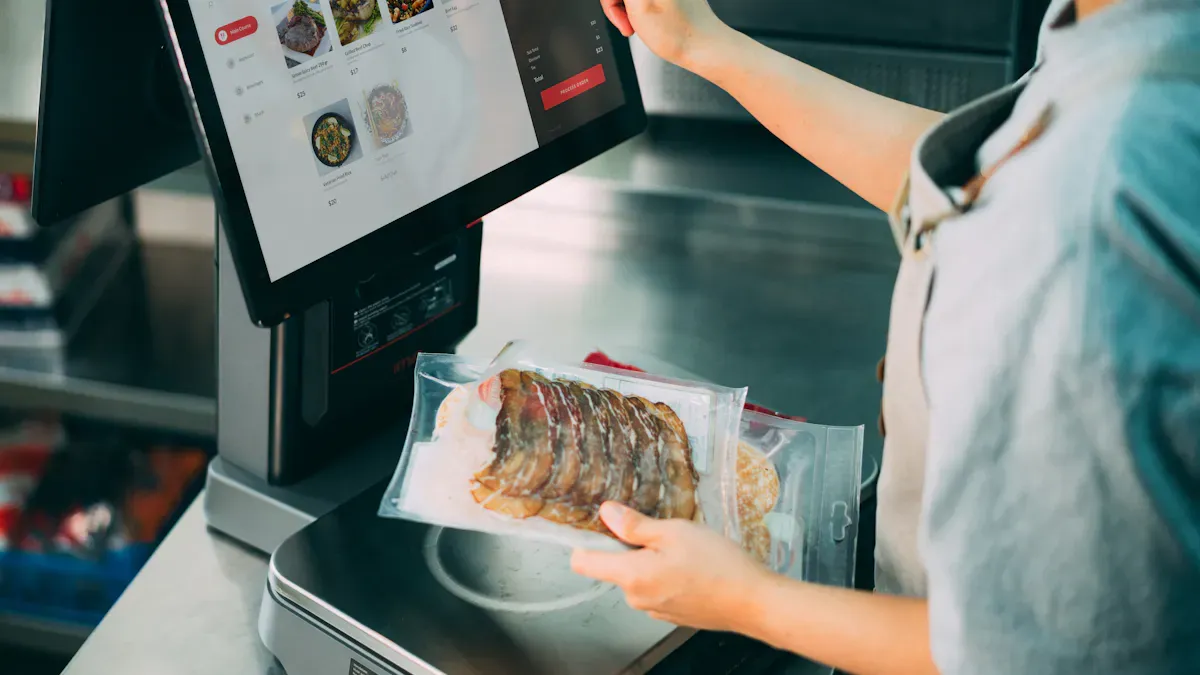
When you search for the best interactive kiosk touch screen in 2026, you will see big brands like NCR Corporation, Diebold Nixdorf, and Elo Touch Solutions are the leaders. These kiosks have 4K UHD resolution, real multi-touch features, and built-in cameras for easy sharing of information. You get strong touchscreen displays that work all the time, even in busy stores or schools. Look at how these interactive kiosk touch screens lead in sales:
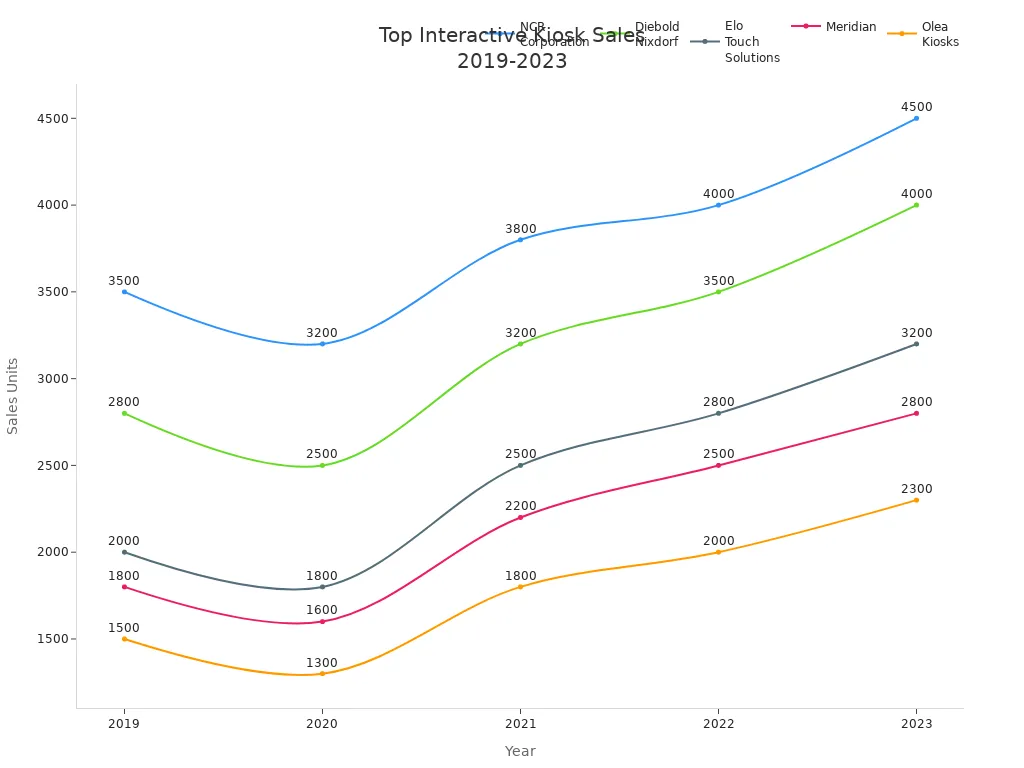
You can use these interactive kiosks in stores, schools, or for public information. They are special because they give easy access, good security, and great performance for everyone.
Key Takeaways
Pick interactive kiosks with strong features like 4K UHD resolution and multi-touch. These features help users have a better experience.
Find kiosks that make content management easy. You can update them without special skills. This keeps information new and up to date.
Choose kiosks built to be tough and reliable. They can handle busy places and last for many years.
Think about what your space needs, like if it is inside or outside. This helps you pick the right kiosk for your needs.
Check software platforms that are simple to change and update in real time. This makes users more interested and happy.
Why These Interactive Kiosk Touch Screen Picks Stand Out
Selection Criteria Overview
You want the best interactive kiosk for your space. You need more than just a nice screen. Here are the most important things:
Platforms can be used for special things, like donor recognition or hall of fame displays.
Systems work in many places and let you control everything from one spot.
Kiosks can grow with you, so you don’t need to buy new ones every year.
Controls are simple, so anyone can update information without being a tech expert.
You get good value because of features, support, and strong vendor relationships.
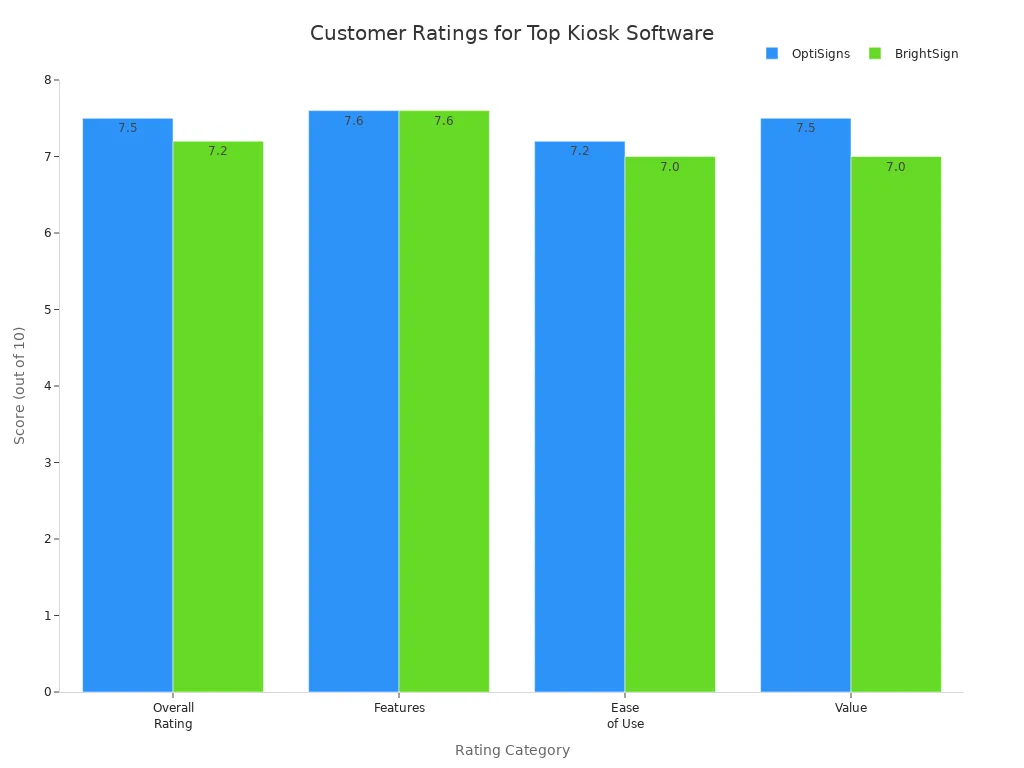
You also see the top nine interactive touchscreen kiosk software platforms leading the market. These include Rocket Alumni Solutions, Intuiface, Pandasuite, and Novisign. Each one has special interactive features, easy content management, and professional customization for your multimedia needs.
Innovation in Interactive Kiosk Touch Screen Technology
Let’s look at what’s new in 2026. The newest interactive kiosk touch screen models have smart upgrades:
Innovation | Impact on Product Performance |
|---|---|
Makes your experience smoother and more accurate | |
Enhanced accessibility features | Lets everyone enjoy engaging visitor experiences |
Streamlined workflows | Cuts wait times and boosts operational efficiency |
Real-time updates | Keeps information fresh and users happy |
These new features help you give custom interactive experiences and great multimedia storytelling every day.
User Experience and Engagement
You want a kiosk that is easy and fun to use. The best interactive touchscreen kiosk software gives you:
Key Factors | Description |
|---|---|
Lets you update information fast, even if you’re not a tech expert | |
User Interface Design | Works for people standing and using intuitive touch interfaces |
Technical Reliability | Runs for years with reliable performance and little troubleshooting |
User Engagement Patterns | Makes navigation simple, so everyone finds what they need quickly |
You get a simple user experience, better analytics and engagement tracking, and great multimedia storytelling that keeps people interested.
Reliability and Durability
You need your interactive kiosk to last a long time. Top models use strong monitors and tough materials like steel and reinforced glass. You get:
Touchscreen technology is bonded to high-performance monitors for strength.
Kiosks are made for busy places, indoors or outdoors.
Warranties last from 1 to 3 years for peace of mind.
Support options include RMA, troubleshooting, and a download center.
With these features, your kiosk works well, can be customized, and gives you good analytics for years.
Interactive Touchscreen Kiosk Product Spotlights
Commercial-Grade Interactive Kiosk
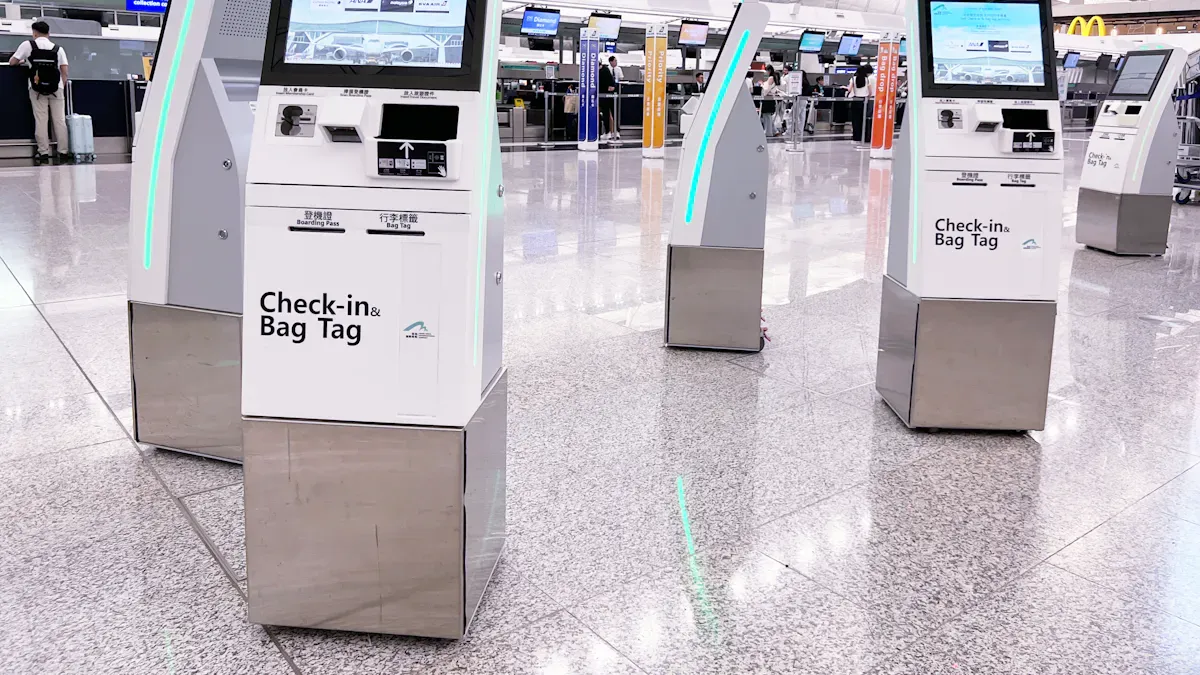
You want a kiosk that works well in busy places. These commercial-grade kiosks are great for airports, hospitals, and stores. They are easy to use and have strong security. You can change the information from anywhere using the cloud. You also get real-time data to see how people use the kiosk.
Feature | Description |
|---|---|
Easy to use, quick touch response, follows accessibility rules, looks nice | |
Content Management | Cloud updates, simple controls, organized content, version tracking, media handling |
Security Features | Locked kiosk mode, session control, encryption, tamper alerts, remote checks |
Analytics and Reporting | Tracks use and gives visitor data |
These kiosks help with self-check-in, finding your way, and other tasks. You see them in hospitals, hotels, and airports. They make checking in faster, help guests sign up, and let travelers get tickets. These kiosks help customers and keep their information safe.
Educational Interactive Touchscreen Kiosk
Schools and colleges need kiosks that help students learn. Educational kiosks let you make lessons for each student. You can change the content for different needs. These kiosks give hands-on learning, so students remember more and stay interested.
Lessons fit each student
Hands-on activities help students remember
Works for all learning needs
Feature | Evidence |
|---|---|
Collaborative Learning | Students working together do 20% better on tests |
Increased Engagement | Using videos and pictures helps students pay attention 25% more |
Accessibility | Text-to-speech helps students who can’t see well, supports many languages |
Students work together, think hard, and use the kiosk to learn. Videos and pictures make learning fun. Teachers use these kiosks to teach in new ways and help students learn by doing.
Best-Selling Digital Kiosk Displays
You want a kiosk that many people trust. Floor-standing digital kiosks are the top choice in 2026. They are strong, easy to fix, and follow accessibility rules. You see them in stores, banks, and hospitals because they are steady and easy to spot.
The kiosk market is getting bigger. In 2025, it was worth $38.7 billion. By 2036, it may reach $82.1 billion. Floor-standing kiosks make up 41% of the market. These kiosks can use many add-ons and fit well in many places. More people want self-service and digital tools, so these kiosks are popular.
Multi-Touch Kiosk with Integrated Camera
You want a kiosk that is fun and interactive. Multi-touch kiosks with cameras make things more exciting. You can use your face to check in or pay. You can try on things virtually when shopping. These kiosks help people have fun and make things faster.
More fun for users
Face check-in and payment is quick
Try on things virtually in stores
Used in hotels, hospitals, stores, and entertainment
You see these kiosks in fast food places, banks, and hotels. They make it easy to get information and give visitors a cool experience.
Interactive Touchscreen Kiosk Software Platforms
You need good software for your kiosk. The best platforms in 2026 let you manage content easily and update it fast. You can make fun interactive screens without knowing how to code.
Rocket Alumni Solutions: Good for schools and nonprofits. Unlimited profiles, cloud updates, real-time changes.
Intuiface: No coding needed for custom screens. Drag-and-drop tools, connects with other systems.
Pandasuite: Lets you make interactive content with no code and share it everywhere.
Novisign: Digital signs with interactive features, simple screens, easy updates.
Touchpros: Gives both hardware and software for full systems.
Arreya: Digital signs and kiosk software for many locations.
HallOfFameWall.com: For sports and school awards, easy content updates.
TouchWall.us: High-quality award content for schools.
You can update info from far away, set schedules, and manage pictures and videos. These platforms help with directions, awards, messages, and saving info. Your kiosk can change to fit your needs and keep people interested.
Tip: Pick a kiosk with features that help you reach your goals. Think about how you want to share info and get people involved. The right kiosk makes your place special and brings visitors back.
Kiosk Comparison Table
You want to know which interactive kiosk touch screen is best. This table helps you choose the right one for your needs. Let’s look at what makes each one different or the same.
Feature Comparison
Here are the top three interactive kiosk touch screens you should know about:
Touch Screen Technology | Key Features | Impact on User Choice |
|---|---|---|
Capacitive | High sensitivity, multi-touch support, durable, low maintenance | Great for interactive kiosks needing quick responses and a user-friendly experience. |
Resistive | Pressure-sensitive, cost-effective, works with many input devices | Perfect for budget projects needing precise control and versatility. |
Surface Acoustic Wave (SAW) | High clarity, durable, water and dust resistance | Best for kiosks in tough environments needing high image quality and strong performance. |
Capacitive screens show clear pictures and let you use more than one finger. They are easy to clean. Resistive screens work with gloves or a stylus, so they are good for hospitals or factories. SAW screens are strong and clear, so they work well in rough places.
Pricing and Value
Let’s see how much these interactive kiosks cost and what you get:
Product Name | Features | Ease of Use | Value |
|---|---|---|---|
ScreenCloud | High | Excellent | Best |
Other Product | Medium | Good | Average |
Another Prod | Low | Fair | Low |
ScreenCloud has the best features and is easy to use. It gives you the most for your money. The other products are okay but do not have as many cool things.
Usability and Application Differences
You want your kiosk to work well in your space. Here is how each type is different:
Touchscreen Type | Usability Features | Application Suitability |
|---|---|---|
Capacitive | Smooth, responsive, supports multi-touch, high clarity | Indoor kiosks where ease of use is important |
Resistive | Accepts input from fingers, gloves, styluses, lower clarity | Healthcare or industrial kiosks with gloves |
Easy-to-use screens help people find what they need.
Big buttons and clear words make it simple to finish tasks.
Accessibility tools help everyone use the kiosk.
Capacitive kiosks are smooth and fun to use. Resistive kiosks are good when people wear gloves. SAW kiosks are best for tough places and keep the screen easy to see.
Tip: Think about where you will put your kiosk and what you want to show. Picking the right touchscreen helps people enjoy using your kiosk and find what they need.
How to Choose the Right Interactive Kiosk Touch Screen
Use Case Matching
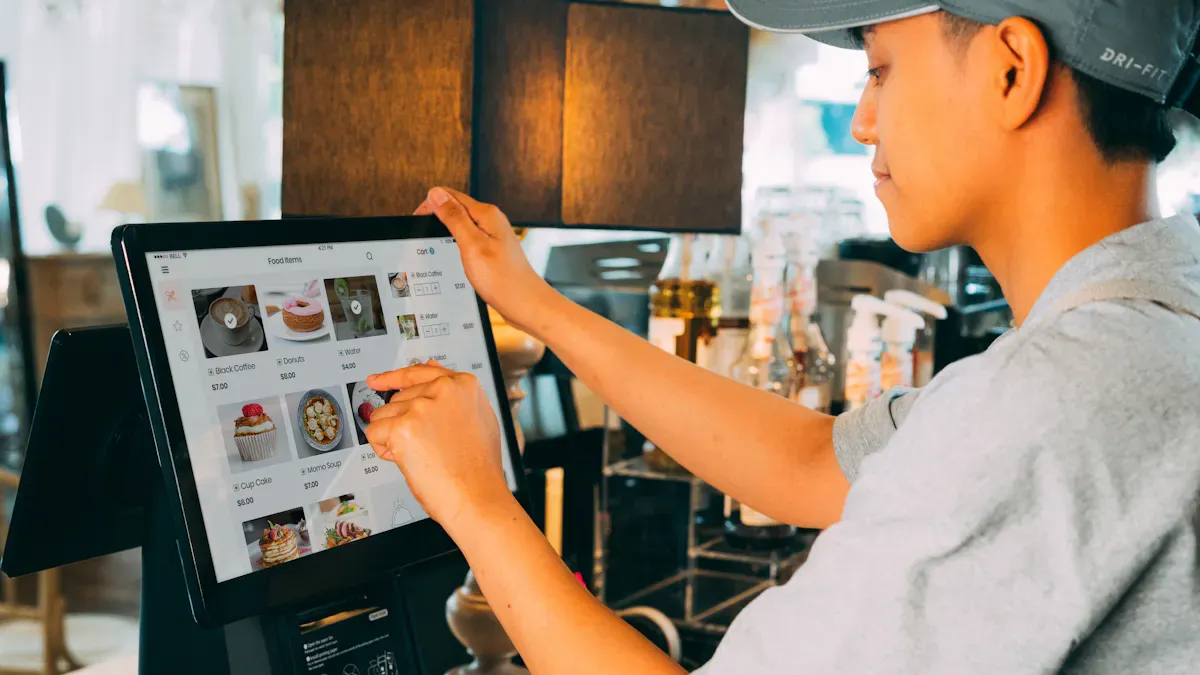
You want your interactive kiosk to do what you need. First, think about where you will put it and what you want people to do. Some kiosks are best for self-service in busy stores. Others are better for schools or museums. Here is a table to help you match your needs:
Factor | Description |
|---|---|
Where you put the kiosk changes what it needs to work well. | |
Bright Environments | Use bright screens that are easy to see in sunlight. |
Harsh Conditions | Zero-bezel designs stop dirt from getting inside in kitchens or factories. |
Vibration and Movement | Strong mounts keep kiosks safe in places that shake a lot. |
If you want people to use self-service, think about how they will use the kiosk. Will they touch the screen, swipe, or use a camera?
Budget Considerations
Your budget is important. Schools, museums, and companies need different things. Look at this table to see what fits your group:
Sector | Recommended Platforms | |
|---|---|---|
K-12 and Higher Education | Good price and easy for staff who are not tech experts | Rocket Alumni Solutions, Touchwall.us, Halloffamewall.com |
Museums and Cultural Institutions | Needs to be easy for everyone to use and look nice | Rocket Alumni Solutions, Intuiface, Pandasuite |
Nonprofit and Development | Needs to look good and work with fundraising tools | Rocket Alumni Solutions, Donorswall.com |
Corporate and Professional | Needs to work all the time and look professional | Rocket Alumni Solutions, Intuiface, Novisign, Arreya |
Pick a platform that gives you the most for your money and helps you reach your goals.
Environmental Suitability
Think about where your kiosk will go. Will it be inside or outside? Here are things to check:
Display Brightness: Outdoor kiosks need very bright screens (1500–2500+ nits). Indoor kiosks need less bright screens (300–500 nits).
Weatherproofing: Outdoor kiosks must keep out rain, dust, and wind.
Temperature Tolerance: Make sure your kiosk works in hot or cold places.
Anti-Glare Technology: This helps people see the screen in bright light.
Durability and Security Features: Kiosks in public need strong cases and locks.
NEMA Ratings: Outdoor kiosks should meet NEMA 3R or 4X for safety.
Tips for Making the Best Choice
Here are some tips to help you pick the right kiosk:
Choose strong hardware for all-day use.
Look for bright screens (at least 500 nits) so people can see well.
Think about projected capacitive touch for smooth, multi-touch use.
Make sure your kiosk fits the place—inside or outside.
Pick software that is easy and works with your other tools.
Check for strong cases and good locks.
Make sure you have Wi-Fi or Bluetooth if you need it.
Plan for data safety and safe payments if your kiosk handles private information.
Tip: The right interactive kiosk helps you share information, make fun moments, and bring visitors back.
You want a great interactive kiosk touch screen for your space. Here are three top picks for 2026:
Product | |
|---|---|
Yodeck | Central control, many screens, app-like use |
ScreenCloud | Easy browser content, scheduling, main dashboard |
Intuiface | Visual tools, many screens, rich media features |
These interactive kiosks help you make cool experiences for visitors. To choose the best one, follow these steps:
Check what tech help and support you have.
Count all costs, not just the price.
Test it before buying many.
The right interactive kiosk makes your space special and brings people back.
Winner 1: The All-in-One Solution – Allsee 43" Android PCAP Kiosk
If you need a complete, ready-to-deploy solution for a high-traffic indoor space, the Allsee 43" Android PCAP Touch Screen Kiosk is an excellent choice. It's an all-in-one unit that frees you from sourcing and assembling separate components.
Core Features & Specs: Its 43" commercial-grade IPS panel has Full HD (1920x1080) resolution and a built-in Android media player that allows for true plug-and-play operation. The sleek design features edge-to-edge glass with an oleophobic coating to resist smudges and ensure a smooth touch experience.
Why It's a Winner: The standout feature is the optional internal locker for a 3rd-party media player or NUC PC, giving you flexibility if your software requires Windows. With 10-point touch, an anti-fingerprint surface, and a 3-year warranty, it's a durable, all-in-one package.
Ideal Use Cases: This kiosk is perfect for creating interactive information points in museums, deploying self-service systems in busy hotel lobbies, or setting up digital wayfinding directories in large shopping malls.
Winner 2: The Versatile Workhorse – Philips Interactive 3000 Series (by PPDS)
For businesses that need a highly versatile and reliable display for custom installations, the Philips Interactive 3000 Series is a standout. It's not a complete kiosk, but a professional-grade touch display designed to be integrated into your own enclosures or existing structures, offering unmatched reliability.
Core Features & Specs: It offers a range of sizes (24" to 55") and advanced PCAP touch technology, all housed in a bezel-free design. Crucially, it's rated for 24/7 operation and its new models feature a 30-degree tilt option for improved ergonomics.
Why It's a Winner: This series is purpose-built for commercial endurance and flexibility. It includes a secure 'Kiosk Mode' to prevent tampering, supports both landscape and portrait orientations, and optional open-frame brackets allow it to seamlessly integrate into custom furniture or kiosk housings.
Ideal Use Cases: Its combination of durability and design makes it ideal for point-of-sale (POS) and self-service order points in busy quick-service restaurants (QSRs), or as a reliable interactive map and information display in airports and train stations.
Winner 3: The Flexible Foundation – ASDA AIoT Interactive Solution
For tech-focused businesses or OEMs building their own kiosk, having a powerful, flexible hardware foundation is critical. The ASDA AIoT Interactive Solution, based on the Rockchip RK3568 platform, provides this core.
Core Features & Specs: The RK3568 solution runs on Android 11 and features a 10-point capacitive touch, available in popular 10- to 21-inch screen sizes. Its key strength is its industrial-grade connectivity, offering up to 8x COM ports (RS232/TTL/RS485) and 6x USB ports, along with options for POE, Wi-Fi 6, and Bluetooth.
Why It's a Winner: It provides the perfect balance of performance and cost for custom projects. The comprehensive industrial I/O ensures seamless connection to a wide range of peripherals like printers, scanners, and payment terminals. Combined with ASDA's 48-hour technical response and 14-day RMA service, it's a reliable choice.
Ideal Use Cases: This hardware is the ideal engine for building custom self-order kiosks for fast-casual restaurants, creating industrial HMIs to control machinery, or developing patient check-in systems that need to connect to medical peripherals.
Kiosk Comparison at a Glance
Feature | Allsee 43" Android PCAP Kiosk | Philips Interactive 3000 Series | ASDA AIoT RK3568 Solution |
|---|---|---|---|
Best For | Complete, ready-to-deploy solution | Versatile, high-reliability custom build | Flexible, cost-effective OEM projects |
Form Factor | Freestanding, all-in-one kiosk | Professional touch display for integration | Panel PC kit for custom integration |
Screen Size | 43" | 24" / 32" / 43" / 55" | 10" – 21" (lineup) |
Touch Technology | Projected Capacitive (PCAP) | Projected Capacitive (PCAP) | 10-point Capacitive |
Key Strengths | All-in-one; 24/7 use; 3-year warranty | 24/7 rated; 30° tilt; Kiosk Mode; open-frame | Industrial I/O; fast RMA |
A Quick Guide to Choosing Your Winner
To make the final decision, define your deployment environment and project goals:
🚀 For Maximum Integration Flexibility → Evaluate the Philips Interactive 3000 Series first. Its professional-grade features are designed to integrate seamlessly into high-traffic, custom environments.
📈 For a Balanced, All-in-One Solution → The Allsee 43" Android PCAP Kiosk offers an ideal balance of robust commercial build quality and a sleek, tablet-like user interface for an attractive package.
🏗️ For Custom OEM Projects with Clear Roadmaps → ASDA's AIoT Solution provides the necessary technical flexibility with its extensive I/O and offers a long-term, reliable hardware partnership.
Ultimately, the best interactive kiosk for your project is the one that aligns with your specific operational needs, budget, and long-term vision. By focusing on a kiosk's core strengths, you can make a confident choice that will serve your business well.
If you'd like to share more about your specific business type, anticipated user volume, or environment, I can offer more targeted advice.
FAQ
What is an interactive kiosk touch screen?
An interactive kiosk touch screen is a digital display that lets you use your fingers to control menus, apps, or information. You can find these in stores, schools, and airports. They help you get what you need fast.
How do I keep my kiosk running all day?
You should pick a kiosk built for 24/7 use. Clean the screen often. Check for software updates. If you see any problems, contact support right away. This keeps your kiosk working smoothly.
Which three interactive kiosk touch screen winners should I check out?
You’ll love Yodeck, ScreenCloud, and Intuiface. These three stand out for their easy setup, strong features, and great support. They help you create amazing experiences for your visitors.
Can I update kiosk content without tech skills?
Yes! Most modern kiosks let you change content with simple tools. You can drag and drop pictures or text. You don’t need to know how to code. This makes updates quick and easy.
Are interactive kiosks safe for public use?
Yes, they are safe when you follow best practices. Use strong passwords and keep software updated. Many kiosks have security features like locked modes and tamper alerts to protect your information.
See Also
Discover 10 Unexpected Applications of Touch Screen Kiosks in 2026
Identifying LCD Kiosks with Touch Screen Features for 2026
Leading 10 Firms Focused on Touchscreen Kiosks in 2026
