Interactive Flat Panels vs Smartboards Pros and Cons for Educators
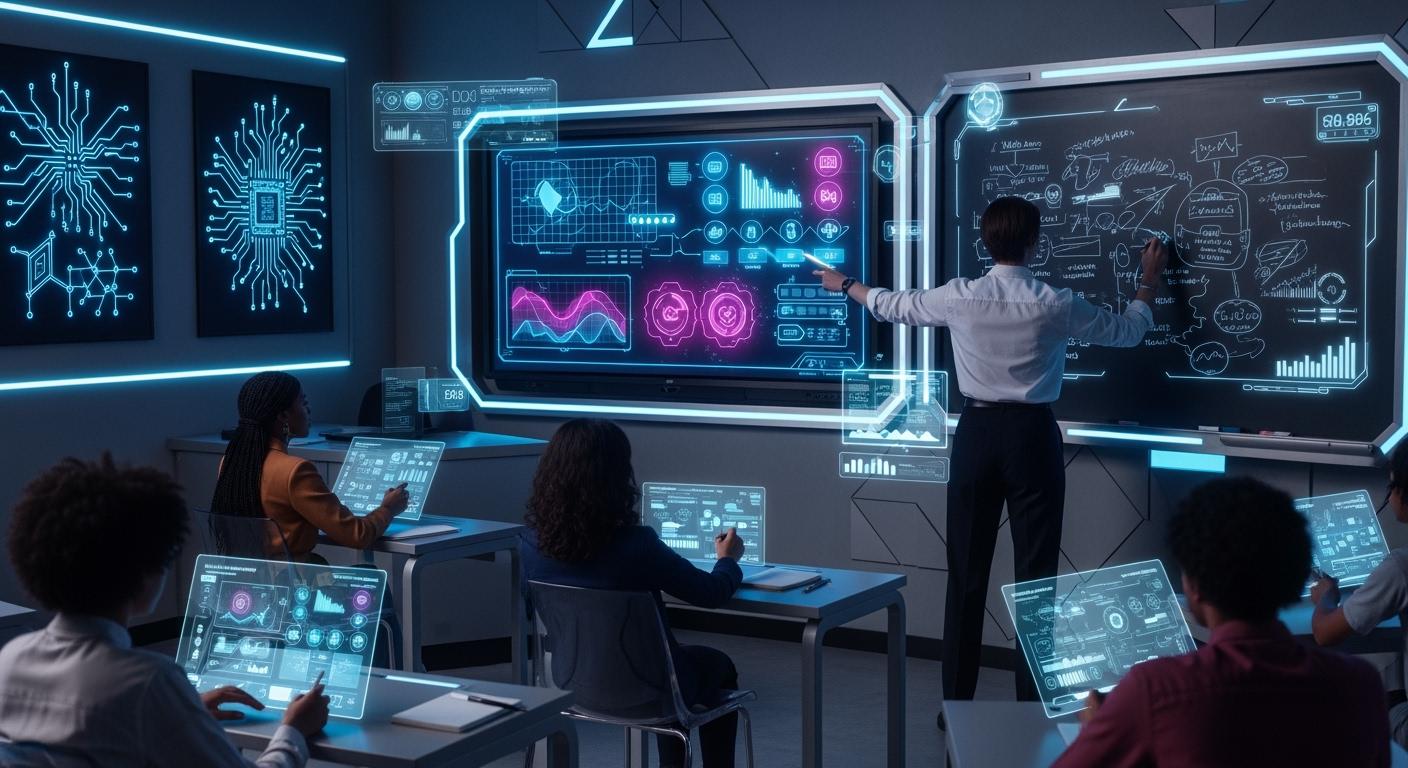
You have a big decision in 2026: interactive flat panel or smartboard for your classroom. Most schools now like interactive flat panels more. They are brighter, respond to touch faster, and make learning more fun for students. These panels are now the top choice in schools around the world. Teachers also think they are easier to use and take care of.
Shenzhen TopAdkiosk Display Technology Co., Ltd.
Add.: 2F, Bldg 10, Changfeng Industrial Park, Dongkeng, Fenghuang, Guangming, Shenzhen, China 518132
Mobile/WHATSAPP: 86-138 25769658
Email: marketing@topadkiosk.com topadkiosk@gmail.com
Skype: pghenry1
Wechat: adkioskhenry
English Web.: http://www.topadkiosk.com/
https://www.topkioskdisplay.com/
http://www.ad-kiosk.com/
https://www.toplcddisplay.com/
http://www.multitouchdigitalsignage.com/
https://www.youtube.com/channel/UCYVYNJHxLVEcQD8fuUxXNTA/videos?view_as=subscriber
https://www.facebook.com/TOPADKIOSKSHENZHEN/?ref=bookmarks
Brightness and touch response are very important when choosing classroom technology.
Many smartboards need extra training and do not get students as interested.
Cons of Smartboards | |
|---|---|
More fun and interesting for students in class | Often used to advertise instead of teach |
Good prices for different needs | Needs a lot of training to use well |
Same basic features and hardware | Students do not use the boards much |
Key Takeaways
Interactive flat panels have brighter screens and react faster to touch. This makes lessons more fun for students.
Smartboards need more training and care. This can make them harder to use in class.
Interactive flat panels let many students use them at the same time. This helps students work together and join in more.
Picking the best technology can save money over time. Interactive flat panels usually cost less to keep working than smartboards.
Both tools can help students pay attention. But interactive flat panels are usually simpler to use and work with other classroom tools.
Classroom Technology Overview
What Is an Interactive Flat Panel?
Interactive flat panels are in many classrooms today. They look like big touchscreen TVs with clear pictures. You can use your finger or a stylus to write or draw. You can also move things on the screen. Many students can use the screen at the same time. Teachers show videos, pictures, and fun activities on them. The speakers and big screen help everyone hear and see well. You can connect laptops or tablets quickly. This makes sharing lessons easy. These panels have apps for working together and giving feedback. Teachers can change lessons to fit what students need.
Tip: Interactive flat panels cost less to keep working. They do not need extra bulbs or special pens.
What Is a Smartboard?
A smartboard is also used in classrooms. It is sometimes called an interactive whiteboard. You use a projector to show things on the board. You can touch the board or use a special pen. Many smartboards need special software like SMART Notebook. This software lets you make fun activities. Smartboards let students work together on group tasks. Some smartboards need more training to use all features. They still help make lessons more fun and interesting.
Here is a quick comparison of main features:
Feature | Interactive Flat Panels | Smart Boards |
|---|---|---|
Display Quality | Clear screens with bright colors | Quality is good but can change |
User Interaction | Many students can use at once | Many students can use with special tools |
Software Ecosystem | Built-in apps for teamwork | Needs SMART software like SMART Notebook |
Long-term Costs | Usually lower because fewer extra parts needed | May need more software to buy |
Both interactive flat panels and smartboards have interactive features. The way you use them and their value over time can be different. Pick the best one for your classroom based on how you teach and what your students need.
Visual Quality in the Classroom
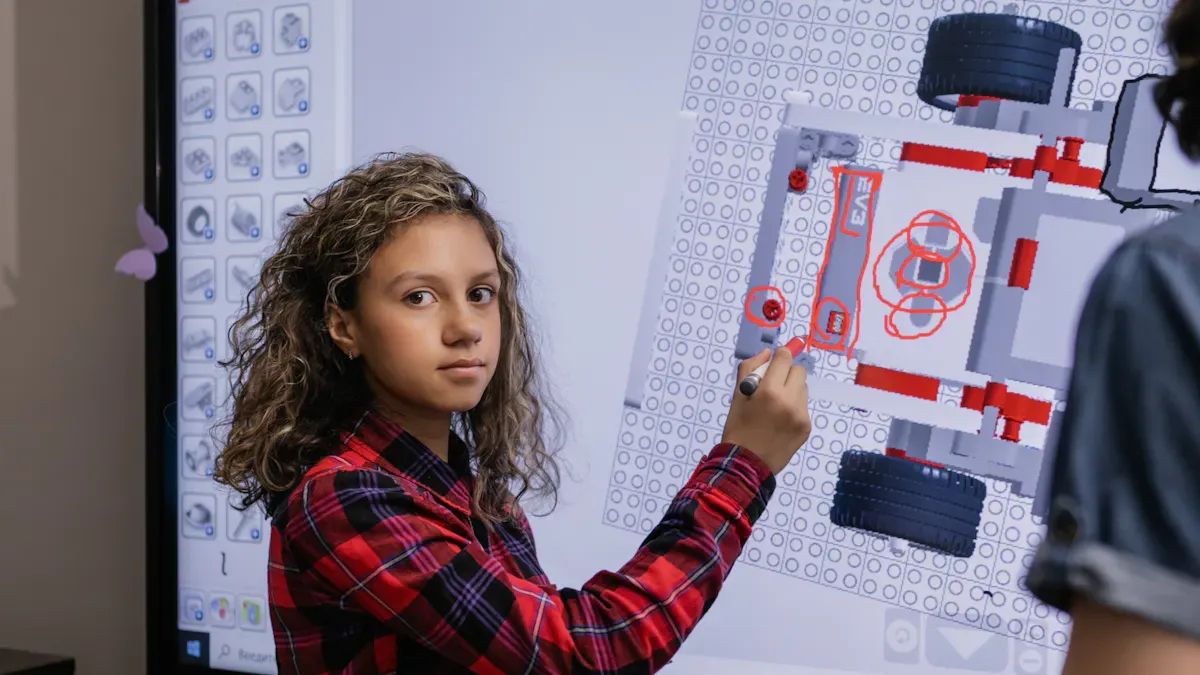
Interactive Flat Panel Display
You can see the difference in screen quality right away. The screen stays bright and clear, even with sunlight in the room. There is no glare or faded colors. This helps you and your classmates focus on what is shown. The panel works well for lessons during the day. You can use it for videos, pictures, and activities without worrying about seeing them.
Feature | Interactive Flat Panels | Smartboards |
|---|---|---|
Visibility in Well-Lit Rooms | Stays clear without glare | Has glare and lower contrast |
Usability | Harder to use in bright rooms | |
Cognitive Strain | Clear visuals help thinking | Glare makes thinking harder |
Modern LED and LCD panels show brighter and cleaner pictures than projectors. You can see the screen from many places in the classroom. Students sitting anywhere can see the screen well. Bigger screens help students at the back read and see details. You do not have to worry about glare making blind spots. Using the panel feels smooth and easy for everyone.
Note: Clear screens help students think better. They can pay attention longer and understand lessons more.
Smartboard and Interactive Whiteboard Visuals
Smartboards use projectors to show things on the board. You might see glare and less clear pictures, especially in bright rooms. Students sitting at some spots may see faded images or blind spots. The picture quality changes with the projector and lighting. Students at the back may not see small details well.
LED panels can have glare, but smartboards have more problems with glare and contrast.
Students at the back may miss details if the screen is not big enough.
Wide viewing angles matter in classrooms with lots of students.
Smartboards still let you do interactive things. You can use polls and group activities in real time. Students remember lessons better and share ideas together. Smartboards help different learning styles, making lessons lively and welcoming.
Evidence Type | Statistic/Claim |
|---|---|
Increase in Collaboration | |
Improvement in Attentiveness | 50% more students pay attention |
Academic Performance | More engagement helps students do better in school |
You can see that students join in more when they can see and use the screen easily. Interactive lessons help students pay attention and take part. The experience feels more welcoming and fun.
Touch and Collaboration

Interactive Flat Panel Touch Experience
You can tell the touch feels different right away. The screen reacts fast to your finger or stylus. You do not have to press hard. The special touch technology makes everything smooth. You can write, draw, and move things easily. The panel lets many students use it at once. You do not need to wait for your turn. This helps you and your friends share ideas and solve problems together.
Feature | Interactive Flat Panels | Smartboards |
|---|---|---|
Touch Technology | Projector-based systems with resistive touch | |
Responsiveness | Highly responsive, zero-pressure touch | Less responsive, requires pressure |
Multi-Touch Support | Supports multiple simultaneous touch points | Limited to single or dual-touch |
Calibration Needs | Minimal calibration required | Requires periodic calibration |
Tip: You save time because interactive flat panels need little calibration. You can start your lesson right away.
You can work on projects and activities with your classmates. The panel lets you see changes as they happen. You see your friends' ideas show up right away. This makes learning more fun and exciting. You feel good using the panel because it always reacts to your touch.
Interactive flat panels let groups work together with fast response.
You can use multi-touch to do group tasks.
The touch feels natural and correct.
Smart Board Collaboration Features
A smartboard gives you interactive tools for your classroom. You use a projector and a special pen or your finger. The touch may not feel as smooth. You might need to press harder or fix the board often. Some smartboards let two people use them, but most only let one or two at a time. This can slow down group work.
Basic interactive whiteboards let one person write at a time.
New smartboards and interactive flat panels let more people use them together.
You see that smartboards help you work with classmates, but they may not be as fast or accurate. Sometimes you wait for your turn to use the board. You may need to fix the board before starting your lesson. This can take away from your learning time.
Note: Interactive projectors can lag or have accuracy problems, especially if the surface is not flat. You may notice delays when you try to write or draw.
You use smartboards for group work, but interactive flat panels make it easier. You see your classmates join in more when the board reacts quickly. Schools using interactive displays see a 70% increase in students remembering lessons compared to old ways. About 84% of teachers think these tools help students pay attention and stay motivated. More classrooms want interactive flat panels because they help learning.
You see more excitement when you use technology that reacts fast.
Group work gets better when everyone can use the board together.
You remember lessons more when you join in activities.
The touch experience affects how you learn and work with others. You get more from your lessons when the board lets many people use it and reacts well. You feel more involved and excited in your classroom.
Software and Compatibility
Classroom Integration with Interactive Flat Panels
You want technology that works with your classroom tools. An interactive flat panel is flexible and open. You can get many interactive apps from the Android app store. This lets you use classroom management tools, video apps, and quiz games. You can share things from your laptop or tablet with a few taps. The panel helps teamwork and lets you show student work right away.
Here is a quick look at how brands work with classroom software:
Brand | Software Compatibility | Notes |
|---|---|---|
SMART Board | Best with SMART Notebook and Lumio | Other software can be used, but key features may be lost. |
Promethean | ActivInspire needs a connected computer | On-board Android apps are more limited. |
Vibe, ViewSonic, BenQ, ClearTouch | Android-based, open app ecosystem | Lets you install many apps used in schools. |
You can see that brands like Vibe, ViewSonic, and BenQ let you use many features. You do not need to buy extra software. This helps lower the total cost and makes it easy to use new classroom tools.
Smartboard Software Ecosystem
A smartboard works best with its own software, like SMART Notebook or Lumio. You may need to learn new steps to use all the features. Some smartboards need a computer to run special programs. This can make setup harder and limit which apps you can use. If you use other software, you might lose some features.
Smartboards and interactive flat panels both get software updates. These updates help keep your classroom safe and add new features. You get better privacy and security for your students. Updates also help your technology last longer and improve your teaching.
Feature | Description |
|---|---|
Update Frequency | SMART interactive displays get regular updates automatically. |
Security | Updates help protect teacher and student data. |
Functionality | Ongoing support for third-party apps improves teaching. |
Longevity | Regular updates help the technology last longer. |
You can get used to new updates quickly. Most teachers find both tools support classroom needs, but interactive flat panels give more choices and lower costs. You save money and get more value over time.
Tip: Pick a system that lets you use your favorite classroom apps and keeps your content safe.
Maintenance and Cost
Interactive Flat Panel Durability
You want technology in your classroom that lasts and saves money over time. An interactive flat panel gives you a strong, all-in-one display. You do not need to worry about projector bulbs or extra pens. Most panels work for years with little trouble. You can clean the screen with a soft cloth and check for software updates each month. If you see touch problems or the display will not turn on, you can often fix it by restarting or checking cables.
Here are some common issues and quick fixes:
Issue Description | Common Causes | Quick Fixes |
|---|---|---|
Touch Not Responding | Dirty screen, too many apps open | Clean screen, restart, close unused apps |
Display Won’t Turn On | Power or cable problems | Check cables, try another outlet |
No Sound | Volume or cable issues | Check volume, test cables |
You can keep your interactive display working by following a simple routine:
Clean the screen every day.
Check for updates each month.
Inspect cables every few months.
Ask for a yearly checkup if needed.
The initial purchase price for an interactive flat panel depends on the model. Here is a quick look:
Category | |
|---|---|
Entry-Level | ~$1,500 - $3,000 |
Mid-Range | ~$3,000 - $6,000 |
High-End | ~$6,000 - $10,000+ |
You pay more at first, but you save on repairs and parts. Over five years, the total cost of ownership is often lower than other options.
Smartboard Maintenance and Expenses
A smartboard uses a projector, which means you need to replace bulbs every few years. Each bulb can cost $150 to $300. You also pay for yearly maintenance and cleaning. Over five years, these costs add up. You may spend more than $1,200 just on bulbs and upkeep.
Item | Projector Costs | Interactive Flat Panel Costs |
|---|---|---|
Bulb Replacement | $150 - $300 every 2-3 years | N/A |
Annual Maintenance | $100 | N/A |
Exceeds $1,200 | N/A | |
N/A | 67% reduction in costs |
You also need to pay for software licenses and updates. The total cost of ownership for a smartboard can be higher than for an interactive flat panel. Here is a chart that shows the difference in upfront, software, maintenance, and total costs over five years:
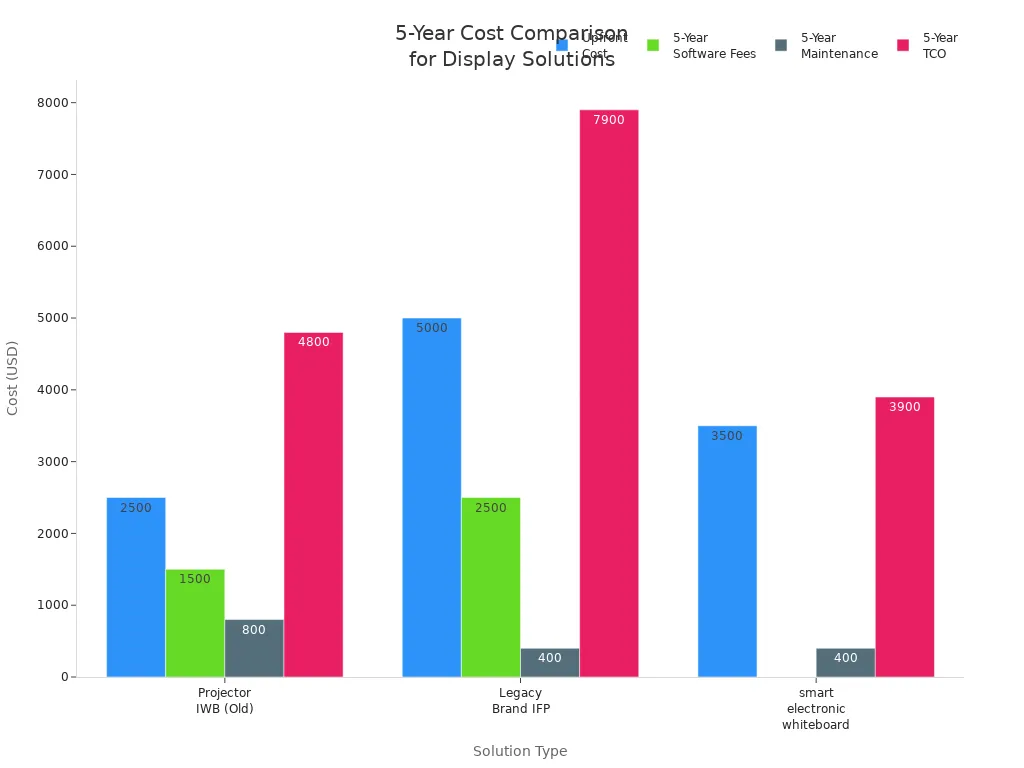
You can see that interactive displays help you save money in the long run. You spend less on repairs and parts. You also spend less time fixing problems, so you can focus on teaching and sharing content in your classroom. When you look at tco, interactive flat panels give you better value and fewer worries.
Installation and Setup
Classroom Space Requirements
You want your classroom to feel open and easy to move around. An interactive flat panel takes up less space than a smartboard with a projector. You can mount the panel on a wall, so you keep more floor space for students and activities. The screen sits flat against the wall, which helps you avoid tripping over wires or bumping into equipment.
Smartboards often need a projector mounted on the ceiling or a cart. This setup can take up extra space and make the classroom feel crowded. You might see cables running across the floor, which can be a safety risk. When you plan your classroom, think about how much room you need for group work and movement.
Tip: Wall-mounted interactive displays help you keep your classroom organized and safe.
Smartboard vs Interactive Flat Panel Setup
Setting up an interactive flat panel is usually quick. You only need to mount the panel on the wall and connect power. The process changes based on your wall type. For drywall over wood studs, you use wood and lag screws. If your classroom has drywall over steel studs, toggle bolts and butterfly anchors work best. For solid concrete or brick walls, you need concrete screws and anchors. These tools help keep the panel secure and stable.
Wall Type | Details | |
|---|---|---|
Drywall over wood studs | Wood and lag screws | Widely spaced threads for strong hold |
Drywall over steel studs | Toggle bolts, butterfly anchors | Wings open inside the wall for support |
Solid concrete, masonry, or brick walls | Concrete screws and anchors | Alternating threads for extra grip |
Smartboards need more steps. You must install the board and the projector. You also need to align the projector and connect extra cables. Sometimes, you need to calibrate the touch system before you use it. Moving a smartboard to another classroom can take a lot of time. Interactive flat panels are easier to move if you use a rolling stand.
You save time and effort with interactive flat panels. You spend less time setting up and more time teaching. Your classroom stays neat, and you can focus on interactive lessons.
Classroom Health and Comfort
Eye Comfort and Safety
You want your classroom to be safe and cozy for everyone. Interactive flat panels use new screens that lower blue light. This helps keep your eyes safe during long lessons. You can change the brightness to match your classroom’s light. Students can look at the screen for a long time and not feel tired. Smartboards use projectors that can cause glare and shadows. Projector light can bother your eyes if you sit close.
Noise and heat also matter for comfort. Interactive flat panels are quiet because they do not use fans or projectors. You will not hear extra noise during lessons. Projector smartboards make more noise and heat. The fans in projectors can distract you. Extra heat can make the classroom warmer and less comfy.
Interactive flat panels stay cool and quiet.
Projector smartboards make heat and noise.
A quiet classroom helps you focus and learn.
Tip: Pick technology that keeps your classroom calm and comfy.
Accessibility for All Students
You want every student to join classroom activities. Both interactive flat panels and smartboards have features for students with disabilities.
Text-to-speech and screen readers help students who cannot see well.
Subtitles and captions help students who cannot hear well.
Adjustable screen height and touch sensitivity help students with physical disabilities.
You can zoom in or change text size and color to see better.
Voice commands let students control the display without touching it.
Built-in speakers and microphones help students with speech or audio needs.
Interactive technology makes your classroom more welcoming. Students with different needs can use these tools to learn and share ideas. You can make lessons easier for everyone to understand.
Teaching Impact
Engagement with Interactive Flat Panels
When you use an interactive flat panel, your classroom feels different. Students pay more attention and join activities. You can switch between videos, quizzes, and drawings fast. This keeps everyone interested and helps you explain things in new ways.
Interactive flat panels make learning active. Students work together and share ideas.
You can change how you teach to fit your students. The technology lets you go from group work to solo tasks quickly.
Interactive displays help you give feedback right away. Students see their answers and learn from mistakes.
Many students can use the screen at once. You watch them solve problems together.
Teachers say interactive flat panels make lessons more fun. Students understand hard topics better. You see more smiles and hear more questions in class. Students feel part of the lesson, so engagement goes up.
Smartboard Teaching Outcomes
A smartboard also brings interactive features to your classroom. You use touch and digital pens to write, draw, and move things. This helps you show ideas clearly. Many teachers use smartboards to make lessons more visual and hands-on.
Evidence Type | Findings | Impact |
|---|---|---|
Meta-analysis | Large, positive effect on academic achievement (effect size d = .94) | |
Qualitative studies | Student motivation and engagement | More interest, enjoyment, and better understanding in interactive lessons |
Clarity of understanding | Improved clarity in learning materials | Students find abstract ideas easier to understand |
Both interactive flat panels and smartboards help students join in and learn. Students remember lessons better and take part more often. Interactive technology helps you reach different learning styles. Your classroom becomes a place where everyone can do well.
Note: Using interactive displays helps students connect with lessons and each other. This leads to better results and more excitement for learning.
Feature | Interactive Flat Panel | Smartboard |
|---|---|---|
Visual Quality | Bright, clear, no glare | Can have glare, less clear |
Touch Experience | Fast, multi-user | Slower, fewer users |
Maintenance | Low, easy to clean | Needs bulb changes |
Cost Over Time | Lower | Higher |
Pick a screen size that fits your classroom. Small rooms need screens between 55 and 65 inches. Standard rooms work best with a 75 inch screen. Big lecture halls need an 86 inch screen. When you get ready, make lesson templates for your class. Save your work in the cloud so you do not lose it. Always update your apps to keep them working well.
By 2027, most classrooms will have interactive displays. New things like AI and virtual reality will help make learning more fun.
FAQ
What is the main difference between an interactive flat panel and a smartboard?
You use an interactive flat panel like a giant tablet. It has a bright, clear screen and responds quickly to touch. A smartboard uses a projector and may need special pens. The flat panel is easier to use and maintain.
Can you use your own apps on an interactive flat panel?
Yes, you can install many apps on an interactive flat panel. Most panels use Android or Windows. You can add classroom tools, games, and video apps. This helps you make lessons more fun and useful.
How long does an interactive flat panel last?
Most interactive flat panels work well for 5 to 7 years. You do not need to change bulbs or do much maintenance. Clean the screen and update the software to keep it working.
Is a smartboard or interactive flat panel better for group work?
Interactive flat panels support more students at once. You can write, draw, and move things together. Smartboards often let only one or two students use the board at a time. This makes group work easier with a flat panel.
See Also
Exploring The Pros And Cons Of LCD Display Screens
Evaluating Performance And Value Of Business Touch Screen Kiosks
Pros And Cons Of Using LCD Display Screens
