Intelligent digital podium make conference and event great
Shenzhen TopAdkiosk Display Technology Co., Ltd.
Add.: 2F, Bldg 10, Changfeng Industrial Park, Dongkeng, Fenghuang, Guangming, Shenzhen, China 518132
Mobile/WHATSAPP: 86-138 25769658
Email: marketing@topadkiosk.com topadkiosk@gmail.com
Skype: pghenry1
Wechat: adkioskhenry
English Web.: http://www.topadkiosk.com/
https://www.topkioskdisplay.com/
http://www.ad-kiosk.com/
https://www.toplcddisplay.com/
http://www.multitouchdigitalsignage.com/
https://www.youtube.com/channel/UCYVYNJHxLVEcQD8fuUxXNTA/videos?view_as=subscriber
https://www.facebook.com/TOPADKIOSKSHENZHEN/?ref=bookmarks
You notice events are different when you use an intelligent digital podium for conference. Speakers feel sure because they use tools that help them talk to the audience. The digital podium gives clear sound, bright pictures, and fun features. Intelligent digital podium make conference and event more interesting and easy for all people.
Key Takeaways
Intelligent digital podiums help speakers feel more confident. They put audio, visual, and digital tools together in one easy device.
These podiums make the audience pay more attention. They use fun features like live polls, multimedia shows, and group games.
Event management gets easier with built-in systems. These systems make setup simple and let events happen both in-person and online.
Using a digital podium can save money over time. It cuts down on needing many devices and makes fixing things easier.
Training and support for users help everything run smoothly. This lets people get the most out of the intelligent digital podium.
What is an intelligent digital podium for conference?
Core concept and technology
When you use an intelligent digital podium for conference, you get many helpful tools in one place. This podium changes how you show your ideas and run events. It mixes audio, visual, and digital features to help you speak clearly. You control everything with a simple touchscreen or a built-in computer. This makes your session easy and fun for everyone. The intelligent digital podium for conference lets you handle the whole event in a digital way. You get a new experience that makes meetings more professional and exciting.
Here is a table that shows what makes an intelligent digital podium for conference special:
Feature | Description |
|---|---|
Combines audio, visual, and digital features into one unit for seamless presentations. | |
User-Friendly Interface | Allows presenters to control everything through a touchscreen interface or built-in PC. |
Enhanced Communication | Facilitates professional and impactful communication, making sessions more interactive. |
Digital Management | Realizes digital and intelligent management of the conference process. |
Systematic Integration | Integrates all aspects of the conference process for efficient communication. |
Unique Advantages | Provides new experiences and benefits to corporate meetings through intelligent innovation. |
Main components and design
An intelligent digital podium for conference has hardware and software parts. These parts work together to make your presentation simple and strong. The main components often include:
Multi-point capacitive or infrared touch technology
USB and HDMI ports for connecting devices
Visual presenter or document camera support
Built-in audio control panel for clear sound
Secure locking system and strong body for safety
Wireless screen sharing and network connections like Wi-Fi, LAN, and Bluetooth
Accessories such as a light, touch pen, microphone, keyboard, mouse, and sometimes a document camera
You can use these features to connect with your audience, share content, and control your environment. The intelligent digital podium for conference helps you focus on your message and keeps your event running smoothly. With these tools, you make every conference more engaging and successful.
Key benefits for conferences and events
You want your conference to go well and keep people interested. Intelligent digital podiums help by making presentations simple, getting the audience involved, and making event management better. These podiums put many tools together, so you can share ideas and connect with your audience easily.
Enhanced speaker experience
When you use an intelligent digital podium, you feel more comfortable and in control. You can handle slides, videos, and notes all from one device. You do not need to switch laptops or deal with extra wires. The touchscreen lets you move through your content easily. You can also write or draw on the screen to show important points.
Here is a table that shows how intelligent digital podiums are different from traditional podiums:
Feature | Traditional Podium | Intelligent Digital Podium |
|---|---|---|
Presentation Management | Limited | Centralized control |
Audience Engagement | Basic | Enhanced interactivity |
Technical Barriers | Common | Minimal, easy access |
Multimedia Control | External devices | Integrated touchscreen |
Adaptability | Low | High, many tools available |
These features help you feel more confident. You can focus on your message instead of worrying about technical issues. The digital podium helps you give a clear and professional presentation every time.
Audience engagement features
You want your audience to listen and join in your session. Intelligent digital podiums give you tools to make this happen. You can show videos, pictures, and interactive slides to keep people interested. Real-time feedback lets you ask questions and get answers fast. You can use polls or live Q&A to involve everyone, even those online.
Here are some interactive features you can use:
Interactive presentations with multimedia parts
Real-time feedback and audience polls
Group learning tools for activities
Discussion boards for sharing ideas and asking questions
Peer-to-peer learning through group projects
These features help you make your session lively and active. Your audience will remember your session because they joined in and learned together.
Event management efficiency
You want your event to start on time and run smoothly. Intelligent digital podiums make setup fast and easy. You do not need to connect lots of devices or set up extra microphones. The built-in system puts display, sound, and network tools in one unit. This saves time and makes things less stressful for speakers and organizers.
You can use the digital podium for hybrid events. This means you can reach people in the room and online at the same time. Features like live Q&A, chat forums, and virtual breakout rooms help everyone join the conversation. Organizers can manage the event from one place, making sure everything works well.
Tip: Using a digital podium can save money over time. You do not need to buy or fix many separate devices. The system lasts longer and is easier to take care of.
You will see your conference is more organized and fun for everyone. Intelligent digital podiums help you make a great experience for speakers, audiences, and event managers.
Essential features of digital podium
Multimedia and connectivity
A digital lectern helps you show all your content in one place. You can play videos, slides, and documents without changing devices. It is easy to connect laptops, tablets, or phones with USB, HDMI, or wireless. This lets you share information with people in the room or online. One-touch control lets you manage everything from one spot. You do not need many remotes or lots of cables. The table below lists important multimedia and connectivity features:
Feature | Description |
|---|---|
Multimedia Integration | Show videos, slides, and images smoothly during your talk. |
One-Touch Control | Manage all devices and media with a single touch. |
AV Broadcasting | Share your presentation with people in other rooms or online. |
Cloud Connectivity | Access and share files from the cloud easily. |
Mobile Control | Use your phone or tablet to control the digital lectern. |
Connectivity Options | Plug in devices with USB, HDMI, Type-C, or connect wirelessly. |
Built-in AV Equipment | Use built-in cameras and microphones for better sound and video. |
These features help you reach more people and keep your session smooth.
Interactive display and annotation
A digital lectern has a touchscreen like a smartboard. You can write, draw, or highlight right on the screen. Some digital lecterns have two touchscreens or let you use a pen for neat writing. This makes your ideas easy to see and helps your audience pay attention. Annotation tools let you explain things as you talk. You can circle words, underline facts, or draw pictures while you speak. This way of showing ideas helps everyone understand your message.
Tip: Use annotation tools to show main ideas and keep your audience interested.
Recording and streaming tools
You want everyone to learn from your session, even if they are not there. A digital podium lets you record your talk with built-in cameras and microphones. You can stream your session live to other rooms or online. Good sound and video make sure people hear and see you well. You can also share your files or connect with learning platforms. The table below shows some recording and streaming features:
Feature | Description |
|---|---|
Direct camera integration | Record your presentation with built-in cameras. |
Lecture recording capabilities | Save your session for later viewing. |
High-quality audio for streaming | Make sure everyone hears you clearly. |
Easy digital file sharing | Send your slides and notes to your audience. |
Integration with LMS platforms | Connect with learning systems for easy access. |
AV Broadcasting | Stream your event to remote viewers. |
Live Event Streaming | Share your session in real time with anyone. |
These tools make your conference open and easy to join. You help more people learn, no matter where they are.
Implementation and real-world use

Success stories and applications
You can see how intelligent digital podiums change real events. At SXSW Sydney, organizers used digital podiums with fast content editing. This helped them share media right away, not after weeks. The event was more efficient and fun. In smart conference rooms, you can use these podiums to connect with people in the room and online. Many companies use digital podiums to manage talks, record sessions, and share content quickly.
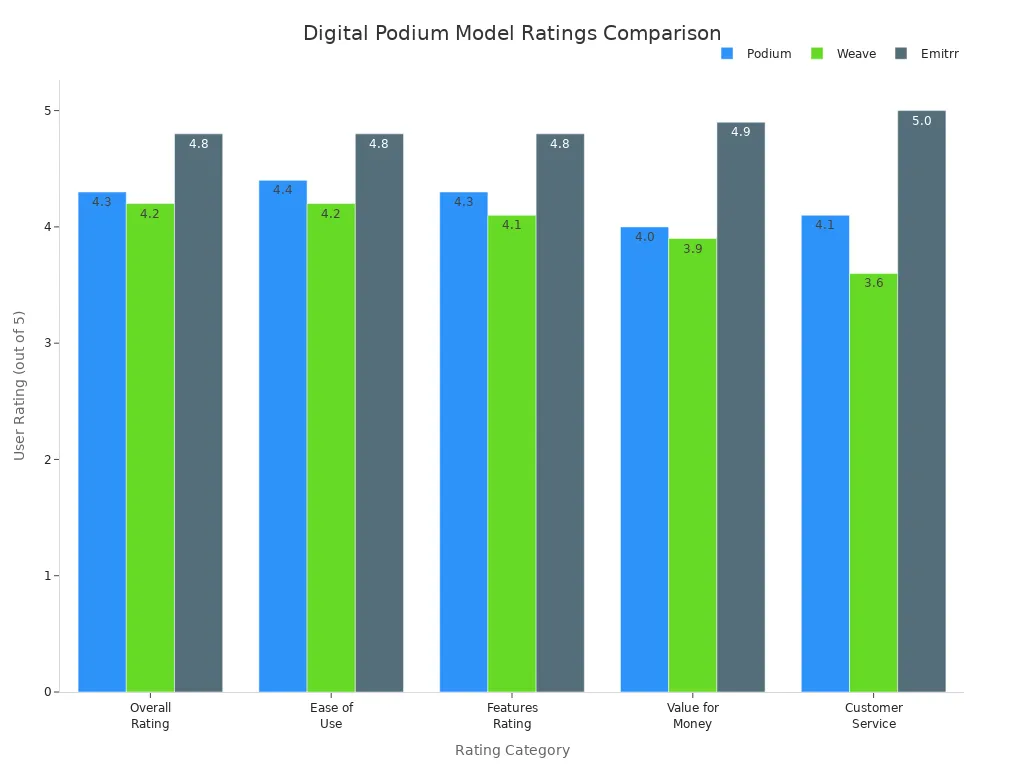
User ratings show people are happy with these podiums. You can see how different models compare in the chart below:
You can use intelligent digital podiums for trade shows, lectures, and meetings. These tools help make things smooth for everyone.
Choosing the right podium
You want the best podium for your conference rooms. Use the table below to compare important points:
Criteria | Description |
|---|---|
Brand and Supplier Selection | Think about product quality, after-sales service, and costs when picking brands and suppliers. |
Maintenance and Support Costs | Remember expenses for fixing equipment, updating software, and getting technical help. |
Technical Configuration | Advanced features and functions can change the total cost of the podium. |
Device Integration | The quality and choice of multimedia parts affect how well it works and the price. |
Customization Options | Custom features and accessories can make it fit better but may cost more. |
You should also check user ratings for how easy it is to use, features, and customer service. Emitrr, for example, scores high in all areas. This helps you pick a podium that fits your needs in smart conference rooms and corporate conference rooms.
Setup and training tips
You can set up your intelligent digital podium for success by following these steps:
Give training to all users so they know how to use every feature.
Change the podium for your event, including software and hardware.
Plan regular maintenance and make sure you have technical support.
Use flexible branding options, like magnetic signs, to match your event.
Keep sponsor logos smaller than your main brand for a neat look.
Tip: Regular training and support help everyone feel sure using the podium in corporate conference rooms.
You can use these best practices to make your events run smoothly. Intelligent digital podiums help you create a professional and interactive experience in every meeting.
You can make your conferences special with intelligent digital podiums. These tools help you talk to people and manage events better. They also make your presentations look good. Here are some ways these features help your event:
Contribution to Event Success | |
|---|---|
Flexible registration and check-in | Makes it easy for guests to sign in and feel welcome. |
Feedback collection | Helps you learn what worked and what to change next time. |
Customizable website templates | Lets you add your own style so your event looks unique. |
Engagement tools | Things like AI matchmaking and live chat help people meet and talk to each other. |
You will notice new trends, like more fun presentations and support for both in-person and online events. Better technology helps everyone work together easily. Pick an intelligent digital podium to make your event awesome.
FAQ
What makes an intelligent digital podium different from a traditional podium?
You get cool features like touchscreens and multimedia controls. Wireless connectivity lets you do more things. These tools help you run presentations and connect with your audience. You can share content and interact easily. Your event goes smoother and is more fun.
Can you use an intelligent digital podium for hybrid events?
Yes, you can use it for hybrid events. It supports live streaming and recording. You can reach people in the room and online. This makes your event flexible and includes everyone.
How do you connect your devices to a digital podium?
You can use USB, HDMI, Wi-Fi, or Bluetooth. Most podiums let you plug in laptops, tablets, or phones. You can share your screen or files with a few taps.
Is it hard to learn how to use an intelligent digital podium?
No, it is not hard. The touchscreen and controls are easy to use. Most people learn fast with simple training. You can focus on your talk instead of worrying about tech.
What benefits do event organizers get from using digital podiums?
You save time setting up and managing your event. You control audio, video, and presentations from one spot. You can collect feedback and run hybrid events easily. Everyone has a smooth experience.
See Also
Must-See High-Resolution LCD Kiosks For Your Next Exhibit
Innovative Digital Signage Solutions You Should Explore
Top Digital Signage Players Gaining Popularity In 2026
