Indoor vs outdoor info kiosks which is best for your business
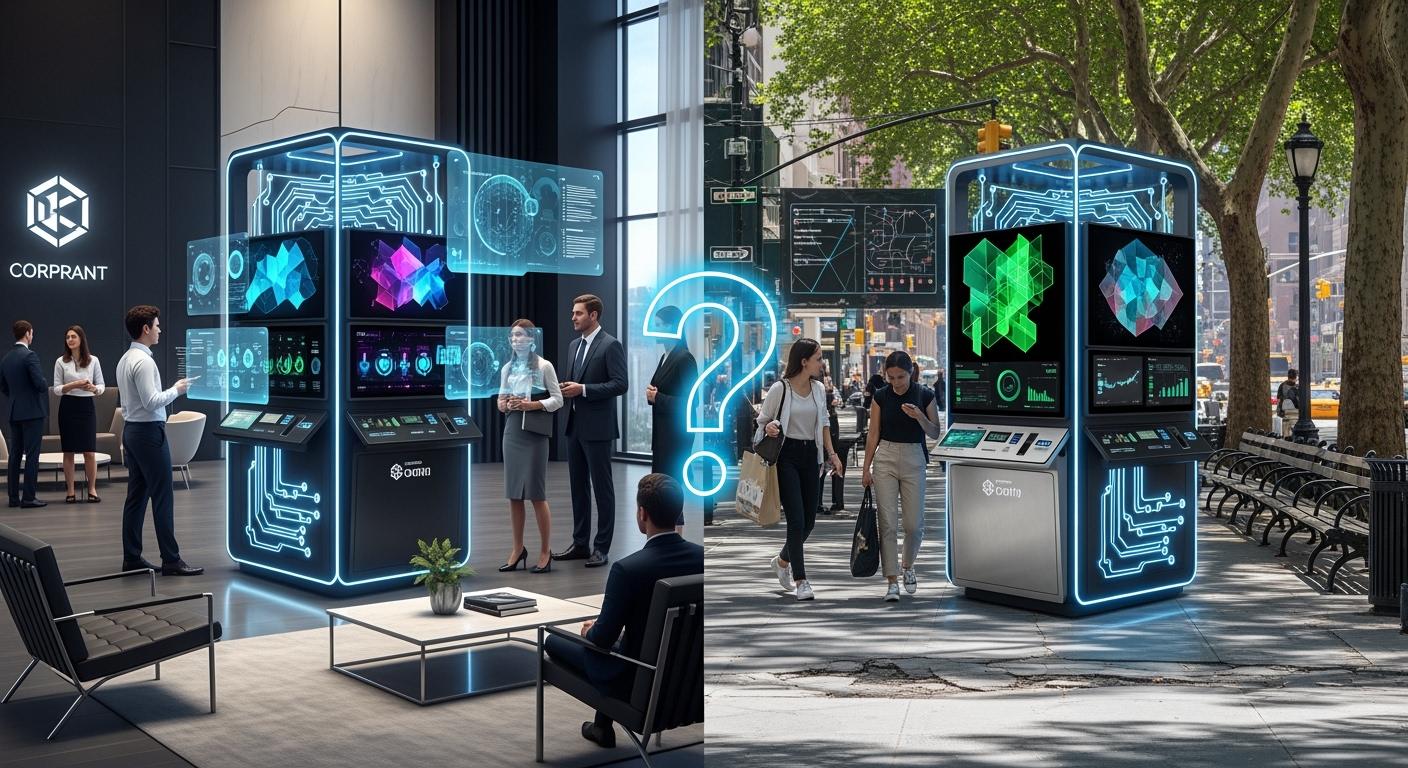
You should pick info kiosks based on where you are, how many customers you have, and what your business needs. Most businesses use indoor kiosks. These kiosks make up over 68.7% of the market. Outdoor kiosks are getting more popular in places like airports and train stations. Think about these important things before you choose:
Shenzhen TopAdkiosk Display Technology Co., Ltd.
Add.: 2F, Bldg 10, Changfeng Industrial Park, Dongkeng, Fenghuang, Guangming, Shenzhen, China 518132
Mobile/WHATSAPP: 86-138 25769658
Email: marketing@topadkiosk.com topadkiosk@gmail.com
Skype: pghenry1
Wechat: adkioskhenry
English Web.: http://www.topadkiosk.com/
https://www.topkioskdisplay.com/
http://www.ad-kiosk.com/
https://www.toplcddisplay.com/
http://www.multitouchdigitalsignage.com/
https://www.youtube.com/channel/UCYVYNJHxLVEcQD8fuUxXNTA/videos?view_as=subscriber
https://www.facebook.com/TOPADKIOSKSHENZHEN/?ref=bookmarks
Indoor Kiosks | Outdoor Kiosks | |
|---|---|---|
Display Rate | Shows things faster in calm places | Can be hard to see in sunlight |
Weather Resistance | Not made for outside weather | Built to keep out rain and wind |
Peripheral Configurability | Easy to add extra devices | Harder to add extra devices |
Traffic Consideration | Best for people inside | Good for lots of people outside |
Longevity of Branding | Vinyl logos last longer inside | Weather can damage vinyl logos |
Tip: Think about these things to pick the best kiosk for your business.
Key Takeaways
Pick kiosks based on where they will go and what customers want. Indoor kiosks are good for quiet places. Outdoor kiosks are better for busy spots. Outdoor kiosks let people use them all day and night. They can help more people, but they cost more and need more care. Indoor kiosks cost less money. They help people wait less. They have things like self-service and ways to help everyone use them. Think about how strong the kiosk is and how much care it needs. Outdoor kiosks must be safe from weather. Indoor kiosks are easier to look after. Use the checklist given to check what you need. This helps you pick the best kiosk for your business.
Outdoor kiosk overview
Outdoor info kiosks let you talk to people outside. You can see these kiosks at airports, train stations, and busy streets. An outdoor kiosk uses strong materials that can handle bad weather. It has bright screens and tough locks. Many have heating and cooling to keep electronics safe from hot or cold. Some have sealed cases, screens that stop glare, and parts that are hard to break. These kiosks help people get info or services any time they need.
Outdoor kiosk benefits
You get many good things with an outdoor kiosk.
You reach more people because the kiosk is outside and easy to see.
The kiosk gives info all day and night, so it works all the time.
Bright screens help people read even when it is sunny.
Strong build keeps the kiosk safe from rain, dust, and people who try to break it.
Fun tech lets users have a better experience.
Note: Outdoor kiosks use HVAC to keep water and heat away, so electronics last longer.
Outdoor kiosk limitations
There are some problems with outdoor kiosks.
You need to keep water out and stop the kiosk from getting too hot.
Sunlight can make screens hard to see, so you need very bright displays.
You often need to connect wires and hire workers to set it up.
It is harder to take care of because you must clean filters and check seals.
Some places need UL certification, which costs more money and takes more time.
Challenge | Description |
|---|---|
Site Preparation | Needs wires and trained workers to install |
Heating & Cooling | Needed to keep electronics safe in hot or cold |
Vandalism | Must have strong parts to stop people from breaking it |
Outdoor kiosk best uses
You can find outdoor kiosks in many places.
Event ticket sales
Campus maps
Drive-thru orders
Tourism and parking payments
Self-service for government tasks
Outdoor kiosks help people get info or services outside, especially where it is busy or public.
Indoor info kiosks overview
An indoor kiosk is a digital station you put inside. You see these kiosks in stores, hospitals, banks, hotels, and schools. They help people find info, check in, pay bills, or get directions. Most indoor kiosks have touchscreens, card readers, printers, and speakers. You can set them up for self-service, wayfinding, or health checks. These kiosks work best indoors where weather and vandalism are not a problem.
Indoor kiosk benefits
You get many good things from using an indoor kiosk.
You save money because the kiosk does jobs like checkout and inventory. This means you do not need as many workers.
The kiosk helps customers finish shopping faster, so lines are shorter and people are happier.
Customers have more control. They can scan items, pay, or get help without waiting.
You can add things like many languages, voice help, and touch features. These make the kiosk easier for everyone, even people with disabilities.
The kiosk follows ADA rules, so people with physical, visual, or hearing problems can use it.
Tip: Indoor kiosks help your business by doing simple jobs and making customer service better.
Benefit | Description |
|---|---|
Automating Routine Tasks | Kiosks do jobs like checkout and inventory, so you spend less on workers. |
Reducing Wait Times | Self-checkout kiosks help people finish faster, so lines are shorter and fewer people leave. |
Enhancing Self-Service Options | Kiosks let customers do things on their own, so workers can help with harder jobs. |
Indoor kiosk limitations
You may have some problems with an indoor kiosk.
The kiosk can stop working if the software crashes or the screen freezes.
Sometimes, the printer jams or the card reader does not work. This can slow things down.
If the instructions are not clear, people may get confused and need help.
Old software can make the kiosk slow or unsafe.
You need to check the kiosk often to keep it working well.
Technical Issue | Description |
|---|---|
Technical Downtime | Kiosks stop working, so people cannot use them and get upset. |
Frozen Screens | Screens stop working, so customers cannot use the kiosk. |
Printer Issues | Paper jams slow things down and make people unhappy. |
Faulty Card Readers | If card readers do not work, people cannot pay. |
Application Crashes | Software bugs make the kiosk stop, so it cannot be used. |
Indoor kiosk best uses
You can use an indoor kiosk in many places.
In stores, the kiosk helps people check out, find things, or get deals.
In healthcare, the kiosk lets patients check in, find their way, or check their health.
In hotels, the kiosk helps guests check in, get keys, or find fun places.
In banks, the kiosk lets people pay bills or get info without waiting.
In schools, the kiosk gives students directions or helps them sign up for classes.
Indoor info kiosks work best where you want to make service better, save time, and help people do things themselves.
Info kiosks comparison
Key decision factors
There are a few things to think about when you pick indoor or outdoor info kiosks. Each thing can change how well your kiosk works. It also changes how much it helps your business. This guide can help you choose the best one.
Durability
Outdoor kiosks are made with tough materials. They can handle rain, wind, and people who try to break them. Indoor kiosks do not need to fight the weather. They last longer if they stay inside.Maintenance
Outdoor kiosks need to be checked often. You have to clean filters and look at seals. You must keep the electronics safe from hot and cold. Indoor kiosks are easier to take care of. You just check the software and hardware sometimes.Cost
Outdoor kiosks cost more money. They need special parts and workers to put them in. Indoor kiosks are cheaper. You do not spend as much to set them up or fix them.Configurability
Both types of kiosks can be changed to fit your needs. Custom kiosks make customers happier by 20% in six months. If you have many stores, you can save about $2,400 each year at every store. Custom kiosks help you fix problems and keep your brand the same.Feature Flexibility
Indoor kiosks let you add things like printers, card readers, and speakers. Outdoor kiosks cannot add as many things because they must stay safe from weather.
Tip: Make a list before you pick a kiosk. Write down what you need for durability, maintenance, cost, and configurability. This will help you choose the right info kiosks for your business.
Quick comparison table
This table shows the main ways indoor and outdoor info kiosks are different. You can see the costs, how much work they need, and how easy they are to change. It helps you pick the best kiosk for your business.
Factor | Indoor Kiosk | Outdoor Kiosk |
|---|---|---|
Durability | Good in calm places | Strong in harsh weather |
Maintenance | Low | High |
$8,000 | $3,400 - $25,900 | |
Configurability | High | Medium |
Feature Flexibility | Easy to add devices | Limited options |
Information Access | Inside only | Anytime, anywhere |
Note: Outdoor kiosks cost more money. You pay between $3,400 and $25,900. Indoor kiosks cost about $8,000. Think about your money and what you need before you choose.
Checklist for choosing info kiosks:
Where will you put the kiosk?
How many people will use it?
Do you need it to handle weather?
How much money can you spend?
Do you want to add more devices?
Will you need to change info a lot?
If you say "yes" to needing weather protection or helping lots of people outside, outdoor kiosks are better. If you want easy care and more features, indoor kiosks are a good choice.
📝 Use this guide and checklist to help you pick the right info kiosks for your business.
Real-world kiosk examples
Outdoor kiosk case study
You can see how outdoor info kiosks work in real life by looking at two successful projects. Many cities use outdoor kiosks to help people find information and services. For example, California installed 300 weatherproof kiosks at EV charging stations. These kiosks let users start charging their cars and check prices. In Las Vegas, outdoor kiosks give transit information, emergency help, and details about local attractions. These kiosks stand up to sun, rain, and wind, so they work all year.
Kiosk Type | Description |
|---|---|
EV Charging Station Kiosks | 300 weatherproof kiosks in California let users start charges and check pricing. |
City Info Kiosks | Outdoor kiosks in Las Vegas provide transit info, emergency help, and local attractions. |
Outdoor kiosks also help businesses measure results. Unlike traditional signs, digital kiosks show real data, such as how many people use them and how long they stay. You can target your message based on traffic or weather. This means you reach more people and improve brand visibility. Outdoor kiosks cost more at first, but you save money over time because you do not need to print new signs.
Note: Outdoor kiosks give you better ways to connect with users and track results.
Indoor kiosk case study
Indoor info kiosks help businesses in many ways. In a hospital, you might see a kiosk that lets patients check in or find their way. This saves time for both staff and visitors. In a retail store, an indoor kiosk helps customers look up products, check prices, or print coupons. These kiosks work well because they stay safe from weather and need less maintenance.
You can add features like printers, card readers, and speakers to indoor kiosks. This makes them flexible for different needs. Many businesses report shorter lines and happier customers after installing indoor kiosks. You also get data on how people use the kiosks, so you can improve your service.
Hospitals use indoor kiosks for patient check-in and directions.
Stores use them for product lookup and self-checkout.
Hotels use them for guest check-in and key pickup.
Indoor kiosks help you serve users faster and make your business run smoothly.
Cost and maintenance
Installation costs
You need to think about installation costs before you choose an info kiosk. Indoor kiosks usually cost less to install. You place them inside, so you do not need to worry about weatherproofing or extra protection. Outdoor kiosks cost more because you must use strong materials and special parts. You also need to prepare the site, add wiring, and sometimes get permits.
Installation costs change based on where you live and what your business does.
North America, especially the U.S., has high demand for kiosks. This makes installation more expensive.
The Asia-Pacific region is growing fast in kiosk adoption. Costs there can be different because of new markets and technology.
Banking, retail, and hospitality industries have special needs. These needs can raise installation and maintenance costs.
💡 Tip: Ask about local rules and industry standards before you buy a kiosk. This helps you plan your budget.
Kiosk Type | Typical Installation Cost | Extra Needs |
|---|---|---|
Indoor | Lower | Basic wiring, simple setup |
Outdoor | Higher | Weatherproofing, permits |
Maintenance needs
You must keep your info kiosk working well. Indoor kiosks are easier to maintain. They stay safe from rain, wind, and sun. You still need to clean them and check for dust, food, or spills, especially in busy places.
Outdoor kiosks need more care. Weather can damage screens, locks, and electronics. You must check seals, filters, and heating or cooling systems often. Rain, snow, and heat make maintenance more frequent.
Indoor kiosks face dust and spills in high-traffic areas.
Outdoor kiosks need regular checks because weather can harm parts and slow performance.
🛠️ Note: Outdoor kiosks cost more to maintain. You pay for repairs and cleaning more often. Indoor kiosks need less work, but you should still check them regularly.
You save money and time when you plan for maintenance. Choose the right kiosk for your location and needs. This helps your business run smoothly and keeps customers happy.
You now know the key differences between indoor and outdoor info kiosks. Outdoor kiosks give you strong durability and work in any weather, but cost more and need extra care. Indoor kiosks offer more features and lower costs, but only work inside. Think about your location, budget, and customer needs. Use the checklist above to match the right kiosk to your business. The best info kiosk helps you serve customers better and keeps your business running smoothly.
FAQ
What is an info kiosk?
An info kiosk is a digital station that gives information or services. You use a touchscreen or buttons to get directions, pay bills, or check in. Businesses place kiosks in stores, hospitals, and public spaces.
How do you maintain an info kiosk?
You clean the screen and check the hardware often. Indoor kiosks need dusting and software updates. Outdoor kiosks require seal checks, filter cleaning, and weatherproofing. Regular care keeps your kiosk working well.
Can you customize an info kiosk?
You can add printers, card readers, and speakers to most indoor kiosks. Outdoor kiosks allow fewer changes because they must stay weatherproof. Custom features help your kiosk fit your business needs.
Are info kiosks safe to use?
Info kiosks use secure software and hardware. You protect customer data with encryption and regular updates. Outdoor kiosks have strong locks and tough cases to stop vandalism.
Where should you place an info kiosk?
You place indoor kiosks near entrances, checkout areas, or waiting rooms. Outdoor kiosks work best in busy public spots like parking lots, campuses, or transit stations. Choose a location with high traffic for best results.
See Also
Selecting Ideal Outdoor Digital Signage For Your Company Needs
The Benefits of Outdoor Digital Signage For Business Visibility
Top Rated Outdoor LCD Kiosks To Consider In 2026
Six Essential Tips For Selecting Interactive Kiosks Effectively
Leading Providers Of Outdoor LCD Display Kiosks Available Today
