Comparing Top ICD Display Kiosk Manufacturers and Their Product Features
Add.: 2F, Bldg 10, Changfeng Industrial Park, Dongkeng, Fenghuang, Guangming, Shenzhen, China 518132
Mobile/WHATSAPP: 86-138 25769658
Email: marketing@topadkiosk.com topadkiosk@gmail.com
Skype: pghenry1
Wechat: adkioskhenry
English Web.: http://www.topadkiosk.com/
https://www.topkioskdisplay.com/
https://www.toplcddisplay.com/
http://www.multitouchdigitalsignage.com/
https://www.youtube.com/channel/UCYVYNJHxLVEcQD8fuUxXNTA/videos?view_as=subscriber
https://www.facebook.com/TOPADKIOSKSHENZHEN/?ref=bookmarks
You face many choices when searching for top-rated Icd display kiosk manufacturers. Picking the right one can feel overwhelming. You want kiosks made with strong materials like stainless steel or aluminum for durability. You need a variety of models to fit your business needs and engage customers. Good customer service, technology support, and meeting industry regulations matter for smooth and legal operations. Comparing features, customization, software, support, and pricing helps you make the best choice.
Key Takeaways
Choose kiosks made from durable materials like stainless steel or aluminum to ensure longevity.
Evaluate manufacturers based on their technology, customization options, and support services to find the best fit for your business.
Consider both upfront and long-term costs when selecting a kiosk, as some may save you money over time despite higher initial prices.
Ask key questions about warranty, integration, and customization to avoid potential issues and ensure a good match for your needs.
Utilize a checklist of your must-have features to streamline your comparison process and make informed decisions.
Top ICD Display Kiosk Manufacturers
Selection Criteria
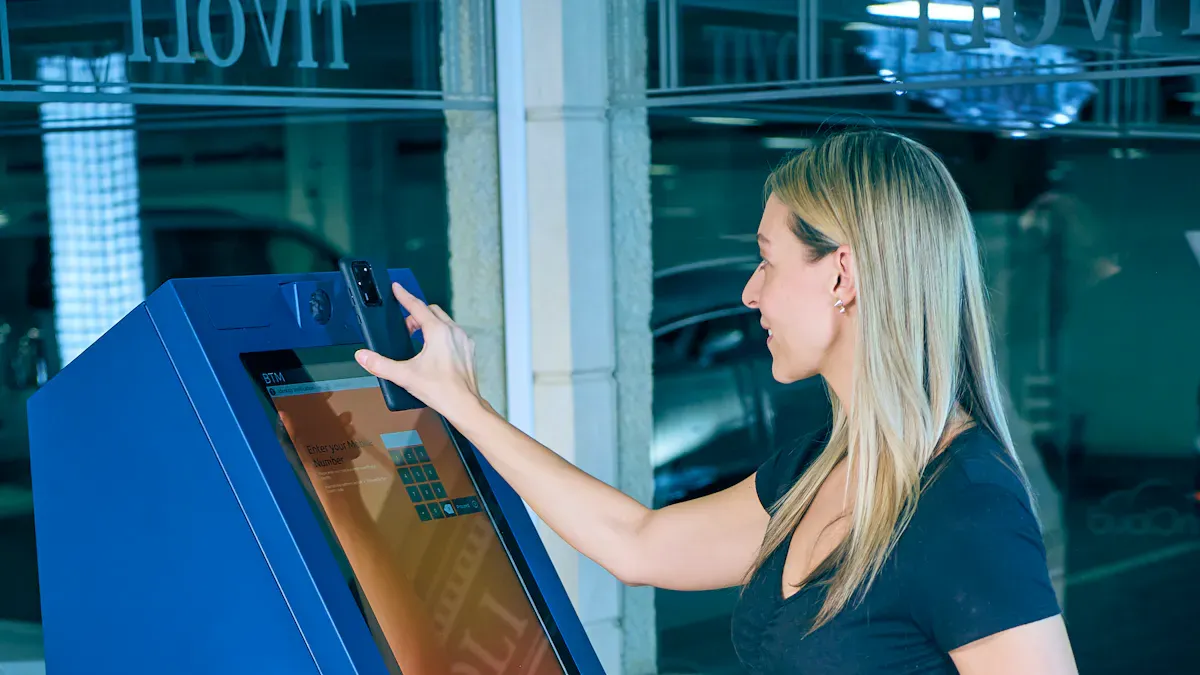
You want to choose the best Icd display kiosk manufacturers for your business. You should look at several important factors. First, check the quality of materials. Strong metals like stainless steel or aluminum help kiosks last longer. Next, review the technology inside each kiosk. Touchscreens, scanners, and printers make kiosks more useful. You should also look at software options. Easy-to-use software helps customers and staff. Customization matters too. You may need special colors, logos, or extra features. Good support and service help you fix problems quickly. Price is important. You want value for your money.
Tip: Make a checklist of your needs before you compare manufacturers. This helps you focus on what matters most.
Quick Manufacturer Overview
You will find many top brands in the kiosk industry. Here is a quick look at the leading names:
NCR Voyix: Offers reliable kiosks with strong hardware and advanced software.
Diebold Nixdorf: Known for secure and durable kiosks, often used in banking.
KIOSK Information Systems: Provides flexible designs and custom solutions.
Meridian Kiosks: Delivers high-quality kiosks with easy integration.
Olea Kiosks: Focuses on stylish designs and robust technology.
Frank Mayer & Associates: Creates kiosks for retail and interactive displays.
Zivelo: Offers modern kiosks with sleek looks and smart features.
Advanced Kiosks: Specializes in self-service kiosks for many industries.
Pyramid Computer: Builds kiosks with strong performance and reliability.
Zebra Technologies: Known for rugged kiosks and strong support.
These brands stand out because they offer quality, innovation, and good service. You can trust them to deliver products that meet your needs. Each company has strengths in design, technology, or support. You should compare their features to find the best fit for your business.
Key Comparison Factors
Experience & Reputation
When you compare Icd display kiosk manufacturers, start by looking at their experience and reputation. Companies with many years in the industry often have more knowledge and better solutions. You should check for certifications and awards. These show that a manufacturer meets high standards. Some companies invest in research and development. This helps them stay ahead with new technology.
Description | |
|---|---|
Can change materials, screen sizes, and add special parts. | |
Lifecycle Support & Service | Offers good warranties, spare parts, and service networks. |
Scalability & Production | Can make more kiosks quickly without losing quality. |
Regulatory Compliance | Meets safety and industry rules. |
Innovation & R&D | Invests in new ideas and technology. |
Hardware & Technology
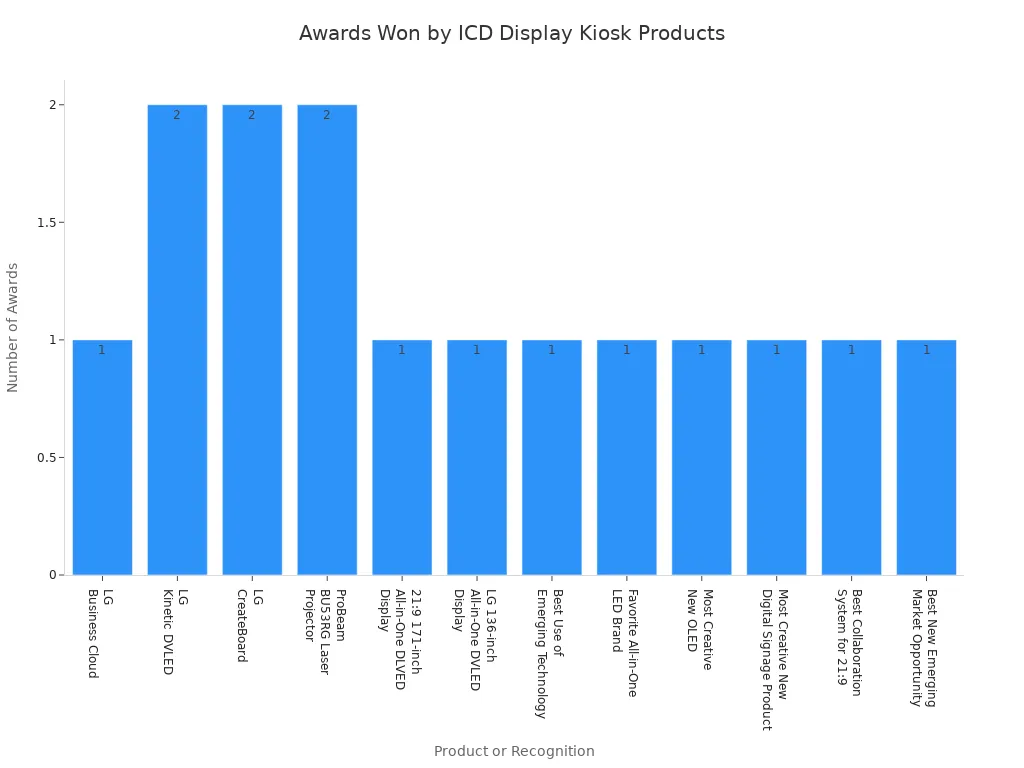
You want kiosks with strong hardware and the latest technology. Look for models with tough screens, fast processors, and good printers or scanners. Some products win awards for their design and features. In 2024, many kiosks received top honors for innovation and performance.
Software & Integration
Software is important for smooth business operations. Good kiosks work with your current systems. You should check if the kiosk supports controller software, cloud-based management, and custom solutions. This makes it easy to update content and keep everything running well.
Integration Type | Description |
|---|---|
Controller software | Runs business apps and logic. |
Helps manage digital signs and kiosks from anywhere. | |
Cloud-based CMS | Lets you update and schedule content easily. |
Custom solutions | Allows you to pick the best devices for your needs. |
Customization Options
You may need kiosks that match your brand or fit special spaces. Top manufacturers offer many choices. You can pick colors, logos, screen sizes, and even special hardware. Modular designs let you use the same kiosk in different places. Flexible options help you save money and adjust as your needs change.
Adapt hardware and software for your project.
Order small or large quantities.
Add special features or connect to other devices.
Support & Service
Good support keeps your kiosks working. Look for companies that offer strong warranties, fast repairs, and helpful customer service. Some provide ADA-compliant kiosks, heavy-duty bases, and easy-to-use software. Many also include training and one-year maintenance plans.
Pricing & Value
Price matters, but value is more important. Some manufacturers offer lower prices for bulk orders. Others focus on high-end features for retail or public spaces. You should compare what is included in the price, like support and software. Watch for hidden costs, such as extra fees for updates or repairs.
Category | Key Characteristics |
|---|---|
B2B | Multi-size displays, lower bulk prices, strong for public use. |
B2C | Popular sizes, high resolution, higher retail prices, good for resellers. |
Tip: Always ask for a full price breakdown before you buy.
Manufacturer Comparison
NCR Voyix
You find NCR Voyix at the forefront of kiosk technology. This manufacturer delivers reliable hardware and advanced software. You benefit from strong security features and easy integration with payment systems. NCR Voyix kiosks work well in retail, hospitality, and banking. You can expect high uptime and robust support. Some users report limited customization for smaller projects. You should choose NCR Voyix when you need proven solutions and wide deployment.
Diebold Nixdorf
Diebold Nixdorf stands out for secure and durable kiosks. You see these kiosks in banks and retail stores. The company uses AI technology to improve self-checkout and customer experience. You can streamline transactions and reduce wait times. Diebold Nixdorf integrates advanced tech for efficient operations.
Description | |
|---|---|
Self-Checkout Solutions | Utilizes AI technology for item recognition, enhancing speed and accuracy in transactions. |
Customer Experience Enhancement | Improves the overall shopping experience by streamlining the checkout process and reducing wait times. |
Integration of Advanced Tech | Incorporates AI and machine learning for efficient self-service operations in retail environments. |
You should select Diebold Nixdorf when you want secure, high-tech kiosks for busy environments.
KIOSK Information Systems
KIOSK Information Systems specializes in designing and manufacturing kiosk solutions. You find their products tailored for retail, healthcare, and transportation. This specialization helps you meet diverse industry needs. You can request custom designs and flexible features. KIOSK Information Systems offers strong support and scalable production. Some users note higher prices for advanced customization.
You get kiosks built for your specific sector.
You can scale up production quickly.
You receive expert guidance for integration.
Meridian Kiosks
Meridian Kiosks delivers innovation and flexibility. You benefit from their technical expertise and comprehensive manufacturing capabilities. Meridian helps you create designs that fit your brand and space. Their customer service stands out, supporting global deployments and offering 24-hour ambassador kiosks.
Unique Selling Point | Evidence |
|---|---|
Commitment to innovation | Meridian delivered what others couldn’t. |
Flexibility in design | Their flexibility, design acumen, technical expertise, and manufacturing capabilities exceed what we have seen from other vendors. |
Technical expertise | We’ve collaborated to leverage and build a scalable, consistent, and exceptional on-site service program that successfully supports our global mobile deployment for our OEM clients. |
Comprehensive manufacturing capabilities | Meridian was able to help create a design that fit our aesthetics, see those needs, and offer some plans that fit exactly what we needed. |
Customer service and support | Thanks to Meridian Kiosks, we now have a 24-hour “ambassador” for Martin County, NC. |
You should choose Meridian Kiosks when you need custom solutions and strong support.
Olea Kiosks
Olea Kiosks addresses industry-specific needs with specialized models. You find kiosks for driver check-in, self-ordering, and gaming. Olea optimizes efficiency and safety in logistics, improves order accuracy in retail, and supports 24/7 use in casinos.
Kiosk Model | Industry Application | Key Features |
|---|---|---|
Tampa Kiosk | Driver Check-in / Yard Management | Optimizes operational efficiency, improves yard traffic flow, and enhances driver safety. |
Detroit Kiosk | Self-Ordering & Drive-Thru | Increases efficiency and ROI, improves order accuracy, and offers multiple deployment options. |
Monte Carlo Gaming | Casino and Retail | Features card-printing, vibrant LED lighting, and robust components for 24/7 use. |
You can use Olea Kiosks in transportation, retail, gaming, healthcare, and more. You benefit from modular designs and robust components.
Frank Mayer & Associates
Frank Mayer & Associates improves user experience and offers cost-effective kiosks. You save money compared to hiring staff. The company creates kiosks for retail and interactive displays. You may face challenges with installation and maintenance, especially with hardwired connections.
Cost-effective for businesses
Installation and maintenance can be difficult
You should consider Frank Mayer & Associates for retail and public spaces where cost savings matter.
Zivelo
Zivelo provides modern kiosks with sleek designs and smart features. You find their products in retail, hospitality, and government settings. Zivelo focuses on aesthetics and user-friendly interfaces. You can customize kiosks to match your brand. Some users report limited hardware options for unique projects. You should choose Zivelo when you want stylish kiosks that attract customers.
Advanced Kiosks
Advanced Kiosks designs products with innovation and robust software. You can integrate their kiosks with your existing systems. This helps you enhance operational efficiency without changing your infrastructure. You benefit from real-time device health monitoring, crash log analysis, battery management, and AI-driven automation.
Real-time device health monitoring
Usage and crash log analysis
Battery management for tablet kiosks
AI-driven automation
Predictive maintenance
Personalization through edge computing
Accessibility standards
Sustainability in deployment
Reduced operational costs and maximized transactions
You should select Advanced Kiosks for enterprise projects that require seamless integration and advanced management.
Pyramid Computer
Pyramid Computer ensures reliability and performance. You get high-quality components from their own brands. Their kiosks withstand tough environments and offer multiple mounting options. You can adjust performance based on your needs, which helps you save money.
Description | |
|---|---|
High-Quality Components | Utilizes components from own brands ensuring reliability and performance. |
Robust Design | Designed to withstand various environments, enhancing durability. |
Flexibility | Offers multiple mounting options and configurations for diverse use cases. |
Scalable Performance | Performance can be adjusted based on customer needs, allowing for cost-effective solutions. |
You should choose Pyramid Computer for projects that demand durability and flexible configurations.
Zebra Technologies
Zebra Technologies stands out with advanced self-checkout solutions. You benefit from their acquisition of Elo Touch Solutions, which adds touchscreen technology and self-service kiosks. Zebra integrates AI and RFID for comprehensive solutions across sectors. You can use their unified systems for grocers, combining self-service kiosks, mobile scanning, automated payment, and real-time inventory.
Evidence Description | Key Points |
|---|---|
Acquisition of Elo Touch Solutions | Enhances Zebra's portfolio with consumer-facing touchscreen technology and self-service kiosks. |
Comprehensive self-checkout solutions | Integrates advanced technologies like AI and RFID, addressing a larger market across various sectors. |
Unified solutions for grocers | Combines self-service kiosks, mobile self-scanning, automated payment, and real-time inventory. |
You should select Zebra Technologies when you need advanced, integrated solutions for retail and grocery environments.
Customization & Integration
Customization Importance
You want your ICD display kiosks to match your business needs. Customization gives you flexibility and helps you stand out. LCD touchscreen digital kiosks let you adapt and scale your displays. You can update or modify content quickly to meet changing customer demands. This keeps your business relevant and responsive.
You can use digital kiosks to show marketing messages tailored to your customers. These messages use customer data to boost marketing effectiveness and drive sales. You can change the information and features on your kiosks as your business grows. This improves customer experience and helps you stay ahead of competitors.
LCD touchscreen kiosks offer adaptability and scalability.
You can update content easily to meet new demands.
Tailored marketing messages increase sales.
You can add new features to improve customer experience.
Tip: Choose a manufacturer that offers easy customization. This helps you respond to market changes and customer needs.
System Integration
You need your kiosks to work smoothly with your existing systems. Integration connects your kiosks to AV systems, POS networks, inventory management, and customer databases. If your kiosks do not sync well, you may face system crashes or slow data transfers. Operational disruptions can hurt your business.
Common integration challenges include compatibility issues and poor quality hardware. If you pick a vendor with limited integration skills, you may pay more for maintenance and repairs. Reliable kiosks use industrial quality hardware components. Manufacturers should test their products with thermal analysis and design verification. These tests improve system reliability and reduce downtime.
Digital signage must integrate with AV systems and POS networks.
Compatibility issues can cause crashes and slow data transfers.
Failure to sync with inventory and customer databases leads to disruptions.
Vendors with limited integration skills increase maintenance costs.
Proper hardware integration and thorough testing boost reliability.
Note: Always ask about integration capabilities and testing procedures before you choose a kiosk manufacturer.
Software & User Experience
Proprietary vs. Third-Party Software
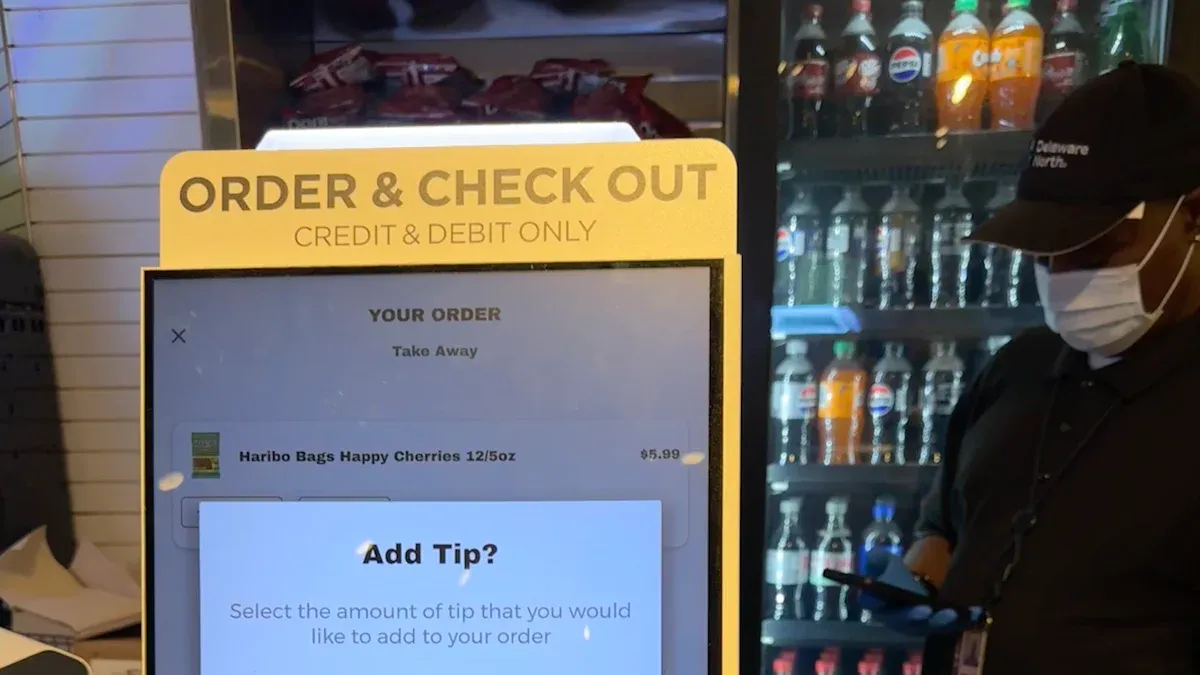
You need to decide between proprietary and third-party software when choosing an ICD display kiosk. Proprietary software comes from the kiosk manufacturer. You get a system that works smoothly with the hardware. Updates and support often happen faster. You may find fewer options for customization. Third-party software gives you more flexibility. You can add features or connect with other systems. You might face challenges with compatibility or support.
Software Type | Benefits | Challenges |
|---|---|---|
Proprietary | Seamless integration, fast support | Limited customization |
Third-Party | Flexible features, wider integration | Compatibility issues, slower support |
Tip: You should ask about software compatibility before you buy. This helps you avoid problems later.
User Interface
The user interface shapes how people interact with your kiosk. You want a design that feels easy and natural. Intuitive touchscreen displays help users find what they need quickly. Multi-language support opens your kiosk to more people. Real-time updates guide visitors and improve satisfaction. Dynamic content lets you show ads or alerts, which boosts communication.
Intuitive touchscreen displays enhance usability.
Multi-language support increases accessibility for diverse users.
Real-time updates improve navigation and visitor satisfaction.
Dynamic content capabilities allow for advertisements and alerts, enhancing communication.
You should test the interface with real users. This helps you spot problems and make improvements. A good user interface makes your kiosk more effective and keeps customers happy.
Note: Always choose a kiosk with a user interface that matches your audience. This ensures everyone can use your kiosk easily.
Support & After-Sales Service
Warranty & Maintenance
You want your ICD display kiosks to last and work well. Top manufacturers give you clear warranty options. Most touchscreen kiosks come with a warranty that lasts from 1 to 3 years. Some companies offer a comprehensive warranty for up to 3 years. You can see the typical warranty periods in the table below:
Product Type | Warranty Period |
|---|---|
Touchscreen Kiosks | 1-3 years |
Comprehensive Warranty | 3 years |
You also find different warranty periods for other kiosk products:
Product Type | Warranty Period |
|---|---|
Touchscreen Signage | 3 years |
Touchscreen Computers (Windows) | 3 years |
Touchscreen Computers (Android) | 2 years |
Touchscreen Monitors | 3 years |
Mobile Computers | 1 year |

You should check what the warranty covers. Some warranties include parts and labor. Others may only cover certain repairs. Many manufacturers also offer maintenance plans. These plans help you keep your kiosks running smoothly and reduce downtime.
Tip: Always ask about warranty details and maintenance options before you buy.
Training & Technical Help
You need strong support to get the most from your kiosks. Leading manufacturers help you from the start. They guide you through project planning and site surveys. You get help with installation and setup. Most companies offer 24/7 technical support. You can reach them by phone, email, or online chat. Some brands provide remote diagnostics and on-site help if needed.
You also receive training resources and clear documentation. These tools help you and your team use the kiosks with confidence. Regular software updates and preventive maintenance programs keep your kiosks up to date. This support helps you avoid problems and keeps your business running.
Note: Good training and technical help make your investment safer and easier to manage.
Pricing & ROI
Upfront vs. Long-Term Costs
You need to look at both upfront and long-term costs when choosing ICD display kiosks. Upfront costs include the price of the kiosk, installation, and setup. Long-term costs cover maintenance, software updates, and repairs. Some kiosks cost more at first but save money over time. You can see how different industries get a return on investment (ROI) and how quickly they recover their costs.
Industry | Average ROI | Payback Period |
|---|---|---|
Retail | 52% | 14 months |
Quick Service Restaurants | 48% | 11 months |
Corporate Communications | 28% | 24 months |
Healthcare | 35% | 18 months |
DOOH Advertising | 64% | 9 months |
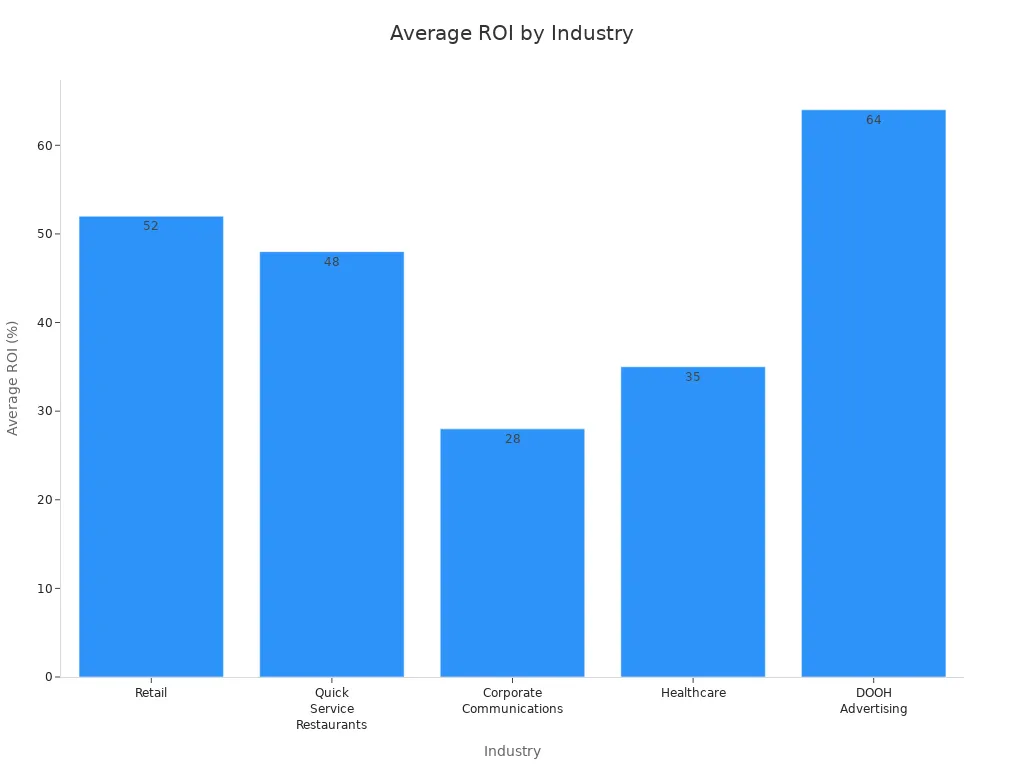
You see that DOOH advertising kiosks have the highest ROI and the shortest payback period. Retail and quick service restaurants also show strong returns. You can expect your investment to pay off in about one year for most industries.
Tip: Calculate both the upfront and ongoing costs before you buy. This helps you plan your budget and measure your ROI.
Pricing Factors
Many factors affect the price of ICD display kiosks. You should know what drives costs so you can make smart choices.
Screen size: Larger screens cost more because they use more materials and higher resolution.
Display technology: LCD, LED, and OLED screens have different price points.
Enclosure quality: Strong materials and complex designs raise the price.
Internal components: High-performance CPUs, RAM, and storage increase costs.
Additional features: Printers, cameras, and advanced touchscreens add to the price.
Installation and maintenance: Professional setup and ongoing care require extra spending.
Software requirements: Custom software and operating systems can boost costs.
Brand reputation: Well-known brands may charge more for quality and support.
You can lower costs by choosing standard models and fewer extra features. You should balance your needs with your budget to get the best value.
Note: Always ask for a detailed price list and check what is included. This helps you avoid hidden fees and surprises.
Choosing the Right ICD Display Kiosk Manufacturer
Matching Features to Needs
You want to find a kiosk that fits your business goals. Start by listing the features you need. Think about screen size, durability, and software options. If you run a busy store, you may need fast processors and strong enclosures. For a school or hospital, you might want easy-to-use interfaces and ADA compliance. Look at how each kiosk handles integration with your current systems. Some kiosks work better with inventory software or payment networks. You should also consider branding. Custom colors and logos help your kiosk stand out.
Use this table to match features to your needs:
Business Type | Important Features |
|---|---|
Retail | Fast checkout, strong hardware |
Healthcare | ADA compliance, easy interface |
Education | Secure access, simple navigation |
Hospitality | Custom branding, payment options |
Tip: Write down your top three must-have features before you contact any manufacturer.
Questions to Ask
You need to ask smart questions before you choose from Icd display kiosk manufacturers. These questions help you avoid mistakes and find the best fit.
What warranty and support do you offer?
How does your kiosk integrate with my current systems?
Can I customize the design and software?
What is the average lifespan of your kiosks?
How quickly can you deliver and install?
What are the ongoing maintenance costs?
Do you provide training for staff?
Are your kiosks ADA compliant?
What hidden fees should I expect?
Note: Asking these questions gives you confidence and helps you make a smart decision.
You should compare answers from different manufacturers. This helps you see which company meets your needs best. Always ask for a demo or sample before you buy.
You see clear differences among ICD display kiosk manufacturers in hardware quality, software design, and support services. To make the best choice, you should:
Evaluate technical capabilities and craftsmanship.
Verify industry standards like ISO 9001 and UL listings.
Request physical samples for durability testing.
Consider support services such as installation and remote monitoring.
Seek consulting for compliance and sourcing.
Focus on features that match your goals. Contact manufacturers for demos or quotes. Download a comparison checklist to guide your decision.
FAQ
What is an ICD display kiosk?
You use an ICD display kiosk to provide information or services through a touchscreen. These kiosks help customers check in, order products, or get directions. Businesses use them in stores, hospitals, and airports.
How do I choose the right kiosk manufacturer?
You start by listing your needs. Compare hardware quality, software options, support, and pricing. Ask for demos and check reviews. Make sure the manufacturer offers customization and integration with your systems.
Can I customize my kiosk’s design and features?
You can customize colors, logos, screen sizes, and software. Most manufacturers let you add special hardware like printers or scanners. Customization helps your kiosk match your brand and business goals.
What maintenance does an ICD display kiosk need?
You clean screens and check hardware regularly. Manufacturers offer maintenance plans that include software updates and repairs. Good maintenance keeps your kiosk running smoothly and extends its lifespan.
See Also
Leading LCD Display Kiosk Producers to Watch in 2026
Comparing Pricing of Freestanding LCD Display Kiosks by Brands
Top LCD Display Kiosks Ideal for Retail Spaces in 2026
Selecting the Right LCD Display Kiosk Installation Service Locally
Evaluating Business Touch Screen Kiosks for Quality and Cost
