How to Use a 3D LED Fan for Advertising Success in 2025
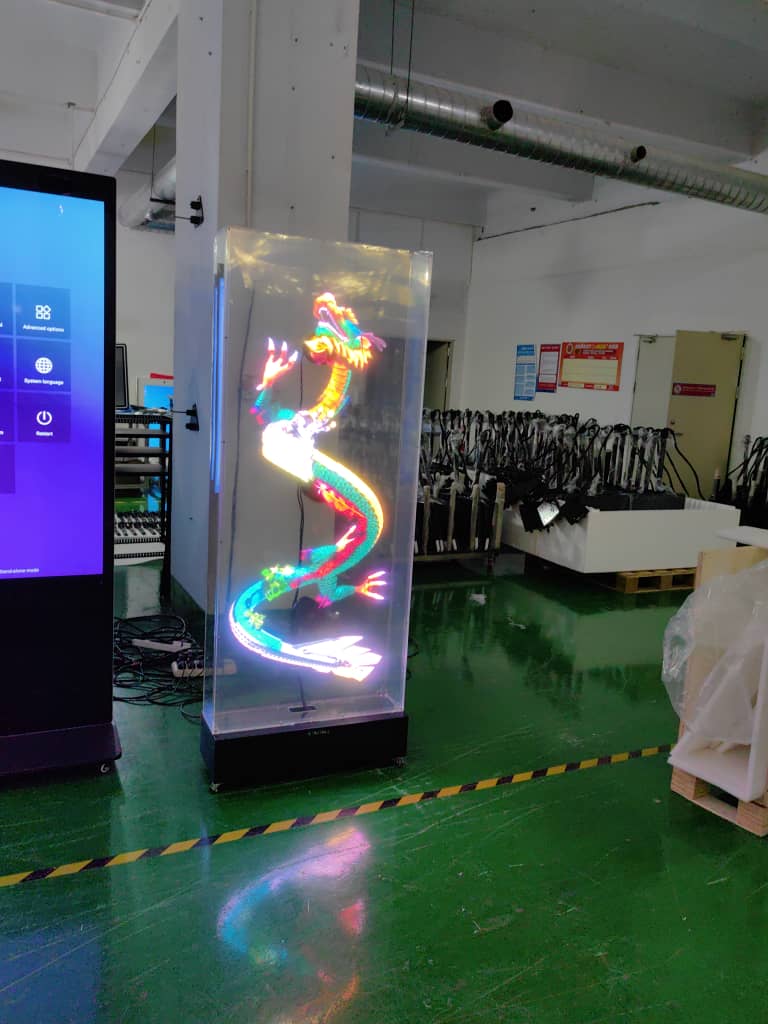
Imagine you walk into a store and see a 3d hologram fan spinning colorful images in mid-air. You stop and watch. That’s the power of a holographic fan for advertising. Businesses in 2025 use these fans because they boost engagement and make brands stand out. Check out the numbers:
Year | Market Size (USD) | Projected Growth Rate (CAGR) |
|---|---|---|
2023 | 19.2% | |
2032 | 1.2 billion | N/A |
You get more attention with a 3d led fan, especially when you use high-quality content and interactive features. The importance of 3d hologram fans keeps growing as more brands trust topadkiosk 3D LED fan to create a stunning hologram that draws people in.
Key Takeaways
3D LED fans show cool holograms that help people notice your brand. They make more people interested in your ads.
Setting up your hologram fan the right way helps it work well. Taking care of it makes it last longer.
Use clear and good-looking pictures to make your display stand out. Add things people can interact with to make it fun and easy to remember.
Play your content at the best times to reach more people. Choose busy times when more people will see it.
Put your fan where lots of people walk by and where there is good light. This helps more people see it and want to look at it.
3D LED Fan Basics
What Is a 3D LED Fan?
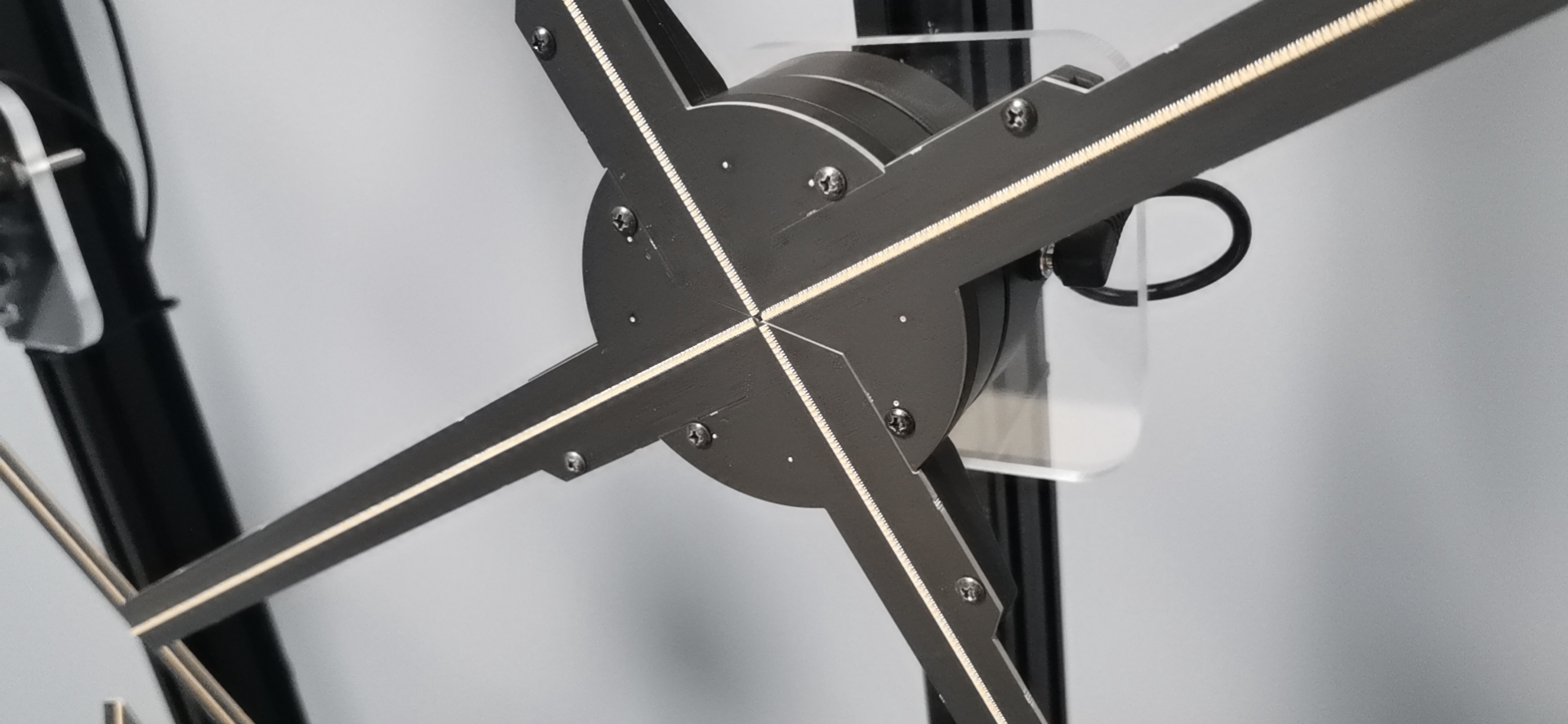
A 3d led fan makes pictures float in the air. It uses special technology to do this. The fan has blades that spin very fast with a strong motor. LED lights on the blades flash in a set order as they move. This tricks your eyes because of persistence of vision. You see 3D images that look like they are hanging in space. The hologram led fan can show logos, products, or moving characters. The display looks cool and gets people’s attention quickly.
Tip: Always check how fast your holographic fan spins. Faster spinning gives you clearer pictures and smoother movement.
Why Use a 3D Hologram Fan for Advertising?
A 3d hologram fan helps your brand stand out in 2025. It gets more attention than regular screens. Here are some reasons:
3D digital billboards use LED lights for bright pictures. These displays are more exciting than flat screens.
Floating hologram images make people interact more. People stop and watch, so they remember your brand better.
3d hologram fan displays help you get more sales. People look longer, so they trust your brand more.
Here are reasons why businesses pick holographic fan for advertising:
Floating 3D images grab attention in busy places like malls.
You can show product demos and stories. The hologram led fan works for many types of businesses.
These fans save money. You can use them again and they don’t cost much to fix.
The cool hologram display makes people watch longer and interact more.
Challenge | Description |
|---|---|
Buying a 3D LED hologram fan costs a lot for small businesses. | |
Short Lifespan of Components | Parts like LEDs and motors wear out fast, so they don’t last long. |
Installation and Maintenance Issues | Setting up is hard, and mistakes can cause problems. |
Environmental Limitations | The fan may not work well everywhere, so you can’t use it in all places. |
High Power Consumption | The fan needs a lot of electricity, so bills go up. |
The market for 3d hologram fan advertising keeps growing every year. Experts think it will be worth $9.85 billion in 2025. Stores and advertising companies use this technology most. It helps them get more attention and sell more products.
Setting Up Your 3D Hologram Fan
Unboxing and Mounting
You just got your new 3d hologram fan. Exciting, right? Let’s start with unboxing and mounting. First, open the box carefully and check all the parts. You want to make sure nothing is missing or damaged. Next, pick a spot for your hologram led fan. You need a place where people can see the hologram, but also where it’s safe.
Here’s a simple checklist for mounting:
Choose an appropriate height. Most experts say you should mount the fan at least 2.1 meters above the ground in public spaces. This keeps people from touching it while it spins.
Leave enough space around the fan. You don’t want anything close that could get hit or cause injury.
Use safety barriers if you mount it lower than 1.8 meters. This helps protect everyone.
Always use grounded outlets for electrical safety. Never daisy-chain power supplies.
If you need to hardwire the fan, call a qualified electrician.
Set up emergency stop provisions if you use the fan in busy areas.
Category | Safety Measures |
|---|---|
Electrical Safety | Always use grounded outlets |
Never daisy-chain power supplies | |
Qualified electrician for hardwired installations | |
Physical Safety | Minimum 2.1m mounting height in public spaces |
Safety barriers if < 1.8m | |
Emergency stop provisions | |
Content Safety | Brightness limits for eye comfort |
Strobe effect warnings | |
Content rating compliance |
Tip: Always unplug your 3d hologram fan before cleaning or moving it. Never use it in wet conditions.
Power and Connections
Now you’re ready to power up. Plug your hologram led fan into a grounded outlet. Most fans use a standard power cord, but some models need a special connection. If you have to hardwire the fan, get help from a professional.
You’ll also need to connect your fan to a device for uploading images and videos. Most fans use USB or HDMI ports. Plug in your USB drive or connect your computer. Make sure the files are in the right format for your fan. Some fans let you use Wi-Fi or Bluetooth for easy setup.
Here’s a quick look at power consumption:
Power Consumption Type | Value |
|---|---|
Max. Power Consumption | |
Average Power Consumption | 300 W/M2 |
Note: Always check your power source before you start setting up your 3d hologram fan. This keeps your fan running safely and helps avoid electrical problems.
Adjusting Fan Speed
Fan speed matters a lot for your hologram. If you want clear and smooth images, you need to set the right speed. Most fans work best at around 2600 RPM. This speed gives you sharp images and less flickering.
Fan Speed (RPM) | Effect on Image Quality |
|---|---|
2600 | Optimal image quality with reduced flickering |
The HoloFan’s transparent design helps make your hologram look crisp and bright. When you increase the fan speed, you get smoother animations. You also see less flickering, which makes the display more enjoyable.
Higher fan speeds lead to smoother animations.
Reduced image flickering enhances visual experience.
To get the best results, coordinate the fan blade rotation with the RGB LED activation. You want the timing and intensity of the LED lights to match the movement of the blades. This lets you display static images, animations, and videos with better clarity and depth.
Tip: If your images look blurry or flicker too much, try adjusting the fan speed. Small changes can make a big difference.
When you finish setting up your 3d hologram fan, test it with a simple hologram. Watch how the images look. If you see problems, check your mounting, power, and fan speed. You want everything to work together for the best display.
How to Use a 3D Hologram Fan for Advertising
Creating Engaging Content
You want your 3d hologram fan to make people stop and look. Pick visuals that are easy to see and understand. If your images are too busy, people might get confused. Use clear and sharp pictures or videos. Blurry images do not look good and will not impress anyone. Good quality makes your hologram led fan show cool 3d displays from every angle.
Add your brand’s logo and colors to each display. This helps people remember your business. If you want more people to interact, add features like gesture or face recognition. These let people play with your hologram. Interactive displays are fun and memorable.
Here are some tips for making great 3d displays:
Keep things simple and neat.
Use clear 3D models and videos.
Make sure your images look good from all sides.
Show your main message so people know what is important.
Add interactive features to make your display more exciting.
Tip: Try your content on the real fan before your big event. Sometimes, things look different on the fan than on your computer.
Uploading Images and Videos
Uploading your pictures and videos is easy when you know how. First, choose the files you want to show. Make sure they are in the right format. Most 3d hologram fans work with mp4, mov, avi, png, jpg, and gif files. Good quality files make your hologram look better.
Upload Method | |
|---|---|
mp4 | App, SD card |
mov | App |
avi | App |
png | App |
jpg | App, SD card |
gif | App |
To upload, connect your device to the fan using Wi-Fi. Open the Lumina app and pick your content. The app changes your files to work with your hologram led fan. When you finish, your display will play over and over, usually in alphabetical order.
Pick your content like a logo or product video.
Check the file format.
Connect to the fan with Wi-Fi.
Use the app to upload and control your display.
If you want your marketing to stand out, add sound or interactive features. Some fans let you play audio with your hologram. This makes your promotions more exciting.
Note: Always check your setup before a big event. Test your fan to make sure it shows your pictures and videos the right way.
Scheduling and Playback
You can get more from your 3d hologram fan by planning when your content plays. Scheduling helps you reach more people at busy times. Many fans let you set up timed playback using a cloud platform. You can control your display from anywhere.
Feature | Description |
|---|---|
Timed Playback | Play your content at the best times for your audience. |
Remote Publishing | Change your display from far away for flexible advertising. |
Interactive Display | Use gesture or face recognition for real-time interaction and special experiences. |
Smart scheduling tools let you change your playback based on things like weather or traffic. You can also set a priority playlist so your most important promotions show first. If your fan is in a lobby or busy area, match your loop length to how long people stay. For example, a two-minute loop works well in most lobbies.
Best Practice | Description |
|---|---|
Changes playback based on real-time data like weather and traffic. | |
Priority playlist | Shows your most important content first. |
Multi-screen linkage | Connects many fans for big, synchronized promotions. |
Calibrated loop length | Matches loop to how long people stay (like 2 minutes in lobbies). |
Dayparting | Plays video-heavy content during busy hours for more views. |
Tip: Use remote publishing to update your display fast. This helps you stay ahead with 3d hologram fans in advertising.
By following these steps, you can get the most from your 3d hologram fan. You will see how holographic displays help your marketing and events. With good visuals, smart scheduling, and interactive features, you can make cool 3d displays that help your brand and get results.
Maximizing Impact and Maintenance
Placement for Visibility
You want your 3d hologram fan to stand out. Put it where lots of people walk by. Good spots are near doors, checkout lines, or busy hallways. People will see your display as they pass. Bright lights help your images look clear. Do not put the fan in dark places or spots with glare. If people can interact with your display, they remember your brand more. Touching or moving the hologram makes it fun. This helps your advertising work better and gets more people to notice.
Here’s how you can maximize visibility:
Put your 3d hologram fan where many people gather.
Make sure the lighting is good for clear images.
Add interactive features to keep people interested.
Set up your fan so it is safe and easy to see.
Tip: Try looking at your display from different spots. You want everyone to see your hologram, not just people in one place.
Synchronizing Multiple Fans
You can use more than one hologram led fan for a bigger display. When you sync fans, you can show large 3D images or videos. Plan your setup and change your display for the best results. Sometimes, you have problems with hardware, content, and keeping things stable. You also need to think about how image quality changes when you link fans.
Challenge/Requirement | Description |
|---|---|
Super-dense screens cost much more than regular ones. | |
Complexity of Content Production | You need skilled people to make 3D models and animations. |
Heat Dissipation and Stability | Bright screens get hot and may lose quality over time. |
Insufficient Standardization | Different fans may not work well together, which affects customizing your display. |
Syncing fans gives you a strong holographic fan for advertising. You should check your setup often. Make sure your images look sharp and your display works well.
Cleaning and Maintenance Tips
Cleaning your 3d hologram fan helps it last longer. Dust and dirt can block the lights and make your display look bad. Always turn off and unplug your fan before cleaning. Use a soft cloth to wipe the blades and body. Do not use water or strong cleaners. Check the motor and LED lights every month. If you see flickering or dim images, you might need new parts. Clean your fan often and fix problems quickly to keep your hologram led fan working well for advertising.
Simple maintenance steps:
Unplug the fan before cleaning.
Wipe the blades gently.
Look for loose wires.
Change old LEDs.
Test your display after cleaning.
Note: A clean fan gives you the best display and keeps your marketing fresh.
Real-World Examples
Retail Advertising
Stores use 3d hologram fan technology a lot now. Volkswagen Mexico shows new cars with a holographic fan. People stop and look at the floating images. This helps them learn about the cars. Starbucks in Norway uses a hologram led fan too. The display shows drinks and deals. People see the bright hologram and buy more. You can use a 3d led fan to show products and offers in your store. The display grabs attention and makes shopping fun.
Volkswagen Mexico: Used floating car images to get more customers.
Starbucks Norway: Sold more drinks by showing offers on a hologram led fan.
Tip: Put your 3d hologram fan near the entrance or checkout for best results.
Event and Trade Show Use
You want your booth to stand out at events. A 3d hologram fan helps you do that. Organizers use these fans to make booths that people see from all sides. Visitors watch the display from every angle. You can sync more fans for a bigger show. Gesture control lets people interact with the hologram. Social media links help your brand get noticed online.
Outcome Description | Measurement |
|---|---|
Booths that draw five times more visitors | More people visit |
Synchronized fans for cool experiences | Better brand engagement |
Touchless presentations with gesture control | More people interact |
Social media links for viral engagement | More online visibility |
Creative Campaigns
You can make creative ads with a 3d hologram fan. Brands use these fans for cool campaigns. The display can show pandas, superheroes, and more. You see dragons, handbags, and cookies come to life. These ads make people stop and talk about your brand.
Campaign Name | Description | Result |
|---|---|---|
Panda jumps out of a billboard in Beijing | Lots of people watched | |
Galaxy Z Flip4 | 3D LED wall shows phone design | More people saw the brand |
Spider-Man 2 | Spider-Man shows up in many cities | Viewers got excited |
Samsung Galaxy S23 | 3D projections of smartphone features | Good product promotion |
3D Pepsi Can | Giant can pops out of the screen | Got lots of attention |
Oreo Hologram | Oreo cookies float in the air | Viewers liked the AR display |
L’Oréal Paris | Model puts on makeup on a 3D billboard | Brand looked more special |
PS5 Campaign | Gaming console in a stunning 3D display | People got excited for launch |
Coca-Cola Hologram | Bottle floats in the air | Unique way to show the brand |
Lady Dior Handbag | Handbag floats in Paris | Made the brand look fancy |
NFL 3D Billboard | 3D American football visuals | Sports fans paid attention |
Christmas Shop Ad | Holiday decorations come to life | Shoppers liked the display |
3D Dragon Ad | Giant dragon on a 3D LED wall in China | Made people talk and watch |
You can use a holographic fan for advertising to make your brand stand out. Try new ideas and see your display get noticed.
You can make your brand stand out with a 3d led fan. Here’s what you need to do:
Use the fan to show products and ideas in new ways.
Give customers an immersive experience with your display.
Stage | Description |
|---|---|
Used mainly for science demos. | |
Advanced Holograms | Now in stores, events, and more industries. |
Stay curious and keep trying new things. Technology keeps changing, so your advertising can get even better.
FAQ
How do you upload new content to a 3D LED fan?
You can use a USB drive, SD card, or a special app. Just pick your images or videos, check the format, and follow the steps in the app. Your fan will show the new content right away.
Can you use a 3D hologram fan outdoors?
You can use some fans outside, but you need to protect them from rain and dust. Always check the weather and use a cover if needed. Outdoor fans work best in dry, safe places.
What file formats work with most 3D LED fans?
Format | Works? |
|---|---|
MP4 | ✅ |
JPG | ✅ |
PNG | ✅ |
GIF | ✅ |
MOV | ✅ |
Most fans support these formats. Always check your fan’s manual.
How do you clean a 3D hologram fan safely?
Turn off and unplug the fan.
Use a soft cloth to wipe the blades.
Never use water or strong cleaners.
Check for loose wires.
Test the fan after cleaning.
Do 3D LED fans use a lot of electricity?
😃 Most fans use less power than big screens. You can check the wattage on your fan’s label. If you want to save energy, turn off the fan when you don’t need it.
See Also
Exploring The Popularity Of 3D LED Fans In 2025
The Magic Of Holographic Visuals With 3D LED Fans
The Impact Of Round LCD Displays On Signage In 2025
Selecting The Ideal Round LCD Display For Your 2025 Project
Understanding The Functionality Of Outdoor Digital Signage Today
