How to Choose the Best LCD Round Display for Your Project in 2025
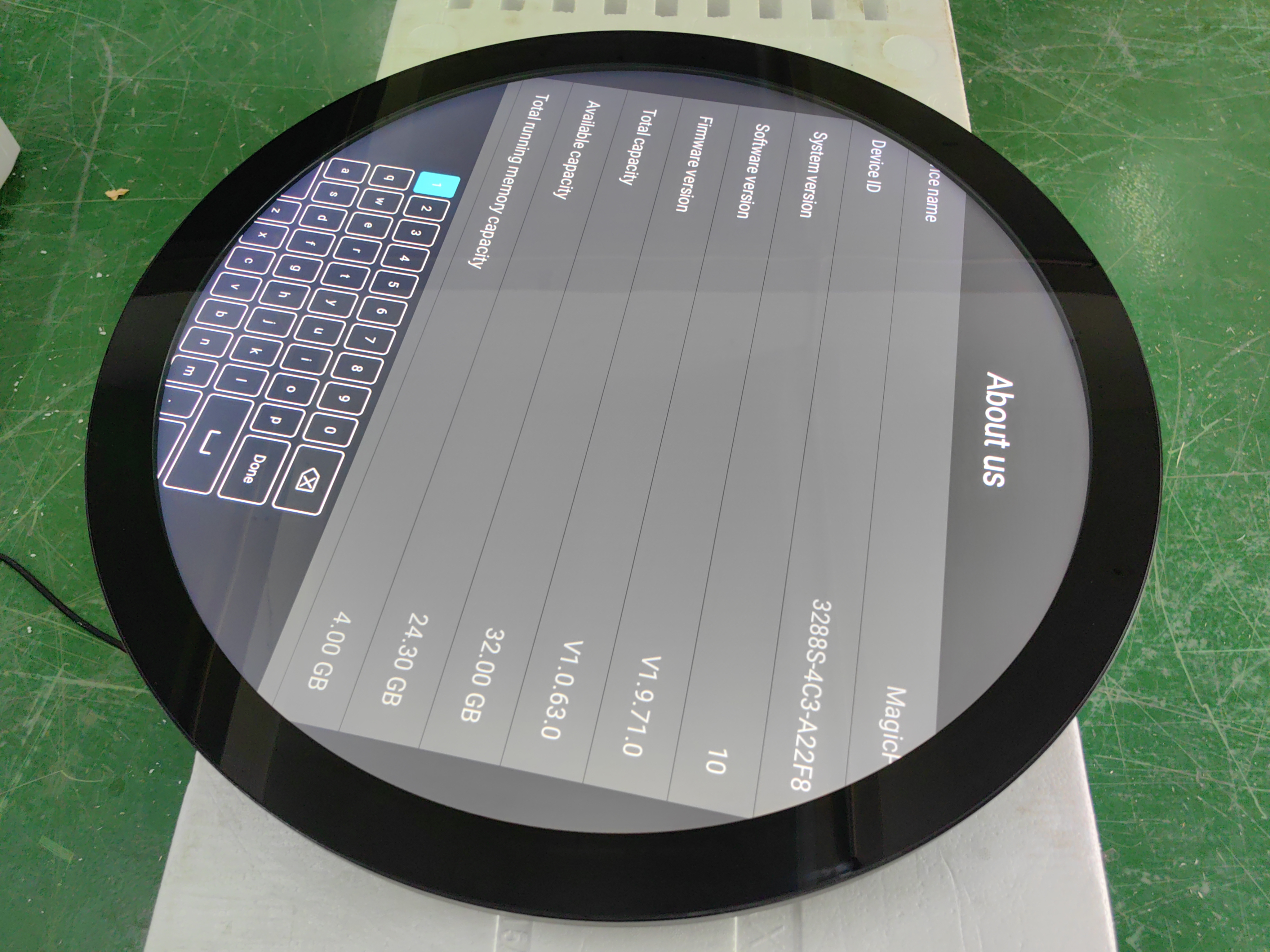
When choosing the best LCD round display, focus on the most important features. Check the size of the LCD round display. Review the resolution and brightness. Consider the contrast ratio. Make sure the interface is compatible with your devices. Pay attention to how much power the LCD round display uses. The table below highlights the key factors to consider:
Criteria | What to Look For |
|---|---|
Interface Compatibility | Works with HDMI, DisplayPort, or other common ports |
Power Efficiency | Saves energy, uses up to 30% less power |
Brightness & Contrast | More than 1,000 nits, 1000:1 ratio for clear images |
Viewing Angles | 170° or more so it is easy to see |
Response Time | Less than 5ms for smooth movement |
Durability & Weatherproofing | Handles tough places, IP65 for outdoor use |
Manufacturer Support | Trusted brands like topadkiosk round display |
Prototyping | Try it out before making a lot |
Be sure to match these specifications to your project’s requirements. Also, keep an eye on new technology trends for LCD round displays in 2025.
Key Takeaways
Look at important things like size, resolution, and brightness when picking an LCD round display.
Make sure the display's interface works with your device so you do not have problems setting it up.
Choose a display with strong brightness and contrast so you can see it well, even when it is very bright outside.
Try out samples to find problems early and make the user experience better before making many displays.
Think about how tough and weatherproof the display is so it will last in different places.
Project Needs
When you begin a project with an lcd round display, think about what you need. Consider what kind of device you are making. Check if your device has space for the display. Make sure your system works with the display. People use round displays in many places. You can find them in stores and malls. They are also used at events and hotels. Offices, theme parks, and museums use them too. Each place needs a different size and resolution. You also need to check if the display works with your system. Power efficiency is important for every project.
Size and Resolution
Pick a size and resolution that fits your device. The size depends on how much room you have. Small screens are good for watches and smart home devices. Big screens are better for signs and public places.
Size | Resolution |
|---|---|
1.28inch/1.3inch | 240*240 |
1.39inch | 360*360 |
1.45inch | 412*412 |
1.52inch | 360*360 |
1.6inch | 400*400 |
2.1inch | 480*480 |
2.47inch | 480*480 |
2.8inch | 480*480 |
3.0inch | 480*480 |
3.4inch | 800*800 |
3.6inch | 544*506 |
4.0inch | 720*720 |
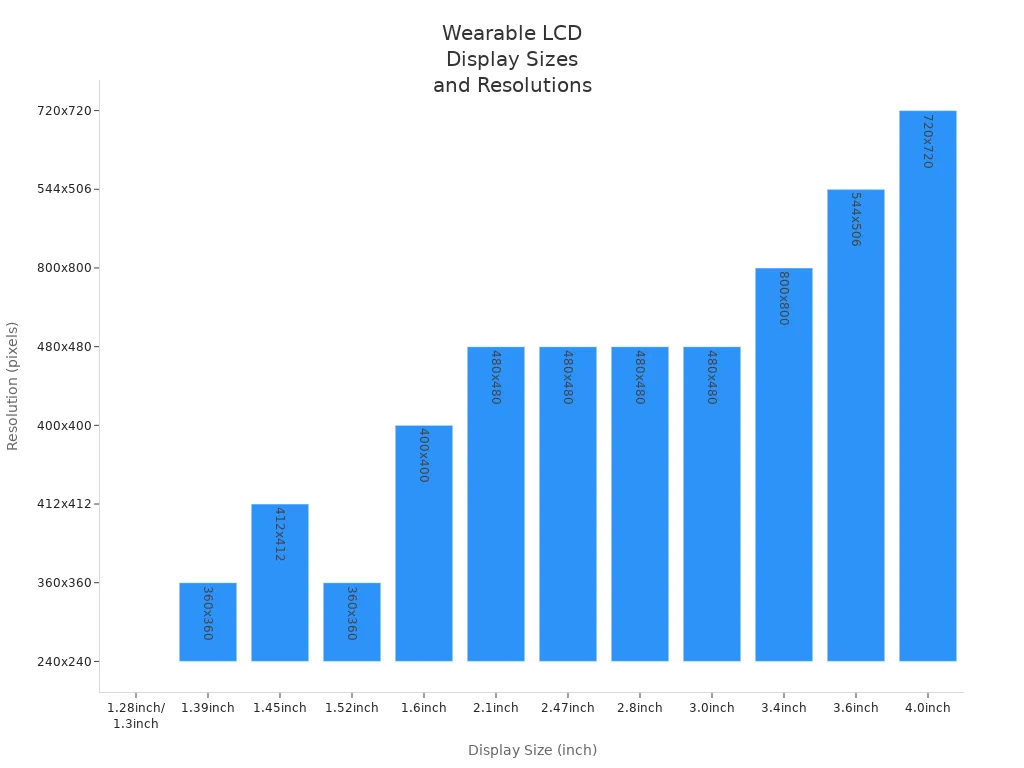
A higher resolution gives you clearer pictures. Text and graphics look sharper. More pixels use more power. The backlight uses most of the energy. Extra processing for high resolution also uses more power. Try to balance size and resolution with battery life.
Interface Compatibility
Check if your lcd round display matches your system. Most round displays use MCU, SPI, TTL, LVDS, DSI, or EDP. Your system on chip must support the same interface. If they do not match, you may need a converter.
Step | Description |
|---|---|
Provide detailed technical requirements including LCD specifications, input signal, and functional requirements. | |
2. Technical Assessment & Quotation | Evaluate feasibility, confirm signal conversion solutions, and provide design suggestions. |
3. Design Confirmation & Sample Production | Confirm design and produce samples for testing. |
4. Sample Testing & Feedback | Test samples and gather feedback for adjustments. |
5. Mass Production & Delivery | Proceed to mass production based on confirmed designs and requirements. |
Always match the display’s specs with your system and enclosure. This helps you avoid problems when you set up your device.
Power Consumption
Power efficiency matters for every lcd round display project. You want your device to last longer. Different displays use different amounts of power.
Display Technology | Power Consumption (Example) |
|---|---|
TFT LCD | ~30W (15-inch) |
Monochrome LCD | ~1W (similar size) |
OLED | Nearly 0W (black image) |
E-paper | ~4mW (during update) |
Traditional LCD | ~400mW (similar size) |
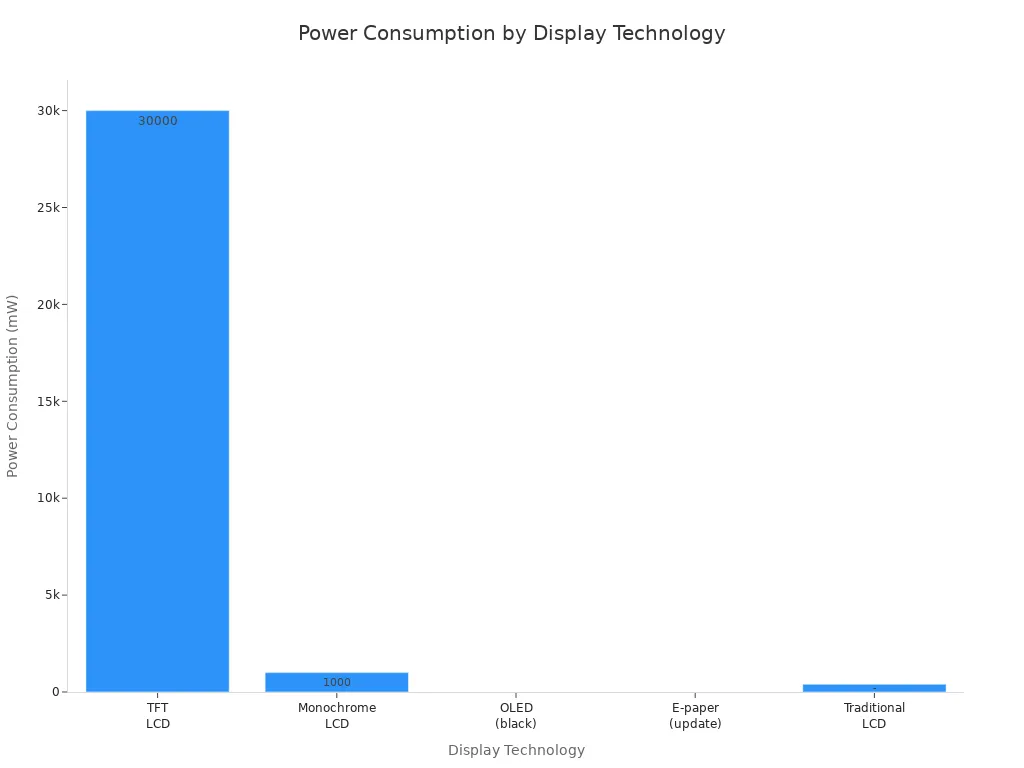
Pick a display that fits your power needs. Battery-powered devices need displays that use less energy. If you want bright and colorful images, you may need more power.
Tip: Test your display in real life. See how long the battery lasts. Check how the display looks in your device.
Performance Factors
Brightness and Contrast
You should check the brightness and contrast before picking your lcd round display. Brightness shows how easy it is to see the screen in different places. If you use your lcd round display outside, you need a very bright screen. The table below lists how bright your display should be for outdoor use:
Application | Environment | Recommended Brightness |
|---|---|---|
Outdoor public space | Direct sunlight | |
Outdoor | - | 5,000 to 8,000 nits |
Outdoors with direct sun | - | Above 8,000 nits |
Contrast helps you see details on the screen. A higher contrast ratio makes words and pictures easier to see. You should pick a display with a contrast ratio of at least 10 to read things well. The table below shows how different contrast ratios change how easy it is to read:
Contrast Ratio | Readability Level |
|---|---|
5 | Acceptable |
10 | Well readable |
15 | Outstanding |
20 | Excellent |
Close to 1 | Unreadable |
Tip: Choose a round display with high brightness and contrast if you want clear pictures in bright places.
Viewing Angles
Viewing angles tell you if you can see the screen from the side. If your display is in a car or a watch, good viewing angles are important. You want everyone to see the screen clearly, even from the side. The table below explains why viewing angles matter:
Application | Impact of Poor Viewing Angles |
|---|---|
Automotive Displays | Colors may shift, contrast may degrade, and brightness can drop, affecting navigation visibility. |
Medical Devices | Multiple professionals need clear visuals to avoid misinterpretation of patient data. |
You should test your lcd round display in your device. Make sure colors and brightness look the same from every angle. Good viewing angles help people use your device safely and easily.
Wide viewing angles give you better results.
Your display stays sharp and bright from all sides.
You do not have problems with color or contrast changes.
Response Time
Response time tells you how fast your display reacts when you touch it or when images move. A lower response time means your display works faster. You want a display with quick response time for smooth movement and fast touch actions. The table below gives some examples:
Display Type | Response Time |
|---|---|
23.6'' Circular Round LCD Display | |
16inch Round Monitor | 6ms |
Lower response time makes your display react faster.
Quick actions make your device easier to use.
The display works better overall.
Fast response time helps with games, videos, and touch controls.
If you want your round display to feel smooth and modern, always check the response time. Fast response time makes your device more fun and simple to use. It also saves power because the display does not waste energy on slow updates.
Durability and Environment
When you pick an lcd round display, think about how tough it is. Durability helps your display last longer. Environmental resistance lets it work in many places.
Temperature Range
Check the temperature range before you choose a display. Some lcd round displays work in very hot or cold places. Industrial models can handle -30°C to +80°C. These are good for outdoor and factory use. Regular displays work from 0°C to 50°C. If you store your device, it can handle -20°C to 60°C.
Type of Temperature Range | Temperature Range |
|---|---|
Operating Range | 0°C to 50°C |
Storage Range | -20°C to 60°C |
Displays that work in extreme heat or cold stay reliable. High heat can hurt the liquid crystals. This can break the display. Cold can make the screen slow. It might show marks or streaks. If you use your device outside, pick a display that handles these changes.
Temperature Impact | Description |
|---|---|
Liquid crystals can melt and stop working. | |
Low Temperatures | Screen can show ghost images and slow down. |
Operational Limits | Going past limits can cause streaks and jitter. |
Tip: Match your display’s temperature range to where you use it. This helps your device work well and not break.
Weatherproofing
Weatherproofing keeps your lcd round display safe from water and dust. Look for displays with high IP ratings. These ratings show how well the display blocks water and dust. Seals between the cover and case keep moisture out. Touchscreens need special chips to work when wet. Makers use coatings on the PCB to stop water damage.
Description | |
|---|---|
IP Rating | Shows how well it blocks dust and water. |
Sealing Techniques | Seals between cover, case, and touchscreen. |
Touchscreen Functionality | Works even with water drops. |
PCB Waterproofing | Coating keeps electronics safe from moisture. |
Housing Assembly | Sealant and vents block water and let air move. |
Additional Measures | Special compounds, sealed connectors, and drying packs keep moisture out. |
Weatherproofing helps your display survive in tough places. It protects from water, heat, and bumps. Strong designs use hard glass or plastic to stop damage. Seals keep out dirt and water. This makes your display last longer. Some displays use salt waterproofing to help touch work and keep the screen safe.
Waterproof TFT LCDs work in tough places.
Strong cases and coatings help displays last longer.
Sealed connectors and vents keep out water and dust.
Displays with these features work safely from -30°C to +80°C.
Note: Good weatherproofing and temperature control help save power. Your device uses less energy to keep the display working in hard places.
Round LCD Display Options
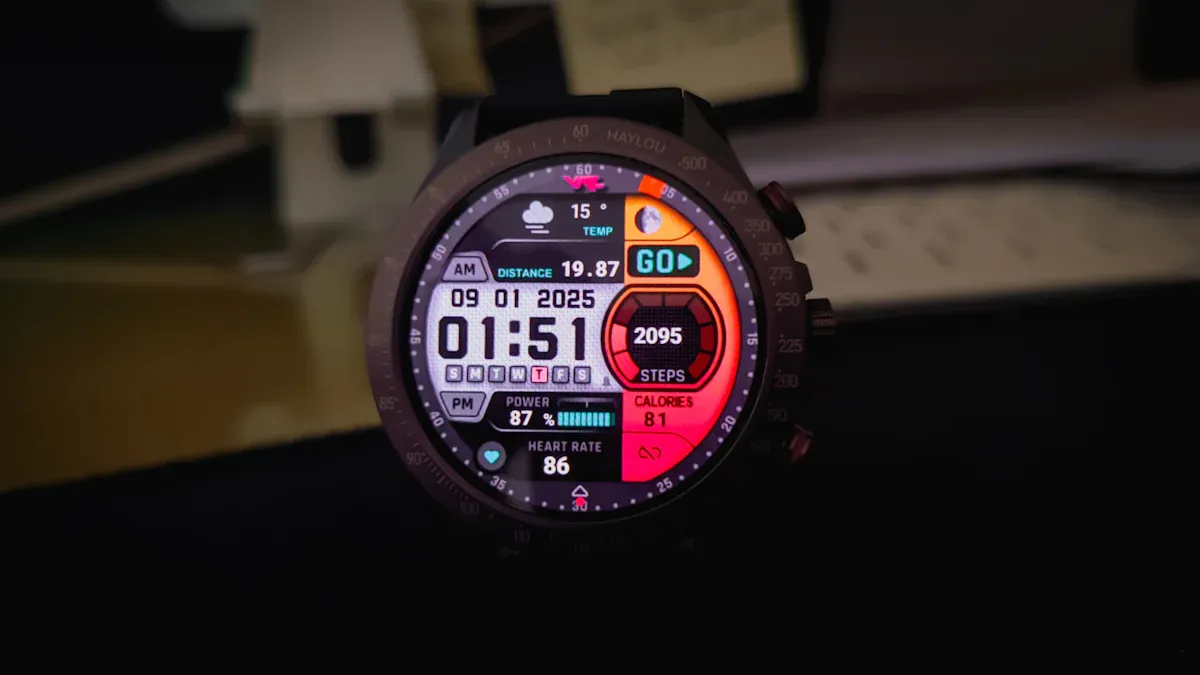
When you pick a round lcd display, look at different types and brands. You want a display that fits your project and lasts a long time. It is important to know how the display works in your device before buying many.
Manufacturer Support
Good support from the manufacturer helps you avoid problems. Companies like topadkiosk round display (www.topadkiosk.com) help you from start to finish. They answer your questions fast and fix problems quickly. You get advice on picking the best display for your device. Reliable help means you spend less time fixing things and more time building.
"E3 has made three touch displays for my company. Every project saved me time, had great communication, and never let me down."
Manufacturers who care about your project build strong partnerships. They help with design, testing, and making the displays. You get better results and your display works well for a long time.
topadkiosk round display www.topadkiosk.com
Topadkiosk has many choices for lcd round display projects. You can pick small screens for wearables or big ones for public places. Their team helps you match the display to your system and case. They also give tips on saving power and making the display tough. You get help with both hardware and software, so your project is easier.
Prototyping and Testing
Prototyping and testing show how your round lcd display works in real life. You build a sample and test it with users. This step helps you find problems early and fix them before making many displays.
Evidence | Explanation |
|---|---|
Prototypes show the main ideas and features | This helps people see the product before spending money. |
Early problem finding | You can fix issues with looks or how it works in time. |
Usability tests with real users | Getting feedback helps you make better design choices and improve user experience. |
You can use PCAP touch round display models for testing. These displays let you check touch response, brightness, and viewing angles. You see how the display looks in your device and how users use it.
You avoid expensive mistakes after launch.
Testing helps you make the display better before making a lot.
PCAP touch round display
PCAP touch round displays work well for smartwatches, medical devices, and control panels. You test how the touch works with wet or dirty hands. You also check how the display looks in bright light or from the side. This helps you pick the best display for your project.
Comparing Round and Rectangular Displays
You should know how round displays are different from rectangular ones. Round displays give you more design choices and can be easier to see.
Round TFT Displays | Rectangular Displays | |
|---|---|---|
Aesthetic Appeal | Modern and stylish look | Regular and simple appearance |
Space Efficiency | Saves space in some designs | May waste space sometimes |
Viewing Angles | Wide angles for better viewing | Sometimes limited angles |
User Experience | Easy for round controls | Standard ways to use |
Durability | Tough and built for many places | Depends on design and materials |
Versatility | Good for many uses | Used in regular applications |
Round LCD displays are used in car dashboards.
You see them in health monitors.
Their small size fits smart watches and home devices.
They cut down glare, so users see better in sunlight.
Studies show people pay more attention to outdoor round screens than rectangular ones.
Round displays let you make devices that look cool and different. You also get better viewing and user interest, especially outside.
Tip: Pick a round display if you want your device to look special and work well in bright places.
You can pick the best LCD round display by using simple steps. First, check if the technical specs fit your project. Next, think about how strong the display is and if the maker will help you. The table below can help you choose:
Description | |
|---|---|
Long-term availability | Choose displays that last for many years |
Easy prototyping | Try out samples before making a lot |
Personalization option | Plan for special features from the start |
Keep learning about new display technology. This helps you get better pictures, more ways to use the display, and save power. Make a list of your top choices and test them in real life.
FAQ
What is the best size for a wearable LCD round display?
You should pick a size between 1.28 inches and 1.45 inches for wearables. These sizes fit smartwatches and fitness trackers. They give you clear images and save space.
How do you check if your system supports a round LCD display?
Look at your device’s interface. Most round LCDs use SPI, MCU, or DSI. Check your system’s datasheet. If the interface matches, you can connect the display.
Why does brightness matter for outdoor displays?
High brightness helps you see the screen in sunlight. You need at least 1000 nits for outdoor use. Bright screens make images and text easy to read outside.
Can you use a round LCD display in cold weather?
Yes, you can use special round LCDs in cold weather. Pick displays with a wide temperature range, like -30°C to +80°C. These displays work well in winter and summer.
What is the main advantage of a round display over a rectangular one?
Round displays give your device a modern look. They fit circular designs, like clocks and dashboards. Users find round screens easier to read in bright places.
See Also
The Impact of Round LCD Displays on Signage by 2025
Comparing LED, LCD, OLED, and QLED Display Technologies
Selecting the Ideal Gaming Monitor for Your Configuration
