How to choose an LCD display kiosk for interactive advertising
Add.: 2F, Bldg 10, Changfeng Industrial Park, Dongkeng, Fenghuang, Guangming, Shenzhen, China 518132
Mobile/WHATSAPP: 86-138 25769658
Email: marketing@topadkiosk.com topadkiosk@gmail.com
Skype: pghenry1
Wechat: adkioskhenry
English Web.: http://www.topadkiosk.com/
https://www.topkioskdisplay.com/
http://www.ad-kiosk.com/
https://www.toplcddisplay.com/
http://www.multitouchdigitalsignage.com/
https://www.youtube.com/channel/UCYVYNJHxLVEcQD8fuUxXNTA/videos?view_as=subscriber
https://www.facebook.com/TOPADKIOSKSHENZHEN/?ref=bookmarks
If you want to choose an LCD display kiosk for interactive advertising, start by thinking about what you need it to do. Focus on your goals and who will use the kiosk. Pay attention to important features like screen size, brightness, durability, and how the kiosk connects to your systems. Maintenance and support matter, too, because they help protect your investment and keep things running smoothly. Did you know 64% of businesses see higher customer engagement after adding interactive digital signage? With the right choices, you can see real results.
Key Takeaways
Define your advertising goals before choosing a kiosk. This helps you select the right features and design.
Understand your audience's preferences. Tailor the kiosk's content and features to engage them effectively.
Choose the right screen size and brightness. Larger screens attract more attention, while high brightness ensures visibility in all lighting conditions.
Prioritize durability and security. Select materials that withstand wear and tear, and implement data protection measures.
Consider vendor support and warranty options. A reliable vendor ensures your kiosk remains functional and well-maintained.
Define Kiosk Purpose
Set Advertising Goals
Before you choose an LCD display kiosk, you need to know what you want to achieve. Do you want to boost your brand, educate your customers, or promote a new product? Clear goals will help you pick the right features and design. Take a look at some of the most common reasons businesses use interactive kiosks:
Purpose | Description |
|---|---|
Engaging Customers | Kiosks create interactive experiences that draw in customers. |
Promoting Products | They highlight and promote products effectively to shoppers. |
Enhancing Shopping Experience | Kiosks improve the overall shopping experience through dynamic content. |
When you set your advertising goals, you also shape the features you need. For example, if you want to promote products, you might need high-resolution screens and eye-catching visuals. If you want to engage customers, you may want touch screens or interactive elements. Here’s how your goals can guide your choices:
Key Factor | Description |
|---|---|
Purpose Alignment | Define the purpose of the screen to maximize impact. |
Target Audience Understanding | Tailor features for your audience, like interactive screens for tech-savvy viewers. |
Location-Based Decision Making | Pick features based on where you’ll place the kiosk, such as durability for public spaces. |
Tip: Write down your main advertising goals before you start shopping. This will make the process much easier.
Know Your Audience
You want your kiosk to speak to the right people. Think about who will use it. Will your audience be tech-savvy millennials, older adults, or a mix? Different groups like different types of content and displays. Understanding your audience’s preferences helps you create ads that work.
Tech-savvy users may enjoy interactive screens and fast responses.
Older customers might prefer larger text and simple navigation.
Families may like fun, colorful content.
When you know your audience, you can choose an LCD display that fits their needs. This step makes your advertising more effective and your investment more valuable.
Choose an LCD Display: Key Features
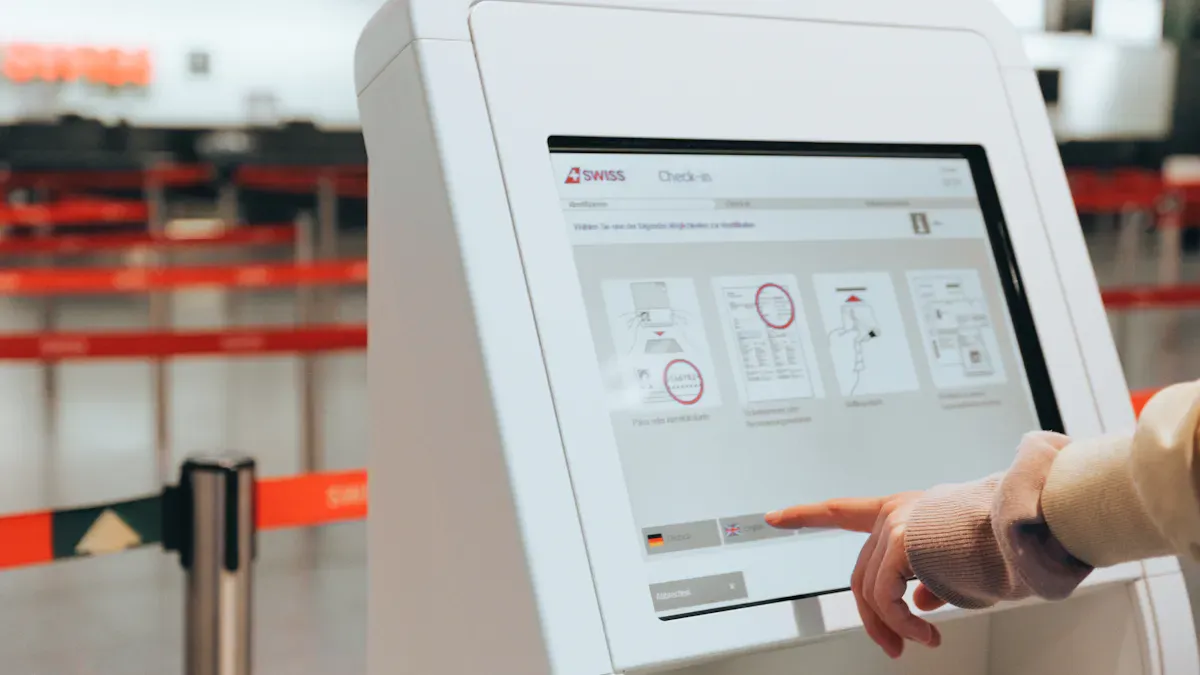
When you choose an LCD display for your interactive advertising kiosk, you want to make sure it fits your space, grabs attention, and lasts for years. Let’s break down the most important features so you can make a smart decision.
Screen Size and Orientation
Screen size matters a lot. If your kiosk sits in a busy area, a bigger screen will catch more eyes and help your message stand out. You also need to think about how far people will stand from the kiosk. Larger screens work best for longer viewing distances and make your content easier to read.
Here’s a quick look at industry standards for screen sizes and orientations:
Screen Size | Orientation |
|---|---|
19” | Landscape |
20” | Landscape |
22” | Landscape |
24” | Landscape |
26” | Landscape |
32” | Landscape |
42” | Landscape |
47” | Landscape |
55” | Landscape |
65” | Landscape |
Larger than 65” | Depends on application |
Smaller screens usually sit in landscape mode. Bigger screens often use portrait mode, which works well for showing lots of information. If you want to maximize branding and make your kiosk more engaging, go with a larger screen. It gives you more space for visuals and helps your message pop.
More visual space means clearer messages.
Bigger screens help your products and brand get noticed faster.
Tip: Measure your space and check how far users will stand from the kiosk before you choose an LCD display.
Brightness and Resolution
You want your kiosk to shine, even in bright sunlight. For outdoor kiosks, brightness is key. Look for screens with at least 1,000 nits. If your kiosk sits in full sun, you’ll need 2,500 to 5,000 nits to keep your content readable.
Outdoor kiosks need at least 2,000 nits of brightness.
High brightness keeps your display clear in any lighting.
Resolution is just as important. High-resolution screens make text and graphics sharp and easy to read. If you use low-resolution screens, your content can look blurry or pixelated. Full HD or 4K screens are common in modern kiosks. They make everything look crisp, even from a distance or in bright light.
Note: High resolution and brightness help your kiosk stand out and keep users engaged.
Durability and Design
Your kiosk needs to handle tough environments. You want materials that protect against dust, water, and vandalism. Look for high IP ratings like IP55 or IP66. These ratings mean your kiosk can resist dust and moisture.
Here’s a table showing common materials and their benefits:
Material | Characteristics |
|---|---|
Tempered Glass | Hardness rating of 7H or higher, scratch and impact resistant |
Aluminum Alloy | Lightweight, strong, and resistant to corrosion |
Stainless Steel | High durability and resistance to weather elements |
You also want your kiosk to run 24/7. Industrial-grade power supplies and cooling systems help with that. Tough materials like anti-vandal glass keep your kiosk safe from tampering. If your kiosk sits outside, it should handle rain, snow, heat, and cold.
Design matters, too. Interactive kiosks keep users engaged much longer than static signs. People spend an average of 28.4 seconds interacting with kiosks, compared to less than 2 seconds with regular signs. When users feel involved, they pay more attention and remember your brand.
Callout: A strong, attractive design boosts engagement and protects your investment.
Smart Features and Connectivity
Smart features make your kiosk more useful and interactive. You can run dynamic ads, collect real-time feedback, and offer product recommendations. These features help you connect with customers and drive sales.
Here’s a table of popular smart features:
Feature | Description |
|---|---|
Digital Advertising | Dynamic ads and promotional content. |
Increased Sales Opportunities | Product recommendations and upselling options. |
Brand Visibility and Promotion | Interactive billboards for brand messages and offers. |
Interactive Marketing | Campaigns like quizzes and virtual product trials. |
Real-time Feedback Collection | Instant customer feedback to improve service quality. |
Connectivity is just as important. You want your kiosk to stay updated and connected. Here are the main options:
Connectivity Type | Description |
|---|---|
Wi-Fi | Real-time updates and remote management. |
Ethernet | Stable network connections. |
Cellular Data | Works in areas without wired internet. |
Bluetooth | Connects with smartphones for content sharing. |
NFC | Enables contactless payments. |
HDMI | Connects to external displays. |
USB | Lets you add peripherals. |
Wi-Fi keeps your kiosk updated.
Ethernet gives you a stable connection.
Cellular data works in remote spots.
Bluetooth and NFC make your kiosk more interactive.
Tip: Choose an LCD display with smart features and strong connectivity to make your kiosk future-proof.
When you choose an LCD display for interactive advertising, focus on these key features. You’ll get a kiosk that stands out, lasts longer, and keeps customers engaged.
Software, Integration, and User Experience
System Compatibility
You want your kiosk to work smoothly with your software. Most LCD display kiosks support Android, Windows, and sometimes Linux. Each system has its own strengths. Android is affordable and easy to use. You can customize it and manage many kiosks from one place. Windows is reliable and supports many business apps. Linux works well if you need special setups.
Operating System | Compatibility with LCD Display Kiosk Software |
|---|---|
Android | Yes |
Windows | Yes |
Linux | Yes (with conditions) |
Think about what your team already uses. This helps you avoid headaches later.
Content Management
You need to update ads fast. Content management software makes this easy. You can change what shows on your kiosk from any computer with internet. No need to print new signs or send someone to the store. You can schedule ads to play at certain times. This saves money and time.
Update ads from anywhere.
Tip: Good content management software helps you stay flexible and react to trends.
User Interface and Accessibility
A simple interface helps everyone use your kiosk. Large fonts and buttons make reading easy. Good spacing between buttons stops mistakes. High contrast colors help people with poor eyesight.
Feature | Description |
|---|---|
Size of Fonts/Buttons | Large and clear for easy reading and use. |
Spacing Between Buttons | Prevents accidental taps, good for users with motor challenges. |
High Contrast Colors | Makes text stand out for users with vision issues. |
You want everyone to feel welcome when they use your kiosk.
Integration with Existing Systems
Your kiosk should work with your other business tools. APIs connect your kiosk to your systems. Cloud services keep your data up to date everywhere. This means your ads, inventory, and customer info stay in sync.
Integration Method | Description |
|---|---|
APIs | Connects kiosks with your business systems for smooth data sharing. |
Cloud Services | Updates data in real time and keeps everything working together. |
When you choose an LCD display, make sure it fits with your software and business needs. This keeps your advertising smooth and your customers happy.
Security, Maintenance, and Support
When you choose an LCD display for interactive advertising, you want to keep your kiosk safe, reliable, and easy to manage. Let’s look at how you can protect your data, secure your kiosk, and make sure it keeps working for years.
Data Protection
You need to keep user information safe. People trust your kiosk with their data, so you should use smart ways to protect it. Here are some simple steps:
Use encryption for all sensitive data, especially if your kiosk handles payments.
Set up session timeouts so the kiosk logs out users after a short time.
Control which websites users can visit by whitelisting safe sites and blacklisting risky ones.
Update your software often to fix security holes.
Tip: Always use secure payment methods and keep your system updated to block hackers.
Physical Security
Your kiosk sits in public, so it needs to be tough. You want it to last and stay safe from damage or theft. Here’s what you can do:
Pick a kiosk made from strong materials that can handle daily use.
Secure the kiosk to the floor or wall to prevent theft.
Add tamper-resistant locks and covers to protect important parts.
Schedule regular checks to spot any damage early.
Security Feature | Why It Matters |
|---|---|
Durable Build | Handles wear and tear |
Secure Mounting | Stops thieves from moving the kiosk |
Tamper-Resistant Design | Blocks access to internal parts |
Note: Physical security keeps your investment safe and your kiosk running smoothly.
Maintenance and After-Sales Support
You want your kiosk to work well every day. Regular care helps your LCD display last longer and look better. Here are some easy ways to keep things in top shape:
Clean the screen and body often to stop dust and dirt from building up.
Place your kiosk in a dry, cool spot away from direct sunlight.
Make sure the area has good airflow to prevent overheating.
Work with a vendor who offers fast support and easy repairs.
If you choose an LCD display from a company with strong after-sales support, you can fix problems quickly and avoid long downtimes. Good maintenance and support protect your investment and keep your advertising on track.
Placement, Budget, and ROI

Location and Environment
You want your kiosk to get noticed and used. The right spot makes a huge difference. Place your kiosk where people walk by often, like store entrances, lobbies, or busy hallways. If you put it in a dark corner, most people will ignore it. The environment matters, too. Outdoor kiosks need weather protection and higher brightness. Indoor kiosks can focus more on design and user comfort.
Take a look at how placement affects advertising results:
Metric | Static Digital Signage | Interactive Kiosks |
|---|---|---|
<2 seconds | 28.4 seconds | |
Content Interaction Rate | 0% | 68% |
Email Capture/Lead Conversion | 0% | 18% |
Bounce/Ignore Rate | 92% | 21% |
Return Visit Rate | N/A | 24% |
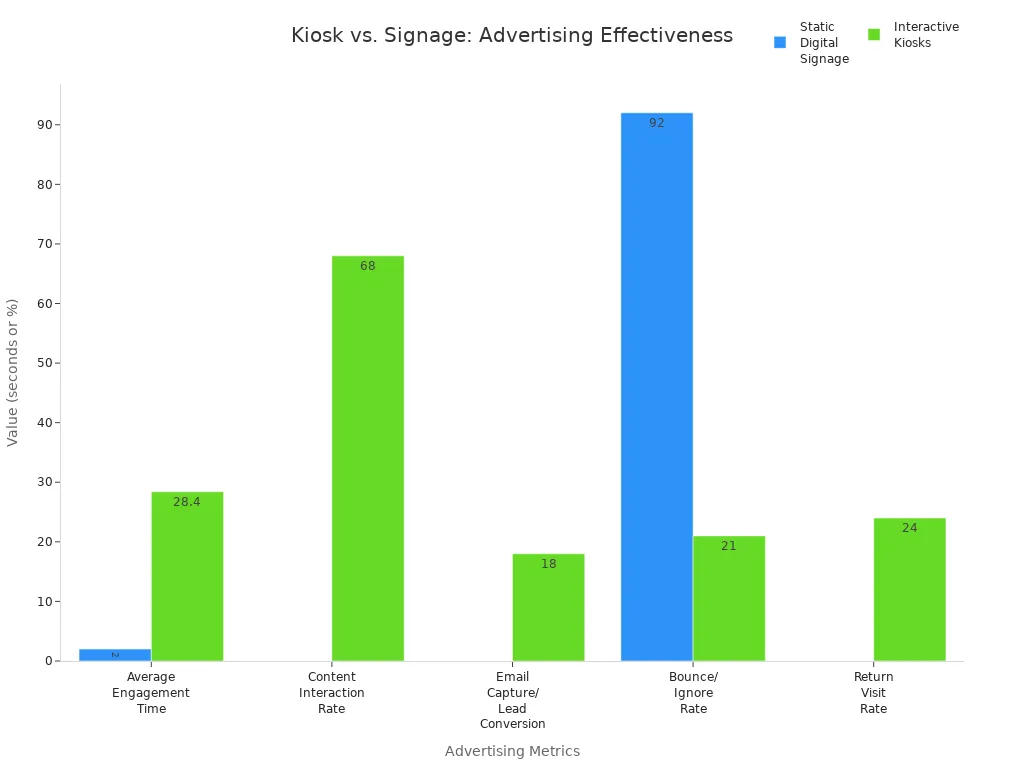
You can see that interactive kiosks keep people engaged much longer and get better results.
Accessibility Compliance
You want everyone to use your kiosk easily. Accessibility rules help you make sure no one gets left out. In the U.S., ADA standards cover things like reach and tactile controls. In Europe, EN 301 549 and EAA focus on digital and physical access. WCAG guidelines help with screen flow and contrast.
Standard | Role | Key Focus Areas |
|---|---|---|
ADA (U.S.) | Physical compliance | Reach, operability, tactile controls |
EN 301 549 | ICT accessibility | Non-visual, cognitive, audio support |
EAA (EU) | Legal enforcement | Market access requirements |
WCAG | Digital UX | Screen flow, contrast, navigation |
Check these standards before you choose an LCD display for your project.
Budgeting and Total Cost
You want to know what you’re really spending. The average total cost of ownership for an LCD display kiosk over five years is about $18,000. This includes an initial cost of $10,000 plus maintenance, updates, and support. Plan for these costs so you don’t get surprised later.
Initial purchase: $10,000
Maintenance and updates: $8,000 (over five years)
Total: $18,000
Tip: Budget for both the upfront price and ongoing care to keep your kiosk running smoothly.
Evaluate ROI
You want to see results from your investment. You can measure ROI in a few ways:
Track how much your sales go up from promotions.
Count how much you save by using digital signs instead of printed ones.
Combine both numbers for a full picture of your return.
Set clear goals and track your results.
Use a ROMI calculator to compare costs and revenue.
Watch for sales lifts and more customer engagement.
In retail, interactive kiosks often boost sales by promoting products right at the point of decision. When you measure these gains, you can see how well your kiosk works for your business.
How to Choose an LCD Display Vendor
Vendor Criteria
You want a vendor you can trust. Not all vendors offer the same quality or service. Before you choose an LCD display, check these important criteria:
Criteria | Description |
|---|---|
Industry experience | Years in business and display expertise |
Installation portfolio | Past projects like yours |
Technical capabilities | Hardware, software, and integration skills |
Support services | Ongoing help and maintenance |
Financial stability | Strong resources for long-term support |
Client references | Testimonials from similar businesses |
Warranty support | Good coverage and fast service |
Geographic reach | Service in your area |
Ask for examples of their work. Look for vendors with a strong track record. You want someone who understands your needs and can deliver.
Support and Warranty
Support and warranty matter a lot. Most vendors offer a standard warranty from 1 to 3 years. Some give you the option to extend it up to 5 years. Extended plans can cover things like accidental damage or weather problems. Good vendors also offer service agreements. These set clear rules for how fast they fix problems and how they help you. Fast support means less downtime and happier customers.
Tip: Always ask about warranty details and support response times before you sign a contract.
Real-World Examples
You can learn a lot from real campaigns. Here are some ways businesses use LCD display kiosks for interactive advertising:
Element | Description |
|---|---|
Product Displays | Adidas used high-def screens to show new products and prices. |
Interactive Mirrors | Stores added digital mirrors for virtual try-ons in fitting rooms. |
Social Media Integration | Kiosks let shoppers share their experience online, adding user content to the display. |
Real-Time Promotions | Digital signs showed flash sales and exclusive offers to boost impulse buys. |
Impact | Stores saw more visitors, better customer response, and lots of social media buzz. |
These examples show how the right vendor can help you create a smart, engaging kiosk that gets results.
You can make a smart choice when you choose an LCD display kiosk for interactive advertising. Here’s a quick checklist to guide you:
Figure out your business needs, like self-service or sharing information.
Think about your audience and what they expect.
Look at screen size, touch features, durability, and connectivity.
Keep security in mind, especially for data and payments.
Pick the best spot for your kiosk to get noticed.
Follow these steps and you’ll feel confident about your decision. Your kiosk will help you reach your goals and boost your results.
FAQ
What screen size should I pick for my kiosk?
You should match the screen size to your space and how far people stand from the kiosk. Bigger screens grab more attention in busy areas. Smaller screens work well for close-up use.
Can I use an LCD kiosk outdoors?
Yes, you can! Just make sure you choose a kiosk with high brightness and weather protection. Look for features like waterproofing and sunlight-readable screens.
How do I update the content on my kiosk?
Most kiosks let you update content remotely. You can use content management software to change ads, videos, or information from your computer. It saves you time and keeps your messages fresh.
What maintenance does an LCD kiosk need?
You should clean the screen and check for damage often. Make sure the software stays updated. If you spot any problems, contact your vendor for support.
See Also
Selecting The Top LCD Kiosk Installation Service In Your Area
Picking Sturdy LCD Kiosks For Shopping Malls In 2026
Top LCD Kiosks Ideal For Retail Spaces In 2026
Finding LCD Kiosks With Touch Screen Features In 2026
Selecting The Perfect LCD Digital Signage For Your Business In 2026
