High-resolution LCD display kiosks for exhibitions
Add.: 2F, Bldg 10, Changfeng Industrial Park, Dongkeng, Fenghuang, Guangming, Shenzhen, China 518132
Mobile/WHATSAPP: 86-138 25769658
Email: marketing@topadkiosk.com topadkiosk@gmail.com
Skype: pghenry1
Wechat: adkioskhenry
English Web.: http://www.topadkiosk.com/
https://www.topkioskdisplay.com/
http://www.ad-kiosk.com/
https://www.toplcddisplay.com/
http://www.multitouchdigitalsignage.com/
https://www.youtube.com/channel/UCYVYNJHxLVEcQD8fuUxXNTA/videos?view_as=subscriber
https://www.facebook.com/TOPADKIOSKSHENZHEN/?ref=bookmarks
You want your exhibition booth to stand out and capture attention instantly. A high-resolution LCD display kiosk gives you the power to showcase vivid images, sharp videos, and interactive content that draws visitors in. With responsive touch screens, you let attendees explore your products, sign up for updates, and interact with dynamic presentations. These kiosks help you collect leads and create memorable experiences that turn casual visitors into engaged prospects.
Key Takeaways
High-resolution LCD display kiosks enhance attendee engagement by up to 40% with interactive content.
Use touch screens to create memorable experiences that keep visitors at your booth longer.
Choose the right screen size and resolution to ensure your visuals are clear and impactful.
Regularly update your kiosk content to keep information fresh and relevant for visitors.
Select a kiosk with strong connectivity to manage updates and engage your audience effectively.
Benefits of High-resolution LCD Display Kiosks
Attendee Engagement
You want your exhibition booth to become a magnet for visitors. A high-resolution LCD display kiosk makes this possible. When you use digital signage, you can boost attendee engagement by up to 40%. People love to see live social feeds and take part in audience polls. These features turn passive viewers into active participants. When attendees see their own contributions on the screen, they feel more involved and excited about your booth.
Interactive content lets each visitor have a unique experience. Real-time updates keep your information fresh and interesting. You can guide attendees with interactive wayfinding displays. These displays not only help people find their way but also give sponsors a chance to advertise. Attendees often seek out these kiosks for information, which means more engagement for your brand.
Tip: Use interactive quizzes or polls on your high-resolution LCD display to spark curiosity and keep visitors at your booth longer.
Information Delivery
You need to deliver information quickly and clearly at exhibitions. High-resolution LCD display kiosks help you do this with ease. These kiosks support your staff by handling administrative tasks and point-of-sale systems. This makes your team more efficient and frees them up to connect with visitors.
Touch screens grab attention and make people want to learn more about your products. Stunning visuals and interactive content keep visitors interested. The LCD segment is set to lead the digital signage market by 2025. Many retailers already use these screens to create personalized shopping experiences. In busy exhibition halls, high-resolution displays are essential for capturing attention and sharing your message.
Digital kiosks help your team work smarter.
Touch screens make your booth more inviting.
High-resolution visuals showcase your brand in the best light.
Visual Impact
You want your booth to stand out from the crowd. High-resolution LCD display kiosks use bright, vibrant visuals that draw people in right away. Dynamic content on these screens increases foot traffic to your booth. When you add interactive features, visitors stay longer and explore more of what you offer.
The clarity of your display matters. The right screen size and resolution make your content easy to see and understand. A smaller pixel pitch gives you sharper images, even up close. Good brightness and contrast keep your visuals clear in any lighting. These factors help attendees grasp your message quickly and remember your brand.
Choose the right screen size and resolution for clear, visible content.
Use a small pixel pitch for sharp images at close range.
Adjust brightness and contrast for the best results in any environment.
Note: A high-resolution LCD display not only attracts attention but also helps visitors understand your products and services better.
Key Features
High-resolution LCD Display Quality
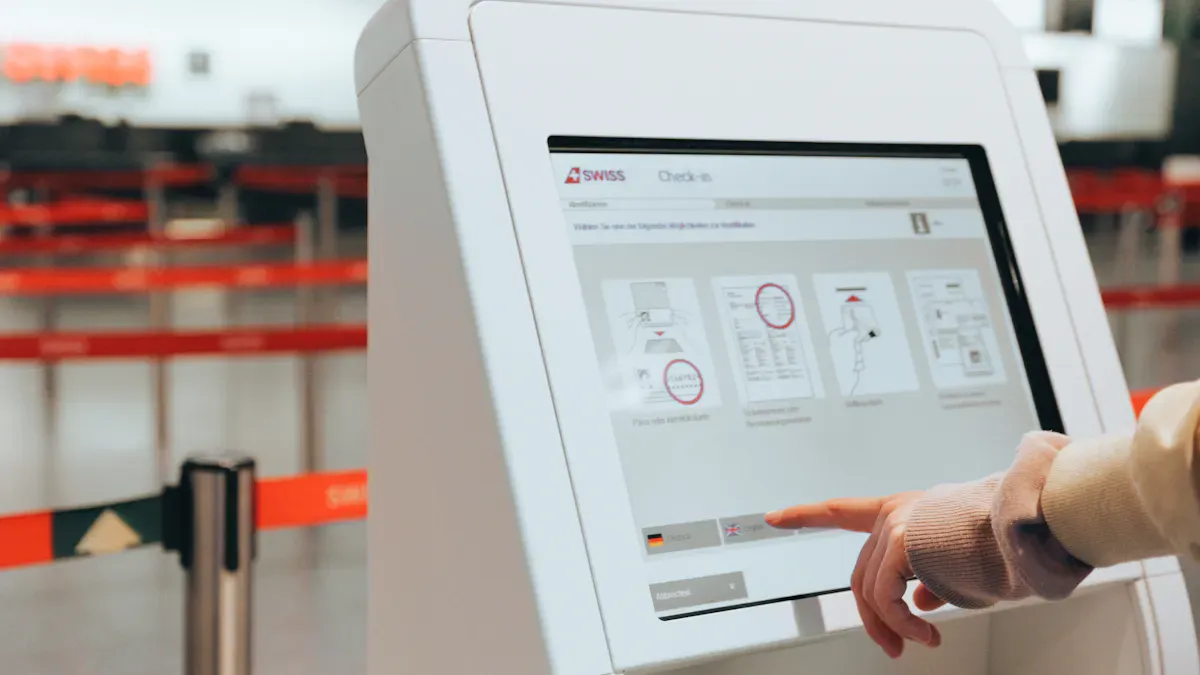
You want your visuals to shine at every exhibition. A high-resolution LCD display delivers crisp images and vibrant colors that grab attention. Most exhibition kiosks use screens with at least 1920x1080 (Full HD) resolution, but 4K displays take your content to the next level. 4K screens show four times the detail of HD, making your presentations sharper and more impressive. This clarity keeps attendees focused and boosts satisfaction. The industry recommends displays with high brightness (400–700 nits), wide viewing angles (178°), and anti-glare coatings for clear visibility in any lighting.
Specification | Details |
|---|---|
Resolution | 1920x1080 (HD) or 4K |
Brightness | 400–700 nits |
Viewing Angles | 178 degrees |
Contrast Ratios | High for readability |
Anti-Glare Coatings | Reduces reflection |
Lifespan | 50,000–70,000 hours |
Note: 4K displays cost more than HD, but the visual impact can make your booth unforgettable.
Touch Interactivity
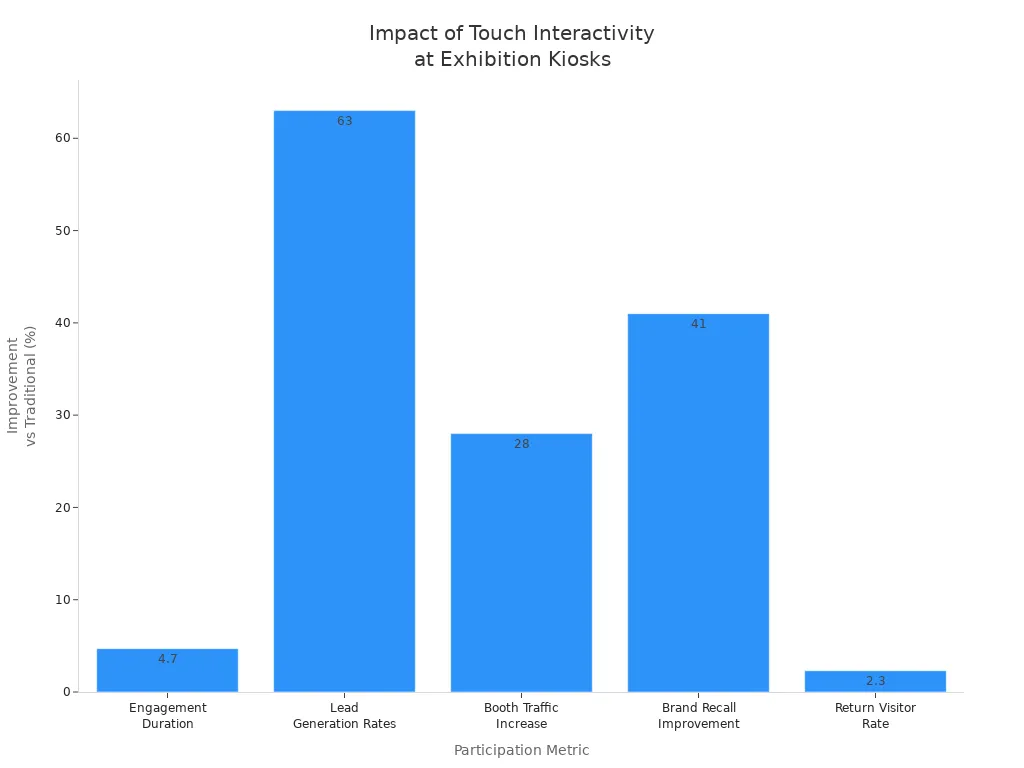
You can turn every visitor into an active participant with touch interactivity. Interactive touchscreens keep people engaged 4.7 times longer than printed materials. They also boost lead generation by 63% and increase booth traffic by 28%. Multi-touch capabilities let several users interact at once, making navigation easy and fun. Instant responses reduce wait times and encourage visitors to return.
Durability
You need a kiosk that stands up to heavy use. Durable kiosks feature aluminum structures for stability and corrosion resistance. High-brightness displays and anti-glare glass ensure your content stays visible, even in direct sunlight. Cooling systems keep everything running smoothly, while IP65-rated enclosures protect against dust and water. These features guarantee your kiosk performs reliably throughout the event.
Material/Feature | Description |
|---|---|
Aluminum Structure | Corrosion-resistant and stable |
High Brightness | Visible in direct sunlight (up to 3500 nits) |
Anti-Glare Glass | Reduces reflection |
Cooling System | Maintains stable operation |
IP65 Rating | Shields from water and dust |
Connectivity
You want to update your content quickly and manage kiosks remotely. Modern kiosks support LAN, Wi-Fi, and 4G connections. This flexibility lets you keep information current, no matter where your booth is located. Seamless integration with exhibition management software allows for real-time updates, remote monitoring, and secure data handling. You stay in control and your visitors always see the latest information.
Connectivity Type | Description |
|---|---|
LAN | Wired network for stable remote management |
Wi-Fi | Wireless updates and management |
4G | Mobile connectivity for locations without wired access |
Tip: Choose a kiosk with strong connectivity and software integration to maximize your exhibition success.
Applications in Exhibitions
Interactive Maps
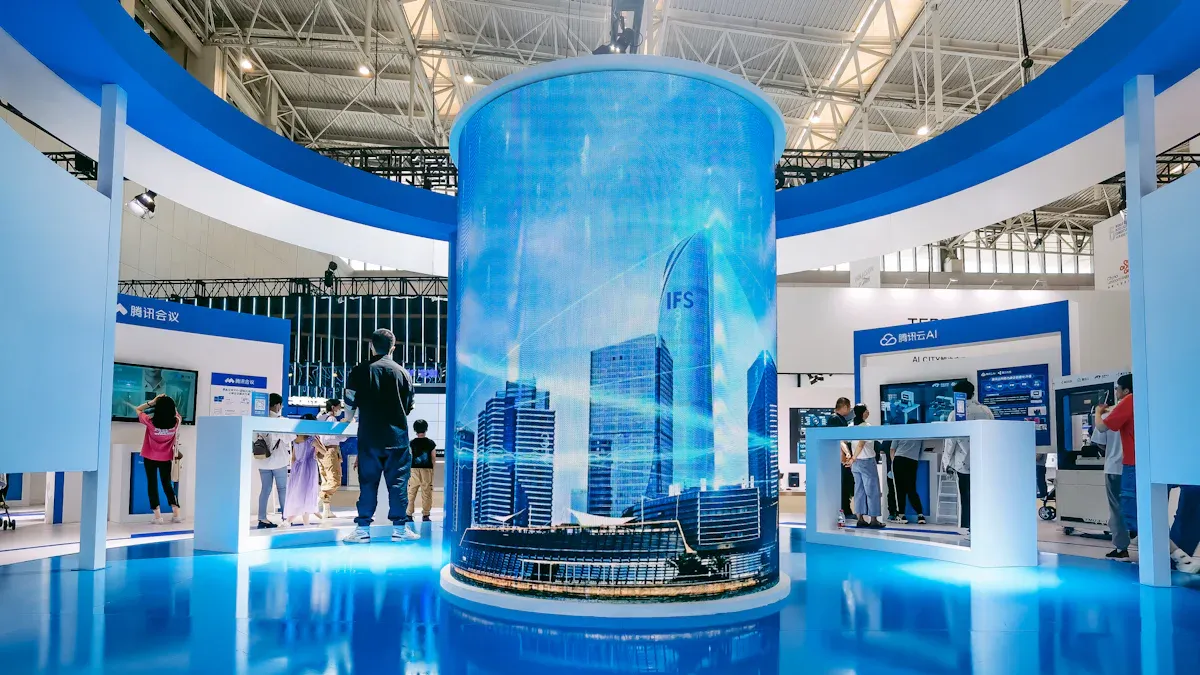
You can help visitors find their way with interactive maps on a high-resolution LCD display. These maps show clear details and let people touch the screen to search for booths or sessions. The best kiosks offer easy-to-use interfaces, support many languages, and update in real time. This makes navigation simple for everyone, including those with special needs.
Feature | Description |
|---|---|
Clear, detailed maps for better visibility | |
Intuitive interfaces | Easy for all ages and abilities |
Multi-language support | Accessible for diverse audiences |
Accessibility options | Helps visually or hearing impaired users |
Real-time updates | Shows current events or changes |
Integration with mobile apps | Lets users access info on their own devices |
Clear directions | Reduces confusion and stress |
User engagement | Makes the experience better for everyone |
Product Demos
You can showcase your products in a way that grabs attention. With a high-resolution LCD display kiosk, you let visitors explore features, watch videos, and interact with demos. Touch screens create hands-on experiences, so people feel more connected to your brand. When attendees can try products virtually, they remember your booth and are more likely to buy.
What You Get | How It Helps You Sell More |
|---|---|
Interactive technology keeps visitors engaged | Stronger brand connections influence decisions |
Attendees explore products in fun ways | Immersive demos drive purchasing choices |
Touch screens offer hands-on experiences | Personalized content boosts brand loyalty |
Registration
You can speed up check-in and capture leads with digital kiosks. Attendees use touch screens to register, print badges, and even book meetings. You collect valuable information with custom forms and QR code scanning. This makes follow-up easy and helps you focus on the most interested visitors.
Attendees search booths and sessions
Print badges and check in quickly
Submit feedback and book appointments
Scan QR codes or business cards for lead capture
Digital Signage
You can turn your booth into a dynamic hub with digital signage. Unlike traditional signs, digital displays let you update content instantly and target specific groups. Most people notice digital signage more, and many make impulse purchases after seeing it. You can even sell ad space to create extra revenue.
Advantage | Digital Signage | Traditional Signage |
|---|---|---|
Flexibility | Change content easily | Static content only |
Real-time updates | Instant updates | Needs manual changes |
Targeting capabilities | Target specific audiences | General audience only |
Interactive features | User interaction possible | Passive viewing only |
Tip: Use cloud-based systems to manage all your displays from one place. This keeps your information fresh and your booth looking modern.
Choosing a Kiosk
Size and Form Factor
You want your kiosk to fit your booth and attract attention. Think about where you will place it and how people will use it. Different kiosk types offer unique benefits:
Kiosk Type | Description | Pros and Cons |
|---|---|---|
Stand-alone | Single display in an enclosure | Pros: Flexible location, modern look. Cons: Can be moved or damaged easily. |
Wall-mounted | Mounted on a wall, great for tight spaces | Pros: Secure, saves space. Cons: Less privacy for users. |
Table-mounted | Placed on tables for group interaction | Pros: Perfect for teamwork. Cons: Prone to spills, not visible from far away. |
Display Size | Ranges from 19” to 65” or more | Bigger screens grab more attention. Smaller screens work for check-ins or lead capture. |
Orientation | Landscape or portrait | Landscape feels familiar. Portrait looks sleek for info displays. |
Enclosure | Aluminum or fiberglass, sometimes weather-resistant | Durable materials last longer, especially outdoors. |
Choose a size and style that matches your goals and space.
Software Compatibility
You need your kiosk to work smoothly with your digital content. Software compatibility ensures your high-resolution LCD display runs videos, maps, and interactive forms without glitches. When your software matches your hardware, you can update content quickly and manage kiosks remotely. This keeps your booth fresh and engaging. Reliable software also helps you guide visitors and deliver a seamless experience, even in busy exhibition halls.
Tip: Always check if your kiosk supports the apps and tools you plan to use.
Support and Reliability
You want your kiosk to work perfectly during the entire event. Choose a vendor who offers strong technical support and fast service. Reliable kiosks use quality materials and come with warranties. Good support means less downtime and more time impressing visitors. Ask about on-site help and remote troubleshooting options.
Cost Considerations
You need to balance features and budget. LCD kiosks usually cost between $3,000 and $25,000, depending on size, quality, and extras. Compare this to LED displays or projection systems, which often cost more. Look at all expenses, not just the sticker price:
Hardware and display quality
Software integration
Service and maintenance fees
Material durability
Vendor pricing and support
Average Cost Range (2025) | Key Considerations | |
|---|---|---|
Affordable, but quality matters for long-term savings | ||
LED Displays | Higher than LCD | Premium visuals, higher upfront cost |
Projection | Varies | Depends on setup and environment |
Choose a kiosk that fits your needs and delivers value for every dollar you spend.
Implementation Tips
Placement and Setup
Maximize attendee interaction by placing your kiosks in high-visibility areas. Position them at the front and center of your booth, where visitors naturally gather. Use overhead signage and create queues with stanchions to draw attention and signal availability. Place kiosks strategically to interrupt the flow of foot traffic, encouraging visitors to engage with them instead of just passing by. Ensure ample space around each kiosk to accommodate all users, including those with mobility challenges. Invest in proper infrastructure—power outlets and data connections—to support smooth operation. According to best practices, placing kiosks in accessible, prominent spots significantly boosts interaction rates and makes your booth more inviting.
Content Optimization
Design your content to be clear, engaging, and easy to understand. Use high-contrast visuals to make messages stand out, helping visitors quickly grasp key information. Incorporate videos and live demonstrations to create dynamic content that captures attention and enhances retention. Display real-time updates to keep your information fresh and relevant, fostering stronger engagement. Keep your interface simple and intuitive, allowing users of all ages and technical skills to navigate effortlessly. When content is visually appealing and easy to access, attendees are more likely to remember your message and stay longer at your booth.
Maintenance
Maintain peak performance by establishing a routine for regular updates and checks. Continuously refresh your kiosk content to keep it relevant and engaging throughout the event. Ensure the interface remains simple and user-friendly, minimizing frustration. Conduct ongoing testing and performance monitoring to identify and resolve usability issues promptly. Regular maintenance prevents technical glitches, ensuring your kiosks operate smoothly during busy exhibition hours. By proactively managing your kiosks, you create a seamless experience that encourages visitors to interact more and leaves a lasting positive impression.
You can transform your exhibition booth with high-resolution LCD display kiosks. These kiosks boost engagement, deliver clear information, and create immersive experiences that keep visitors interested. Digital signage lets you adapt your message fast and increase sales. For the future, look for these trends:
Interactive kiosks with product explorers and maps
Augmented reality overlays for richer experiences
Multimedia elements that captivate every audience
Choose the right features and best practices to make your next exhibition a success.
FAQ
What makes high-resolution LCD kiosks better for exhibitions?
You get sharper images and vibrant colors. Visitors notice your booth first. High-resolution screens make your content stand out. You deliver a professional look that builds trust and attracts more leads.
Can I update kiosk content during the event?
Yes! You can update content instantly using Wi-Fi or LAN. This keeps your information fresh and relevant. You control everything remotely, so your booth always shows the latest updates.
Are LCD kiosks easy to set up and use?
Absolutely. You receive clear instructions and user-friendly interfaces. Most kiosks arrive ready to use. You can set up quickly and start engaging visitors right away.
How do LCD kiosks help capture leads?
You collect attendee data with interactive forms, badge scanning, or QR codes. This process is fast and accurate. You follow up with interested visitors after the event and boost your sales pipeline.
Building High-Resolution LCD Kiosks for Exhibitions
For exhibitions, a high‑resolution LCD kiosk must deliver stunning clarity and smooth interactivity to attract and engage visitors. Below is a focused, practical guide covering the essential aspects.
1. Core Display Requirements
Feature | Why It Matters | Recommended Spec |
|---|---|---|
Resolution | Crisp text, detailed images, 4K video | 4K UHD (3840×2160) or higher |
Brightness | Overcome ambient lighting (hall lights, windows) | 350–800 nits (indoor); >1000 nits for bright spots; 2500+ nits for semi‑outdoor |
Anti‑Glare | Reduce reflections from surrounding lights | Anti‑glare (AG) coating or matte finish |
Touch Technology | Fast, accurate, multi‑user interaction | Projected Capacitive (PCAP) – works through thick glass, supports multi‑touch |
Viewing Angle | Good visibility from any direction | 178° horizontal/vertical |
Durability | Withstand high‑traffic, occasional impacts | Chemically strengthened glass (e.g., 6 mm), IK10 rating optional |
2. Hardware Selection
You have two main paths: ready‑to‑use all‑in‑one kiosks or custom integration.
A. Ready‑made Interactive Kiosks
Best for: quick deployment, standard sizes (32″, 43″, 55″), professional look.
Features: integrated PC, touchscreen, sturdy base (e.g., K‑style floor stand).
Examples: many vendors offer “interactive digital signage kiosks” for exhibitions.
B. Custom / Open‑Frame Displays
Best for: embedding into booth walls, custom furniture, or unique installations.
Example: TES TEC APM series – semi‑outdoor open‑frame monitors with up to 1500 nits brightness, IP66 rating (dust/water resistant), and IK10 impact resistance.
Pair with a separate high‑performance media player or PC.
C. Computing Power
To drive 4K interactive content smoothly, use a modern mini PC (Intel Core i5/i7 or equivalent) or an edge AI computer (e.g., TES TEC TBX‑200 with MediaTek Genio 520, offering 10 TOPS AI).
Ensure enough RAM (8 GB+), SSD storage, and a GPU that supports 4K output.
3. Software & Content Management
Content Management System (CMS)
Use a cloud‑based CMS like SiteKiosk Online (supports Windows/Android, remote scheduling, device monitoring).Allows you to update content across all kiosks from anywhere.
Can lock down the device to a single application (kiosk mode).
No‑Code Interactive Builders
Tools like EasySignage’s interactive kiosk app let you design touch‑based product catalogs, floor plans, or quizzes without programming.Custom Development
For advanced interactivity (e.g., gesture control, AI‑powered recommendations), you may need a web or Unity‑based application. Ensure it works flawlessly with PCAP touch and runs at 60 fps.
4. Installation & Physical Security
Aspect | Action |
|---|---|
Stability | Use heavy bases or floor‑bolt the kiosk to prevent tipping. |
Enclosure | If not buying a full kiosk, place the display in a lockable steel enclosure to protect internal components. |
Tamper Resistance | Use security screws and lockable rear doors. |
Cable Management | Hide and secure all cables – exposed wires are both unsafe and unprofessional. |
5. Network & Data Security
Network isolation: Put kiosks on a separate VLAN from your main business network.
Access control: Use strong passwords, two‑factor authentication for CMS login, and role‑based permissions.
Content approval: Require a second person to approve any content change before it goes live.
Encryption: Use HTTPS for web content and encrypt data at rest if sensitive information is stored.
6. Deployment & On‑site Maintenance
Pre‑show testing: Run the full interactive experience on the actual hardware for at least 48 hours.
Remote monitoring: Choose a CMS that reports device uptime, touch calibration status, and errors.
On‑site support: Have a technician available during show hours to reload paper (if printing), restart devices, or clean the screen.
Quick‑swap plan: Keep a spare display or media player ready to minimise downtime.
Summary Table – Decision Guide
Your Need | Recommended Approach |
|---|---|
Fast, standard deployment | All‑in‑one 4K PCAP kiosk with built‑in CMS |
Custom booth integration | Open‑frame high‑brightness display + separate mini PC |
Extreme durability (outdoor / semi‑outdoor) | TES TEC APM or similar (1500 nits, IP66, IK10) |
No in‑house developer | No‑code CMS like EasySignage or SiteKiosk Online |
Full control & advanced interactivity | Custom web/Unity app + locked‑down Windows kiosk mode |
Final Tips
Visit trade shows like InfoComm, EuroShop, or Embedded World to see hardware in person.
Ask vendors for a demo unit to test in your actual lighting conditions.
Plan for daily cleaning – exhibition kiosks get very dirty; use a gentle cleaner safe for anti‑glare coatings.
See Also
Amazing High-Resolution LCD Kiosks You’ll Adore for Exhibitions
Top LCD Display Kiosks for Retail Spaces in 2026
Leading Providers of Outdoor LCD Display Kiosks
LCD Display Kiosks with Touch Screen Features Available in 2026
