Graphic LCD Display 320x240 What Matters Most
Shenzhen TopAdkiosk Display Technology Co., Ltd.
Add.: 2F, Bldg 10, Changfeng Industrial Park, Dongkeng, Fenghuang, Guangming, Shenzhen, China 518132
Mobile/WHATSAPP: 86-138 25769658
Email: marketing@topadkiosk.com topadkiosk@gmail.com
Skype: pghenry1
Wechat: adkioskhenry
English Web.: http://www.topadkiosk.com/
https://www.topkioskdisplay.com/
http://www.ad-kiosk.com/
https://www.toplcddisplay.com/
http://www.multitouchdigitalsignage.com/
https://www.youtube.com/channel/UCYVYNJHxLVEcQD8fuUxXNTA/videos?view_as=subscriber
https://www.facebook.com/TOPADKIOSKSHENZHEN/?ref=bookmarks
When you choose a graphic lcd display 320x240, focus on display quality and readability first. The right screen technology gives you better images and less eye strain. You should also pay attention to the screen backlight type, as it affects how clear the screen looks. Each screen offers different brightness and contrast. Make sure the screen matches your system for easy integration. You want a graphic lcd that is durable and works well in many settings.
Key Takeaways
Focus on how clear and easy to read the display is. A clear display helps your eyes and makes using it better.
Pick the best screen technology for your needs. TFT gives sharper pictures and reacts faster. STN costs less and saves more power.
Think about the backlight type for seeing the screen well. LED backlights use less power and work well in different lights.
Look at how bright and sharp the screen is. High brightness and contrast make it easier to read, even outside.
Make sure it works with your hardware. The display must match your microcontroller for best results.
Graphic LCD Display 320x240 Quality
When you pick a graphic lcd display 320x240, you should look at the screen quality. The best choice gives you clear pictures, easy-to-read words, and smooth changes on the screen. You need to know how things like screen technology, backlight type, brightness, contrast, and viewing angles change what you see. Each part helps the display work well for your project.
Screen Technology
There are two main kinds of screen technology in graphic lcd displays: TFT and STN. Both types have good and bad points. TFT uses an active matrix, so every pixel has its own driver. This means you get faster changes, better detail, and nicer images. STN uses a passive matrix, so pixels share drivers. This makes the screen slower and less sharp, but it saves power and costs less money.
Here is a table that compares the two technologies:
Feature | TFT (Thin Film Transistor) | STN (Super Twisted Nematic) |
|---|---|---|
Display Technology | Active matrix LCD | Passive matrix LCD |
Contrast | Higher contrast | Moderate contrast |
Viewing Angles | Around 90 degrees | Up to 120 degrees |
Duty Cycle | 1/8 duty (max 8 commons) | 1/240 duty (max 240 commons) |
Power Consumption | Higher | Lower |
Manufacturing Cost | More expensive | Less expensive |
Image Quality | Higher | Lower |
Response Time | Faster | Slower |
TFT screens give you better pictures, more pixels, and faster changes. You see sharper images and smoother motion. STN screens are good if you want to use less power and spend less money. Pick the one that fits your project’s needs for detail, speed, and how well it works.
Some of the best 320x240 graphic lcd displays for small computers use TFT technology. These models have high detail, fast changes, and strong driver support. They are great because they show clear graphics, lots of pixels, and work well in many places.
Backlight Type
The backlight type changes how you see the screen in different light. You can pick yellow-green, white, or blue backlights. Each one makes the display look different in bright or dark places.
Backlight Type | Visibility in Bright Light | Visibility in Dark Light |
|---|---|---|
Yellow-Green | Reflects ambient light for easy readability | Strong backlight for high contrast and clarity |
White | High contrast for clarity in any lighting | Enhanced visibility with built-in backlight |
Blue | Reflective layer aids readability in sunlight | Strong backlight ensures clear graphics |
You should also think about how much power the backlight uses. LED backlights use less power than CCFL backlights. For a 5-inch TFT LCD display at 320x240, an LED backlight uses about 0.5 to 1 watt. CCFL backlights need more power and a special part called a high-voltage inverter. This changes how long your battery lasts and how hot your device gets.
LED backlights use less energy than CCFL backlights.
LED backlights help you save power and keep your device cool.
Brightness & Contrast Ratio
Brightness and contrast ratio tell you how easy it is to see the display in different places. If you use your graphic lcd display 320x240 outside, you need high brightness and a strong contrast ratio. A good outdoor display should have at least 1000 nits of brightness and an 800:1 contrast ratio.
Specification | Value |
|---|---|
Brightness | 1000 Nits |
Contrast Ratio | 800:1 |
Resolution | 320x240 |
High-brightness backlights help you see the screen in sunlight.
These displays are good for outside and work use.
Positive mode displays, with dark letters on a light background, are easier to read in sunlight.
More brightness helps you see the screen even when it is bright outside.
A good contrast ratio makes words and pictures stand out.
You should always check the brightness and contrast ratio when you look at displays. These numbers show how easy it will be to read the screen where you use it.
Viewing Angles
Viewing angle tells you how far you can move to the side, up, or down and still see the screen clearly. A wide viewing angle helps you read the display from different spots. Most graphic lcd display 320x240 models let you see the screen from 80 degrees left, right, up, and down.
Viewing Angle | Description |
|---|---|
80 degrees | Left |
80 degrees | Right |
80 degrees | Up |
80 degrees | Down |
If you use the display with a group or put it at an angle, you want a wide viewing angle. This makes it easier for everyone to see the screen. TFT screens usually have better viewing angles than STN screens, but some STN screens can go up to 120 degrees.
Tip: Always check the viewing angle before you buy. A wide angle makes your project easier to use.
Now you know what is most important for display quality. Look at screen technology, backlight, brightness, contrast, and viewing angles. These things help you get the best detail, speed, and pixels for your graphic lcd display 320x240. The right display gives you clear pictures, smooth changes, and strong driver support for your project.
LCD Display Module Interface
When you hook up a lcd display module, check if it fits your hardware and software. The right interface lets you send data fast and keeps the display working well. You should learn about communication protocols, hardware pieces, and software tools.
Communication Protocols
There are different ways to send data between your lcd display module and microcontroller. The most common protocols are parallel and serial. Each one has its own speed, number of wires, and best use.
Protocol Type | Description |
|---|---|
8-/9-/16-/18-bit bus width for parallel data transmission | |
Serial data transfer port | SPI for serial communication |
RGB port | 6-/16-/18-bit parallel interface (DOTCLK, VSYNC, HSYNC, ENABLE) |
8080 interface | Parallel, asynchronous, half-duplex communication protocol |
Parallel interfaces move data quickly because they send many bits at once. You need more wires for parallel, but you get faster data.
Serial interfaces like SPI use fewer wires. They send one bit at a time, so they are slower but easier to set up.
The amount of data you need depends on your project. If you want fast screen changes, pick parallel. If you want simple wiring, pick serial.
You should match the protocol to your microcontroller. For example, the ILI9341 driver uses SPI, which is a serial protocol. This changes how you wire things and how fast you can send data. Always check if your lcd display module works with the protocol you want.
Hardware Integration
You need the right hardware to connect your lcd display module. The microcontroller should have a graphics controller and support the interface you choose. You also need a frame buffer to hold images before sending them to the display.
Hardware Component | Description |
|---|---|
Microcontroller | Needs a graphics controller for display interfacing |
Frame Buffer | Stores image data for the lcd display module |
Display Interface | Must match the lcd display module’s requirements |
Parallel interfaces need more pins on your microcontroller.
Serial interfaces use fewer pins, which is good if you have little space.
Make sure your hardware can handle the speed and size of the data.
Check the signal quality. Long wires or weak connections can cause problems with data. Use short, shielded cables for parallel interfaces to keep the signal strong.
Software Support
You need good software to control your lcd display module. Many platforms have libraries that help you send data, draw pictures, and test your display.
Feature | Description |
|---|---|
Supported Resolution | 320x240 |
Free Graphic Software | emWin |
Microcontroller Series | NuMicro M032 with Arm Cortex-M0 |
Interfaces | SPI and i80 (parallel) |
Development Board | NuMaker-emWin-M032 with 320x240 lcd display module |
You can use LCD software, USB LCD drivers, and test programs to make your project easier. Some libraries give you example code for Linux. These tools help you check data, fix problems, and get your display working fast.
Tip: Pick a lcd display module with strong software support. This saves you time and helps you finish your project.
Now you know how to connect your lcd display module. Pick the right protocol, check your hardware, and use good software. This will give you a display that works well and sends data at the speed you need.
Physical Features of Graphic LCD
Size & Dimensions
You need to know the size and dimensions of your graphic LCD before you start your project. The size of the display affects how much data you can show on the screen. A 320x240 display comes in different sizes. You can find small screens for handheld devices or larger ones for control panels. Here are some common measurements:
Parameter | Value | Unit |
|---|---|---|
Diagonal size | Inch | |
Dimensions | 51.0 x 45.8 x 2.3 | mm |
Active area | 46.752 x 35.064 | mm |
You can also see the overall size in metric and imperial units:
Parameter | Metric | Imperial |
|---|---|---|
Overall Width | 77.60 mm | 3.055 in |
Overall Height | 64.40 mm | 2.535 in |
Overall Depth | 3.10 mm | 0.122 in |
You should match the display size to your project space. If you need to show a lot of data, pick a bigger screen. If you want a small device, choose a compact display.
Mounting Options
You have different ways to mount your graphic LCD. The mounting method changes how you connect the display to your device and how you handle data. Here are two common options:
Mounting Method | Description |
|---|---|
Chip-on-Board (COB) | The IC sits on the display’s PCB. This gives you a compact design and works for many screens. |
Chip-on-Glass (COG) | The IC attaches to the glass. You do not need a PCB. This is good for small displays. |
You should pick a mounting method that fits your data needs and device size. COB works well if you want a strong connection and easy data handling. COG is better for thin devices and simple data paths.
Tip: Check your device’s space and data flow before you choose a mounting option.
Touchscreen Availability
Touchscreen features make your graphic LCD easier to use. When you add a touchscreen, you can touch the screen to send data or control your device. This helps you move through menus and pick options fast. You do not need extra buttons. A touchscreen makes the display more interactive and lets you work with data directly on the screen. This is important if you want users to control the device quickly and easily.
You should think about touchscreen support if your project needs fast data input or simple user control. A touchscreen can turn your display into a smart tool for data entry and navigation.
Temperature Range & Durability
Operating Temperature Range
You should check the temperature range before picking a graphic LCD display. The temperature range shows where the display works best. If you use the display outside or in a factory, it must handle hot and cold places. Many 320x240 displays work from -30℃ to 85℃. This wide range means your screen will not stop working in cold or hot weather.
The display starts at low temperature and keeps working at high temperature.
You can use the display in winter or summer without worry.
The screen shows data even if the temperature changes quickly.
A wide temperature range helps the display last longer.
You should also check the storage temperature. This tells you if the display can survive in hot or cold storage.
Feature | Details |
|---|---|
Operating Temperature (°C) | |
Durability | Built to last |
Additional Features | Has voltage generator and temperature compensation for steady operation |
Environmental Resistance
You want your display to resist dust and water. If you use the display outside, it must work in rain or wind. Hot and cold weather can damage the screen if it is not strong. Good displays have seals to keep out dirt and water. This helps the display show data clearly in any weather.
The display keeps working in hot and cold places.
The screen does not break in dusty spots.
You can trust the display to show data in tough conditions.
Lifespan
The lifespan tells you how long your display will work. Most 320x240 TFT LCD panels last between 30,000 to 60,000 hours if used all the time. Hot weather can make the display wear out faster. Cold weather can also hurt the screen if you do not use the right display.
The display works for many years if used in the right temperature.
You get more value because you do not need to change the display often.
The screen keeps showing data with good performance.
Display Type | Lifespan (Hours) | Advantages |
|---|---|---|
OLED | 30,000 - 100,000 | Improved technology, but affected by static content |
LCD | More than OLED | Longer lifespan, stable backlight, reliable performance |
Tip: Pick a display with a wide temperature range and strong resistance to dust and water. This helps your screen last longer and keeps your data safe.
Cost & Supplier Support
Price Range
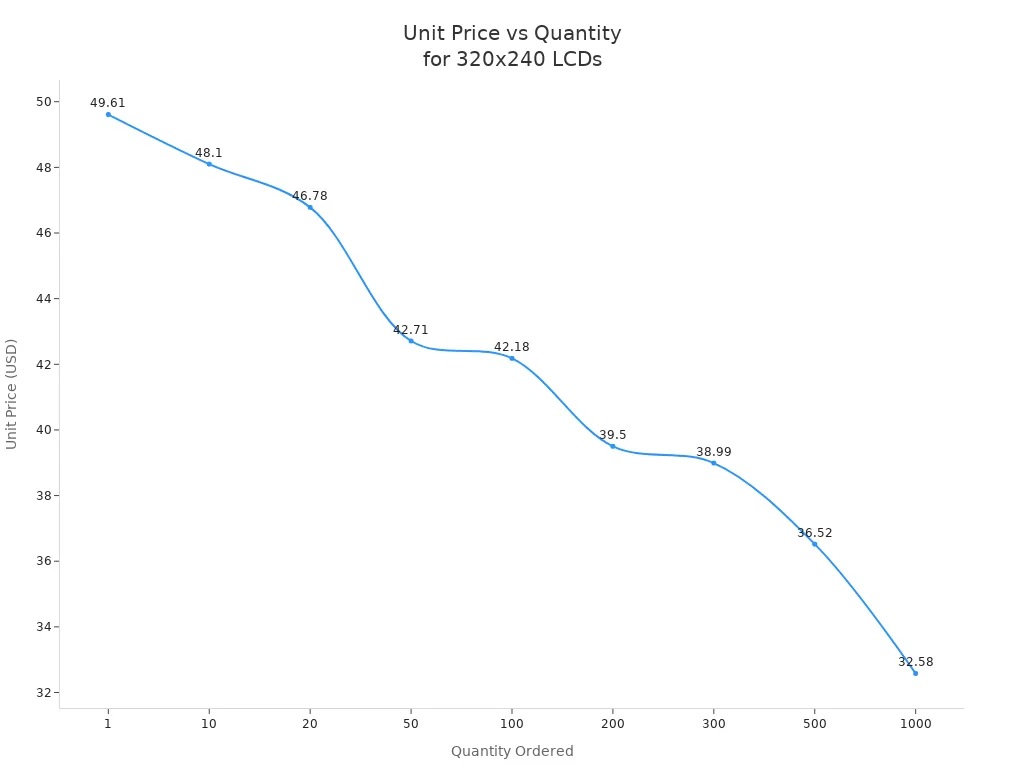
You need to know how much a graphic LCD display 320x240 costs before you start your project. The price changes based on how many units you buy. If you order just one screen, you pay more for each unit. When you order more, the price for each display drops. This helps you plan your budget and manage your data needs.
Quantity | Unit Price |
|---|---|
1 | $49.61 |
10 | $48.10 |
20 | $46.78 |
50 | $42.71 |
100 | $42.18 |
200 | $39.50 |
300 | $38.99 |
500 | $36.52 |
1000 | $32.58 |
You can see from the table that buying more displays saves you money. This is important if you need to collect data from many devices or want to build a large project. The price for each screen goes down as your order grows.
Tip: Always check the price for your order size. This helps you use your data and money wisely.
Supplier Reliability
You want a supplier who gives you good displays and strong support. A reliable supplier sends your order on time and helps you solve problems. You should look for suppliers who share clear data about their products. They should answer your questions and help you pick the right screen for your project.
A good supplier tests each display before shipping. This keeps your data safe and your screen working well. You can trust suppliers who have a long history and many happy customers.
Choose suppliers who give you clear data sheets.
Ask for test reports on the display.
Check reviews from other users.
Warranty & Support
You need strong support when you buy a graphic LCD display 320x240. Good suppliers offer more than just the screen. They help you with data, setup, and any problems you find. Most suppliers give you a warranty and after-sales support. This keeps your project running and your data secure.
Support Option | Description |
|---|---|
Customer Service | Commitment to providing excellent customer service for a positive experience. |
Technical Support | Comprehensive technical support from design to production by experts in LCD module manufacturing. |
Customization | Options for tailoring LCD modules to meet specific customer needs. |
Quality Assurance | Stringent quality control measures to ensure high performance and reliability. |
After-Sales Support | Ongoing support including warranty coverage, technical assistance, and troubleshooting. |
You can ask for help with data transfer, screen setup, or custom display needs. Good support means you get answers fast and keep your data safe. Always check the warranty and support before you buy a display.
Note: Strong support and a good warranty protect your data and make your screen last longer.
You should think about display quality and how easy it is to read when choosing a graphic LCD display 320x240. Things like screen technology, backlight, interface, how tough it is, and price all help you decide. The table below explains why each thing is important:
Feature | Why It Matters |
|---|---|
Screen Technology | Clear images and fast response times |
Brightness | Better visibility in bright places |
Contrast | Sharp and easy-to-read graphics |
Viewing Angle | Good view from different positions |
Durability | Long-lasting performance |
Cost | Fits your project budget |
Here is a checklist to help you pick:
Make sure the resolution and size work for you.
Choose the display technology that fits your needs.
Check if the interface matches your hardware.
Pick the backlight color and brightness you want.
See if the temperature range is right for where you use it.
Decide if you need any special features.
Tip: Go over each step to choose the best display for your project.
Top 320×240 Graphic LCD Displays for Embedded Projects
320×240 resolution is a classic in the embedded display world, especially in the mainstream size range of 2.4 inches to 3.2 inches. It strikes an excellent balance between power consumption, readability, and cost.
For small screens, mature driver support and a friendly development experience are key, and QVGA (320×240) is the gold standard with widespread support. At 2.4″ to 3.5″, it delivers sharp, crisp visuals.
💎 Core Types: Three Main Technologies
Understanding the three underlying technologies will help you choose the right display for your application.
TFT‑LCD (Thin‑Film Transistor LCD) – The most mainstream choice. Mature technology offering rich, vivid colours and fast response times. Ideal for consumer electronics or industrial HMI projects requiring dynamic images, touch interfaces, and rich visuals.
IPS‑LCD (In‑Plane Switching LCD) – A “picture quality upgrade” of TFT. Features ultra‑wide viewing angles (up to 178°) and excellent colour accuracy, with minimal colour shift even from the side. Perfect for projects demanding high colour fidelity and wide viewing angles.
STN‑LCD (Super Twisted Nematic LCD) – A passive‑matrix technology for monochrome or grayscale displays. Its key advantages are ultra‑low power consumption and excellent sunlight readability, but colours are limited and viewing angles are narrow. Ideal for battery‑powered devices or industrial instruments that only need simple text or graphics.
📊 Mainstream Models & Key Specifications
The table below compares popular models from leading brands, ranging from beginner‑friendly entry‑level screens to industrial‑grade options for harsh environments.
Brand / Model | Size | Type | Key Strengths & Use Cases | Key Parameters | Approx. Price (USD) |
|---|---|---|---|---|---|
Winstar WF24MTLAJDNN0 | 2.4″ | TFT | Minimal SPI – Only 4 wires to drive. Simple interface, great for quick prototyping and Arduino projects with limited I/O. | Interface: 4‑wire SPI | ~$11 |
Newhaven NHD-2.4-240320AF-CTXP | 2.4″ | IPS | Image quality champion – IPS panel for wide viewing angles and high colour accuracy. SPI or parallel interface. Great for projects prioritising display quality without immediate touch needs. | Interface: SPI/Parallel | ~$13.44 |
Waveshare 3.2inch Touch LCD | 3.2″ | TN‑TFT | All‑in‑one touch – Integrated resistive touchscreen. Excellent value. Uses ILI9341 driver with rich development resources. Ideal for interactive mid‑size projects. | Interface: 8080 Parallel + SPI | ~$21.44 |
CrowPanel Pico Display | 2.4″ | TN‑TFT | One‑stop dev tool – On‑board RP2040 MCU, touch, SD card slot. Program with MicroPython or Arduino IDE. Great for fast interactive prototyping. | On‑board MCU: RP2040 | ~$30 |
DFRobot 2.0″ IPS | 2.0″ | IPS | Compact high performance – IPS wide‑angle and 320×240 in a tiny 2.0″ package. Built‑in MicroSD slot. Suitable for portable or wearable devices. | Interface: SPI | ~$35 |
Nextion NX3224T024 | 2.4″ | TFT | HMI‑dedicated – Independent HMI processor and dedicated editor. Design UI logic separately – greatly simplifies interactive interface development. | On‑board MCU: 48MHz | ~$29.87 |
Newhaven NHD-320240WG-BoTFH-VZ# | 5.7″ | FSTN | Industrial monochrome leader – 5.7″ monochrome (B/W) transflective LCD. Sunlight readable, extremely low power, very durable. Ideal for outdoor devices or industrial instruments with tight power budgets. | Type: FSTN monochrome | Quote‑based |
EA DOGM240W-6 | 3.6″ | FSTN | Ultra‑low power comms expert – Monochrome FSTN. Very low power consumption, rich interfaces (I2C, SPI). Excellent for portable devices needing low power and simple communication. | Type: FSTN monochrome | Quote‑based |
Note: Prices are estimates. Actual costs vary by vendor, quantity, and promotions.
🛠️ Buying Guide: How to Make the Right Choice
Follow these steps to narrow down your selection.
1. Define Your Display Needs: Colour or Monochrome?
Colour (TFT/IPS) – Choose this if your project needs photos, video, colourful charts, or complex UI. TFT is the standard. Upgrade to IPS if colour accuracy and viewing angles are critical.
Monochrome (STN/FSTN) – Choose this if you only need simple text, data, or basic graphics, and power consumption is a major concern (battery‑powered), or if the display will be used in direct sunlight (outdoor).
2. Choose the Interface: Speed vs. Pin Count
Parallel – Faster data transfer, smoother refresh. But consumes many I/O pins (typically 8+), making hardware design and routing more complex.
Serial (SPI) – Simple connection (usually 3‑4 wires), saves precious I/O pins. Slower transfer speed – may cause refresh delays with heavy animation.
3. Hardware Ecosystem: Check Compatibility with Your Board
Arduino – Look for displays with well‑supported driver chips like ILI9341. Libraries such as Adafruit_ILI9341 and Adafruit_GFX greatly simplify coding.
ESP32 – The built‑in SPI controller is powerful and works well with SPI displays. Note that ESP32 logic level is 3.3V – most common modules are compatible, but double‑check.
Raspberry Pi – Choose displays with official or community support, e.g., TFT screens driven directly via GPIO pins. They usually have optimised drivers and tutorials.
4. Environmental Factors: Durability, Power, and Size
Mechanical dimensions – Verify the module’s physical size (length, width, thickness) fits your enclosure, especially for flush mounting.
Power consumption & supply – TFT screens consume more power. If battery‑powered, calculate overall runtime. The datasheet’s current consumption (e.g., DFRobot module ~29mA typical) is a key reference.
Industrial / outdoor environments – If the device must operate in extreme temperatures (e.g., -20°C to +70°C), choose a wide‑temperature model. For outdoor use, also require high brightness (>800 cd/m²) for sunlight readability.
🛒 Sourcing Channels & Developer Resources
Sourcing Channels
International distributors – For high‑quality, reliable parts in production: Mouser, DigiKey, RS Components. Higher prices, sometimes minimum order quantities.
Online marketplaces – For beginners and DIY: AliExpress, eBay, Amazon, or LCSC. Search for keywords like “ILI9341 SPI Module” to find inexpensive generic modules.
Community & Resources
Libraries and examples – Most generic TFT screens use classic driver chips. For ILI9341, use Adafruit_ILI9341 + Adafruit_GFX. For ST7789, use Adafruit_ST7789.
Development tools – For complex GUIs, check out LVGL (Lightweight Versatile Graphics Library) – a powerful open‑source GUI library running on almost all major embedded platforms. SquareLine Studio is a graphical UI designer for LVGL that dramatically speeds up development.
Learning sites – Adafruit Learning System and SparkFun Tutorials offer excellent getting‑started guides and project examples.
💎 Summary
Choosing the right 320×240 LCD module is about trade‑offs. Balance cost, power consumption, display quality, development difficulty, and sourcing channel against your core requirements.
For fast start and rich resources – Start with Arduino + ILI9341 SPI module – a safe choice for most DIYers.
For best image quality and wide viewing angles – Focus on IPS panels, e.g., Newhaven or Waveshare IPS models.
For low power and outdoor readability – Look at FSTN monochrome screens, e.g., Newhaven or EA DOG series.
For rapid interactive UI development – Consider the Nextion series – use their dedicated editor to quickly realise your interactive ideas.
If you share more details about your project (application, budget, main development board), I can offer more targeted recommendations.please contact Shenzhen TopAdkiosk Display Technology Co.
FAQ
What devices use a 320x240 graphic LCD display?
You can find these displays in many devices. They are used in handheld meters and industrial controls. Medical devices and smart home panels use them too. Many small projects use these displays because they show clear graphics. They also fit well in small spaces.
How do I connect a 320x240 LCD to my microcontroller?
You can use common interfaces like SPI, I²C, or parallel. Check your microcontroller’s datasheet for details. Make sure the interface type matches your microcontroller. Use the right wires to connect everything. Many LCDs have example code to help you set them up.
Can I use a 320x240 LCD outdoors?
Yes, you can use these displays outside. Pick a display with high brightness and a wide temperature range. Some models have backlights that work well in sunlight. Sealed displays keep out dust and water. This makes them better for outdoor use.
Do these displays support touch input?
Some 320x240 LCDs have touchscreens. You can pick resistive or capacitive types. Touchscreens let you control your device without extra buttons. Always check the product details before you buy.
What is the typical lifespan of a 320x240 graphic LCD?
Most 320x240 LCDs last between 30,000 and 60,000 hours. The display lasts longer if you use it at normal temperatures. Try not to show the same image for a long time. Always check the manufacturer’s specifications.
See Also
Understanding The Pros And Cons Of LCD Display Screens
Key Innovations In LCD Displays To Watch For In 2026
Essential Tips For Enhancing Your Project With OLED Displays
Selecting The Ideal LCD Round Display For Your 2025 Project
Finding The Perfect LCD Digital Signage For Your 2026 Business
