Top Floor Standing Digital Signage Brands Compared for 2026
Shenzhen TopAdkiosk Display Technology Co., Ltd.
Add.: 2F, Bldg 10, Changfeng Industrial Park, Dongkeng, Fenghuang, Guangming, Shenzhen, China 518132
Mobile/WHATSAPP: 86-138 25769658
Email: marketing@topadkiosk.com topadkiosk@gmail.com
Skype: pghenry1
Wechat: adkioskhenry
English Web.: https://www.topkioskdisplay.com/
http://www.ad-kiosk.com/
https://www.toplcddisplay.com/
http://www.multitouchdigitalsignage.com/
https://www.youtube.com/channel/UCYVYNJHxLVEcQD8fuUxXNTA/videos?view_as=subscriber
https://www.facebook.com/TOPADKIOSKSHENZHEN/?ref=bookmarks

LG, Planar, ScreenCloud, and NowSignage are top brands for floor standing digital signage in 2026. This technology shows digital content on tall screens. You put these screens where many people walk by. Picking the right system helps more people see your message. It also makes them pay attention. For example, a store chain used these displays to share new deals. Their sales went up by 30%. You should think about hardware quality and CMS features. Also look at installation, support, price, and integration. To find out more, go to https://www.topkioskdisplay.com/.
Key Takeaways
Pick a digital signage brand that gives good help and simple updates. This will help you keep your content new. Look for screens with high brightness, especially if you use them outside. This makes sure people can see the screen even when it is sunny. Choose a content management system (CMS) that is easy for you to use. It should let you change messages fast from any place. Think about the total cost, like hardware, software, and support. This helps you not get surprised by extra costs. Choose displays that fit your business and can grow with you. This makes it easy to manage many places.
Top Floor Standing Digital Signage Brands
Leading Brands Overview
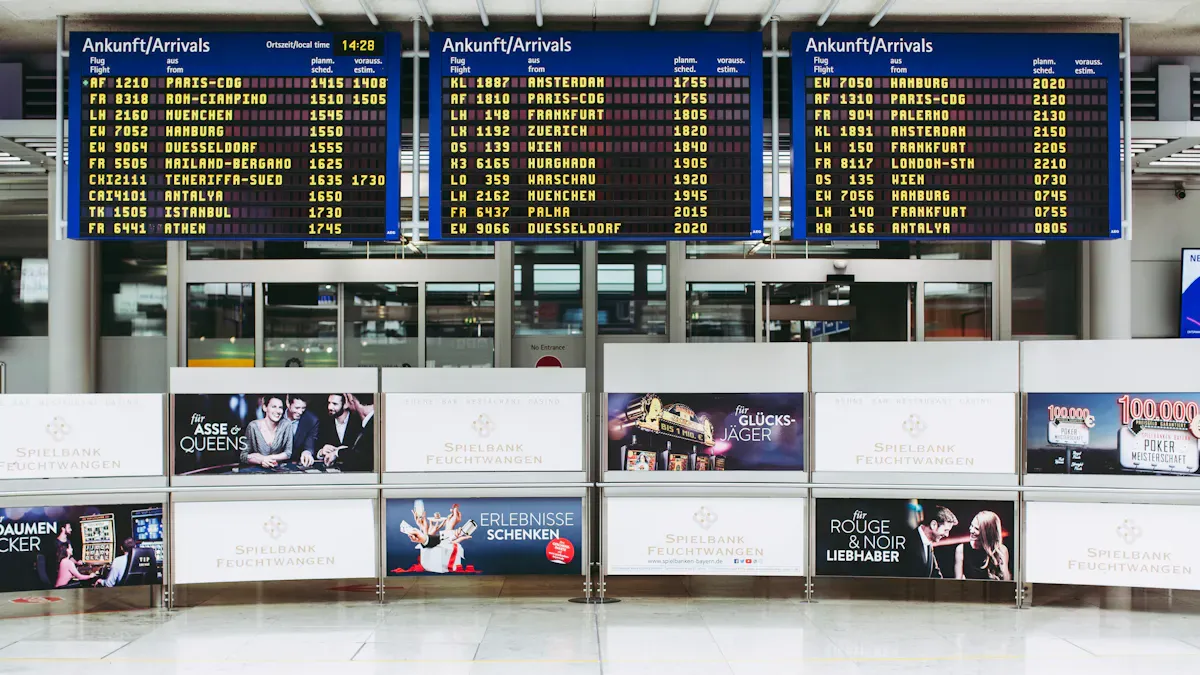
Floor standing digital signage is found in busy places. These screens are tall and show videos, pictures, and messages. People walking by can see them easily. You can use these screens in malls, airports, schools, and offices. They help share news, ads, or directions with everyone. You control what shows on the screen from a computer or phone. This lets you change messages quickly and easily.
Many brands make floor standing digital signage. Some brands are better because they have more features and good support. The table below shows how top brands are different:
Brand | Unique Features | Innovations |
|---|---|---|
LG | High brightness, slim design, strong reliability | Smart sensors, energy-saving technology |
Planar | Durable build, sharp image quality, flexible sizes | Touch interactivity, seamless video walls |
ScreenCloud | Easy-to-use cloud platform, works with many devices | Real-time updates, app integrations |
NowSignage | Fast setup, simple dashboard, strong security | Multi-location management, live content scheduling |
CRI | Focus on creative displays, advanced analytics | Cloud-based content management, engagement measurement |
Clevertouch | Interactive features, user-friendly interface | Central management, announcement broadcasting |
DigitalSignage | Simple drag-and-drop tools, plug-and-play setup | Scalable systems, single dashboard control |
Why These Brands Lead
You want your digital signage to work well and look nice. Top brands are best because they give you more control and better results. They use advanced content management systems. You can update your screens from anywhere you are. You get updates right away, so your messages are always new. Many brands let people touch the screen for more information. This makes your display more helpful.
You also get good support and easy setup. LG and Planar focus on clear images and strong screens. ScreenCloud and NowSignage make it easy to manage lots of screens. CRI and Clevertouch help you see how people use your content. DigitalSignage lets you set up new screens fast.
Tip: When picking a brand, look for easy updates, strong support, and features that fit your needs.
Here are reasons why these brands are ahead:
Advanced content management systems
Real-time updates for your messages
Interactive features for better engagement
Focus on user experience and simple controls
Floor standing digital signage can do many things. You can show ads, share news, or help visitors find their way. The best brands make these jobs easier and help you reach more people.
Digital Signage Displays: Evaluation Criteria
Hardware and Image Quality
When picking digital signage displays, hardware and image quality are very important. You want screens that stay bright and clear, even in sunlight. High brightness, like 2000 nits or more, helps your message stand out in busy places. This makes your content easy to see and colorful from many angles. For indoor use, 300-500 nits is usually enough. Outdoor displays need much more brightness so the sun does not wash out the screen. You should also look at the display type, content player, mounting options, and how tough the screen is. The table below shows the main hardware specs you should compare:
Specification Type | Details |
|---|---|
Indoor: 300-500 nits; Outdoor: 2000+ nits | |
Display Types | Choose technology for best viewer experience |
Content Players | Must support smooth, compatible content playback |
Mounting Options | Pick strong mounts for safety and fit |
Power and Connectivity | Reliable power and connections prevent downtime |
Durability and Reliability | Use commercial-grade displays for 24/7 operation |
CMS and Integration
A good content management system lets you control your digital signage from anywhere. You can change messages quickly and keep your content new. Top CMS tools in 2026 are ScreenCloud, Yodeck, and Rise Vision. These tools are easy to use and have lots of features. See the chart below for a quick look at how they compare:
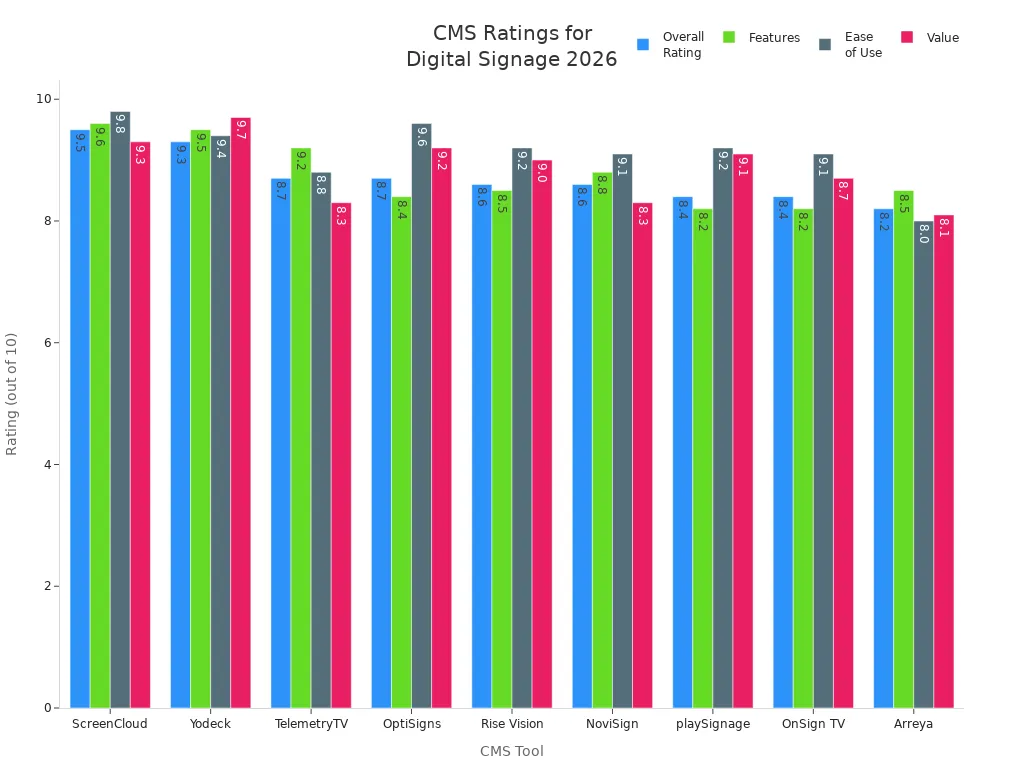
Pick a CMS that fits your skills. Yodeck and OptiSigns are simple to use. ScreenCloud has more features but takes longer to learn. It is important to connect your CMS with other business tools. This lets you show live data, update screens automatically, and keep messages the same everywhere.
Installation and Support
Easy installation saves time and money. You want displays that come with clear instructions and safe ways to mount them. Good brands give strong support. This means you get help fast if something breaks. Good support keeps your screens working and your content showing.
Pricing and Value
Do not just pick the cheapest option. Factory-direct models often give you better value over time. Professional displays last longer and break less often. This saves money and helps you reach more customers. Cheap displays may cost more later because you need to fix or replace them. Buying good quality displays gives you a better experience and saves money in the long run.
Tip: In 2026, pick digital signage displays that are easy to grow with. Multi-location support helps you control many screens at once. This is important for businesses that want to get bigger.
Best Digital Signage Displays Comparison
Feature Comparison Table
You want to pick screens that fit your business. Floor standing digital signage shows videos, pictures, or messages on tall screens. You control these screens from a computer or phone. This lets you share news, ads, or directions with people walking by.
The table below compares top brands and models. It shows their main features and where they work best.
Product | Key Features | Best For |
|---|---|---|
Xiaomi TV P1E | Budget-friendly, screen mirroring, USB playback | Home, small shops, tight budgets |
LG G-Series | High brightness (2,000-10,000 nits), wide angles, platform-ready | Outdoor, storefronts, transport hubs |
Planar | Durable, sharp images, flexible sizes | Retail, public spaces, video walls |
NowSignage | Flexible content management, easy setup | Retail, education, offices |
Scala | Advanced scripting, complex content logic | Large networks, transport, military |
Poster Booking | Simple scheduling, affordable | Hotels, events, small businesses |
Rise Vision | Cloud-based, easy templates, education focus | Schools, campuses, public buildings |
ScreenCloud | Intuitive UX, hardware flexible, enterprise features | Global retail, franchises, hospitality |
Appspace | Integrates with meeting systems, secure | Corporate, meeting rooms, offices |
Note: Choose screens based on where you use them and how much control you want.
Pricing Overview
You should think about more than just the price when picking digital signage. Some brands sell screens for a one-time fee. Others use subscriptions, so you pay every month or year for software, support, and updates. The total cost includes hardware, software, upgrades, and support.
Hardware and software upgrades keep your screens working well.
Content management helps you show new messages.
Integration lets you connect with other tools.
Training and support help your team use the system.
Onsite maintenance and repair keep screens running.
For example, Xiaomi TV P1E costs less at first, but you might need to buy software or support later. LG G-Series and Planar cost more, but they last longer and work well in bright places. NowSignage, ScreenCloud, and Appspace use subscriptions. You get updates and support, but you pay as you go. Rise Vision and Poster Booking have simple plans for schools and events.
Tip: Always check the total cost over time, not just the starting price. This helps you avoid surprises and plan your budget.
You want screens that stay on, even if the internet stops working. Brands like Yodeck and TelemetryTV focus on uptime and offline playback. Your message keeps showing, even if your network has problems. Many businesses, like restaurants and schools, trust these brands for important updates.
When you compare screens for digital signage, look at features, support, and long-term value. Pick the one that fits your business and helps you grow.
Brand Analysis by Business Type
Retail and Multi-Location
Retail stores need digital signage that works well and is easy to use. These displays help bring in customers and show new deals in many stores. LED floor standee displays are bright and easy to see. Interactive digital signage standees let shoppers touch the screen to learn more. Android-based kiosks make it simple to change what is on the screen. Double-sided displays are good for busy malls because people can see them from both sides. Cloud-based electronic advertising displays let you control all your screens from one place. Smart digital signage uses AI to show ads to the right people and see how well they work. Portable stands are helpful at trade shows or pop-up shops.
Feature | Description |
|---|---|
These displays use less power and help save money. | |
High Definition and Resolution | HD or 4K screens make pictures and videos look very clear. |
Interactive Capabilities | Touchscreens let people look at products and get details. |
Remote Management | Cloud systems let you update every store’s screens at once. |
Real-Time Content Updates | You can change deals right away, even from your phone. |
Tip: Pick displays that let you update screens from far away and change deals fast. This helps stores in many places do better.
Restaurants and Hospitality
Restaurants and hotels need digital signage that can show menus, deals, and work outside. CrownTV lets you change menus, connect to POS, and set different menus for breakfast, lunch, or dinner. BrightSign gives you strong media players that many fast food places use. Yodeck is a good pick for small restaurants that want to save money. For outside, choose displays that are bright and can handle hot or cold weather. Strong screens are important for places with outdoor seating or drive-thrus.
Brand | Key Features |
|---|---|
CrownTV | Works with menus, POS, and meal times. Made for restaurants and hotels. |
BrightSign | Strong players, used by many fast food places. Needs a separate display. |
Yodeck | Good price, best for one-location restaurants. |
Feature | Description |
|---|---|
High Brightness | Menus stay easy to read, even in sunlight. |
Thermal Management | Screens stay safe from heat and cold. |
Durability | Screens last a long time, even with lots of use. |
The right digital signage helps guests have a better time and can help you sell more.
Corporate and Meeting Rooms
Offices need digital signage that helps teams work together and keeps data safe. CrownTV connects to over 200 apps, calendars, and live data. Four Winds Interactive is good for companies that need strong data rules. ScreenCloud is simple for small offices. TelemetryTV is safe and lets big companies control all their screens from one place. Good meeting room systems make meetings look professional and help people talk clearly. AV setups that work well help everyone share ideas.
Brand | Key Features | Ideal Use Case |
|---|---|---|
CrownTV | Connects to apps, live data, and social walls. | Good for company offices. |
Four Winds Interactive | Runs on-site, keeps data safe. | Best for companies with strict rules. |
ScreenCloud | Easy to use and not expensive. | Good for small offices. |
TelemetryTV | Very safe, controls many screens at once. | Best for big companies. |
Good AV systems show your company is strong and smart.
The right setup helps teams work better and talk more easily.
Education and Public Spaces
Schools and public buildings need digital signage that is cheap, simple, and easy for everyone to use. Yodeck, OptiSigns, and Rise Vision give you good results without costing a lot. Xibo is best for tech teams who want to change things. ScreenCloud and NoviSign are good for medium-sized groups that want both features and easy use. Mappedin helps people find their way and learn more in big schools or public places.
Interactive screens should be low enough for everyone to reach, no higher than 44 inches.
Screens should talk and read out all the information.
Text should be big so people can read it from far away.
Sans-serif fonts make signs easy to read and follow ADA rules.
Picking displays that everyone can use makes schools and public places friendlier for all.
Choosing the Best Digital Signage
Assessing Business Needs
Start by making clear goals for your digital signage. Ask yourself if you run sales often or need to share updates fast. Are you in a busy place? Write down your main goals and how you will check if you reach them. Think about who will see your screens and where you want to put them. Look at your staff and how much money you have. Learn about the hardware, like the media player and display. This helps you pick the best indoor digital signage for your needs.
Tip: Always make sure your screens match your goals and audience. This gives you the best results.
Matching Features to Use Cases
Different businesses need different features for their digital signage. Look at the table below to see which features fit your business:
Industry | Digital Signage Features |
|---|---|
Retail | Interactive displays, immersive experiences |
Hospitality | Tailored content management solutions |
Education | Interactive displays for enhanced learning |
Interactive digital signage can help customers pay more attention. It can boost engagement by 33%. For example, 'lift-and-learn' setups play videos when shoppers pick up items. Endless-aisle kiosks let people look at more products than what is in the store. Pick a cloud-based cms that has these features and makes managing screens easy.
Budget and Scalability
Plan your budget so you can grow later. Good digital signage lets you start small and add more screens as you grow. This saves money and time because you do not need a new system each time. Use a cloud-based cms to control all your screens from one place. Think about the price, including hardware, software, and support. The table below shows smart ways to plan your budget:
Strategy | Description |
|---|---|
Capital Planning | Plan money for growth and daily needs. |
Cash Flow Forecasting | Track spending so you do not run out of money. |
Marketing Budget | Try new ways to use your budget well. |
Note: Do not make mistakes like unclear goals, messy designs, or bad screen placement. Keep your screens working with regular checks. Turnkey installation helps you set up fast and avoid problems. Many businesses pick turnkey installation and cloud-based cms for easy growth and good support.
You can find the best floor standing digital signage for your business by reading reviews. Reviews show that LG works well for outdoor spaces. Planar fits retail and public areas. ScreenCloud and NowSignage help with easy management. Reviews highlight how these brands match different needs. You should check reviews to see which features help you reach your goals. Reviews also help you plan for growth. Always read reviews before you choose. Reviews give you the facts you need.
What Is Floor Standing Digital Signage and How Does It Work?
Floor standing digital signage is, simply put, an independent digital display system that does not require wall mounting. It functions like a "plug‑and‑play" piece of modern furniture that can be flexibly placed in high‑traffic areas to attract attention and convey information through dynamic content.
🤔 What Is Floor Standing Digital Signage?
It is a self‑supporting device that integrates a display, media player, and other components. Think of it as a large, smart tablet standing on a base. Its exterior design is typically more modern and eye‑catching, blending into the surrounding environment while grabbing attention. Common names include "digital standee" or "kiosk".
⚙️ How Does It Work?
Like most digital devices, floor standing digital signage follows the principle of "hardware as the body, software as the soul". Four core components work together to manage and play content:
Display Hardware – Your "digital canvas". Usually a high‑resolution (4K ultra‑HD), high‑brightness industrial‑grade LED or LCD screen.
Integrated Media Player – The "brain". A built‑in hardware component that stores, decodes, and plays the videos, images, and other content you upload.
Content Management System (CMS) – Your "remote control". Through a cloud‑based (online) or on‑premise (software) platform, you can remotely manage everything – uploading content, setting playback schedules, batch updating, and even monitoring device status in real time.
Network & Connectivity – The "blood vessels". Built‑in Wi‑Fi and Ethernet ports allow the unit to communicate with the CMS server, receiving the latest playback instructions and content files.
🌟 Advantages of Floor Standing Digital Signage
Its core strengths can be summed up in four words: flexible, eye‑catching, intelligent, durable.
Flexible deployment – plug and play – No wall drilling or permanent installation required. Just plug it in and turn it on. Many models have hidden casters on the base, making it easy to move between different events or promotional areas.
Visually prominent – naturally attention‑grabbing – In open spaces, this freestanding device has a strong "presence" and naturally becomes a visual focal point. Its height is usually at eye level, making it easy to view and interact with.
Smart content – efficient management – With a cloud‑based CMS, you can update promotions at all stores nationwide with one click from headquarters, reducing sync time from days to minutes and greatly improving efficiency.
Durable and stable – built for public spaces – Designed for long operating hours, these units use aluminium alloy heat‑dissipation designs for efficient cooling and stable operation. Tempered glass protection on the front effectively resists potential impacts in public areas.
🛍️ Main Types and Application Scenarios
Different types of floor standing digital signage serve different roles.
Type | Core Function | Typical Applications | Key Value |
|---|---|---|---|
Information display | Play dynamic ads and brand videos | Shopping mall atriums, hotel lobbies, fast‑food chains | Create atmosphere, enhance brand image |
Advertising & marketing | Show products, promotions, interactive games | Retail store entrances, new product launch areas, cosmetics counters | Attract customers, boost conversion rates |
Wayfinding & inquiry | Provide interactive maps and facility search | Airports, hospitals, large office buildings, museums | Reduce customer confusion, provide smart navigation |
Self‑service | Complete ticket purchases, ordering, etc. | Cinemas, restaurants, government service halls, bank branches | Streamline processes, reduce labour costs |
Specialised (e.g., analytics) | Integrate professional data such as foot traffic counters | Chain stores, shopping centres | Collect data, support operational decisions |
⚖️ Floor Standing vs. Wall‑Mounted: A Quick Comparison
Aspect | Floor Standing | Wall‑Mounted |
|---|---|---|
Floor space | Requires floor space | Saves floor space |
Visual impact | High – a natural "visual anchor" | Moderate – more about blending in |
Mobility | High – some models have wheels for repositioning | None – fixed location |
Installation & maintenance | Simple – plug and play; low maintenance | Complex – requires drilling; harder to replace later |
Typical use cases | Temporary event promotions, new product launches, large open spaces | Long‑term fixed brand displays, hallway information screens, menu boards |
💎 Summary: Floor Standing Signage as a Strategic Tool
Floor standing digital signage is no longer just an advertising screen. It has evolved into a smart service hub that can collect data, analyse foot traffic, and optimise operations. It not only captures attention but also, with integrated sensors, provides valuable data insights to support business decisions.
If you would like to explore how to choose the right model or see specific product recommendations for floor standing digital signage, feel free to ask!
please contact Shenzhen TopAdkiosk Display Technology Co.
FAQ
What is floor standing digital signage and how does it work?
Floor standing digital signage is a tall screen. It shows digital messages, videos, or ads. You put these screens where many people walk. You use software to control what is on the screen. You can change what shows fast. This helps more people see your message.
How do you choose the best digital signage for your business?
You check if the screen looks clear and bright. Make sure the hardware is strong and made for business. See if the screen works well outside. Pick a system that lets you update messages easily. Choose the one that fits your needs and budget.
Can you use commercial screens outdoors?
Yes, you can use commercial screens outside. Outdoor digital signage uses special screens. These screens can handle rain, sun, and wind. They stay bright even in sunlight. You need strong hardware for outdoor use.
What makes commercial digital signage solutions different from regular screens?
Commercial digital signage uses tough screens and hardware. These screens last longer than regular ones. You get better help if something breaks. You can control many screens at once. Commercial screens are made for busy places.
How do you manage multiple screens in different locations?
You use cloud-based software to control all screens. You can change what shows on every screen from one place. You update messages everywhere at the same time. This is good for businesses with many locations. Cloud solutions make it simple to manage many screens.
See Also
Best Digital Signage Solutions for Retail in 2026
Popular Digital Signage Options Gaining Attention in 2026
Leading Video Wall Digital Signage Options for 2026
