Digital signage vertical explained and why it matters
Shenzhen TopAdkiosk Display Technology Co., Ltd.
Add.: 2F, Bldg 10, Changfeng Industrial Park, Dongkeng, Fenghuang, Guangming, Shenzhen, China 518132
Mobile/WHATSAPP: 86-138 25769658
Email: marketing@topadkiosk.com topadkiosk@gmail.com
Skype: pghenry1
Wechat: adkioskhenry
English Web.: https://www.topkioskdisplay.com/
http://www.ad-kiosk.com/
https://www.toplcddisplay.com/
http://www.multitouchdigitalsignage.com/
https://www.youtube.com/channel/UCYVYNJHxLVEcQD8fuUxXNTA/videos?view_as=subscriber
https://www.facebook.com/TOPADKIOSKSHENZHEN/?ref=bookmarks

You can find vertical digital signage in lots of places. This kind of screen stands up tall like a portrait. Businesses use these screens to show menus, lists, and social media posts. Vertical displays help get more attention from customers. The digital signage market is growing quickly around the world. It may reach USD 33.56 billion by 2026. Digital signage vertical helps people join in and find information easily.
Key Takeaways
Vertical digital signage is tall, so people notice it easily. It works well for showing menus and lists. This kind of signage helps people see things better. Customers can read the information fast and without trouble. Vertical displays are good for mobile-first content. They attract younger people and help them pay more attention. Businesses can use vertical signage in many places. These places include stores and hospitals. It helps make the customer experience better. Picking the best spot and making good content for vertical screens is important. It can help get more attention and increase sales a lot.
What is vertical digital signage?
Portrait orientation of digital displays
Vertical digital signage is seen in many places. The screen stands up tall, like a portrait photo. You mount it so it is taller than it is wide. Many commercial digital displays can be rotated for this setup. Vertical digital signage lets you show moving content that fits menus and lists. This way, you can show more lines of text. It makes information easier to read.
Tip: Vertical displays look like how people use their phones. This makes your content feel familiar and simple to follow.
Some main advantages of portrait orientation are:
Adaptability: You can use vertical digital signage to highlight products and branding.
Visibility: You can show more text, so customers read menus and lists faster.
Human Scanning: Vertical displays match how people look at information, especially on kiosks.
Comparison with horizontal digital signage
You might wonder how vertical digital signage is different from horizontal screens. Both types have their own strengths. Horizontal displays are common and often show videos or web pages. Vertical digital signage stands out and grabs attention in busy places. You can use vertical screens to show products or share mobile-style content.
The table below shows the main differences between portrait and landscape digital signage:
Orientation | Key Features | Use Cases |
|---|---|---|
Landscape | Looks more appealing, gives an immersive experience, good for videos and moving content. | Used where video content is shown. |
Portrait | Can be changed for product needs, shows detailed features and specs. | Best for showing products with special branding. |
Vertical digital signage also has visual and ergonomic benefits:
Advantage Type | Description |
|---|---|
Adaptability | Portrait orientation can be changed for product needs, making branding and product focus better. |
Visibility | Shows more lines of text, so lists and menus are easier to read. |
Human Scanning | Matches how people scan information, good for kiosks and mobile-style content. |
Vertical digital signage fits mobile-first content and attracts younger people. It stands out in places with lots of horizontal screens. This makes your digital signage vertical more likely to catch attention and boost engagement.
The table below shows how vertical and horizontal signage compare in content and user engagement:
Signage Type | Content Compatibility | User Engagement |
|---|---|---|
Horizontal | Works with many types of content, like TV and web pages. | Often better for video content, so it works for different media. |
Vertical | Eye-catching and made for mobile-first content. | Can surprise viewers, so users are more likely to engage. |
Vertical digital signage is used in stores, offices, and restaurants. It helps you show menus, directories, and promotions in a way that feels natural and easy to read. Horizontal signage is good for videos and general information, but vertical displays give you a special way to connect with your audience.
Benefits of digital signage vertical
Improved visibility and attention
You can spot vertical digital signage in busy places like malls and airports. These tall screens stand out and grab your attention. Their portrait shape makes them easy to notice among other screens. You can see more information at once, so you find what you need faster.
Digital signage solutions draw crowds and help businesses earn more by showing ads for products, services, and events.
Vertical digital signage makes customers happier by showing moving content that keeps people interested.
Digital signage helps you find your way, so it is easier to get to your destination in crowded places.
Digital signage lets you see how people react right away. Unlike paper signs, digital screens show how people interact with the content. Most shoppers only notice about 15–20% of in-store signs, and they look for just 2 seconds. When stores change their signs, about 60% see sales go up by 10%. Many people visit new stores because of signs, and 41% judge a business by how its displays look.
Content fit for menus, directories, and feeds
Vertical digital signage is great for menus, directories, and social media feeds. The portrait shape works well for these types of content.
Portrait orientation is perfect for digital menus, wayfinding directories, or social media feeds.
You can see more lines of text, so lists and menus are easier to read. Restaurants use vertical screens to show menu items and prices. Offices use them for directories and schedules. Social media feeds look normal on vertical screens, just like on your phone. This makes it easier to get information and makes the experience feel more real.
Enhanced engagement in retail and corporate settings
Vertical digital signage helps people pay more attention in stores and offices. You notice new deals and products right away. Clothing stores use vertical screens to show style ideas, making shopping more fun. In offices, vertical screens help manage visitors and share news. You spend less time waiting and get updates quickly. In hotels, vertical screens act like digital helpers, giving you tips and event times.
Vertical digital signage grabs customer attention, which can lead to more sales and happier visitors.
Stores use vertical screens to show special deals and new products, which can make people buy more.
Offices use vertical screens to help visitors and share important news.
Hotels use vertical screens to give guests helpful information, making their stay better.
The table below shows how vertical digital signage helps stores get more sales and keep customers interested:
Metric | Description |
|---|---|
Sales Uplift | Shows how sales go up because of digital signage. |
Dwell Time | Measures how long people look at the screens. |
Engagement Metrics | Checks how well the screens get people’s attention. |
Digital signage can make people spend almost 30% more. You see updates and content made just for you, which makes your visit more fun and interesting. These uses show how helpful and flexible vertical digital signage can be in many places.
Applications of vertical digital signage
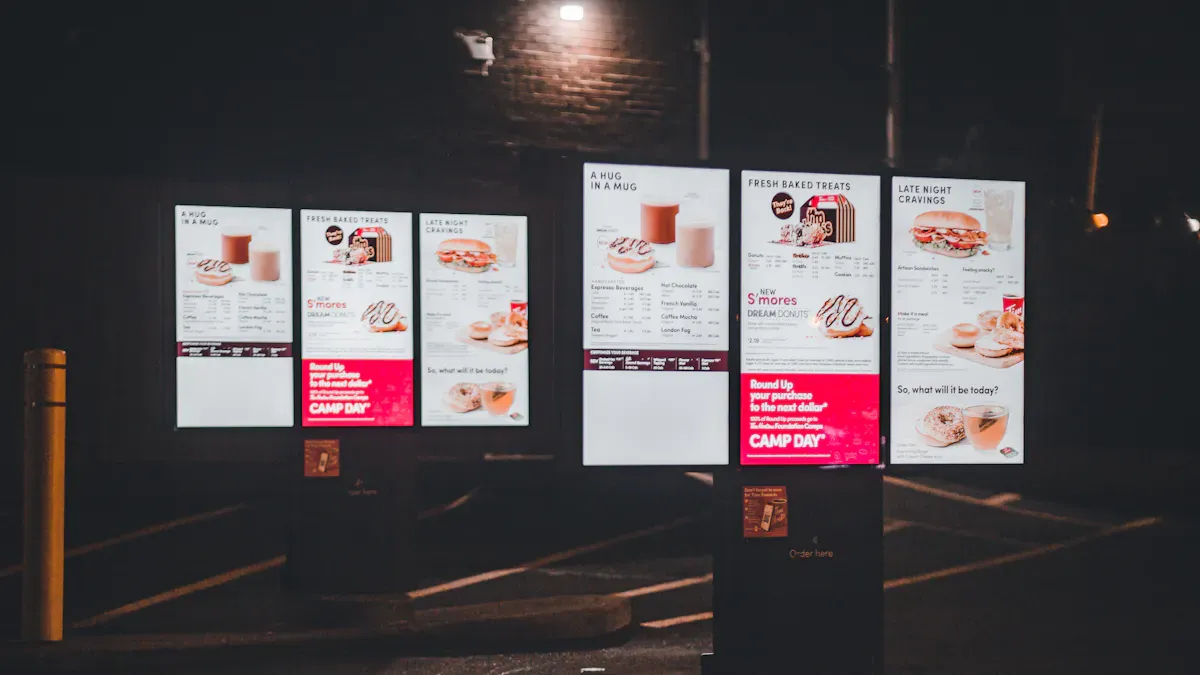
Vertical digital signage can be used in many places. These screens help guide, inform, and interest people in busy spots. Vertical screens are a smart pick for businesses. They make customer experience and communication better.
Retail store navigation and promotions
In stores, vertical digital signage helps shoppers find things. You see these screens at entrances, aisles, and checkouts. They show maps and deals. They also replace old posters with cool pictures. Vertical screens fit in small spaces and stand out in crowded stores.
Example Use Case | Description |
|---|---|
Navigation | Vertical screens act as maps in stores. They help customers find products and deals. |
Interactive Displays | Stores use vertical screens instead of old displays. They show products with fun visuals. |
Digital Menu Boards | Vertical screens in restaurants show menu items and specials in a nice way. |
Stores check how well these screens work by looking at numbers. They track sales, how long people look, and how much people interact.
Metric | Description |
|---|---|
Shows if sales go up from certain ads. | |
Dwell time | Tells how long people look at the screens. |
Engagement metrics | Measures how much people use the screens. |
Attribution data | Links ads on screens to real purchases. |
Corporate visitor check-in and directories
Vertical digital signage makes checking in and finding rooms easy at work. You can update lists fast, so info is always right. Visitors can search for names or departments on the screen. Cloud tools let you control many screens from one place.
Feature | Description |
|---|---|
Real-time updates | You can change info on the screens from anywhere. It keeps everything up to date. |
Interactive directories | People can search by name or group. This makes visits easier. |
Integration with back-end systems | The screens connect to databases. This keeps info fresh and correct. |
Cloud-based management | You can manage all screens from far away. You can update them fast. |
Customizable hardware options | You can pick different screens and sizes. Kiosks work in many places. |
Support and installation | You get help from start to finish. This makes setup and care easy. |
These screens fit well in small halls and lobbies. You can show moving messages and pictures to welcome visitors.
Hospitality and restaurant menus
Restaurants and hotels use vertical digital signage for menus and deals. You can put screens at doors or waiting spots to get attention. The tall shape looks like a phone, so it feels normal.
Space efficiency: Vertical screens save space. They are great for small cafes or food trucks.
Focused content: You can show off special foods or drinks.
Dynamic updates: You can change menus or deals fast. No need to print new signs.
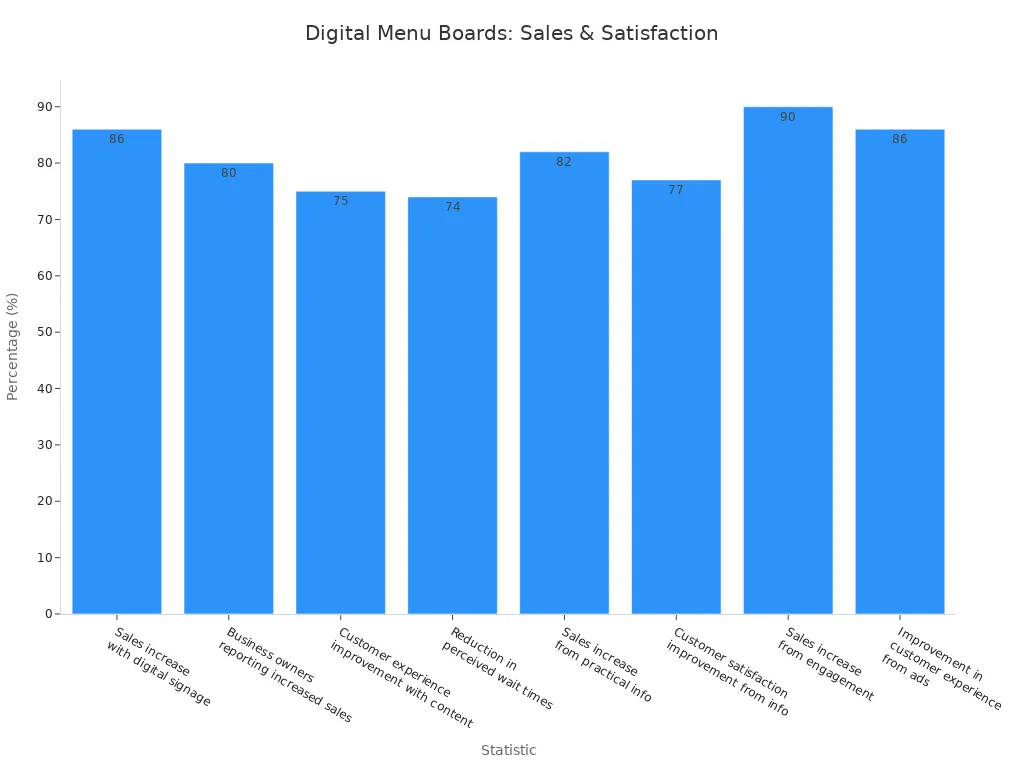
Many restaurants say they sell more and customers are happier with digital signage vertical. People like using interactive menus. Businesses can change what they offer right away.
Healthcare and public space information
Hospitals and clinics use vertical digital signage to help people find their way. You can show maps, health tips, appointment info, and emergency alerts. These uses make it easier to get around and lower stress in busy places.
Function | Description |
|---|---|
Wayfinding | |
Health Tips | Shows health tips to teach patients and visitors. |
Appointment Details | Gives info about appointments and schedules. |
Emergency Alerts | Shows alerts for emergencies to keep everyone safe. |
Facility Announcements | Shares important news across the building. |
You help people move fast and safe in big buildings. Digital screens also save staff time by sharing info for them. This makes people happier and more loyal.
Vertical digital signage is special because it can do so much. You can use these screens in busy places to help people, share info, and get more attention.
Practical considerations for digital signage
Choosing the right digital displays
You should pick digital displays that fit your space and needs. Vertical displays are good for narrow halls and walls. They save space and fit near doors or tight spots. You reach mobile-first users by using screens like smartphones. These displays show one message or call to action. Portrait displays work best for lots of text or products. Restaurant menus and directories stack up, so information is easy to see.
The table below lists important technical details for digital signage:
Specification | Details |
|---|---|
Orientation | Portrait screens help you see better in small spaces. |
Resolution | Full HD, 4K, or higher makes pictures and videos clear. |
Brightness | 700–1500 nits for inside, 2000+ nits for outside screens. |
Resistance to elements | IP and IK ratings keep screens safe from dust, water, and bumps. |
Connectivity | HDMI, DisplayPort, USB, Ethernet, and Wi-Fi let you connect easily. |
Installation and placement tips
Put vertical digital signage where lots of people walk. Screens at doors, aisles, and checkouts help people decide what to buy. You get more attention by placing screens where people wait. Put screens at eye level, about 60–66 inches, so people see them well. Change screen size and resolution based on how far people stand. Make content fit the place and the people for better results.
The table below shows ways to install screens well:
Strategy | Description |
|---|---|
High-Traffic Areas | Put screens where crowds gather, like doors and checkouts. |
Eye-Level Placement | Place screens at 60–66 inches high for best results. |
Contextual Relevance | Use info that fits the location for better impact. |
Viewing Distance | Pick screen size and resolution based on how far viewers are. |
Good placement can make customers pay more attention, up to 33% more. You change how people act by picking smart spots.
Optimizing content for vertical screens
You need to make content for vertical screens easy to read and interesting. Use font sizes between 20 and 30 points so text is clear. Use only one or two fonts to keep things simple. Follow the 3x5 rule: three lines with five words or five lines with three words. Show one main message or call to action. Make sure designs work on different screen sizes and shapes.
Tip: Put interactive parts no higher than 44 inches so people can reach them. Use speech options and make letters at least 5/8 inch tall so everyone can see.
The table below shows good ways to lay out content:
Design Principle | Description |
|---|---|
Optimize for Portrait Aspect Ratio | Make content for vertical screens, not just turned horizontal ones. |
Use Concise and Legible Text | Keep text bold and easy to read, using the '5x5 rule'. |
Incorporate High-Quality Visuals | Use videos and animations to make screens more fun. |
Leverage Interactive Technology | Add motion sensors for more personal and interactive experiences. |
Consider Placement and Viewing Angles | Put screens at eye level or use big graphics for people far away. |
You help people pay attention and understand better by using these tips for vertical digital signage.
You get lots of good things when you pick vertical digital signage. The table below explains why experts like vertical displays:
Advantage/Application | Description |
|---|---|
Engagement | Digital signage is more interesting than paper signs. It helps people remember and notice brands. |
Flexibility and Real-Time Updates | You can change what is on the screen right away. This is important for busy places like stores and hotels. |
Cost-Effective | You save money over time because you do not need to print or hand out signs. |
Targeted Advertisement | You can show ads to the right people at the best time. |
Enhanced Customer Experience | It makes things better for customers by giving info and fun. It also helps people find their way in places like airports. |
You need to pick the right screen direction for your content and space. Vertical screens are great for menus, lists, and social media posts. When you set up your digital signage vertical, think about who will see it, what you want to do, and where it will go. This helps you make a digital sign that is special and connects with people.
🧭 What Is a "Vertical" Digital Signage Display?
A vertical digital signage screen is physically mounted so its height is greater than its width – just like a smartphone or a magazine. The opposite is horizontal (landscape) orientation, which is what most TVs and computer monitors use.
Typical aspect ratios: 9:16 (portrait version of 16:9) or 3:4.
Common sizes: 49", 55", or 86" screens turned on their side.
Note: Some manufacturers sell “vertical‑native” displays with factory‑rotated panels and better cooling for 24/7 portrait use. But you can also mount a standard landscape display vertically using a compatible bracket.
📱 Why Does Vertical Orientation Matter?
Human behavior and space constraints make vertical displays more effective in many real‑world scenarios.
1. It Matches How People Hold Their Phones
Most people interact with content vertically on their smartphones. A vertical digital sign feels familiar and natural – content like social media feeds, QR codes, and short videos are already designed for this orientation.
2. It Fits Narrow Spaces
Many high‑traffic locations have limited horizontal space: elevator doors, store window pillars, hallway walls, transit station columns. A vertical screen fits perfectly where a wide screen would be impossible.
3. It Improves Wayfinding
Maps, directories, and floor plans are often taller than they are wide. A vertical display shows more floors or a longer list of tenants without awkward scrolling.
4. It Grabs Attention Differently
In a sea of horizontal screens (TVs, billboards), a vertical display stands out simply because it’s different. This novelty can increase glance rates.
🎯 Best Use Cases for Vertical Digital Signage
Industry | Application | Why Vertical Works |
|---|---|---|
Retail | Window displays, mannequin‑sized screens, digital shelf talkers | Mimics a poster or a person; shows full‑length product images. |
Restaurants & QSR | Drive‑thru menu boards, counter‑top displays | Tall menus show more items without wide space; easy to read from a car. |
Corporate | Lobby directories, elevator screens, meeting room signs | Fits narrow walls; shows floor lists or daily schedules vertically. |
Transportation | Train/bus arrival boards, airport gate displays | Lists times and destinations in a scrollable vertical format. |
Healthcare | Patient check‑in kiosks, waiting room educational screens | Matches standing user height; easy touch interaction. |
Education | Hallway announcements, campus directories | Fits between lockers or classroom doors. |
🖼️ How to Design Content for Vertical Signage
Designing for vertical is not just cropping a landscape image. Follow these principles:
Layout Zones
Treat a vertical screen like a tall canvas. Common zones:
Top (20‑30%): Header with branding or time/date.
Middle (50‑60%): Main message or video.
Bottom (20%): Call to action, QR code, or secondary info.
Typography
Avoid very long lines of text – readers shouldn’t move their head side to side.
Use larger line spacing (leading) for easier vertical scanning.
Visuals
Use portrait‑shot photos and videos (9:16). If you only have landscape assets, center them with blurred backgrounds or place two pieces of content side‑by‑side in a split layout.
Vertical video is now standard on Instagram Reels, TikTok, and YouTube Shorts – those assets work perfectly.
QR Codes & Calls to Action
Place QR codes near the bottom or at a comfortable scanning height (around 1.2–1.5m from floor).
Make the CTA text large and brief: “Scan to order” or “Tap for map”.
🔄 Can You Switch Between Vertical and Horizontal?
Yes – most digital signage software allows you to rotate content 90°, 180°, or 270°. However, keep in mind:
Hardware limitations: Some cheap media players or consumer TVs may overheat when used vertically 24/7 because ventilation holes are designed for landscape orientation. Choose commercial displays rated for portrait mounting.
Touch orientation: If using a touchscreen, the touch controller must also rotate its coordinate mapping. Most professional touch displays handle this automatically.
✅ Why It Matters for Your Business
Ignoring vertical orientation means missing opportunities to communicate effectively in tight spaces and to align with mobile‑first user expectations.
Higher engagement: Vertical displays in elevator lobbies or store windows have been shown to increase dwell time by 30‑50% compared to landscape screens in the same location.
Better space utilization: Use otherwise wasted narrow walls.
Future‑proofing: As short‑form vertical video dominates social media, repurposing that content for digital signage becomes trivial – but only if your screens are vertical.
📊 Quick Comparison: Vertical vs. Landscape
Factor | Vertical (Portrait) | Landscape |
|---|---|---|
Best for | Narrow spaces, directories, phone‑like content | Wide rooms, video walls, traditional TV |
Content sources | Instagram Reels, TikTok, posters, menus | YouTube, broadcast TV, widescreen presentations |
Viewing distance | Close to medium (2–15 feet) | Medium to far (5–30+ feet) |
Common sizes | 49″, 55″, 86″ (rotated) | 32″, 43″, 55″, 65″, 75″ |
Cost | Same panel as landscape + possibly extra bracket | Standard |
💡 Final Advice
If your content is mostly text lists, social media feeds, QR codes, or full‑body product images – and your installation spot is a column, door, or narrow wall – go vertical. If you’re showing wide video, sports, or cinematic content, stay landscape.
And remember: the best digital signage strategy often uses both orientations – landscape for main attraction zones and vertical for wayfinding, queues, and impulse points.
If you describe your physical space and main message, I can tell you whether vertical orientation is worth the extra effort.
FAQ
What is digital signage vertical?
Digital signage vertical is when a screen stands up tall. It is not wide like a TV. You see these screens for menus and social media. This way, you can show more information at once. It looks like how people use their phones.
Why should I choose vertical digital signage over horizontal?
Pick vertical digital signage if you want to show lists or menus. These screens get noticed in busy places. They fit well in small or narrow spots. People can read the information fast.
Where can I use vertical digital signage?
You can use vertical digital signage in many places. Stores, offices, and restaurants use them. Hospitals and public spaces use them too. Put these screens at doors, halls, or waiting spots. They help people find their way and see news or deals.
How do I design content for vertical digital signage?
Use big, easy-to-read words and simple pictures. Keep your message short and clear. Make sure everything fits the tall screen. Try your content on the screen before showing others.
Can vertical digital signage increase customer engagement?
Yes! Vertical digital signage gets people’s attention fast. It makes information easy to see and read. You can change what is on the screen quickly. This helps you connect with customers and make their visit better.
See Also
Understanding Digital Signage And Its Importance Today
Exploring The World Of Digital Signage Solutions
Examining Digital Signage Trends That Will Define 2026
The Role Of Outdoor Digital Signage In Business Success
Comparing Digital Signage And LED Signs For Businesses In 2026
