Emerging Trends in Digital Signage Templates for 2026
Shenzhen TopAdkiosk Display Technology Co., Ltd.
Add.: 2F, Bldg 10, Changfeng Industrial Park, Dongkeng, Fenghuang, Guangming, Shenzhen, China 518132
Mobile/WHATSAPP: 86-138 25769658
Email: marketing@topadkiosk.com topadkiosk@gmail.com
Skype: pghenry1
Wechat: adkioskhenry
English Web.: http://www.topadkiosk.com/
https://www.topkioskdisplay.com/
http://www.ad-kiosk.com/
https://www.toplcddisplay.com/
http://www.multitouchdigitalsignage.com/
https://www.youtube.com/channel/UCYVYNJHxLVEcQD8fuUxXNTA/videos?view_as=subscriber
https://www.facebook.com/TOPADKIOSKSHENZHEN/?ref=bookmarks
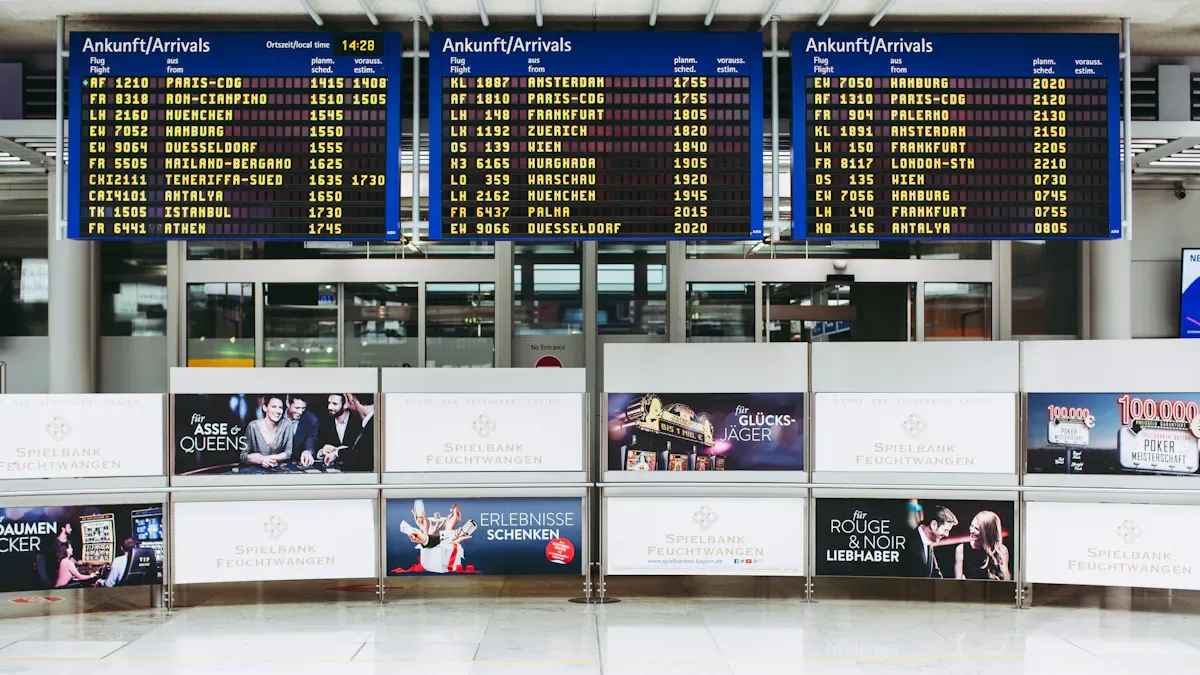
Here are the main digital signage template trends for 2026:
Trend | What It Means for You |
|---|---|
Hardware Innovation | Flexible displays can fit your space and style. |
Smart Store Ecosystems | Signage changes with real-time data and people flow. |
Dynamic Pricing | Prices can change fast for better sales control. |
AI Alerting | Maintenance happens early to keep displays working. |
5G Integration | Content updates are quick and streaming is clear. |
Ethical Data Practices | Audience information is used safely and clearly. |
Knowing these trends helps you stay ahead. You can use digital signage templates to get more viewers. You can also manage content easily and help your business work better. Think about how these new features can change your signage plan and help you reach your audience.
Key Takeaways
Keep up with digital signage trends to help people pay attention and make your business better.
Use AI tools to make content that fits your audience, so more people will interact and buy things.
Add eco-friendly ideas to your signs to use less energy and help the planet, which is good for your brand and nature.
Pick templates that work on different screens, so your signs stay useful as technology changes.
Use interactive features like touchless controls and sensors to make fun experiences that bring in and keep customers.
AI Personalization in Digital Signage Templates
Dynamic Content with Audience Data
AI can help make your digital signage templates smarter. These tools collect data about people in real time. They notice things like age, gender, and mood. With this data, your digital signage can show content people want to see. For example, a clothing store can show jackets if it sees more young adults on a cold day. A restaurant can show lunch specials if it sees a crowd at noon. This helps you connect with your audience and makes your messages work better.
AI also lets you change your digital signage content triggers fast. You do not have to guess what works best. The system learns from each person and updates the content. This keeps your digital signage templates fresh and useful. You save time and reach more people with the right message.
Predictive Analytics for Engagement
AI does more than just react to people. It can guess what they might want next. Predictive analytics uses patterns in customer behavior to plan future content. You can use this to get people interested and keep them coming back.
You can learn what each customer likes and offer special deals.
You can see when people lose interest and use messages to get them back.
You can change marketing messages based on what your audience likes, which helps more people pay attention and buy things.
You can make better plans that help your business stand out in a busy market.
Tip: Try predictive features on a few screens first. Watch how people react and change your digital signage templates to get better results.
AI-powered digital signage templates will shape digital signage trends in 2026. You can use these tools to make your designs better and give your customers a great experience.
Interactive and Immersive Trends for 2026
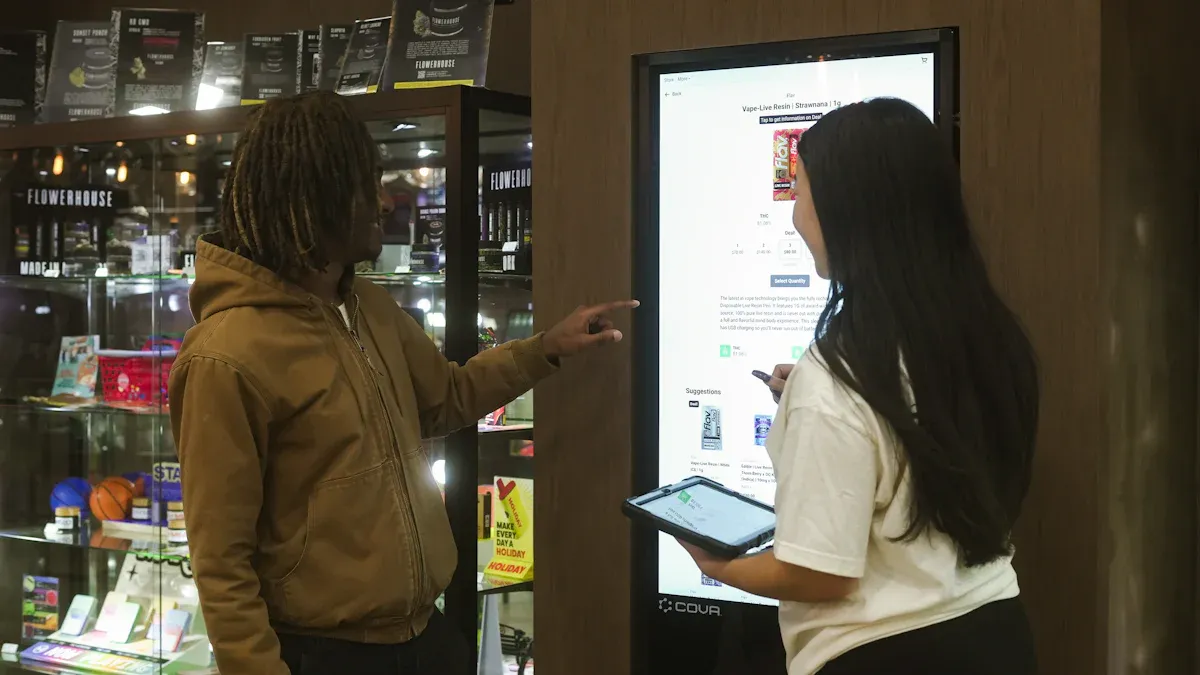
Touchless and Gesture Controls
Now, more screens work without touch. Motion sensors let you wave or point to control digital signage. You can also use your voice to give commands. These touchless ways make digital signage safer for everyone. You do not have to touch the screen, so it stays clean and easy.
Motion sensors notice when you are near and start content.
Gesture controls let you wave or swipe to change the screen.
Voice commands help you ask for help or directions.
These trends make things smooth for your customers. You can use digital signage templates that react to movement or voice. This helps your business stand out and keeps people interested.
Note: Touchless controls are great for busy places like stores, airports, and hospitals. You can use them to share news or help visitors find their way.
AR, VR, and Gamification
Augmented reality (AR) and virtual reality (VR) change how you use digital signage. AR puts digital things on top of real objects. VR makes a new world for people to see. Gamification adds fun by letting people play games or win prizes on screens.
AR shows product details when you scan something.
VR lets you look around or try things in a pretend world.
Gamification gets people to play and try to win.
These new trends make digital signage more fun and interesting. You can make templates that invite people to play or learn. This helps people remember your business and want to come back. In 2026, digital signage trends focus on making things fun and getting people involved. You can use these tools to help your business and connect with customers in new ways.
Eco-Smart and Sustainable Digital Signage
Energy-Efficient Template Design
You can help the planet and save money with energy-efficient digital signage templates. Many businesses use displays that need less power now. About 72% of companies use energy-saving displays. Automated brightness control is also common. Around 68% of businesses use it to lower energy use during the day or night. These smart features help screens last longer and lower electricity bills.
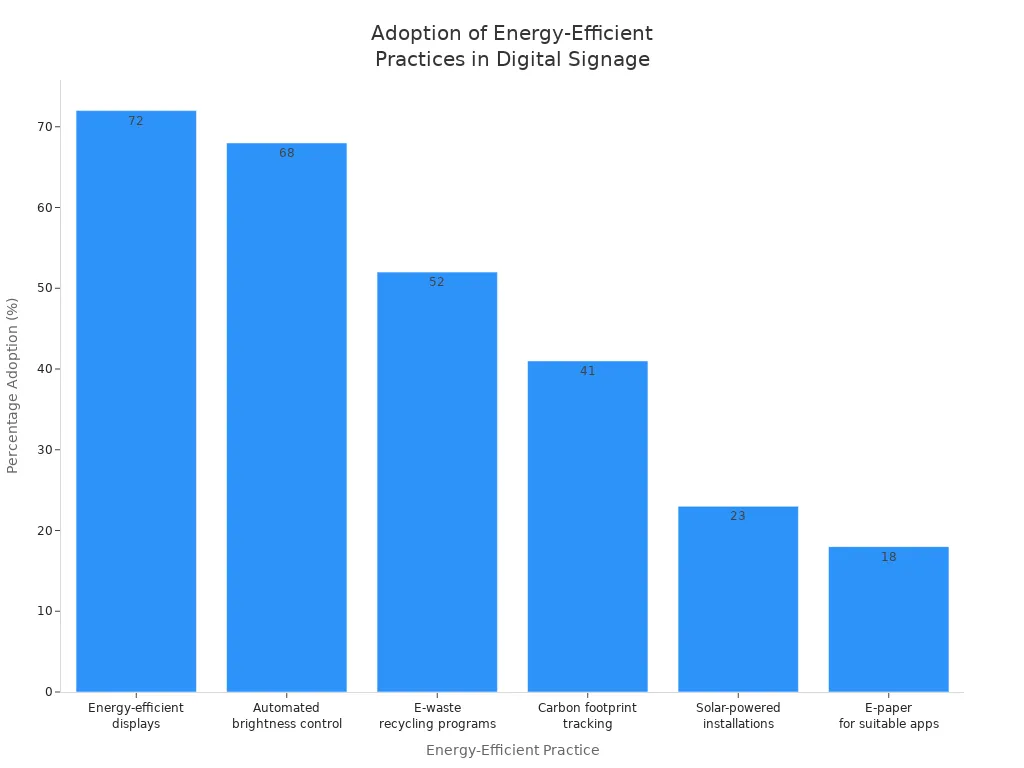
Here are more eco-friendly solutions in the table below:
Energy-Efficient Practices | Percentage Adoption |
|---|---|
Energy-efficient displays | 72% |
Automated brightness control | 68% |
E-waste recycling programs | 52% |
Carbon footprint tracking | 41% |
Solar-powered installations | 23% |
E-paper for suitable apps | 18% |
Switching to LED lighting can cut energy use by up to 80%. This helps the environment and lowers your costs. When you plan your next digital signage project for 2026, look for templates and hardware with these features.
Tip: Use automated brightness and LED displays to make your signage greener and save money.
Green Messaging and Materials
You can make your business stand out by using green messaging and sustainable materials in your digital signage. Clear messages work best. If your audience understands your message, they may support your eco-friendly efforts.
Material Type | Sustainability Benefit |
|---|---|
Recycled aluminum and plastics | Reduces waste and promotes recycling |
Responsibly sourced wood | Supports sustainable forestry practices |
Water-based and plant-based inks | Minimizes harmful chemical use in production |
LED lighting | Reduces energy consumption by up to 80% |
Using recycled materials or water-based inks shows you care about the planet. You can also use message framing to highlight your green actions. For example, you might show how much energy your screens save each month. This builds trust and encourages others to follow your lead.
If you want to use digital signage templates for business, focus on eco-friendly solutions and clear communication. This helps your brand and the environment at the same time.
Advanced Display Technologies in 2026
MicroLED and OLED Integration
MicroLED and OLED displays will be common in 2026. MicroLED screens are brighter than OLED. They show colors more accurately. Your digital signage will look clear and bright. Even in sunny rooms, the screens stay sharp. MicroLED shows many colors and strong contrast. Pictures and videos look real on these screens. MicroLED displays can last a long time. They work for over 100,000 hours. They do not get burn-in easily. This makes them good for businesses that need strong screens.
OLED screens show deep blacks and smooth movement. You can use them for creative designs. They work well for curved screens. Both MicroLED and OLED help your signs stand out. Picking the right screen helps your design grab attention. Your message will be easy to see.
Tip: Pick MicroLED for bright places. Use OLED for rich colors and flexible shapes.
AV-over-IP and Video Walls
AV-over-IP changes how you control digital signage. You can send sound and video through your network. This lets you manage many screens from one spot. You save time and money. You do not need special wires or hard setups.
Here are some main benefits of AV-over-IP and video walls:
Advantage | Description |
|---|---|
Scalability | Grow your system without new wires. |
Centralized Management | Control all screens from one place. |
Cost Efficiency | Spend less and install faster. |
Enhanced Quality | Get clear images with little delay. |
Geographical Flexibility | Share content in different places fast. |
Easy Integration | Works with your current IT setup. |
Future-Proofing | Update software without new hardware. |
Stunning Video Walls | Make big displays for cool experiences. |
Video walls make a big impact in stores and airports. You can use them at events too. These tools help you use eco-friendly solutions. They cut waste and make updates simple. When you plan your next digital signage project, think about these new technologies. They can help your business and your designs.
Design and Experience Trends
Bold Typography and Digital Integration
You can help your digital signage get noticed by using bold typography and smart digital integration. In 2026, more screens will show big, clear letters and moving words. This makes it easy for people to see your message fast. Strong fonts show viewers what is most important. They also help people remember what they read.
Here is how bold typography and digital integration change what people see:
Evidence Point | Description |
|---|---|
Typography's Role | Typography changes how people see and understand your message. |
Information Hierarchy | Clear font order makes your message simple to read and follow. |
Emotional Engagement | The right font style can make people feel things and remember your brand. |
Motion and Animation | Moving words keep people interested and help them remember your message. |
You can use these design ideas to make digital signage templates that catch the eye and share clear messages. Try using animation or different font sizes to show what matters most. This will help your business reach more people and help them remember your message.
Tip: Use bold fonts and moving words so your digital signage is easy to read, even from far away.
Tactile and Dimensional Signage
Tactile and dimensional signage gives your displays a new feel. You can use raised surfaces, textures, and braille to make your signs easier for everyone. This helps people with disabilities find their way and feel welcome.
Architectural signage helps people move around safely and easily.
ADA-compliant features like braille and raised surfaces help include everyone.
Good signs make people feel better about your space and enjoy their visit.
Signs with different textures and shapes make people feel something and remember your business.
Experience-first design cares about how people feel when they see and touch your signs. You can use these trends to make digital signage templates that look nice and help everyone enjoy your space. This helps with both accessibility and getting people interested, so your business stands out in the future of visual communication.
Template Adaptability and Future-Proofing
Multi-Display Compatibility
You want your digital signage templates to work on many screens. This helps your business grow and keeps your system ready for new technology in 2026. You can use templates that fit both HD and 4K displays. This means your videos, animations, and live data will always look sharp. Modular signage players let you upgrade parts instead of replacing the whole system. This saves money and reduces waste.
When you set up multi-display networks, you need to plan your network well. Here are some important steps:
Use a strong network with enough bandwidth for each screen.
Choose reliable media players for every display.
Protect your network with good security and access controls.
You can change your digital signage as your needs change. Careful planning helps you pick parts that grow with your business. This makes your system last longer and keeps your content looking fresh. Good design means your message will always reach your audience.
Tip: Start with templates that support different screen sizes. This makes it easy to add more displays later.
IoT and Sensor Integration
You can make your digital signage smarter with IoT and sensors. These tools help your screens react to what happens around them. You can show the right message at the right time. This makes your signs more useful and helps people get the information they need.
Here is how different sensors work in digital signage:
Sensor Type | Function |
|---|---|
Motion Sensors | Trigger content based on movement |
Temperature Sensors | Display alerts based on temperature |
Occupancy Sensors | Adjust messaging based on occupancy |
You can use motion sensors to start a video when someone walks by. Temperature sensors can show weather alerts or special offers. Occupancy sensors help you change messages when a room gets busy. These features help you create interactive experiences that people remember.
You can use these tools to keep your digital signage ready for the future of visual communication. Your business will stay ahead as technology changes.
---

**Reworded paragraph content (7th grade readability):**
Template Adaptability and Future-Proofing
Multi-Display Compatibility
You want your digital signage templates to work on lots of screens. This helps your business grow and keeps your system ready for new tech in 2026. You can pick templates that fit both HD and 4K screens. Your videos, animations, and live data will always look clear. Modular signage players let you swap out parts instead of buying a whole new system. This saves you money and cuts down on waste.
When you set up networks with many screens, you need to plan well. Here are some important things to do:
Use a strong network with enough speed for every screen.
Pick media players that work well for each display.
Keep your network safe with good security and access rules.
You can change your digital signage when your needs change. If you plan carefully, you can choose parts that grow with your business. This helps your system last longer and keeps your content looking new. Good design makes sure your message always gets to your audience.
Tip: Start with templates that work on different screen sizes. This makes it simple to add more screens later.
IoT and Sensor Integration
You can make your digital signage smarter by using IoT and sensors. These tools help your screens react to what is happening around them. You can show the right message at the right time. This makes your signs more helpful and gives people the info they need.
Here is how different sensors help digital signage:
Sensor Type | Function |
|---|---|
Motion Sensors | Start content when someone moves nearby |
Temperature Sensors | Show alerts if it gets too hot or cold |
Occupancy Sensors | Change messages when a room gets crowded |
Motion sensors can play a video when someone walks past. Temperature sensors can show weather alerts or special deals. Occupancy sensors help you switch messages when more people enter a room. These features help you make interactive experiences people will remember.
You can use these tools to keep your digital signage ready for the future. Your business will stay ahead as technology changes.
Implementing Digital Signage Trends
Assessing Readiness and Needs
Before you start with new digital signage trends, check if your business is ready. You need to know if your team feels confident and willing to use new technology. Make sure leaders support the change and that you have enough resources. Staff training is important. Build awareness by talking to your team about the benefits. Give clear training and set easy-to-follow steps. If you find barriers like unclear timelines or not enough training, fix these early. This helps everyone feel prepared and makes the switch smoother.
Ask your team how they feel about new technology.
Make sure leaders show support.
Plan training sessions for everyone.
Remove any confusion about what will happen next.
Choosing Technology Partners
Picking the right partner for your digital signage project matters. Look for a company that offers a wide range of services. They should have strong audio-visual skills and be able to help on-site if problems come up. Choose a partner who can handle projects of any size, so you can grow in the future. Make sure their pricing is clear and matches your budget. Good partners help you use the latest trends, like AI for personalization and cloud-based platforms for easy updates.
Check if the partner can support all your needs.
Ask about their experience with audio-visual systems.
Make sure they offer help during setup and events.
Look for partners who can scale with your business.
Measuring Success
You need to track how well your digital signage works. Use clear metrics to see if your investment pays off. The table below shows some key ways to measure success:
Metric | Why It Matters |
|---|---|
Content Engagement Rate | Shows if people interact with your content |
Sales Lift by Screen/Campaign | Connects your signage to sales and return on investment |
Customer Dwell Time | Measures how long people stay in areas with your screens |
Message Timing & Context | Checks if your content works best at certain times or places |
Employee Display Usage | Tracks how staff use internal screens for better communication |
You can use these numbers to improve your design and make better choices. If you see low engagement, try new content or update your templates. Always look for ways to make your digital signage more effective as you move toward 2026.
Tip: Review your results often. Use feedback to keep your signage fresh and useful.
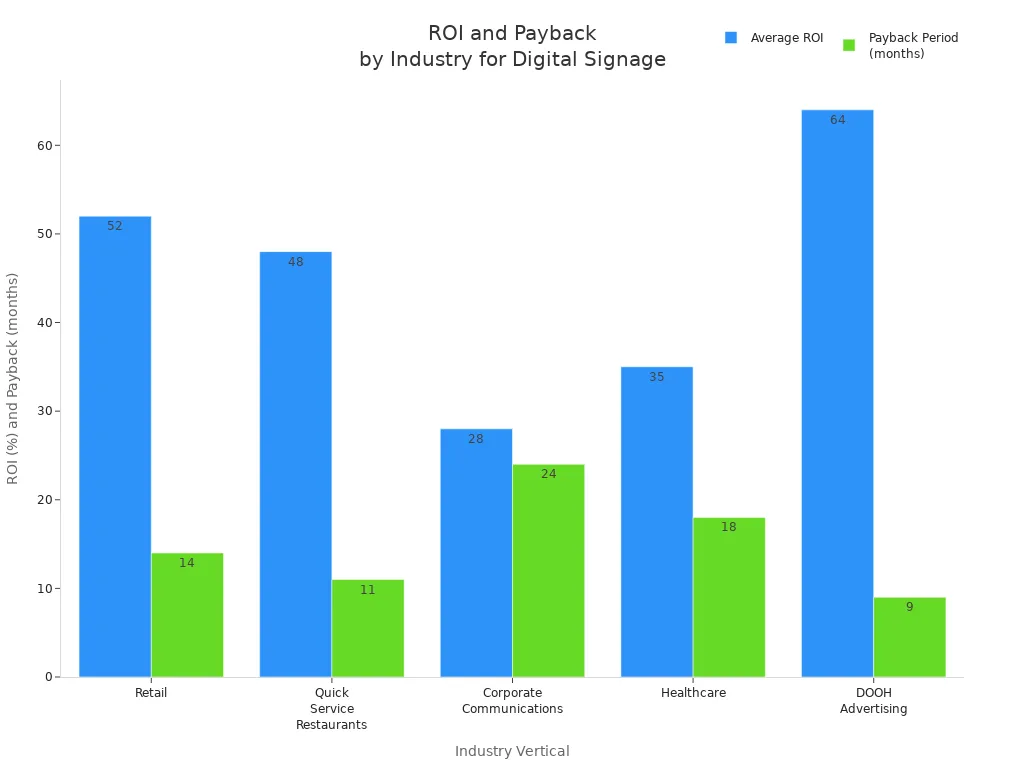
You have learned how digital signage template trends for 2026 can help your business. The table below shows how different industries get better ROI and faster payback by using these trends.
Industry Vertical | Average ROI | Payback Period | Key Impacts |
|---|---|---|---|
Retail | 52% | 14 months | 29% increase in unplanned purchases |
Quick Service Restaurants | 48% | 11 months | 38% of viewers made unplanned purchases |
Corporate Communications | 28% | 24 months | 47% increase in message recall |
Healthcare | 35% | 18 months | 28% reduction in perceived wait time |
DOOH Advertising | 64% | 9 months | 85% ad recall rate |
You can get ready for 2026 by picking interactive digital signage, experience-first design, and new signage ideas. Experts think 2026 will have more AI, hyper-personalization, and flexible displays. You should check your current system, update your templates, and focus on interactive experiences. This will help you be a leader in the future of visual communication.
Tip: Begin now to make your digital signage ready for 2026 and the years after.
🤔 Why Bother with Templates at All?
Instead of building each screen from scratch, templates give you a proven layout for your message. The main benefit is speed—you can often go from selecting a template to publishing content in just minutes.
For internal teams, templates maintain a professional standard, ensuring all your communications look polished and consistent, regardless of who created them. A good template also bakes in design principles for you, so you never have to worry about visual hierarchy or readability from scratch.
🧰 Your 2026 Toolkit: Software & Design Options
The best way to get started is by using your digital signage software's built-in library. Here’s a look at some leading options:
Software | Free Plan | Starting Price | Standout Template Features | Best For |
|---|---|---|---|---|
Yodeck | Yes (for 1 screen) | $8/screen/month | 200+ templates, intuitive drag-and-drop layout editor | Overall value, ease of use, and budget-conscious users |
OptiSigns | No | $10/screen/month | 100+ templates, wide hardware support (Fire Stick, Android, etc.) | Businesses needing hardware flexibility and multi-device setups |
GoBright | Contact provider | Contact provider | 600+ templates covering workplace, events, safety, etc. | Large organizations needing a massive variety of on-brand templates |
SignPresenter | No | $10/screen/month | No built-in templates; designed for Canva integration | Restaurants that already use Canva for other design work |
Canva (General Tool) | Yes (limited) | Free / Pro version | Thousands of 16:9 templates, purpose-built for digital signage | Small teams comfortable designing slides separately |
Beyond these, some platforms are integrating AI to simplify creation. New AI tools can generate complete multi-zone template layouts and even translate plain English descriptions (like "show this ad on rainy weekends") into complex scheduling rules.
📝 5 Steps to Using a Template
Browse and Choose: Check your software's template library for a design that matches your content, like a menu promo instead of a data dashboard.
Add Your Content: Drag in your logos, images, and replace placeholder text with your own copy.
Brand and Customize: Adjust fonts and colors to match your brand guidelines.
Set a Schedule: Use the software's scheduling tools to control exactly when your content plays.
Preview and Publish: Always preview on a test screen to check for typos, spacing, and readability before going live.
💡 Design Best Practices for Templates
While templates do the heavy lifting, applying these principles will elevate your work:
The 3-Second Glance: Design every slide knowing you have just 3-5 seconds to grab someone's attention. Break down complex information into a series of single-message slides.
Visual Hierarchy: Apply the 50/30/20 rule; the primary message should take up about 50% of the space, secondary supporting info 30%, and branding/tertiary details the remaining 20%.
Typography & Readability: Always use sans-serif fonts like Arial, Helvetica, or Roboto. A good rule of thumb is to allow 1 inch of letter height for every 10 feet of viewing distance.
Contrast & Color: Ensure there’s a high contrast between your text and background, aiming for a ratio of 4.5:1 minimum.
Always Include a Call to Action (CTA): Guide your audience on what to do next with a clear CTA that uses action verbs like "Scan," "Visit," or "Save," and keep it brief—just 2-5 words.
✨ Real-World Examples by Industry
🍽️ Restaurants & Cafes
Menu Boards: Use clean, text-forward layouts that prioritize readability. Resist the urge to over-clutter with photos.
Daily Specials: Create hero images for your specials with short, punchy text and clear time-based availability.
🛍️ Retail
Promotions & Sales: Bold, clean layouts with high-quality hero images to showcase products.
Social Proof: Use templates that integrate live social media feeds to display customer photos and Google Reviews.
🏢 Corporate
Employee KPIs: Use dashboard templates to display performance metrics and department news.
Safety & Alerts: High-contrast templates for urgent announcements and safety reminders.
🛠️ Troubleshooting Common Issues
Text Too Small on Actual Screen: Increase your font size. Always test designs on the final screen.
Colors Look Off: Check if the display is in a "demo" or "vivid" picture mode and switch to a standard mode.
Low-Res Images: Embed high-resolution images (matching your screen's 1080p or 4K resolution) directly into your template.
Awkward Image Cropping: Use your template's built-in image tools to format images properly.
❓ Frequently Asked Questions
Can I make my own templates? Yes, most professional software lets you design custom layouts from scratch.
How often should I update my content? For high-traffic areas, weekly is ideal; monthly schedules are fine for most, and quarterly updates are acceptable for low-traffic locations where content stays relevant.
What if my software has limited templates? Use free tools like Canva or PowerPoint to design your slides, then upload them as images or videos to your signage software.
Using digital signage templates isn't a shortcut; it's a strategic advantage. They free you from the complexities of design, allowing you to focus on creating content that truly engages your audience and achieves your business goals.
What industry are you in? If you share more details about your business, I can point you toward some specific template ideas or software that might be a good fit
FAQ
What are the top digital signage trends for 2026?
You will see more content made just for each person. There will be more interactive digital signage and eco-friendly solutions. These trends help you give your audience a better experience. You can use new display technology and focus on design that puts people first. This will help your business stay ahead in visual communication.
How can you use digital signage templates for business?
You can choose templates that fit your brand and what you want to do. Use content triggers to show the right message at the right time. Update your templates often so your content stays new. This helps you connect with customers and get better results for your business.
Why is interactive digital signage important?
Interactive experiences let people touch, move, or talk to screens. This makes your messages more fun and easy to remember. You can use these features to get people more interested and make your business stand out from others.
How do eco-friendly solutions help your signage?
Eco-friendly solutions save energy and make less waste. You can use LED displays, recycled materials, and smart design to help the planet. These choices help your brand and show you care about the environment while keeping up with new trends.
See Also
Exploring Emerging Digital Signage Trends for 2026 Ahead
Latest Innovations in Digital Signage Technology for 2026
Popular Digital Signage Solutions Gaining Attention in 2026
Seven Key Trends in Digital Signage Player Technology for 2026
