How Digital Signage Solutions for Schools Transform Communication in 2026
Shenzhen TopAdkiosk Display Technology Co., Ltd.
Add.: 2F, Bldg 10, Changfeng Industrial Park, Dongkeng, Fenghuang, Guangming, Shenzhen, China 518132
Mobile/WHATSAPP: 86-138 25769658
Email: marketing@topadkiosk.com topadkiosk@gmail.com
Skype: pghenry1
Wechat: adkioskhenry
English Web.: https://www.topkioskdisplay.com/
http://www.ad-kiosk.com/
https://www.toplcddisplay.com/
http://www.multitouchdigitalsignage.com/
https://www.youtube.com/channel/UCYVYNJHxLVEcQD8fuUxXNTA/videos?view_as=subscriber
https://www.facebook.com/TOPADKIOSKSHENZHEN/?ref=bookmarks
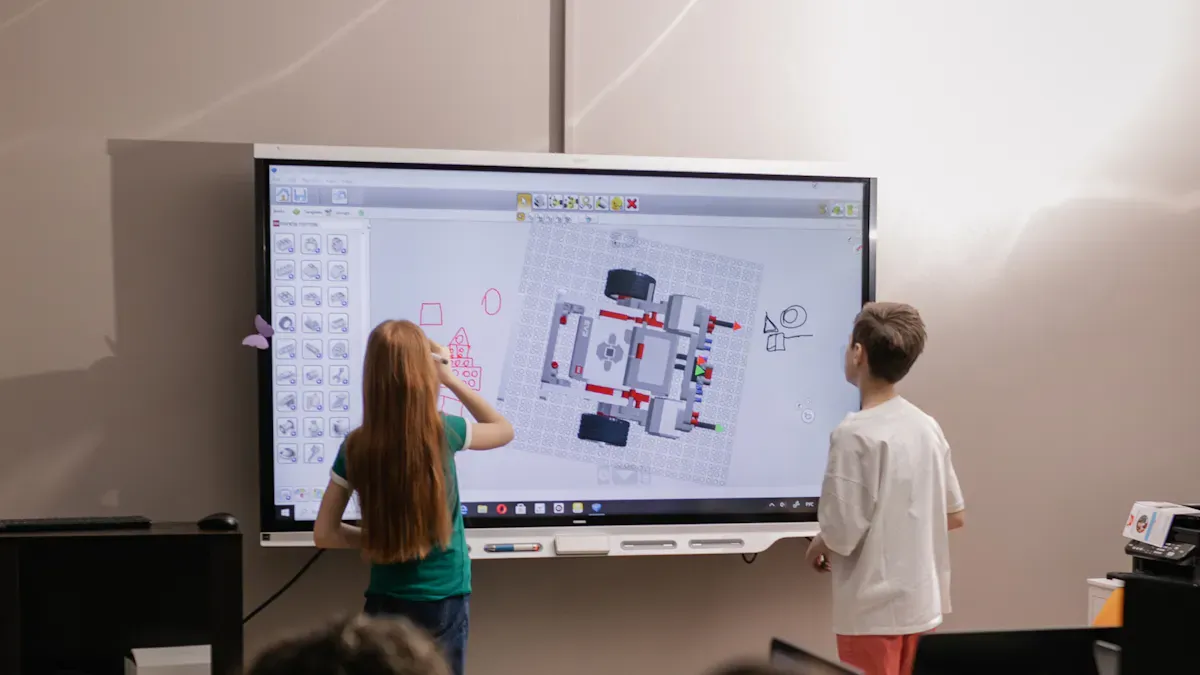
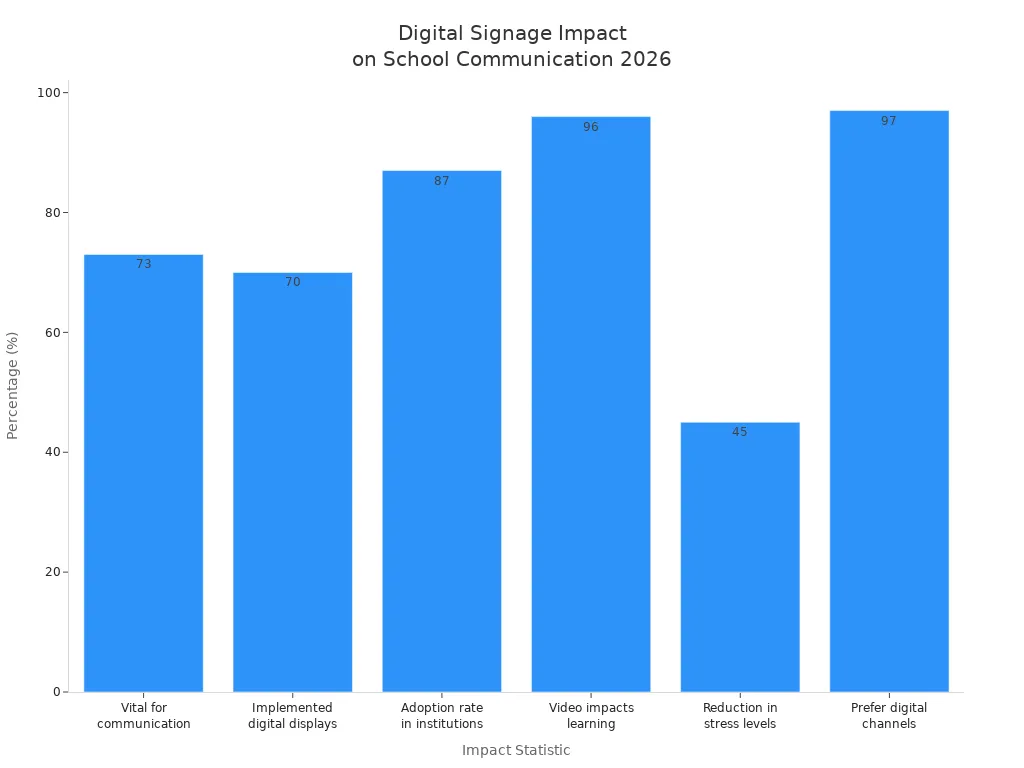
You now see digital signage solutions for schools changing how you talk every day in 2026. These systems give updates right away, help keep everyone safe, and make your school community feel closer. As a school leader, you can expect clear messages that reach students, staff, and families wherever they are. Schools say student stress dropped by 45% and 97% of students like getting digital information.
Key Takeaways
Digital signage helps schools share news fast. It gives updates right away. This makes it easy for students, staff, and families to know what is happening.
Safety alerts show up on digital signage right away. This helps everyone know what to do in emergencies. People do not have to look at their phones.
Interactive features make students more interested. They can join polls and surveys. This helps them feel like they belong at school.
Digital signage cuts down on paper waste. It helps the planet by not using printed flyers and posters.
Schools can start with just a few screens. They can add more later if they need to. This makes digital signage a smart and cheap way to help people talk and share news.
Key Benefits of Digital Signage Solutions for Schools
Digital signage solutions for schools help you talk in new ways. They make communication better than old methods. You see updates in places you go, like hallways and cafeterias. This means you do not miss important news. Schools say 62% got better at sharing information after using digital signage. These benefits help you all day, from quick updates to safer schools and stronger friendships.
Statistic | Description |
|---|---|
62% | Schools said they share information better with digital signage. |
73% | Most schools think digital signage will be important in the future. |
Real-Time Updates and Announcements
You get updates right away where you are. Digital signage in education shows new news fast. You do not wait for flyers or emails. You learn about schedule changes, club meetings, or events as soon as they happen. The system lets schools change messages quickly. Everyone stays up to date. You do not need to check your phone or look for a bulletin board.
Digital signage lets schools change messages fast without printing.
Digital signage in education helps everyone see urgent news right away.
Feature | Digital Signage | Traditional Methods |
|---|---|---|
Speed | Updates happen instantly | Print takes longer |
Interactivity | Fun, interactive screens | Content does not change |
Flexibility | Content is easy to change | Changing takes more work |
Integration | Real-time data and social media | Not much integration |
You see more messages because digital signage changes every 45-60 seconds. Students pay attention for about 6-7 seconds per message. This system helps you catch important details. With digital signage solutions for schools, you always know what is going on.
Safety and Emergency Alerts
Safety and emergency alerts reach you fast with digital signage. When something happens, the system shows important messages right away. You do not need to check your phone or email. Visual alerts pop up on screens all over campus. You know what to do next.
Digital signage sends alerts faster than texts or emails.
Visual alerts help your brain understand messages quickly.
The system can use sound and text for clear messages everywhere.
Benefit | Description |
|---|---|
Immediate Visual Communication | Digital signage gives alerts without needing you to do anything. |
Rapid Dissemination | Information spreads to many places at once, so everyone gets it fast. |
No Action Required | Alerts show up on screens automatically. You do not need to check devices or listen for audio. |
You stay safe because emergency messages show up right away. Pictures and signs help you remember what to do. Staff can control messages from far away to keep everyone safe.
Community and Family Engagement
Digital signage in education helps your school feel like a community. You see news about events, awards, and calendars that keep you connected. Parents and families feel more involved because they get updates about school activities. Kailee Rowell, a parent, said, "It's going really well. I really like it. I use it weekly. If not, sometimes daily to update current events that we have going on." This shows digital signage helps families stay informed.
Digital signage turns people from watchers into participants. You see your achievements and creativity on screens. This makes you feel like you belong. Schools use digital signage to celebrate students, share news, and build trust.
Note: Digital signage helps everyone feel connected by sharing news and celebrating achievements. This builds a trusted school community.
Wayfinding and Navigation
You find your way around school more easily with digital signage solutions for schools. Interactive maps and updates help you get to classrooms, offices, and events. If a hallway closes or an event moves, you see the change right away. This lowers stress and helps you get there on time.
Feature/Application | Description |
|---|---|
Interactive Campus Maps | Kiosks let you search for places and get directions. |
Real-time Updates | Information changes instantly for closures and events. |
Event-Specific Wayfinding | Screens change for events to help visitors find their way. |
Accessibility Features | Routes show elevators and ramps for everyone. |
Emergency Information | Screens show safety tips and where to go in emergencies. |
Parking Information | Updates show parking spots and locations. |
Amenities Locations | Directions to restrooms, ATMs, and cafeterias are included. |
You get real-time alerts and directions, especially when things are busy or during emergencies. Digital signage in education helps everyone, including visitors and new students, find their way easily.
Practical Uses of Digital Signage in Education
Daily Announcements and Event Promotion
Digital signage in education makes daily news more fun and easy to see. Schools use screens to tell you about sports, clubs, and shows. You notice big events like concerts or meetings with bright pictures and moving images. Staff can change what is on the screen right away with cloud-based tools. This stops old flyers from being a problem.
Digital signage shows daily news as it happens.
You see event boards with countdowns and QR codes for quick access.
Schools put screens in busy places like doors, cafeterias, and libraries so everyone sees them.
This means you always know the newest news. Digital signage solutions for schools help you keep up with changes, even if plans change fast.
Interactive Features for Student Engagement
Digital signage in education now has interactive parts that make you want to join in. You can answer polls and surveys right on the screen. These activities help you feel like you matter and have a say at school. Interactive digital signage can make students join in 33% more.
Polls and surveys let you share what you think.
Interactive screens help you feel part of your school.
You see your answers show up right away, so talking is more real.
These features make learning and joining in more fun. You become a bigger part of how your school shares news.
Showcasing Achievements and School Culture
Schools use digital signage in education to show off good things and build a happy school. You see classmates get noticed for good grades, sports wins, and being kind. Real-time updates make everyone excited around school.
Schools show students who do well in class.
Sports wins and team scores show up after games.
Staff notice things like perfect attendance or growing as a person.
Students get picked for being kind or creative.
School projects, like charity drives, get more attention.
Note: Sharing good news and kind words helps everyone feel proud and close.
Top 7 Digital Signage Solutions for Schools in 2026
You have lots of choices for digital signage solutions for schools. The top seven in 2026 have special things for schools, like cloud tools, touchscreens, safety alerts, easy links to school calendars, screens that save power, phone app help, and templates you can change for news and events. These solutions help you talk better, join in more, and stay safe at school.
Trends Shaping Digital Signage in 2026

AI Personalization and Automation
In 2026, digital signage in education gets much smarter. Artificial intelligence helps screens show you the right things. Sometimes, a screen says your name or shows messages for your grade. AI can learn what students like to see and change the content. This keeps you interested in what is on the screen. Staff can use automation to update all screens from one place. You get news and safety alerts right away, no matter where you are. Smart scheduling means lunch menus only show at lunchtime. Event reminders pop up before events start.
Trend | Description |
|---|---|
Content changes for each person using AI technology. | |
Screens show new information instantly, like room changes or emergencies. | |
Automated content management | Staff control all screens from one place, saving time and effort. |
Note: Digital signage solutions for schools make sure you get the most important news fast.
Mobile Integration
Now, mobile devices work with digital signage in education. You can scan QR codes on screens to get more details on your phone. Sometimes, you get a push notification when you walk by a display. These messages tell you important news. You can reply to messages or save them to read later. This helps you stay connected, even if you are not near a screen. Schools use mobile integration to send reminders and class schedules. You can interact with digital signage from anywhere.
Feature | Description |
|---|---|
QR Code Connections | Scan codes to get more info on your phone. |
Push Notifications | Get alerts and updates sent straight to your device. |
Two-way Communication | Reply to messages or give feedback right from your phone. |
Schedule Personalization | See content that matches your own class schedule. |
Mobile integration makes sure you do not miss important news.
You can bookmark events or updates to check later.
Sustainability in Digital Signage
Digital signage in education helps schools take care of the environment. You do not need paper flyers or posters anymore. This means there is less waste at school. New displays use less energy and last longer. Schools save money and help the planet by using these screens. Before, 24% of school waste was paper. Now, digital signage helps lower that number and makes schools greener.
Benefit | Description |
|---|---|
No more printing flyers or posters, so less waste. | |
Longevity | Displays last 5-10 years, so fewer replacements are needed. |
Energy Efficiency | New screens use less power, saving money and helping the planet. |
Tip: Using digital signage helps your school protect the earth and keep the future clean.
Addressing Concerns with Digital Signage Solutions
Cost and Scalability
You might worry if digital signage in schools costs too much or can grow with your school. The price changes based on how many screens you want and what features you pick. A simple system with five screens can cost from $8,000 to $15,000 at first. Each screen usually costs between $680 and $3,400. This includes hardware, setup, and software. You pay yearly software fees from $480 to $900. If you want a system that recognizes students or staff, the price can reach $25,000. Yearly fees are higher for these systems.
Cost Component | Estimated Cost Range |
|---|---|
Display hardware | $500 - $3,000 per screen |
Media players | $50 - $400 per display |
Software licensing | Free to $15+ per display/month |
Installation | $200 - $800 per display |
Ongoing annual expenses | Varies |
Digital signage solutions work for small, medium, or big schools. You can start with a few screens and add more later. Many platforms let you control all screens from one place. This makes it easy to send messages to everyone. This flexible way helps you share news as your school grows. Good vendor support and smart technology make it easy to show calendars, live messages, and emergency alerts.
Tip: Start with a few screens and add more as your school gets bigger. This helps you save money and keep messages the same everywhere.
Ease of Use and Training
You may think digital signage is hard or needs special skills. Today’s digital signage in education uses easy software. You can change things like calendars or safety alerts with a few clicks. Many systems have templates for school calendars, news, and emergencies.
Staff training is important for using the system well. Most vendors give step-by-step guides, videos, and lessons you can click through. You can split training into small parts so it is not too much at once. Digital signage helps new staff learn fast and helps teams share ideas. You can use digital signage to help staff grow and share resources. This makes it easier for everyone to use and keeps your school ready for emergencies.
Note: Digital signage gives you an easy way to share news, keep people safe, and help everyone stay connected.
You notice digital signage makes your school better. It shows news right away and keeps people safe. You talk to classmates and staff more easily. Schools say students feel happier and learn more. You get news fast, so you feel like you belong on a team.
Digital signage helps you share ideas and cheer for others.
It works for different ways of learning and keeps everyone updated.
Step for School Leaders | What You Can Do |
|---|---|
Plan your goals | Pick what you want to make better |
Train your staff | Teach everyone how to use the system |
Track your progress | Check how digital signage helps school |
Try digital signage to make your school safer and help everyone feel closer.
Top 7 Digital Signage Solutions for Schools in 2026
Digital signage has become an essential tool for modern school communication and display. However, there are many solutions on the market, each with different focuses. To help you compare, I have listed the 7 main types in a table with their core differences, then explained each solution's advantages and potential drawbacks.
📊 Quick Comparison of Core Differences
Solution | Core Positioning / 2026 Updates | Pricing (Educational Starting Point) | Key Strengths | Main Limitations / Who Should Avoid |
|---|---|---|---|---|
Rise Vision | K‑12 all‑scenario main display: Free version is ad‑free, built‑in emergency alerts, deep integration with Google Workspace. Supports daily announcements, emergency alerts, and large‑screen displays. | Free unlimited (requires school email verification) | Zero cost, seamless Google ecosystem integration, emergency response capabilities, rich education templates | Free only for K‑12; non‑Chrome OS hardware may have higher setup costs |
Yodeck | Budget‑friendly backup / growth option: First screen free, great value, rich template library, fast setup. | First screen free, then $7.99/screen/month | Low cost, 200+ design templates, quick deployment | No built‑in emergency alert module; requires additional integration |
OptiSigns | Heterogeneous hardware compatibility champion: Supports Fire Stick / PC / Android devices – no extra hardware needed. Balanced features, wide integrations. | $10/screen/month | Cross‑platform hardware (including streaming sticks and old PCs), feature‑rich, excellent value | Requires initial setup; education‑specific templates are relatively limited |
Rocket Alumni | Honour display & interactive touchscreen specialist: Excels at building database‑driven interactive honour walls – unique for culture and achievement showcases. | Custom quote – higher than standard SaaS | Immersive database interaction, showcases school history and culture, boosts community engagement | Higher cost; not suitable for daily announcements |
Xibo (Open Source) | Tech‑friendly self‑hosted solution: Fully open source and free, highly customisable; self‑hosted to avoid external costs. | Core self‑hosted version free; cloud versions require quotes | Zero licensing cost, full customisation, complete data control | Requires strong internal IT support; ongoing maintenance and configuration effort |
ScreenCloud | Enterprise‑grade unified management platform: Focuses on multi‑site chains, 75+ app ecosystem, includes SSO management and centralised control. | No free tier – starts at $20/screen/month | Powerful integration ecosystem, strong management for large districts or chains | Less affordable for small schools |
AIScreen | AI‑driven smart information hub: Built‑in AI analytics to adjust playback and content strategy based on time of day and audience behaviour. | Custom quote based on needs | AI analytics, personalised content delivery, fine‑grained targeting | Overkill for basic needs; higher budget and technical requirements |
🛠️ Detailed Solution Breakdown
1️⃣ Rise Vision – Best Zero‑Cost Foundation for K‑12 Schools
If you are a K‑12 school administrator wanting fast digital signage deployment at no cost, Rise Vision is the top choice. After signing up with a .edu email address, K‑12 schools get unlimited free use with no screen limit. It seamlessly integrates with Google Slides, Calendars, etc., allowing teachers to push content directly to screens. The 2026 version has enhanced safety features, integrating with existing security systems for high‑speed emergency notifications (fire, severe weather, etc.).
2️⃣ Yodeck – Great Budget Alternative for Non‑Chrome Schools
For schools not using Chrome OS or with extremely tight budgets, Yodeck offers excellent value. The first screen is permanently free, and upgrade pricing is only $7.99/screen/month. The platform has 200+ content templates that can be created by students and staff. With Raspberry Pi hardware, you can even repurpose old devices.
3️⃣ OptiSigns – Versatile Workhorse for Mixed‑Hardware Schools
With support for Fire Stick, PC, Android, and many other players, OptiSigns is the best platform for maximising existing old computers and TVs. It offers rich functionality and integrations, covering digital menus, social media displays, and more, with outstanding value for money.
4️⃣ Rocket Alumni – Stunning Solution for School Culture & Achievements
If your goal is not just advertising but an immersive showcase of student achievements, alumni, and school history, Rocket Alumni is almost the only specialised solution. Its interactive database experience far exceeds traditional displays, letting users browse through old photos and honour roll data.
5️⃣ Xibo (Open Source) – Self‑Hosted Option for Tech‑Savvy Schools
Xibo’s open‑source edition gives schools full control: run it on your own server, completely free, and modify it as you wish. It requires strong IT expertise, but for higher education institutions with a technical team, it can save significant licensing costs. For multi‑site schools, Xibo’s complete CMS can manage long‑term content centrally.
6️⃣ ScreenCloud – Central Management Hub for Multi‑Campus or Large Districts
If your district manages hundreds of screens, ScreenCloud is the professional choice. It offers SSO unified access, detailed interaction analytics, and integrates 80+ applications. Its enterprise features improve decentralised management efficiency, ideal for large districts needing centralised control.
7️⃣ AIScreen (AI‑Powered) – Building a Smart Interactive Frontline for High‑End Schools
For well‑funded premium private schools seeking differentiated digital displays, AIScreen’s built‑in AI analytics engine provides real value. It tracks viewer count and dwell time, then automatically adjusts content strategy – pushing different messages by time of day. This future‑oriented solution suits high‑demand school communication systems.
📋 Summary Flowchart – How to Choose
If you are willing to share more specific requirements – such as budget range, number of screens, primary use case, and existing IT capabilities – I can help you narrow down the most suitable solution.
FAQ
What is digital signage in schools?
You see digital signage as screens that show news, alerts, and events around your school. These displays help you get updates fast and keep everyone connected.
How do you update content on school screens?
You use easy software to change messages. Staff can add news, schedules, or alerts from any computer. Updates appear on screens right away.
Can digital signage help during emergencies?
Yes. You get safety alerts on screens instantly. These messages tell you what to do and where to go, helping you stay safe.
Is training needed to use these systems?
Most staff learn quickly. Vendors give guides and videos. You practice with simple steps and soon feel comfortable updating screens.
How does digital signage support school events?
You see event details, countdowns, and reminders on screens. This helps you remember dates and join activities with your friends.
See Also
Exploring Digital Signage Innovations That Will Define 2026
Latest Advancements in Digital Signage Technology for 2026
Key Factors That Make Digital Signage Essential for 2026
Enhancing Restaurant Efficiency Through Digital Signage in 2026
