Digital Signage Pricing Explained for 2026 Budget Planning
Shenzhen TopAdkiosk Display Technology Co., Ltd.
Add.: 2F, Bldg 10, Changfeng Industrial Park, Dongkeng, Fenghuang, Guangming, Shenzhen, China 518132
Mobile/WHATSAPP: 86-138 25769658
Email: marketing@topadkiosk.com topadkiosk@gmail.com
Skype: pghenry1
Wechat: adkioskhenry
English Web.: https://www.topkioskdisplay.com/
http://www.ad-kiosk.com/
https://www.toplcddisplay.com/
http://www.multitouchdigitalsignage.com/
https://www.youtube.com/channel/UCYVYNJHxLVEcQD8fuUxXNTA/videos?view_as=subscriber
https://www.facebook.com/TOPADKIOSKSHENZHEN/?ref=bookmarks

You might ask how much digital signage will cost in 2026. The price for each screen can be $200 or as high as $15,000. Software usually costs between $10 and $100 every month. Most companies use cloud-based subscriptions. CMS licensing is often $15 to $50 for each screen every month. You should know all the digital signage costs to make a good budget. If you miss any cost, you might get surprised later and have trouble planning. Looking closely at digital signage pricing helps you avoid extra costs you did not expect.
Key Takeaways
Digital signage prices are very different. Screens can cost from $200 to $15,000. Software subscriptions usually cost $10 to $100 each month.
You should plan for every cost. This means hardware, software, installation, and maintenance. If you forget a cost, your budget may not work.
Pick the right display size and type for what you need. Bigger screens and high-resolution screens cost more money.
Think about both one-time and regular costs when you make a budget. This means the first hardware price and the fees for software and maintenance.
Update your content often and take care of your system. This helps your digital signage work well. It can also help you save money over time.
Digital Signage Pricing 2026

Average Cost Ranges
Before you make a budget, you should know the average price for each part of a digital signage system. In 2026, digital signage pricing includes hardware, software, and installation. Each part costs a different amount. The table below shows the usual prices:
Component | Price Range |
|---|---|
Hardware | $500 - $5,000 per display |
Software | $100 - $1,000 per screen per year |
Installation | $200 - $1,000 per display |
A basic single-screen setup usually costs $500 to $1,500. If you want a professional single-screen system, you might pay $2,000 to $5,000. Video walls are much more expensive. They cost $3,000 to $10,000 for each screen. Outdoor digital signage displays are even pricier. They can cost $5,000 to $25,000 for each unit. Software for your digital signage system often costs $5 to $50 per screen each month.
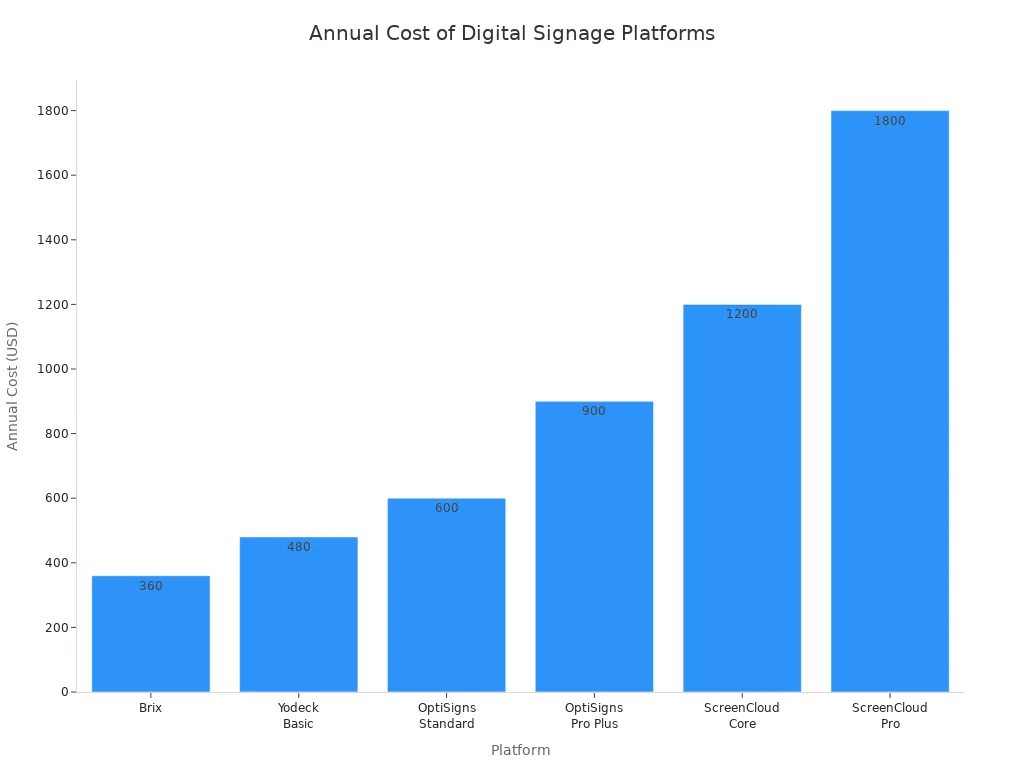
You can look at the table below to compare popular software platforms. This helps you see how the price changes depending on the platform you pick.
Platform | Price per Screen | Annual Cost (5 screens) |
|---|---|---|
Brix | $6/month | $360 |
Yodeck Basic | $8/month | $480 |
OptiSigns Standard | $10/month | $600 |
OptiSigns Pro Plus | $15/month | $900 |
ScreenCloud Core | $20/month | $1,200 |
ScreenCloud Pro | $30/month | $1,800 |
The global market for digital signage systems is getting bigger every year. In 2025, the market was worth about $31 billion. By 2033, experts think it will reach $58 billion. As more businesses buy digital signage, digital signage pricing may change in the future.
Key Pricing Factors
There are several things to think about when you plan to buy a digital signage system. The price depends on the size and type of digital signage displays you pick. Bigger screens cost more money. High-resolution displays also make the price go up. For example, a regular indoor commercial display (43"–65") costs $600 to $2,000. If you need a high-brightness or 24/7-rated display, the price goes up to $2,000 to $4,000 or more. Outdoor IP-rated displays start at $3,000 and can be more than $8,000 for each unit.
The kind of hardware you choose matters too. A 55" PCAP touch kiosk costs about $2,500 to $3,000. An indoor LED video wall (3m × 2m) can cost $10,000 to $20,000. Even mounts add to your costs. Basic wall mounts cost $200 to $600 for each screen.
You also need to think about how many screens you want to install. If you add more screens, your total cost goes up. Software and installation also add to the total cost of digital signage. Installation costs range from $200 to $1,000 for each display. The price depends on how hard the setup is.
Tip: Always remember to include software, installation, and maintenance in your budget. These costs can add up fast and change your total spending.
Here are the main things that affect digital signage pricing:
Screen size and resolution
Type of display (indoor, outdoor, video wall, kiosk)
Number of screens (deployment scale)
Software subscription and licensing fees
Installation and setup costs
Accessories like mounts and media players
Ongoing maintenance and support
You should remember that the cost of digital signage is not just about hardware. You need to think about the whole digital signage system, including software and installation. This helps you avoid surprises and plan your spending better.
Hardware Costs Breakdown
Screens and Displays
Screens and displays are the biggest part of hardware costs. In 2026, a basic commercial screen costs about $500. High-end or outdoor screens can cost over $5,000. The price changes with the type, size, and brightness of the display. A 43-inch indoor screen is much cheaper than a 75-inch outdoor display with high brightness. When you make your budget, remember hardware is about 59% to 60% of your total digital signage cost. Over five years, hardware is 25% to 35% of your total cost.
Cost Category | Percentage of Total Cost |
|---|---|
Hardware | 59%-60% |
5-Year Total Cost of Ownership (TCO) | 25%-35% |
Tip: Pick the display that fits your needs. If you buy features you do not use, your costs can go up fast.
Media Players
Media players are like the brains of your digital signage hardware. There are many types, and each one changes your budget and how well things work. Some screens have media players built in, which can save you money. If you need a separate device, check the table below to see your choices:
Type | Cost | Power | Reliability | Best For |
|---|---|---|---|---|
BrightSign | $$ | Medium-High | Excellent | Enterprise, mission-critical |
Windows PC | $-$$ | Highest | Good | Complex content, video walls |
Android | $ | Medium | Good | Cost-sensitive, standard |
Raspberry Pi | $ | Low | Fair | DIY, education, basic |
System-on-Chip | $* | Medium | Good | Simple deployments |
Chrome | $ | Low-Medium | Good | Simple web content |
Advanced 4K and 8K media players cost more money. But prices for parts like SSDs and DRAM are going down, so the total cost is less. Many companies use screens with built-in media players for simple projects. This helps lower hardware costs.
Mounts and Accessories
You need the right mounts and accessories to set up your digital signage hardware. Wall mounts and brackets usually cost $20 to $150. Bigger screens or floor and ceiling mounts cost $200 or more. Do not forget about cables. HDMI or DisplayPort cables cost $5 to $30. If you need special or long cables, they can cost up to $50. Extra mounts and cables can add $50 to $200 to your total cost.
Wall mounts and brackets: $20–$150
Floor or ceiling mounts: $200+
HDMI/DisplayPort cables: $5–$50
Additional mounts and cabling: $50–$200
Note: Accessories may look small, but their cost adds up fast. Always count them in your hardware budget.
Software and Subscription Costs
Cloud-Based Software Pricing
Most digital signage systems use cloud-based software. This software lets you control your screens from anywhere. You pay a fee every month for each screen. The price changes based on what features you want. Basic plans cost $10 to $35 per screen each month. These plans give you updates and a low starting cost. If you need more tools, you can pick an enterprise plan. These plans start at $35 and can be more than $50 per screen each month.
Tier | Cost per Screen per Month | Additional Notes |
|---|---|---|
Entry to Mid-Tier | $10 - $35 | Low upfront cost, automatic updates |
Enterprise Tier | $35 - $50+ | Advanced analytics, integrations |
You pay these costs every month as long as you use the service. Over time, these fees can become a lot, so you should add them to your budget.
Tip: Pick a plan that fits your needs. If you pay for things you do not use, your cost will go up.
CMS and Licensing Fees
A content management system helps you show what you want on your screens. Companies offer different ways to pay for this software. You can see the main types in the table below:
Licensing Model | Description |
|---|---|
Subscriptions | Ongoing fees that include updates, support, and cloud hosting. |
Perpetual Licensing | One-time fees for permanent software use. Updates and support cost extra. |
Freemium Models | Free basic tiers with paid upgrades for advanced features. |
Enterprise Pricing | Custom pricing for large deployments. Volume discounts and extra services are possible. |
Most basic plans let you upload files and set schedules. More expensive plans add things like remote checks, analytics, and better security. Basic plans usually cost $10 to $20 per screen each month. If you want more features, the price can be $30, $50, or even $100 per screen each month. Some companies, like Play Digital Signage, charge $18 per screen each month. You might get a discount if you pay for a whole year at once.
Basic plans: $10–$20 per screen per month
Advanced features: $30–$100+ per screen per month
Annual payment options may lower your total costs
Always check what each plan gives you. This helps you not pay for things you do not need and keeps your monthly costs down.
Installation and Setup Expenses
Professional Installation
You need to plan for professional installation when you set up digital signage. This step makes sure your screens work well and stay safe. Most companies offer installation services that include mounting screens, connecting media players, and testing the system. You can expect installation costs to range from $200 to $1,000 for each screen. The price depends on how complex your project is. If you have a simple indoor screen, the cost stays low. Outdoor displays or video walls need more work, so the costs go up.
Here is a quick list of what professional installation covers:
Screen mounting and alignment
Media player setup
Cable management
System testing
Tip: Ask your installer for a clear breakdown of installation and setup. This helps you avoid surprise fees.
Network and Electrical Setup
You must connect your digital signage to power and the internet. Network and electrical setup is a key part of your project. You may need new power outlets or network cables. Sometimes, you need Wi-Fi upgrades or extra switches. These costs can add $100 to $500 per screen. If your building needs special wiring, the cost can be higher.
Setup Task | Typical Cost Range |
|---|---|
Power outlet install | $100 - $250 |
Network cabling | $150 - $300 |
Wi-Fi upgrades | $100 - $500 |
You should check your site before installation and setup. This helps you spot problems early and control costs. If you plan ahead, you can keep your installation costs low and avoid delays.
Note: Always include network and electrical setup in your budget. Missing these steps can lead to extra cost and trouble later.
Content Creation and Management Costs
Custom Content Design
You want your digital signage to be special. Custom content design lets you make unique messages and pictures. You can hire a designer or a creative agency. Designers usually charge $50 to $150 per hour. Agencies sometimes have package deals for big projects. You can use templates from your software platform. Templates help you save time and money. Custom animations and videos cost extra. If you want interactive content, you pay more. You should plan for these costs early. This helps you not spend too much.
Tip: Ask for sample designs before you decide. You can check if the style fits your brand.
Ongoing Content Updates
You need to keep your screens new. Ongoing content updates make your digital signage important. You can update content yourself or use a service. Many software platforms have monthly plans for updates. The price depends on what features you pick. Entry SaaS platforms cost $8 to $15 each month. Mid-tier feature sets cost $18 to $44. Enterprise-focused platforms start at $59 per month.
Service Tier | Monthly Cost Range |
|---|---|
Entry SaaS platforms | $8–$15 |
Mid-tier feature sets | $18–$44 |
Enterprise-focused platforms | $59+ |
You can pick a plan that matches your needs. Some plans have automatic scheduling and remote updates. Others give analytics and advanced tools. You should check your content often. This keeps your screens interesting and helps you reach your goals.
Note: Regular updates help you get the most value from your digital signage system.
Ongoing Maintenance and Support
Technical Support
You need good technical support to keep your digital signage working well. Many companies give you support plans with their service. These plans help you fix problems fast. You can talk to support by phone, email, or live chat. Some companies help you all day and night. Others only help during certain hours. Support plans usually give you software updates, help with problems, and remote support.
You should look at what each support plan gives you. Some plans only help with software. Other plans also help with hardware. If you have many screens, you might want better support. Premium support gives you faster help and special care. Technical support is a cost you need to remember. It helps stop problems and keeps your screens on.
Tip: Ask your company how fast they answer and what their support includes. This helps you know your costs and stops surprise bills.
Repairs and Replacements
Digital signage hardware can break or stop working after a while. You need to plan for repairs and replacements as part of your costs. Common repairs are fixing screens, changing media players, or swapping cables. Some problems are easy to fix. Others need a pro to help. You can buy longer warranties or maintenance contracts. These can pay for repairs and make planning easier.
Here is a simple table that shows repair and replacement costs:
Item | Average Repair Cost | Replacement Cost |
|---|---|---|
Screen | $200 - $800 | $500 - $5,000 |
Media Player | $100 - $400 | $150 - $1,000 |
Mounts/Cables | $20 - $100 | $50 - $200 |
You should check your hardware warranty. Some warranties pay for repairs for a set time. Others make you pay for new parts. Planning for these costs helps your digital signage work well and stops big surprises.
Note: Regular care and fast repairs keep your system safe and save money later.
Hidden and Unexpected Digital Signage Costs
You may think you know all the expenses for your digital signage project. However, some hidden and unexpected costs can surprise you. If you plan ahead, you can avoid these problems and keep your project on track.
Integration Fees
When you connect your digital signage to other systems, you may face extra fees. These fees cover the work needed to link your screens with tools like scheduling software, social media, or data feeds. Sometimes, you need custom programming or special hardware. These tasks can add to your total cost. You should ask your vendor if integration is included or if you need to pay more.
Note: Regular cleaning and repairs also count as hidden costs. You may spend $50 to $150 per screen each year for these services. If you hire someone to update your content, you might pay $200 to $600 every month, depending on how often you change your screens.
Upgrades and Scalability
As your business grows, you may want to add more screens or upgrade your system. Each new screen brings extra costs. You must pay for new hardware, software licenses, and sometimes better network equipment. The table below shows the average monthly cost per screen for different system tiers in 2026:
Tier | Average Monthly Cost per Screen |
|---|---|
Entry-tier | $6.49 – $15 |
Mid-tier | $15 – $30 |
Enterprise tier | $59+ |
You should plan for these upgrades early. This helps you avoid big bills when you want to expand your digital signage network.
Compliance and Permits
You must follow local rules when you install digital signage. Compliance and permit fees are important for your budget in 2026. These fees are mandatory and can change your installation cost, especially for outdoor screens. You need to follow building codes, electrical codes, fire and safety rules, and ADA requirements.
If you skip these steps, you may face fines, delays, or even have to reinstall your screens.
Always check with your city or landlord before you start your project.
Tip: Set aside money for permits and compliance checks. This keeps your project safe and legal.
Budgeting for Digital Signage
Estimating Total Cost
When you make a budget for digital signage, look at every cost. First, think about the money you spend at the start. This includes screens, media players, mounts, cables, and paying people to install everything. Remember to count the cost to make your content. You also need to plan for costs that come later. Many people forget about repairs and replacements, but these matter too. To find out the total cost, add up all the money you will spend over the years. This means you count hardware, software, licensing, and support. Knowing your total cost helps you see if your investment is worth it and helps you make smart choices.
Screens and displays
Media players
Mounts and cables
Installation labor
Content creation
Repairs and replacements
Tip: Always count both the first costs and the ones that come later. This way, you know the real price of your digital signage.
Upfront vs. Recurring Expenses
You need to think about both upfront and ongoing costs. Upfront costs are for things like hardware and putting it in place. Ongoing costs are for software, fixing things, and updating your content. The table below shows how each part fits into your digital signage budget.
Component | Description |
|---|---|
Hardware Costs | Biggest cost at the start. Includes screens, media players, and mounts. |
Software Licensing and Features | Changes with CMS and extra features. You pay every month or year. |
Maintenance, making content, and support. These costs keep coming over time. |
Note: Plan for both kinds of costs. This helps you not get surprised and keeps your budget safe.
Cost-Saving Tips
There are many ways to save money on digital signage. Today, digital signage is easier for everyone to use. You can set up a good system even if you do not have a big budget or lots of tech skills. Careful planning and clear steps help you not spend too much. Pick LED or MicroLED displays to use less energy. Green choices help you reach ESG goals and lower your total cost.
Plan your project carefully before you begin.
Use displays that save energy.
Choose software plans that fit what you need.
Do regular maintenance to stop big problems.
Use templates for your content to save on design.
Tip: Good planning and picking the right tools help you get more value and spend less.
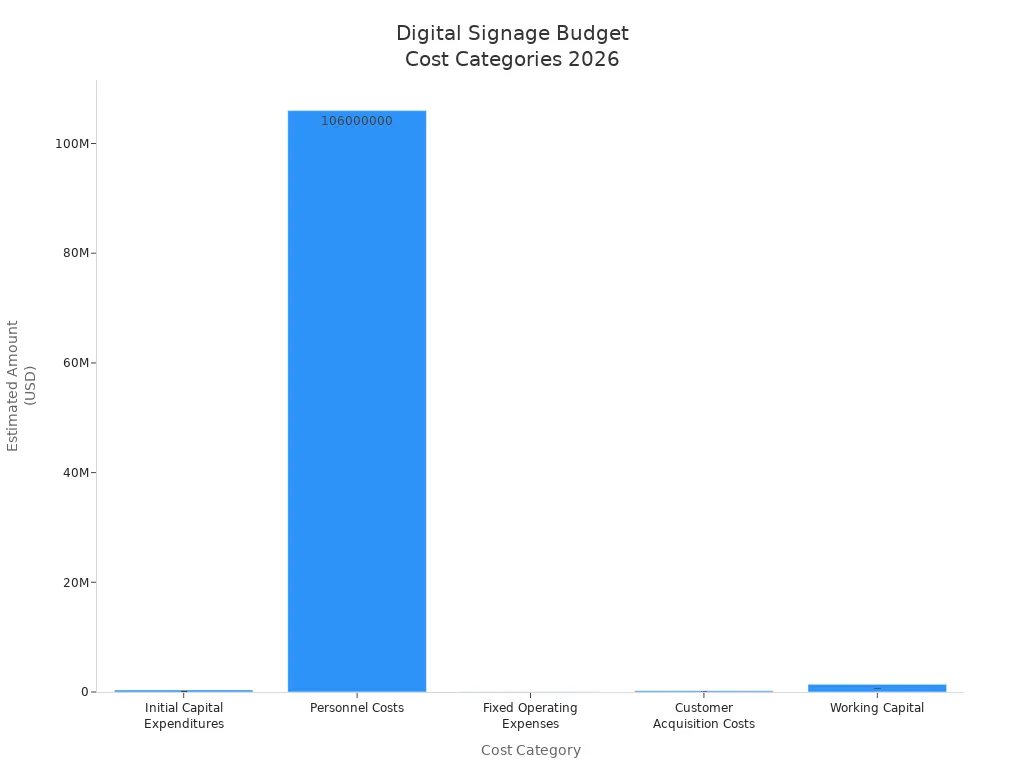
You have to know about each cost to make a good digital signage budget. The table below lists the main things you will spend money on:
Cost Category | Estimated Amount |
|---|---|
Initial Capital Expenditures | $380,000 |
Personnel Costs | $106 million |
Fixed Operating Expenses | $32,800/month |
Customer Acquisition Costs | $240,000 |
Working Capital | $1,392,000 |
You can stop surprise costs if you plan for things like installation, permits, content, and maintenance. Making a list of all costs helps you control your money and guess what you will spend later. To get the most for your money and spend less:
Begin with a small project and grow bigger later.
Change your content often.
Pick cloud CMS to make updates easy.
Think about both starting and future costs.
Good planning helps you feel sure about your digital signage project in 2026.
What Is the Average Cost of Digital Signage in 2026?
In 2026, the total investment for a digital signage deployment typically ranges from $1,500 to $5,000 per screen for entry‑level indoor systems, while high‑end outdoor or LED video wall projects can reach $15,000 to $25,000+ per screen. However, the screen itself often accounts for only 20% to 30% of the total cost. When budgeting, at least 70% of your funds should be reserved for software, content, installation, and ongoing maintenance.
🧩 Cost Breakdown – All Expenses at a Glance
The table below breaks down typical costs per screen, helping you estimate and compare.
Cost Category | Sub‑item | Typical Range | Notes |
|---|---|---|---|
Hardware | Display | $200 – $10,000+ | Consumer TV: $200‑$500; Standard commercial display: $800‑$3,000; Outdoor/high‑brightness: $4,000‑$10,000+. |
Media player | $0 – $1,200+ | Built‑in SoC: $0 extra; External player: $100‑$500+; high‑end industrial players can exceed $1,200. | |
Installation & Mounting | Mounting & labour | $150 – $5,000+ | Standard indoor installation: $350‑$650; outdoor or complex installs: $3,000‑$10,000+. |
Software & Services | Content Management System (CMS) | $3 – $50+/screen/month | Basic: $3‑$10/screen/month; Professional: $10‑$30; Enterprise: $50+. |
Content creation | $500 – $3,000+/month | In‑house: lower cash cost but labour‑intensive; Outsourced: typically $500‑$3,000/month; one‑time projects: thousands to tens of thousands. | |
Other | Licensing & permits | $400 – $2,500+ | Required for outdoor billboards in some cities/countries. |
Electricity | Varies by device | High‑brightness or outdoor large screens consume more. | |
Maintenance & support | 5‑10% of hardware cost/year | Budget for hardware warranty, on‑site repairs, and tech support. | |
Spare / redundancy | 10‑20% of hardware cost | Mission‑critical installations should have backup units. | |
Network service | ISP‑dependent | Cloud‑based CMS requires a stable internet connection. |
Hardware notes: High‑brightness outdoor screens or custom mounts (e.g., digital signage pillars) will significantly increase this budget. Adding touch functionality typically adds $1,000 – $3,000 per screen.
📝 Typical Total Cost by Project Type
Once you understand individual expenses, you can estimate the total for your project. Below are four common investment levels:
Entry‑level (single screen, indoor, DIY): $300 – $500
Uses consumer TV, streaming stick, and basic software. Suitable for individuals or micro‑businesses with extremely tight budgets and low reliability demands.Standard commercial deployment (single screen, indoor, professional): $1,500 – $8,000
The choice of most businesses. Includes commercial‑grade display, professional player, software, and professional installation – balancing reliability and performance.High‑end / complex scenarios: $15,000 – $25,000+ per screen
Includes ultra‑HD, very large indoor displays, or outdoor billboards requiring high brightness and weatherproofing.Multi‑screen network (e.g., 25 screens): Hardware $2,500 – $12,500 + Software $95 – $500/month
At scale, per‑screen hardware costs drop, but software subscription costs add up. Suitable for multi‑location or large‑scale deployments.
💰 Key Factors That Affect Your Final Bill
The following choices directly determine your total investment:
1. Display choice – Consumer vs. Commercial
Consumer TV: cheaper upfront, but shorter lifespan, less robust warranty, and not designed for 24/7 operation.
Commercial display: higher upfront, but built for 24/7 use, better cooling, longer life – a safer long‑term investment. For outdoor or sun‑facing locations, high‑brightness screens (1500+ nits) are essential.
2. Player performance – Built‑in SoC vs. External player
Built‑in SoC: integrated into the display – cleaner installation, but limited processing power for complex content.
External player: separate device (like a small computer) – more powerful, easier to upgrade, better for 4K video and complex layouts.
3. Software features – What do you need?
Your budget determines software capabilities: number of content zones, layouts, API access, multi‑user roles, ad integration, and real‑time data dashboard integration.
4. Installation complexity
Wall material, distance between components, and custom mounting (e.g., video wall frames) all affect labour and material costs.
5. Content creation difficulty – Often underestimated
Includes design, copywriting, animation, and video production. Higher complexity = higher cost. Using free/open‑source templates or user‑generated content can help control this budget.
💡 Cost‑Saving Tips
Consider BYOD (Bring Your Own Device) – Start with existing consumer TVs and low‑cost players (e.g., $35‑$50 Fire TV Stick). Test the concept before scaling up.
Prioritise commercial‑grade hardware – When funds allow, invest in commercial displays. Higher upfront cost pays off in reduced downtime and replacement costs.
Use free‑tier software – Most CMS providers offer free trials or permanent free tiers with limitations (screen count, watermark). Great for evaluating core features.
Create a unified content template – A standard template for all screens reduces ongoing content production effort and keeps operations manageable.
💎 Summary
Digital signage is an ongoing investment. In the long run, the stability and low maintenance of quality hardware may be more valuable than initial savings. To help you plan more accurately, feel free to share your approximate budget and primary use case (e.g., outdoor billboard vs. indoor information display). I can help you analyse the most suitable configuration.
FAQ
What is the average cost of digital signage in 2026?
You can expect to pay $200 to $15,000 for each screen. Software costs $10 to $100 per month for each screen. Most projects cost $2,000 to $5,000 for a professional single-screen setup.
Do I need to pay for digital signage software every month?
Yes, most platforms use a monthly subscription. You pay $10 to $50 for each screen every month. Some companies offer discounts if you pay yearly.
Can I use my own TV for digital signage?
You can use your own TV, but commercial displays last longer and work better. Home TVs may not handle long hours or bright spaces.
What hidden costs should I watch for?
Watch for fees like installation, permits, content updates, and repairs. These costs can add up. Always ask your vendor for a full price list.
How can I save money on digital signage?
You can start small and add more screens later. Use templates for content. Pick energy-saving screens. Plan your project before you buy anything.
See Also
Must-Have Digital Signage Solutions For 2026
The Future Of Digital Signage Technology
Evaluating Digital Signage Options In Singapore: Costs And Features
