Top Digital Signage Solutions for Manufacturing Compared in 2026
Add.: 2F, Bldg 10, Changfeng Industrial Park, Dongkeng, Fenghuang, Guangming, Shenzhen, China 518132
Mobile/WHATSAPP: 86-138 25769658
Email: marketing@topadkiosk.com topadkiosk@gmail.com
Skype: pghenry1
Wechat: adkioskhenry
English Web.: http://www.topadkiosk.com/
https://www.topkioskdisplay.com/
https://www.toplcddisplay.com/
http://www.multitouchdigitalsignage.com/
https://www.youtube.com/channel/UCYVYNJHxLVEcQD8fuUxXNTA/videos?view_as=subscriber
https://www.facebook.com/TOPADKIOSKSHENZHEN/?ref=bookmarks
You can pick from top digital signage solutions for manufacturing in 2026. Some examples are Kitcast, ScreenCloud, Yodeck, Rise Vision, OptiSigns, Mvix, Poppulo, and STRATACACHE. These solutions help you share updates right away. They also help you work better and keep everyone safe. When you use digital signage solutions, there are fewer injuries. There are also fewer quality problems.
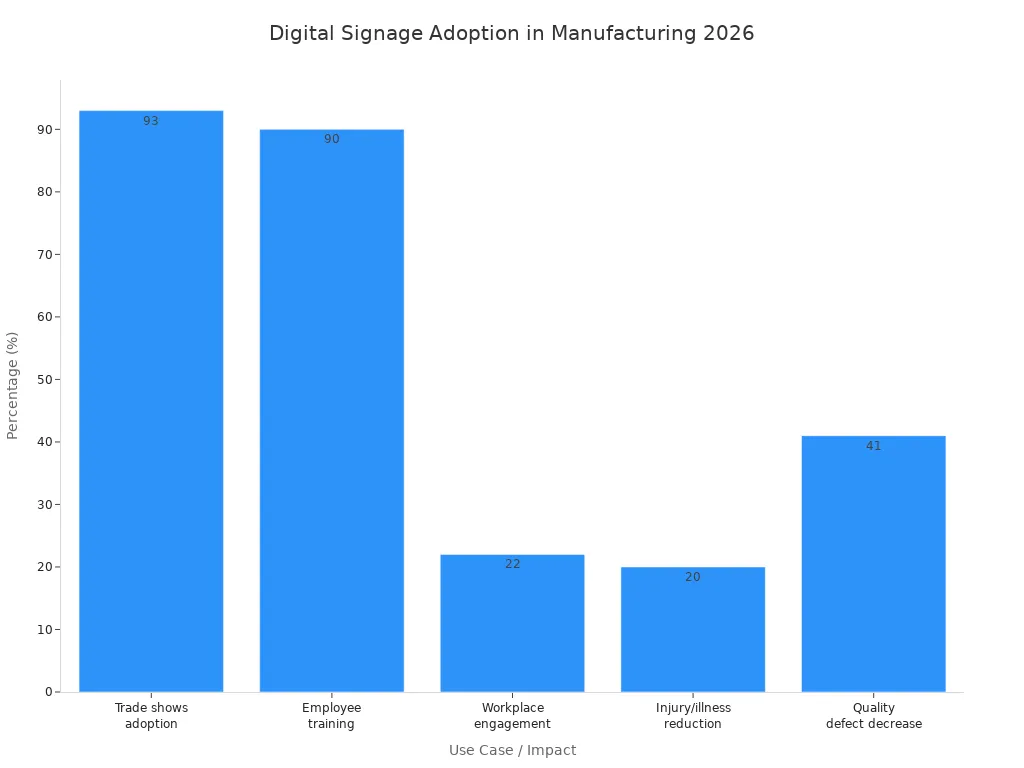
Statistic Description | Value |
|---|---|
Annual cost due to workplace injuries, illnesses, and fatalities in the U.S. | $170 billion |
Reduction in workplace injuries and illnesses with digital signage | 20% or more |
Percentage of manufacturing companies using digital signage at trade shows | 93% |
Manufacturers using digital signage for employee training | 90% |
Improvement in workplace engagement due to digital signage | 22% |
Decrease in quality defects linked to digital signage | 41% |
You should look at features, price, how it works with other tools, and if it can grow with your company. You should also see if it fits your needs. Digital signage manufacturing lets you show safety rules, production numbers, and training information. With the right digital signage solutions, your facility will be safer and work better.
Key Takeaways
Digital signage makes workplaces safer. It lowers injuries and sickness by 20% or more.
Screens show updates right away. Teams fix problems fast. This helps them work better. Productivity goes up by 25%.
Pick a digital signage solution that matches your factory. Look at features, how it connects, and support.
Use digital signage for training. It helps new workers learn faster. They make fewer mistakes.
Digital signage improves communication. It keeps everyone updated on safety rules. It also shares news about production.
Why Digital Signage Matters in Manufacturing
Key Benefits for Manufacturing
Digital signage manufacturing is changing factories. It shows real-time data and clear messages. Teams spot problems fast and fix them quickly. New workers get easy instructions on screens. Shift handovers are smoother because everyone sees updates. Safety alerts pop up right away so people stay safe. Machine status updates help plan maintenance and stop breakdowns.
Benefit | Description |
|---|---|
Teams find and fix issues fast with real-time data. This cuts downtime. | |
Easier Training | Clear instructions help new workers learn faster. They make fewer mistakes. |
Smoother Shift Handover | Incoming teams see what happened before. This lowers confusion. |
Improved Safety Compliance | Safety messages show up right away. No one misses important alerts. |
Proactive Maintenance | Machine updates stop surprise breakdowns. Production keeps moving. |
Digital signage manufacturing helps factories work better. You watch key numbers on screens. This helps you find ways to improve. Everyone stays focused on goals. You use screens instead of paper postings. This cuts clutter and waste. You update info fast and show more details.
Digital signage manufacturing gives one place to share information. Workers and supervisors stay connected and know what is happening.
Common Use Cases
Factories use digital signage manufacturing for many jobs. Bridon-Bekaert, a steel rope maker, switched from PowerPoint displays to digital signage. They show safety rules, production numbers, and company news. This change made employees pay more attention and feel more involved.
Safety Alerts: You show real-time safety alerts and compliance messages. Employees always know the latest safety rules.
Employee Training: You play training videos and guidelines on screens. Training is easier and more interesting.
Live Data Display: You show production numbers in real-time. Teams stay responsible and work toward goals.
Digital signage manufacturing helps factories go digital. You stop using old bulletin boards and paper notices. You make the workplace safer and more efficient with better communication.
Digital Signage Manufacturing Trends 2026
Market Leaders and Innovations
Many companies are top leaders in digital signage for manufacturing in 2026. These companies make new tools and ideas to help you work better and safer. The table below lists some top companies and their newest features:
Company | Innovations |
|---|---|
BrightSign LLC | Media players that work for simple or complex setups. |
SpinetiX | Media players built for nonstop use and a special signage operating system. They also partner with others for full solutions. |
ScreenCloud | All-in-one signage with hardware, software, and support. You get an easy-to-use content system and remote control. |
Signagelive | Tools that grow with your needs. You can connect with other systems easily. |
Yodeck | Simple software for digital signs. You can manage screens from anywhere. |
These companies help you share important news fast. You can show safety alerts, production numbers, and training videos. This helps everyone in your building stay safe and know what is happening.
Digital signage helps people work together and stay safe. When you use these tools, there are fewer injuries and people feel happier at work.
The newest trends show big changes in safety, how much work gets done, and how people talk to each other. Here is a quick look at what is new:
Trend | Key Insights |
|---|---|
Safety & Absenteeism | Real-time messages lower injuries by about 20%. They also cut health problems and missed days almost in half. |
Productivity & Workflows | Live data on screens can make people work 25% better and cut downtime by 15%. |
Internal Communication & Training | Most factories use digital signage for training. This makes work faster and helps people make fewer mistakes. |
Engagement & Morale | Fun and moving content makes workers feel good and want to stay. |
Integration and Automation
You want your digital signage to work with your other tools. In 2026, you can connect screens to your production software. This lets you see live updates from your ERP or MES systems right on the screen. You do not have to type in data yourself.
Real-time data links your screens to production systems for instant updates.
Automated content updates keep your screens up to date without extra work.
AI-based systems check device health, content, and network. They help stop problems before they happen.
With these features, you talk to your team better and keep everyone safe. You get alerts right away, and everyone knows what to do. This makes your workplace safer and helps things run smoother every day.
Top Solutions Overview
Selection Criteria
You must pick the best digital signage software for your factory. There are many things to think about before you choose. These things help you find what works for you and keeps everyone safe.
Integration capabilities let you connect screens to your other systems. You can get real-time updates from your ERP or MES.
Network architecture helps data move fast and without problems. You want screens to show info right away.
Security keeps your important data safe from people who should not see it.
Investment planning helps you know the costs and if you will save money. You want a solution that helps you work better and spend less.
Reliability means your screens work every day, even in tough places.
Communication lets you share safety alerts and news fast with everyone.
Usability makes it easy to change what is on the screens. You do not need special training to use it.
Support means you get help when you need it. Good vendors answer fast and give clear help.
Digital signage software helps you talk to your team and keep them safe. You can share important messages and warn about dangers.
Comparison Table
You can use this table to compare digital signage software and content management systems. The table shows features, price, how they connect, and support for Kitcast, ScreenCloud, Yodeck, Rise Vision, OptiSigns, Mvix, Poppulo, and STRATACACHE.
Solution | Usability | Features | Pricing | Integration | Support | Best for |
|---|---|---|---|---|---|---|
Kitcast | Easy | Advanced | $ | ERP/MES | 24/7 | Large factories |
ScreenCloud | Simple | Flexible | $ | Cloud apps | Chat | Multi-site plants |
Yodeck | Intuitive | Basic | $ | API | Small facilities | |
Rise Vision | User-friendly | Customizable | $ | Google Workspace | Ticket | Training centers |
OptiSigns | Straightforward | Rich | $ | IoT devices | Phone | Safety displays |
Mvix | Moderate | Robust | $ | Legacy systems | Phone | High-security sites |
Poppulo | Advanced | Enterprise | $$ | HR systems | Dedicated | Corporate plants |
STRATACACHE | Complex | Scalable | $$ | Custom | On-site | Large-scale ops |
You can see which software and system match what you need. This table helps you pick the best one for your factory. You can talk to your team better, keep them safe, and make your factory work better.
Kitcast for Manufacturing
Features
Kitcast gives you strong tools for digital signage in factories. It works with Apple TV and Amazon Fire TV. You do not need special hardware to use it. You can control screens in many factories from one account. Local teams can change their own content. Kitcast sends emergency alerts to keep people safe. Here are the main features:
Feature | Description |
|---|---|
Integration | Works with Apple TV, Amazon Fire TV, and more. Easy setup with your current displays. |
Emergency Alerts | Sends urgent messages to screens. Helps protect workers during emergencies. |
Multi-Facility Control | Lets you manage screens in many factories. Central control with local content options. |
Pros and Cons
You should know what Kitcast does well and what it does not.
Pros:
You can set it up fast with your screens.
You control many places from one spot.
Emergency alerts help keep people safe.
The interface is easy to use.
Cons:
Some extra features may cost more money.
There are fewer ways to customize than some others.
You need good internet for it to work best.
Tip: Kitcast helps you share safety rules and updates quickly. This keeps workers informed and lowers accidents.
Pricing
Kitcast has flexible prices. You pay for the number of screens and features you want. You can start with a basic plan and add more as you grow. Kitcast shows clear prices so you can plan your budget. You may need to ask Kitcast for exact prices because costs change based on your needs.
Best Use Cases
Kitcast works well in big factories with many locations. It is good for safety alerts, production numbers, and training videos. You talk to workers better and keep them safe. Kitcast is best for factories that want easy setup and strong control over many screens.
ScreenCloud for Manufacturing
Features
ScreenCloud gives you a cloud-based platform that helps you manage screens in many places at once. You can use this digital signage software to show safety alerts, production numbers, and training videos. You control what appears on each screen from your computer or phone. ScreenCloud connects with many apps, so you can pull in data from tools you already use. You can set up screens for different teams or locations. This makes it easy to share the right message with the right group.
Tip: You can use ScreenCloud to send emergency alerts or reminders about safety rules. This keeps everyone informed and safe.
Pros and Cons
You should know what ScreenCloud does well and where it may not fit your needs. Here is a quick look:
Pros | Cons |
|---|---|
Strong app marketplace and data integrations | Can become expensive at scale |
Good for remote management across multiple locations | Interface can feel busy for non-technical users |
Useful for corporate communication and deskless teams |
ScreenCloud stands out because you can manage many screens from one place. You get strong tools for sharing news and safety updates. Some users say the interface feels busy if you do not use digital signage software often. The price can go up if you add many screens.
Pricing
ScreenCloud starts at $20 per screen each month. This price is higher than some other digital signage software options. For example, Yodeck starts at $10 per screen, and Kitcast starts at $7. If you need to add many screens, ScreenCloud can cost more. You pay for extra features and support as your needs grow.
ScreenCloud: $20 per screen/month (basic plan)
Yodeck: $10 per screen/month
Kitcast: $7 per screen/month
You should plan your budget if you want to use ScreenCloud for a large factory.
Best Use Cases
ScreenCloud works best for factories with many locations or teams. You can use this digital signage software to share safety alerts, company news, and training content. It helps you reach workers who do not sit at desks. You can also use it for live updates on production lines. If you want a tool that connects with many apps and lets you control screens from anywhere, ScreenCloud is a smart choice.
Yodeck for Manufacturing
Features
Yodeck is an easy way to manage digital signage software in your factory. You can set up screens fast with plug-and-play media players. This platform is good for teams that want to start small and grow later. The interface is simple and helps you organize and schedule what shows on screens. Yodeck lets you use tag-based playlists, so each screen shows the right message. You can also make safety videos or training clips with built-in video editing tools. The platform has single sign-on (SSO) for better security. If you pick an annual plan, you get a free Raspberry Pi player. This helps you save money when you add more screens.
Feature | Description |
|---|---|
User-friendly platform | Easy to use, even if you are new to digital signage software. |
Tag-based playlists | Organize content for different teams or shifts. |
Plug-and-play setup | Quick installation with pre-configured media players. |
Built-in video editing | Create and edit safety or training content directly on the platform. |
Enhanced security | SSO integration keeps your system safe. |
Cost-effective scaling | Free Raspberry Pi player with annual plans for affordable growth. |
Tip: Yodeck lets you share safety alerts and production updates right away. This keeps your team safe and informed.
Pros and Cons
You should know what Yodeck does well and where it might not work for you.
Pros | Cons |
|---|---|
Very affordable for small businesses | Raspberry Pi hardware may not last in dusty or hot areas |
Free hardware with annual subscriptions | Fewer advanced features for large-scale data visualization |
Simple layout editor for basic messaging |
Pricing
Yodeck is known for its low prices. You can try a free plan if you want to test digital signage software first. Paid plans cost less than many other choices, so you can add more screens as your factory grows. You get a free Raspberry Pi player with every annual plan, which saves you more money. ScreenCloud does not have a free plan and costs more for each screen.
Free plan for small teams
Paid plans are budget-friendly
Free hardware with annual subscriptions
Best Use Cases
Yodeck is best for small or medium factories. If you are new to digital signage software, Yodeck is easy to set up and use. It works well for factories that need flexible tools and want to talk to workers better and keep them safe. You can use Yodeck to show safety alerts, training videos, and live production data. This helps your team stay updated and make fewer mistakes.
Note: Yodeck makes it easy to keep everyone in the loop. You can share important news fast, which helps stop accidents and keeps your workplace safe.
Rise Vision for Manufacturing
Features
You can use Rise Vision to make your factory safer and more connected. This digital signage software gives you tools that fit your factory’s needs. You can set up screens in different ways to match your building and help your team grow. Rise Vision helps you see if your investment will pay off over time. You can check how much support you need to keep everything running well. Training programs help your team learn how to use the system fast. You also improve how you share news and updates with your workers.
Feature | Description |
|---|---|
Deployment Strategies | Matches your factory’s setup and helps you grow easily. |
ROI Analysis | Shows you the long-term value and savings from using the system. |
Maintenance Requirements | Helps you plan for support and keeps your screens working. |
Training Programs | Makes sure your team learns how to use the screens quickly. |
Communication Enhancement | Lets you share news and safety alerts to keep everyone informed and engaged. |
Pros and Cons
Rise Vision gives you strong tools for real-time updates and better decisions. You see what is happening in your factory right away. This helps you fix problems fast and work smarter. You can grow your system as your factory gets bigger. Some things may be hard for small factories. The system can cost a lot to set up. You may need skilled workers to run it well. There are also risks if your network is not secure.
Pros | Cons |
|---|---|
Real-time monitoring and analytics | High setup costs for small factories |
Better decisions with data-driven insights | Needs skilled workers to manage |
Improved efficiency and productivity | Cybersecurity risks if not managed well |
Easy to scale as your factory grows |
Tip: Use Rise Vision to send safety alerts and updates. This keeps your team safe and helps everyone know what to do.
Pricing
Rise Vision offers a free version that you can use to start. You can try out the main features without paying. If you want more options or support, you can choose a paid plan. The price depends on how many screens you use and what features you need. You can pick a plan that fits your budget and your factory’s size.
Best Use Cases
You can use Rise Vision to make your factory safer and more organized. Here are some ways factories use it:
You improve communication between teams and shifts.
You use a free system that you can change to fit your needs.
You follow best practices for showing safety rules and updates.
Rise Vision helps you share important news, safety alerts, and training videos. Your team stays informed and works together better. This makes your factory safer and more efficient every day.
OptiSigns for Manufacturing
Features
OptiSigns gives you a platform that is easy to use. You can make your content right in the OptiSigns Management Portal. You do not need to use other apps. The platform lets your team help manage screens together. You can set who can change messages and who must approve them. Real-time analytics show which content is most popular. You can use interactive kiosks to get workers or visitors involved. Sensors and AI let screens show different messages based on who is nearby or what is happening. You get more than 1,000 free templates. You can use almost any screen or device.
Feature | Description |
|---|---|
Online Editor | Make and change content right in the portal. |
Multi-User Permission | Set roles and approval steps for your team. |
Analytics & Reporting | See how your content does and make smart choices. |
Kiosk Mode | Add touchscreens for training or safety checks. |
Sensors & AI | Change messages using real-time data from sensors or cameras. |
Templates | Use lots of customizable templates. |
Hardware Agnostic | Use screens and devices you already have. |
Pros and Cons
OptiSigns is simple to use. The interface helps you set up screens fast. The price starts at $10 per screen each month. You get over 160 apps and thousands of templates. You need good internet for the best experience. If your internet is weak, you may see delays or problems. Advanced interactivity is not as strong as some other platforms.
Pros | Cons |
|---|---|
Easy-to-use interface | Not much advanced interactivity |
Needs strong internet connection | |
160+ apps and 4,000 templates | May have issues with poor internet |
Pricing
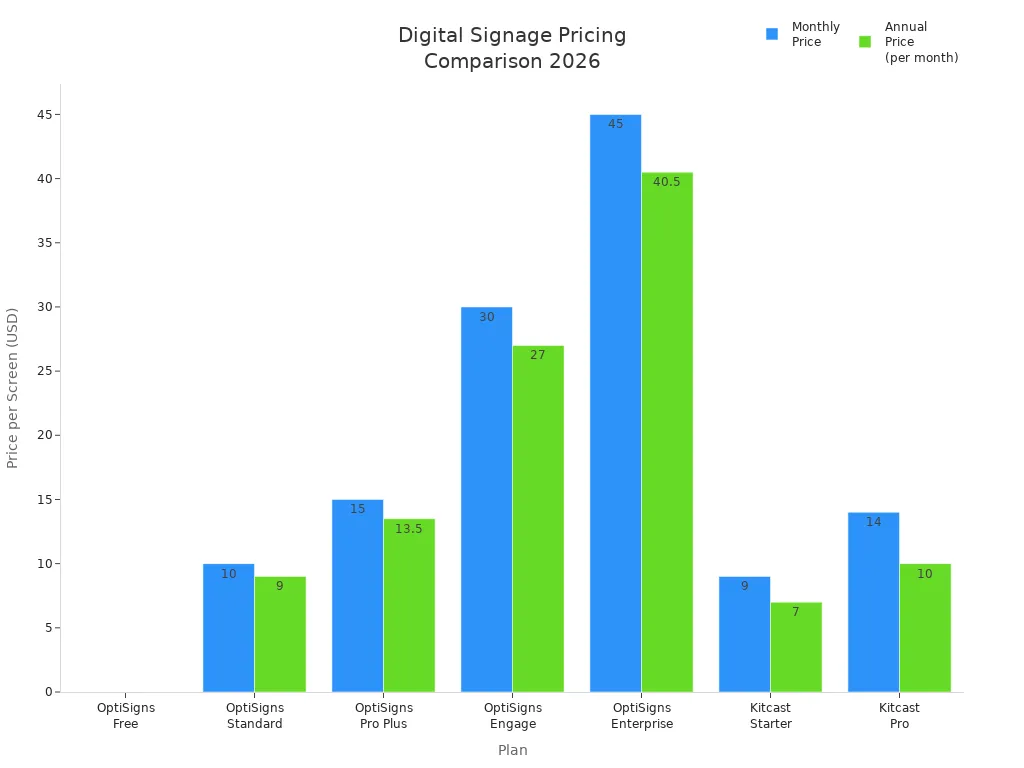
OptiSigns has different plans for your needs. You can start with a free plan for up to three screens. The Standard plan costs $10 per screen each month. It includes templates, scheduling, and basic analytics. The Pro Plus plan adds SSO, IoT management, and unlimited users for $15 per screen. The Engage plan is $30 per screen for interactive kiosks. The Enterprise plan starts at $45 per screen and needs at least 25 screens.
Best Use Cases
You can use OptiSigns in many places, but it is great for manufacturing. The platform helps you share safety alerts, training videos, and live updates. You keep your team informed and help stop mistakes. You can also use it in logistics, offices, and healthcare. In manufacturing, OptiSigns shows real-time alerts and instructions on the shop floor. This keeps everyone aware of dangers and helps prevent accidents.
Tip: Use OptiSigns to show emergency steps and daily safety tips. This helps your team stay safe and pay attention every day.
Mvix for Manufacturing
Features
Mvix is a strong digital signage platform for factories. You can connect screens to your network. This lets you show real-time updates. The system works with many kinds of hardware. You can use Mvix to show safety alerts, production numbers, and training videos. The platform lets you schedule messages for different shifts. You can put screens in break rooms, on the shop floor, or at entrances. Mvix works with legacy systems, so you can get data from older machines.
Feature | Description |
|---|---|
Real-Time Alerts | Show safety messages and emergency instructions |
Scheduling | Set content for different shifts and locations |
Hardware Flexibility | Use screens you already have |
Integration | Connect with legacy systems and sensors |
Content Management | Control messages from one dashboard |
Pros and Cons
Mvix gives you many good things in your factory. The platform helps you share news fast. You keep workers safe and informed. Here are some pros and cons:
Pros:
You can use screens you already have.
You get support for older machines.
You control messages from one place.
You make things safer with real-time alerts.
Cons:
The interface can be hard for new users.
You need IT help for advanced setup.
The price is higher than basic platforms.
Tip: Show emergency steps and daily safety tips with Mvix. This helps your team stay safe and pay attention every day.
Pricing
Mvix has flexible prices. You pay for the number of screens and features you want. The basic plan starts at $25 per screen each month. You can add more screens as your factory grows. There are custom plans for big sites. You may pay extra for advanced features or support.
Best Use Cases
Mvix is best for factories with strict safety rules. You can use it in high-security places or where there are old machines. The platform helps you share safety alerts, training videos, and updates. You keep your team informed and lower accidents. You can also use Mvix in factories with many sites. You control all screens from one dashboard.
Note: Mvix helps you talk to your team and keep them safe. You share news fast and help everyone focus on safety.
Poppulo and STRATACACHE
Features
You can use Poppulo and STRATACACHE to help your factory be safer and more connected. Poppulo lets you send messages to screens, phones, and emails all at once. STRATACACHE helps you control lots of screens in big factories. You get alerts right away, see live data, and use dashboards that you can click on.
Platform | Key Features |
|---|---|
Poppulo | Multi-channel messaging, analytics, templates |
STRATACACHE | Large-scale control, automation, device health |
You can show safety rules, emergency alerts, and updates about production. These tools help you reach every worker, even if it is loud or busy.
Pros and Cons
Both platforms have strong tools, but you need to know what is best for you.
Poppulo Pros:
It is easy to send messages to many devices.
You can track how many people see your messages.
Templates help you set things up fast.
Poppulo Cons:
Advanced features cost more money.
New users need training to use it well.
STRATACACHE Pros:
It can control many screens at the same time.
It has good automation and checks on devices.
You can get custom solutions for big factories.
STRATACACHE Cons:
It is hard to set up for small teams.
It costs a lot for small factories.
Tip: Use these tools to show safety alerts and instructions. This helps your team stay safe and know what to do every day.
Pricing
Poppulo has custom prices. You pay for how many users and screens you have. Most factories pay $30 to $50 for each screen every month. STRATACACHE also gives custom prices. Big factories may pay $50 or more for each screen. If you add more screens, you can get a discount.
Platform | Typical Price Range (per screen/month) |
|---|---|
Poppulo | $30–$50 |
STRATACACHE | $50+ |
Best Use Cases
Pick Poppulo if you want to reach workers on screens, phones, and email. It works well for big plants and factories with lots of teams. STRATACACHE is good for large factories with many screens and strict safety rules. You can use it to show live data, safety alerts, and training videos.
Use Poppulo for company news, HR updates, and safety reminders.
Use STRATACACHE for real-time alerts, machine status, and emergency instructions.
Note: Digital signage helps you talk to your team and keep them safe. You can lower accidents and help everyone work together with the right tools. 🦺
Choosing the Right Digital Signage Manufacturing Solution
Assessing Needs
Start by thinking about your factory’s biggest problems. Look for places where workers need better updates or faster safety alerts. Decide if you want to show live production numbers or training videos. Some factories, like Steel Dynamics, use digital signage to help truck drivers find their way. Others, like Warn Automotive, use screens to share news and have fewer long meetings. Rainbow Energy uses changing content to help workers pay attention. You can look at these examples and pick what is most important for your team.
Tip: Walk around your factory and see where workers miss updates or safety rules. These are the best spots for digital signage.
Key Factors
You need to think about a few important things before picking a solution. Each one can help your factory be safer and work better. The table below shows how digital signage can make your workplace better:
Factor | Typical Improvement |
|---|---|
Safety & Absenteeism | About 50% fewer health and safety incidents and missed days |
Productivity | Around 25% more productivity with real-time data |
Internal Communication | 90% of factories use screens for training and updates |
Engagement & Morale | Higher engagement means less turnover and burnout |
Check your network and equipment too. Make sure you have enough internet speed and good security. Strong mounts and covers help screens last longer.
Matching Solutions
You can choose a digital signage solution that fits your needs. If you have a small factory, you might want something simple like Yodeck or OptiSigns. For big factories, Kitcast or STRATACACHE can handle lots of screens and more complex setups. If you need to reach workers on phones and email, Poppulo is a good choice. Always think about how easy it is to add more screens, get help, and keep costs low.
Note: The best solution lets you share safety alerts, training, and news fast. This keeps your team safe and your factory working well.
You might pick Yodeck or OptiSigns for small factories. Kitcast and ScreenCloud are good for companies with many locations. Mvix and STRATACACHE are best for places that need extra security. Digital signage lets you show safety alerts and news fast. This helps your team stay safe and know what is happening.
Tip: Think about what your factory needs most. Look at features, prices, and how each tool works with your other systems. Check what is popular in the market to help you decide. The best choice helps everyone talk better and keeps your factory safe every day.
How Digital Signage Improves Communication and Safety in Manufacturing Facilities
Manufacturing facilities are dynamic, often noisy, and potentially hazardous environments. Traditional communication methods (paper notices, whiteboards, PA announcements) are easily missed, misunderstood, or delayed. Digital signage addresses these challenges by delivering real‑time, visual, and targeted information across the factory floor, improving both operational communication and workplace safety.
📢 1. Real‑Time Operational Communication
Digital signage provides a centralised, instantly updateable communication channel for the entire facility.
Communication Need | How Digital Signage Helps |
|---|---|
Production targets & KPIs | Display real‑time output, efficiency, and downtime metrics on large screens visible to all shifts. |
Shift change handovers | Show pending tasks, machine status, quality issues, and maintenance schedules without paper logs. |
Schedule changes | Instantly notify teams of production plan adjustments, rush orders, or line changeovers. |
Internal announcements | Share lean initiative updates, employee recognition, or meeting reminders without interrupting work. |
Training & SOPs | Loop short, recurring safety and process training videos on break room or floor screens. |
Benefit: Reduced misinformation, faster response to changes, and improved alignment across shifts.
🛡️ 2. Enhanced Safety Communication & Hazard Prevention
Safety is the highest priority in manufacturing. Digital signage provides immediate, attention‑grabbing safety alerts.
🔴 Emergency Alerts
Integrated with facility alarm systems, digital signage can automatically override any content to display:
Evacuation routes
Shelter‑in‑place instructions
Hazardous material spills
Active shooter or fire alerts
Unlike sirens alone, visual instructions reduce confusion and guide workers to safe actions.
⚠️ Real‑Time Hazard Warnings
Display live sensor data (e.g., toxic gas levels, high temperature, equipment vibration) on floor screens near the risk area.
Warn workers approaching a danger zone with flashing "DO NOT ENTER" or "LOCKOUT/TAGOUT IN PROGRESS" messages.
📋 Daily Safety Reminders
Rotate short safety tips (e.g., "Wear your gloves", "Report near misses") on screens in break areas, locker rooms, and entrance points.
Show the number of consecutive accident‑free days to build a safety culture.
🔁 Incident Investigation & Prevention
After a near‑miss or injury, display anonymised lessons learned and corrective actions to all shifts – preventing repeat incidents.
Benefit: Faster alert propagation, reduced reaction time, and continuous safety awareness.
👁️ 3. Visual Warnings in High‑Noise Areas
Manufacturing floors are often too loud for PA announcements. Digital signage offers high‑visibility visual cues that cut through noise.
Machine status boards – Show which equipment is under maintenance, in operation, or faulted, so workers don’t approach dangerous machinery.
Traffic & pedestrian zones – Indicate forklift routes, pedestrian walkways, and crossing points – reducing vehicle‑pedestrian accidents.
Lockout/Tagout (LOTO) verification – Display the current LOTO status of specific machines at the point of entry.
Benefit: Silent but unmistakable warnings that work even with ear protection.
🧑🏭 4. Consistent Training & Onboarding
Many manufacturing injuries happen to new or temporary workers. Digital signage helps reinforce training continuously.
Loop short safety videos (e.g., proper lifting, machine guarding, chemical handling) on screens in break rooms.
Display PPE (Personal Protective Equipment) requirements at each area entrance – changing automatically based on the zone.
Quiz or interactivity – Touchscreen kiosks can test workers on safety procedures before they start a shift.
Benefit: Reinforced learning without pulling workers off the line for classroom sessions.
📊 5. Performance Transparency & Lean Communication
When workers see real‑time performance data, they feel more engaged and accountable.
Metric | How Displayed |
|---|---|
Overall Equipment Effectiveness (OEE) | Live gauge or trend chart on floor screen |
Scrap / defect rate | Red‑yellow‑green indicator at each line |
On‑time delivery | Countdown to next shipment deadline |
Improvement suggestions | Employee‑submitted ideas and implementation status |
Benefit: Increased ownership, faster problem identification, and stronger team cohesion.
🏭 6. Visitor & Contractor Safety Briefing
Visitors and external contractors are often unfamiliar with site hazards. Digital signage at the entrance can:
Play a mandatory 2‑minute site safety video.
Display current high‑risk activities (e.g., overhead crane operation, welding in bay 3).
Show required PPE for each zone before they enter.
Benefit: Reduced liability and better protection for non‑employees.
✅ Summary of Benefits
Area | Improvement |
|---|---|
Communication speed | From hours or days (paper) to seconds (digital update) |
Alert reach | Visual – works in high noise, no PA system needed |
Incident response | Instant evacuation and hazard warnings |
Safety culture | Daily reminders, near‑miss sharing, accident‑free counters |
Training reinforcement | Continuous, low‑cost repetition of critical procedures |
Visitor safety | Automated briefings before entering the floor |
💡 Implementation Tips for Manufacturing Digital Signage
Use industrial‑rated screens – Dust‑proof, vibration‑resistant, wide‑temperature displays (e.g., IP65‑rated for harsh areas).
Connect to existing sensors – Pull live data from PLCs, gas detectors, and fire alarms for automatic alerts.
Place screens strategically – At entrances, break rooms, machine bays, and blind corners.
Keep messages short and visual – Use icons, colour codes (red = danger, green = safe), and large fonts.
Integrate with your LMS or ERP – Automatically pull OEE, shift schedules, and training completion data.
💎 Conclusion
Digital signage transforms a manufacturing facility from a noisy, paper‑dependent environment into a connected, responsive, and safer workplace. It accelerates communication, delivers critical safety warnings instantly, reinforces training, and makes performance visible. The result is fewer accidents, faster reaction to hazards, and a stronger safety culture – all while improving daily operational efficiency.
FAQ
How does digital signage improve safety in manufacturing?
Digital signage helps keep people safe at work. It shows safety alerts and emergency steps right away. You see these messages on screens all over the factory. This helps stop accidents and reminds everyone about dangers.
Can digital signage help with employee training?
Yes! Digital signage can show training videos and guides. New workers learn faster when they watch clear steps on screens. This helps lower mistakes and makes sure everyone does things the right way.
What types of information can you display on digital signage?
You can show safety rules, production numbers, and shift times. Company news and reminders also appear on screens. Emergency alerts and training videos help your team stay focused and know what to do.
Is digital signage easy to update?
You can change digital signage from your computer or phone. New info shows up on screens in just a few seconds. You do not need to print new signs, so updates are always fast.
Does digital signage work with other factory systems?
Many digital signage tools connect with ERP or MES systems. You see live data and updates on your screens. This helps you watch production and find problems quickly.
See Also
Best Digital Signage Solutions for Retail in 2026
Latest Innovations in Digital Signage for 2026
Key Factors That Make Digital Signage Essential for 2026
Enhancing Restaurant Efficiency with Digital Signage in 2026
