Digital signage in hospitals: 3 smart ways for 2026
Shenzhen TopAdkiosk Display Technology Co., Ltd.
Add.: 2F, Bldg 10, Changfeng Industrial Park, Dongkeng, Fenghuang, Guangming, Shenzhen, China 518132
Mobile/WHATSAPP: 86-138 25769658
Email: marketing@topadkiosk.com topadkiosk@gmail.com
Skype: pghenry1
Wechat: adkioskhenry
English Web.: http://www.topadkiosk.com/
https://www.topkioskdisplay.com/
http://www.ad-kiosk.com/
https://www.toplcddisplay.com/
http://www.multitouchdigitalsignage.com/
https://www.youtube.com/channel/UCYVYNJHxLVEcQD8fuUxXNTA/videos?view_as=subscriber
https://www.facebook.com/TOPADKIOSKSHENZHEN/?ref=bookmarks
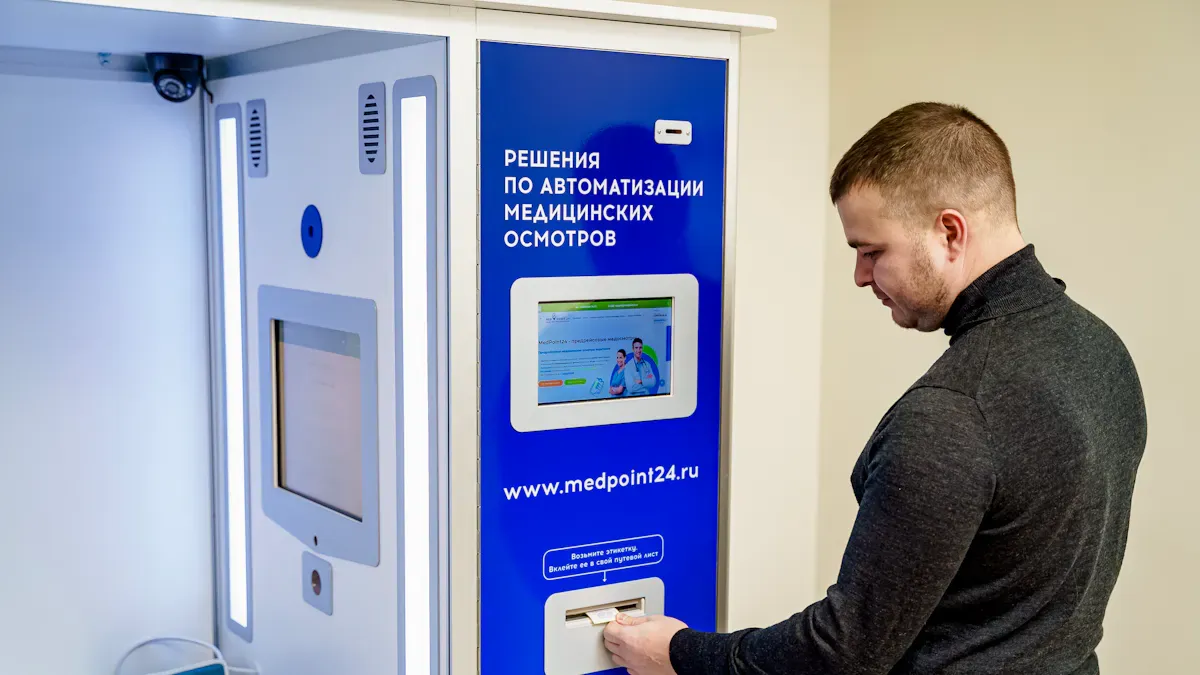
Digital signage in hospitals is growing fast. You see screens giving important information to patients and staff every day. The worldwide market for these systems will be worth $63.3 billion by 2026. It was $23.5 billion in 2021. Hospitals say they save money and get fewer questions at the front desk. They also share information faster. Patients get better communication and feel like they wait less. You will find useful ideas to help your hospital work better, be safer, and make people happier.
Key Takeaways
Digital signage helps people talk better in hospitals. It gives quick updates about appointments and health news. This makes visits easier for patients.
AI-powered screens make things better for patients. They show special messages for each person. They also help stop crowds, so people feel less stress and can find their way.
To use digital signage well, you must know what the hospital needs. Pick the best technology, teach staff, and fix problems to get the most out of it.
Digital signage keeps people safe in emergencies. It sends fast alerts and clear steps, so everyone knows what to do when things go wrong.
Changing content for different groups is important. Make messages for patients, staff, and visitors. This helps everyone get the right information.
Digital signage in hospitals: AI-powered communication
How AI enhances patient messaging
Digital signage in hospitals is changing how you get information. AI-powered screens show health messages made just for you. You see updates about your appointments right away. These screens connect to hospital systems. You get automatic updates about schedules and delays. AI looks at how many people are in each area. It helps guide patients to places that are not crowded. This makes it easier to move around and improves your visit.
Digital signage in hospitals shows content for each department.
Patients get quick notifications about changes.
AI-driven screens help reduce crowds and make moving easier.
Benefits for patient experience
AI-powered digital signage makes patient visits better in many ways. You get clear directions and fast updates. The screens show you helpful information and help you find clinics. Real-time updates help patients and families feel less stressed. The signs change during busy times and give more details when needed. You learn about health risks and healthy habits from patient education.
Improvement Type | Description | Impact on Patient Satisfaction |
|---|---|---|
Enhanced Patient Engagement | Personalized messages and reminders | Better following care plans |
Efficient Handling of Tasks | AI takes care of simple tasks, so staff can help patients | Better patient experience |
Steps for implementation
Here are steps to use AI-powered digital signage in your hospital:
Find out what your hospital needs and wants from digital signage.
Pick the best technology and content for your hospital.
Teach staff how to use it and give support.
Solve problems like people not wanting change and money issues.
Digital screens help teach patients with special content. They make finding your way easier and give fast updates for important news. You feel like you wait less in waiting rooms.
Use cases in healthcare
Hospitals use digital signage for many things. You see information about visiting hours and patient rules. Screens teach patients and staff about health and hygiene. Interactive maps help visitors and patients find places. Wait times help people know what to expect and feel less worried. Hospitals use digital signage to share services and health programs.
Real-time wayfinding and alerts
Technology overview
You can find digital screens in hospitals that help you get around. These screens use interactive wayfinding, kiosks, and QR codes. You can scan a QR code with your phone for directions. The technology supports many languages, so everyone understands. Digital signage in hospitals gives real-time updates for emergencies and appointments. You can find ADA-accessible routes, so it is easier for all.
Technology Type | Functionality |
|---|---|
Interactive Wayfinding Systems | Dynamic directories and mobile wayfinding options for users. |
Digital Signage Platforms | Real-time updates and emergency alerts across multiple screens. |
Emergency Alert Systems | Location-specific alerts and overrides scheduled content during emergencies. |
Safety and efficiency gains
Digital screens help keep you safe and make things work better. You see alerts like Code Red or weather warnings right away. The screens show clear steps, so people do not get confused. You get real-time updates about appointments and patient lines. Staff duress alerts help staff get help faster. Patient flow tools help lower wait times. Asset dashboards help stop waste and keep things running well.
Information stays easy to see, so patients feel less stress.
Staff answer fewer repeat questions and can focus on care.
Safety and hygiene messages remind everyone to stay healthy.
Integration with hospital systems
You get more help when digital signage links to hospital systems. The screens show up-to-date schedules and waiting times. Emergency alerts reach everyone fast. Solutions like 22Miles and BrightSign give one place for wayfinding and digital screens. These systems work with electronic medical records and reminders, making things easier for patients and staff.
Evidence Description | Key Features |
|---|---|
Digital signage integration | Real-time updates and alerts, better communication and efficiency. |
Displays current data | Automatic updates for patients and staff. |
Emergency alerts | Fast broadcasts to everyone in the facility. |
Emergency response scenarios
You depend on digital signage when there is an emergency. Hospitals use color backgrounds, big text, and sound alerts for clear messages. The screens stop normal content to show emergency news first. PA systems and mobile alerts help everyone get the message quickly. Staff practice using the system so it works well in any emergency.
Fast messages go to all hospital areas.
Clear, location-based instructions help patients and staff.
Pre-made alert templates help send messages quickly.
Tip: Hospitals using real-time wayfinding and alerts have better safety. You see less confusion and faster help during emergencies.
Personalized staff and visitor displays
Customization for user groups
Digital signage in hospitals helps show the right messages. Staff and visitors see different information that fits their needs. Screens are in waiting rooms, exam rooms, break rooms, and nurse stations. These screens update quickly, so you get news right away. Each location gets messages that matter most.
Content Focus | Screen Type | |
|---|---|---|
Patients | Clarity, reassurance, guidance | Public screens |
Staff | Coordination, policies, reminders, operational performance | Staff screens |
One great thing about digital signage in healthcare is targeting content. You do not have to show the same message everywhere. Only the right content appears in each spot.
Customization Feature | Description |
|---|---|
Location-based Content | Show special content on screens in certain places. This makes sure the audience gets what they need. |
Real-time Overrides | Change what is on screens fast, like showing videos in some rooms. |
Personalized Messaging | Send messages for each department, like different content for emergency or maternity. |
Workflow and experience impact
Digital signage in hospitals helps staff work better and makes visits nicer. Staff get updates fast, so everyone knows what is happening. This lowers mistakes. Wayfinding screens help visitors find their way. This makes people less stressed. Wait times show up on screens, so patients worry less. Patient care messages and videos help you learn about your health.
Digital signage gives updates fast, so people understand more.
Wayfinding kiosks help visitors and patients find places easily.
Showing wait times can make people feel like they wait less.
Personalized messages help patients take part in their care.
Benefit | Description |
|---|---|
Updates help staff and patients share information. This makes people happier. | |
Wayfinding Solutions | Maps help patients find their way and feel less nervous. |
Reducing Wait Times | Showing wait times can make patients feel less anxious. |
Personalized Patient Care | Special messages and reminders help patients care about their health. |
Streamlining Internal Communication | Staff share information better, so there are fewer mistakes and work is easier. |
Emergency Communication | Fast messages during emergencies keep patients and staff safe. |
Deployment best practices
Here are steps to use digital signage well:
Welcome patients with special messages.
Show wait times so people know what to expect.
Give health tips and advice.
Share patient stories to build trust.
Use maps to help visitors find places.
Add social media for quick updates.
Show calming pictures to help people relax.
Give patients helpful health information while they wait.
Make sure messages fit each group’s needs.
Change content for different patient groups.
Success stories
Hospitals see good results with digital signage. Emerson Hospital used a feedback tool and made patient visits better. Staff answered faster, going up by four points in six months. Care board updates went from 22% to 100%. Patient stress dropped by 37%. Wayfinding questions went down by 42%. Staff were happier with communication, and turnover dropped from 18% to 13%. Patients remembered health information 65% of the time. More people went to health classes, up by 47%.
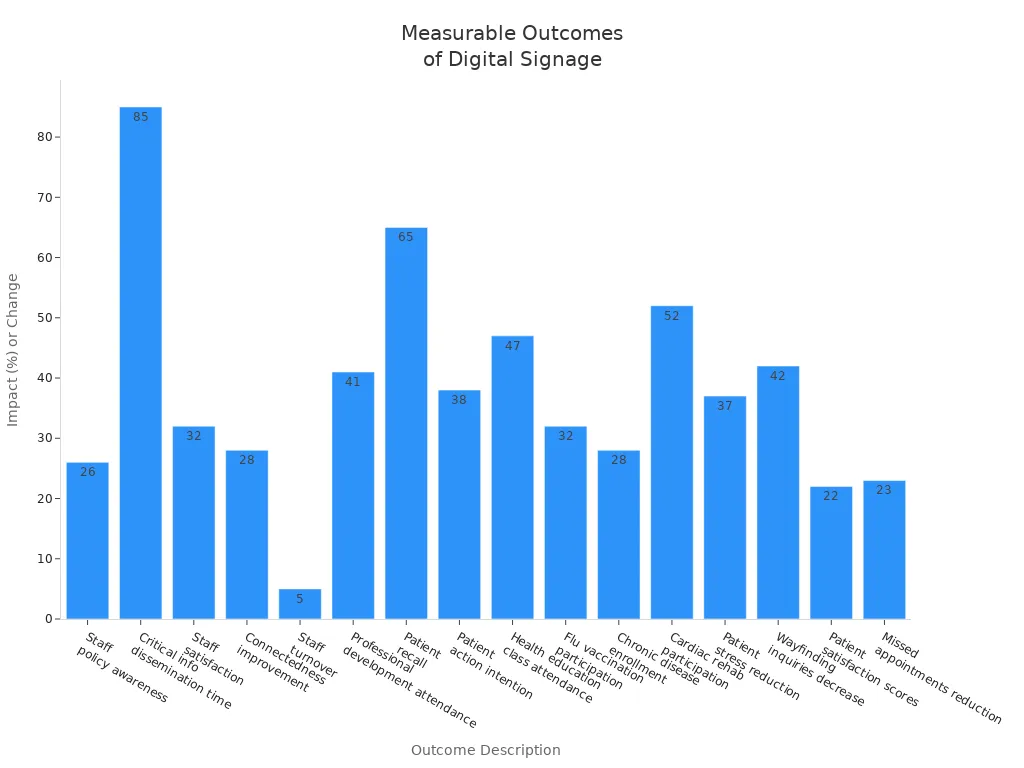
Digital signage in hospitals helps everyone stay informed. It lowers stress and makes visits better for staff, patients, and visitors.
You can see that digital signage helps hospitals in three ways. It makes talking to patients easier. It gives real-time updates for finding your way and for emergencies. It also shows special information for staff and visitors. These tools help hospitals stay safe and work better. Hospitals do well when they plan for new digital tools. You should look at new trends before making choices.
Trend/Factor | Description |
|---|---|
Growth in Real-Time Communication | Hospitals use digital screens for fast updates about appointments, wait times, and alerts. |
Demand for High-Resolution Displays | Hospitals use clear pictures and videos to get patients’ attention. |
Integration with Healthcare Systems | Digital signage works with EHRs and IoT platforms to share information better. |
AI-Powered Solutions | Hospitals buy AI tools to show special content and work faster. |
Compliance Challenges | Rules like HIPAA make it harder and more expensive to set up. |
Tip: Check your systems now and use market data to help you plan what to do next.
How Digital Signage Is Used in Hospitals
Digital signage in hospitals has moved far beyond simple information display. It has become a core tool for improving patient experience, optimising operational workflows, and enhancing staff communication. Below are the main application scenarios and value of digital signage in hospitals in 2026.
🏥 Core Application Scenarios & Value
Application Area | Specific Locations | Implementation | Core Value |
|---|---|---|---|
Wayfinding & navigation | Lobbies, elevator halls, corridor intersections | Interactive touchscreen maps, dynamic floor directories, route highlighting with estimated walking time | Reduces patient anxiety, lowers front‑desk inquiries, improves appointment efficiency |
Waiting area management | Outpatient clinics, labs, pharmacy waiting zones | Queue number display with estimated wait time, health education video loops, interactive Q&A on medical topics | Alleviates waiting anxiety, increases satisfaction, uses idle time for health education |
Clinic / ward entrance | Outside doctor’s office, patient room entrance | Electronic door signs: doctor profile, current call number, status (busy/away); ward signs show nurse, attending physician, care level | Improves transparency, organises patient flow, builds trust in care teams |
Bedside terminals | Hospital bedside or wall | Integrated TV, call button, meal ordering, exam reminders, health questionnaires, entertainment, remote visiting | Gives patients a sense of control, reduces non‑nursing tasks, creates ancillary revenue |
Pharmacy window | Waiting area, dispensing counter | Prescription status (paid/preparing/ready), medication instruction videos, pharmacist information | Optimises collection process, reduces queues, improves medication safety education |
Administrative & staff areas | Staff lounges, meeting rooms, hallways | Internal announcements, shift schedules, training videos, emergency drills, infection control reminders, department performance dashboards | Improves internal communication, ensures timely information, boosts team collaboration |
OR / ICU family waiting | Family waiting room | Large‑screen anonymised surgical progress (in op / recovery / ready for visit), pre‑op instructions, organ donation awareness | Reduces family anxiety, lessens nurse call burden, enhances humanistic care |
Cafeteria / coffee shop | Staff and visitor dining | Dynamic menus, nutritional labels, calorie display, daily specials, mobile payment QR codes | Enhances dining experience, promotes healthy choices, reduces queue time |
Emergency notifications | All screens hospital‑wide | One‑click emergency mode: evacuation routes, fire/weather alerts, missing child alerts | Improves emergency response speed, enables unified command, ensures safety |
🧠 New Technology Trends (2026)
AI + Digital Signage – With patient consent, facial recognition or ID card recognition can trigger personalised greetings, daily exam reminders, and customised health advice on bedside or waiting area screens.
E‑paper – Used for bed signs and department door labels. Paper‑like display, no blue light, ultra‑low power. Information updates wirelessly, reducing paper waste and manual changes.
IoT integration – Digital signage connected to bed sensors and call systems. Real‑time updates on nursing station whiteboards: bed exit alerts, IV drip progress, bathroom occupancy.
Centralised remote management – All screen content managed via a cloud platform with role‑based, zone‑based, and time‑based scheduling. IT staff can diagnose and fix issues remotely, significantly lowering maintenance costs.
📊 Quantified Value (Industry Data)
Patient satisfaction – Hospitals using digital wayfinding report a 30‑40% average increase in “ease of navigation” scores.
Operational efficiency – Self check‑in combined with queue management reduces outpatient waiting time by 15‑25%.
Nurse time savings – Bedside terminals for meal ordering, questionnaires, and entertainment save each nurse approximately 45 minutes of non‑clinical work per day.
Health education – Digital signage in waiting areas improves patients’ disease knowledge by 2‑3 times compared to static posters.
💡 Implementation Recommendations
Start with needs – Work with clinical departments, facility management, and IT to identify pain points and prioritise scenarios (e.g., wayfinding, queue management, bedside).
Choose an open platform – Ensure the digital signage system can integrate via API with hospital HIS, LIS, PACS, and other core systems – avoid data silos.
Pilot before scaling – Test on one busy outpatient floor or one inpatient ward, collect feedback, then roll out hospital‑wide.
Prioritise accessibility – Add voice guidance for visually impaired patients, large‑font and high‑contrast interfaces for elderly patients – ensure information is accessible to all.
The value of digital signage in hospitals is evolving from “helping patients not get lost” to “making healthcare warmer and more efficient”. If you have a specific hospital department or scenario you would like to explore further, feel free to share – I can provide more targeted case studies or product suggestions.
FAQ
What is digital signage in hospitals?
Digital signage uses screens to share news and tips. You see screens in waiting rooms, hallways, and staff rooms. They show updates, directions, and health advice. You get important news fast.
How does digital signage help patients?
You get clear directions and updates right away. Screens show wait times, appointment changes, and health lessons. This helps you feel less worried and more ready.
Tip: Look for screens near entrances and waiting rooms for new updates.
Can digital signage improve hospital safety?
Yes. Digital signage gives emergency alerts and safety steps. You see warnings for fire, bad weather, or other emergencies. Staff and visitors know what to do fast.
Alert Type | Example Message |
|---|---|
Fire Alert | "Code Red: Exit Now" |
Weather Alert | "Storm Warning: Stay Inside" |
How do staff use digital signage?
Staff see schedules, rules, and reminders on their screens. This helps everyone stay organized and work better. You get quick updates without checking emails.
Is digital signage easy to update?
Yes. Hospital teams can change messages fast. You see new information in seconds. This keeps everyone up to date about changes, events, or emergencies.
See Also
Exploring Digital Signage Innovations That Will Define 2026
Latest Developments in Digital Signage Tech for 2026
Enhancing Restaurant Efficiency with Digital Signage in 2026
